Overview

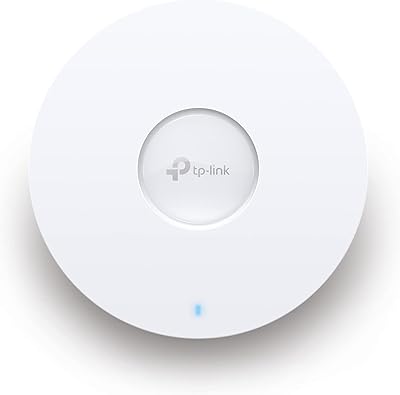
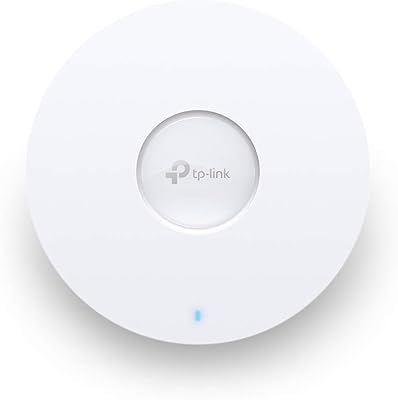
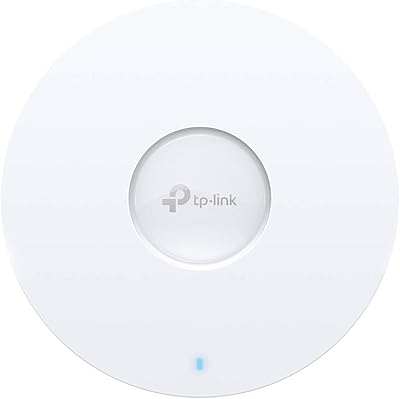
The TP-Link EAP770 WiFi 7 Wireless Access Point sits at a sweet spot in the market — capable enough for small business deployments, yet approachable for serious home network enthusiasts. It mounts to a ceiling or wall and slots naturally into TP-Link's Omada ecosystem, where it can be managed alongside switches and gateways from a single dashboard. For a tri-band WiFi 7 device with a 2.5G uplink port, the price is genuinely competitive. The box includes both a DC adapter and PoE support, so you have real installation flexibility from day one. Worth setting straight upfront: this is a managed access point, not a router — it needs an existing network to plug into.
Features & Benefits

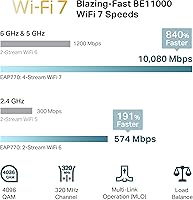
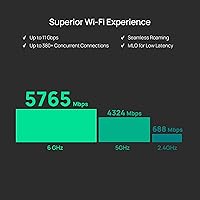
The EAP770 spans three bands — 2.4 GHz, 5 GHz, and 6 GHz — with the 5 GHz band rated up to 4,324 Mbps. What matters more in practice is Multi-Link Operation, which lets compatible WiFi 7 clients bond multiple bands simultaneously, cutting latency noticeably in busy environments. The 4K-QAM modulation pushes roughly 20% more data per transmission compared to WiFi 6E. That 2.5G Ethernet port is a quiet hero here — when your ISP eventually delivers multi-gigabit speeds, you won't need to replace the AP hardware. Managing everything through the Omada Cloud Platform unlocks VLAN segmentation, bandwidth controls, and Zero Touch Provisioning, though standalone mode works fine for simpler setups. A five-year warranty rounds out a well-considered package.

Best For

This Omada AP is a natural fit for anyone already running TP-Link Omada switches or gateways — it extends your managed network to WiFi 7 without switching ecosystems entirely. Home power users upgrading from WiFi 6 or 6E will notice real throughput gains on newer client devices, and the 2.5G uplink prepares the install for faster ISP tiers down the road. Small offices, clinics, or co-working spaces with many concurrent devices will appreciate the capacity headroom and dependable multi-AP roaming. That said, WiFi 7 client support is still rolling out broadly — most older laptops and phones won't tap the 6 GHz band yet, so the full performance benefit grows over time as you refresh your devices.

User Feedback

Across close to 300 ratings, this WiFi 7 access point holds a 4.6-out-of-5 average — a score that reflects genuine satisfaction. Buyers repeatedly highlight how straightforward Omada app onboarding is, and long-term stability gets singled out as a consistent strength. Upgraders from WiFi 6E setups report meaningful real-world speed improvements in device-dense environments. The honest caveat: users expecting plug-and-play simplicity without a controller account are sometimes caught off guard by the managed-AP model. The 2.4 GHz band is noticeably slower than its faster counterparts, though that matters less as devices migrate upward. TP-Link's security practices have drawn scrutiny in some markets; the company's CISA Secure-by-Design pledge is a factual counterpoint worth considering before purchasing.

Pros

  • Tri-band WiFi 7 with MLO delivers real throughput gains over WiFi 6E in device-dense environments.
  • The 2.5G Ethernet uplink keeps the hardware relevant as multi-gigabit ISP tiers become mainstream.
  • PoE and DC adapter support included out of the box means genuine installation flexibility from day one.
  • Omada Cloud management offers VLAN segmentation, bandwidth controls, and remote config without a paid subscription.
  • Five-year warranty is unusually generous for consumer-grade networking hardware at this price tier.
  • Multi-AP roaming via 802.11r/k/v works reliably, with buyers reporting smooth transitions between access points.
  • Onboarding through the Omada app is consistently rated as straightforward, even by non-technical users.
  • The EAP770 supports Zero Touch Provisioning, which saves meaningful time when deploying multiple units across a site.
  • WPA3 security and CISA Secure-by-Design signatory status offer a credible baseline for security-conscious buyers.
  • At close to 300 ratings, a 4.6-out-of-5 average reflects genuinely strong real-world satisfaction.

Cons

  • Requires an existing router and wired network — not suitable as a standalone internet gateway.
  • Full feature access depends on setting up an Omada controller or cloud account, which surprises some first-time buyers.
  • The 2.4 GHz band tops out at 688 Mbps, noticeably slower than what the 5 GHz and 6 GHz bands offer.
  • WiFi 7 client device adoption is still limited, so many existing laptops and phones cannot use the 6 GHz band yet.
  • No dedicated management VLAN port, which may frustrate stricter enterprise network segmentation requirements.
  • TP-Link has faced regulatory scrutiny in certain markets, a factor some security-focused buyers weigh seriously.
  • Ceiling or wall mounting requires running a wired Ethernet cable, which adds installation effort in retrofitted spaces.
  • Cloud-dependent advanced features create a soft reliance on TP-Link infrastructure remaining operational long-term.

Ratings

Our AI-generated scores for the TP-Link EAP770 WiFi 7 Wireless Access Point are built by analyzing verified global buyer reviews, with spam, bot-submitted, and incentivized feedback actively filtered out before any scoring takes place. The result is a transparent breakdown that reflects both what buyers genuinely love and the real friction points that show up repeatedly across hundreds of real-world installs. Nothing is smoothed over — the ratings reflect the full picture.
Wireless Performance
91%
Buyers upgrading from WiFi 6E consistently report a tangible speed improvement, particularly in homes and offices packed with 20 or more active devices. The 5 GHz band handles heavy workloads — 4K streaming, large file transfers, video conferencing — without the stuttering that plagued older hardware under similar loads.
The 2.4 GHz band tops out at 688 Mbps, which is adequate for low-demand devices like smart home sensors but noticeably lags behind what the upper bands deliver. Users with mostly older 2.4 GHz-only gadgets will not see much of an uplift from this hardware.
WiFi 7 & MLO Implementation
87%
On WiFi 7-capable laptops and newer Android flagships, Multi-Link Operation delivers a real reduction in latency — something competitive gamers and video call-heavy remote workers have flagged as a meaningful day-to-day improvement. 4K-QAM also squeezes noticeably more throughput out of strong-signal connections compared to WiFi 6E.
The 6 GHz band and MLO benefits are irrelevant until your client devices actually support WiFi 7, which remains a small share of most households' device pools. Buyers expecting an immediate whole-home performance revolution may be underwhelmed until they cycle in newer hardware.
Setup & Onboarding
88%
The Omada app-guided setup process earns consistent praise for being one of the least frustrating managed-AP onboarding experiences at this tier. Even buyers with limited networking experience report getting an AP online and connected to the cloud dashboard within 15 to 20 minutes.
Standalone mode setup is simpler but leaves buyers without access to the features they likely bought the hardware for. A small number of users hit initial firmware update delays that stalled the process, though this appears rare based on overall review sentiment.
Management Platform
89%
The Omada Cloud dashboard gives IT administrators and technically capable home users remote access to VLAN config, bandwidth policies, and per-client monitoring without a paid subscription — a competitive advantage that users switching from other ecosystems repeatedly highlight. Zero Touch Provisioning is particularly valued by small business owners managing multiple sites.
The depth of the management platform can feel overwhelming for users who just want a simple access point with a few basic controls. Standalone mode works but exists at a noticeable feature deficit, and a handful of enterprise reviewers find the lack of a dedicated management VLAN port a real limitation for stricter segmentation requirements.
Multi-AP Roaming
86%
In multi-AP deployments across larger homes or open office floors, the EAP770 handles client handoffs cleanly via 802.11r/k/v. Users running two or three APs across different floors report that phones and laptops transition between access points without dropped calls or video stream interruptions.
Roaming quality is heavily dependent on correct placement and configuration — poorly positioned APs or misconfigured thresholds can cause sticky client issues that are not unique to this hardware but do require some tuning to resolve. Buyers expecting it to work perfectly out of the box with no adjustment may be disappointed.
Hardware Build & Design
78%
22%
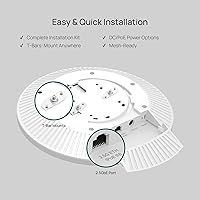
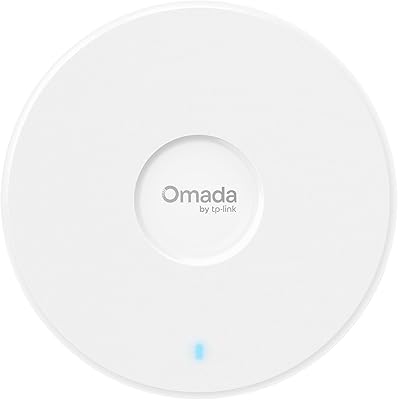
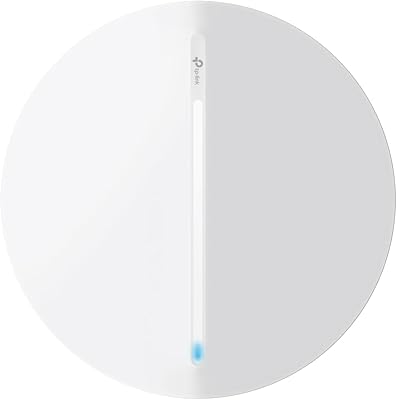
The circular form factor is compact and unobtrusive once mounted, and at 1.54 pounds it does not stress ceiling tile or drywall anchors. The included mounting hardware covers both ceiling and wall scenarios without requiring additional purchases.
The build feels slightly plasticky compared to competing APs in adjacent price brackets, and a few reviewers note the LED indicator behavior is not highly customizable from the dashboard. It is functional and solid, but it does not feel premium to the touch.
2.5G Ethernet Port
92%
Having a 2.5G uplink port at this price point is practically uncommon enough that buyers planning for multi-gigabit ISP upgrades in the next few years specifically cite it as a tipping point in their purchase decision. It removes the need to replace the AP hardware when faster internet arrives.
The AP has only one Ethernet port, so there is no secondary port for a wired downlink device — something a small number of reviewers wanted for connecting a nearby desktop or smart TV directly. For most ceiling-mount use cases this is a non-issue, but it is worth knowing.
Value for Money
84%
For a tri-band WiFi 7 access point with a 2.5G uplink, cloud management at no extra subscription cost, PoE support, and a five-year warranty included, buyers broadly feel the pricing is justified and competitive against comparable hardware. The long warranty in particular shifts the long-term cost calculus in its favor.
The full value proposition only materializes if you use the Omada ecosystem — buyers purchasing this as a standalone AP without any managed features are paying for capabilities they will not use, and could potentially get adequate performance from a simpler, less expensive device.
Security & Trust
73%
27%
WPA3 support and the company's CISA Secure-by-Design pledge give security-aware buyers a factual baseline to work from, and there have been no publicly documented firmware exploits specific to Omada AP hardware that have drawn significant community alarm.
TP-Link as a brand has faced regulatory scrutiny in certain markets over supply chain and data handling concerns, and some enterprise-adjacent buyers weigh this heavily regardless of specific certifications. For high-sensitivity environments, that reputational cloud introduces hesitation that the CISA pledge alone does not fully resolve for every buyer.
Long-Term Stability
90%
Stability over weeks and months of continuous operation is one of the most consistent themes in positive reviews — buyers running the EAP770 in small offices and busy home networks report no unexpected reboots, dropped SSIDs, or performance degradation after extended uptime. Automatic firmware updates through Omada help keep things running cleanly.
A small cluster of reviews mention occasional cloud sync delays that temporarily affect remote management visibility without impacting local network operation. It is minor, but users who rely on real-time remote monitoring for business continuity may find it mildly frustrating.
PoE & Power Flexibility
88%
Shipping with a DC adapter included means there is no waiting on a PoE switch before you can test the hardware — a practical touch that saves time during initial evaluation. PoE support also keeps cable runs clean in permanent installs, with no separate power outlet required near the ceiling mount.
The unit supports PoE input but does not include a PoE injector, so buyers without a PoE-capable switch who also lose the DC adapter option mid-deployment would need to source one separately. This is standard for the category but worth flagging for buyers new to managed AP hardware.
Documentation & Support
74%
26%
The Omada knowledge base is reasonably comprehensive, and community forums carry a substantial volume of solved configuration questions that help self-sufficient buyers work through edge cases. TP-Link's five-year warranty backstop adds confidence for long-term deployments.
The printed installation guide included in the box is minimal and skewed toward simple setups, leaving advanced configuration scenarios entirely to online resources. Phone and live chat support quality receives uneven feedback, with some users reporting long resolution times for nuanced networking issues.
Client Capacity & Density
82%
18%
In environments with 40 to 80 simultaneous client devices — a realistic count for a small office or a busy household — the EAP770 maintains stable throughput where single-band or dual-band WiFi 6 hardware begins to visibly degrade. OFDMA and MU-MIMO handling is solid across the 5 GHz and 6 GHz bands.
TP-Link does not publish an official maximum client count, which makes capacity planning for larger deployments somewhat speculative without real-world testing. Very high-density environments — think a 200-seat conference room — would likely require multiple units rather than a single EAP770 handling the full load.

Suitable for:

The TP-Link EAP770 WiFi 7 Wireless Access Point is a strong match for small business owners, IT-minded home users, and network enthusiasts who want a serious wireless upgrade without moving to enterprise-tier pricing. It fits especially well in environments with a growing number of concurrent devices — think a busy home office, a small clinic, a boutique retail space, or a co-working suite where congestion on older WiFi 6 hardware has become a real problem. Anyone already running TP-Link Omada switches or gateways will find it slots in with minimal friction, extending centralized cloud management to WiFi 7 without swapping out the rest of the stack. The 2.5G uplink port also makes it a smart long-term buy for anyone on a multi-gigabit ISP plan or expecting to upgrade to one within the next few years. If you are deploying multiple access points across a larger space and need reliable roaming between them, this Omada AP handles that cleanly through standard 802.11r/k/v protocols.

Not suitable for:

The EAP770 is not the right tool if you are shopping for a simple plug-in router replacement or expecting a consumer-grade setup experience with no learning curve. It is an access point — it requires an existing router and wired network infrastructure to function, which rules it out for anyone without at least a basic understanding of home networking. Users hoping to unlock the full suite of management features without creating an Omada cloud account or setting up a hardware controller may find the experience limiting; standalone mode works, but it leaves a lot of the value on the table. The 6 GHz band, while present, delivers its best results only with WiFi 7-capable client devices, which still represent a small fraction of most households in 2025. Buyers in markets where TP-Link products have faced regulatory scrutiny should factor that context into their decision, even acknowledging the company's CISA Secure-by-Design commitment. Finally, anyone needing a dedicated management VLAN port for strict network segmentation may find the feature set just short of their requirements.

Specifications

  • WiFi Standard: The EAP770 uses 802.11be (WiFi 7), and is backward-compatible with 802.11ac, 802.11ax, 802.11g, and 802.11n devices.
  • Frequency Bands: Tri-band operation covers 2.4 GHz, 5 GHz, and 6 GHz simultaneously for flexible client distribution.
  • Max Throughput: Aggregate throughput is rated at BE11000, combining up to 688 Mbps on 2.4 GHz, 4324 Mbps on 5 GHz, and additional 6 GHz capacity.
  • Uplink Port: A single 2.5G Ethernet port connects the AP to your wired network, supporting speeds up to 2.5 Gbps.
  • Power Options: The unit accepts power via PoE (802.3at/af compatible switch required) or the included DC power adapter.
  • Wireless Features: Supported wireless technologies include Multi-Link Operation (MLO), 4K-QAM modulation, Beamforming, and fast-roaming via 802.11r/k/v.
  • Security Protocols: Wireless encryption supports WPA3 and WPA2, and the device is a CISA Secure-by-Design signatory.
  • Management Options: The EAP770 can be managed via Omada Cloud, a local hardware controller, the Omada app, or in basic standalone mode.
  • Mounting: Ceiling and wall mounting hardware is included in the box, and the unit weighs 1.54 pounds.
  • Dimensions: Packaged dimensions measure 10.98 x 10.2 x 3.5 inches, suitable for standard ceiling tile and bracket installs.
  • Warranty: TP-Link provides a 5-year limited warranty covering manufacturing defects on the EAP770 hardware.
  • Operating System: The device runs TP-Link OS, which powers the Omada management interface and supports remote firmware updates.
  • Network Features: Advanced networking capabilities include VLAN segmentation, bandwidth management, PPSK, schedule controls, and Zero Touch Provisioning.
  • Compatible Devices: The AP is designed for general wireless clients and is specifically listed as compatible with IP security cameras requiring wireless connectivity.
  • Recommended Use: TP-Link rates the EAP770 for both home and business environments, covering prosumer, SMB, and light enterprise deployments.
  • In the Box: Package contents include the EAP770 unit, ceiling and wall mounting kits, a DC power adapter, and a printed installation guide.
  • ASIN: The Amazon product identifier for this unit is B0FJQL2T2V, first listed in August 2025.

Related Reviews

TP-Link Omada EAP720 WiFi 7 Access Point
81%
88%
Wireless Performance
91%
Value for Money
83%
Setup & Installation
79%
Build Quality & Design
86%
Omada Ecosystem Integration
More
TP-Link Festa F76 WiFi 7 Access Point
76%
83%
Wireless Performance
88%
Ease of Setup
54%
Ecosystem Compatibility
67%
Cloud Management & App Quality
86%
Build Quality & Design
More
TP-Link TL-WA3001 WiFi 6 AX3000 Wireless Gigabit Access Point
84%
88%
Performance
91%
Signal Range
82%
Ease of Setup
85%
Build Quality
89%
Value for Money
More
TP-Link EAP653 Wi-Fi 6 Access Point
83%
88%
Wireless Performance
79%
Setup & Installation
83%
Omada App & Controller Experience
91%
Build Quality & Design
84%
Range & Coverage
More
TP-Link TL-WA1201 AC1200 Wireless Access Point
75%
88%
Value for Money
81%
Wi-Fi Coverage & Range
83%
Ease of Setup
86%
Multi-Mode Flexibility
58%
PoE Implementation
More
TP-Link EAP660 HD WiFi 6 Access Point
79%
88%
Wireless Performance Under Load
91%
Network Capacity & Device Density
84%
Omada SDN Integration
86%
2.5G Uplink Value
89%
PoE+ Installation Experience
More
TP-Link EAP615-Wall AX1800 In-Wall Access Point
80%
91%
Ease of Installation
84%
Wi-Fi Performance
93%
Wired Port Versatility
88%
PoE Power & Pass-Through
79%
Omada SDN Integration
More
Zyxel NWA130BE WiFi 7 Access Point
77%
83%
Wireless Performance
74%
Setup & Initial Configuration
67%
Nebula Cloud Management
81%
Build Quality & Hardware Design
89%
PoE+ Implementation
More
TP-Link Omada EAP650-Outdoor WiFi 6 Access Point
87%
88%
Performance
94%
Build Quality/Durability
85%
Ease of Setup
90%
Range/Coverage
87%
Value for Money
More
TP-Link EAP620 HD V3 WiFi 6 Access Point
85%
88%
Setup and Installation
91%
Performance in High-Density Environments
90%
WiFi Speed and Reliability
85%
Build Quality
89%
Powering Options (PoE+ and DC)
More

FAQ

You do need a separate router — the EAP770 is an access point, not a router. It connects to your existing router via the 2.5G Ethernet port and handles the wireless side of things. Think of it as the WiFi antenna for your network, not the device managing your internet connection.

Yes, standalone mode works without any cloud account or controller. That said, standalone mode limits what you can configure — things like VLAN management, bandwidth scheduling, and remote access all require either the Omada cloud or a local hardware controller. For a single AP in a basic home setup, standalone is fine. For anything more complex, the cloud account is worth setting up.

Not necessarily. Older WiFi 6 and WiFi 6E devices will still connect and perform well — they just won't access the 6 GHz band or WiFi 7-specific features like MLO. The real-world difference will grow as you replace devices with WiFi 7-capable hardware over time.

MLO lets a WiFi 7 client bond two bands at once — say 5 GHz and 6 GHz — rather than being locked to just one. In practical terms, this reduces latency and improves reliability, especially in environments where one band gets congested. For video calls, gaming, or real-time applications, the difference is noticeable on compatible devices.

The AP supports PoE input, but the PoE power itself comes from your network switch — the AP does not include a PoE injector. If your switch does not have PoE ports, you can use the included DC power adapter instead. Either way, you have a working power solution out of the box.

It is a fair question to ask. TP-Link has faced scrutiny from regulators in some markets, primarily around potential supply chain concerns. As a factual counterpoint, the TP-Link EAP770 WiFi 7 Wireless Access Point is produced by a company that has signed the CISA Secure-by-Design pledge, committing to ongoing security practices. Whether that is sufficient depends on your risk tolerance and specific environment — for most home and small business users, it is unlikely to be a dealbreaker.
TP-Link does not publish a hard client limit for the EAP770, but WiFi 7 tri-band hardware with OFDMA and MU-MIMO is generally capable of handling 100 or more concurrent connections without significant degradation. Real-world performance will vary depending on how active those devices are and how much bandwidth each one demands.

Yes. The Omada ecosystem is designed to support mixed-generation hardware under one controller. You can manage the EAP770 alongside older EAP WiFi 6 models through the same Omada dashboard, which makes it straightforward to upgrade your network gradually without replacing everything at once.

Yes — the included mounting kit supports both ceiling and wall installation. The AP is circular in design and looks reasonably unobtrusive on a wall, though ceiling placement tends to give better omnidirectional coverage for most room layouts.

No, the AP itself continues operating and serving WiFi to connected clients even if the Omada cloud is unreachable. You lose remote management access during an outage, but your local network keeps running. This is a common concern with cloud-managed hardware, and it is good to know the local functionality is not dependent on the cloud staying online.