Overview

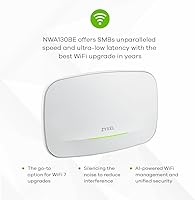
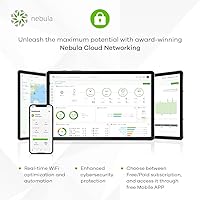
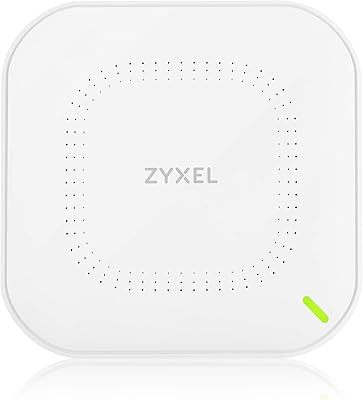
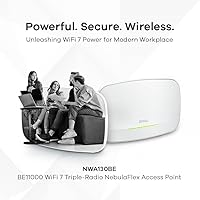
The Zyxel NWA130BE WiFi 7 Access Point sits at an interesting spot in the market — it is one of the more accessible tri-band WiFi 7 options available without crossing into enterprise pricing territory. The NebulaFlex management system is worth understanding upfront: you can run it completely standalone, manage it through the Nebula cloud dashboard, or use the mobile app, and critically, no subscription is required for basic operation. That flexibility matters. Still, a strong spec sheet only tells part of the story — how well this WiFi 7 access point performs depends heavily on your deployment environment, client devices, and existing network infrastructure.
Features & Benefits

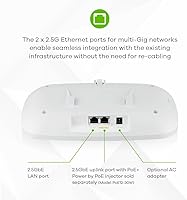
The headline spec — BE11000 combined throughput — deserves some context. That figure represents the theoretical maximum across all three bands simultaneously; no single device will hit that number, but in a dense environment with many clients, having that headroom across 2.4GHz, 5GHz, and 6GHz genuinely helps with congestion. The dual 2.5Gbps MultiGig ports are a practical highlight: they let you use a fast wired backhaul or connect a multi-gig switch without replacing existing cabling. PoE+ support means ceiling or wall mounting stays clean — just a single Ethernet run. Add WPA3 security, captive portal for guest access, and VLAN tagging for traffic separation, and the NWA130BE punches above its weight for business-grade features.

Best For

Zyxel's NebulaFlex AP is a strong fit for small offices and co-working spaces that need managed WiFi without committing to expensive enterprise hardware or per-device licensing fees. IT admins will appreciate that cloud management is entirely optional — you can run it standalone and still access a solid feature set. For home users, the ceiling-mount form factor and PoE+ convenience make it a cleaner install than most consumer mesh nodes. Where this WiFi 7 access point really earns its keep is in multi-AP rollouts: mesh roaming and VLAN segmentation add genuine operational value when covering a larger space. It is also a sensible upgrade path for anyone still running WiFi 5 or early WiFi 6 gear.

User Feedback

With around 96 ratings and a 3.9 out of 5 average, the NWA130BE has a respectable but not definitive track record — the sample size is small enough that a handful of outlier reviews can shift the score noticeably. On the positive side, buyers frequently cite straightforward initial setup via the Nebula app and solid reliability once the unit is running. The 6GHz band performance draws consistent praise from those with compatible client devices. On the other hand, some users find the Nebula cloud dashboard less intuitive than expected — it is not a simple experience if you want deeper configuration. A few reviewers also flagged occasional firmware quirks, though these appear sporadic rather than widespread.

Pros

  • Tri-band WiFi 7 with a dedicated 6GHz band meaningfully reduces congestion in environments with many simultaneous clients.
  • Dual 2.5Gbps Ethernet ports future-proof wired connections without requiring a full switch infrastructure overhaul.
  • PoE+ support keeps installations clean — one cable run handles both data and power with no adapter clutter.
  • NebulaFlex lets you choose standalone, app, or cloud management with no mandatory subscription for core functionality.
  • WPA3 security and a built-in captive portal cover both personal and light commercial network access scenarios.
  • VLAN tagging allows proper traffic separation between staff, guest, and IoT devices on a single hardware platform.
  • The NWA130BE is one of the more affordable tri-band WiFi 7 access points currently available with this feature set.
  • Smart Mesh support means adding a second unit later is a realistic and low-cost expansion path.
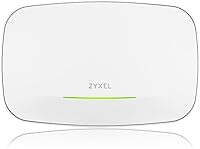
  • The low-profile white design integrates cleanly into commercial ceilings without drawing attention.

Cons

  • Requires a PoE+ switch to operate — no power adapter is included, which catches some buyers off guard.
  • The Nebula cloud dashboard has a steep learning curve and feels dense compared to consumer-grade management interfaces.
  • Some firmware versions have introduced instability, including unexpected reboots reported by a subset of users.
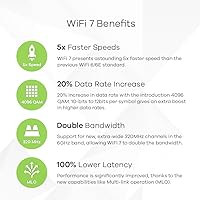
  • WiFi 7 performance gains are only realized with compatible client devices — most current hardware will not fully benefit.
  • Advanced features like 802.1X authentication and rogue AP detection require a paid Nebula Pro subscription.
  • The review base is still under 100 ratings, making it harder to draw firm long-term reliability conclusions.
  • Customer support response times have been cited as slow by buyers who encountered configuration issues.
  • Beginners attempting web-based setup without the app face an interface that assumes prior networking knowledge.
  • Mesh roaming consistency can be uneven in borderline coverage zones between multiple deployed units.

Ratings

The Zyxel NWA130BE WiFi 7 Access Point earned an overall score built from AI analysis of verified global buyer reviews, with automated filtering applied to remove incentivized, bot-generated, and duplicate feedback. Scores reflect what real installers, IT admins, and prosumer home users actually experienced — not the spec sheet. Both the standout strengths and the friction points that frustrated buyers are represented transparently below.
Wireless Performance
83%
Users with WiFi 7-capable devices consistently reported strong throughput on the 6GHz band, noting noticeably lower latency during video calls and large file transfers compared to their previous WiFi 6 setups. In lightly congested environments, the tri-band architecture kept multiple simultaneous users well-separated and responsive.
The BE11000 figure is a combined theoretical ceiling across all three bands, and some buyers were disappointed when real-world single-device speeds were far more modest. Performance gains are also heavily dependent on client device support — those with older laptops or phones saw minimal uplift over WiFi 6.
Setup & Initial Configuration
74%
26%
Buyers who used the Nebula mobile app for first-time setup generally found the out-of-box experience manageable, with the unit coming online within minutes in standalone mode. The PoE+ power delivery meant there was no fumbling with power adapters during the physical install.
Users who skipped the app and attempted web-based configuration hit a steeper learning curve, particularly around VLAN and band steering settings. A few reviewers noted that the initial firmware on arrival required an immediate update before key features functioned correctly.
Nebula Cloud Management
67%
33%
IT admins managing several units genuinely appreciated the ability to monitor all access points from a single cloud dashboard without paying a recurring subscription for basic visibility. Remote reboots and firmware pushes worked reliably once the admin was familiar with the interface layout.
The Nebula dashboard is not beginner-friendly — multiple reviewers described it as dense and unintuitive compared to consumer-grade alternatives. Finding specific settings like captive portal configuration or SSID scheduling required more clicks and more reading than buyers expected for a product at this tier.
Build Quality & Hardware Design
81%
19%
The unit feels solid and appropriately dense for a ceiling-mount AP — not the flimsy plastic common on budget hardware. The low-profile white finish blends into most commercial ceilings without drawing attention, which small business owners specifically called out as a positive.
The mounting plate design drew some criticism for being slightly awkward to align solo during a ceiling install. A handful of users also noted the unit runs noticeably warm under sustained load, though no thermal shutdowns were reported.
PoE+ Implementation
89%
This was one of the most consistently praised aspects across all buyer segments. Installers appreciated that the unit powered up cleanly from standard 802.3at PoE+ switches without negotiation issues, simplifying structured cabling runs in offices and retail environments significantly.
The unit requires PoE+ rather than standard PoE, which means older or budget PoE switches may not supply enough wattage. A few buyers discovered this only after purchase, requiring an unplanned switch upgrade to get the unit operational.
Multi-AP Mesh Performance
77%
23%
Users deploying two or three units across a medium-sized office or multi-floor home reported that client devices handed off between APs without dropped connections during normal use — walking around on a video call remained stable in most tested environments.
Mesh configuration is not automatic out of the box and requires deliberate setup through Nebula or the web interface. Some reviewers found roaming behavior inconsistent in edge areas between APs, with devices occasionally clinging to a weaker signal rather than switching promptly.
VLAN & Network Segmentation
78%
22%
Small business users who needed to separate guest WiFi traffic from internal networks found VLAN tagging worked reliably once configured correctly. The ability to assign different SSIDs to different VLANs per band gave IT admins meaningful control over traffic policy without additional hardware.
VLAN setup is not a guided process — it assumes the user understands tagging concepts and has a compatible managed switch upstream. Buyers without networking backgrounds found this section of the configuration interface particularly opaque.
Security Features
84%
WPA3 support was cited positively by security-conscious buyers, and the captive portal feature was appreciated by cafe owners and co-working space operators who needed a branded splash page for guest access. The combination covers both personal and light commercial security needs well.
Advanced security features like rogue AP detection or 802.1X authentication require the full Nebula Pro tier, which adds cost. Some buyers felt the free tier left gaps that competitors fill at the same price point without a subscription.
Value for Money
82%
18%
For a tri-band WiFi 7 access point with PoE+, dual MultiGig ports, and optional cloud management, most buyers agreed the price represented a genuine step into next-gen networking without the usual enterprise premium. IT purchasers buying multiple units found the per-unit economics particularly attractive.
Buyers who later discovered that some desirable management features sit behind a Nebula Pro subscription felt the effective cost of ownership was higher than the hardware price implied. Casual home users may find similarly priced mesh router kits offer a more complete experience for less effort.
Firmware Stability
63%
37%
Most users running the latest firmware reported stable, uninterrupted operation over periods of several weeks to months. Scheduled reboots and automatic firmware update options through Nebula helped keep units current without manual intervention.
A recurring thread in negative reviews involved firmware-related quirks — primarily unexpected reboots or band steering misbehavior on specific firmware versions. The issues appeared sporadic rather than universal, but they were frequent enough across the review base to be a credible concern worth monitoring.
Dual 2.5Gbps Port Utility
86%
Having two MultiGig ports rather than one gave installers real flexibility — one for uplink and one for a downstream device or wired backhaul in a daisy-chain configuration. Users with 2.5G-capable switches praised this as a forward-looking decision that most competing APs at this price skip.
The benefit is only realized if your existing switch infrastructure supports 2.5Gbps, which many small office setups still do not. Buyers running standard gigabit switches gain no throughput advantage from the MultiGig ports and may feel they are paying for headroom they cannot yet use.
Documentation & Support
58%
42%
Zyxel's online knowledge base and community forums provided answers for common configuration questions, and experienced network admins generally found enough documentation to work through advanced setups without contacting support directly.
First-time access point buyers found the included documentation insufficient, and several reviewers described Zyxel's direct customer support response times as slower than expected. The gap between the hardware capability and the quality of beginner-facing guidance was a consistent friction point.
Physical Installation
76%
24%
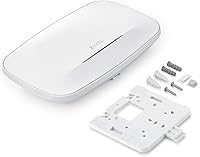
The included mounting plate and screws covered standard ceiling tile and drywall installations, and the unit's weight was manageable for a solo installer. The clean cable routing through the mounting bracket kept finished installs looking professional.
The locking mechanism between the AP and the mounting plate required more force than expected to engage, and a few users reported it felt less secure than comparable Ubiquiti or TP-Link hardware. Without a second set of hands, ceiling installations on high mounts were described as fiddly.

Suitable for:

The Zyxel NWA130BE WiFi 7 Access Point is a strong match for small business owners, co-working space operators, and IT admins who need business-grade wireless infrastructure without the budget or complexity of full enterprise hardware. If you are managing a café, boutique office, or multi-room workspace and want the ability to segment guest and staff networks via VLANs, deploy multiple APs with roaming, and optionally oversee everything from a cloud dashboard without paying an ongoing subscription, this unit covers all of that at a genuinely competitive price point. Home prosumers who want a clean ceiling-mount installation, hate the look of consumer mesh nodes on bookshelves, and already have a PoE+ switch in place will find the physical deployment refreshingly straightforward. It also suits IT generalists who want the option to scale — buying a second or third unit later and tying them together via Smart Mesh is a realistic, low-friction upgrade path. Anyone moving from WiFi 5 or early WiFi 6 who wants meaningful headroom for the next several years of device upgrades will find this WiFi 7 access point a forward-looking investment.
Not suitable for:

The Zyxel NWA130BE WiFi 7 Access Point is not the right call for buyers expecting a plug-and-play consumer experience — if you are not comfortable with concepts like VLAN tagging, SSID configuration, or PoE+ switch requirements, the setup process will likely frustrate you. Households that simply want to extend WiFi coverage with minimal effort would be better served by a consumer mesh kit that handles everything automatically through a polished app. The PoE+ dependency is also a real barrier: if you do not already own an 802.3at-capable switch, you will need to budget for one, since the unit ships with no power adapter. Buyers chasing the highest possible single-device throughput should also temper expectations — the BE11000 rating is an aggregate across all three bands, and real-world speeds for any individual device are significantly lower. Finally, anyone who needs robust manufacturer support, highly polished documentation, or enterprise-level SLA backing should look at vendors with a stronger track record in that area, as Zyxel's support responsiveness has drawn criticism from buyers who ran into configuration issues.
Specifications

  • WiFi Standard: Operates on 802.11be (WiFi 7), with backward compatibility for 802.11ac, 802.11ax, 802.11g, and 802.11n devices.
  • Frequency Bands: Tri-band operation covering 2.4GHz, 5GHz, and 6GHz simultaneously for maximum client distribution.
  • Max Throughput: Combined theoretical maximum of BE11000 across all three bands — not a single-device or single-band figure.
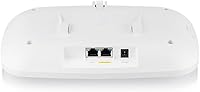
  • Ethernet Ports: Two 2.5Gbps MultiGig Ethernet ports support both high-speed uplink and wired backhaul or downstream device connections.
  • Power Input: Powered exclusively via PoE+ (802.3at); no DC power adapter is included or supported.
  • Antenna Design: Internal antennas are fully enclosed within the housing, maintaining a clean profile suitable for visible ceiling installations.
  • Management Options: Supports three management modes: fully standalone via web interface, mobile app control, or cloud-managed via the Nebula dashboard.
  • Cloud Platform: Integrates with Zyxel Nebula Cloud, with core monitoring and management available at no subscription cost in the base tier.
  • Security Protocols: Supports WPA3 personal and enterprise encryption, plus a built-in captive portal for guest network access control.
  • VLAN Support: VLAN tagging is supported, enabling traffic segmentation across multiple SSIDs for guest, staff, and IoT network separation.
  • Mesh Technology: Smart Mesh with seamless roaming allows multiple NWA130BE units to coordinate client handoffs without dropped connections.
  • Dimensions: The unit measures 10.9 x 7.1 x 2.7 inches, sized for standard suspended ceiling tile or drywall ceiling mounting.
  • Weight: The access point weighs 1.78 pounds, manageable for solo installation with the included mounting hardware.
  • In-Box Contents: Package includes the access point unit, a mounting plate, and mounting screws — no Ethernet cable or PoE injector is included.
  • Housing Color: Available in white, designed to blend unobtrusively into typical commercial or residential ceiling environments.
  • Release Date: First made available in January 2024, positioning it as an early consumer and SMB entry point into the WiFi 7 hardware generation.
  • Compatible Devices: Compatible with any WiFi-enabled device including laptops, smartphones, tablets, and smart home hardware across all supported bands.
  • Recommended Use: Designed for both home prosumer and business deployments, with particular suitability for multi-AP and high-density client environments.

Related Reviews

Ubiquiti UniFi U7 Pro
82%
91%
Wireless Performance
88%
Build Quality
83%
Range & Coverage
67%
Ease of Setup
78%
Value for Money
More
Zyxel NWA50AX WiFi 6 Access Point
76%
83%
Wireless Performance
88%
Setup & Installation
61%
Nebula Cloud Management
91%
PoE+ & Power Flexibility
74%
Build Quality & Design
More
TP-Link EAP770 WiFi 7 Wireless Access Point
85%
91%
Wireless Performance
87%
WiFi 7 & MLO Implementation
88%
Setup & Onboarding
89%
Management Platform
86%
Multi-AP Roaming
More
TP-Link Omada EAP720 WiFi 7 Access Point
81%
88%
Wireless Performance
91%
Value for Money
83%
Setup & Installation
79%
Build Quality & Design
86%
Omada Ecosystem Integration
More
TP-Link Festa F76 WiFi 7 Access Point
76%
83%
Wireless Performance
88%
Ease of Setup
54%
Ecosystem Compatibility
67%
Cloud Management & App Quality
86%
Build Quality & Design
More
BrosTrend AX3000 WiFi 6 Access Point
84%
87%
Performance
92%
Ease of Setup
85%
Signal Strength
90%
Device Support
80%
Build Quality
More
Cudy AX3000 WiFi 6 Access Point
84%
89%
Performance & Speed
85%
Installation & Setup
91%
Reliability in High-Density Areas
76%
Compatibility with Devices
92%
Range & Coverage
More
VSVABEFV AP240 Dual-Band WiFi Access Point
85%
88%
Performance
91%
Ease of Setup
85%
Coverage & Range
83%
Reliability
80%
Build Quality
More
TP-Link EAP615-Wall AX1800 In-Wall Access Point
80%
91%
Ease of Installation
84%
Wi-Fi Performance
93%
Wired Port Versatility
88%
PoE Power & Pass-Through
79%
Omada SDN Integration
More
TP-Link EAP660 HD WiFi 6 Access Point
79%
88%
Wireless Performance Under Load
91%
Network Capacity & Device Density
84%
Omada SDN Integration
86%
2.5G Uplink Value
89%
PoE+ Installation Experience
More

FAQ

No, a subscription is not required for basic operation. The Zyxel NWA130BE WiFi 7 Access Point runs in fully standalone mode with web-based management at no ongoing cost. The Nebula cloud dashboard also has a free tier that covers core monitoring and configuration. You only need a paid Nebula Pro plan if you want advanced features like 802.1X authentication or extended log retention.
You need a switch that supports PoE+ under the 802.3at standard — standard PoE (802.3af) does not supply enough wattage to power the NWA130BE reliably. If your current switch only supports 802.3af, you will either need to upgrade the switch or use a PoE+ injector. There is no DC power adapter option, so a compatible PoE+ source is non-negotiable.

BE11000 is the combined theoretical maximum across all three radio bands added together — it is not the speed any single device will achieve. In practice, a single laptop or phone connects to one band at a time, so real-world throughput will be a fraction of that number. The value of the tri-band design is that it distributes many clients across three separate bands, reducing congestion rather than delivering BE11000 to any one device.

No — this is an access point, not a router. It needs to be connected to an existing router or gateway that handles your internet connection and DHCP. Think of it as extending or upgrading the wireless side of your network, not replacing your router entirely.

Zyxel supports multi-AP deployments through its Smart Mesh feature, and the NWA130BE can work alongside other Nebula-compatible access points in the same mesh. The practical ceiling for standalone mesh deployments depends on your network infrastructure, but for most small offices or homes, two to four units is a common and well-supported configuration.

They will still connect and work fine, but they will not use WiFi 7 features like multi-link operation. The real benefit of upgrading now is network-level headroom — newer devices on the 6GHz band will perform better, and existing devices on 2.4GHz and 5GHz benefit from less congestion as newer clients migrate to the higher bands. It is a forward-looking purchase as much as an immediate performance upgrade.

It is manageable for straightforward setups, but it is not a consumer-grade app designed for beginners. If you just need a basic SSID with a password, you can get there without too much trouble. However, features like VLAN configuration, captive portal customization, or band steering require some networking familiarity. Users who attempted advanced configuration without prior experience frequently reported frustration with how the interface is organized.

Yes, the mounting plate works on both wall and ceiling surfaces. Ceiling mounting is the more common choice for coverage pattern reasons, since the internal antennas are optimized to radiate downward and outward from a ceiling position. Wall mounting is entirely possible but may affect coverage uniformity depending on the room layout.

VLAN tagging lets you assign different SSIDs to different virtual network segments — for example, one SSID for staff devices that can reach internal servers, and a separate guest SSID that is isolated to internet-only access. To make this work, you also need a managed switch upstream that supports VLAN trunking, since the access point itself handles the wireless side while the switch enforces the network separation on the wired side.

Most users running the current firmware report stable, consistent operation. That said, a recurring thread in buyer feedback involves firmware-related quirks on specific versions — primarily unexpected reboots or inconsistent band steering behavior. The recommendation from experienced installers is to check for a firmware update immediately after first boot, and to monitor Zyxel's release notes if stability matters for your deployment. The issues appear sporadic rather than affecting every unit.