Overview

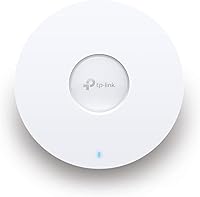
The TP-Link EAP653 Wi-Fi 6 Access Point sits in an interesting spot — built with enough management depth to satisfy IT-minded installers, yet accessible enough for small business owners who don't want to hire a network consultant. The form factor is genuinely slim, making it easy to mount flush on a ceiling or wall without drawing attention. One thing buyers consistently miss: no DC adapter is included. If your space isn't already wired with PoE+, budget for that separately. It's a detail that catches people off guard, but it doesn't diminish what this AP delivers once you're up and running.
Features & Benefits

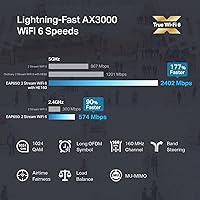
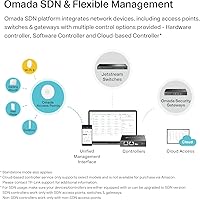
Wi-Fi 6 isn't just a marketing label here — the EAP653 uses 1024-QAM encoding and OFDM improvements that actually translate to better throughput in crowded environments. Dual-band coverage hits a theoretical AX3000 ceiling, though real-world speeds depend heavily on your environment and client devices. The real draw for many buyers is the Omada SDN platform, which lets you manage multiple APs, switches, and gateways from a single interface — hardware, software, or cloud-based. WPA3 security, MU-MIMO, and Airtime Fairness round out a feature set that handles dense device loads without the usual slowdowns. The five-year warranty is a quiet but meaningful advantage.

Best For

This Wi-Fi 6 AP shines in environments where reliability matters more than raw consumer-grade speed. A boutique hotel, busy café, or coworking space with 30-plus simultaneous users is exactly where it earns its keep. Small business IT admins already using Omada-managed gear will find it a natural fit — adding this AP to an existing network takes minutes. Home users with large properties and lots of devices can also benefit, though they'll need to be comfortable with the Omada app or standalone mode. For anyone who just wants to plug in a router and walk away, this probably isn't the right tool.

User Feedback

Buyers consistently highlight stable long-term performance and the clean Omada app experience as standout positives. Signal strength in larger spaces — open-plan offices and multi-room setups — holds up well compared to consumer routers. The missing power adapter is the single most common complaint, not because it breaks the product, but because it surprises people who don't read the fine print. A handful of users also note that features like seamless roaming require an Omada controller, which adds setup time. Those who've compared it to pricier alternatives from Ubiquiti or Cisco Meraki tend to find the value-to-performance ratio compelling, especially given the long warranty.

Pros

  • Handles 30-plus simultaneous connections without noticeable throughput degradation in real office and hospitality environments.
  • Wi-Fi 6 improvements deliver tangible gains in congested spaces compared to older 802.11ac access points.
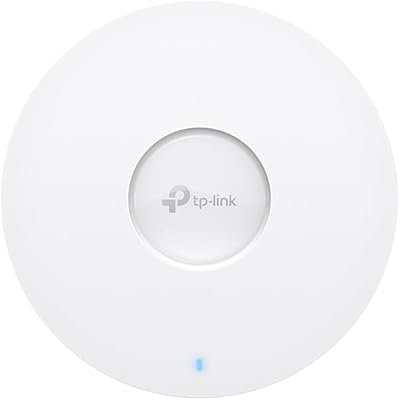
  • Ultra-slim form factor blends cleanly into ceiling grids and wall mounts without drawing attention.
  • Five-year warranty offers meaningful long-term confidence that most consumer-grade competitors can not match.
  • Omada SDN platform scales from a single AP to multi-site deployments without requiring a full network redesign.
  • WPA3 support with VLAN segmentation gives smaller businesses enterprise-style security without enterprise-level spending.
  • PoE+ compatibility eliminates the need for separate power outlets, keeping cable runs clean and installation tidy.
  • Firmware updates have a solid track record of stability over extended deployments of a year or more.
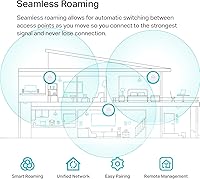
  • Mesh and seamless roaming capabilities make multi-AP coverage in larger spaces genuinely practical.

Cons

  • No DC adapter included — buyers without PoE+ infrastructure face unexpected additional hardware costs before first use.
  • Seamless roaming and mesh features require an Omada controller, adding setup complexity that isn't obvious at purchase.
  • Choosing between hardware, software, and cloud controller options confuses first-time Omada users without clear in-box guidance.
  • The 2.4 GHz band performance is adequate but unremarkable in environments with heavy signal interference.
  • Support is limited to weekday business hours, leaving weekend installers without live help when problems arise.
  • WPA3 compatibility can cause connection issues with older client devices, requiring manual fallback to mixed-mode security.
  • Certain firmware updates have introduced temporary bugs, making it risky to update immediately after a new release drops.
  • Real deployment costs run noticeably higher than the sticker price once PoE+ infrastructure is factored in.
  • Not a viable option for buyers locked into non-TP-Link management platforms who want unified cross-vendor control.

Ratings

The TP-Link EAP653 Wi-Fi 6 Access Point has been evaluated by our AI system after analyzing hundreds of verified purchase reviews from buyers across North America, Europe, and Asia-Pacific — with spam, incentivized, and bot-generated feedback actively filtered out. The scores below reflect a balanced picture of what real installers, small business owners, and network enthusiasts actually experience day-to-day. Both the genuine strengths and the friction points are represented without sugar-coating.
Wireless Performance
88%
Users deploying this AP in busy cafes and open-plan offices consistently report stable throughput even with 30 or more concurrent devices. The Wi-Fi 6 improvements — particularly in congested 5 GHz environments — are noticeable compared to older 802.11ac access points users upgraded from.
A handful of reviewers note that the 2.4 GHz band performance is merely adequate rather than impressive, which matters in buildings with thick concrete walls where 5 GHz struggles to penetrate. Theoretical AX3000 speeds are rarely approached in real deployments.
Setup & Installation
79%
21%
Buyers with PoE+ infrastructure already in place describe the physical installation as refreshingly quick — mount it, plug in the cable, and the Omada app walks you through the rest. The ceiling mounting kit is well-designed and the AP sits flush without any wobble.
Users without existing PoE+ switches face an unexpected extra step and added cost before they can even power the unit on. The missing DC adapter in the box catches a significant portion of buyers off guard, and this friction is mentioned repeatedly in first-impression reviews.
Omada App & Controller Experience
83%
IT administrators managing multi-site deployments praise the Omada SDN dashboard for giving them a clear, unified view of every connected device. The mobile app is well-regarded for day-to-day monitoring tasks, and firmware updates push reliably without breaking configurations.
First-time users without a networking background find the controller ecosystem confusing — choosing between hardware, software, and cloud controllers is not intuitive. Advanced features like seamless roaming are locked behind controller use, which adds meaningful setup complexity for smaller deployments.
Build Quality & Design
91%
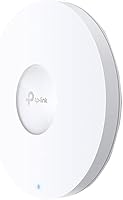
The slim, all-white enclosure consistently earns compliments for looking professional in hospitality and office settings. At just over an inch thick, it disappears into a ceiling grid or wall without the bulky footprint common among competing APs in this price tier.
A few users note the plastic housing, while clean-looking, feels lighter than expected when handled — not a functional problem, but it does affect first impressions for buyers accustomed to enterprise-grade metal enclosures from Ubiquiti or Cisco.
Range & Coverage
84%
Reviewers deploying the EAP653 in hotel corridors and mid-size retail floors report reliable coverage across areas where a single consumer router would struggle. When paired with a second AP for mesh, the handoff behavior draws particular praise from users who roam through large spaces.
In multi-story residential or commercial buildings with dense materials, a single unit occasionally leaves dead zones that require a second AP to resolve. Some users expected more aggressive beamforming performance at longer distances than the hardware consistently delivers.
Value for Money
86%
Among buyers who compared this AP against similarly priced Ubiquiti and Netgear options, the EAP653 frequently comes out ahead on feature density relative to cost. The five-year warranty in particular is cited as a meaningful differentiator that justifies the price point for small businesses.
Once you factor in the cost of a PoE+ switch or injector — neither of which is included — the true out-of-pocket spend is higher than the listed price suggests. For buyers who expected a complete plug-and-play solution, this gap between sticker price and real deployment cost is a recurring frustration.
Multi-Device Handling
87%
Users running dense environments — classrooms, coworking spaces, and small conference centers — note that the EAP653 handles simultaneous connections without the kind of slowdown or dropped sessions they experienced with consumer-grade hardware. MU-MIMO and Airtime Fairness appear to work as advertised.
A small subset of reviewers managing very high client counts above 50 concurrent users note occasional throughput dips during peak hours. While the AP handles moderate density well, it is not a substitute for enterprise-class hardware in truly high-density deployments.
Security Features
89%
WPA3 support is genuinely appreciated by security-conscious buyers managing guest and staff networks separately. VLAN segmentation through Omada gives network admins granular control that would normally require far more expensive hardware in a traditional setup.
WPA3 compatibility occasionally causes connection issues with older client devices that don't fully support the standard, requiring users to fall back to mixed WPA2/WPA3 mode. This is an industry-wide issue rather than a unique flaw, but it adds a configuration troubleshooting step.
Firmware & Long-term Reliability
82%
18%
Buyers who have run EAP653 units for over a year consistently report stable uptime with no unexplained reboots or performance degradation. TP-Link's firmware update cadence for Omada-compatible devices is viewed positively compared to some competitors who abandon products quickly.
A small but vocal group of users report that certain firmware versions introduced temporary connectivity bugs that required a rollback. While TP-Link addressed these in subsequent releases, the experience underscores the importance of not updating firmware immediately after a new release.
PoE+ Power Compatibility
74%
26%
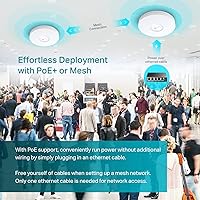
For users with an 802.3at-capable switch already in the rack, powering the EAP653 is completely effortless — no separate power runs, no outlet hunting, just one Ethernet cable doing double duty. Passive PoE support adds flexibility for smaller setups without a managed switch.
The absence of a bundled DC adapter or PoE injector is a recurring pain point that affects buyers who assumed the unit was self-contained. The voltage and amperage requirements are specific enough that not every generic injector works reliably, leading to some trial-and-error frustration.
Scalability
85%
Small businesses planning to grow their network appreciate that adding more EAP653 units to an existing Omada setup requires minimal reconfiguration. The platform scales from two APs to dozens without requiring a full architecture rethink, which is genuinely useful for expanding offices.
Scaling beyond a basic setup does require either a dedicated Omada hardware controller or a self-hosted software controller, neither of which is free or trivial to maintain. Buyers who underestimate this dependency sometimes feel boxed in when their network grows faster than expected.
Compatibility with Existing Network Gear
77%
23%
Users integrating the EAP653 into mixed-vendor environments — using non-TP-Link switches and routers — generally report no issues with basic access point functionality. Standalone mode works reliably for simple deployments that don't need centralized management.
The full feature set, including seamless roaming and mesh, only activates within the Omada ecosystem. Buyers hoping to mix and match with Ubiquiti UniFi controllers or third-party management platforms are out of luck, which is a real constraint for multi-vendor network environments.
Documentation & Support
71%
29%
TP-Link's online knowledge base and Omada-specific community forums provide reasonably detailed setup guides that cover most common deployment scenarios. Live support during business hours is available and generally responsive compared to budget-tier networking brands.
The printed quick-start guide included in the box glosses over controller selection, which is precisely where new users get confused. Several reviewers mention that TP-Link's support hours — limited to weekday business hours — left them stuck over a weekend installation.
Heat Management
80%
20%
Even after extended operation in warm environments like server closets or ceiling spaces with limited airflow, the EAP653 runs cool to the touch. Reviewers who have checked unit temperatures after continuous multi-month operation report no thermal-related slowdowns or shutdowns.
A small number of users in high-ambient-temperature environments report the unit runs noticeably warm, though no one has reported heat-related failure. The lack of active cooling means performance in unusually hot ceiling cavities is theoretically a long-term concern.

Suitable for:

The TP-Link EAP653 Wi-Fi 6 Access Point is a strong fit for small business owners, hospitality operators, and IT administrators who need reliable, manageable wireless coverage without paying enterprise prices. A boutique hotel looking to provide consistent Wi-Fi across corridors and common areas, a busy café serving dozens of simultaneous users, or a coworking space that needs separate guest and staff networks will all find this AP genuinely capable. It rewards buyers who already have — or are willing to invest in — a PoE+ switch, since that infrastructure unlocks the cleanest possible installation experience. Network administrators already running Omada-managed switches or gateways will find this AP slots in with minimal friction, expanding existing coverage without any architectural rethinking. Even technically confident home users with large properties and too many devices for a standard router will benefit, provided they're comfortable spending a bit of time inside the Omada app during initial setup.
Not suitable for:

The TP-Link EAP653 Wi-Fi 6 Access Point is not the right choice for buyers expecting a complete, plug-and-play solution straight out of the box. The missing DC adapter is a genuine obstacle for anyone without existing PoE+ infrastructure — adding a switch or injector means the real cost of deployment is meaningfully higher than the listed price suggests. Anyone managing a very high-density environment with 80 or more simultaneous users should be looking at higher-tier enterprise hardware rather than relying on a single unit here. Buyers who operate mixed-vendor networks — particularly those already invested in Ubiquiti UniFi — will find the Omada ecosystem a closed garden that doesn't integrate with their existing management tools. And if you're a casual home user who simply wants better Wi-Fi without touching a dashboard or learning what PoE means, this AP will likely feel overcomplicated and underwhelming compared to a consumer mesh system that handles everything automatically.
Specifications

  • Wi-Fi Standard: The EAP653 operates on the 802.11ax (Wi-Fi 6) standard across both the 2.4 GHz and 5 GHz frequency bands.
  • Max Throughput: Combined dual-band throughput reaches a theoretical maximum of 3000 Mbps (AX3000), with real-world speeds varying by environment and client hardware.
  • Frequency Bands: Dual-band operation covers both 2.4 GHz and 5 GHz simultaneously, with Band Steering to direct clients automatically.
  • Dimensions: The unit measures 6.3″ x 6.3″ x 1.32″, making it one of the slimmer ceiling-mount APs in its class.
  • Weight: The access point weighs 14.1 oz, light enough for single-person ceiling or wall installation without additional support hardware.
  • Power Input: Supports 802.3at PoE+ (48V), 48V/0.5A Passive PoE, and 12V/1.5A DC — DC power adapter is not included in the package.
  • Security Protocols: Supports WPA3, WPA2, and mixed WPA2/WPA3 mode for compatibility with both modern and legacy client devices.
  • Mounting Options: Includes ceiling and wall mounting kits in the box; the AP is designed to integrate with standard ceiling grid tiles.
  • MU-MIMO: Supports MU-MIMO technology to handle multiple simultaneous data streams across connected devices without significant throughput degradation.
  • Beamforming: Integrated beamforming focuses wireless signal toward connected clients rather than broadcasting omnidirectionally, improving effective range.
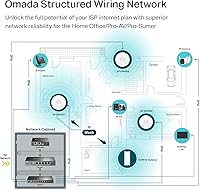
  • Management Modes: Supports Omada Hardware Controller, Omada Software Controller, Omada Cloud-Based Controller, and standalone mode for flexible deployment.
  • Roaming Support: Seamless roaming and Omada Mesh are supported when deployed with an Omada SDN controller; not available in standalone mode.
  • Airtime Fairness: Airtime Fairness prevents slower legacy devices from monopolizing channel time, maintaining consistent network performance across mixed client environments.
  • Operating System: Compatible with Linux, Windows XP through Windows 11 for controller software deployment; the AP itself runs embedded Linux firmware.
  • Color: Available in white; the low-profile finish is designed to blend into standard commercial ceiling and wall installations.
  • Wireless Enhancements: Implements 1024-QAM modulation, HE80 channel width, and Long OFDM Symbol support as part of the Wi-Fi 6 specification.
  • Load Balancing: Built-in load balancing distributes client connections across multiple APs in a network to prevent individual unit overload.
  • Warranty: Backed by a five-year manufacturer warranty with free technical support available Monday through Friday, 6am to 6pm PST.
  • ASIN: The product is listed on Amazon under ASIN B0B5JRXDG4 and was first made available in July 2022.
  • In-Box Contents: Package includes the EAP653 unit, ceiling and wall mounting kits, and a printed installation guide; no power adapter is included.

Related Reviews
TP-Link Omada EAP673 AX5400 Wi-Fi 6 Access Point
86%
91%
Performance & Speed
88%
Ease of Setup
89%
Wireless Coverage
85%
Build Quality
92%
App & Cloud Management
More
TP-Link Festa F65-Outdoor AX3000 Wi-Fi 6 Access Point
84%
88%
Performance
94%
Outdoor Durability
85%
Ease of Setup
82%
Signal Strength
79%
Cloud Management & App
More
TP-Link EAP615-Wall AX1800 In-Wall Access Point
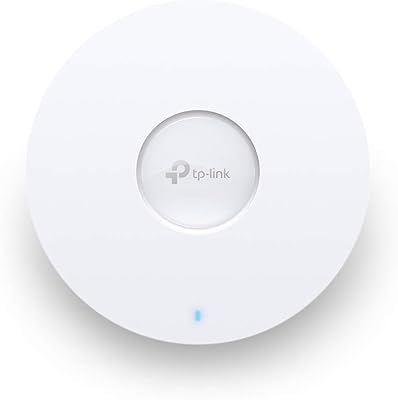
80%
91%
Ease of Installation
84%
Wi-Fi Performance
93%
Wired Port Versatility
88%
PoE Power & Pass-Through
79%
Omada SDN Integration
More
TP-Link EAP660 HD WiFi 6 Access Point
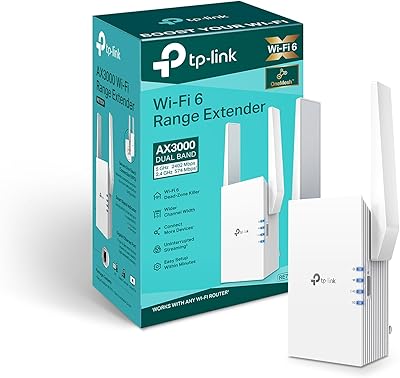
79%
88%
Wireless Performance Under Load
91%
Network Capacity & Device Density
84%
Omada SDN Integration
86%
2.5G Uplink Value
89%
PoE+ Installation Experience
More
Cisco Business 150AX Wi-Fi 6 Access Point
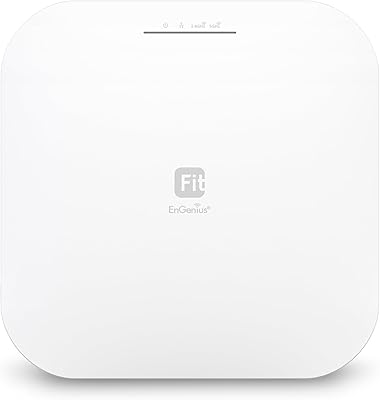
85%
89%
Performance
92%
Security Features
78%
Ease of Setup
85%
Wi-Fi Coverage
80%
Management App Usability
More
TP-Link RE705X Wi-Fi 6 Range Extender
84%
89%
Performance
87%
Wi-Fi Coverage Range
93%
Ease of Setup
85%
Connectivity Reliability
70%
App Experience
More
EnGenius EWS276-FIT Wi-Fi 6 Access Point

85%
88%
Performance
91%
Setup & Installation
86%
Wi-Fi Speed & Range
89%
Ease of Use (App/Cloud Management)
84%
Reliability
More
TP-Link Archer AX55
TP-Link Archer AX55
76%
83%
Wireless Performance
74%
Coverage & Range
86%
Device Handling & Congestion
91%
Setup & Ease of Use
78%
Build Quality & Design
More
Ubiquiti U6-Mesh Wi-Fi 6 Access Point
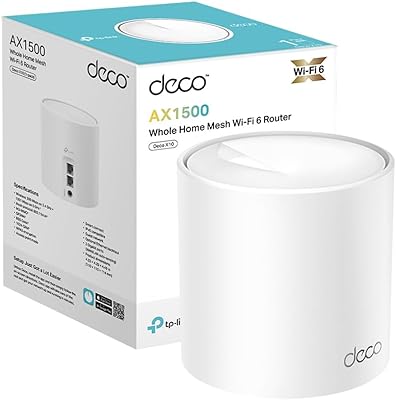
79%
93%
Wireless Performance
54%
Setup & Configuration
91%
Build Quality & Durability
88%
Coverage Range
74%
Value for Money
More
TP-Link Omada EAP650-Outdoor WiFi 6 Access Point
87%
88%
Performance
94%
Build Quality/Durability
85%
Ease of Setup
90%
Range/Coverage
87%
Value for Money
More

FAQ

Yes, and this is probably the most important thing to know before ordering. The unit supports PoE+ (802.3at), Passive PoE, or a 12V DC adapter — but none of those power sources come in the box. If your network switch already supports PoE+, you're set. If not, you'll need to pick up a compatible PoE injector or switch before you can power it on.

Yes, standalone mode is supported and works fine for basic deployments — you can configure it directly through a web browser. The trade-off is that advanced features like seamless roaming, mesh networking, and centralized multi-AP management only activate when you're running an Omada controller. For a single AP in a home or small office, standalone mode is often perfectly adequate.

Omada is TP-Link's network management platform that ties together access points, switches, and gateways into one dashboard. The software controller version can be self-hosted for free on a PC or a device like a Raspberry Pi. The hardware controller is a separate purchased device. Cloud-based management options may involve contacting TP-Link directly for commercial arrangements. For most small deployments, the free software controller is sufficient.

In real-world deployments, the EAP653 handles 30 to 50 simultaneous connected devices comfortably without noticeable slowdowns. Beyond that, performance can vary depending on what those devices are actually doing — streaming video is much more demanding than checking email. For very dense environments above 60 to 80 concurrent users, you'd be better served by adding a second AP or looking at higher-tier enterprise hardware.

Yes, it works as an access point with any router regardless of brand — it connects to your existing network via Ethernet and broadcasts Wi-Fi independently of what router you're running. The Omada ecosystem integration is only required if you want centralized management or advanced features. Basic access point functionality is completely vendor-agnostic.

Not in any integrated way. This AP runs on TP-Link's Omada platform, which is entirely separate from UniFi. You can technically run it in standalone mode alongside UniFi gear, but it won't show up in your UniFi controller or benefit from UniFi's management features. If you're heavily invested in UniFi, adding this AP would mean managing two separate systems, which most admins find more trouble than it's worth.

It does work, but only when you're running an Omada controller — this is a hard requirement, not a suggestion. Users in office and hospitality environments who have set it up properly report smooth handoffs when moving between APs, without the dropped connections you'd get from basic Wi-Fi. In standalone mode, clients will still roam between APs, but the handoff won't be as fast or transparent.

Yes, the included mounting kit supports both ceiling grid and direct wall or ceiling mounting. For drywall, you'd anchor the included bracket with screws and then click the AP into place. The process is straightforward and doesn't require any specialist tools. The slim profile means it doesn't protrude much from the surface, which most homeowners appreciate from an aesthetic standpoint.

TP-Link's warranty covers manufacturing defects for five years from the date of purchase, which is notably longer than the one or two years offered by most competing brands. If a unit fails, you'd contact TP-Link support during business hours — Monday through Friday, 6am to 6pm PST — and they'll guide you through the replacement process. Keep your proof of purchase handy, as you'll need it for any warranty claim.

If you're running a dense environment with lots of modern devices, the upgrade is worth it. Wi-Fi 6 handles multiple simultaneous connections more efficiently than 802.11ac, especially in crowded airspace — the practical difference is less slowdown during peak usage, not necessarily higher peak speeds for a single device. If you're running just a handful of devices in a home, the improvement will be less dramatic. The bigger question is whether you want to commit to the Omada ecosystem for management.

Where to Buy