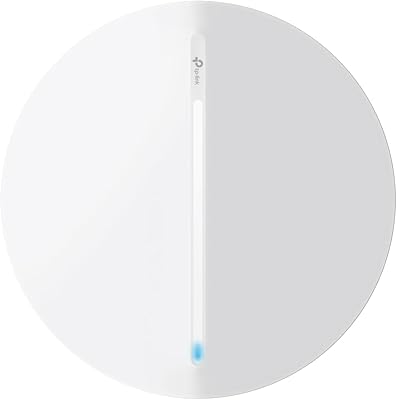
TP-Link EAP615-Wall AX1800 In-Wall Access Point

Overview
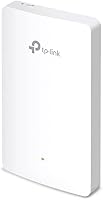
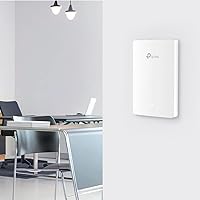
The TP-Link EAP615-Wall AX1800 In-Wall Access Point takes a different approach to wireless coverage by mounting directly into a standard electrical box, sitting flush against the wall like any outlet or switch plate. That form factor matters more than it might sound — in hotel rooms and office cubicles, a ceiling-mounted AP can feel intrusive or get blocked by furniture, while this wall-plate access point stays out of the way entirely. It runs on a Wi-Fi 6 dual-band radio with up to 1800 Mbps aggregate throughput, draws power over a single Ethernet cable via PoE, and plugs into TP-Link's broader Omada management ecosystem for centralized multi-site control. For a mid-range price, that is a compelling combination.
Features & Benefits
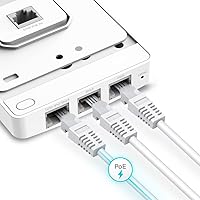
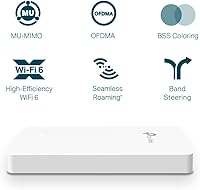
Four Gigabit Ethernet ports are arguably the headline feature here — one accepts the incoming PoE uplink, while the remaining three feed wired devices like a laptop dock, smart TV, or IP phone from the same wall plate. One of those downlink ports supports PoE pass-through, so you can power a VoIP handset without hunting for a spare outlet. On the wireless side, the in-wall AP uses OFDMA and MU-MIMO to handle multiple clients simultaneously without the congestion that plagues older access points in busy corridors or meeting rooms. Beamforming steers the signal toward connected devices rather than scattering it in every direction. Omada SDN ties together access points, switches, and gateways under one dashboard, with standalone mode available if you prefer to skip the controller entirely.
Best For
This wall-plate access point is purpose-built for hospitality and office environments where neatness and per-room connectivity both matter. Hotel properties are the obvious fit — each room gets its own private wired and wireless network from a single wall drop, with guest isolation keeping visitors off each other's traffic. Small offices replacing bulky ceiling-mount APs will appreciate how much less conspicuous a wall-plate unit looks once installed. If your facility already runs a PoE switch infrastructure, the process is straightforward: run a cable to each room, clip the unit into the box, and you are done. IT teams already using Omada for other TP-Link gear will find that extending Wi-Fi 6 to new floors or buildings requires minimal extra configuration.
User Feedback
Across several hundred verified purchases, the EAP615-Wall holds a 4.5-star rating, and the feedback is largely consistent. Buyers frequently highlight clean installation as a standout experience — swapping this in for a standard wall plate takes around fifteen minutes when a PoE switch is already in the closet. Throughput and stability improvements over older Wi-Fi 5 wall-plate units are regularly mentioned. That said, first-time Omada users flag a real learning curve getting the controller up and running, and the 2.4 GHz band can feel underpowered in very dense environments. One recurring frustration is the cloud controller pricing — it is not spelled out on the product page, so buyers expecting a fully free cloud tier have occasionally been caught off guard when they need to contact TP-Link for plan details.
Pros
- Fits directly into a standard electrical box, replacing a wall plate with no structural modifications needed.
- Single Ethernet uplink delivers both power and data, keeping cable runs clean and simple.
- Three Gigabit downlink ports let one wall outlet simultaneously serve a laptop, a TV, and a VoIP phone.
- Wi-Fi 6 brings a genuine throughput and stability improvement over older wall-plate APs in the same form factor.
- PoE pass-through on one port powers a connected handset without needing an extra power brick or outlet.
- Guest network isolation works reliably through Omada, keeping hotel guests and office visitors off shared infrastructure.
- The EAP615-Wall integrates neatly into an existing Omada dashboard alongside switches and gateways already on-site.
- Passive cooling means no fan noise, which matters in quiet hotel rooms and private offices.
- At its price tier, consolidating an AP and a small switch into one unit produces real savings across large deployments.
- Holds a 4.5-star rating across several hundred verified purchases, reflecting broad satisfaction in real commercial use.
Cons
- Omada controller setup has a real learning curve that can slow down first-time deployments by several hours.
- Cloud controller pricing is not disclosed upfront and requires contacting TP-Link directly, which has blindsided buyers mid-project.
- The 2.4 GHz band underperforms in high-density environments where many co-channel neighbors compete for airspace.
- Only one downlink port supports PoE pass-through, limiting options in rooms with multiple powered devices.
- Standalone mode lacks advanced features like traffic scheduling, roaming support, and granular QoS controls.
- White is the only color option, which can clash with off-white or custom-finish wall plates in upscale properties.
- Buyers without an existing PoE switch must invest in additional infrastructure before a single unit can go live.
- Coverage area is smaller than a ceiling-mount AP, making it unsuitable as a standalone solution for large open spaces.
- Some firmware updates have temporarily broken compatibility with specific Omada controller versions, requiring rollbacks.
- Three downlink ports fall short in tech-heavy rooms that need four or more simultaneous wired connections.
Ratings
The TP-Link EAP615-Wall AX1800 In-Wall Access Point has been evaluated using AI-driven analysis of verified global buyer reviews, with spam, bot-generated, and incentivized feedback actively filtered out to ensure the scores reflect genuine experiences. This wall-plate access point earns strong marks in several areas that matter most to hospitality and small-business buyers, though a handful of real friction points keep certain scores grounded. Both the strengths and the legitimate frustrations are reflected transparently in every category below.
Ease of Installation
Wi-Fi Performance
Wired Port Versatility
PoE Power & Pass-Through
Omada SDN Integration
Cloud Controller Transparency
Build Quality & Form Factor
Value for Money
Standalone Mode Usability
2.4 GHz Band Strength
Guest Network & Isolation
Firmware & Update Reliability
Heat & Passive Cooling
Documentation & Setup Guides
Suitable for:
The TP-Link EAP615-Wall AX1800 In-Wall Access Point is purpose-built for hospitality and commercial environments where both wired and wireless connectivity need to come from a single wall drop. Hotel operators are the clearest beneficiaries — each room gets its own isolated Wi-Fi 6 network plus three Gigabit ports for a TV, desk, and phone, all from one unit powered by the existing PoE switch infrastructure. Small and medium offices looking to replace ceiling-mount APs with something less visually prominent will appreciate how naturally this in-wall AP disappears into a finished wall. IT teams already running TP-Link Omada switches and gateways will find that adding this device to an existing controller dashboard is straightforward, making it a practical way to extend Wi-Fi 6 coverage to new floors or buildings without introducing a second management platform. If your site already has structured cabling and a PoE switch in the closet, deployment is about as close to plug-and-play as managed networking gets.
Not suitable for:
The TP-Link EAP615-Wall AX1800 In-Wall Access Point is not the right tool for every situation, and buyers should go in with clear expectations. Home users or small home offices looking for a simple plug-in AP will find the Omada ecosystem unnecessarily complex for a single-device setup, and standalone mode strips out enough features to make the premium feel hard to justify. Anyone deploying in very high-density environments — a packed conference floor, a large open-plan office, or a busy hotel corridor with dozens of simultaneous users per AP — should note that the 2.4 GHz band struggles under that kind of pressure, and the overall radio coverage area is smaller than what a ceiling-mount unit with external antennas would achieve. Buyers who want a fully cloud-managed setup should also be aware that the cloud controller tier is not free and requires contacting TP-Link directly for pricing, which has caught a number of deployers off guard mid-project. Finally, anyone without an existing PoE switch will need to budget for that infrastructure separately, since this in-wall AP has no alternative power input.
Specifications
- Wi-Fi Standard: This wall-plate access point uses 802.11ax (Wi-Fi 6) across both bands, delivering improved efficiency and throughput compared to previous-generation Wi-Fi 5 hardware.
- Frequency Bands: Dual-band operation covers both the 2.4 GHz and 5 GHz spectrums simultaneously, allowing devices to connect on whichever band best suits their location and speed requirements.
- Max Throughput: Aggregate wireless throughput reaches up to 1800 Mbps (AX1800), combining the 2.4 GHz and 5 GHz band capacities under ideal conditions.
- Spatial Streams: Four spatial streams support MU-MIMO operation, enabling multiple client devices to receive data simultaneously rather than taking turns on the same channel.
- Uplink Port: One Gigabit Ethernet uplink port accepts 802.3af or 802.3at PoE input, providing both network connectivity and power through a single cable from a compatible PoE switch.
- Downlink Ports: Three Gigabit Ethernet downlink ports allow wired devices such as a desktop, smart TV, or IP phone to connect directly from the wall plate without an additional switch.
- PoE Pass-Through: One of the three downlink ports supports PoE pass-through, allowing a connected device such as a VoIP handset to receive power through the same cable without a separate power adapter.
- Form Factor: The unit is designed as a wall-plate access point that installs directly into a standard single-gang electrical box, replacing a conventional wall plate without requiring new wall penetrations.
- Dimensions: Physical dimensions measure 5.67 x 3.39 x 0.78 inches, keeping the installed profile nearly flush with the wall surface.
- Weight: The unit weighs 7 ounces, making handling and positioning during installation straightforward for a single installer.
- Power Input: Power is supplied entirely via 802.3af or 802.3at PoE from the uplink port; no AC power adapter or separate power outlet is required at the installation point.
- Color: The unit ships in white only, matching the most common wall plate and outlet finish used in commercial and hospitality interiors.
- Management Options: The EAP615-Wall supports Omada SDN management via a hardware controller, self-hosted software controller, or cloud-based controller, with a standalone local web interface also available.
- Key Wireless Features: OFDMA, MU-MIMO, and Beamforming are all supported, collectively improving per-client efficiency and signal directionality in environments with multiple simultaneous users.
- Security & Access: WPS is supported for quick client onboarding, and guest network isolation allows per-room or per-zone private networks to be provisioned without exposing the main network infrastructure.
- Wireless Standard Family: The device is backward compatible with 802.11a/b/g/n/ac client devices, ensuring older hardware can still connect even in a Wi-Fi 6 deployment.
- Market Position: The product holds the number 31 ranking in the Computer Networking Wireless Access Points category on Amazon, reflecting sustained buyer demand since its November 2021 launch.
- In the Box: The package includes the AX1800 wall-plate access point unit, a mounting kit for single-gang electrical box installation, and a printed installation guide.
Related Reviews
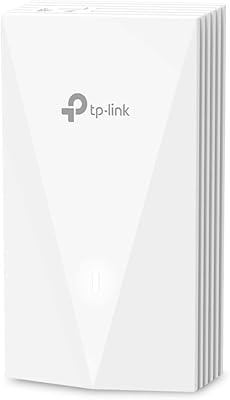
TP-Link EAP655-Wall WiFi 6 AX3000 Wall Plate Access Point
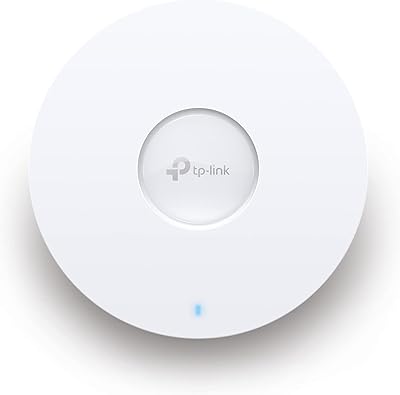
TP-Link EAP653 Wi-Fi 6 Access Point

TP-Link Omada EAP225-Outdoor

TP-Link TL-WA1201 AC1200 Wireless Access Point
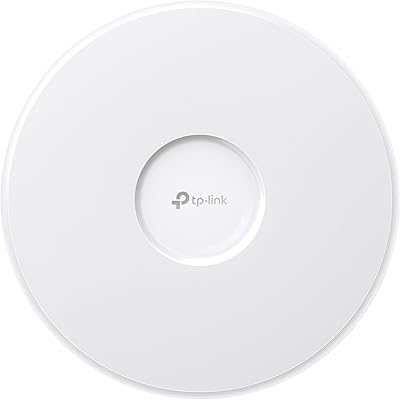
TP-Link EAP770 WiFi 7 Wireless Access Point
TP-Link EAP660 HD WiFi 6 Access Point
TP-Link EAP620 HD V3 Wireless Access Point
TP-Link Omada EAP720 WiFi 7 Access Point
TP-Link EAP650-Outdoor WiFi 6 Outdoor Access Point