Overview

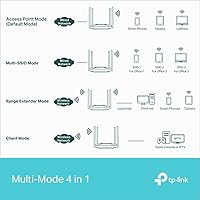
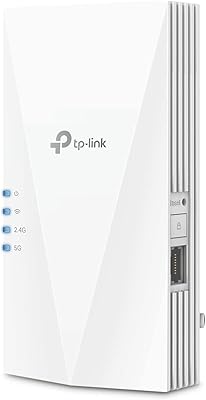
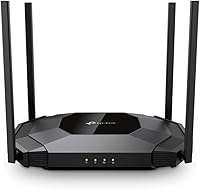
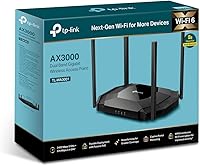
The TP-Link TL-WA3001 AX3000 WiFi 6 Access Point sits comfortably in the mid-range networking space, targeting home users and small offices that need dependable wireless coverage without overhauling an existing router. What separates this TP-Link unit from basic range extenders is its four operating modes — Access Point, Client, Range Extender, and Multi-SSID — all manageable without a cloud subscription or ongoing fees. The desktop form factor and four fixed antennas favor signal performance over a slim profile. Add passive PoE support to the mix, and you have a device that can be tucked away cleanly with a single cable run. TP-Link has been building networking hardware long enough that the fundamentals here feel solid rather than speculative.
Features & Benefits

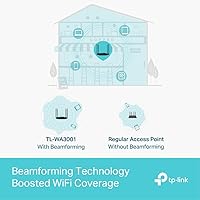
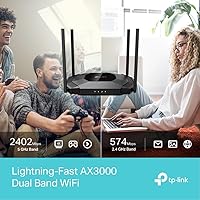
WiFi 6 brings more to the table than just a faster number on the box. The TL-WA3001 uses HE160 channel support and 1024-QAM modulation, which together allow more data to move in each transmission — a noticeable difference when several devices are streaming or video-calling simultaneously. The AX3000 rating reflects combined dual-band throughput across both 2.4 GHz and 5 GHz bands, so real-world single-band speeds will be lower, as they always are. Beamforming through the four external antennas focuses signal toward connected devices rather than radiating equally in all directions, which helps at range. Setup via WPS or the web interface is straightforward, though anyone expecting OpenWrt compatibility or VLAN configuration will find the proprietary firmware limiting.

Best For

This WiFi 6 access point makes the most sense for home users dealing with dead zones who want a genuine WiFi 6 upgrade without swapping out their router. It also suits home office setups where running a short Ethernet cable to the unit is practical — the passive PoE option keeps things tidy in those cases. Renters will appreciate the desktop design; no drilling, no ceiling mounts, no landlord conversations required. The Client mode is genuinely useful for connecting a wired-only device, like a smart TV or desktop PC, to a wireless network. If you are stepping up from WiFi 5 and want efficiency improvements without committing to a full mesh system overhaul, this TP-Link unit offers a reasonable, no-fuss entry point.

User Feedback

With a 4.3-star average across over 260 ratings, the general reception leans positive, and the most consistent praise centers on ease of setup and noticeable coverage improvement right out of the box. Passive PoE works reliably for buyers who use it, which is reassuring given how often that feature causes confusion on cheaper units. On the critical side, a recurring complaint is that the management interface looks and feels dated — functional, but not refined. A handful of users mention the unit runs warm during extended use, worth considering if airflow around the desk placement is limited. Range Extender mode gets mixed reviews: it works for most, but a small number report inconsistent connections in larger or multi-story homes.

Pros

  • Supports four operating modes in one device, reducing the need to buy separate hardware for different network roles.
  • WiFi 6 technology delivers meaningful efficiency improvements when several devices are active at the same time.
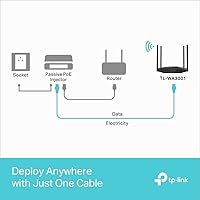
  • Passive PoE support allows a clean single-cable installation with the included injector, no electrician required.
  • Setup is straightforward enough for non-technical users, with WPS available for quick device pairing.
  • Four external antennas with beamforming help push signal further and more accurately than basic extenders.
  • Desktop form factor requires no drilling or permanent mounting, which is ideal for renters.
  • HE160 wide channel support on the 5 GHz band helps squeeze more throughput out of compatible devices.
  • Includes both a DC adapter and a PoE injector in the box, so you have flexibility from day one.
  • Solid 4.3-star rating across a meaningful number of real-world buyers points to consistent, reliable performance.

Cons

  • The management interface looks and feels outdated compared to competitors at a similar price point.
  • AX3000 is a combined dual-band figure; real single-band throughput will be noticeably lower in practice.
  • Passive PoE requires exactly 48V — incompatible with standard active PoE switches without the specific injector.
  • No OpenWrt support or VLAN configuration, which rules it out for users with more complex network needs.
  • The unit can run warm during extended use, so placement in poorly ventilated spots may be a concern.
  • Range Extender mode receives mixed feedback in larger or multi-story homes, with some users reporting drops.
  • No centralized cloud management or app-based control, which limits convenience for less technical households.
  • Fixed antennas cannot be swapped or upgraded, limiting options if you later need extended directional coverage.

Ratings

The TP-Link TL-WA3001 AX3000 WiFi 6 Access Point has been evaluated by our AI system after processing verified purchase reviews from buyers worldwide, with spam, bot-generated feedback, and incentivized reviews actively filtered out. The scores below reflect a balanced synthesis of real-world experiences — where this TP-Link unit genuinely delivers and where it falls short. Both consistent praise and recurring frustrations are represented transparently in each category.
Wireless Performance
83%
Users consistently report a noticeable improvement in throughput and connection stability after switching from WiFi 5 extenders, particularly when the unit is deployed in Access Point mode with a wired backhaul. Devices that previously struggled to hold a signal in far corners of a home or office connected reliably and maintained stable speeds.
Real-world single-band speeds fall well short of the AX3000 headline figure, which reflects a combined dual-band total under ideal lab conditions. Buyers who expected near-gigabit wireless performance on everyday devices were sometimes disappointed by more modest real-world results.
Setup & Ease of Use
81%
19%
The WPS button and browser-based configuration page make initial setup accessible for users who have never configured an access point before. Most buyers reported being up and running within 15 to 20 minutes, with the included quick-start guide covering the basics clearly enough for non-technical households.
Switching between operating modes requires navigating the web interface, which can trip up less experienced users who expect a dedicated app experience. A small but vocal group of reviewers found the mode-switching process confusing without prior networking knowledge.
Range & Coverage
78%
22%
For medium-sized homes and single-floor offices, the four external antennas combined with beamforming deliver meaningful coverage improvements over a router broadcasting from a central location. Users in apartments and single-story layouts reported strong signal in rooms that were previously borderline dead zones.
In larger multi-story homes, a single unit struggles to provide uniform coverage throughout. Reviewers in two-story houses noted that signal quality dropped off more sharply than expected on upper floors, particularly when walls or ceilings introduced additional interference.
Build Quality & Design
74%
26%
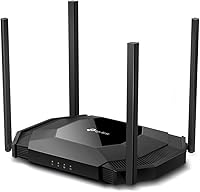
The all-plastic chassis feels reasonably solid for a desktop networking device at this price level, and the matte black finish resists fingerprints well enough for shelf or desk placement. The form factor is practical — it sits flat and stable without needing any mounting hardware.
The fixed antennas cannot be adjusted or repositioned, which limits the ability to fine-tune signal direction for specific room layouts. Some users felt the overall construction felt less premium than competing units in a similar price bracket, particularly around the antenna bases.
Thermal Management
61%
39%
Under moderate load during typical home use, the unit operates within acceptable temperature ranges without any active cooling. Users running it in well-ventilated spots on a desk reported no issues with performance degradation related to heat during standard daily use.
During extended high-load sessions or when placed in enclosed spaces, the unit runs noticeably warm, which several users flagged as a concern for always-on deployments. A handful of reviews mentioned the chassis becoming uncomfortably hot to the touch after several hours of continuous heavy traffic.
PoE Implementation
77%
23%
The inclusion of a passive PoE injector in the box removes a common barrier for buyers who want a tidy single-cable installation but do not already own compatible hardware. Users who deployed the unit in home office or garage setups praised the clean result of running just one cable to the device.
The strict 48V passive PoE requirement catches some buyers off guard, particularly those who assumed it would work with their existing 802.3af or 802.3at PoE switches. This incompatibility has led to frustration and return attempts from buyers who did not catch the specification difference before purchasing.
Multi-Mode Flexibility
76%
24%
Having four distinct operating modes in a single unit provides genuine versatility without buying separate hardware for each use case. Users who needed Client mode to bridge a wired device onto their wireless network, or who set up a secondary SSID for guests, found this capability genuinely practical.
Range Extender mode, which relies on a wireless backhaul rather than a wired connection, delivers inconsistent results depending on the environment. Several users reported frequent disconnections or reduced throughput in this specific mode, making it less dependable than Access Point mode with a wired backhaul.
Management Interface
57%
43%
The local web interface covers all essential configuration tasks and does not require a cloud account or subscription, which is a genuine advantage for privacy-conscious users. Basic settings like SSID naming, password management, and mode switching are all accessible without deep technical knowledge.
The interface design feels dated compared to competitors that offer app-based management or more modern browser dashboards. Advanced users looking for features like VLAN support, detailed traffic monitoring, or guest network isolation with granular controls will find the firmware frustratingly limited.
Value for Money
79%
21%
For buyers who need a straightforward WiFi 6 access point with wired backhaul support and do not require advanced firmware features, the price-to-performance ratio is solid. The bundled PoE injector and DC adapter add practical value that reduces the need for additional purchases.
Buyers who later discover the firmware limitations or the passive PoE incompatibility with their existing equipment may feel the value proposition weakens considerably. There are competing units in a similar range that offer more refined management interfaces or active PoE compatibility, which can make this a harder recommendation for informed buyers.
WiFi 6 Capability
82%
18%
The HE160 channel support and 1024-QAM modulation represent a genuine generational step up from WiFi 5, particularly in environments with many simultaneously connected devices. Users with WiFi 6 phones and laptops reported noticeably lower latency and more consistent throughput compared to their previous AC-standard access points.
The WiFi 6 benefits are only fully realized when connecting WiFi 6 client devices, and many households still carry a mix of older hardware. Users with primarily WiFi 5 or older devices will see compatibility but will not extract the full efficiency improvements that justify the upgrade.
Firmware & Software
54%
46%
The proprietary firmware is stable and does not require frequent manual updates to maintain basic functionality, which suits users who prefer a set-it-and-forget-it deployment. WPS integration and a simple configuration flow mean that non-technical users rarely need to return to the interface after initial setup.
The closed firmware architecture rules out OpenWrt installation and any open-source customization, which is a hard stop for network enthusiasts. There is no support for advanced features like VLAN tagging, dynamic DNS, or detailed per-device bandwidth controls, limiting usefulness as a network grows in complexity.
Compatibility
86%
Being a standard 802.11ax device, the TL-WA3001 pairs without issue alongside routers from any brand, and its backward compatibility with 802.11ac and 802.11n means older devices connect without reconfiguration. Users switching from a different router brand mid-deployment found it straightforward to integrate.
The passive PoE standard creates a meaningful compatibility gap with managed switches in small business environments, and this incompatibility is not prominently disclosed in the product listing. Buyers who discovered this after purchase consistently flagged it as a frustrating surprise.
Packaging & Included Accessories
84%
The box includes a PoE injector, DC power adapter, an RJ45 Ethernet cable, and a quick installation guide — a complete kit that allows most users to get started without sourcing any additional components. Reviewers appreciated not having to order a separate cable or injector after unboxing.
The quick installation guide covers only the essentials, and users who attempted more advanced configurations like Multi-SSID or Client mode found themselves needing to search online for supplementary guidance. A more detailed reference document included in the box would reduce post-purchase confusion.

Suitable for:

The TP-Link TL-WA3001 AX3000 WiFi 6 Access Point is a strong fit for home users and small office workers who have a functioning router they want to keep but need better wireless coverage in specific areas of their space. If you can run a single Ethernet cable to the spot where coverage drops off, this unit turns that wired connection into a clean WiFi 6 signal without requiring a full network rebuild. Renters who cannot mount hardware to ceilings or walls will appreciate the desktop form factor — it simply sits on a shelf or desk and gets to work. The Client mode also makes it genuinely useful for people who need to bridge a wired-only device, like a network printer or older desktop, onto a wireless network. For anyone upgrading from a WiFi 5 extender and wanting real efficiency gains with multiple connected devices, this TP-Link unit offers that step up at a reasonable entry point.
Not suitable for:

The TP-Link TL-WA3001 AX3000 WiFi 6 Access Point is not the right tool for network enthusiasts who expect deep firmware control, VLAN support, or open-source compatibility — the proprietary OS keeps things simple at the cost of flexibility. If your home spans multiple floors or exceeds around 2,500 square feet, a single access point of this type may not be enough, and a mesh system would serve you better. Buyers who need true 802.3af or 802.3at PoE should look elsewhere, as the passive PoE here operates at a strict 48V and is not interchangeable with standard active PoE switches without a compatible injector. This unit also lacks the centralized management dashboard that IT administrators expect in even light commercial deployments. Finally, anyone who prioritizes a minimal footprint or needs a ceiling-mount solution will find the fixed-antenna desktop design inconvenient for their setup.
Specifications

  • WiFi Standard: This unit operates on 802.11ax (WiFi 6), with backward compatibility for 802.11ac and 802.11n devices.
  • Frequency Bands: Dual-band operation covers both 2.4 GHz and 5 GHz simultaneously for flexible device distribution.
  • Aggregate Speed: Maximum combined throughput is rated at AX3000, reflecting the sum of both bands under ideal lab conditions.
  • Channel Width: HE160 wide-channel support on the 5 GHz band enables higher per-stream throughput on compatible client devices.
  • Modulation: 1024-QAM encoding allows more data per transmission cycle compared to the 256-QAM ceiling of WiFi 5 equipment.
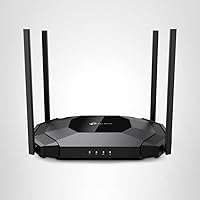
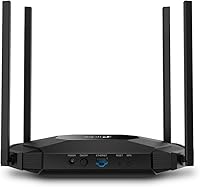
  • Antennas: Four fixed external antennas are built into the unit and cannot be swapped or repositioned independently.
  • Beamforming: Beamforming technology focuses wireless signal toward connected devices rather than broadcasting equally in all directions.
  • Operating Modes: The device supports four modes: Access Point, Client, Range Extender, and Multi-SSID, selectable via the web interface.
  • PoE Support: Passive PoE operation requires a 48V/0.5A power source; a compatible PoE injector is included in the box.
  • Power Options: A standard DC power adapter is also included, giving users the choice between wired PoE and direct wall power.
  • Ethernet Port: One Gigabit Ethernet port handles both the wired backhaul connection and PoE power input on a single cable when using PoE.
  • WPS: A physical WPS button is present on the unit for quick wireless pairing with compatible routers and client devices.
  • Dimensions: The unit measures 9.45 x 6.5 x 1.72 inches, designed for stable horizontal desktop placement.
  • Weight: At 1.03 pounds, the device is light enough to reposition easily but substantial enough to sit stably on a flat surface.
  • Operating System: The TL-WA3001 runs TP-Link's proprietary routing firmware; it does not support OpenWrt or third-party open-source alternatives.
  • Color: Available in black only, with a matte finish that minimizes visible dust accumulation in typical desktop environments.
  • Box Contents: The package includes the access point, a PoE power injector, a DC power adapter, an RJ45 Ethernet cable, and a quick installation guide.
  • Voltage: The unit operates at 48 volts when powered via the passive PoE path, which is not interchangeable with standard 802.3af or 802.3at PoE switches.

Related Reviews

TP-Link EAP655-Wall WiFi 6 AX3000 Wall Plate Access Point
85%
88%
Overall Performance
91%
Wi-Fi Speed and Range
87%
Ease of Setup
85%
PoE Passthrough Flexibility
82%
Build Quality
More
TP-Link EAP615-Wall AX1800 In-Wall Access Point
80%
91%
Ease of Installation
84%
Wi-Fi Performance
93%
Wired Port Versatility
88%
PoE Power & Pass-Through
79%
Omada SDN Integration
More
TP-Link EAP660 HD WiFi 6 Access Point
79%
88%
Wireless Performance Under Load
91%
Network Capacity & Device Density
84%
Omada SDN Integration
86%
2.5G Uplink Value
89%
PoE+ Installation Experience
More
TP-Link EAP620 HD V3 Wireless Access Point
75%
78%
Network Performance
84%
Ease of Installation
81%
Management Software
58%
Controller Dependency
83%
Build Quality
More
TP-Link EAP650-Outdoor WiFi 6 Outdoor Access Point
80%
91%
Wireless Range
88%
Wi-Fi 6 Performance
93%
Build & Weather Resistance
67%
Ease of Setup
84%
Omada SDN Integration
More
TP-Link Festa F65-Outdoor AX3000 Wi-Fi 6 Access Point
84%
88%
Performance
94%
Outdoor Durability
85%
Ease of Setup
82%
Signal Strength
79%
Cloud Management & App
More
BrosTrend AX3000 WiFi 6 Access Point
71%
88%
Ease of Setup
83%
WiFi Performance
71%
Coverage Range
86%
Multi-Device Handling
79%
Build & Design
More
Cudy AX3000 WiFi 6 Access Point
84%
89%
Performance & Speed
85%
Installation & Setup
91%
Reliability in High-Density Areas
76%
Compatibility with Devices
92%
Range & Coverage
More
TP-Link TL-WA1201 AC1200 Wireless Access Point
75%
88%
Value for Money
81%
Wi-Fi Coverage & Range
83%
Ease of Setup
86%
Multi-Mode Flexibility
58%
PoE Implementation
More
TP-Link EAP770 WiFi 7 Wireless Access Point
85%
91%
Wireless Performance
87%
WiFi 7 & MLO Implementation
88%
Setup & Onboarding
89%
Management Platform
86%
Multi-AP Roaming
More

FAQ

No, you do not. The TL-WA3001 is designed to work alongside your existing router, not replace it. You connect it to your router via an Ethernet cable, and it creates a WiFi 6 wireless signal in whatever area you point it at. Your router handles all the internet routing; this unit just extends wireless coverage.

Passive PoE is different from the active PoE standards (802.3af and 802.3at) used by most managed switches. This TP-Link unit requires a specific 48V passive power feed, which is not the same voltage profile as standard active PoE equipment. If you plug it into a typical office PoE switch expecting it to just work, it likely will not power on correctly. The safest approach is to use the included PoE injector, which is specifically matched to this unit's requirements.

The TP-Link TL-WA3001 AX3000 WiFi 6 Access Point does not publish a hard device limit, but as a WiFi 6 device it handles concurrent connections considerably better than older AC equipment thanks to OFDMA technology. In a typical home or small office, 20 to 30 simultaneously connected devices should be well within its capabilities without significant degradation.
Yes, that is exactly what Client mode is for. You switch the unit into Client mode, connect it to your wireless network, and then plug a wired device into its Ethernet port. It effectively acts as a wireless adapter for devices that only have an Ethernet port, such as older desktop computers, smart TVs, or network printers.

It is fairly approachable. You can use the WPS button for a quick connection if your router supports it, or log into the local web-based management page by typing a simple IP address into your browser. The interface walks you through mode selection and basic configuration. It is not as polished as some app-driven mesh systems, but most users get it running within 15 to 20 minutes.

Yes, this TP-Link unit is brand-agnostic on the router side. It connects over standard Ethernet and broadcasts standard WiFi, so it is compatible with routers from Netgear, Asus, Eero, or any other brand. The only requirement is a working Ethernet port on your router or switch to feed it a wired connection.

A number of users have noted that the unit runs warm, particularly during extended use. This is not unusual for a desktop access point with fixed antennas and no active cooling. As long as you place it somewhere with reasonable airflow — not stuffed inside a closed cabinet or buried under papers — it should operate within safe thermal limits without issue.

Yes, Multi-SSID mode lets you broadcast more than one network name from the same device. This is useful if you want to keep a guest network separate from your main home or office network without buying additional hardware. Keep in mind that all SSIDs share the same bandwidth, so the more you add, the more you are dividing available throughput.

No subscription or cloud account is needed. All configuration is handled locally through a web browser interface. This is genuinely useful for privacy-conscious users or anyone who does not want their network device phoning home to a cloud service just to change a setting.

A traditional range extender works by rebroadcasting your existing WiFi signal wirelessly, which typically cuts your bandwidth roughly in half and can introduce latency. This TP-Link unit, when used in Access Point mode with a wired Ethernet backhaul, avoids that problem entirely because it is receiving and sending data over a reliable wired connection. The result is a much cleaner, faster extended network. The Range Extender mode on this device does use a wireless backhaul, so if wiring is not an option, you will see some of the same trade-offs as traditional extenders.

Where to Buy