Overview

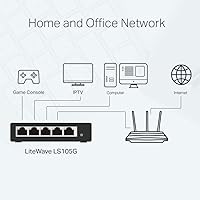
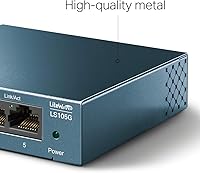
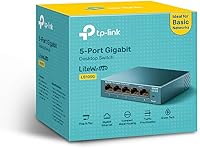
The TP-Link LS105G 5-Port Gigabit Ethernet Switch is one of those rare networking devices that does exactly what it promises without asking anything complicated in return. Plug it in, connect your cables, and you're done — no software to install, no login page to navigate, no configuration headaches. What sets this gigabit switch apart from similarly priced competitors is the all-metal chassis, which feels noticeably more solid than the plastic-bodied alternatives crowding the same shelf. It consistently sits near the top of Amazon's networking switch bestseller charts, a signal that a lot of buyers have found it dependable. Just keep in mind: this is an unmanaged switch, built for expanding wired connections, not for advanced network control like VLANs or port monitoring.
Features & Benefits

All five ports on this little TP-Link switch run at full gigabit speeds simultaneously, with auto-negotiation handling whatever device you plug in — whether that's an older fast-ethernet printer or a modern NAS. The fanless design is genuinely appreciated in practice; there's no hum, no whirring, nothing to disturb a quiet workspace or a bedroom setup. A non-blocking architecture means every port gets its full bandwidth allocation regardless of what else is active on the network. It also supports basic QoS prioritization through 802.1p and DSCP, which helps when VoIP calls or video streams need to take precedence over background file transfers. Power draw is impressively low too, thanks to Green Ethernet technology that adjusts consumption based on actual cable length and link activity.

Best For

This gigabit switch is an easy recommendation for anyone who simply needs more wired ports without any setup friction. Home users who've run out of router ports, small offices connecting shared printers or IP cameras, students in dorm rooms who want a stable wired connection for gaming or video calls — it suits all of them well. The compact footprint means it tucks away neatly on a desk or shelf, and the silent operation makes it genuinely living-room-friendly. The metal housing also means it holds up better in dustier or more demanding environments than a typical plastic switch would. If you need VLANs, port mirroring, or any managed features, look elsewhere — but for pure plug-and-play gigabit expansion, this hits the mark.

User Feedback

Across thousands of reviews, a few consistent themes emerge. Setup time is almost universally praised — most buyers report being up and running in under a minute, which for a networking device is saying something. The build quality is another recurring point of satisfaction, with many noting it feels more substantial than they expected at this price tier. Long-term reliability also scores well, with a large number of owners reporting months of continuous uptime without a single hiccup. On the downside, a notable share of users find the bundled power adapter bulkier than ideal, especially in tight desk setups. No deal-breaker, but worth knowing if cable management is a priority for you.

Pros

  • True plug-and-play setup — no app, no login, no configuration required at any point.
  • All five ports deliver full gigabit speeds simultaneously without throttling each other.
  • The all-metal chassis feels noticeably more solid than plastic-bodied rivals at this price level.
  • Completely silent operation makes it a natural fit for quiet home and office environments.
  • Power consumption is extremely low, making it cost-effective to leave running around the clock.
  • Basic QoS support helps prioritize video calls or streaming over background traffic.
  • Compact enough to tuck behind a monitor or sit flat on a crowded desk.
  • Long-term reliability is a consistent theme among buyers who have used it for months without issues.
  • Auto MDI/MDIX means you can use any standard patch cable without worrying about crossover compatibility.
  • TP-Link's established reputation in networking hardware gives buyers reasonable confidence in support and parts availability.

Cons

  • The bundled power adapter is bulkier than expected and can be awkward in tight cable management setups.
  • Five ports fills up fast — anyone with more than four devices will immediately hit the limit.
  • No managed features whatsoever, so there is zero flexibility for advanced network configuration down the line.
  • Wall-mounting options are absent, which limits placement choices in some setups.
  • The power brick is external rather than integrated, adding an extra cable to manage behind your desk.
  • No link activity LEDs that are easily visible when the unit is placed flat or tucked away.
  • Not suitable for PoE applications — devices like IP phones or access points will still need separate power sources.
  • Only five ports means it cannot scale with a growing home office or small business without adding another device.

Ratings

The scores below were produced by our AI engine after parsing thousands of verified global reviews for the TP-Link LS105G 5-Port Gigabit Ethernet Switch, with spam, bot submissions, and incentivized feedback actively filtered out before any scoring was applied. The result is an honest, weighted picture of where this switch genuinely excels and where real buyers have run into friction. Both the strengths and the sticking points are reflected transparently in every category.

Ease of Setup
97%
Buyers across skill levels — from IT professionals to people who have never touched a network device — consistently report being fully operational within a minute of opening the box. There is no firmware wizard, no app pairing, and no account creation. You plug it in and it works.
A small number of users who expected some form of status feedback during initial connection found the lack of any setup confirmation slightly unnerving, even though the device was functioning perfectly. This is more of a perception gap than a real flaw.
Build Quality
91%
The all-metal housing is the most frequently praised physical attribute across the review base, with many buyers noting it feels meaningfully more solid than similarly priced plastic-bodied competitors. Long-term owners report no warping, discoloration, or structural degradation even after extended continuous use.
The metal shell, while robust, shows fingerprints and light surface scratches more readily than a matte plastic finish would. A handful of buyers also noted the unit gets slightly warm to the touch during heavy sustained load, though never to a concerning degree.
Noise Level
96%
With no fan and no moving parts of any kind, this gigabit switch produces absolutely zero audible noise during operation. Buyers who placed it in bedrooms, home theaters, and open-plan offices specifically called out the silence as a deciding factor in their purchase and a reason they kept it.
There is genuinely very little to criticize here. A tiny fraction of users who expected indicator beeps or audio feedback on port connection were briefly confused, but that is a preference issue rather than a product deficiency.
Port Performance
89%
Full gigabit throughput across all five ports simultaneously is the headline capability, and real-world testing by buyers bears this out — transferring large files between NAS devices, streaming 4K, and running VoIP calls concurrently did not produce any noticeable degradation on other ports.
Five ports fills up faster than many buyers anticipate, and there is no uplink port or stacking capability, so expanding beyond five connections means adding another switch entirely. Users with four existing devices already have no headroom left for growth.
Value for Money
93%
Given the metal construction, gigabit speeds on every port, and near-zero configuration overhead, buyers widely consider this one of the strongest value propositions in the unmanaged switch segment. Many reviewers explicitly compared it favorably to more expensive alternatives they had tried previously.
For buyers who later realize they need managed features — even basic ones like port-based VLANs — the money spent here is effectively wasted since the unit cannot be upgraded through firmware. Knowing your requirements upfront matters more than the price itself.
Long-term Reliability
88%
A significant proportion of reviewers are long-term owners who return specifically to update their reviews after six months or more of continuous uptime. Reports of sustained, uninterrupted operation without restarts or port failures are a consistent pattern across the review base.
A small but meaningful cluster of reviews describe units failing after one to two years, occasionally without obvious cause. These cases are statistically minor relative to the overall volume, but they do suggest quality consistency is not perfectly uniform across production batches.
Power Efficiency
86%
Drawing under three watts at maximum load, the LS105G costs almost nothing to run continuously. The Green Ethernet technology actively scales power consumption based on cable length and link status, which buyers with energy-conscious home setups appreciated as a genuine and measurable benefit.
The power adapter is external rather than integrated into the unit, which adds a cable and a small brick to the desk equation. Several buyers found the adapter disproportionately large relative to the compact switch itself, creating unnecessary cable management friction.
Compatibility
84%
Auto MDI/MDIX and auto-negotiation across all three standard Ethernet speeds mean the switch works with virtually any networked device without any manual configuration or cable type concerns. Buyers connecting a mix of older printers, modern NAS units, and IP cameras reported zero compatibility issues.
The switch has no SFP or fiber uplink option, limiting it entirely to copper RJ45 connections. In environments where fiber backhaul is already in use, this creates a mismatch that forces buyers to look at a different product class altogether.
Physical Footprint
87%
At roughly the size of a deck of playing cards and weighing almost nothing, this little TP-Link switch disappears easily onto a desk, behind a monitor, or onto a shelf without demanding any meaningful space. Buyers in compact apartments and dorm rooms cited the form factor as a genuine convenience.
The absence of integrated mounting holes or a proper bracket option means wall-mounting or rack-adjacent placement requires third-party solutions or improvisation. Users who wanted a tidy, fixed installation had to source their own mounting hardware separately.
Heat Management
82%
18%
Passive cooling through the metal chassis keeps the unit operating within safe thermal limits without any airflow assistance. Buyers who have left it running for months in enclosed entertainment units or cable-management boxes have not reported heat-related shutdowns or throttling.
In unusually warm environments or fully enclosed enclosures with no airflow at all, the metal shell can accumulate heat more than expected. This is unlikely to cause failure under normal conditions, but buyers in hot climates with poor ventilation should factor it in.
Indicator LEDs
73%
27%
Each port has a dedicated LED that lights up clearly when a device is connected and active, giving users a quick visual confirmation that cables and devices are recognized without needing any software or diagnostic tools.
The LEDs are positioned on the front face but are relatively dim compared to competing products, making them hard to read from an angle or in bright ambient lighting. Users who placed the unit below desk level or behind other equipment found them nearly impossible to check at a glance.
Cable Management
67%
33%
All five ports are aligned on a single face of the unit, which makes cable runs reasonably tidy when the switch is positioned thoughtfully. The compact body means patch cables do not need to span a wide panel before reaching their ports.
With five ports clustered together in a very compact housing, thicker or stiffer patch cables can crowd each other and make individual ports harder to access without disturbing neighboring connections. The external power cable adds one more cord to route cleanly away from the data cables.
Documentation & Support
71%
29%
TP-Link provides basic setup guides in multiple languages, and the brand has a well-established support presence online including community forums and downloadable datasheets. For a plug-and-play device, most buyers never needed documentation at all.
Because the switch is entirely unmanaged, the documentation has little practical depth beyond basic connection diagrams. Buyers who encountered edge-case issues — like specific QoS behavior or power adapter replacements — found the official documentation too thin to be genuinely useful.

Suitable for:

The TP-Link LS105G 5-Port Gigabit Ethernet Switch is purpose-built for people who need more wired ports and want the whole thing sorted in under two minutes. If your router only has one or two open LAN ports and you're trying to wire up a desktop, a smart TV, a NAS, and a printer at the same time, this is exactly the kind of device that solves your problem without requiring you to learn anything new. Small business owners who need to quietly connect shared office equipment — IP cameras, receipt printers, a couple of workstations — will find it reliable and completely unobtrusive. The fanless design makes it genuinely suitable for bedrooms, living rooms, and any space where noise is a concern. Its rugged metal housing also gives it an edge in slightly harsher environments, like a workshop corner or a retail back office, where a flimsy plastic switch might not hold up as well over time.
Not suitable for:

The TP-Link LS105G 5-Port Gigabit Ethernet Switch is an unmanaged device, and that distinction matters if your networking needs go beyond simply connecting more devices. Anyone shopping for VLAN support, port mirroring, traffic monitoring, or any form of remote management should look at a managed switch instead — this one offers none of those features by design. Network administrators setting up segmented office environments or configuring QoS policies at a granular level will quickly find its capabilities too limited. It also tops out at five ports, so if you're already anticipating needing eight or more connections in the near future, buying a larger switch upfront makes more sense than adding another device later. Finally, users who are particular about a clean, minimal desk setup may find the bundled power adapter adds more cable bulk than they'd prefer.
Specifications

  • Ports: The switch includes five RJ45 ports, each supporting auto-negotiation across 10, 100, and 1000 Mbps speeds depending on the connected device.
  • Switching Type: This is an unmanaged switch, meaning it requires no configuration and offers no administrative interface or advanced network controls.
  • Architecture: A non-blocking switching architecture ensures every port can operate at full capacity simultaneously without any port limiting another.
  • QoS Support: Basic traffic prioritization is available through 802.1p and DSCP standards, which can help prioritize time-sensitive traffic like VoIP or video streaming.
  • Cooling: The unit uses a fully fanless passive cooling design, producing zero noise during operation.
  • Housing Material: The outer casing is constructed from solid metal, providing greater durability and passive heat dissipation compared to plastic-bodied alternatives.
  • Dimensions: The unit measures 3.94″ in length, 3.86″ in width, and 0.98″ in height, making it one of the more compact switches in its class.
  • Weight: At just 70 grams (approximately 2.47 oz), the switch is light enough to sit unobtrusively on a desk or shelf without any mounting hardware.
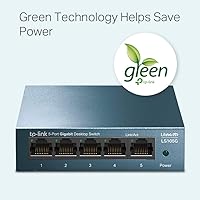
  • Power Draw: Maximum power consumption reaches 2.78 watts, and TP-Link Green Ethernet technology dynamically reduces draw based on cable length and link activity.
  • Interface Type: All connectivity is handled through standard RJ45 ports with Auto MDI/MDIX support, eliminating the need for crossover cables.
  • Data Transfer Rate: Each port supports data transfer at up to 1000 Megabits per second under full gigabit link conditions.
  • Operating Temperature: The switch is rated for operation starting from 1 degree Celsius, making it suitable for a range of indoor environments including lightly industrial spaces.
  • Plug-and-Play: No software installation, driver setup, or web-based configuration is required — the switch is fully operational as soon as it is connected to power and cabled devices.
  • Energy Standard: TP-Link Green Ethernet compliance means the device actively adjusts its energy consumption based on actual network load and physical cable conditions.
  • Spare Parts: EU spare part availability is guaranteed for a period of two years from the date of purchase.
  • Manufacturer: The switch is designed and produced by TP-Link, a globally recognized networking hardware brand with a wide support and distribution network.
  • Model Number: The official model designation is LS105G, which distinguishes it within TP-Link's unmanaged switch lineup.
  • Compatibility: The switch works with any standard networked device, including computers, printers, IP cameras, IPTV boxes, and network-attached storage units.

Related Reviews

TP-Link TL-SG1048 48-Port Gigabit Ethernet Switch
83%
89%
Performance
93%
Ease of Setup
88%
Reliability
90%
Build Quality
91%
Noise Level (Fanless Design)
More
TP-Link TL-SG116 16-Port Gigabit Switch
84%
91%
Build Quality
94%
Ease of Setup
88%
Port Count & Density
89%
Network Performance
97%
Noise Level
More
TP-Link TL-SG1024S 24-Port Gigabit Switch
89%
93%
Build Quality
97%
Ease of Setup
91%
Port Performance
98%
Noise Level
89%
Value for Money
More
TP-Link TL-SG1005P
TP-Link TL-SG1005P
85%
96%
Ease of Setup
83%
PoE Power Delivery
91%
Build Quality
98%
Noise Level
89%
Gigabit Throughput
More
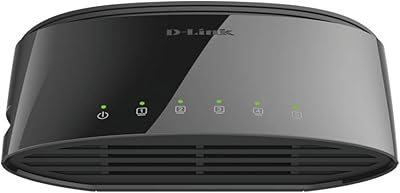
D-Link DGS-1005G 5-Port Gigabit Ethernet Switch
77%
94%
Ease of Setup
58%
Reliability & Longevity
87%
Network Performance
97%
Noise Level
76%
Value for Money
More
TP-Link TL-SG105PE 5-Port Gigabit PoE Switch
79%
91%
Value for Money
84%
PoE Performance
93%
Ease of Setup
76%
Network Management
62%
Web Interface
More
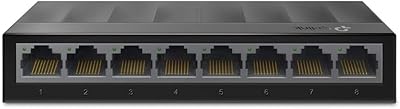
TP-Link LS108GP
TP-Link LS108GP
81%
96%
Ease of Setup
62%
PoE Power Budget
78%
Extend Mode Performance
93%
Silent Operation
84%
Build Quality
More
TP-Link TL-SG105-M2 5-Port 2.5G Unmanaged Switch
82%
91%
Throughput Performance
96%
Ease of Setup
88%
Build Quality
71%
Thermal Management
63%
Port Count & Expandability
More
TP-Link LS1008G Gigabit Ethernet Switch
86%
94%
Ease of Setup
88%
Reliability
90%
Energy Efficiency
85%
Build Quality
91%
Quiet Operation
More
Linksys SE3005 5-Port Gigabit Ethernet Switch
83%
97%
Ease of Setup
88%
Network Performance
79%
Build Quality
93%
Reliability & Uptime
91%
Value for Money
More

FAQ

Not at all. This little TP-Link switch is completely plug-and-play. Connect the power adapter, run your cables, and every port starts working on its own. There is no app, no web interface, and no configuration page to deal with.

They each get their full allocation simultaneously. The non-blocking architecture means one busy port does not slow down any of the others, so you can have multiple devices transferring large files at the same time without any of them bottlenecking the rest.

Yes, each port auto-negotiates independently. So if you plug in an older device that only supports 100Mbps, that port will communicate at 100Mbps while your gigabit-capable devices on other ports continue running at full speed.

It is genuinely silent. There is no fan anywhere in the unit, so there is no hum, no airflow noise, nothing. Plenty of buyers specifically mention using it in bedrooms and living rooms for exactly that reason.

No, it does not. This switch does not supply power over Ethernet, so any device that requires PoE will still need its own power adapter or a separate PoE injector. If PoE is a requirement, you would need to look at a different switch model.

No — this is an unmanaged switch, so there is no management interface of any kind. You cannot configure VLANs, set up port mirroring, monitor traffic, or apply any custom policies. If those features matter to you, you need a managed switch instead.

It is quite compact — roughly the footprint of a deck of cards and less than an inch tall. Most people find it easy to tuck behind a monitor or sit it flat on a crowded desk without it taking up meaningful space.

It makes a real practical difference. Metal conducts heat better than plastic, so the switch passively stays cooler without needing a fan. It also holds up better in dustier or more physically demanding environments where a plastic shell would crack or degrade faster over time.

Very little — the maximum draw is under 3 watts, and the Green Ethernet technology often keeps it lower than that during normal use. Running it continuously around the clock will add a negligible amount to your electricity bill.

The switch uses an external power adapter rather than a direct-plug design, so there is a small brick and a cable involved. It is a fair criticism — a handful of users find it adds more cable clutter than they expected. It is not a major issue, but worth knowing if you are aiming for a very tidy setup.