Linksys SE3005 5-Port Gigabit Ethernet Switch

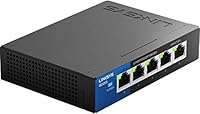
Linksys SE3005 5-Port Gigabit Ethernet Switch — image 1
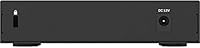
Linksys SE3005 5-Port Gigabit Ethernet Switch — image 2
Linksys SE3005 5-Port Gigabit Ethernet Switch — image 3
Linksys SE3005 5-Port Gigabit Ethernet Switch — image 4
83%

Overview

The Linksys SE3005 5-Port Gigabit Ethernet Switch has been a quiet staple in home and small office networking since 2013 — and its staying power says a lot. Plug it in, connect your devices, and it just works. No software to install, no configuration menus to navigate. Linksys built a solid reputation in consumer networking over the years, and this gigabit switch reflects that heritage. It sits comfortably in the budget-to-mid-range tier, which makes it a compelling option for anyone who wants reliable wired speeds without paying for features they will never use. Simple, capable, and proven.

Features & Benefits

Each of the five ports on this 5-port switch automatically adjusts its speed — 10, 100, or 1,000 Mbps — based on whatever device you plug in, so older hardware and modern gigabit machines can coexist without any manual tweaking. The auto MDI/MDI-X detection means you can use any standard ethernet cable without worrying about crossover types. There is also built-in QoS that gives priority to audio and video traffic, which can make a noticeable difference when streaming on a busy network. The fanless design runs completely silently, and a power-saving mode cuts energy use by detecting idle ports.

Best For

This gigabit switch is a natural fit for anyone whose router has run out of ethernet ports — a common problem when you start adding desktops, NAS drives, smart TVs, and streaming boxes to the same network. It works just as well in a small office environment where staff need reliable wired connections but nobody wants to spend hours configuring hardware. Gamers and anyone who streams video regularly will also appreciate the low-latency stability that a wired connection provides over Wi-Fi. If you are running an older 10/100 network and want to step up to full gigabit speeds, this 5-port switch is a sensible and low-effort upgrade.

User Feedback

With over 4,200 ratings and a 4.7-star average, the Linksys SE3005 has earned an unusually strong track record for a product in this category. Buyers consistently praise how quickly they got up and running — most describe it as literally unboxing, plugging in, and moving on. Long-term owners frequently mention running the unit for two, three, or even four years without a hiccup, which is exactly the kind of endorsement that matters for a networking device. The most common complaint is the external power adapter, which adds a bit of cable clutter. A handful of users also mention the indicator LEDs being brighter than expected in darker rooms.

Pros

  • Truly plug-and-play setup — most users are up and running in under two minutes with zero configuration.
  • All five ports run at full gigabit speeds, making local file transfers and 4K streaming noticeably faster than on older switches.
  • The fanless design means it runs in complete silence, which matters if it lives on your desk or in a living room.
  • Auto-sensing ports handle mixed device speeds automatically, so you never have to think about compatibility.
  • Built-in QoS gives audio and video traffic priority on a busy network without any manual setup required.
  • Power-saving mode reduces energy draw by detecting unused ports — a small but appreciated efficiency feature.
  • Compact enough to tuck behind a monitor or on a media shelf without dominating the space.
  • Long-term reliability is consistently reported by owners who have run the unit for multiple years without issues.
  • At its price point, the combination of gigabit speeds and a trusted brand is hard to match in this port count.
  • The included power adapter means you have everything you need right out of the box.

Cons

  • The external power adapter adds an extra cable and takes up an outlet, which feels unnecessary at this size.
  • Only five ports — if your wired device count grows, you will outgrow this switch quickly.
  • No management interface whatsoever, so there is no way to monitor traffic, set priorities manually, or troubleshoot port-level issues.
  • The LED indicator lights are noticeably bright and can be distracting in a dark bedroom or home theater setup.
  • No wall-mount or rack-mount options make permanent installation awkward in structured setups.
  • VLAN and network segmentation are completely unsupported, which is a hard stop for small business environments with security requirements.
  • The power brick design feels dated compared to newer switches that use USB-C or inline barrel connectors.
  • No link aggregation support, which limits throughput for users pushing very high volumes of local network traffic.

Ratings

The scores below reflect an AI-driven analysis of thousands of verified global reviews for the Linksys SE3005 5-Port Gigabit Ethernet Switch, with spam, bot-submitted, and incentivized feedback actively filtered out before scoring. Each category is graded on real-world user sentiment, capturing both the strengths that keep buyers satisfied long-term and the friction points that occasionally frustrate them. Nothing is glossed over — the numbers reflect the full picture.

Ease of Setup
97%
Users across skill levels — from complete networking novices to IT professionals setting up a secondary office — consistently describe installation as taking under two minutes. There is nothing to configure: plug in the power adapter, connect the cables, and every port comes alive on its own.
A very small number of users encountered units that required a power cycle before all ports were recognized, suggesting occasional initialization quirks fresh out of the box. This is rare, but worth noting for anyone deploying the switch in a critical environment.
Network Performance
88%
Buyers upgrading from older 10/100 switches report immediately noticeable improvements in local file transfer speeds and smoother 4K streaming. Gamers specifically mention stable ping and zero packet-drop incidents even when multiple devices are active simultaneously on the switch.
As an unmanaged switch, there is no way to monitor actual throughput per port or diagnose bottlenecks — users experiencing slowdowns have no built-in tool to investigate. Real-world speeds, while strong, are also dependent on cable quality and the router upstream.
Build Quality
79%
21%
The plastic casing feels sturdy enough for desk or shelf placement, and the unit does not flex or creak when handled. Long-term owners who have run this 5-port switch continuously for several years report no physical degradation in the chassis or port integrity.
The housing is all plastic with no metal reinforcement, which feels noticeably lightweight compared to prosumer alternatives. A few users have flagged that the port labeling can wear off over time with repeated cable swapping in high-traffic setups.
Reliability & Uptime
93%
Multi-year continuous operation without failure is one of the most frequently cited talking points in long-term owner reviews — and that pattern holds across a broad range of home and small office environments. Many buyers mention having forgotten the switch exists because it simply never demands attention.
A small subset of reviews describes units that failed within the first year, suggesting some variability in component quality across production batches. Failures appear to be more common in warmer or poorly ventilated spaces where heat builds up around the passive chassis.
Value for Money
91%
At its price point, getting five full gigabit ports, QoS support, auto-sensing detection, and a trusted brand name in a single compact unit is genuinely hard to beat. Buyers who compared it against competing switches in the same range consistently ranked it as the smarter purchase for home use.
The external power adapter is an added component that some buyers feel should not exist at this size and price — a built-in power supply would feel more polished. A handful of users also note that slightly higher spend opens up managed switch options with meaningfully more control.
Noise Level
96%
The completely fanless design means this gigabit switch produces absolutely no audible output under any operating condition, which buyers in bedroom setups, home theaters, and quiet offices specifically single out as a major advantage. It sits beside a television or on a desk without ever drawing attention to itself.
While silence is a genuine strength, the passive cooling approach means heat has nowhere to go in a cramped enclosure or a poorly ventilated shelf. A small number of users in warmer climates report the unit running warm to the touch after prolonged heavy use.
Port Density
67%
33%
Five ports is genuinely sufficient for the majority of home setups — a router uplink plus four device connections covers most living rooms or home offices without issue. The compact footprint means users are not paying for or accommodating extra ports they do not need.
Anyone with more than four downstream devices will hit the wall quickly and either need a second switch or should have bought an 8-port unit from the outset. Growing households or small offices that add devices frequently report outgrowing this switch faster than expected.
QoS & Traffic Management
74%
26%
The built-in IEEE 802.1p QoS does a reasonable job of giving streaming video and audio traffic priority in mixed-use scenarios, and users running a NAS alongside active video calls report smoother experiences than with switches that lack any traffic shaping.
Because this is an unmanaged switch, there is no way to customize or tune the QoS behavior — it operates on fixed rules that cannot be adjusted. Power users who want granular control over which devices or applications get priority bandwidth will find these limitations frustrating.
Power Design
58%
42%
The included 5V external adapter is reliable and users rarely report it failing independently of the switch itself. It delivers consistent power without fluctuation, which contributes to the overall uptime record that long-term owners praise.
The external wall-wart design is one of the most consistently mentioned irritants in buyer feedback — it consumes an outlet, adds cable clutter, and feels dated for a product of this era. Buyers with limited power strips or clean desk setups find it disproportionately annoying relative to the size of the switch itself.
LED Indicators
61%
39%
Each port has a dedicated activity LED that gives a clear visual confirmation of link status and data activity, which is genuinely useful when troubleshooting a connection or confirming a cable is seated properly. Most users in well-lit rooms find them appropriately informative.
In darker bedrooms or home theater rooms, the LEDs are bright enough to become a genuine nuisance — multiple reviewers describe covering them with tape as a workaround. There is no brightness adjustment or option to disable them, which is a recurring complaint with no fix short of physically blocking the light.
Compatibility
94%
This 5-port switch works with any router or modem regardless of brand, and its auto-sensing ports handle the full mix of device speeds without any user input. Buyers connect everything from decade-old desktops to current gaming consoles and NAS enclosures without compatibility issues.
There are no driver downloads or firmware updates available for this unmanaged switch, which is by design but means there is no recourse if a compatibility edge case arises. Users in rare mixed-protocol enterprise environments should verify compatibility independently before purchase.
Size & Footprint
89%
At just over seven inches long and under two and a half inches in each other dimension, this gigabit switch slots neatly behind a monitor, onto a media shelf, or into a cable management tray without commanding much real estate. Its light weight also makes repositioning effortless.
While compact for five ports, the external power adapter effectively increases the total footprint of the setup. Users expecting a minimal, self-contained unit may find the combination of the switch body and separate adapter more space-consuming than anticipated.
Longevity
86%
The volume of reviews from buyers who have owned and operated this switch for three, four, or even five-plus years without incident is genuinely reassuring and somewhat unusual for consumer networking hardware at this price. It suggests solid core component selection rather than a product engineered for planned obsolescence.
Linksys does not publish a formal warranty duration prominently for this model, which leaves some buyers uncertain about their coverage if an early failure does occur. Units that fail appear to do so either very early — within the first few months — or not at all, which is a classic bathtub curve failure pattern.

Suitable for:

The Linksys SE3005 5-Port Gigabit Ethernet Switch is purpose-built for anyone who needs to expand wired network access quickly and without any technical headaches. It is an ideal pick for home users who have maxed out the ethernet ports on their router and need to connect additional devices — think a desktop PC, a NAS drive, a smart TV, and a streaming box all running simultaneously in the same room. Small business owners and home office workers who simply need reliable, fast connections for a handful of workstations will find it more than adequate for day-to-day demands. Gamers and heavy streamers who have grown frustrated with Wi-Fi dropouts will also benefit, since the wired gigabit connection delivers the kind of consistent, low-latency performance that wireless simply cannot guarantee. If you are upgrading from an older 10/100 switch, the jump to full gigabit speeds — especially for local file transfers between machines — will be immediately noticeable.

Not suitable for:

The Linksys SE3005 5-Port Gigabit Ethernet Switch is not the right tool if your networking needs require any level of management or control. It is a fully unmanaged switch, meaning there is no web interface, no VLAN support, no port mirroring, and no traffic monitoring — so IT administrators or businesses that need to segment their network or prioritize traffic manually should look at a managed alternative. If you need more than five ports, this unit will not scale with you; connecting a second switch is possible but adds complexity. Power users who prefer a clean, wall-wart-free setup may also find the external power adapter annoying, particularly in tight spaces where outlet availability is limited. Finally, anyone planning to mount this in a rack or structured wiring cabinet will find its consumer-grade form factor a poor fit for professional installations.

Specifications

  • Port Count: This switch provides 5 RJ45 Gigabit Ethernet ports, each capable of handling a separate wired device simultaneously.
  • Port Speed: Every port auto-senses and adjusts to 10, 100, or 1,000 Mbps depending on the connected device, requiring no manual configuration.
  • Switch Type: This is a fully unmanaged switch with no web interface, VLAN support, or remote configuration options of any kind.
  • Cable Detection: Auto MDI/MDI-X support means the switch works with any standard ethernet cable — no crossover cables are ever needed.
  • QoS Standard: IEEE 802.1p quality-of-service prioritization is built in, giving audio and video traffic preference on congested networks automatically.
  • Flow Control: IEEE 802.3x full duplex flow control and half duplex backpressure work together to reduce packet loss during heavy network activity.
  • Cooling: The unit uses a fully passive, fanless design that produces zero noise during operation under normal conditions.
  • Power Supply: An external 5V power adapter is included in the box; the switch does not support Power over Ethernet (PoE).
  • Dimensions: The switch measures 7.4″ long by 2.36″ wide by 2.36″ tall, making it compact enough for a desk, shelf, or media cabinet.
  • Weight: The unit weighs 15.2 ounces, light enough to move around easily or tuck behind other equipment.
  • Operating Temp: Linksys rates this switch for operating environments up to 40 degrees Celsius, suitable for typical indoor home and office conditions.
  • Interface Type: All five ports use the standard RJ45 interface, compatible with Cat5e, Cat6, and Cat6a ethernet cables.
  • Data Transfer Rate: Maximum throughput per port reaches 1,000 Mbps (1 Gbps) under full duplex conditions with a compatible gigabit device and cable.
  • Energy Saving: An advanced power-saving mode monitors each port and reduces power draw when a connected device goes idle or a port is unplugged.
  • Manufacturer: The switch is designed and sold by Linksys, a networking brand with decades of presence in the consumer and small business market.
  • Model Number: The official model designation is SE3005-AMZ, and the Amazon Standard Identification Number is B00FHREBDI.
  • First Available: This switch was first listed for sale in September 2013 and has remained in continuous production since then.
  • Included Items: The box contains the switch unit and an external power adapter; no ethernet cables are included.

Related Reviews
Binardat 5-Port Gigabit Industrial Ethernet Switch
89%
89%
Performance & Speed
94%
Build Quality & Durability
92%
Noise & Operation
91%
Ease of Installation
90%
Temperature Tolerance
More
MokerLink 5-Port Gigabit Industrial Ethernet Switch
86%
94%
Build Quality & Durability
91%
Performance & Speed
89%
Ease of Installation
93%
Environmental Resistance
88%
Reliability in Harsh Conditions
More
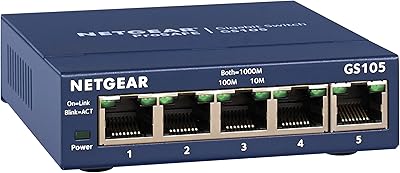
NETGEAR GS105NA 5-Port Gigabit Unmanaged Switch
85%
97%
Ease of Setup
93%
Network Performance
88%
Build Quality
96%
Noise Level
91%
Value for Money
More
Tripp Lite NG5 5-Port Gigabit Ethernet Switch
86%
89%
Performance
94%
Ease of Setup
83%
Build Quality
90%
Energy Efficiency
87%
Reliability
More
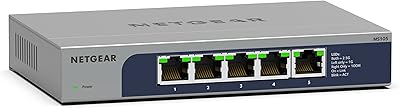
NETGEAR MS105 5-Port Multi-Gigabit Unmanaged Switch
76%
96%
Plug-and-Play Setup
88%
Multi-Gig Port Performance
91%
Build Quality & Materials
94%
Fanless & Noise Level
67%
Value for Money
More
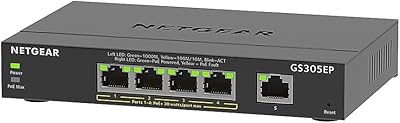
NETGEAR GS305EP 5-Port PoE Gigabit Switch
79%
91%
Ease of Setup
78%
PoE Performance
97%
Noise Level
67%
Management Interface
72%
Build Quality
More
Steloproad 5-Port Industrial Gigabit Ethernet Switch
81%
86%
Build Quality
91%
Temperature Resilience
93%
Power Input Flexibility
88%
Ease of Installation
84%
Network Performance
More
NETGEAR GS305E 5-Port Gigabit Managed Switch
76%
93%
Value for Money
84%
Setup & Ease of Use
81%
Build Quality & Durability
88%
Network Performance & Throughput
97%
Silent Operation
More
Hereta LNK-IMC005G 5-Port Industrial Gigabit Switch
80%
88%
Build Quality
71%
Heat Management
91%
Port Performance
93%
Power Flexibility
84%
Installation Ease
More
NETGEAR GS305P v2 5-Port Gigabit Ethernet PoE Switch
87%
93%
Ease of Setup
89%
PoE Power Delivery
94%
Noise Level (Fanless Design)
85%
Build Quality
91%
Energy Efficiency
More

FAQ

Not at all. This is a plug-and-play unmanaged switch, so there is no software, no app, and no browser interface involved. You plug in the power adapter, connect your ethernet cables, and everything starts working on its own within seconds.

Yes. The Linksys SE3005 5-Port Gigabit Ethernet Switch connects to any router with a standard ethernet port — it is completely brand-agnostic. You simply run one cable from your router to any port on the switch, and the remaining four ports become available for other devices.

Yes, you can connect one switch to another using a single ethernet cable between them. Keep in mind that this will reduce your available ports slightly and can introduce a minor performance overhead on heavy traffic, but for typical home use it works fine.

No, it does not. This gigabit switch has no PoE capability, so devices that draw power through their ethernet cable — like many IP cameras, VoIP phones, or wireless access points — will still need their own separate power source.

No, each port operates independently at its own negotiated speed. A slower device on one port does not drag down the performance of a gigabit device on another port, which is one of the practical strengths of auto-sensing port design.

It runs completely silently. There is no fan in this unit at all — heat is managed passively through the casing. You will not hear a thing from it, which makes it a natural fit for quiet environments.

A noticeable number of users mention this in their reviews. The LEDs are fairly bright, particularly the activity indicators, and some people find them intrusive in a darkened room. If that is a concern, placing the switch in a cabinet or behind other equipment is an easy workaround.

The adapter is a standard external wall-wart style, so yes, it does occupy one outlet and adds a cable to manage. It is one of the more common complaints about this 5-port switch, especially for users with limited outlet space or who prefer a cleaner desk setup.

For practical purposes, yes. An unmanaged gigabit switch adds negligible latency — we are talking fractions of a millisecond — and is completely transparent to your network. Gamers consistently report stable, reliable performance when routing through this switch.

Based on the volume of long-term user feedback available, many owners have used this 5-port switch continuously for three to five years or more without any hardware failures. It is not something most buyers find themselves replacing frequently, which is a meaningful signal for a product at its price tier.

Where to Buy