Overview

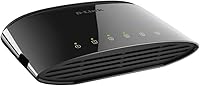
The D-Link DGS-1005G 5-Port Gigabit Ethernet Switch has been quietly solving the same problem since 2010: you need more wired ports, and you need them without hassle. It holds a top-150 bestseller rank in networking switches, which says something about its staying power in a crowded category. This is a strictly unmanaged switch — no web interface, no configuration menu, nothing to set up. You plug it in and it works. That simplicity is the whole point. The 3.7-star average does hint at some real inconsistency in unit quality, so it suits buyers who value plug-and-play convenience over premium build guarantees.
Features & Benefits

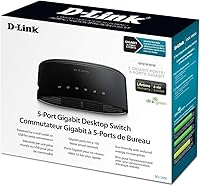
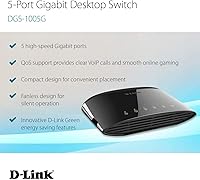
All five ports run at full Gigabit speed — that means 1,000 Mbps per connection, a genuine step up if you have been stuck on older 100 Mbps gear. The fanless design is a real practical win; there is no hum, no whir, just silence. D-Link's energy-saving circuitry scales power use based on cable length and port activity, keeping idle consumption low without any manual intervention. QoS 802.1p support lets the switch automatically favor time-sensitive traffic like voice calls and gaming packets when bandwidth is shared. The metal chassis keeps the footprint tiny — barely an inch tall — so it tucks neatly behind a monitor or into a media cabinet without claiming extra space.

Best For

This compact gigabit switch is a natural fit for anyone who wants to hardwire a handful of devices — a gaming console, a NAS drive, a desktop PC, a smart TV — without touching a router's settings. It works particularly well in living room setups or home offices where a noisy switch would be annoying and a managed one would be overkill. If you are still running a Fast Ethernet switch and noticing slowdowns during large local file transfers, the DGS-1005G is the kind of straightforward upgrade that makes an immediate difference. It is not built for network admins needing VLANs or traffic monitoring — this is a simple wired expansion tool, nothing more.

User Feedback

Buyers who receive a working unit tend to be satisfied — setup takes under a minute, operation is completely silent, and day-to-day performance holds up well over time. The complaints, though, are hard to ignore. A meaningful number of users have reported units arriving non-functional or failing within a few months, and that inconsistency is almost certainly why the overall rating sits low relative to how the hardware performs on paper. It is also worth noting that some negative reviews appear to reference older, slower D-Link models rather than this Gigabit version. Long-term owners with good units generally report years of stable operation, making this a reasonable calculated risk for the price.

Pros

  • All five ports run at full Gigabit speed, making local file transfers noticeably faster than older Fast Ethernet gear.
  • Completely fanless design means zero noise — ideal for quiet rooms where a humming switch would be distracting.
  • Setup takes under a minute: plug in the power, connect your cables, and everything works immediately.
  • The compact metal chassis is barely an inch tall, so it fits easily behind a monitor or inside a media cabinet.
  • Energy-efficient circuitry scales power draw automatically based on cable length and port activity.
  • QoS support helps prioritize gaming and VoIP traffic when multiple devices are sharing the network.
  • Long-term owners with reliable units consistently report stable, trouble-free performance over several years.
  • A limited lifetime warranty offers at least some peace of mind at this price point.
  • Lightweight at just 3.2 ounces, making it easy to mount or reposition without any effort.

Cons

  • Unit reliability is inconsistent — a notable number of buyers have received dead-on-arrival or early-failure units.
  • No managed features at all: no VLANs, no traffic monitoring, no port configuration of any kind.
  • The external power brick adds a cable to manage, which can feel unnecessary for such a small device.
  • The 3.7-star average rating reflects real quality control concerns that buyers should weigh before purchasing.
  • Only five ports — anyone needing six or more connections will need a different switch entirely.
  • No rack-mount option; this is purely a flat desktop device with limited mounting flexibility.
  • The DGS-1005G can be confused with older, slower D-Link Fast Ethernet models, so buyers should verify the model number carefully.
  • No built-in cable diagnostics or link status indicators beyond basic LED activity lights.

Ratings

Our AI rating engine analyzed verified global buyer reviews for the D-Link DGS-1005G 5-Port Gigabit Ethernet Switch, actively filtering out incentivized, bot-generated, and duplicate submissions to surface what real users actually experience. The scores below reflect both the genuine strengths that keep this switch in bestseller rankings and the honest pain points that pull its overall satisfaction down. Nothing has been softened — the reliability concerns are weighted just as heavily as the setup praise.

Ease of Setup
94%
Buyers across all technical skill levels consistently describe setup as taking under two minutes — unbox, plug in the power adapter, connect cables, done. There is no app to download, no account to create, and no configuration screen to navigate. For someone who just needs more ports without a learning curve, this is about as frictionless as it gets.
A small number of users expected some form of status dashboard or indicator beyond the basic LEDs, and felt the lack of any feedback made it hard to diagnose issues when a port was not behaving correctly. For purely plug-and-play users this is a non-issue, but it does surface as a frustration during troubleshooting.
Reliability & Longevity
58%
42%
Users who receive a fully functional unit often report running it continuously for two or more years without a single hiccup. In home setups — always-on NAS arrays, gaming rigs left connected overnight — working units tend to stay stable and never need a reboot or reset.
This is the DGS-1005G's most significant weakness. A meaningful share of buyers report units arriving dead or failing within the first few months of use, which is the primary driver of its lower-than-expected overall rating. The inconsistency feels like a batch quality control issue rather than a design flaw, but it is a real risk buyers need to accept.
Network Performance
87%
On functioning units, all five ports deliver genuine Gigabit throughput with low latency — users copying large files between a NAS and a desktop notice a tangible improvement over older 100 Mbps gear. The non-blocking switching architecture means ports do not bottleneck each other even when multiple devices are transferring simultaneously.
Performance is only as good as your cables — buyers using older Cat5 (not Cat5e) wiring occasionally find they are not hitting Gigabit speeds and mistakenly blame the switch. There are also no advanced traffic management tools, so on heavily congested networks, the basic QoS support has limits.
Noise Level
97%
The completely fanless design earns near-universal praise from users who place this switch in living rooms, home theaters, and bedrooms. Unlike budget switches that use small, whiny fans, the DGS-1005G produces absolutely zero acoustic output — even in a silent room at night, you will not hear it.
There are no real noise complaints for this switch, though the trade-off for fanless design is that passive cooling has physical limits — in enclosed, poorly ventilated spaces with very high ambient temperatures, passive cooling is theoretically less robust than active cooling over the very long term.
Value for Money
76%
24%
For buyers who receive a reliable unit, the price-to-performance ratio for a true Gigabit, fanless, plug-and-play switch feels fair and competitive. Long-term users who have had theirs running for years without issues tend to describe it as one of the smarter small purchases they have made for their home network.
The reliability lottery somewhat undermines the value proposition — if there is a real chance of receiving a defective unit and having to process a return, the effective cost and hassle increase significantly. Buyers who want more certainty may find slightly pricier alternatives from competitors offer better peace of mind.
Build Quality
67%
33%
The metal chassis gives the DGS-1005G a noticeably more solid feel than similarly priced all-plastic switches. It does not flex or creak when cables are plugged in, and the port sockets feel firmly seated. For a desktop device that rarely gets moved, the construction feels adequate.
The external power adapter adds a fragile point in the system that some users find annoying, particularly since the connector can feel a little loose on some units over time. A few buyers also noted that while the chassis is metal, some internal components appear to be cost-optimized, which may contribute to the early failure rate.
Port Count & Layout
72%
28%
Five ports is the sweet spot for most home users expanding from a router with only one or two LAN ports free. The port spacing is comfortable enough that standard RJ45 plugs, including those with slightly larger boots, fit side by side without forcing.
If you have more than four devices to hardwire — accounting for one port connecting back to your router — you will hit the limit immediately. Users who underestimated how many wired devices they would eventually add often wish they had bought an 8-port model from the start.
Energy Efficiency
83%
The IEEE 802.3az Energy Efficient Ethernet support is a genuine, automatic feature — when ports are idle or connected via shorter cables, the switch draws measurably less power without any user input. For a device that runs 24 hours a day, that passive efficiency adds up over months of use.
The actual power draw is already low by design, so the real-world energy savings from the green technology are modest rather than dramatic. Users hoping for significant electricity cost reduction will find the impact minor, though it is still a welcome feature in a device that runs continuously.
QoS Performance
69%
31%
Home users running VoIP calls or gaming while other household members are streaming video report that the 802.1p QoS does make a perceptible difference — voice calls stay clear and gaming ping stays stable compared to connections with no QoS at all.
The QoS implementation is basic and automatic with no user control over priorities or thresholds. On heavily loaded networks with many simultaneous high-bandwidth tasks, the prioritization has limits, and users expecting granular traffic shaping will find this switch falls well short of what even entry-level managed switches offer.
Size & Form Factor
91%
At under an inch tall and just over 11 inches long, this compact gigabit switch slips neatly behind a monitor, into a media cabinet shelf, or along the back edge of a desk with minimal footprint. Users repeatedly mention how easy it is to hide or place discreetly compared to bulkier switches.
The elongated, flat shape works well for desk placement but is not rack-mountable without additional hardware. Users trying to mount it on a wall or integrate it into a structured home network panel find the form factor limiting compared to switches designed with more flexible mounting in mind.
Indicator Lights
61%
39%
Each port has an activity LED that confirms a live connection and blinks during data transfer, which is enough for basic at-a-glance diagnostics. For typical home use — confirming a device is connected and active — the indicators do the job.
The LED feedback is minimal by modern standards — there is no speed indicator to confirm whether a port has negotiated at 100 Mbps versus 1000 Mbps, which makes it harder to diagnose cable or device speed mismatches. Several users specifically mentioned wishing they could see per-port link speed without needing external tools.
Compatibility
88%
As a fully auto-negotiating, standards-compliant switch, the DGS-1005G works with essentially any device that has an Ethernet port — gaming consoles, smart TVs, routers, NAS units, desktop PCs, and media players all connect without any configuration. Auto-MDI/MDIX support means straight-through and crossover cables both work.
A small number of users with very old network cards or legacy hardware report occasional auto-negotiation quirks where a port falls back to 100 Mbps unexpectedly. This is rare and often a device-side issue rather than the switch itself, but it does come up in reviews from users with older equipment.
Warranty & Support
64%
36%
A limited lifetime warranty is a genuinely generous policy for a budget networking device, and buyers who have had to use it generally describe D-Link's replacement process as functional. Knowing the warranty exists provides at least some buffer against the reliability variability.
The warranty claim process draws some frustration in reviews — users report slow response times and bureaucratic hoops that make the process more cumbersome than expected for a simple replacement. Given that dead-on-arrival units are not uncommon, a more streamlined RMA experience would significantly improve buyer confidence.

Suitable for:

The D-Link DGS-1005G 5-Port Gigabit Ethernet Switch is a practical choice for home users who simply need more wired ports without any configuration overhead. If your router has run out of LAN ports and you want to hardwire a gaming console, a NAS drive, a smart TV, and a desktop all at once, this switch handles that job quietly and without fuss. It fits naturally into entertainment centers, home offices, and bedroom desks where a completely silent device matters — there is no fan to listen to, ever. Gamers and streamers who have grown frustrated with Wi-Fi dropouts will appreciate the stable, low-latency wired connection it enables. It also makes solid sense for anyone still running older 100 Mbps hardware who wants a genuine speed upgrade on local transfers without spending much or learning anything new.
Not suitable for:

Anyone who needs network control features should look elsewhere — the D-Link DGS-1005G 5-Port Gigabit Ethernet Switch is strictly unmanaged, meaning there are no VLANs, no port mirroring, no traffic monitoring, and no web interface whatsoever. IT professionals, small business operators who need to segment networks, or power users who want link aggregation will find this switch simply cannot do those things. The unit-to-unit reliability variance is also a real concern for buyers who cannot afford downtime or the hassle of a return — a meaningful share of users have reported dead-on-arrival units or early failures. If you are equipping a production environment, a server rack, or anywhere that demands consistent uptime and quality control, a more premium managed switch from a higher tier is the smarter investment. This is a budget utility device, and it carries the trade-offs that come with that.
Specifications

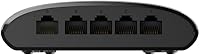
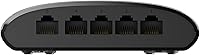
  • Ports: The switch provides 5 x RJ45 ports, each supporting 10/100/1000 Mbps (Gigabit) auto-negotiation.
  • Switching Capacity: Total non-blocking switching capacity is 10 Gbps, allowing all ports to operate at full speed simultaneously.
  • Transfer Rate: Full-duplex data transfer rate reaches 2000 Mbps per port, supporting both send and receive at Gigabit speeds at the same time.
  • Switch Type: This is a strictly unmanaged switch with no configuration interface, web portal, or software utility required or available.
  • QoS Support: IEEE 802.1p Quality of Service is supported, enabling automatic prioritization of latency-sensitive traffic such as VoIP and gaming.
  • Energy Efficiency: IEEE 802.3az (Energy Efficient Ethernet) compliance allows the switch to reduce power consumption dynamically based on cable length and port activity.
  • Cooling: The switch uses fully passive, fanless cooling, producing zero fan noise during operation.
  • Case Material: The outer chassis is constructed from metal, providing basic structural rigidity in a compact desktop form factor.
  • Dimensions: The unit measures 11.02″ in length and 0.98″ in height, making it one of the slimmer desktop switches in its class.
  • Weight: The switch weighs 3.2 ounces, light enough to sit on a desk or mount behind a monitor without added hardware.
  • Power Supply: Power is delivered via an included external adapter rated at 5V / 1A, which connects through a dedicated port on the unit.
  • Interface Type: All five ports use standard RJ45 connectors, compatible with Cat5e, Cat6, and Cat6a Ethernet cables.
  • Warranty: D-Link provides a limited lifetime warranty on the DGS-1005G, covering manufacturing defects under normal use conditions.
  • In the Box: The package includes the switch unit, a power adapter, mounting screws, a warranty card, and a Quick Installation Guide.
  • First Available: This model was first listed for sale in August 2010 and remains in active production as of the current date.

Related Reviews

D-Link DGS-108 8-Port Gigabit Ethernet Switch
88%
92%
Performance and Speed
95%
Ease of Setup
88%
Build Quality
90%
Energy Efficiency
93%
Noise Level
More
D-Link DGS-1016S 16-Port Gigabit Ethernet Switch
82%
88%
Build Quality
96%
Ease of Setup
91%
Port Count & Connectivity
97%
Noise Level
89%
Network Performance & Throughput
More
D-Link DGS-1100-05PDV2 5-Port Gigabit PoE Managed Switch
82%
92%
Value for Money
88%
Ease of Setup
90%
Quiet Operation
85%
PoE Functionality
87%
Energy Efficiency
More
D-Link DGS-1100-05V2 5-Port Gigabit Smart Managed Switch
85%
91%
Value for Money
92%
Ease of Setup
88%
Performance & Reliability
89%
Energy Efficiency
93%
Quiet Operation
More
D-Link DGS-1008P 8-Port Gigabit PoE Switch
84%
94%
Ease of Setup
71%
Power Delivery
88%
Quiet Operation
83%
Build Quality
90%
Energy Efficiency
More
D-Link DGS-1100-24V2 24-Port Gigabit Smart Managed Switch
86%
88%
Performance
90%
Reliability
92%
Ease of Setup
89%
Energy Efficiency
91%
Quiet Operation
More
D-Link DGS-1100-16V2 16-Port Gigabit Ethernet Switch
80%
83%
Ease of Setup
67%
VLAN Configuration
84%
Build Quality
91%
Fanless Performance
76%
QoS Effectiveness
More
D-Link DGS-1210-10 10-Port Gigabit Smart Managed Switch
88%
88%
Performance & Speed
91%
Build Quality
85%
Ease of Setup
94%
Fanless Design (Noise Level)
90%
Security Features
More
D-Link DGS-1100-08PV2 8-Port Gigabit Smart Managed PoE+ Switch
87%
85%
Performance & Reliability
88%
PoE Power Delivery
90%
Ease of Setup
91%
Fanless Design & Noise Levels
87%
Value for Money
More
D-Link DES-1008PA 8-Port PoE Fast Ethernet Switch
82%
94%
Ease of Setup
88%
PoE Port Reliability
91%
Build Quality & Durability
58%
Network Speed & Throughput
97%
Noise Level
More

FAQ

No, there is nothing to install or configure. The D-Link DGS-1005G 5-Port Gigabit Ethernet Switch is completely unmanaged — you plug in the power adapter, connect your devices with Ethernet cables, and it starts working immediately. There is no web interface, no app, and no login of any kind.
This specific model is a true Gigabit switch — all five ports support up to 1000 Mbps. Some older D-Link desktop switches topped out at 100 Mbps (Fast Ethernet), which has caused confusion in reviews, but the DGS-1005G is not one of those. Just make sure your cables are Cat5e or better to get the full benefit.

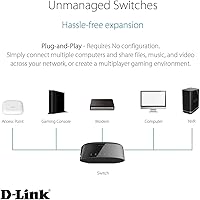
Yes, that is exactly what it is designed for. You connect one port to your router using an Ethernet cable, then connect up to four other devices — a PC, a gaming console, a smart TV, a NAS — to the remaining ports. The switch handles the rest automatically.

It is completely silent. There is no fan, so there are no moving parts and no noise whatsoever. This makes it a genuinely good fit for living rooms, bedrooms, or anywhere you would notice a humming device.

No, this compact gigabit switch does not support VLANs, port mirroring, traffic monitoring, or any other managed features. It is a pure plug-and-play device. If you need any of those capabilities, you will need to look at a managed switch, which is a different and typically more expensive category.

The specs are genuinely solid for an unmanaged home switch. The issue is quality control variability — a notable portion of buyers have reported units that arrived non-functional or failed within the first few months. Units that work correctly tend to get praised and run reliably for years, but the risk of receiving a bad unit is real enough to factor into your decision.

Yes, D-Link covers this switch under a limited lifetime warranty. In practice, that means if your unit fails under normal use conditions, you can contact D-Link support for a replacement. Keep your proof of purchase handy, as warranty claims typically require it.

No, a switch does not throttle your internet speed. It simply extends your local network by adding more wired ports. Your internet speed is still determined by your router and ISP plan — the switch just lets more devices access it over a wired connection.

For Gigabit speeds, you will want Cat5e cables at minimum. Cat6 or Cat6a work even better, especially over longer runs. Standard Cat5 (not Cat5e) can technically work but may limit you to 100 Mbps, so it is worth double-checking what you already have before assuming you will get full Gigabit throughput.

No, this D-Link switch requires its own dedicated external power adapter (5V / 1A), which is included in the box. It does not support USB power delivery or Power over Ethernet (PoE) input. Make sure you have a nearby power outlet wherever you plan to place it.

Where to Buy