Overview

The TP-Link Festa FS328G 28-Port Gigabit Switch is a cloud-managed networking solution built for small businesses that want real management features without the overhead of enterprise-grade infrastructure. One thing to clarify upfront: this Festa switch is part of TP-Link's newer Festa ecosystem, which is entirely separate from their Omada lineup. The two are incompatible, and mixing them up is the most common reason for frustrated returns. The metal, fanless chassis fits neatly in a rack or sits quietly on a desk, and the mid-range price makes it accessible for growing teams. Just know going in: no standalone mode exists — cloud access through the Festa app is how this device is managed, full stop.
Features & Benefits

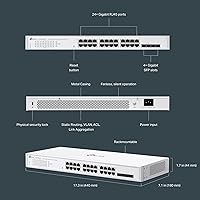
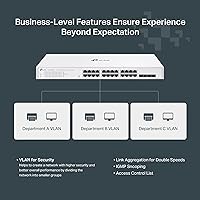
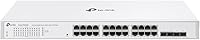
Starting with the hardware, the FS328G packs 24 Gigabit RJ45 ports alongside 4 SFP uplink slots, which opens the door to fiber runs or longer-distance connections to other parts of a building. Cloud management through the Festa app is free — no ongoing subscription — and the web portal gives you a clean view of your entire network from anywhere. On the software side, VLAN support lets you segment traffic between departments or guest Wi-Fi, while IGMP Snooping keeps multicast traffic from flooding every port unnecessarily. Static routing is a genuine bonus at this price tier, letting the switch handle basic inter-VLAN routing without a dedicated router. The fanless operation keeps things whisper-quiet in any environment.

Best For

This cloud-managed switch is a strong fit for small businesses or branch offices connecting 20 to 25 wired devices — think desktops, printers, cameras, and laptops — where some traffic management is needed but a full enterprise setup would be overkill. IT generalists will appreciate that cloud-based configuration doesn't require memorizing CLI commands or running a local controller. It also works well in open-plan offices or front-of-house spaces where fan noise would be disruptive. If you're building out a network using other Festa devices, the ecosystem integration is a real practical benefit. One firm caveat: no PoE support here, so anything requiring powered-over-Ethernet will need its own injector or a separate PoE switch.

User Feedback

With a 4.7-star rating across more than 780 reviews, the FS328G has clearly landed well with its target audience. Buyers consistently call out easy cloud onboarding as a highlight — most report having the switch up and running within minutes of creating a Festa account. The solid metal build and silent fanless operation also draw frequent praise, particularly from people who installed it in shared workspaces. That said, the cloud-only management model does generate some pushback: a handful of buyers would prefer a local web interface as a fallback, and a few note that account creation is required before you can configure anything. Comparisons to Omada come up regularly, with most users treating the two as distinct products for different needs rather than direct competitors.

Pros

  • Free cloud management through the Festa app means no ongoing subscription costs eating into your IT budget.
  • VLAN support lets you cleanly separate guest, staff, and device traffic without needing extra hardware.
  • Static routing gives this Festa switch capabilities you rarely find at this price tier.
  • The fanless design keeps operation completely silent — a real advantage in customer-facing spaces.
  • Setup is fast; most buyers report going from unboxing to a configured network in well under an hour.
  • 24 Gigabit RJ45 ports plus 4 SFP slots gives you room to grow and connect fiber uplinks if needed.
  • Solid metal construction feels durable and holds up well in both rack and desktop installations.
  • The Festa app provides remote visibility into your network from anywhere, with no VPN required.
  • Includes both a rackmount kit and silicone feet, so it works in almost any physical setup out of the box.
  • A 4.7-star rating across hundreds of verified buyers suggests reliability well above the average in its category.

Cons

  • No PoE support means powered devices like IP cameras or access points need separate power sources or injectors.
  • Cloud-only management creates a single point of failure — if Festa cloud has an outage, remote config is unavailable.
  • Creating a Festa account is mandatory before you can configure anything, which some buyers find intrusive.
  • No local fallback interface means troubleshooting during internet outages is significantly more difficult.
  • Incompatibility with Omada makes this a dead end for anyone already invested in TP-Link's other managed platform.
  • The SFP slots are Gigabit only — no 10G uplink option if your backbone eventually demands higher throughput.
  • Advanced enterprise features like LACP link aggregation or MSTP are absent, limiting scalability for growing networks.
  • Long-term reliance on TP-Link maintaining the Festa cloud platform introduces vendor lock-in risk over time.

Ratings

The TP-Link Festa FS328G 28-Port Gigabit Switch earns a strong overall reception across more than 780 verified global ratings, and our AI-driven scoring system has analyzed that feedback while actively filtering out incentivized, bot-generated, and outlier submissions. The scores below reflect an honest picture of where this cloud-managed switch genuinely excels and where real buyers have encountered friction — nothing is glossed over.
Ease of Setup
91%
Buyers consistently describe the onboarding process as refreshingly straightforward for a managed switch. Plugging in the hardware, creating a Festa account, and seeing the switch appear in the portal typically takes under 30 minutes — a win for small business owners without dedicated IT staff.
The mandatory account creation before any configuration is possible irritates some buyers who expected a plug-and-play or browser-based local setup. Users who have previously worked with traditional locally managed switches find the cloud-first approach a noticeable adjustment.
Cloud Management
83%
The Festa cloud portal gives small business owners genuine remote visibility into their network from anywhere, with no subscription fee attached. The mobile app works cleanly for basic monitoring and port-level changes, which is practical for anyone managing a network across multiple physical locations.
A handful of buyers express concern about long-term dependency on TP-Link maintaining the Festa cloud infrastructure. When the cloud platform has brief outages, remote configuration becomes temporarily impossible — a real operational risk for businesses that rely on quick remote changes.
Build Quality
88%
The all-metal chassis earns consistent praise for feeling genuinely solid rather than the hollow, lightweight plastic common on consumer-grade switches. Several buyers specifically mention that the unit inspires confidence when installed in a rack alongside more expensive enterprise hardware.
The white finish, while clean-looking, shows dust and fingerprints more visibly than a typical dark-grey rack unit. A small number of users note that the chassis can feel warm to the touch under sustained load, which is expected for fanless designs but still draws occasional concern.
Fanless Operation
93%
For buyers deploying networking hardware in open offices, reception desks, or client-facing spaces, the complete absence of fan noise is a decisive advantage. Reviewers who previously dealt with the low hum of fan-cooled switches in quiet environments describe the silent operation as a genuine relief.
Passive cooling means the chassis does accumulate heat during sustained high-traffic periods, so placement in poorly ventilated server closets requires some consideration. There are no temperature alerts or thermal monitoring tools visible in the Festa portal, which leaves buyers to manage placement judgment on their own.
Port Performance
87%
All 24 Gigabit RJ45 ports deliver consistent throughput in real-world deployments, with buyers reporting stable connections across mixed workloads involving video streaming, file transfers, and general office traffic simultaneously. The 4 SFP slots perform reliably with standard 1G fiber modules from major brands.
The SFP slots are capped at 1 Gigabit, which becomes a bottleneck if you are connecting this switch to a higher-speed backbone. Buyers planning future network upgrades to multi-gigabit infrastructure will find this limitation forces an earlier hardware refresh than expected.
Value for Money
89%
Compared to similarly spec'd managed switches from competitors, the FS328G delivers VLAN support, IGMP Snooping, static routing, and free cloud management at a price point that buyers across the 780-plus review base repeatedly flag as a strong deal for small business deployments.
Buyers who discover the PoE limitation or the Omada incompatibility after purchase feel the value proposition collapses for their use case. For anyone who needs PoE or is already in an Omada environment, the effective value drops to near zero since no feature overlap exists.
VLAN & Network Control
82%
18%
Setting up basic VLAN segmentation through the Festa portal is noticeably more accessible than CLI-based alternatives, with a visual interface that guides non-specialist users through port assignments. IT generalists managing guest versus staff network separation report the feature working reliably in day-to-day operation.
Advanced VLAN scenarios — such as voice VLAN or complex multi-subnet environments — can expose the limits of the Festa portal's current feature depth. Power users who want granular QoS configuration or detailed per-port traffic statistics find the toolset thinner than enterprise-grade alternatives at higher price points.
Omada Compatibility
11%
89%
There is essentially nothing positive to say here for Omada users — this rating category exists specifically because buyer confusion on this point is the single most common complaint in the review base. The product itself works as designed; the issue is purely one of mismatched expectations.
The FS328G is completely and permanently incompatible with TP-Link Omada controllers, and there is no workaround or hybrid mode available. Buyers who discover this after purchase overwhelmingly describe frustration, and the number of one-star reviews tied specifically to this issue is disproportionately high relative to the overall rating.
Mobile App Experience
76%
24%
The Festa mobile app covers the fundamentals well — you can check port status, review connected devices, and push basic configuration changes without touching a laptop. For a small business owner doing a quick check from a phone while off-site, the app handles the most common tasks smoothly.
The app's feature set lags behind what more mature cloud networking platforms offer, and several buyers note that complex tasks still require switching to the full web portal. Occasional sync delays between app and device state have been flagged in reviews, though these appear to resolve without intervention.
Static Routing
79%
21%
Having static routing available at this price tier genuinely expands what the FS328G can do in a small routed network, allowing basic inter-VLAN communication without a dedicated router. Network-aware buyers who recognize this feature's presence frequently cite it as a deciding factor over competing unmanaged or basic managed alternatives.
Static routing here means exactly that — static only, with no support for dynamic routing protocols like OSPF or RIP. For networks that need to adapt routes automatically, or for businesses anticipating significant topology changes, this limitation becomes relevant faster than buyers might initially expect.
Packaging & Accessories
84%
Including both a rackmount kit and silicone desktop feet in the box is a thoughtful move that buyers notice and appreciate — it removes a small but real friction point at installation time. The installation guide is clear enough that most buyers set up the hardware without consulting outside resources.
The power cord included is functional but basic, and a small number of buyers who deploy the switch internationally note that cord compatibility requires attention depending on region. Some reviewers would have appreciated color-coded port labels or cable management accessories to accompany the otherwise complete kit.
Firmware & Updates
73%
27%
Firmware updates are pushed through the Festa cloud platform, which means buyers benefit from improvements without manually downloading and flashing files. Several reviewers note that TP-Link has pushed meaningful updates since launch, adding minor feature enhancements that suggest ongoing platform development.
Because updates are cloud-managed, buyers have limited control over when they are applied, and there is no documented rollback path if a firmware update introduces issues. The relative newness of the Festa platform means the update history is short compared to the more established Omada product line.
Rack Mountability
91%
The 1U form factor and included bracket kit make rack installation clean and straightforward, with buyers describing a solid, rattle-free fit in standard 19-inch racks. The unit's weight and chassis rigidity mean it sits securely without flex or movement after installation.
The white color stands out visually in a rack populated with traditional black hardware, which a minority of buyers find aesthetically jarring in a professional server environment. The rackmount ears, while functional, feel slightly lighter in construction than the main chassis itself.

Suitable for:

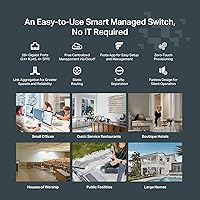
The TP-Link Festa FS328G 28-Port Gigabit Switch is a well-matched choice for small businesses, retail offices, or branch locations that need to connect 20 or more wired devices and want some control over how traffic flows across their network — without hiring a network engineer to set it up. IT generalists and small business owners who are comfortable with a smartphone app will find the Festa cloud portal approachable and surprisingly capable for day-to-day management. Teams that need to separate guest traffic from internal systems using VLANs, or keep multicast video streams from bogging down the whole network, will get real mileage out of the built-in managed features. The fanless metal chassis also makes it a natural fit for open offices, reception areas, or any space where a noisy cooling fan would be out of place. If you're already building a network around other Festa devices — access points, routers — the ecosystem integration adds genuine value that unmanaged alternatives simply can't match.
Not suitable for:

The TP-Link Festa FS328G 28-Port Gigabit Switch is a poor fit for anyone who needs to power devices like IP cameras, VoIP phones, or wireless access points directly through the network cable, since this switch has no PoE capability whatsoever. Network administrators who prefer or require local management — a traditional web GUI accessible on the LAN without any cloud account — will find the Festa model frustrating; there is no fallback local interface, and every configuration action goes through the cloud. Buyers who already run a TP-Link Omada network should steer clear entirely, as Festa and Omada are incompatible platforms that cannot be managed together under any circumstances. Organizations with strict data governance policies that prohibit cloud-connected infrastructure may also hit compliance walls. Finally, anyone who needs advanced routing protocols, link aggregation, or enterprise-grade redundancy features will quickly outgrow what this switch can offer.
Specifications

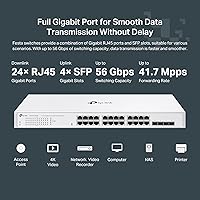
  • Total Ports: The switch provides 28 total ports: 24 x 10/100/1000 Mbps RJ45 Gigabit ports and 4 x Gigabit SFP uplink slots.
  • PoE Support: This switch does not support Power over Ethernet on any port; all connected devices must be independently powered.
  • SFP Slots: Four Gigabit SFP slots support fiber or copper SFP modules for long-distance or high-interference uplink connections.
  • Switching Capacity: The switch delivers a total data transfer rate of 24 Gigabits per second across all RJ45 ports.
  • Form Factor: The chassis is a 1U rack-mountable unit with dimensions of 20.87 x 10.63 x 3.15 inches.
  • Weight: The unit weighs 4.39 pounds, making it straightforward to install in a standard server rack or on a desk.
  • Chassis Material: The enclosure is constructed from metal, contributing to both durability and passive heat dissipation.
  • Cooling: The switch uses a fully fanless design, relying on passive cooling with no moving parts and zero fan noise.
  • Cloud Management: Centralized management is handled via the Festa cloud platform, accessible through the Festa mobile app or web portal at no cost.
  • Standalone Mode: Standalone local management is not available; all configuration requires an active Festa cloud account and internet connectivity.
  • Omada Compatibility: This switch is not compatible with TP-Link Omada controllers and cannot be integrated into an Omada-managed network.
  • VLAN Support: The switch supports 802.1Q VLAN configuration for logical network segmentation across ports.
  • IGMP Snooping: IGMP Snooping is supported, allowing the switch to intelligently manage multicast traffic and prevent unnecessary flooding.
  • Routing: Static routing is supported, enabling basic inter-VLAN or inter-subnet routing without a dedicated router.
  • Security Features: Access Control and Loopback Detection are included to help prevent unauthorized access and protect against network loops.
  • Color: The unit is finished in white and ships with both a rackmount kit for 19-inch racks and silicone feet for desktop placement.
  • Included Items: The package includes the switch, an installation guide, a power cord, a rackmount kit, and silicone feet.
  • Manufacturer: The switch is designed and manufactured by TP-Link under its Festa product line, separate from the Omada and Unmanaged Switch families.

Related Reviews

TP-Link Festa FS318GP 18-Port PoE Switch
78%
88%
PoE Performance
76%
Cloud Management
84%
Setup Experience
86%
Build Quality
91%
Value for Money
More
TP-Link Festa FS352GP 52-Port PoE Switch
76%
88%
PoE Performance
79%
Cloud Management
92%
Build Quality
86%
Setup Experience
91%
Port Density & Layout
More
TP-Link TL-SG1218MPE 16-Port PoE+ Switch
76%
91%
PoE Reliability
68%
PoE Power Budget
88%
Build Quality
63%
Web Management Interface
93%
PoE Auto Recovery
More
TP-Link T1500G-8T 8-Port Gigabit Smart Switch
83%
91%
Port Speed & Performance
88%
VLAN & Network Segmentation
89%
Web Management Interface
67%
Setup & Ease of Use
92%
Long-Term Reliability
More
TP-Link TL-SG108E 8-Port Gigabit Switch
82%
91%
Build Quality
94%
Value for Money
83%
Ease of Setup
61%
Management Software
93%
Long-term Reliability
More
TP-Link TL-SG3428 24-Port Gigabit Switch
87%
85%
Setup & Installation
92%
Performance & Reliability
91%
Value for Money
80%
Software & Firmware Management
89%
Security Features
More
TP-Link TL-SG1024DE 24-Port Gigabit Switch
82%
91%
Build Quality
93%
Port Performance & Reliability
63%
Management Interface (Web UI)
82%
VLAN Configuration
78%
QoS Effectiveness
More
TP-Link TL-SG1016DE 16-Port Gigabit Switch

82%
88%
Build Quality
91%
Value for Money
86%
Port Count & Layout
84%
Setup & Installation
63%
Management Interface
More
TP-Link TL-SG1008MP 8-Port PoE+ Gigabit Switch
81%
96%
Ease of Setup
93%
PoE Coverage
91%
Build Quality
89%
Value for Money
88%
Reliability & Uptime
More
TP-Link TL-SG1048 48-Port Gigabit Network Switch
81%
94%
Reliability & Uptime
96%
Noise Level
93%
Ease of Setup
91%
Port Performance
88%
Build Quality
More

FAQ

No, you cannot. The FS328G has no local web interface or standalone mode whatsoever. Every configuration change — VLANs, access control, port settings — is handled through the Festa cloud portal. If your internet connection goes down, you lose the ability to make remote changes, though existing network configurations will continue to function on the switch itself.

It will not. Festa and Omada are completely separate TP-Link ecosystems that cannot be managed together. If you already run Omada hardware and want a centrally managed switch, you will need an Omada-compatible model. This is one of the most common sources of buyer confusion, so it is worth double-checking before purchasing.

No, this switch does not support PoE on any of its ports. If you need to power wireless access points, VoIP phones, or IP cameras directly through the Ethernet cable, you will need either a PoE switch or separate PoE injectors for each device.

As of now, Festa cloud management is genuinely free with no subscription fee required. You create a Festa account and manage the switch through the app or web portal at no ongoing cost. That said, it is worth keeping in mind that cloud platform availability is ultimately under TP-Link's control going forward.

The SFP slots are Gigabit speed, so they support standard 1G SFP modules — both fiber (single-mode or multi-mode) and copper SFP modules depending on your cabling needs. They do not support 10G SFP+ modules, so if you need high-speed uplinks for a backbone connection, this switch may not be sufficient.

Yes, VLAN configuration is one of the more useful features on this Festa switch. Through the cloud portal, you can assign ports to different VLANs, keeping guest traffic isolated from internal systems. It requires a compatible router or access point to enforce the VLAN tagging end-to-end, but the switch handles its part of the configuration cleanly.

It produces no fan noise at all because the design is entirely fanless. Passive cooling handles heat dissipation through the metal chassis, so there are no spinning components to generate sound. It is a genuinely silent piece of hardware, which makes it a practical choice for reception areas, open offices, or any space where equipment noise would be noticeable.

Yes, a rackmount kit is included in the box and the switch fits in a standard 19-inch rack as a 1U unit. If you prefer to place it on a shelf or desktop instead, the included silicone feet keep it stable. You do not need to buy any additional mounting hardware for either scenario.

The setup process is notably approachable for a managed switch. You create a Festa account, plug in the switch, and it appears in the app or web portal where you can start configuring ports and VLANs. Most users describe going from unboxing to a working network in under an hour. That said, features like static routing and access control do assume some basic familiarity with networking concepts.

Buyers consistently mention the build quality in a positive light — the metal chassis feels solid and appropriately heavy for a rack-mount device at around 4.4 pounds. It does not have the plasticky feel of consumer-grade switches. For a small business deployment where the switch may stay in service for several years, the construction appears to hold up well based on real-world user reports.