Overview

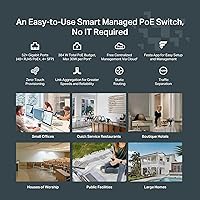
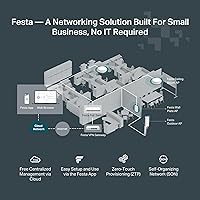
The TP-Link Festa FS352GP 52-Port PoE Switch occupies a practical middle ground for small-to-medium businesses — capable enough for a real deployment, yet approachable enough that you don't need a dedicated IT person to run it. One thing to get straight upfront: this Festa switch is not compatible with Omada, TP-Link's more widely known controller-based platform. These are two separate ecosystems. Beyond that split, the bigger structural point is that cloud management here is mandatory — there is no standalone or local fallback mode. If the Festa app is down, your management access is down. The rack-mountable metal chassis, however, feels solid and purpose-built for the price tier.

Features & Benefits

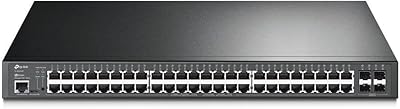
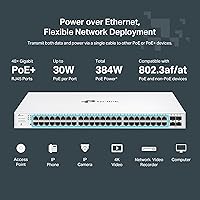
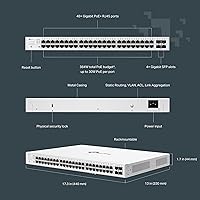
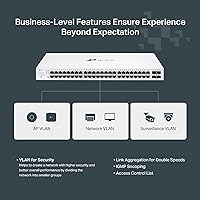
The FS352GP gives you 48 PoE+ ports rated at up to 30W each, which covers IP cameras, wireless APs, and VoIP phones comfortably. The 384W total power budget sounds generous, but it pays to do the math: if you push a large number of ports near their limit simultaneously, that ceiling can arrive faster than expected. Dense camera installations, in particular, warrant planning. Four Gigabit SFP slots handle uplink or fiber backbone needs cleanly. On the software side, Static Routing, VLAN segmentation, ACL, LAG, Storm Control, and Port Isolation are all included — Layer 2+ features that genuinely distinguish this from unmanaged alternatives at a comparable price.

Best For

This 52-port PoE switch fits best in environments where simplicity and cloud accessibility matter more than deep local control. Think a small hotel powering ceiling-mount APs and security cameras across multiple floors, a dental office wiring up VoIP handsets, or a retailer rolling out a structured network without outside consulting. Zero-Touch Provisioning makes remote setup across locations realistic for non-technical staff. That said, buyers already invested in Omada hardware should stop here — these ecosystems are incompatible, period. Anyone with a strict policy against cloud-dependent infrastructure management, or who needs offline fallback access, should look elsewhere. This Festa switch rewards commitment to its own platform.

User Feedback

Sitting at 4.7 stars across nearly 800 ratings, the reception is strong — but the reviews tell a more specific story. Build quality and consistent PoE delivery draw repeated compliments, with users noting the hardware performs reliably right out of the box. The Festa app earns praise for its clean setup flow. The friction point that surfaces regularly is the cloud-only model: buyers who expected some form of local management access were genuinely surprised when none existed. A handful of reviewers also noted the 384W budget became a real constraint once their deployments filled out. Satisfied buyers are largely those who knew what they were signing up for from the start.

Pros

  • 48 PoE+ ports in a single 1U rack unit is exceptional density for small business deployments.
  • Free cloud management with no subscription fee or controller hardware keeps ongoing costs low.
  • Zero-Touch Provisioning makes multi-location rollouts realistic without sending a technician on-site.
  • The Festa app is consistently praised for its clean interface and fast initial setup experience.
  • Layer 2+ features like Static Routing, VLAN, ACL, and LAG go well beyond basic unmanaged switches at this price.
  • Build quality is solid — metal chassis, three cooling fans, and rack-mountable design feel purpose-built.
  • Three-year warranty with free weekday technical support adds meaningful peace of mind.
  • Four Gigabit SFP uplink slots provide flexible backbone or fiber connectivity options.
  • Security tools including Storm Control, Port Isolation, and IGMP Snooping are included at no extra cost.
  • Strong buyer satisfaction across a large review base suggests reliability in real-world deployments.

Cons

  • No standalone or offline management mode — cloud access is required for any configuration changes.
  • Omada incompatibility is a hard wall; existing TP-Link Omada users cannot integrate this switch at all.
  • The 384W PoE budget can run short in high-density deployments where many ports power demanding devices simultaneously.
  • Mandatory cloud dependency creates a single point of failure if internet connectivity is lost or the Festa service experiences downtime.
  • No CLI access limits options for network engineers who rely on command-line tools for diagnostics or automation.
  • Buyers locked into the Festa ecosystem have limited exit paths if TP-Link discontinues or changes the platform.
  • Not suitable for environments with strict data sovereignty or compliance rules that prohibit cloud-managed infrastructure.
  • Switch management is entirely app and web-based, which some IT professionals find less efficient than traditional interfaces.

Ratings

The scores below for the TP-Link Festa FS352GP 52-Port PoE Switch were generated by our AI rating engine after analyzing verified buyer reviews from multiple global markets, with spam, bot submissions, and incentivized feedback actively filtered out. Each category reflects the honest consensus of real-world users — small business owners, IT generalists, and network installers — who have deployed this Festa switch in live environments. Both the standout strengths and the recurring frustrations are weighted transparently in every score.

PoE Performance
88%
Users running IP camera systems and wireless APs across retail floors and hotel corridors consistently report stable, reliable power delivery across all 48 ports. The 30W per-port ceiling comfortably handles standard PoE+ devices, and buyers note that ports maintain consistent output without voltage fluctuations during normal operation.
The 384W total budget becomes a real constraint in dense deployments. Installers powering a full rack of high-draw dual-radio APs or PTZ cameras simultaneously have hit the ceiling earlier than expected, requiring them to calculate load distribution carefully before deployment.
Cloud Management
79%
21%
The Festa app earns genuine praise for its intuitive layout and fast initial device discovery. Small business owners with limited networking experience say they were able to get VLANs and port settings configured without calling a technician, which is exactly the value proposition TP-Link is aiming for here.
The mandatory cloud dependency is a structural tradeoff that frustrates more experienced users. If the Festa service has downtime or the site loses internet connectivity, all configuration access is lost — a concern that surfaces repeatedly in critical reviews from IT professionals who expected some form of local fallback.
Build Quality
92%
The all-metal chassis feels noticeably solid for a switch at this price point, and rack installation is straightforward with the included mounting kit. Users repeatedly mention that the unit runs cool and stable under sustained load, with the three fans keeping thermals well-managed even in warmer server closets.
The three cooling fans do produce audible noise under load, which a handful of buyers flagged as a problem when installing the switch in open office environments or reception areas rather than a dedicated equipment room.
Setup Experience
86%
Zero-Touch Provisioning genuinely delivers on its promise — integrators who managed multi-site rollouts report being able to pre-stage configurations in the cloud and have non-technical staff simply plug in the switch at the destination. The onboarding flow in the Festa app is clean and well-documented.
Users who came from a traditional managed switch background occasionally found the cloud-only workflow disorienting at first, since there is no familiar web GUI accessible from the local network. The learning curve is short but exists for anyone expecting a conventional local-access setup experience.
Port Density & Layout
91%
Fitting 48 active PoE+ ports and four SFP uplinks into a single 1U chassis is a genuine space saver in crowded equipment racks. Installers working in small server closets appreciate not needing a second switch unit just to hit the port count required for a mid-sized business.
Port labeling and physical spacing are functional but not exceptional — a few users noted that in low-light environments, quickly identifying a specific port by sight requires more attention than it should, particularly when troubleshooting a live installation.
Software Feature Depth
77%
23%
For a cloud-managed SMB switch, the Layer 2+ feature set is broader than many competitors at this tier. VLAN segmentation, ACL rules, LAG configuration, and Static Routing give network-aware buyers meaningful control over traffic without needing enterprise-grade hardware.
Advanced users looking for deeper Layer 3 routing, dynamic routing protocols, or comprehensive QoS scheduling will find the software capabilities hit a ceiling fairly quickly. The feature set is well-matched to its target audience but will feel limited to anyone coming from a more complex network background.
Omada Compatibility
12%
88%
There is nothing positive to say here from the perspective of an Omada user — the incompatibility is total and by design. For buyers who are starting fresh with no prior TP-Link investment, this is simply a non-issue since they have no existing ecosystem to protect.
This is the single most common source of buyer regret in the review pool. Users who purchased this switch assuming it would integrate with their existing Omada access points and routers discovered the hard way that the two platforms share a brand name and nothing else. The mismatch has generated a notable cluster of one-star reviews.
Value for Money
83%
When buyers evaluate what they are getting — 48 PoE+ ports, free cloud management, Layer 2+ software, metal chassis, and a three-year warranty — the overall package is competitive against comparable managed switches from other brands. The absence of subscription fees adds meaningful long-term value.
A segment of buyers feel the price is slightly harder to justify once they fully understand the cloud-only constraint and Omada incompatibility, particularly those who discover post-purchase that they cannot use features they assumed would be standard on a managed switch at this price.
App Reliability
74%
26%
Day-to-day use of the Festa app is generally smooth — device status updates are timely, port monitoring is clear, and most buyers report that routine tasks like toggling ports or adjusting PoE settings work without friction across both mobile and web interfaces.
A recurring complaint in user reviews involves occasional app latency or cloud sync delays, particularly when making rapid configuration changes or when managing multiple devices simultaneously. A small number of users also experienced brief periods where the app lost visibility of the switch without any apparent network issue on-site.
PoE Budget Management
68%
32%
The switch provides per-port PoE power monitoring through the Festa app, which gives administrators visibility into how much of the 384W budget is being consumed in real time. This helps prevent accidental overloads in environments with a mix of device types drawing different wattages.
There is no dynamic power prioritization or port-level PoE scheduling built into the current firmware, meaning if the total draw exceeds the budget, lower-priority devices do not automatically yield power gracefully. Administrators have to plan port assignments manually to avoid this scenario.
Thermal Management
84%
Even in sustained high-traffic environments running close to the PoE power ceiling, the three-fan cooling system keeps the chassis at stable operating temperatures. Users in warmer climates or poorly ventilated server closets report no heat-related instability after extended runtime.
The fan noise is the main thermal trade-off. Unlike fanless switches designed for quiet environments, this unit is audibly active, which limits its placement options for businesses without a dedicated wiring closet or network cabinet.
Documentation & Support
71%
29%
TP-Link includes a clear installation guide in the box, and the Festa support portal provides setup videos and configuration walkthroughs that are genuinely useful for first-time managed switch deployments. Weekday phone and chat support is available within the warranty period at no extra charge.
Some users found the documentation gaps noticeable when attempting more advanced configurations like multi-VLAN routing or LAG setup, where the online guides are less thorough than those available for the Omada product line. Community forum resources for the Festa platform are also less developed than those for Omada.
Warranty & Longevity
87%
A three-year warranty is above average for this product category, and buyers report that TP-Link support has been responsive to hardware defect claims. The all-metal construction gives most users confidence that the unit will hold up well beyond the warranty period in normal operating conditions.
The cloud dependency introduces a long-term uncertainty that the hardware warranty does not address — if TP-Link were to discontinue the Festa Cloud service, the switch would lose all management capability. This concern is speculative but has been raised by cautious IT buyers planning five-plus-year deployments.

Suitable for:

The TP-Link Festa FS352GP 52-Port PoE Switch is a strong fit for small and mid-sized businesses that need to power a meaningful number of network devices — IP cameras, wireless access points, VoIP phones — without hiring a full-time network administrator. A boutique hotel wiring up ceiling-mount APs and a surveillance system across multiple floors, a medical office deploying IP handsets at every desk, or a retail chain standardizing its branch networking are all genuinely good matches. The free cloud management through the Festa app is a real differentiator for lean IT teams or owner-operators who need to make changes remotely without paying for a controller appliance or a monthly subscription. Zero-Touch Provisioning also makes this a practical option for businesses opening new locations, since devices can be pre-configured and handed off to non-technical staff. If you are starting fresh on TP-Link's Festa platform and plan to stay within that ecosystem, this switch offers a compelling combination of port density, PoE capacity, and software features for the price.

Not suitable for:

The TP-Link Festa FS352GP 52-Port PoE Switch is a clear mismatch for anyone already running TP-Link Omada hardware — these two platforms are entirely incompatible, and no firmware update or workaround will bridge that gap. Buyers who require local or offline management access should also look elsewhere; there is no standalone mode, meaning your ability to configure the switch is entirely dependent on cloud connectivity. Security-conscious IT teams operating in regulated environments — healthcare, finance, government — may find mandatory cloud dependency a non-starter from a compliance standpoint. Network engineers who want deep CLI access, granular offline diagnostics, or integration with third-party NMS platforms will find this switch limiting. Additionally, anyone planning to maximize all 48 PoE ports with high-draw devices like PTZ cameras or dual-radio APs should run the numbers carefully, since the 384W total budget can become a real constraint in dense deployments. This is a cloud-first device designed for simplicity, and buyers who need flexibility or independence from an external platform will be better served by something in the Omada or competitor managed-switch lines.

Specifications

  • Total Ports: The switch provides 52 total ports: 48 x PoE+ RJ45 Gigabit ports and 4 x Gigabit SFP uplink slots.
  • PoE Standard: All 48 RJ45 ports support IEEE 802.3at (PoE+) and 802.3af (PoE), delivering up to 30W per port.
  • PoE Budget: The total PoE power budget across all 48 active ports is 384W.
  • Data Rate: Each port supports Gigabit speeds with a maximum data transfer rate of 1 Gbps.
  • SFP Uplinks: Four Gigabit SFP slots are included for fiber or high-speed copper uplink and backbone connections.
  • Management: The switch is managed exclusively via the Festa Cloud app and web portal, which are free with no subscription fee required.
  • Provisioning: Zero-Touch Provisioning is supported, allowing remote pre-configuration before physical installation at a site.
  • Layer 2+ Features: Supported advanced features include Static Routing, VLAN, ACL, LAG, and IGMP Snooping.
  • Security Features: Built-in security tools include Storm Control, Port Isolation, Loopback Detection, Flow Control, and Rate Limiting.
  • Form Factor: The switch is housed in a 1U rack-mountable metal chassis with a rackmount kit included in the box.
  • Cooling: Three internal fans provide active cooling to maintain stable operation under sustained network load.
  • Operating Temp: The switch is rated for operating environments up to 40 degrees Celsius (104 degrees Fahrenheit).
  • Dimensions: Physical dimensions are 17.32 x 12.99 x 1.73 inches, fitting a standard 19-inch rack.
  • Weight: The unit weighs 12.61 pounds, typical for a fully metal-chassis 52-port switch.
  • Omada Support: This switch does not support TP-Link Omada controllers and cannot be integrated into an Omada-managed network.
  • Standalone Mode: No standalone or offline local management mode is available; cloud access is required for all configuration.
  • Warranty: TP-Link backs this switch with a 3-year limited warranty and free weekday technical support.
  • In the Box: Package includes the switch unit, installation guide, power cord, rackmount kit, and silicon feet for desktop use.
  • Availability: The switch became commercially available in July 2024.
  • Ecosystem: This switch is part of the TP-Link Festa Self-Organizing Network platform, designed for simplified small business deployments.

Related Reviews

TP-Link Festa FS318GP 18-Port PoE Switch
78%
88%
PoE Performance
76%
Cloud Management
84%
Setup Experience
86%
Build Quality
91%
Value for Money
More
TP-Link TL-SL1311MP 8-Port PoE+ Network Switch
80%
94%
Ease of Setup
88%
PoE Performance
52%
Port Speed & Throughput
76%
Extend Mode Utility
73%
Build Quality
More
TP-Link TL-SF1006P 6-Port PoE Switch
88%
88%
Performance
95%
Ease of Setup
92%
Build Quality
89%
Reliability
91%
Power Delivery (PoE)
More
TP-Link TL-SF1009P 9-Port PoE+ Switch
80%
94%
Ease of Setup
78%
PoE Power Delivery
86%
Build Quality
71%
Extend Mode Performance
89%
Value for Money
More
TP-Link TL-SL1218MP 16-Port PoE Network Switch
79%
91%
Value for Money
88%
PoE Performance
79%
Extend Mode Reliability
93%
Ease of Setup
62%
Build Quality
More
TP-Link TL-SF1005P
TP-Link TL-SF1005P
82%
96%
Ease of Setup
81%
PoE Power Delivery
88%
Build Quality
94%
Fanless & Noise Level
67%
Extend Mode Performance
More
TP-Link TL-SG1016PE 16-Port Gigabit PoE Switch
80%
91%
PoE Reliability
88%
Build Quality
67%
Power Budget
63%
Management Interface
86%
Setup & Ease of Use
More
TP-Link LS108GP
TP-Link LS108GP
81%
96%
Ease of Setup
62%
PoE Power Budget
78%
Extend Mode Performance
93%
Silent Operation
84%
Build Quality
More
TP-Link TL-SG1428PE 28-Port PoE+ Gigabit Switch
80%
93%
Value for Money
81%
PoE Performance
88%
Build Quality
91%
Ease of Setup
72%
Management Interface
More
TP-Link TL-SG1008MP 8-Port PoE+ Gigabit Switch
81%
96%
Ease of Setup
93%
PoE Coverage
91%
Build Quality
89%
Value for Money
88%
Reliability & Uptime
More

FAQ

No, and this is probably the most important thing to know before buying. The TP-Link Festa FS352GP 52-Port PoE Switch belongs to the Festa ecosystem, which is entirely separate from Omada. You cannot manage it through an Omada controller, and it will not appear in the Omada SDN portal. If you already have Omada devices, this switch will not integrate with them.

Unfortunately, no. There is no standalone or local management mode on this switch. All configuration is done through the Festa Cloud app or web interface, which requires an active internet connection. If your internet goes down, you lose management access, though the switch itself will continue forwarding traffic based on its last-saved configuration.

No, the cloud management is completely free. There is no subscription, no per-device licensing fee, and no controller hardware to purchase. You create a Festa account and manage the switch through the app or web browser at no ongoing cost.

That depends on what each device draws. The switch has a 384W total PoE budget spread across 48 ports, with a maximum of 30W per port. Standard IP cameras typically use 5 to 15W, basic indoor APs draw around 10 to 15W, and VoIP phones are usually under 5W. A mix of those types across most of the ports is very manageable. Where you can run into trouble is if you are running a lot of high-draw devices like PTZ cameras or tri-radio APs simultaneously across a large number of ports.

It means you can pre-configure devices in the Festa Cloud before they are physically installed. So if you are opening a new branch office, you can set up the network configuration in advance, ship the switch to the location, have someone plug it in and connect it to the internet, and it will automatically pull its configuration from the cloud. No IT technician needs to be on-site.

It has three active cooling fans, so it does produce some fan noise during operation. It is not going to be silent like a fanless desktop switch. For most server closets or equipment rooms it is a non-issue, but if you plan to put it in an open office or reception area, the fan noise may be noticeable depending on the ambient sound level.

Yes, that is exactly what those slots are designed for. The four Gigabit SFP slots support standard SFP modules for single-mode or multi-mode fiber, which makes them practical for connecting to another switch in a separate building or a fiber uplink from your ISP demarcation point. Just make sure you purchase compatible SFP modules separately.

Yes, VLAN support is included and works well for exactly that kind of segmentation. You can create separate VLANs for guest Wi-Fi traffic, internal staff devices, IP cameras, and so on, then manage inter-VLAN routing with the Static Routing feature if needed. It is a legitimately useful Layer 2+ feature set for a small business switch.

The switch itself keeps running and continues forwarding traffic based on its stored configuration — connected devices stay online. What you lose is the ability to make any configuration changes until cloud connectivity is restored. For most day-to-day operations this is not a problem, but it does mean you cannot troubleshoot or reconfigure the switch in real time during a cloud outage.

It can be, depending on the setup. If a school needs to power a fleet of wireless APs across classrooms, run IP cameras in hallways, and wants simple centralized management without a full-time IT staff member, this Festa switch covers those needs well. The main consideration is the cloud dependency — school IT policies vary on that point, so it is worth checking internal guidelines before committing to a cloud-managed-only device.