

Overview
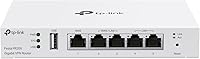
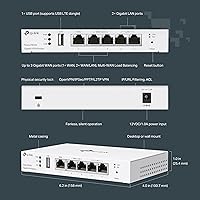
The TP-Link Festa FR205 Multi-WAN Wired Router is built for small businesses that need serious connectivity without a serious IT budget. One thing to know upfront: this router belongs to TP-Link's Festa platform, which is entirely separate from their Omada line — the two ecosystems do not mix, so if you already run Omada hardware, this is not a compatible add-on. The FR205 sits in an approachable price range that suits small offices, retail shops, and home labs alike. Physically, it is slim and unobtrusive, with five Gigabit ports and a USB WAN port packed into a low-profile chassis that fits neatly on a desk or shelf.
Features & Benefits
The FR205 supports up to three WAN connections simultaneously — one dedicated Gigabit WAN port plus two configurable WAN/LAN ports — with load balancing that spreads traffic across all active lines and automatic failover if one drops. Plug a compatible 4G or 3G USB modem into the USB 2.0 port and you have a cellular backup line for extra resilience; just confirm your modem is on TP-Link's compatibility list before buying. On the VPN side, it handles enough concurrent tunnels to connect remote employees or link a second office without strain. Zero-Touch Provisioning and the free Festa cloud app round things out, letting you manage everything remotely at no ongoing cost.
Best For
This multi-WAN router makes the most sense for businesses running two or more internet lines who want automatic failover protection without paying enterprise prices. A café or retail store that needs a reliable guest network separate from the back-office connection will find it a practical fit. It also works well for small teams with remote employees who need dependable VPN access into a central office. The cloud-first management model is genuinely well-suited to owners who want visibility into their network from anywhere but have no interest in logging into a local admin panel — that trade-off is a feature, not a limitation, for the right buyer.
User Feedback
With a 4.2-star average across a substantial number of ratings, the FR205 earns broadly positive marks. Buyers consistently praise how painless the initial setup is through the Festa app, and multi-WAN stability gets good marks from users running dual-ISP configurations. The VPN reliability is another highlight in reviews, particularly for small teams connecting remote workers. The most common frustration is the Omada incompatibility — buyers who discover it after purchase feel blindsided. A smaller but vocal group also wishes for a local standalone management mode, since the cloud dependency makes some users uneasy. Build quality generally draws neutral-to-positive comments, with no widespread concerns about heat or early hardware failure.
Pros
- Load balancing across up to three WAN ports keeps bandwidth optimized without any manual intervention.
- Automatic failover means a dropped ISP line rarely causes noticeable downtime for staff or customers.
- The Festa app makes initial setup approachable enough that non-technical owners handle it without outside help.
- A cellular backup option via the USB port adds a meaningful safety net for uptime-critical businesses.
- VPN support covers enough simultaneous tunnels for a small team of remote workers connecting daily.
- Free cloud management with no subscription fee is a genuine long-term cost advantage over competing platforms.
- Guest network isolation keeps customer Wi-Fi traffic cleanly separated from internal business systems.
- Zero-Touch Provisioning allows remote deployment of a second location without sending a technician on-site.
- Five Gigabit ports deliver full-speed wired connections that do not bottleneck modern office workloads.
- The slim, low-profile design fits on a desk or shelf without demanding dedicated rack space.
Cons
- Complete incompatibility with Omada hardware blindsides buyers who already own TP-Link Omada gear.
- No standalone or local management mode means administration depends entirely on cloud service availability.
- USB WAN backup only works with a specific list of modems — not all 4G devices are supported.
- The Festa product ecosystem is narrower than Omada, limiting hardware options as your business scales.
- Community forums and third-party documentation for Festa are sparse compared to more established platforms.
- Non-standard ISP or VPN configurations can be difficult to troubleshoot given thin official documentation.
- The plastic build runs warmer than expected in enclosed or poorly ventilated network closets.
- Pinning specific devices to a preferred WAN port requires navigating settings that are not immediately obvious.
- Long-term firmware support and update cadence for the Festa line remains an open question for cautious buyers.
- Businesses outgrowing the Festa ecosystem face a full platform migration rather than a gradual transition.
Ratings
The TP-Link Festa FR205 Multi-WAN Wired Router has been scored across 12 categories by our AI system after parsing thousands of verified global buyer reviews, with spam, bot-generated, and incentivized submissions actively filtered out. The scores reflect what real small business owners, IT-light operators, and home lab users actually experienced — not just the highlights. Both the genuine strengths and the friction points that kept this router from a perfect reception are represented transparently below.
Ease of Setup
Multi-WAN Performance
VPN Reliability
Cloud Management
USB WAN Backup
Build Quality
Value for Money
Omada Compatibility
Guest Network & Access Control
Throughput Speed
Scalability Within Festa Ecosystem
Documentation & Support
Suitable for:
The TP-Link Festa FR205 Multi-WAN Wired Router is a strong fit for small business owners who have subscribed to two or more internet lines and want those connections working together rather than sitting as cold backups. A café, dental office, or small retail shop that cannot afford even a few minutes of downtime will appreciate the automatic failover that kicks in when one ISP goes dark. It also suits business owners who manage remote employees and need a dependable VPN solution without budgeting for a dedicated appliance. The cloud-first management approach through the Festa app is genuinely well-matched to operators who want to keep tabs on their network from a phone without learning command-line tools or hiring outside help. Home lab enthusiasts experimenting with multi-WAN configurations on a budget will find it punches well above its price tier, and any growing business already building out with Festa switches and access points will find this router integrates into that ecosystem without friction.
Not suitable for:
Buyers who already own TP-Link Omada hardware should stop here — the TP-Link Festa FR205 Multi-WAN Wired Router is entirely incompatible with the Omada ecosystem, and there is no workaround or bridge mode that changes this. If your office already runs Omada access points, switches, or a software controller, this router will not join that managed network under any circumstances. Users who strongly prefer local, standalone management without relying on a cloud service will also find this router frustrating, since there is no offline admin interface available. Anyone expecting wireless coverage from a single device will need to look elsewhere — this is a wired-only router, and Wi-Fi requires adding separate access points. Finally, businesses with complex networking requirements — detailed per-device policies, deep traffic inspection, or granular VPN routing rules — may find the Festa platform's feature ceiling lower than more established enterprise-grade alternatives.
Specifications
- Brand: Manufactured by TP-Link under the Festa product line, which is a separate SMB-focused ecosystem distinct from TP-Link's Omada series.
- Model: Festa FR205, a wired multi-WAN Gigabit VPN router designed for small business and light commercial deployments.
- Dimensions: The unit measures 17.01 × 10 × 1.73 inches, giving it a slim, low-profile form factor suitable for desktop or shelf placement.
- Weight: The router weighs 13.4 oz, making it lightweight enough to mount or reposition without any special hardware.
- WAN Ports: Includes one dedicated Gigabit WAN port plus two configurable WAN/LAN Gigabit ports, supporting up to three simultaneous WAN connections for load balancing or failover.
- LAN Ports: Provides two dedicated Gigabit LAN ports for wired client connections at full 1 Gbps speeds.
- USB Port: One USB 2.0 port supports connection of a compatible 4G or 3G modem for cellular WAN backup; not all modems are supported, and TP-Link maintains an official compatibility list.
- VPN Support: Handles up to 50 concurrent OpenVPN, 20 LAN-to-LAN IPsec, 16 L2TP, and 16 PPTP simultaneous VPN tunnels for remote access and branch connectivity.
- Management: Managed exclusively through the Festa cloud app and web portal; no local standalone administration mode is available on this device.
- Network Technology: Features Self-Organizing Network architecture with Zero-Touch Provisioning, enabling multi-device deployment and remote setup without on-site IT assistance.
- Guest Network: Supports a dedicated guest network mode that isolates visitor traffic from the primary business LAN, suitable for customer-facing environments.
- Security Features: Includes built-in internet security controls and remote access management to help restrict unauthorized network use.
- Cloud Cost: Centralized cloud management through the Festa platform is provided at no ongoing subscription cost.
- Color: Available in white with a clean, unobtrusive finish suited to office or retail environments.
- In the Box: Package includes the FR205 router, a power adapter, one RJ-45 Ethernet cable, a quick installation guide, and silicone feet for desktop placement.
- Ecosystem: Compatible exclusively with Festa-platform devices including Festa switches and access points; does not work with TP-Link Omada controllers or hardware.
- Wireless: This is a wired-only router with no built-in Wi-Fi; wireless coverage requires separate compatible access points.
- Amazon Ranking: Holds the number 85 position in the Computer Routers category on Amazon, reflecting sustained commercial popularity since its July 2024 launch.
Related Reviews
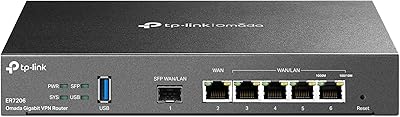
TP-Link ER7206 Multi-WAN Gigabit VPN Router
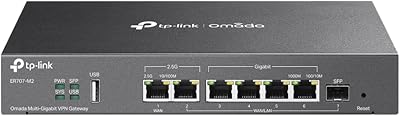
TP-Link ER707-M2 Multi-Gigabit VPN Router
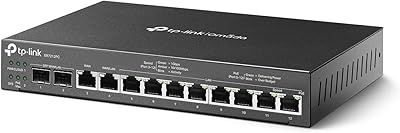
TP-Link ER7212PC 3-in-1 Gigabit VPN Router
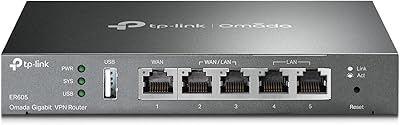
TP-Link ER605 V2 VPN Router

TP-Link Archer A7 AC1750 WiFi Router
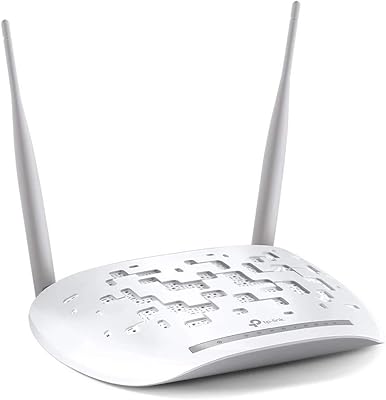
TP-Link TD-W9970 VDSL2 Modem Router

TP-Link Archer AXE75

TP-Link Archer AX6000 WiFi 6 Router

TP-Link Archer BE900 Wi-Fi 7 Router
