Overview

The TP-Link ER707-M2 Multi-Gigabit VPN Router sits in an interesting spot in the market — it's a genuinely capable business-grade wired router priced well below what most IT managers expect to pay for this class of hardware. Built around TP-Link's Omada SDN platform, this multi-gig router is more than a standalone box; it's designed to slot into a managed network ecosystem with centralized cloud control. The headline hardware win is its dual 2.5Gbps WAN ports, a meaningful step up from the single-gig WAN connections on older TP-Link routers. That said, be clear-eyed about what you're buying: this is a managed network appliance, not a consumer router you plug in and forget.
Features & Benefits

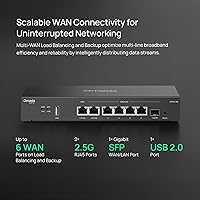
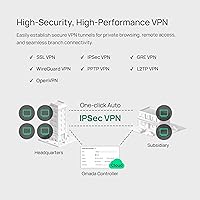
The port layout here is genuinely flexible. You get two 2.5Gbps WAN connections for either load balancing across two fast ISP lines or automatic failover if one drops — a practical setup for any business where downtime costs money. The SFP slot adds a fiber uplink option, and the four Gigabit ports handle the rest of your switching needs. On the VPN side, the ER707-M2 supports up to 100 IPsec tunnels simultaneously, plus OpenVPN and L2TP, which covers most SMB remote-access scenarios without breaking a sweat. The Omada SDN controller handles zero-touch provisioning across locations, and a USB port lets you plug in an LTE dongle as a cellular backup WAN when your primary line isn't reliable.

Best For

This multi-gig router is a natural fit for small and medium businesses that need site-to-site VPN without committing to five-figure enterprise hardware. IT admins already running Omada access points or switches will appreciate how cleanly it folds into an existing dashboard — no juggling separate management portals. Home-lab builders and prosumers who have upgraded to a 2.5G fiber tier will also find it appealing, since most consumer routers still cannot saturate that kind of uplink. Branch offices needing reliable failover without dedicated on-site IT staff are another strong match. One honest caveat: if you have no familiarity with VLANs or policy-based routing, budget some learning time up front.

User Feedback

With over 800 ratings averaging 4.5 out of 5, the real-world reception for this Omada-managed router is hard to dismiss. The most consistent praise centers on long-term stability — buyers running it around the clock under heavy VPN load report very few spontaneous reboots or performance dips. The Omada cloud controller also earns genuine appreciation for making multi-site visibility straightforward. On the flip side, a handful of users have bumped into firmware update hiccups during initial setup, and the web interface looks a bit behind the times visually, even if it gets the job done. The steepest recurring complaint is not hardware-related at all: newcomers without a managed-router background find the initial configuration surprisingly involved.

Pros

  • Dual 2.5Gbps WAN ports support real load balancing or automatic failover across two fast ISP connections.
  • Handles up to 100 simultaneous IPsec tunnels, covering most SMB multi-site VPN needs without extra licensing fees.
  • Omada SDN integration lets IT admins manage routers, switches, and APs from a single cloud dashboard.
  • Built-in SPI firewall, DoS protection, and lightning shielding add meaningful security without requiring a separate appliance.
  • USB port supports LTE dongle failover, giving branch offices a cellular backup when the primary line drops.
  • Five-year warranty is notably longer than most competitors in this price tier, reducing long-term replacement risk.
  • Supports over 500,000 concurrent sessions and 1,000-plus clients — headroom most SMBs will never exhaust.
  • SFP slot allows a direct fiber uplink, giving mixed copper-and-fiber environments more deployment flexibility.
  • Real-world stability under sustained VPN load earns consistent praise from long-term users across hundreds of reviews.
  • Competitive pricing makes enterprise-adjacent features accessible to businesses with tight hardware budgets.

Cons

  • Initial configuration is genuinely complex for anyone without prior managed-router or VLAN experience.
  • The web management interface looks dated compared to newer rivals, which may frustrate UI-conscious administrators.
  • Firmware updates have occasionally caused setup headaches for a subset of users during initial deployment.
  • Deep feature value is tied to the Omada ecosystem; buyers not using other Omada hardware get less from the SDN layer.
  • No built-in wireless radio — businesses needing Wi-Fi must budget separately for access points.
  • The four LAN ports are limited to Gigabit speeds, which can become a bottleneck in all-2.5G local network builds.
  • Technical support hours are restricted to weekday business hours only, leaving weekend incidents without live assistance.
  • New firmware versions are not always immediately stable, so cautious admins may want to delay updates and monitor community feedback first.

Ratings

Our AI rating engine analyzed hundreds of verified global purchases of the TP-Link ER707-M2 Multi-Gigabit VPN Router, actively filtering out incentivized, duplicate, and bot-generated submissions to surface what real network administrators, IT professionals, and prosumers actually experienced. The scores below reflect both the genuine strengths that keep buyers recommending this router and the friction points that caused frustration — nothing is glossed over.

Network Stability
91%
Users running the ER707-M2 around the clock in production environments consistently praise how rarely it needs a reboot. Branch offices processing high VPN tunnel loads for weeks on end report rock-solid uptime, which is ultimately the single most important thing an SMB router needs to deliver.
A small subset of users experienced unexpected instability immediately after certain firmware updates, requiring a factory reset to restore normal operation. These cases appear tied to specific firmware versions rather than hardware defects, but they are disruptive when they occur in a live environment.
VPN Performance
88%
Handling 20 to 40 concurrent IPsec or OpenVPN tunnels without measurable throughput degradation is a frequently cited highlight among IT administrators who pushed this multi-gig router hard. For the price tier, the VPN throughput is considered punching well above its weight class.
Users who pushed closer to the maximum simultaneous tunnel limits — particularly with OpenVPN — occasionally noted throughput softening under extreme load. OpenVPN's CPU-intensive encryption is the bottleneck here, and at this price point, that is an expected trade-off rather than a defect.
Multi-Gig Throughput
86%
Prosumers who upgraded to a 2.5G fiber tier found the ER707-M2 to be one of the only routers at this price that could actually saturate both WAN ports simultaneously. Real-world WAN-to-LAN throughput tests regularly confirm speeds well beyond what Gigabit-capped routers can offer.
The four LAN ports are capped at Gigabit speeds, which creates an internal bottleneck for anyone building a fully 2.5G local network. If your NAS or workstation has a 2.5G NIC, you will not benefit from that speed on the LAN side without adding a separate multi-gig switch.
Ease of Setup
54%
46%
Users with prior managed-router or enterprise networking experience found the initial setup process logical and well-documented. The Omada controller's guided provisioning flow helps experienced admins get a multi-site deployment running faster than they expected.
First-time managed-router buyers frequently describe the setup experience as unexpectedly complex, with VLAN configuration, WAN assignment, and firewall policy all requiring hands-on learning. Several reviewers specifically warned that this router is not suitable for anyone without at least a working knowledge of networking fundamentals.
Omada SDN Integration
89%
IT admins managing multiple sites consistently rate the Omada controller dashboard as one of the most practical and clear multi-device management interfaces available at this price point. Being able to see router, switch, and AP status from one screen significantly reduces daily management overhead.
The SDN value proposition only fully materializes if you are using other Omada hardware alongside this router. Buyers running third-party switches or access points get a more limited management view, and the deeper you go into Omada-specific features, the more it nudges you toward full ecosystem adoption.
WAN Failover Reliability
84%
Automatic failover between the dual WAN ports — including switchover to an LTE dongle — works reliably according to users who tested it in retail and branch office scenarios. Recovery times after a primary line failure are reported as fast enough to avoid meaningful service disruption in most cases.
A few users noted that the LTE dongle compatibility list is not exhaustive, and some modems require manual configuration to get failover working correctly. The initial failover configuration also involves enough steps to trip up less experienced administrators during setup.
Web UI Design
61%
39%
The local web management interface covers all the configuration options a network administrator needs, and experienced users generally find everything they are looking for without digging too deep through menus. Functionality has never really been questioned in user feedback.
Visually, the interface looks noticeably dated compared to what competing brands offer in 2024 and 2025. Users coming from Ubiquiti or Firewalla find the UI aesthetics jarring, and while it works, it lacks the polish that modern IT teams increasingly expect from management tools.
Port Flexibility
82%
18%
The combination of two 2.5G ports, four Gigabit ports, and one SFP slot gives network engineers more deployment options than almost anything else in this price range. Being able to assign ports dynamically as WAN or LAN gives the router a long useful lifespan as network layouts change.
With only four Gigabit LAN ports, larger office deployments will need a downstream switch immediately — the router alone cannot serve more than a handful of wired devices directly. The SFP slot is Gigabit only, which may disappoint users hoping for a 10G fiber uplink option.
Security Features
83%
The SPI firewall, DoS protection, and IP/MAC/URL filtering are cited by security-conscious buyers as surprisingly comprehensive for a router in this price bracket. Built-in lightning protection is an underappreciated hardware feature for installations in areas with frequent electrical storms.
Advanced security features like deep packet inspection or integrated threat intelligence feeds that buyers might find on pricier competitors are absent here. Users managing highly regulated environments may find the security toolkit sufficient but not best-in-class for compliance-heavy use cases.
Value for Money
93%
Across hundreds of reviews, the recurring theme is genuine surprise at how much router you get for the price. SMB owners who previously assumed multi-gig WAN and 100-tunnel IPsec were out of their hardware budget frequently describe the ER707-M2 as a revelation in terms of capability per dollar spent.
The value equation tilts less favorably for buyers who do not actually need multi-site VPN, SDN management, or multi-gig WAN. Those users end up paying for a feature set they will never use, and a simpler router would serve them just as well at a lower cost.
Firmware Update Experience
62%
38%
When firmware updates go smoothly — which is the majority experience — they are straightforward to apply through either the local interface or the Omada controller, and TP-Link does release updates with meaningful improvements to stability and feature sets.
A meaningful minority of users have hit post-update issues ranging from minor configuration resets to more disruptive behavior that required a full factory restore. The practical advice circulating in user communities is to delay updates by a few weeks and monitor forum feedback before applying them to a production network.
Hardware Build Quality
78%
22%
The chassis feels appropriately solid for a business-grade appliance, and the fanless passive cooling design means there are no moving parts to fail over time. Desktop and rack deployments both work without issues, and the unit runs cool even under sustained load.
The plastic casing does not convey the same premium feel as higher-end enterprise hardware, which matters less functionally but can affect perception when presenting to clients or stakeholders. Port labeling is clear, though the overall industrial design is purely utilitarian rather than refined.
Cloud Management
81%
19%
Remote cloud access via the Omada portal and mobile app is genuinely useful for IT teams managing distributed locations without on-site staff. Being able to check tunnel status, push a config change, or restart an interface from a phone is a concrete operational benefit for lean IT teams.
Cloud-dependent management means that if TP-Link's cloud infrastructure has an outage, remote management becomes unavailable until service resumes — local access still works, but the convenience of remote oversight disappears. Some privacy-conscious administrators are also uncomfortable routing management traffic through a vendor's cloud.
Warranty and Support
74%
26%
A five-year warranty is meaningfully longer than the one- or two-year coverage most competitors offer at this price tier, giving buyers real confidence in the long-term investment. Most users who needed warranty support report satisfactory resolution outcomes.
Technical support is only available on weekdays during Pacific business hours, leaving international users and teams dealing with weekend outages without access to live assistance. The support window is a legitimate operational gap for businesses that run 24/7.

Suitable for:

The TP-Link ER707-M2 Multi-Gigabit VPN Router is a strong match for small and medium-sized businesses that need real VPN infrastructure without the cost of enterprise-grade hardware. If your office runs multiple IPsec tunnels to branch locations, handles remote workers over OpenVPN, or simply needs a router that won't fall over when twenty people are hammering the connection simultaneously, this is a serious contender at a very approachable price. IT administrators already running Omada access points or switches will find the controller integration genuinely useful — managing the router, APs, and switches from one dashboard reduces the kind of friction that wastes hours every week. Prosumers and home-lab enthusiasts who have recently upgraded to a 2.5G fiber tier will also appreciate that this multi-gig router can actually keep pace with that uplink, something most consumer routers still cannot do. Branch offices and retail locations that need automatic WAN failover — including an LTE cellular backup via USB dongle — will find the redundancy features well worth the investment.
Not suitable for:

The ER707-M2 is not the right tool for everyone, and it is worth being direct about that. Anyone expecting a plug-and-play experience similar to a consumer mesh router will be quickly frustrated — this Omada-managed router expects you to understand concepts like VLANs, policy-based routing, and WAN port assignment before you get the most out of it. Households that just need basic internet sharing and the occasional guest network are paying for capability they will never touch. If you are not already in the Omada ecosystem or not planning to adopt it, the SDN management layer adds complexity rather than convenience, and standalone alternatives may serve you better without the learning overhead. Buyers who rely heavily on a modern, polished web UI will also find the management interface functional but visually behind current competitors. Finally, anyone needing wireless connectivity built into the router itself should look elsewhere entirely — this is a wired-only device by design.

Specifications

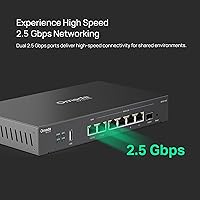
  • WAN Ports: Equipped with two 2.5Gbps WAN ports — one dedicated and one configurable as WAN or LAN — enabling high-speed uplink aggregation or automatic failover between two ISP connections.
  • LAN Ports: Four Gigabit WAN/LAN ports provide flexible local network connectivity for wired devices, switches, or additional WAN assignments depending on deployment needs.
  • SFP Slot: One Gigabit SFP WAN/LAN slot supports fiber optic uplinks, making the router compatible with mixed copper-and-fiber network environments.
  • USB Port: One USB 2.0 port supports an LTE modem dongle for cellular WAN backup or a USB storage device for basic network-attached storage functionality.
  • VPN Support: Supports up to 100 simultaneous LAN-to-LAN IPsec tunnels, 66 OpenVPN connections, 60 L2TP connections, and 60 PPTP connections for comprehensive remote access coverage.
  • Session Capacity: Handles a maximum of 500,000 concurrent sessions, providing substantial headroom for high-traffic business environments with many simultaneous connections.
  • Client Capacity: Supports 1,000 or more connected clients simultaneously, making it viable for mid-sized offices and dense deployment scenarios.
  • Security: Includes an SPI firewall, DoS attack protection, IP/MAC/URL filtering, and built-in lightning protection for a layered hardware and software security posture.
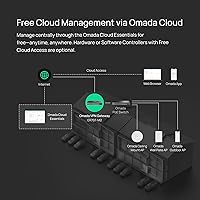
  • Management: Fully integrated with the TP-Link Omada SDN platform, supporting cloud-based centralized management, zero-touch provisioning, and control via the Omada mobile app.
  • Dimensions: The unit measures 12.9 x 9.5 x 3.1 inches, sized for desktop placement or optional rack mounting in a standard network cabinet.
  • Weight: Weighs 2.42 pounds, light enough for easy repositioning during installation or rack deployment without additional mounting hardware complications.
  • Warranty: Backed by a five-year limited warranty along with free technical support available Monday through Friday, 6am to 6pm PST.
  • In the Box: Package includes the ER707-M2 router unit, a power adapter, and a quick installation guide; no rack-mount ears or patch cables are included.
  • Release Date: First made available in August 2023, placing it among TP-Link's more recent Omada SDN router releases with current firmware support.
  • Market Rank: Holds a Best Sellers Rank of number 34 in the Computer Routers category on Amazon, reflecting sustained commercial demand since launch.

Related Reviews
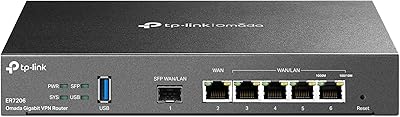
TP-Link ER7206 Multi-WAN Gigabit VPN Router
79%
93%
WAN Failover & Redundancy
88%
VPN Performance
84%
Omada SDN Integration
58%
Setup & Configuration
89%
Value for Money
More
TP-Link TL-SG105-M2 5-Port 2.5G Unmanaged Switch
82%
91%
Throughput Performance
96%
Ease of Setup
88%
Build Quality
71%
Thermal Management
63%
Port Count & Expandability
More
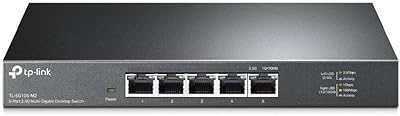
TP-Link TL-SG108-M2 8-Port 2.5G Unmanaged Switch
81%
93%
Network Performance
97%
Ease of Setup
89%
Build Quality
74%
Thermal Management
81%
Value for Money
More
TP-Link ER605 V2 VPN Router
80%
93%
Value for Money
89%
Multi-WAN Reliability
71%
VPN Performance
82%
Ease of Setup
91%
Omada SDN Integration
More
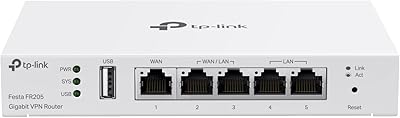
TP-Link Festa FR205 Multi-WAN Wired Router
76%
88%
Ease of Setup
91%
Multi-WAN Performance
86%
VPN Reliability
78%
Cloud Management
74%
USB WAN Backup
More
D-Link DSR-250V2 Gigabit VPN Router
81%
85%
Reliability & Connectivity
62%
Ease of Setup
91%
Security Features
89%
Dual WAN Failover Performance
84%
VPN Tunnel Support
More
TRENDnet TWG-431BR Multi-WAN VPN Router
71%
84%
Multi-WAN Failover Reliability
79%
VPN Performance
58%
Setup & Initial Configuration
51%
Web Interface Usability
77%
Load Balancing Effectiveness
More
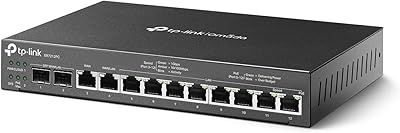
TP-Link ER7212PC 3-in-1 Gigabit VPN Router
73%
83%
Value for Money
74%
PoE Power Delivery
86%
Omada Controller Integration
81%
Multi-WAN & Failover
77%
VPN Performance
More
TP-Link TD-W9970 Modem Router
83%
91%
Value for Money
95%
Ease of Setup
76%
Wi-Fi Performance
84%
Build Quality
87%
USB Port Functionality
More
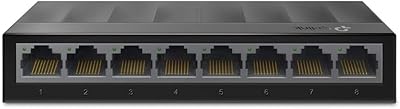
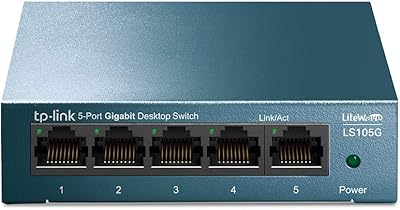
TP-Link LS1008G 8-Port Gigabit Ethernet Switch
84%
97%
Ease of Setup
96%
Noise Level
91%
Network Performance
93%
Value for Money
67%
Build Quality
More

FAQ

You can manage the ER707-M2 through its local web interface without ever touching the Omada controller — standalone mode works fine for basic deployments. That said, if you want centralized multi-site management, cloud access, or zero-touch provisioning across multiple devices, setting up the Omada Software Controller or using a hardware controller unlocks all of that. For a single-site setup, standalone is perfectly reasonable.

Yes, both 2.5Gbps ports can be configured as active WAN connections simultaneously, and the router supports load balancing policies to distribute traffic across them. You can also set one as a primary and the other as a failover backup, which is a popular choice for businesses where downtime is costly.

No, this is a wired-only router with no wireless radio. If you need Wi-Fi, you will need to add separate access points — TP-Link Omada APs integrate cleanly with the same management platform, but any standard access point connected via Ethernet will work too.

Honestly, it has a steeper learning curve than a typical home router. Concepts like VLANs, policy-based routing, and WAN port assignment come up quickly during setup. If you are comfortable following detailed guides and do not mind spending a few hours learning, it is manageable. If you just need basic internet sharing without any of those features, this router is likely more complexity than you need.

Yes, the USB 2.0 port supports compatible LTE dongles as a backup WAN connection. If your primary ISP line goes down, the router can automatically switch over to the cellular connection. Not all dongles are guaranteed compatible, so it is worth checking TP-Link's compatibility list before purchasing a modem.

The router supports up to 66 simultaneous OpenVPN connections and up to 100 IPsec tunnels, so for most small and mid-sized teams, capacity will not be the limiting factor. Performance does depend somewhat on the type of VPN traffic and encryption overhead, but users running 20 to 40 concurrent remote sessions report smooth operation.

Yes, the router functions as a standard network gateway regardless of what other hardware is on your network. You do not need to be all-in on Omada ecosystem gear to use it effectively. The Omada SDN features simply give you additional visibility and control when you do use compatible devices.

Your local network and internet traffic continue operating normally even if the Omada cloud service is unavailable. Cloud access is used for remote management and monitoring, not for routing traffic. The only thing you would lose temporarily is the ability to manage the router remotely through the cloud portal.

The ER707-M2 is a fanless device that relies on passive cooling, so it operates in complete silence. This makes it a practical choice for office environments, reception areas, or anywhere fan noise would be disruptive.

Firmware updates can be applied manually through the local web interface or pushed via the Omada controller. A small number of users have reported minor hiccups when updating — usually resolvable with a factory reset — so it is a reasonable habit to check community forums or release notes before applying a new firmware version to a production network.

Where to Buy