Overview

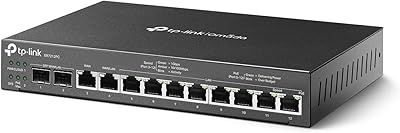
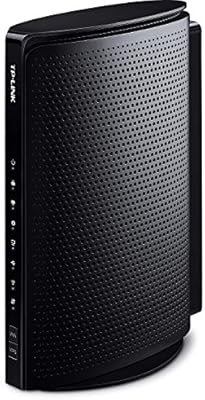
The TP-Link ER605 V2 VPN Router sits in an interesting spot in the networking market — it offers capabilities that small businesses genuinely need without the price tag that usually comes with them. Built around five gigabit ports, it supports up to three simultaneous WAN connections, which means real redundancy for offices that cannot afford unexpected downtime. The Omada SDN integration lets network administrators manage everything from a central controller, whether cloud-based or on-premise. It is compact enough to sit on a desk or mount in a small rack, and it runs quietly without drawing much attention to itself.
Features & Benefits

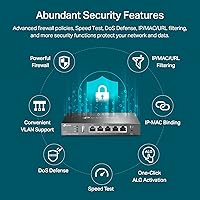
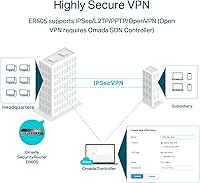
Where this SMB router earns its keep is in the practical flexibility it offers day to day. The multi-WAN load balancing means you can spread traffic across two or three ISP connections rather than leaving backup links idle. The USB port adds a genuine safety net — plug in a compatible 4G modem and you have LTE failover when your primary lines go down. On the security side, the SPI firewall handles DoS defense, plus IP, MAC, and URL filtering, giving admins meaningful control over what enters and leaves the network. The ER605 V2 also supports IPsec, OpenVPN, L2TP, and PPTP simultaneously, which covers most remote access scenarios without requiring additional hardware.

Best For

This gigabit VPN router makes the most sense for small business owners who need enterprise-adjacent reliability but are working with realistic budgets. It fits naturally into retail branches, professional offices, or any environment where WAN failover is non-negotiable and a 4G backup line provides peace of mind. IT generalists managing distributed teams will appreciate the VPN breadth, while home lab users who want hands-on experience with SDN concepts will find it a capable and affordable platform. If you are already running Omada access points or switches, plugging this into that ecosystem makes centralized network management considerably more straightforward.

User Feedback

Across thousands of ratings, the ER605 V2 holds a 4.4 out of 5 average, which reflects broadly positive real-world experience rather than just early enthusiasm. Buyers consistently highlight long-term stability and how well it integrates with the Omada controller once configured. The value relative to pricier competitors comes up repeatedly as a deciding factor. That said, the web interface feels dated and takes some getting used to, particularly for anyone coming from more consumer-friendly routers. USB modem compatibility is not universal, so checking the supported modem list before buying is worth the effort. A handful of experienced users also note that VPN throughput can drop noticeably under heavy simultaneous tunnel loads.

Pros

  • Multi-WAN load balancing lets you spread traffic across two or three ISP connections rather than leaving backup links idle.
  • 4G LTE failover via USB modem provides a genuine safety net when primary broadband goes down.
  • Supports IPsec, OpenVPN, L2TP, and PPTP simultaneously, covering most remote access needs with one device.
  • Long-term stability is a standout strength — many admins report months of uptime with no intervention needed.
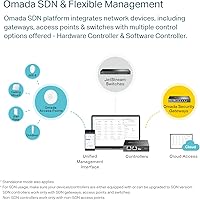
  • Omada SDN integration makes centralized management across multiple sites practical and efficient.
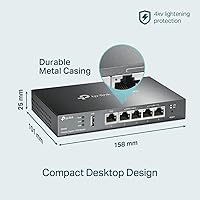
  • Lightning protection on ports adds meaningful resilience in environments prone to power surges.
  • The ER605 V2 delivers enterprise-adjacent features at a price point that most small businesses can justify without debate.
  • SPI firewall with IP, MAC, and URL filtering gives admins real control over network access policies.
  • Compact form factor fits comfortably on a desk or in a small rack without demanding dedicated space.
  • Broad VPN protocol support means compatibility with a wide range of existing client setups and remote devices.

Cons

  • The standalone web UI looks and feels outdated, with navigation that frustrates users unfamiliar with business networking gear.
  • VPN throughput drops noticeably when multiple tunnels are active simultaneously, which can surprise power users.
  • USB modem compatibility is inconsistent — not all popular 4G dongles work, and the supported list is easy to overlook before buying.
  • Firewall lacks deep packet inspection and intrusion prevention, so it cannot replace a dedicated security appliance in higher-risk environments.
  • Official technical support response times draw frequent criticism from buyers dealing with complex configuration issues.
  • The Omada cloud controller requires an active internet connection to function, which is a real limitation in certain deployment scenarios.
  • Advanced traffic shaping and QoS options are limited compared to higher-priced competitors in the same category.
  • Session-persistent applications can behave unpredictably under load balancing, requiring manual policy routing to resolve.
  • Firmware updates have occasionally introduced instability, requiring reboots to restore normal operation.
  • Users outside the Omada ecosystem gain little from the SDN features, reducing the overall value proposition for single-brand setups.

Ratings

The TP-Link ER605 V2 VPN Router has been evaluated by our AI system after processing thousands of verified global buyer reviews, with spam, bot-generated, and incentivized feedback actively filtered out. The scores below reflect a balanced picture of where this SMB router genuinely excels and where real-world buyers have run into friction. Both the strengths and the honest shortcomings are represented so you can make an informed decision.
Value for Money
93%
For small business owners watching budgets carefully, the ER605 V2 punches well above its price class. Buyers consistently note that comparable multi-WAN routing and VPN features from competing brands cost significantly more, making this router a compelling choice for cost-conscious IT buyers.
A small number of users feel that some premium features, particularly advanced traffic shaping, feel slightly underdeveloped relative to pricier alternatives. If your workload demands granular QoS tuning, the value equation becomes a bit less clear-cut.
Multi-WAN Reliability
89%
Offices running dual ISP connections report that WAN failover kicks in quickly and reliably, with minimal disruption to active sessions. Load balancing across multiple uplinks works as advertised for everyday business traffic, which is exactly what most SMB buyers need.
Under sustained heavy traffic across all WAN ports simultaneously, a handful of users noted occasional instability. It is not a common complaint, but it surfaces enough in reviews to be worth flagging for high-demand environments.
VPN Performance
71%
29%
The breadth of supported VPN protocols is genuinely useful — running IPsec for site-to-site alongside OpenVPN for remote workers on the same device saves buying separate hardware. For small teams with modest VPN demands, throughput is more than adequate.
Power users pushing multiple simultaneous VPN tunnels report noticeable throughput degradation. This is not a device built for heavy concurrent VPN workloads, and reviewers with more than a dozen active tunnels at once express real frustration with the performance ceiling.
Ease of Setup
82%
18%
Most buyers describe the initial setup as straightforward, particularly those using the Omada controller interface. The quick installation guide covers the basics well, and non-specialist office managers report getting the router online without needing external help.
The standalone web UI, outside of the Omada ecosystem, feels dated and somewhat unintuitive for first-timers. Users migrating from consumer-grade routers often mention a learning curve before they feel comfortable navigating advanced settings.
Omada SDN Integration
91%
For businesses already invested in the Omada ecosystem — switches, access points, and all — this router slots in naturally and makes centralized network management noticeably more practical. Admins managing multiple sites especially appreciate the unified controller view.
Users who are not part of the Omada ecosystem get less value from this feature, and setting up the controller from scratch adds initial complexity. The cloud-based controller also requires an active internet connection to function, which can be a limitation in some setups.
Firewall & Security Features
86%
The SPI firewall with DoS defense, combined with IP, MAC, and URL filtering, gives IT administrators meaningful tools to lock down network access. In practice, small offices report being able to enforce content policies and block suspicious traffic without needing a dedicated security appliance.
More advanced security professionals note that the firewall rule options, while solid for SMB use, lack the depth found in dedicated UTM appliances. Intrusion prevention and deep packet inspection are absent, which matters if your threat model goes beyond basic perimeter defense.
USB WAN / 4G Backup
67%
33%
The concept of plugging in a 4G USB modem as a WAN backup is genuinely useful for branch offices in areas with unreliable fixed broadband. When it works, users describe it as a reliable safety net that has saved them during ISP outages.
Compatibility with USB modems is inconsistent, and not all popular 4G dongles work out of the box. Several reviewers discovered their modem was not on the supported list after purchase, which is a frustrating and avoidable problem that TP-Link could resolve with clearer upfront documentation.
Build Quality & Hardware
78%
22%
The metal-accented chassis feels solid for its size, and the inclusion of lightning protection on the ports is a practical touch that businesses in storm-prone areas genuinely appreciate. The compact footprint means it fits on a crowded desk or in a small rack without fuss.
The plastic base and overall construction feel more prosumer than enterprise-grade. A few buyers running the device in high-temperature environments have noted it runs warm under load, and the passive cooling design means airflow management matters more in enclosed spaces.
Long-Term Stability
88%
Stability over months of continuous operation is one of the most frequently praised aspects across long-term owner reviews. IT admins report setting this router up and largely forgetting about it, with uptimes measured in months rather than days.
A small subset of users report occasional firmware-related issues after updates, requiring reboots to restore full functionality. These incidents are infrequent but are worth monitoring, particularly in environments where any downtime has operational consequences.
Web Interface & Management UI
61%
39%
Once you invest the time to learn where things live in the interface, day-to-day management tasks like adjusting firewall rules or checking WAN status become reasonably quick. The layout is logical even if it is not modern, and experienced network admins adapt without major difficulty.
The interface looks and feels like it has not had a meaningful design refresh in years. New users, especially those without a networking background, often find the terminology and navigation confusing, and the lack of contextual help within the UI adds to the frustration.
Load Balancing Effectiveness
76%
24%
For offices running two ISP connections, load balancing works reliably for general web traffic and cloud application use. Buyers report a tangible improvement in aggregate bandwidth utilization compared to running a single WAN connection.
Session-persistent applications can behave unpredictably when traffic is balanced across multiple WANs. Some users note that certain business applications require manual policy routing to avoid connection drops, adding configuration overhead that occasional users may not anticipate.
Documentation & Support
69%
31%
TP-Link provides a reasonably detailed online knowledge base, and the Omada community forums are active enough that most common configuration questions have been answered somewhere. The quick start guide included in the box covers the fundamentals clearly.
Official technical support response times draw consistent criticism, and the documentation for edge-case configurations — particularly around advanced VPN setups — can be sparse. Users troubleshooting uncommon modem compatibility issues often have to rely on community forums rather than official channels.
Throughput at Gigabit Speeds
83%
For non-VPN traffic, the router handles gigabit-class WAN connections without becoming the bottleneck, which is the baseline expectation for any modern wired router in this category. Buyers upgrading from older hardware report a clear improvement in routing speed.
Throughput figures drop when NAT, firewall rules, and VPN are all active simultaneously. The hardware is capable for typical SMB workloads, but users with high-bandwidth requirements and complex rule sets may find the real-world ceiling lower than the spec sheet implies.

Suitable for:

The TP-Link ER605 V2 VPN Router is a strong fit for small and medium-sized businesses that need reliable, multi-WAN connectivity without the budget strain of enterprise hardware. If your office depends on two ISP connections for redundancy, or if you need a 4G LTE modem as a fallback when your primary line goes down, this router handles both scenarios well. IT administrators managing distributed teams will find the range of supported VPN protocols — IPsec, OpenVPN, L2TP, and PPTP — broad enough to cover most remote access configurations without bolting on extra hardware. Retail branches and professional offices already using TP-Link Omada switches and access points will get the most out of the SDN integration, since centralizing management across all devices becomes noticeably more practical. Home lab enthusiasts who want hands-on experience with real firewall policies, load balancing, and VPN tunnels will also find this SMB router a capable and affordable platform to learn on.
Not suitable for:

Buyers expecting consumer-grade simplicity should look elsewhere — the ER605 V2 is not a plug-and-play device, and the standalone web interface carries a real learning curve that can frustrate anyone without a basic networking background. If your workload involves a large number of simultaneous VPN tunnels at high throughput, this gigabit VPN router will likely disappoint; real-world VPN performance under heavy concurrent load falls short of what more purpose-built or higher-priced VPN appliances can deliver. Organizations that need advanced security features like deep packet inspection or intrusion prevention will find the built-in firewall capable but not sufficient as a standalone solution. Anyone counting on USB 4G modem backup should verify their specific modem is on TP-Link's compatibility list before purchasing, as incompatible hardware is a recurring source of frustration in buyer reviews. Finally, businesses outside the Omada ecosystem get less value from the SDN features, and setting up the controller from scratch adds overhead that may not be worth it for a single-site deployment.

Specifications

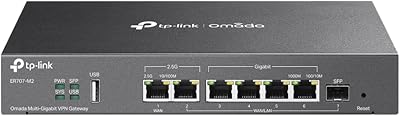
  • WAN Ports: The router includes 1 dedicated Gigabit WAN port plus 2 Gigabit WAN/LAN combo ports, allowing up to 3 simultaneous WAN connections for redundancy and load balancing.
  • LAN Ports: Two dedicated Gigabit LAN ports are available for wired client connections alongside the configurable WAN/LAN combo ports.
  • USB Port: One USB 2.0 port supports 4G/3G modem connections, enabling mobile broadband as a WAN backup source when primary lines fail.
  • VPN Tunnels: Supports up to 20 simultaneous LAN-to-LAN IPsec tunnels, 16 OpenVPN connections, 16 L2TP connections, and 16 PPTP connections concurrently.
  • Firewall: SPI firewall includes DoS defense, Ping of Death protection, IP/MAC/URL filtering, and VPN passthrough for layered perimeter security.
  • SDN Support: Fully compatible with TP-Link Omada SDN, supporting both cloud-based and on-premise hardware controller management for centralized network oversight.
  • Load Balancing: Intelligent load balancing distributes outbound traffic across multiple active WAN connections to optimize bandwidth usage and reduce bottlenecks.
  • Dimensions: The unit measures 6.22 x 3.94 x 1 inches, making it compact enough for desktop placement or installation in a small network rack.
  • Weight: The router weighs 12.6 oz, keeping it lightweight and easy to position or mount in space-constrained office environments.
  • Lightning Protection: Built-in lightning protection on all Ethernet ports provides physical resilience against voltage surges caused by nearby electrical storms.
  • Network Standards: Compliant with IEEE 802.3, 802.3u, 802.3ab, 802.3x, and 802.1q standards, ensuring broad compatibility with existing business network infrastructure.
  • Power Input: The included power adapter supports up to 240V input, making the unit compatible with power systems across a wide range of international markets.
  • Routing Protocols: Supports static routing and policy-based routing, allowing administrators to direct specific traffic types across designated WAN interfaces manually.
  • ALG Support: Application Layer Gateway support covers FTP, H.323, PPTP, SIP, and IPsec protocols to maintain compatibility with common business communication applications.
  • Management Options: Administrators can manage the router via local web UI, Omada hardware controller, or the Omada cloud portal for flexible deployment options.
  • Included Contents: The box includes the ER605 router unit, a power adapter, a quick installation guide, and one RJ45 Ethernet cable.
  • Manufacturer: Designed and manufactured by TP-Link, a globally recognized networking hardware company with a broad SMB and enterprise product portfolio.
  • Release Date: The ER605 first became available in December 2020, with the V2 revision introduced to address early hardware and firmware feedback from the original release.

Related Reviews
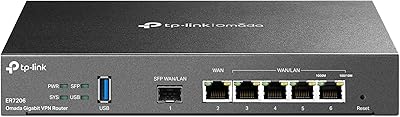
TP-Link ER7206 Multi-WAN VPN Router
86%
91%
Network Performance
94%
Security Features
88%
Cloud Management Experience
89%
VPN Support
82%
Setup & Installation
More
TP-Link ER707-M2 Omada Multi-Gigabit VPN Router
86%
92%
Network Performance
80%
Ease of Setup
89%
Cloud Management (Omada SDN)
85%
Security Features
88%
Build Quality
More
TP-Link EAP610 V2
TP-Link EAP610 V2
82%
86%
Wireless Performance
91%
Setup & Installation
88%
Cloud Management & App
83%
Multi-Device Handling
79%
Range & Coverage
More
TP-Link EAP670 V2
TP-Link EAP670 V2
90%
96%
WiFi Performance
94%
Coverage Consistency
90%
Setup & Installation
92%
Ease of Management
91%
Mesh & Roaming Reliability
More
TP-Link ER7212PC Omada Router
86%
88%
Ease of Installation
84%
VPN Performance
91%
Cloud Management Experience
87%
PoE+ Port Performance
85%
Build Quality
More
TP-Link TD-W9970 Modem Router
83%
91%
Value for Money
95%
Ease of Setup
76%
Wi-Fi Performance
84%
Build Quality
87%
USB Port Functionality
More
TP-Link Archer AC1750 WiFi Router
85%
88%
WiFi Performance
91%
Setup & Installation
80%
Range & Coverage
85%
Value for Money
89%
Alexa Integration
More
TP-Link Archer AX6000 WiFi 6 Router
84%
91%
Performance for Gaming and Streaming
87%
WiFi Coverage and Range
80%
Ease of Setup
90%
Security Features (TP-Link HomeCare)
85%
Build Quality and Durability
More
TP-Link Festa FR205 Multi-WAN Router
86%
88%
Performance and Reliability
93%
Ease of Setup
90%
Cloud Management Experience
85%
VPN Support
87%
Multi-WAN Functionality
More
D-Link DSR-250V2 Gigabit VPN Router
81%
85%
Reliability & Connectivity
62%
Ease of Setup
91%
Security Features
89%
Dual WAN Failover Performance
84%
VPN Tunnel Support
More

FAQ

You can absolutely use it without the Omada controller. The router has a standalone web interface accessible directly via a browser, and most core features including VPN, firewall rules, and multi-WAN configuration are available there. The Omada controller just adds centralized management, which becomes more valuable if you have multiple TP-Link devices across one or more sites.

Not all 4G modems are compatible — TP-Link maintains a list of supported modems on their website, and it is worth checking before you buy a dongle specifically for this purpose. Several reviewers discovered after purchase that their modem was not on the list, so checking upfront saves a frustrating return. Popular Huawei and ZTE models tend to have the broadest support.

It depends on what you need. If you just want basic internet sharing and Wi-Fi, it is overkill — and keep in mind it is a wired-only router with no built-in wireless. But if you work from home and need a reliable VPN back to your company office, or you want a second ISP connection as backup, this SMB router makes a lot of sense even in a home office setting.

On paper, the router supports up to 16 simultaneous OpenVPN connections and 20 IPsec tunnels. In practice, throughput per tunnel decreases as you add more simultaneous connections, so for teams with heavy data transfer needs, performance may feel constrained past 8 to 10 concurrent VPN users. For lighter usage like email and document access, the full tunnel count is workable.

No, the ER605 V2 is a wired-only router with no wireless capability. If you need Wi-Fi, you would pair it with one or more access points — TP-Link Omada access points integrate particularly well if you want everything managed from a single controller interface.

The router can distribute outbound sessions across your active WAN connections based on traffic weight or volume rules you configure. This means your aggregate available bandwidth increases, though individual sessions still travel through a single WAN at a time. For general office browsing and cloud app usage it works well; applications that are sensitive to IP changes may need policy routing to pin them to a specific WAN.

It has a learning curve. The interface is functional and logically organized once you know where things are, but it does not hold your hand with tooltips or guided setup wizards the way consumer routers do. If you have basic networking knowledge — understanding of IP addressing, VLANs, and firewall rules — you will get comfortable with it fairly quickly. Complete beginners may want to budget some time for tutorials.

Yes, VLAN support is available and works well in combination with compatible Omada switches and access points. You can isolate guest Wi-Fi onto a separate VLAN, restrict inter-VLAN routing, and apply different firewall policies per segment. The configuration is done through the web UI or Omada controller and is straightforward for anyone with basic VLAN knowledge.

Long-term stability is one of the most consistently praised aspects by owners who have been running this gigabit VPN router for a year or more. Most report uptimes measured in months without requiring a reboot. The main exception noted in reviews is occasional instability following firmware updates, so it is wise to wait a few days after a new firmware release before applying it, to let others report any issues first.

Automatic failover is supported — you can configure the router to monitor your primary WAN connection using health check pings, and if it detects a failure, it will switch traffic to your backup WAN without manual intervention. The failover detection time and recovery behavior are configurable, so you can tune it to match how quickly your environment needs to respond to an outage.