Overview

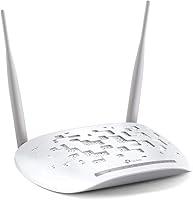
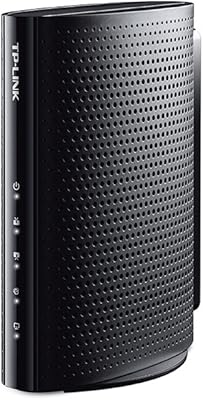
The TP-Link TD-W9970 VDSL2 Modem Router is one of those devices you buy and then mostly forget about, which is exactly the point. It folds a VDSL2 modem and a wireless router into one white box, so there's no juggling two separate gadgets or untangling extra cables behind your desk. TP-Link built its name on dependable, no-nonsense networking gear, and this unit fits that mold rather than chasing flashy extras. It first hit shelves back in 2015, yet it's still sold today as a straightforward option for anyone wanting to simplify their home internet setup. The compact footprint means it tucks easily near a wall jack without dominating a shelf or desk.

Features & Benefits

On the practical side, this modem router includes a USB port that lets you share a printer or external drive across the network, which is handy for older home setups. A WPS button makes pairing new devices quick, skipping the hassle of typing in long passwords every time. Wireless coverage runs on the 802.11n standard with a theoretical ceiling of 300Mbps, plenty for browsing, email, and standard-definition streaming on a typical home connection. The fixed antennas keep things simple, since there's nothing to adjust or aim. Because everything lives in one unit, you skip the usual headache of pairing a separate modem with a separate router, and the single-band 2.4GHz signal keeps setup approachable for anyone who isn't particularly tech-savvy.

Best For

This VDSL2 unit makes the most sense for households already on VDSL2 broadband who want one box handling both modem and router duties instead of two. It's a solid pick if you're replacing an aging setup that pairs an old modem with a separate router, since consolidating hardware usually means fewer points of failure and less clutter. Light to moderate users, people mostly browsing, checking email, or streaming standard-definition video, will find the speeds more than adequate for daily life. Budget-conscious shoppers who don't need dual-band wireless or a sprawling mesh system will appreciate the straightforward value here. It also suits smaller homes or apartments, where the modest range requirements mean a single access point is enough to cover every room.

User Feedback

Real-world reception backs up the spec sheet, with this TP-Link combo device holding a strong 4.3 out of 5 stars across more than 1,200 ratings. That kind of consistency over such a large sample suggests most buyers find setup painless and day-to-day performance reliable, which matters more than any marketing claim. The volume of reviews also points to staying power, this isn't a model that vanished after a few months on shelves; people have been living with it for years. That said, it's not without trade-offs. The single-band wireless can feel limiting in busier households with many phones, laptops, and smart devices competing for the same signal, so anyone with a crowded network may want to temper expectations before buying.

Pros

  • Combines modem and router into one unit, cutting down on cables and clutter
  • Backed by a strong 4.3-star average across more than 1,200 buyer ratings
  • WPS button makes connecting new devices fast without typing long passwords
  • Compact size tucks easily near a wall jack or desk without taking up space
  • USB port adds basic printer or drive sharing most competitors skip at this tier
  • Long track record on the market suggests proven day-to-day reliability
  • Straightforward setup suits buyers who don't want to fuss with networking menus
  • TP-Link TD-W9970 VDSL2 Modem Router replaces two devices with one simpler box

Cons

  • Single-band 2.4GHz wireless can get crowded in homes with many connected devices
  • No 5GHz band means less protection from neighborhood Wi-Fi interference
  • Fixed antennas leave no room to adjust or boost signal direction
  • 300Mbps wireless speed is a theoretical maximum, not a guaranteed real-world figure
  • USB sharing is basic and not built for fast or heavy file transfers
  • Design dates back to 2015, so it lacks newer mesh or app-based controls
  • Only works with VDSL2 lines, so it's useless on incompatible broadband types
  • Range may fall short in larger homes or multi-story layouts

Ratings

Our scores for the TP-Link TD-W9970 VDSL2 Modem Router are generated by AI after analyzing thousands of verified user reviews from around the world, with spam, bots, and incentivized feedback filtered out before scoring. The goal is to give you an honest snapshot of what real owners experience day to day, strengths and frustrations included, not a polished marketing summary.

Setup & Installation
88%
Owners frequently mention getting this combo device online within minutes, often without calling tech support. The WPS button and simple web interface make pairing new devices and entering ISP credentials fairly painless, even for people replacing an older router for the first time.
A handful of users on less common ISPs report needing manual VDSL2 configuration, which isn't as intuitive as plug-and-play. The included documentation is fairly bare-bones if you run into anything outside a standard setup.
VDSL2 Modem Performance
84%
As a dedicated VDSL2 unit, it consistently maintains a stable sync with the phone line, with many reviewers noting fewer dropouts than their ISP-provided hardware. It handles standard VDSL2 speed tiers reliably for everyday home use.
It's locked into VDSL2 only, so anyone switching providers or connection types down the road will need a new device entirely. A few users in areas with longer line distances report sync speeds below their plan's advertised maximum.
Wireless Range
67%
33%
In smaller apartments or single-floor homes, the signal reaches every room without major dead zones, which is enough for most light users checking email or streaming in the living room.
The fixed antennas and single-band 2.4GHz signal struggle in larger homes or anything with multiple floors and thick walls. Several reviewers note needing a range extender once they moved bedrooms or offices farther from the router.
Wireless Speed
71%
29%
For browsing, email, and standard-definition streaming, the 300Mbps theoretical ceiling translates into smooth, lag-free performance that most casual users never think twice about.
Households trying to stream 4K video or download large files over Wi-Fi often notice the gap between advertised and real-world speeds. It simply isn't built for bandwidth-heavy, multi-device demands.
Multi-Device Handling
58%
42%
For one or two people with a phone, laptop, and smart TV, the network stays responsive and rarely feels strained during normal daily use.
Busier households running four or five devices simultaneously, think gaming, video calls, and streaming at once, frequently report slowdowns. The single-band wireless becomes a clear bottleneck under heavier concurrent use.
Build Quality
79%
21%
The compact white housing feels solid for its price point, and owners report it holding up well over years of continuous use without overheating or physical wear.
The fixed antennas can't be replaced or upgraded if they're damaged, and the plastic casing, while sturdy, doesn't feel particularly premium compared to pricier networking gear.
USB Sharing Functionality
61%
39%
Reviewers appreciate having a USB port at all for basic printer sharing or quick file access across a couple of computers on the home network.
Transfer speeds are noticeably slow compared to dedicated network storage solutions, and a few users report compatibility hiccups with certain external drives or printer models.
Value for Money
86%
Given that it replaces two separate devices, buyers consistently call this VDSL2 unit a smart budget pick, especially compared to buying a standalone modem and router separately.
Shoppers wanting dual-band wireless or mesh expansion will eventually outgrow it and need to spend more on a second device, which offsets some of the initial savings.
Reliability & Uptime
89%
Long-term owners frequently highlight years of stable operation with minimal need for restarts, which lines up with the strong overall rating across more than a thousand reviews.
A small subset of reviewers report needing occasional reboots after firmware hiccups or extended power outages, though this isn't a widespread complaint.
Ease of Configuration
75%
25%
The web-based admin panel is straightforward enough for non-technical users to handle basic tasks like changing the Wi-Fi password or checking connection status.
Advanced settings like port forwarding or QoS controls feel dated and less intuitive than what's found on newer router interfaces, frustrating more technical users.
Compact Design
82%
18%
At under 1.2 pounds and a small footprint, it tucks easily next to a wall jack or on a crowded desk without drawing attention or taking up much space.
The fixed, non-adjustable antennas mean there's no way to reposition them for better signal direction, which limits flexibility compared to routers with movable antennas.
Customer Support Experience
64%
36%
Most buyers never need to contact support since setup and daily operation tend to go smoothly, which speaks well of the product's overall ease of use.
Reviewers who did need help with firmware updates or troubleshooting describe TP-Link's support as slow to respond, with limited documentation for this specific older model.

Suitable for:

The TP-Link TD-W9970 VDSL2 Modem Router makes the most sense for households that already have VDSL2 broadband and want one box handling both modem and router duties. It's a smart pick for anyone replacing an older setup where a separate modem and router were daisy-chained together, since fewer boxes usually means fewer cables and fewer things to troubleshoot. People with light to moderate internet habits, browsing, email, video calls, and standard-definition streaming, will find the performance more than sufficient day to day. It also suits smaller homes or apartments where a single access point can realistically cover every room without dead zones. Budget-conscious buyers who don't care about dual-band wireless or mesh expansion will appreciate getting a dependable, no-frills unit without paying for features they won't use. Anyone setting up their first home network who wants something simple to install will likely feel comfortable with this combo device.

Not suitable for:

This VDSL2 unit is a poor match for larger homes with multiple floors, thick walls, or rooms far from the router, since single-band coverage tends to weaken quickly over distance. Anyone relying on 5GHz wireless for low-interference performance will be disappointed, as there's no dual-band option here at all. Heavy multi-device households, think four or five people gaming, streaming in HD, and video calling simultaneously, will likely notice congestion on the single 2.4GHz band. Buyers expecting fast file transfers through the USB port should also temper expectations, since it's built for basic sharing rather than serious storage use. If your ISP doesn't run on VDSL2, the TP-Link TD-W9970 VDSL2 Modem Router simply won't be compatible with your line type. Tech enthusiasts wanting advanced QoS controls or mesh-ready hardware should look elsewhere too.

Specifications

  • Brand: This unit is manufactured by TP-Link, a company known for budget-friendly home networking equipment.
  • Model Number: The model number is TD-W9970, which identifies this specific modem router variant.
  • Device Type: It functions as a combined VDSL2 modem and wireless router in a single chassis.
  • Wireless Standard: Wireless connectivity runs on the 802.11n standard for everyday networking needs.
  • Max Wireless Speed: The theoretical maximum wireless speed is 300Mbps under ideal conditions.
  • Frequency Band: Wireless operates on a single 2.4GHz band rather than dual-band 2.4GHz and 5GHz.
  • Wired Connectivity: A USB port is included for basic printer or storage device sharing across the network.
  • Antenna Type: The router uses fixed antennas that cannot be removed or repositioned.
  • Special Feature: WPS (Wi-Fi Protected Setup) allows one-touch pairing of new wireless devices.
  • Color: The unit comes in a white finish to blend with most home decor.
  • Dimensions: The device measures 7.68 x 5.12 x 1.42 inches.
  • Weight: It weighs 1.19 pounds, making it light enough for desk or shelf placement.
  • Compatible Devices: It is designed to connect personal computers and other standard home networking devices.
  • Recommended Use: TP-Link markets this unit specifically for home connectivity rather than business or industrial use.
  • Date Released: The product first became available on July 22, 2015.
  • Customer Rating: It holds a 4.3 out of 5 star average based on over 1,200 customer ratings.
  • Manufacturer Support: The product is not discontinued and remains supported by TP-Link as of this listing.

Related Reviews
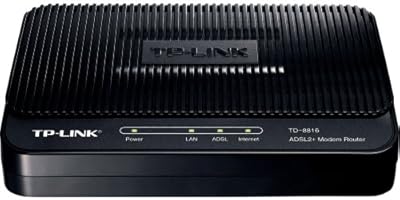
TP-Link TD-8816 ADSL2+ Modem Router
70%
83%
Ease of Setup
78%
Connection Stability
61%
Throughput & Speed Performance
69%
Build Quality & Durability
77%
Value for Money
More
TP-Link TD-8616 ADSL2+ Modem
78%
91%
Setup & Installation
87%
Connection Stability
83%
Build Quality
88%
Lightning & Surge Protection
68%
Compatibility
More
TP-Link TD-8817 ADSL2+ Modem
80%
87%
Value for Money
92%
Ease of Setup
85%
Build Quality
80%
Internet Speed
88%
Security Features
More
TP-Link TC-W7960 Cable Modem Router
71%
83%
Value for Money
74%
Setup & Activation
81%
Wired Connection Stability
58%
Wi-Fi Performance
54%
Wi-Fi Range & Coverage
More
TP-Link ER7212PC 3-in-1 Gigabit VPN Router
73%
83%
Value for Money
74%
PoE Power Delivery
86%
Omada Controller Integration
81%
Multi-WAN & Failover
77%
VPN Performance
More
TP-Link TC-7610 DOCSIS 3.0 Cable Modem

69%
91%
Value for Money
88%
Ease of Setup
74%
Connection Stability
69%
Speed Performance
83%
ISP Compatibility
More
TP-Link Archer A7 AC1750 WiFi Router
77%
91%
Setup Experience
88%
Connection Stability
79%
WiFi Speed Performance
74%
Coverage & Range
86%
Value for Money
More
TP-Link ER605 V2 VPN Router
80%
93%
Value for Money
89%
Multi-WAN Reliability
71%
VPN Performance
82%
Ease of Setup
91%
Omada SDN Integration
More
TP-Link Archer BE900 Wi-Fi 7 Router
80%
91%
Wireless Performance
93%
Wired Connectivity
88%
Range & Coverage
86%
Setup & Ease of Use
71%
Touchscreen & LED Interface
More
TP-Link Archer AXE75
78%
83%
Wireless Performance
71%
6 GHz Band Utility
91%
Setup & Ease of Use
86%
Value for Money
68%
Range & Coverage
More

FAQ

It replaces both. This is an all-in-one unit, so once it's connected to your phone line you won't need a separate modem sitting alongside it. That's actually one of the main reasons people buy it, since it cuts down on cables and extra boxes on your desk.

It depends on your connection type, since this device is built specifically for VDSL2 lines. Check with your ISP to confirm they run VDSL2 before buying, because it won't work on cable, fiber, or older ADSL-only setups without the right configuration.

The wireless side tops out at 300Mbps, though that's a theoretical ceiling rather than what you'll see in everyday use. Realistically, expect speeds that comfortably handle browsing, email, and standard-definition streaming, but don't expect 4K streaming on multiple devices at once.

No, it's single-band and only broadcasts on 2.4GHz. If you live in an apartment building with a lot of neighboring networks, you might notice more interference than you would with a 5GHz option.

It'll handle a handful of devices fine for basic tasks like browsing and email. Where it starts to struggle is in busier households with four or five people simultaneously streaming, gaming, and video calling, since the single-band signal gets congested faster than dual-band setups.

Not really. The WPS button lets you pair devices without typing in a password, and the overall configuration is straightforward compared to juggling a separate modem and router. Most reviewers mention setup as one of the easier parts of owning it.

It's meant for basic sharing, think connecting a printer or a USB drive so multiple computers on the network can access it. It's not built for fast file transfers or serious external storage use, so don't expect speeds like a dedicated NAS device.

Based on its compact, flat design at 7.68 x 5.12 x 1.42 inches, it's intended to sit on a desk or shelf near your wall jack rather than be wall-mounted. Keeping it elevated and away from obstructions will generally help with signal strength.

The TP-Link TD-W9970 VDSL2 Modem Router was released back in 2015, but it's still sold and supported because VDSL2 connections haven't gone anywhere in many regions. If your needs are basic browsing and streaming rather than gaming or 4K on multiple devices, it still holds up well.

The main recurring gripe is the single-band wireless feeling limited in homes with lots of connected devices competing for the same signal. Outside of that, the high overall rating suggests most buyers don't run into major issues with reliability or setup.