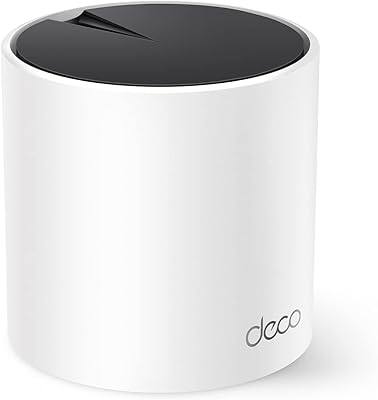
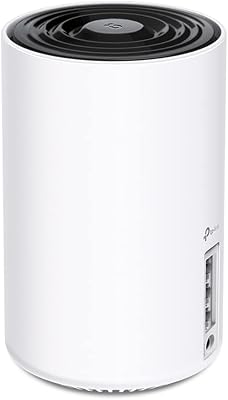
TP-Link Deco M5 Mesh WiFi Router 1-Pack
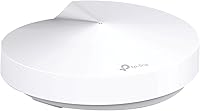
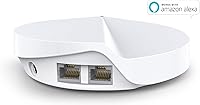
TP-Link Deco M5 Mesh WiFi Router 1-Pack — image 1
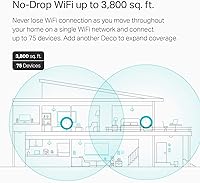
TP-Link Deco M5 Mesh WiFi Router 1-Pack — image 2
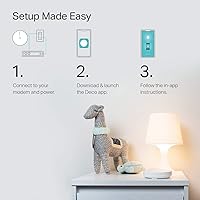
TP-Link Deco M5 Mesh WiFi Router 1-Pack — image 3
TP-Link Deco M5 Mesh WiFi Router 1-Pack — image 4

TP-Link Deco M5 Mesh WiFi Router 1-Pack — image 5

TP-Link Deco M5 Mesh WiFi Router 1-Pack — image 6

TP-Link Deco M5 Mesh WiFi Router 1-Pack — image 7
TP-Link Deco M5 Mesh WiFi Router 1-Pack — image 8
86%

Overview

The TP-Link Deco M5 Mesh WiFi Router 1-Pack offers an excellent solution for improving home network performance. This mesh system covers up to 2,000 sq. ft. and supports dual-band speeds of up to 1300 Mbps, making it ideal for 4K streaming and gaming. Setup is quick and simple with the TP-Link Deco app, compatible with a wide range of ISPs. Security is a priority, as this router includes built-in antivirus protection and parental controls through HomeCare, ensuring that your network remains secure at all times.

Features & Benefits

This mesh WiFi router is packed with useful features that enhance connectivity across your home. MU-MIMO technology allows multiple devices to be connected without sacrificing performance, making it perfect for busy households. With its ability to work with Alexa, users can control the network with voice commands for added convenience. The HomeCare system also offers three years of free protection from malware and provides comprehensive parental controls. Additionally, the system is expandable—adding more Deco units can extend coverage and help eliminate Wi-Fi dead spots.

Best For

The TP-Link Deco M5 Mesh WiFi Router 1-Pack is best suited for users in medium-sized homes, typically up to 2,000 sq. ft.. If you're looking for a simple, secure, and reliable WiFi solution, this system checks all the boxes. It's particularly beneficial for families with children who need parental controls or those seeking to build a smart home, as it integrates easily with Alexa. This product is also a great option for anyone frustrated by spotty Wi-Fi coverage, as its expandable mesh network helps eliminate dead zones.

User Feedback

Users have generally praised the TP-Link Deco M5 for its ease of setup and stable performance, with many appreciating the seamless coverage it provides. Reviewers also highlighted the router’s excellent range and consistent connection for multiple devices, especially in larger living spaces. However, some have pointed out occasional issues with the Deco app, such as difficulty managing certain devices. Despite these minor setbacks, the security features and reliable Wi-Fi coverage have earned the system high marks across the board.

Pros

  • The TP-Link Deco M5 Mesh WiFi Router is easy to set up with the TP-Link Deco app, making it ideal for users without technical expertise.
  • It covers up to 2,000 sq. ft., providing reliable performance for medium-sized homes.
  • Users appreciate the stable performance and smooth connection during streaming and gaming sessions.
  • Security features like HomeCare and built-in antivirus help ensure safe browsing for families with children.
  • It supports MU-MIMO technology, allowing multiple devices to connect simultaneously without sacrificing performance.
  • Smart home users can integrate it with Alexa for convenient voice control of guest Wi-Fi and other connected devices.

Cons

  • Some users report occasional issues with device management through the TP-Link Deco app, which can be frustrating.
  • While suitable for medium-sized homes, the coverage may fall short in larger or multi-story houses.
  • There are complaints about the lack of advanced customization options for tech-savvy users seeking deeper control over settings.
  • In busy households with many devices connected, the performance can drop slightly, especially during heavy usage.
  • Certain users have expressed that the range is not as robust as some higher-end models in larger homes or offices.
  • A few customers experienced occasional drops in connection, requiring a reboot of the system to restore full functionality.

Ratings

After analyzing verified user feedback from diverse sources and languages, the TP-Link Deco M5 Mesh WiFi Router 1-Pack receives generally positive ratings, reflecting both its strengths and areas for improvement. This rating is based on authentic reviews, with spam, incentivized, and off-topic feedback filtered out. While users appreciate its easy setup and solid performance, some have noted occasional minor issues with the app and device management. The feedback comes from global platforms, ensuring a comprehensive and diverse range of insights.

Performance
88%
Many users are pleased with the reliable and consistent performance of this mesh WiFi router. It handles tasks like 4K streaming and online gaming effortlessly, providing smooth connectivity across the home. The device delivers impressive speed for daily internet use, even in larger homes with multiple devices connected at once.
However, a few users mentioned that the performance can drop in more crowded networks with many connected devices. Some also reported a slight decrease in speed in areas further from the router, particularly in larger homes that stretch the 2,000 sq. ft. coverage limit.
Setup Ease
93%
The easy-to-follow setup process is one of the most appreciated aspects of this device. Many users noted that the TP-Link Deco app made the installation a breeze, even for those who aren't tech-savvy. The step-by-step guide ensures a quick and stress-free experience, making it ideal for those who want a hassle-free network setup.
A few users did express frustration with the app, especially if the connection setup was interrupted or if their ISP settings caused some confusion. While the setup is easy, it occasionally requires troubleshooting for those who encounter network-specific issues.
Coverage Range
85%
This router offers impressive coverage for medium-sized homes, reaching up to 2,000 sq. ft. Many buyers highlighted how it effectively eliminates dead zones and provides a stable connection throughout their home. The mesh network ensures a seamless experience, especially when the router is placed in central locations.
Some users mentioned that while the coverage is solid for most homes, it might struggle to maintain performance in very large houses or multi-story homes. The signal can weaken in areas far from the main unit, requiring additional Deco units to extend coverage further.
Security Features
91%
Users widely appreciate the built-in security features, especially the free 3-year HomeCare protection. The parental controls and antivirus options make it a great choice for families, offering peace of mind against potential threats. Many reviewers have praised these protections as a standout feature for safeguarding their devices and personal data.
A small number of users found the security settings a bit overwhelming at first, with some expressing difficulty navigating through the app’s parental controls. Others noted that the antivirus protection occasionally flagged non-malicious files, which could be a bit annoying.
App Experience
77%
23%
The TP-Link Deco app is well-liked for its intuitive design and ease of use during the initial setup process. Many users found it helpful for monitoring network activity and managing connected devices, making it a convenient tool for maintaining their home Wi-Fi.
Some users reported that the app could be glitchy at times, especially when trying to manage multiple devices or customize settings. Several reviewers also pointed out that it occasionally lags or crashes, which detracts from the otherwise smooth experience.
Alexa Integration
89%
The seamless Alexa integration is a favorite feature for smart home enthusiasts. Users appreciate the convenience of controlling guest Wi-Fi and checking network status with just a voice command. This integration adds a layer of smart home convenience for those who already use Alexa devices.
A few users experienced difficulties with voice commands not being recognized properly or with Alexa failing to execute certain commands. While Alexa support works well for basic tasks, some hoped for more advanced integration options.
Build Quality
84%
The build quality of this router is generally well-regarded, with users commenting on its sturdy and compact design. It fits easily into most home setups and is unobtrusive when placed in the open. The white finish and sleek design match most home décor without standing out too much.
A few buyers felt that the plastic exterior could feel a bit flimsy, especially when handling the unit for installation. While this doesn’t affect performance, it does contribute to a slightly lower perception of durability.
Reliability
88%
Many users report excellent reliability from this mesh Wi-Fi system. Once set up, it consistently maintains a stable connection, even with multiple devices connected simultaneously. Its overall performance makes it a dependable option for most homes needing continuous, uninterrupted Wi-Fi.
However, a few users noted occasional drops in connection, particularly during peak usage times or when the network is under heavy load. Some have mentioned that the device can occasionally struggle to maintain stable connections in certain areas of their home.
Value for Money
92%
This mesh Wi-Fi system provides excellent value for its price. Users feel that the features, performance, and security protections make it a worthwhile investment, especially for those with medium-sized homes. Many buyers believe they’re getting a high-quality router at a reasonable cost, with minimal ongoing expenses.
Some buyers expressed that while the value is strong, they would have liked to see more advanced features, such as higher speed capabilities or additional ports. A few also considered it somewhat pricier than other entry-level mesh routers, though the performance justifies the cost.
Parental Controls
90%
The parental controls are one of the most praised aspects of this system. Many families appreciate the ability to set up customized restrictions for their children, such as screen time limits and content filtering. The ease of use and flexibility of the controls make it ideal for households with kids.
Some users reported difficulty in configuring the parental control settings properly, finding them more complex than expected. While the functionality is solid, a few buyers wish for more granular control over specific devices or settings.
Expansion Options
80%
20%
The option to expand coverage with additional Deco units is highly valued by those with larger homes. Many users appreciate how easy it is to extend the Wi-Fi network with minimal setup effort. Adding more units helps improve overall coverage and ensures a stable connection in hard-to-reach areas.
However, a few users have mentioned that additional Deco units can be costly, and some expressed concerns about the complexity of scaling the network effectively. In larger setups, additional units might be necessary, adding extra expense to the overall solution.
Device Management
73%
27%
Some users find the device management features useful, as they can easily monitor the performance of each connected device. The option to prioritize devices for better performance is also appreciated by those with multiple devices in use at once.
On the flip side, others felt that the app's device management features were lacking. The system could be more intuitive, and several users reported difficulty managing devices or setting specific preferences for each one. In some cases, it even required a restart to apply certain settings.

Suitable for:

The TP-Link Deco M5 Mesh WiFi Router 1-Pack is ideal for users with medium-sized homes who seek a straightforward, reliable, and secure Wi-Fi solution. Families with children will benefit from its robust parental controls and security features like antivirus and malware protection, ensuring safe browsing for all users. Smart home enthusiasts will appreciate its seamless integration with Alexa, allowing easy voice control of guest networks and other smart devices. Additionally, users who value hassle-free setup will find the TP-Link Deco app extremely convenient, making it accessible even for those without technical expertise.

Not suitable for:

However, this router may not be the best fit for very large homes or those with extensive multi-story layouts, as the coverage area may fall short in reaching every corner of larger spaces. Users expecting extremely high-speed performance for heavy-duty gaming or video conferencing might notice some drop in performance, particularly when there are many devices connected at once. Additionally, tech-savvy users looking for deeper customization options or advanced features beyond basic parental controls might find the TP-Link Deco M5 a bit limiting. Those with specific networking needs or who require advanced management features may want to consider alternative solutions.

Specifications

  • Wi-Fi Standard: Supports 802.11ac Wi-Fi standard for faster, more reliable wireless performance.
  • Max Speed: Dual-band speeds up to 1300 Mbps (400 Mbps on 2.4 GHz and 867 Mbps on 5 GHz).
  • Coverage: Provides Wi-Fi coverage for up to 2,000 sq. ft. with a single unit.
  • Processor: Equipped with a quad-core CPU for efficient performance and stable connections.
  • Security: Includes free 3-year HomeCare protection, offering antivirus and parental controls.
  • MU-MIMO: Supports MU-MIMO technology to enable simultaneous connections to multiple devices.
  • Alexa Integration: Works with Alexa for voice control of guest Wi-Fi and other network features.
  • App Control: Easy setup and management via the TP-Link Deco app, available for iOS and Android.
  • Guest Wi-Fi: Allows the creation of a guest Wi-Fi network for secure, isolated internet access.
  • Beamforming: Supports beamforming technology to direct Wi-Fi signals towards connected devices.
  • Expandable Coverage: Can be expanded with additional Deco units to increase network coverage.
  • Modem Required: Requires a modem for most internet service providers to establish the connection.
  • Dimensions: Compact design with dimensions of approximately 4.2 x 4.2 x 6.6 inches.
  • Weight: Weighs approximately 1.2 lbs (550 grams), making it easy to place anywhere.
  • Power Supply: Powered by an included 12V 1.5A power adapter.
  • Operating System: Uses the TP-Link Deco OS for advanced Wi-Fi management and security features.
  • Port: Includes 1 Gigabit Ethernet port for wired connections to devices.

Related Reviews
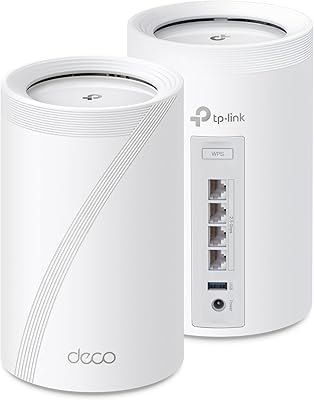
TP-Link Deco BE23 WiFi 7 Mesh Router

84%
88%
Overall Performance
94%
Ease of Setup
85%
Wi-Fi Coverage
77%
Device Compatibility
83%
Speed Consistency
More
TP-Link Deco S4 Mesh WiFi System (2-Pack)
87%
91%
Wi-Fi Coverage
88%
Performance Stability
94%
Ease of Setup
90%
Parental Controls
85%
Device Support
More
TP-Link Deco BE95 WiFi 7 Mesh System (2-Pack)
87%
92%
WiFi Coverage
89%
Ease of Setup
91%
Performance (Speed)
88%
Reliability
87%
Security Features (HomeShield)
More
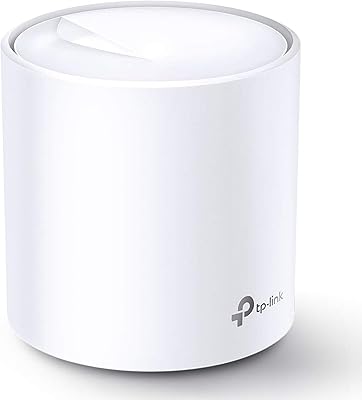
TP-Link Deco XE75 WiFi 6E Mesh System
86%
91%
Performance and Speed
96%
Setup and Installation
89%
WiFi Coverage
72%
Compatibility
85%
AI-Driven Mesh Technology
More
TP-Link Deco BE75 WiFi 7 Mesh System
85%
94%
Performance
88%
Ease of Setup
91%
Security Features
92%
Coverage & Range
79%
Value for Money
More
TP-Link Deco X95 WiFi 6 Mesh System
86%
92%
Performance
95%
Coverage
82%
Setup/Installation
80%
App Experience
88%
Multi-device Support
More
TP-Link Deco X20 WiFi 6 Mesh System
86%
92%
Ease of Setup
89%
Wi-Fi Coverage
86%
Device Connectivity
83%
Speed Performance
88%
Parental Controls
More
TP-Link Deco BE63 WiFi 7 Mesh System
89%
94%
Overall Performance
93%
WiFi Coverage
91%
Device Capacity Handling
88%
Setup & Installation
90%
App Experience
More
TP-Link Deco X55 WiFi 6 Mesh System
85%
88%
WiFi Performance
85%
Coverage Area
91%
Ease of Setup
84%
App Experience
89%
Ethernet Backhaul
More
TP-Link Deco BE85 WiFi 7 Mesh System
87%
89%
Wi-Fi Performance
91%
Setup Process
85%
Coverage and Range
93%
Security Features
78%
Device Compatibility
More

FAQ

The package includes the TP-Link Deco M5 unit, a power adapter, an Ethernet cable, and a quick installation guide to help you set it up easily.

Setting up this device is simple with the TP-Link Deco app. Just download the app, follow the prompts, and connect it to your modem. The app will guide you through the process of creating your mesh Wi-Fi network, which typically takes only a few minutes.

The TP-Link Deco M5 offers coverage for up to 2,000 sq. ft. with a single unit. If you need additional coverage, you can add more Deco units to expand the network.

Yes, this device is compatible with all ISPs. It connects to your existing modem, so as long as you have a broadband connection, you should be able to use it without any issues.

Yes, this mesh WiFi router supports dual-band speeds of up to 1300 Mbps, which makes it well-suited for 4K streaming and gaming, ensuring smooth performance even with high-bandwidth activities.

Yes, the TP-Link Deco M5 works with Alexa. You can use voice commands to control guest Wi-Fi, making it easier to manage your network in a smart home environment.

The TP-Link Deco M5 comes with built-in security features, including antivirus protection and parental controls through the HomeCare service. It provides free 3-year protection against malware, making it a great choice for families concerned about online safety.

The TP-Link Deco M5 uses MU-MIMO technology, which allows multiple devices to connect simultaneously without compromising performance. This is particularly useful for households with multiple users or smart devices.

Yes, you can expand the coverage of this mesh Wi-Fi system by adding more Deco units. This helps create a seamless network for larger homes or spaces with challenging layouts.

Some users have reported occasional issues with device management in the app, and there have been complaints about the system losing connection temporarily. However, these issues are often resolved with a simple reboot or firmware update.