Overview

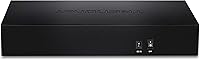
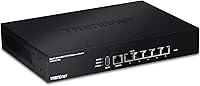
The TRENDnet TWG-431BR Multi-WAN VPN Router is a wired business router built for small and medium-sized businesses that need reliable internet redundancy without paying enterprise prices. Worth clarifying upfront: there is no Wi-Fi radio here — this is a purely wired device. Its five Gigabit ports can be reconfigured to support up to four WAN connections or four LAN ports depending on your layout. For government contractors and public-sector IT teams, NDAA and TAA compliance is a real procurement requirement, and this router meets it. TRENDnet backs the hardware with 3-year manufacturer protection and English-speaking technical support, which matters when something breaks at the worst possible time.
Features & Benefits

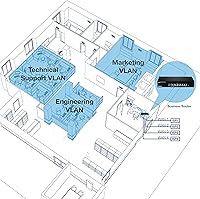
The standout capability here is multi-WAN load balancing, which distributes traffic across up to four separate internet connections simultaneously. If one ISP goes down, the router redirects traffic automatically — no manual intervention needed. VPN support is broad, covering IPSec, PPTP, L2TP with IPSec, and SSL VPN, giving remote workers a secure tunnel back to the office network. Network segmentation is handled through Inter-VLAN routing and 802.1Q VLAN tagging, useful for separating guest traffic from sensitive internal systems. QoS controls let you prioritize critical applications, and the console port with Linux-based OS gives experienced administrators full CLI access when the web interface simply is not enough.

Best For

This multi-WAN router fits naturally in small and medium businesses running two or more internet connections that want automatic ISP failover without paying for carrier-grade hardware. IT administrators supporting distributed or remote teams will appreciate the range of VPN protocol options that keep connections encrypted and stable. If your organization operates under procurement rules mandating NDAA and TAA compliance, the TWG-431BR checks that box where many competitors fall short. Network engineers who prefer hands-on configuration will find the CLI access genuinely useful rather than decorative. Businesses needing to segment internal networks — separating finance from marketing, for instance — will benefit from the built-in VLAN support as well.

User Feedback

Across nearly 730 ratings, the TWG-431BR holds a 3.9-star average — solid for a niche business product, though not without its rough edges. Buyers consistently praise its reliable failover performance and strong VPN throughput once properly configured, with value for the price mentioned frequently as a genuine strength. On the other side, the web interface draws real frustration: it feels dated and takes time to navigate intuitively. Initial setup is not plug-and-play — budget a few hours if you are new to multi-WAN configurations. Documentation could be more thorough, and some users flag occasional hiccups during firmware updates. Experienced admins handle these issues fine, but the learning curve is steeper than some buyers expect.

Pros

  • Automatic ISP failover keeps the office online when one internet connection drops, with no manual intervention needed.
  • Supports up to four simultaneous WAN connections for load balancing across multiple ISPs.
  • Broad VPN protocol support — IPSec, PPTP, L2TP with IPSec, and SSL VPN — covers most remote access scenarios.
  • NDAA and TAA compliance makes this business router legally purchasable for U.S. and Canadian government contracts.
  • Inter-VLAN routing and 802.1Q tagging enable clean network segmentation between departments or guest traffic.
  • Console port and Linux-based OS give experienced admins full CLI control when the web UI falls short.
  • Rackmount kit included out of the box — no extra hardware purchase needed for cabinet installation.
  • Three-year manufacturer protection and English-speaking support add real-world accountability to the purchase.
  • High availability clustering lets multiple units form a redundant router pair to minimize any single point of failure.
  • Solid value for SMBs that need genuine multi-WAN routing without stepping into enterprise pricing territory.

Cons

  • The web interface looks and feels outdated, and navigating it takes longer than it should for routine tasks.
  • Initial setup has a steep learning curve — budget several hours and expect trial and error without better documentation.
  • The included quick-start guide is too thin to cover real-world multi-WAN or VPN configuration scenarios.
  • Firmware update process has caused configuration resets for some users, requiring manual recovery afterward.
  • SSL VPN setup in particular is poorly documented and trips up even moderately experienced administrators.
  • No wireless radio at all — buyers who miss this detail will need to purchase separate access points.
  • Load balancing can cause session disruptions with IP-sensitive applications if not carefully configured.
  • Support is limited to business hours, leaving issues that arise outside that window entirely self-managed.
  • The unit runs noticeably warm under sustained load, which is worth factoring in for poorly ventilated rack setups.
  • Firmware update cadence has slowed since launch, raising reasonable questions about ongoing long-term support.

Ratings

The TRENDnet TWG-431BR Multi-WAN VPN Router earns a well-rounded but nuanced assessment based on AI analysis of verified buyer reviews from around the world, with spam, bot activity, and incentivized feedback actively filtered out. The scores below reflect what real IT administrators and small business owners consistently report — strengths and frustrations alike — so you can make a fully informed decision before buying.
Multi-WAN Failover Reliability
84%
Buyers running dual-ISP setups report that failover kicks in quickly and without requiring manual reboots or intervention. For small offices where downtime translates directly to lost productivity, this core function holds up well under real-world conditions over extended periods.
A subset of users report inconsistent failover timing depending on how WAN health checks are configured — if thresholds are not tuned carefully, the router can be slow to detect a dead link. Documentation on optimizing these settings is thinner than it should be.
VPN Performance
79%
21%
The range of supported protocols — IPSec, PPTP, L2TP with IPSec, and SSL VPN — gives IT administrators real flexibility when connecting remote workers or branch offices. Throughput under IPSec tunnels is reported as adequate for small teams handling standard business traffic.
Under heavier VPN loads with multiple simultaneous tunnels, some users observe throughput drops more noticeable than expected at this price tier. SSL VPN configuration in particular requires hands-on familiarity with the interface, and first-time setup is not especially guided.
Setup & Initial Configuration
58%
42%
Experienced network administrators and IT generalists who have worked with business routers before typically get the TWG-431BR up and running within a reasonable timeframe. The console port and CLI access give knowledgeable users a reliable fallback when the web UI behaves unexpectedly.
For buyers without a networking background, this router presents a steep initial hurdle. The quick installation guide skips over multi-WAN configuration nuances, and the web interface does not do much hand-holding — several reviewers mention spending hours troubleshooting what should have been straightforward first-time setup.
Web Interface Usability
51%
49%
The web UI covers all major configuration areas — VPN, VLAN, QoS, WAN settings — so everything is technically accessible without touching the CLI. For administrators who already know what they are looking for, navigation eventually becomes muscle memory.
The interface looks and feels dated, and the layout is not intuitive by modern standards. Multiple reviewers describe it as cluttered and inconsistent, with settings buried in unexpected menu locations. It is functional, but it adds friction during both initial setup and routine maintenance tasks.
Load Balancing Effectiveness
77%
23%
Distributing outbound traffic across multiple ISP connections works reliably once properly configured, and users managing offices with two or three active WAN links report noticeably better aggregate throughput. WAN protocol binding adds useful granularity for routing specific applications through preferred connections.
The load balancing algorithms have limited configurability compared to more advanced solutions in a higher price bracket. Some buyers note that session-based balancing can cause issues with applications that are sensitive to IP address changes mid-session, requiring workarounds.
VLAN & Network Segmentation
82%
18%
802.1Q VLAN tagging and Inter-VLAN routing work as advertised, making this router a practical choice for offices that need to isolate guest traffic, separate departments, or protect sensitive internal systems from general network access. Administrators familiar with VLAN concepts will find the implementation straightforward.
Configuring VLANs through the web UI requires patience — the interface does not make the logical relationships between tagged ports, VLANs, and routing rules visually clear. Novice administrators without prior VLAN experience will likely need external guides or TRENDnet support to get segmentation right.
Build Quality & Hardware
74%
26%
The metal chassis feels appropriately solid for a rack-mounted business device, and the included rackmount kit means it integrates cleanly into a standard server cabinet without extra purchases. At 2.44 pounds, it is light enough to handle without assistance during installation.
The overall construction is functional rather than impressive — the finish and port labeling feel closer to budget hardware than mid-range. A few long-term owners mention that the unit runs noticeably warm under sustained heavy load, which raises questions about longevity in poorly ventilated enclosures.
Documentation & Learning Resources
47%
53%
TRENDnet does maintain online firmware updates and provides access to a user manual beyond the included quick-start guide. For buyers willing to dig through PDF documentation, most configuration scenarios are technically covered somewhere.
The documentation quality is a genuine weak point that appears repeatedly in user complaints. Explanations are often terse and assume a level of prior knowledge that not all buyers have. There is no robust community forum or third-party knowledge base comparable to what you find around competing brands, leaving users to piece things together independently.
Technical Support Quality
71%
29%
TRENDnet's English-speaking support team is a real asset for North American SMBs, and buyers who contact support during business hours generally report getting through to someone knowledgeable rather than a scripted first-tier agent. For government buyers especially, domestic support availability matters.
Support is limited to business hours, which is a noticeable gap when networking issues strike outside of a standard workday. Response times through email channels are inconsistent, and a handful of reviewers describe situations where support was helpful but slow, leaving them to resolve issues independently in the interim.
NDAA & TAA Compliance
88%
For public-sector buyers and government contractors in the U.S. and Canada, compliance with NDAA and TAA requirements is not optional — it is a procurement gate. The TWG-431BR clears that bar, which immediately removes it from a large pool of cheaper competitors that cannot be legally purchased for those use cases.
This compliance advantage is only relevant to a specific buyer segment. Private-sector SMBs with no government contracts derive no practical benefit from it, and the pool of competing compliant routers has grown, so it is no longer a completely unique differentiator in the way it once was.
High Availability & Redundancy
76%
24%
The ability to cluster multiple TWG-431BR units for router-level redundancy is a feature typically reserved for more expensive hardware. For businesses where network downtime is genuinely costly, having a hot-standby router configuration available at this price point is a meaningful option.
High availability clustering requires purchasing multiple units and configuring them correctly — neither of which is trivial. The setup process for HA configurations is sparsely documented, and users who have attempted it report a trial-and-error process that assumes comfort with both the hardware and networking concepts.
QoS & Traffic Prioritization
69%
31%
QoS controls allow administrators to prioritize VoIP calls, video conferencing, or other latency-sensitive applications over general browsing traffic. In small office environments with shared internet connections, this can meaningfully reduce call quality issues during peak usage hours.
The QoS implementation is relatively basic compared to what purpose-built SD-WAN solutions offer. Granular per-application rules require manual configuration with limited built-in presets, and the interface for managing traffic policies is one of the less polished areas of the web UI.
Value for Money
81%
19%
For an SMB needing wired multi-WAN routing, VLAN support, and a full VPN protocol stack under one roof, the TWG-431BR delivers a capable feature set at a price that would be difficult to match with enterprise alternatives. Buyers who know what they need and can configure it properly tend to rate the value positively.
Buyers who underestimate the setup complexity sometimes feel the router does not deliver on its promise without significant time investment. If you factor in the hours spent troubleshooting initial configuration, the effective cost-to-value ratio looks less favorable than the sticker price alone suggests.
Firmware & Long-Term Support
63%
37%
Online firmware updates are supported and TRENDnet has pushed updates for this model since its 2018 launch, which indicates a reasonable commitment to keeping the hardware current. The Linux-based OS provides a stable underlying foundation that experienced admins can work with confidently.
The firmware update process itself has drawn complaints — a few users report configuration resets or connectivity drops during updates that required manual recovery. The cadence of updates has also slowed in recent years, and given the hardware age, questions about the long-term support horizon are reasonable to raise.

Suitable for:

The TRENDnet TWG-431BR Multi-WAN VPN Router is built for small and medium-sized businesses that depend on internet connectivity and cannot afford unplanned downtime. If your office runs two or more ISP connections — whether for redundancy, bandwidth, or both — this router handles the balancing and failover automatically once properly configured. IT administrators supporting remote or hybrid workforces will appreciate the breadth of VPN protocol support, which covers most corporate tunnel configurations without requiring an additional appliance. Government contractors and public-sector IT teams in the U.S. and Canada will find the NDAA and TAA compliance particularly relevant, as many procurement frameworks legally require hardware that meets these standards. Network engineers who want real CLI access alongside a web interface — rather than being locked into a simplified consumer-grade portal — will feel at home here. It is a wired-only device, so it pairs well with organizations that already manage a separate wireless infrastructure and need a dedicated, capable routing layer underneath it.
Not suitable for:

The TRENDnet TWG-431BR Multi-WAN VPN Router is a poor fit for anyone expecting a quick, plug-and-play setup — this hardware demands networking knowledge and patience from the outset. Small business owners without an in-house IT administrator or access to a managed service provider should think carefully before buying; the web interface is dated, documentation is sparse, and troubleshooting without a networking background is genuinely frustrating. This is also not the right choice for anyone who needs Wi-Fi — there is no wireless radio whatsoever, and buyers who miss that detail will be disappointed. Home users or very small offices with a single internet connection will find the multi-WAN capabilities entirely wasted on their setup, making simpler and cheaper alternatives a smarter choice. Organizations that need high-throughput VPN for large remote teams may find the hardware starts showing its limits under sustained heavy loads. If long-term firmware support is a priority, the age of this platform is worth considering, as update frequency has slowed noticeably in recent years.
Specifications

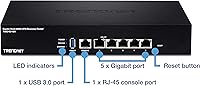
  • Ports: Five Gigabit Ethernet ports configurable as up to 4 WAN + 1 LAN or 1 WAN + 4 LAN, plus one USB 3.0 port and one RJ-45 console port.
  • WAN Support: Supports up to four simultaneous WAN internet connections with load balancing and automatic failover between active links.
  • VPN Protocols: Compatible with IPSec, PPTP, L2TP with IPSec, and SSL VPN protocols for encrypted remote access tunnels.
  • VLAN Support: Supports 802.1Q VLAN tagging and Inter-VLAN routing for logical network segmentation across connected devices.
  • Routing: Includes dynamic routing support alongside static routing, with QoS controls for traffic prioritization across WAN links.
  • High Availability: Multiple TWG-431BR units can be clustered together to form a high availability group with router-level redundancy.
  • Operating System: Runs on a Linux-based OS, providing a stable foundation for CLI management via the included console port.
  • Management: Accessible via HTTP and HTTPS web interface, Telnet and SSH command-line access, and direct console connection.
  • Compliance: NDAA and TAA compliant for U.S. and Canadian government and public-sector procurement requirements.
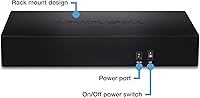
  • Dimensions: Measures 10.4 x 7.28 x 1.75 inches, designed to fit in a standard 1U rack enclosure with the included rackmount kit.
  • Weight: The unit weighs 2.44 pounds without accessories, making it straightforward to handle during rack installation.
  • Power Supply: Powered by an included 12V DC, 1A external power adapter; no redundant power supply option is built in.
  • In the Box: Package includes the router, power adapter, RJ-45 to RS-232 console cable (1.5m), rackmount kit, and a quick installation guide.
  • Warranty: Backed by a 3-year TRENDnet manufacturer protection plan with English-speaking technical support during business hours.
  • Firmware Updates: Supports online firmware updates to keep the device current; updates should be applied carefully as some users report configuration resets.
  • Wireless: This is a wired-only device with no integrated wireless radio — a separate access point is required for any Wi-Fi connectivity.

Related Reviews

TP-Link ER7206 Multi-WAN VPN Router
86%
91%
Network Performance
94%
Security Features
88%
Cloud Management Experience
89%
VPN Support
82%
Setup & Installation
More
TRENDnet TEW-829DRU AC3000 Tri-Band Wireless Gigabit Dual-WAN VPN SMB Router
84%
91%
Performance & Speed
88%
Dual-WAN Functionality
72%
Ease of Setup
89%
Network Stability
84%
Security Features (VPN)
More
Cisco RV042G Dual WAN VPN Router
74%
91%
WAN Failover Reliability
88%
VPN Performance
83%
Dual WAN Load Balancing
86%
Build Quality & Hardware Durability
54%
Setup & Initial Configuration
More
Cisco RV325 Dual Gigabit WAN VPN Router
84%
89%
Performance & Reliability
91%
VPN Functionality
88%
Ease of Setup
86%
Load Balancing Effectiveness
93%
Security & Encryption
More
TP-Link Festa FR205 Multi-WAN Wired Router
76%
88%
Ease of Setup
91%
Multi-WAN Performance
86%
VPN Reliability
78%
Cloud Management
74%
USB WAN Backup
More
Alta Labs Route10 10G Multi-WAN Router
76%
91%
Hardware Value
87%
Routing Performance
83%
VPN Performance
58%
Software Maturity
62%
Setup Experience
More
TP-Link ER707-M2 Omada Multi-Gigabit VPN Router
86%
92%
Network Performance
80%
Ease of Setup
89%
Cloud Management (Omada SDN)
85%
Security Features
88%
Build Quality
More
TP-Link ER605 V2 VPN Router
80%
93%
Value for Money
89%
Multi-WAN Reliability
71%
VPN Performance
82%
Ease of Setup
91%
Omada SDN Integration
More
Deeper Network Connect Mini Decentralized VPN Router
74%
83%
Privacy & Anonymity Protection
79%
Value for Money
86%
Setup & Ease of Use
91%
Portability & Form Factor
63%
Connection Speed & Throughput
More
D-Link DSR-250V2 Gigabit VPN Router
81%
85%
Reliability & Connectivity
62%
Ease of Setup
91%
Security Features
89%
Dual WAN Failover Performance
84%
VPN Tunnel Support
More

FAQ

No, it does not. The TRENDnet TWG-431BR Multi-WAN VPN Router is a strictly wired device with no wireless radio. If you need Wi-Fi in your office, you will need to add a separate wireless access point to your network setup.
Honestly, it is not beginner-friendly. The initial configuration — especially for multi-WAN or VPN — requires a working knowledge of networking concepts like subnets, routing, and VLANs. If you have an IT administrator or work with a managed service provider, they should be able to handle it. If you are setting it up solo without that experience, budget significantly more time than you might expect and plan for some troubleshooting.

You can absolutely use it with a single ISP connection — it will work fine in a basic 1 WAN + 4 LAN configuration. That said, most of its standout features like load balancing and automatic failover only kick in when you have two or more WAN connections active. If you only ever plan to use one ISP, a simpler router would likely serve you just as well at a lower cost.

TAA (Trade Agreements Act) compliance means the product is manufactured in a country covered by U.S. trade agreements, making it eligible for federal government purchasing. NDAA (National Defense Authorization Act) compliance adds restrictions around components from certain foreign manufacturers flagged as security risks. Together, these certifications are mandatory checkboxes for many U.S. and Canadian government contracts — without them, the hardware simply cannot be purchased through official procurement channels.

The router supports multiple concurrent VPN tunnels across IPSec, PPTP, L2TP with IPSec, and SSL VPN. The specific maximum tunnel count depends on the protocol and firmware version. Under heavier simultaneous tunnel loads, some users have reported a noticeable drop in throughput, so it performs best in small-to-medium team environments rather than large-scale concurrent VPN deployments.

Yes, the router monitors WAN link health and reroutes traffic automatically if a connection drops. However, how quickly and reliably this happens depends on how the WAN health check thresholds are configured. The default settings work for most situations, but if you need fast detection of a dead link, it is worth spending time tuning those parameters during setup.

Yes, a rackmount kit is included in the box, so no additional hardware purchase is needed. The unit fits a standard 1U rack space and weighs under 2.5 pounds, making installation straightforward for a single person.

Functional, but dated. It covers all the configuration areas you need — VPN, VLAN, QoS, WAN settings — but the layout is not particularly intuitive and the visual design has not kept up with modern standards. Experienced network administrators will navigate it fine after some familiarization, but do not expect the polished experience you might find on newer consumer or prosumer routers.

Yes, and this is one of the router's genuine strengths for technical users. It runs a Linux-based OS and includes a physical console port along with SSH and Telnet access, giving experienced administrators full CLI control. The included console cable (RJ-45 to RS-232, 1.5 meters) means you can get in directly without relying on the network being up.

You can pair two or more units together so that if the primary router fails, a standby unit takes over automatically — keeping your network running without manual intervention. Setting this up does require purchasing multiple units and going through a configuration process that is sparsely documented, so it is best treated as an advanced setup rather than something you configure out of the box on day one.

Where to Buy