Overview

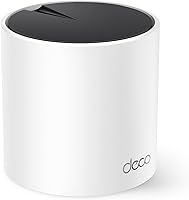
The TP-Link Deco X55 1-Pack Mesh Wi-Fi System sits in a comfortable mid-range spot where WiFi 6 performance meets everyday affordability. Launched in 2022, it has since earned over 16,000 ratings on Amazon, which says something real about its staying power. This mesh node works as a standalone router for apartments and smaller homes covering up to 2500 square feet, but it also slots into a larger Deco setup if you need more coverage later. It does not try to be a prosumer powerhouse. Instead, it focuses on doing the basics very well at a price that does not demand much justification.
Features & Benefits

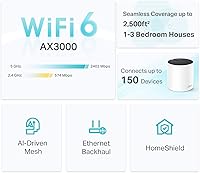
The Deco X55 runs on WiFi 6 AX3000 dual-band radio, which translates to noticeably faster throughput for households juggling multiple devices at once. OFDMA and MU-MIMO handling means your phone, laptop, and smart TV are not competing as aggressively for bandwidth as they would on an older router. Each unit comes with three Gigabit ports, so you can run a wired backhaul cable between nodes for a more reliable connection than wireless backhaul alone provides. The Deco app handles everything from initial setup to parental controls and guest networks in one place. TP-Link is also a CISA Secure-by-Design signatory, a reassuring baseline for anyone thinking about network security.

Best For

This WiFi 6 system is a natural fit for renters and homeowners in smaller spaces who are tired of dead zones near the back bedroom or back patio. If you are still running a router-plus-extender combo, you know the pain of devices clinging to the weaker signal while your main router sits just down the hall. The Deco X55 replaces that headache with a single network name your devices move between automatically. It also suits non-technical users who want a router they can configure in minutes from a phone and then mostly forget about. Existing Deco owners looking to expand their coverage will find it integrates without friction.

User Feedback

With a 4.4-star average across more than 16,000 reviews, buyer satisfaction here runs high by any reasonable measure. Most praise focuses on how fast the setup process is and how much of a difference people notice over whatever they were using before. That said, a few consistent criticisms are worth knowing. Power users who want granular control over VLANs or custom DNS settings will find the Deco app limiting compared to more advanced alternatives. There is also the matter of mandatory account creation; you cannot fully use the app without registering with TP-Link, which some privacy-minded buyers find frustrating. Occasional firmware update hiccups appear in a minority of reviews but do not represent a widespread issue.

Pros

  • WiFi 6 support delivers noticeably faster speeds for homes with several modern devices competing for bandwidth.
  • Three Gigabit Ethernet ports per unit make wired connections and wired backhaul practical without needing a separate switch.
  • Setup typically takes under 15 minutes using the Deco app, even for users with no networking background.
  • The single-SSID mesh means devices roam between nodes automatically without any manual switching on your part.
  • AI-driven channel optimization adapts over time, reducing the need to manually tune settings after installation.
  • Competitively priced for a WiFi 6 mesh node, making the technology accessible without a large upfront investment.
  • Over 16,000 Amazon ratings with a 4.4-star average reflects a broad and consistent track record of buyer satisfaction.
  • TP-Link holds a CISA Secure-by-Design pledge, offering a credible security baseline compared to budget-tier alternatives.
  • Scales easily by adding more Deco nodes later, so you are not locked into a fixed coverage footprint.
  • App-based parental controls and guest network management are included at no extra subscription cost.

Cons

  • Mandatory TP-Link account creation blocks full app functionality, which is a real friction point for privacy-focused users.
  • Advanced configuration options like VLAN support and custom DNS are absent, limiting usefulness for power users.
  • Single-node coverage is genuinely capped around 2500 square feet; larger homes will need additional hardware investment.
  • Occasional firmware updates have caused temporary connectivity disruptions for a subset of users.
  • No tri-band radio means there is no dedicated wireless backhaul band, which can reduce throughput in multi-node setups.
  • The Deco app depends on cloud connectivity for full remote management, creating a potential single point of failure.
  • WAN port tops out at Gigabit speeds, making this mesh node a bottleneck for anyone with a multi-gig internet plan.
  • No local-only management mode exists, which is a notable gap for users uncomfortable with cloud-dependent networking gear.

Ratings

The TP-Link Deco X55 1-Pack Mesh Wi-Fi System has been evaluated by our AI rating engine after processing thousands of verified global buyer reviews, with spam, incentivized, and bot-generated feedback actively filtered out. The scores below reflect the honest consensus of real owners across a range of home setups and technical backgrounds. Both the strengths that keep buyers satisfied and the friction points that trip some of them up are transparently represented in each category.

Ease of Setup
91%
Most buyers report getting from unboxing to a working network in under fifteen minutes, with the Deco app providing clear visual prompts at each step. Non-technical users consistently highlight this as one of the strongest aspects of the experience, often comparing it favorably to far more confusing setups they have dealt with before.
The mandatory TP-Link account registration is a recurring friction point that slows down setup for privacy-conscious users who did not expect it. A small number of buyers also ran into app connectivity issues during the pairing step that required a router restart to resolve.
WiFi Speed & Throughput
84%
Households upgrading from older AC-class routers report a noticeable real-world difference, particularly when multiple people are streaming, video calling, or gaming simultaneously. The 5 GHz band handles bandwidth-hungry devices well, and WiFi 6 features like OFDMA reduce the bottleneck effect that older routers struggle with in busy homes.
Speeds at the edge of the 2500 square foot coverage radius drop more noticeably than some buyers expect, especially through dense walls or across multiple floors. The dual-band setup also means there is no dedicated wireless backhaul band, which can eat into throughput when nodes communicate wirelessly in a multi-unit configuration.
Coverage Reliability
78%
22%
For open-plan apartments and single-story homes within the stated coverage area, the Deco X55 consistently eliminates the dead zones that plague traditional router-plus-extender setups. Buyers frequently mention finally getting a usable signal in a back bedroom, garage, or patio that was previously unreachable.
The 2500 square foot rating assumes favorable conditions that many real homes do not offer, and two-story or older construction homes with thick walls often require a second node for full coverage. A single unit pushing its limits tends to show inconsistent speeds rather than a clean cutoff, which can be frustrating to diagnose.
App & Management Experience
72%
28%
The Deco app covers the essentials well, including guest network creation, parental controls with per-device time limits, and remote management when you are away from home. For users who just want a set-and-forget experience, the interface is clean and approachable without requiring any networking background.
Power users consistently flag the absence of advanced features like VLAN configuration, granular QoS controls, and detailed traffic analytics. The app also depends on cloud connectivity for full functionality, which means local-only management is not an option if TP-Link's servers experience downtime.
Value for Money
88%
At its price point, this mesh node delivers WiFi 6 capability and three Gigabit ports in a package that would have cost significantly more just a couple of years ago. Buyers who compare it against entry-level mesh competitors or budget AC routers consistently feel the performance justifies the cost.
The single-pack does cover a limited area, and buyers with larger homes often find they need to spend more on additional nodes than they initially budgeted. Viewed as a whole-home solution for medium or large homes, the total cost climbs quickly.
Hardware Build Quality
76%
24%
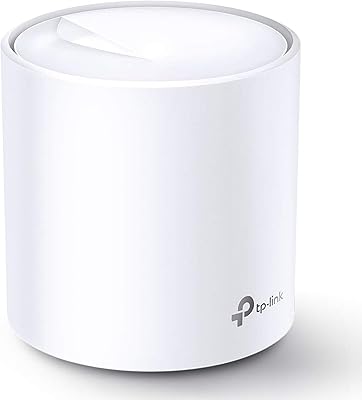
The compact cylindrical design sits unobtrusively on a shelf or bookcase, and the all-internal antenna arrangement keeps it looking tidy. Build quality feels appropriately solid for the price tier, and buyers rarely report physical defects or premature wear.
The unit does run noticeably warm during sustained heavy use, which is typical for the category but worth monitoring in enclosed or poorly ventilated spaces. The matte plastic finish also picks up dust and fingerprints readily, requiring occasional wiping to keep it looking presentable.
Network Stability
83%
Day-to-day connectivity is consistently stable for the majority of owners, with few reports of random disconnections under normal household usage. The AI-driven optimization does appear to reduce the channel interference issues that some cheaper routers struggle with in dense apartment buildings.
A recurring theme in critical reviews involves temporary connectivity drops immediately following firmware updates, which points to an inconsistent update testing process on TP-Link's end. While these disruptions are usually brief, they are inconvenient for households with smart home devices that need constant uptime.
Roaming Performance
81%
19%
Devices moving between rooms transition between nodes without requiring any manual network switching, which is the core promise of a mesh system and one the Deco X55 largely delivers on. Buyers using it in multi-node configurations report that phones and laptops hand off reliably without dropped calls or video sessions.
A subset of users note that some older devices occasionally cling to a farther node rather than switching to the nearer one, which is a client-side behavior issue but still affects the experience. In wireless backhaul configurations, the transition can sometimes introduce a brief lag that is noticeable during latency-sensitive tasks.
Security Features
79%
21%
TP-Link's CISA Secure-by-Design commitment gives this mesh node a credible security baseline that budget alternatives often lack, and automatic firmware updates help keep known vulnerabilities patched without user action. WPA3 support is available for devices that can use it, offering improved protection over the older WPA2 standard.
The reliance on a cloud-connected account means that your network management data passes through TP-Link's servers, which is a meaningful consideration for users who treat home network privacy seriously. There is currently no option to opt out of cloud features while retaining full app functionality.
Port Availability
87%
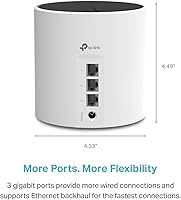
Three Gigabit Ethernet ports per unit is genuinely generous for this price category, and the flexibility to designate any port as WAN gives you useful placement options depending on where your modem sits. Buyers who run wired backhaul between nodes report meaningfully better performance than wireless-only configurations.
While three ports are more than most competing units at this price, households with several wired devices like desktop PCs, smart TVs, and game consoles may still need to add an unmanaged switch to accommodate everything. There is no USB port for network-attached storage or printer sharing, which some buyers miss.
Parental Controls
74%
26%
Built-in parental controls allow parents to set per-profile time limits, pause internet access on demand, and apply content filtering by category, all without a separate subscription. For families with young children, this covers the most common everyday scenarios without adding complexity.
The content filtering categories are fairly broad and cannot be customized with granular blocklists the way dedicated DNS-level filtering solutions can. Teenagers familiar with VPNs can also route around app-level controls fairly easily, which is a limitation shared across most consumer-grade parental control implementations.
Compatibility
89%
Full backward compatibility across 802.11a through 802.11ax means every device in a typical household connects without any configuration adjustments. Buyers who have a mix of older smart home sensors and newer laptops report that everything coexists reliably on the same network.
WiFi 6 performance benefits only apply to devices that support the standard, so households with mostly older hardware will not experience the speed and efficiency gains that justify the upgrade over a cheaper WiFi 5 mesh option. ISP-provided modems with built-in routing can also require a double-NAT workaround that trips up some buyers.
Long-Term Reliability
77%
23%
A large installed base since 2022 and consistent software support from TP-Link suggest this is not a product that gets abandoned quickly after launch. Most buyers who have owned the unit for a year or more report no degradation in performance or hardware issues.
TP-Link's longer-term track record for supporting older hardware models with firmware updates beyond the first two or three years is mixed, which is worth considering for buyers who prefer not to replace networking hardware frequently. A handful of reviews mention units failing outside the warranty window with limited recourse.

Suitable for:

The TP-Link Deco X55 1-Pack Mesh Wi-Fi System is a strong match for anyone living in an apartment, condo, or smaller single-story home who wants reliable, whole-home WiFi without the complexity of a prosumer setup. If you are currently wrestling with a router-plus-extender arrangement where your phone stubbornly holds onto the weak extender signal, this mesh node solves that problem cleanly by presenting a single network your devices hand off between automatically. Households that have already invested in WiFi 6 devices, including recent laptops, phones, and smart TVs, will notice genuine throughput improvements thanks to OFDMA and MU-MIMO support. It also works well as an entry point into the broader Deco ecosystem, since additional nodes can be added later if your coverage needs grow. Non-technical buyers will appreciate that the Deco app walks you through the entire setup process in minutes and handles ongoing management without requiring any command-line knowledge.
Not suitable for:

The TP-Link Deco X55 1-Pack Mesh Wi-Fi System is not the right tool for larger homes exceeding 2500 square feet unless you plan to purchase additional nodes alongside it, and even then you should set realistic expectations about throughput at range. Network enthusiasts who rely on advanced features like VLAN tagging, custom DNS configuration, or detailed traffic monitoring will find the Deco app frustratingly limited compared to platforms like UniFi or even some competing consumer routers. Privacy-conscious buyers should also be aware that the Deco app requires creating and maintaining a TP-Link cloud account, with no fully local management option currently available. If your internet connection exceeds multi-gigabit speeds, the hardware will also become a bottleneck, since the WAN port caps out at Gigabit. Finally, buyers who need tri-band performance to dedicate an entire band to backhaul traffic should look at higher-tier mesh options instead.

Specifications

  • WiFi Standard: The Deco X55 operates on 802.11ax (WiFi 6), and is also backward compatible with 802.11a, 802.11b, 802.11g, 802.11n, and 802.11ac devices.
  • Frequency Bands: Dual-band operation covers both the 2.4 GHz band (up to 574 Mbps) and the 5 GHz band (up to 2402 Mbps) simultaneously.
  • Combined Speed: Maximum combined wireless throughput is rated at AX3000, achieved via a 2x2 HE160 5 GHz radio paired with a 2x2 2.4 GHz radio.
  • Coverage Area: A single unit is rated to cover up to 2500 square feet, making it suitable for apartments and smaller single-story homes.
  • Ethernet Ports: Each unit includes three Gigabit Ethernet ports, any one of which can be configured as the WAN (internet) input.
  • Wired Backhaul: The unit supports Ethernet backhaul, allowing nodes to be connected via cable for more stable and faster inter-node communication.
  • Antenna Design: All antennas are internal, keeping the unit compact and free of external protruding elements.
  • Dimensions: The unit measures 4.33 x 4.33 x 4.49 inches, giving it a compact cylindrical footprint that fits unobtrusively on a shelf or desk.
  • Weight: Each Deco X55 unit weighs 2.23 pounds, making it easy to reposition during setup or when rearranging your space.
  • Setup Method: Initial configuration and ongoing management are handled entirely through the Deco mobile app, available on iOS and Android.
  • Special Features: WPS (Wi-Fi Protected Setup) is supported, allowing compatible devices to join the network without manually entering a password.
  • Security Pledge: TP-Link is a signatory of the CISA Secure-by-Design pledge, committing to building security practices into the device at the hardware and firmware level.
  • Roaming: The system broadcasts a single SSID across all nodes so connected devices transition between units automatically without user intervention.
  • Mesh Intelligence: An AI-driven optimization engine monitors network conditions and adjusts channel and band assignments over time to maintain consistent performance.
  • In-Box Contents: The package includes one Deco X55 unit, one power adapter, one RJ45 Ethernet cable, and a printed quick installation guide.
  • Compatibility: The unit is designed for home use and is compatible with standard personal computers, smartphones, tablets, and smart home devices.
  • Market Rank: As of its latest ranking, the Deco X55 holds the number one position in the Whole Home and Mesh Wi-Fi Systems category on Amazon.
  • Release Date: The Deco X55 was first made available in April 2022 and has since accumulated over 16,000 customer ratings.

Related Reviews

TP-Link Deco X10 Wi-Fi 6 Mesh System
86%
92%
Value for Money
96%
Ease of Setup
89%
Wi-Fi Coverage
85%
Performance under Load
87%
Device Support
More
TP-Link Deco AXE5300 Mesh System 3-Pack
78%
88%
Wireless Coverage
86%
Network Speed & Throughput
91%
Setup & Installation
83%
App Experience & Management
67%
Wi-Fi 6E & 6 GHz Band Utility
More
TP-Link Deco S4 Mesh WiFi System (2-Pack)
87%
91%
Wi-Fi Coverage
88%
Performance Stability
94%
Ease of Setup
90%
Parental Controls
85%
Device Support
More
TP-Link Deco M5 Mesh WiFi Router 1-Pack
86%
88%
Performance
93%
Setup Ease
85%
Coverage Range
91%
Security Features
77%
App Experience
More
TP-Link Deco BE95 Wi-Fi 7 Mesh System 2-Pack
78%
88%
Wireless Performance
83%
Coverage & Range
93%
Wired Connectivity
86%
Setup & Installation
79%
App & Management Experience
More
Cudy M3000 Wi-Fi 6 Mesh System
77%
93%
Value for Money
84%
Wi-Fi Speed & Throughput
91%
2.5G WAN Port
72%
Coverage & Range
88%
VPN Performance
More
TP-Link Deco BE25-Outdoor Wi-Fi 7 Mesh Extender
86%
91%
Wi-Fi Performance
95%
Outdoor Durability
80%
Setup & Installation
88%
Speed & Throughput
85%
Mounting & Placement Flexibility
More
TP-Link Deco X95 WiFi 6 Mesh System
86%
92%
Performance
95%
Coverage
82%
Setup/Installation
80%
App Experience
88%
Multi-device Support
More
TP-Link Deco X20 1-Pack Mesh WiFi System
78%
93%
Ease of Setup
71%
Coverage Reliability
84%
Multi-Device Performance
88%
App Experience
86%
Parental Controls
More
TP-Link Deco BE63 WiFi 7 Mesh System
89%
94%
Overall Performance
93%
WiFi Coverage
91%
Device Capacity Handling
88%
Setup & Installation
90%
App Experience
More

FAQ

No separate router needed. The Deco X55 can function as a standalone router by connecting it directly to your modem via one of its Gigabit Ethernet ports. You only add extra nodes if you want to extend coverage to a larger space.

Yes, that is one of the more practical aspects of the Deco ecosystem. You can start with one unit and purchase additional Deco nodes down the line. They all work together under the same app and the same network name, so expanding coverage does not require starting from scratch.

Unfortunately, yes. The Deco app requires account registration to complete the initial setup and to access management features. There is no fully local or account-free management option currently available. This is a known friction point for privacy-conscious users, so it is worth factoring into your decision before buying.

In almost all cases, yes. The unit connects to your existing modem or modem-router combo via a standard Ethernet cable and works with virtually any ISP. If your ISP uses PPPoE authentication, you can configure that through the Deco app during setup.

The TP-Link Deco X55 1-Pack Mesh Wi-Fi System supports OFDMA and MU-MIMO, which are WiFi 6 technologies that allow the router to communicate with several devices simultaneously rather than one at a time. In practical terms, this reduces congestion noticeably in households with five or more active devices, though real-world results depend on your internet plan speed as well.
That figure is a manufacturer estimate under ideal conditions, meaning open floor plans with minimal interference. In real homes with thick walls, multiple floors, or dense building materials, effective coverage will likely be lower. For a two-story home or a space with a lot of concrete walls, you would probably want a two-pack to be safe.

Yes, wired backhaul means you run an Ethernet cable directly between two Deco nodes instead of having them communicate wirelessly. This gives you a more stable and faster connection between the nodes, which in turn means better speeds for devices connected to the secondary node. If you have Ethernet ports in your walls or do not mind running a cable, it is the better setup option.

Both features are included in the Deco app at no additional cost. Parental controls allow you to filter content by category and set time limits per device or profile. The guest network keeps visitors on a separate network segment, away from your main devices and any locally shared resources.

Yes, the Deco X55 is fully backward compatible with older wireless standards including 802.11a, b, g, n, and ac. Older devices simply connect at their own maximum supported speed. You will not see WiFi 6 improvements on older hardware, but nothing will stop working.

TP-Link periodically releases firmware updates, and the Deco app can notify you when one is available. You can also enable automatic updates if you prefer a hands-off approach. A small number of users have reported temporary connectivity interruptions during updates, so if you have timing-sensitive needs, scheduling updates during off-hours is a reasonable precaution.

Where to Buy