




Overview

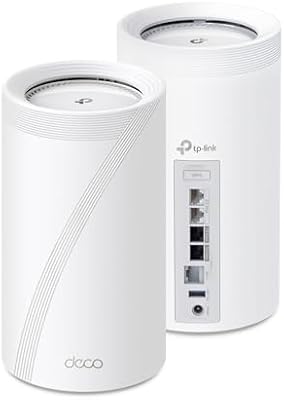
The TP-Link Deco BE63 2-Pack Mesh WiFi System is TP-Link's answer to the growing demand for whole-home coverage that can actually keep pace with modern households. Sitting in the upper tier of the mesh router market, it runs on Wi-Fi 7 tri-band technology — the latest standard — with a combined throughput class that puts it among the fastest home networking options available today. The 2-pack configuration is specifically designed to blanket larger homes, with TP-Link claiming coverage up to 5,800 square feet. Worth noting: most devices in homes right now do not yet support Wi-Fi 7, so buyers are partly investing in infrastructure for the next few years rather than an immediate speed upgrade.

Features & Benefits

The Deco BE63 packs a lot of practical networking muscle into a compact cylindrical form. The headline capability is Multi-Link Operation (MLO), a Wi-Fi 7 feature that lets devices communicate across multiple bands simultaneously — cutting latency noticeably for gaming or video calls. Each unit comes with four 2.5-gigabit ports, so you can run a true wired backhaul between nodes while still connecting wired devices like a NAS or a smart TV without running out of ports. That combination of wired and wireless backhaul running at the same time gives you real placement flexibility. The AI-Roaming feature keeps everything under one network name, and the built-in VPN server means your whole household can tunnel securely without touching individual device settings.

Best For

This Wi-Fi 7 router kit really shines in specific situations. If you have a larger two-story home — anything from roughly 2,500 to 5,800 square feet — with thick walls or dead zones in back bedrooms, the mesh setup will likely make a noticeable difference. Power users who want to hardwire gaming consoles, a NAS, or a home server will appreciate having multiple 2.5-gigabit ports available per node. Families who want network-level parental controls and security monitoring built in — rather than relying on a separate appliance — will find this a convenient all-in-one solution. Remote workers or competitive gamers who need consistent, low-latency connections across the house round out the ideal buyer profile.

User Feedback

Across nearly 8,000 ratings, this mesh system holds a strong overall score, and the most consistent praise centers on quick app setup — most users report getting the network up and running in under 15 minutes using the Deco app. Signal consistency across multiple floors also gets repeated mentions. On the critical side, the most common frustration is that HomeShield's advanced features — including detailed parental controls and real-time threat monitoring — sit behind a paid subscription after the trial ends, which feels limiting at this price point. A smaller number of users mention occasional firmware update hiccups or brief app disconnects. Long-term owners generally report stable performance over many months, which is a good sign for reliability.

Pros

  • Covers up to 5,800 sq ft with two nodes, making dead zones in large homes largely a thing of the past.
  • Each unit offers four 2.5-gigabit ports, so wired backhaul and wired device connections do not compete for the same port.
  • Wi-Fi 7 Multi-Link Operation reduces latency noticeably for gaming and video calls on compatible devices.
  • The Deco app is consistently praised for getting new users set up in under 15 minutes.
  • A single unified network name handles band switching automatically, no manual toggling needed.
  • Built-in VPN server and client support covers every device on the network without extra software installs.
  • Simultaneous wired and wireless backhaul gives you real freedom in where you place the second node.
  • Signal consistency across multiple floors is a standout strength that long-term owners frequently highlight.
  • Supports over 200 connected devices, which matters in households loaded with smart home gadgets.
  • Long-term owners report stable, reliable performance over many months of everyday use.

Cons

  • HomeShield's most useful security and parental control features require a paid subscription after the free trial ends.
  • Buyers whose devices do not yet support Wi-Fi 7 will see limited real-world speed gains over a good Wi-Fi 6E system.
  • The app-only management interface gives advanced users less granular control than a traditional web dashboard would.
  • Some users report occasional brief disconnects or glitches following firmware updates.
  • The 2-pack configuration may feel like an expensive entry point for smaller homes that only need one node.
  • A small number of users note the Deco app can occasionally lose connection to the nodes temporarily.
  • No 10-gigabit port means the system cannot fully saturate a multi-gig fiber internet plan at the WAN level.
  • The HomeShield subscription cost is an ongoing expense that should factor into the total ownership calculation.

Ratings

The scores below were generated by AI after analyzing thousands of verified global user reviews for the TP-Link Deco BE63 2-Pack Mesh WiFi System, with spam, bot-submitted, and incentivized feedback actively filtered out. Each category reflects the full picture — what real owners genuinely praise and where frustrations consistently surface — so you can make a confident, informed decision before buying.

Coverage & Range
91%
Owners in large two-story homes consistently report that the 2-pack eliminates the dead zones that defeated their previous routers, particularly in far bedrooms, garages, and basements. Signal strength at range is one of the most frequently praised aspects across long-term user reviews.
A small number of buyers in homes with unusually thick concrete or brick walls note that coverage drops off faster than expected, and some feel a 3-pack would have been a safer choice for homes above 4,000 square feet with complex layouts.
Network Speed
86%
Users with Wi-Fi 7 compatible laptops and phones report noticeably snappier performance on high-bandwidth tasks like 4K streaming, large file transfers, and cloud backups compared to their previous Wi-Fi 6 setups. Even older devices tend to benefit from reduced network congestion.
Buyers whose entire device lineup is still on Wi-Fi 5 or Wi-Fi 6 often find the real-world speed improvement underwhelming relative to the price premium, since the headline Wi-Fi 7 throughput figures simply cannot be unlocked without compatible client hardware.
Setup & Installation
93%
The Deco app guides you through each step with clear visuals, and the majority of users report a complete two-node setup in well under 20 minutes with no networking background required. The automatic node detection and placement suggestions are consistently called out as genuinely helpful.
A handful of users ran into issues when setting up in Access Point mode behind an existing ISP router, finding the documentation for that specific scenario less clear than the standard setup flow. Edge cases like static IP configuration can require a bit of digging in the app.
App Experience
78%
22%
Day-to-day network management through the Deco app is clean and intuitive — rebooting nodes, checking which devices are connected, and running speed tests are all a couple of taps away. The remote management feature works reliably for parents monitoring usage away from home.
More experienced users frequently flag the absence of a full web-based dashboard as a real limitation, since advanced settings like custom DNS, VLAN configuration, and detailed traffic logs are either buried or unavailable entirely through the mobile-only interface.
Wired Port Flexibility
89%
Having four 2.5-gigabit ports on each node is something power users specifically call out as a deciding factor over competing systems. Being able to run wired backhaul between nodes while still connecting a NAS, a gaming console, and a smart TV without running out of ports is a meaningful real-world advantage.
There is no 10-gigabit port on either unit, which means users with a multi-gig fiber plan pushing beyond 2.5 Gbps at the WAN level will hit a ceiling on their wired throughput. This is a niche limitation but a real one for buyers on cutting-edge ISP plans.
Latency & Reliability
84%
Gamers and remote workers are among the most satisfied users, with many reporting that ping times feel consistently low and that the connection does not stutter during video calls or online sessions even with dozens of other devices active on the network simultaneously.
A recurring thread in critical reviews involves brief connectivity drops or node reboots following automatic firmware updates. It is not a widespread failure mode, but enough owners have experienced it that it is worth monitoring after updates push through.
HomeShield Security
62%
38%
The HomeShield interface is well-designed and the IoT device monitoring in particular gives households with lots of smart home gadgets a useful at-a-glance security overview. The parental control scheduling works reliably during the trial period and is genuinely easy for non-technical parents to configure.
The subscription paywall that activates after the trial is the single most common complaint across the entire review base. Losing access to content filtering, detailed threat reports, and advanced parental profiles without a recurring fee feels like a meaningful downgrade from what was advertised at purchase.
VPN Performance
77%
23%
Having VPN server and client functionality built into the router itself is a feature that technically inclined users appreciate significantly — it means every device on the home network can route through a VPN tunnel without any per-device software installation or configuration.
VPN throughput speeds are noticeably lower than standard internet speeds, which is a hardware reality across most router-level VPN implementations and not unique to this system. Users expecting full-speed VPN performance for 4K streaming or large downloads may be disappointed.
Roaming & Band Steering
82%
18%
The single unified network name combined with the AI-driven band steering means devices transition between nodes and frequency bands without the user ever needing to manually switch connections, which is particularly appreciated in homes where people move between floors frequently during calls or streaming.
Some technically experienced users report that the automatic roaming algorithm occasionally holds a device on a farther node longer than expected before handing it off, resulting in a brief dip in speed rather than an immediate switch. It is a tuning issue more than a design flaw.
Value for Money
71%
29%
For buyers who specifically need Wi-Fi 7 capability, wired backhaul, and multi-floor coverage in a single purchase, the Deco BE63 2-pack represents competitive value compared to other Wi-Fi 7 mesh systems at a similar tier. The hardware specification for the price is genuinely strong.
Buyers who do not yet own any Wi-Fi 7 devices and are primarily motivated by coverage improvement will find that similarly priced Wi-Fi 6E mesh systems deliver comparable real-world results today. The HomeShield subscription also adds a recurring cost that erodes long-term value for security-focused buyers.
Build & Design
79%
21%
The cylindrical white design is compact enough to sit unobtrusively on a shelf or side table, and users consistently note it does not look like networking hardware — an important consideration for households where aesthetics matter and the units need to be in visible living spaces.
The all-plastic construction feels functional rather than premium at close range, and a few users mention the units run noticeably warm during heavy sustained use. There is no passive cooling vent design to speak of, which is a minor but real point for anyone placing units in enclosed shelving.
Device Capacity
87%
Households loaded with smart home ecosystems — dozens of bulbs, sensors, cameras, locks, and voice assistants on top of phones and computers — report no meaningful slowdown, which is a direct benefit of the MU-MIMO architecture managing many simultaneous low-bandwidth device connections efficiently.
The 200-plus device claim is a theoretical ceiling under ideal conditions, and users running extremely dense smart home setups alongside active high-bandwidth streaming have occasionally noted some management lag in the app when the total device count climbs into the triple digits.
Long-Term Stability
81%
19%
The majority of owners who have used the system for six months or longer describe it as consistently reliable, with uptime that compares favorably to previous routers and no need for regular manual reboots to maintain performance. This kind of sustained reliability earns strong loyalty from long-term buyers.
The firmware update experience is the main variable that introduces instability, with a subset of users reporting that updates occasionally require a manual restart to restore full mesh synchronization. TP-Link's update frequency is generally seen as a positive for security, but the execution could be smoother.

Suitable for:

The TP-Link Deco BE63 2-Pack Mesh WiFi System is a strong match for homeowners who have outgrown a single router and need reliable coverage across 2,500 to 5,800 square feet — think multi-story houses, older homes with plaster walls, or open floor plans where signal tends to fade in distant rooms. If your household runs a mix of smart home devices, streaming TVs, gaming consoles, and work laptops all at once, the capacity to handle 200-plus connected devices without degrading performance is a genuine practical benefit. Power users who want to hardwire key devices via 2.5-gigabit ports — a NAS, a desktop, a game console — while still using the system for wireless backhaul will find that flexibility rare at this tier. Families with kids benefit from the built-in parental controls and network-wide security monitoring, even if the full feature set requires a subscription. Anyone planning ahead for Wi-Fi 7 compatible phones, laptops, and TVs in the next couple of years will also get more out of this kit over time as their devices catch up to the standard.

Not suitable for:

The TP-Link Deco BE63 2-Pack Mesh WiFi System is not the right call for every buyer, and it is worth being honest about where it falls short. If you live in a smaller apartment or a compact single-floor home under 1,500 square feet, a single capable router will almost certainly serve you better and cost noticeably less. Buyers who expect a fully featured security and parental control suite out of the box — with no recurring fees — will be frustrated to discover that HomeShield gates its most useful protections behind a paid subscription after the trial period expires. If none of your current devices support Wi-Fi 7, you are essentially paying a premium for future compatibility rather than an immediate, tangible speed improvement, which may not be the best use of your budget right now. Highly technical users who prefer granular control through a desktop web interface may also find the app-first management approach limiting compared to more enthusiast-oriented routers.

Specifications

  • Wi-Fi Standard: Operates on Wi-Fi 7 (802.11be), with backward compatibility for 802.11ac, 802.11ax, 802.11g, and 802.11n devices.
  • Band Configuration: Tri-band design transmits simultaneously across 2.4 GHz, 5 GHz, and 6 GHz frequencies for optimal load distribution.
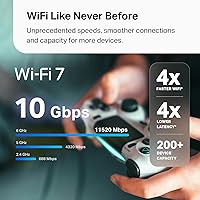
  • Max Throughput: Combined wireless throughput is rated at up to 10 Gbps across all three bands (BE10000 class).
  • 6 GHz Speed: The 6 GHz band delivers up to 5,188 Mbps, primarily benefiting Wi-Fi 7 compatible devices at close to medium range.
  • 5 GHz Speed: The 5 GHz band is rated up to 4,324 Mbps, handling the bulk of mid-range device traffic in most home environments.
  • 2.4 GHz Speed: The 2.4 GHz band runs at up to 574 Mbps, covering longer ranges and legacy smart home devices with lower bandwidth needs.
  • Wired Ports: Each unit includes four 2.5 Gbps WAN/LAN ports, allowing wired backhaul and wired device connections without port conflicts.
  • USB Port: Each unit features one USB 3.0 port for connecting external storage or compatible USB peripherals to the network.
  • Wi-Fi Streams: The system supports 6-stream MU-MIMO, enabling multiple devices to communicate simultaneously rather than taking turns.
  • Device Capacity: The 2-pack configuration is rated to support over 200 connected devices without significant performance degradation.
  • Coverage Area: The 2-pack is designed to cover up to 5,800 square feet, suitable for large multi-story homes or floor plans with obstructions.
  • Backhaul: Supports simultaneous wired and wireless backhaul, allowing both connection types to operate at the same time between nodes.
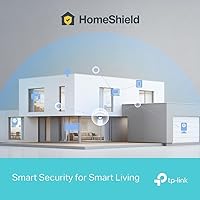
  • Security Suite: TP-Link HomeShield provides network protection, IoT monitoring, and parental controls, with advanced features requiring a paid subscription.
  • VPN Support: Built-in VPN client and server functionality allows the entire network to tunnel securely without installing software on individual devices.
  • Antennas: Each unit houses four smart internal antennas, keeping the exterior clean while optimizing signal directionality automatically.
  • Dimensions: Each Deco BE63 unit measures 4.23 x 4.23 x 6.93 inches, with a compact cylindrical form factor suited to open shelving or a desk.
  • Weight: The complete 2-pack weighs 3.33 lbs in total, making each individual unit relatively lightweight and easy to position anywhere.
  • Color: Both units ship in white, designed to blend into typical home environments without drawing attention.
  • Management App: The network is managed through the TP-Link Deco app, available for iOS and Android, with no desktop web interface offered.
  • In-Box Contents: Each package includes two Deco BE63 units, two power adapters, one RJ45 Ethernet cable, and a quick installation guide.

Related Reviews

TP-Link Deco S4 2-Pack Mesh WiFi System

75%
91%
Setup & Installation
74%
Coverage & Range
83%
Connection Stability
88%
Value for Money
72%
App Experience
More
TP-Link Deco BE95 Wi-Fi 7 Mesh System 2-Pack
78%
88%
Wireless Performance
83%
Coverage & Range
93%
Wired Connectivity
86%
Setup & Installation
79%
App & Management Experience
More
TP-Link Deco X20 1-Pack Mesh WiFi System
78%
93%
Ease of Setup
71%
Coverage Reliability
84%
Multi-Device Performance
88%
App Experience
86%
Parental Controls
More
TP-Link Deco BE85 WiFi 7 Mesh System
76%
84%
Wireless Performance
93%
Wired Port Selection
67%
Mesh Coverage
76%
Setup & App Experience
82%
Build Quality & Design
More
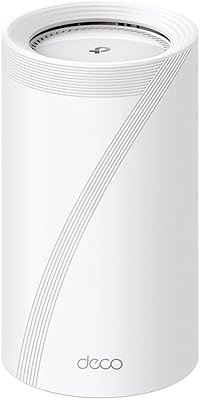
TP-Link Deco X95 2-Pack Mesh WiFi System
76%
83%
Coverage & Range
81%
Network Performance
88%
Setup & Installation
71%
App Experience
67%
Value for Money
More
TP-Link Deco X55 1-Pack Mesh Wi-Fi System
81%
91%
Ease of Setup
84%
WiFi Speed & Throughput
78%
Coverage Reliability
72%
App & Management Experience
88%
Value for Money
More
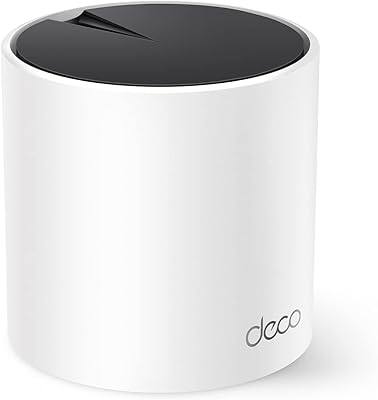
TP-Link Deco XE75 Mesh WiFi System 1-Pack
77%
91%
Setup Experience
78%
WiFi Coverage
83%
Real-World Speed
62%
6 GHz Band Utility
86%
Multi-Device Performance
More
TP-Link Deco BE75 WiFi 7 Mesh System
85%
94%
Performance
88%
Ease of Setup
91%
Security Features
92%
Coverage & Range
79%
Value for Money
More
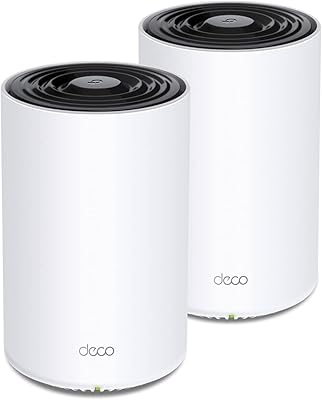
TP-Link Deco M5 Mesh WiFi Router 1-Pack
86%
88%
Performance
93%
Setup Ease
85%
Coverage Range
91%
Security Features
77%
App Experience
More
TP-Link Deco X68 2-Pack Mesh WiFi System
76%
91%
Setup Experience
78%
WiFi Coverage
83%
Network Performance
74%
App & Management
58%
HomeShield Value
More

FAQ

Setup is genuinely straightforward. The Deco app walks you through the entire process step by step, and most users report having the network running in under 15 minutes. You do not need any prior networking knowledge — if you can follow instructions on a phone screen, you can install this system.

Not immediately, but it is worth being realistic. If your current phones, laptops, and tablets only support Wi-Fi 6 or Wi-Fi 6E, you will not see a dramatic speed jump compared to a good Wi-Fi 6E mesh system. The real value for most buyers today is the wired port flexibility, the mesh coverage quality, and the fact that you are buying hardware that will stay relevant as Wi-Fi 7 devices become the norm over the next few years.

Yes, and this is one of the stronger features of the Deco BE63. You can run an Ethernet cable between the two units for a wired backhaul, which improves inter-node speeds significantly, and the system will continue to handle wireless client connections normally at the same time. You do not have to choose one or the other.

Out of the box, you get basic network monitoring and a trial of the full HomeShield features. Once the trial ends, the free tier still provides standard firewall protection and some basic controls, but the more detailed parental control scheduling, content filtering profiles, and real-time threat intelligence reports move behind the paid plan. It is a legitimate ongoing cost to factor in if those features matter to your household.

The TP-Link Deco BE63 2-Pack Mesh WiFi System stands out primarily because of its four 2.5-gigabit ports per unit — most competitors at this tier offer fewer wired ports or slower ones. The simultaneous wired and wireless backhaul support is also less common. Where it gives ground is in the app-only management approach, which enthusiast users sometimes find limiting compared to systems that offer a full web-based dashboard.

In almost all cases, yes. You connect the primary Deco node to your modem or ISP gateway via Ethernet, and the system takes over routing from there. It also supports Access Point mode if your ISP requires you to keep their router handling the main routing duties.

You can expand the mesh by adding additional Deco BE63 units to the same network through the app. TP-Link supports multi-node setups, so if your home is particularly large or has tricky layouts, adding a third or fourth node is a straightforward option rather than a full replacement.

In real-world use, most households well under the 200-device ceiling report no perceptible slowdown during typical peak usage — streaming on a few TVs, several phones, smart home devices, and a laptop or two simultaneously. Performance under extreme load is always going to depend partly on your internet plan speed, but the mesh system itself handles device distribution well.

A small portion of users have noted that occasional firmware updates can cause a brief disruption or require a router restart to restore full connectivity. This is not a widespread or persistent issue, but it is worth knowing about. Keeping automatic updates enabled is generally recommended for security, and any disruptions tend to resolve quickly on their own.

Yes, the Deco app supports remote management, so you can check network status, run speed tests, adjust parental control settings, and reboot nodes from anywhere with a mobile internet connection. This is particularly handy for households where a parent needs to manage kids' screen time while traveling or at work.

Where to Buy