Overview

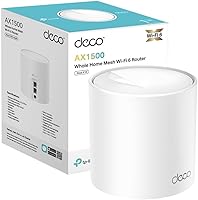
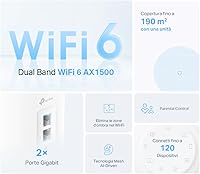
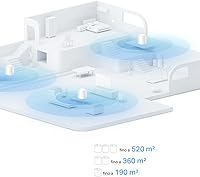
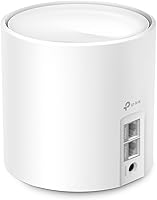
The TP-Link Deco X10 1-Pack Mesh System is an entry-level Wi-Fi 6 router aimed at apartments and smaller homes that want solid coverage without a complicated setup. Unlike a traditional single router, a mesh system distributes signal more evenly across your space — think fewer dead zones rather than one strong central point. This Deco mesh node covers up to 190 m², which is a realistic fit for a compact one-story home, though multi-floor layouts may push its limits. The TP-Link Deco app ties the whole experience together, handling everything from initial pairing to ongoing network management, and makes it genuinely accessible even if you have never touched a router admin panel before.

Features & Benefits

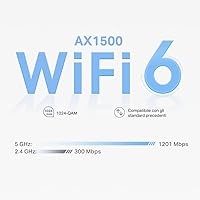
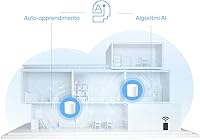
The Deco X10 runs on Wi-Fi 6, the current mainstream wireless standard that handles congested networks far better than its predecessor — lower latency and more reliable speeds when a dozen devices are online at once. Its AX1500 rating is a theoretical ceiling across both bands; real-world throughput will be lower, but still a noticeable improvement for streaming, video calls, and smart home gadgets. The AI-driven routing quietly monitors each device and adjusts band allocation automatically, so you rarely need to intervene. A single Gigabit Ethernet port adds flexibility for wired connections or backhaul, and the system is fully scalable — you can add extra Deco nodes later as coverage needs grow without replacing anything you already own.

Best For

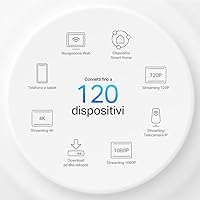
This Wi-Fi 6 mesh unit is a strong match for renters and homeowners in single-story apartments or modest houses who are still running an older Wi-Fi 5 router. If your home is packed with smart speakers, cameras, thermostats, and phones, support for up to 120 connected devices means you have plenty of headroom as your setup expands. Non-technical users will especially appreciate the app-driven install — there is no browser admin panel to navigate. It also suits someone who wants a starter mesh setup and plans to add nodes gradually rather than committing to a multi-pack upfront. Buyers in larger homes or those with thick concrete walls should weigh whether a single node will truly reach every corner.

User Feedback

Buyers consistently praise how quickly this Deco mesh node gets up and running — most report being online within minutes, and the app interface draws steady compliments for its clean layout. The jump from older routers is something many users notice right away, especially in previously weak signal areas. That said, single-node coverage comes up regularly as a limitation: buyers in two-story homes or larger spaces often find the real-world reach falls short of the advertised 190 m², particularly through dense walls. The app's parental controls and QoS tools get occasional mentions as useful, though some users want finer control. Several reviewers note that the 2-pack bundle delivers better value for anything beyond a compact apartment.

Pros

  • Setup takes under ten minutes using the Deco mobile app — no router experience needed.
  • Wi-Fi 6 handles multiple simultaneous connections far better than older Wi-Fi 5 routers.
  • Supports up to 120 devices, giving smart home-heavy households plenty of capacity headroom.
  • The single Gigabit Ethernet port allows a wired connection for a desktop or a TV.
  • AI-driven band steering quietly optimizes device routing without any manual intervention.
  • The Deco ecosystem is expandable — add more nodes later without replacing existing hardware.
  • Parental controls and basic QoS tools are built into the app at no extra subscription cost.
  • Compact and unobtrusive design blends into home decor without looking like a data center.
  • TP-Link has a solid track record of pushing firmware updates to keep Deco devices current.

Cons

  • A single node realistically covers closer to 130 to 160 m², not the full 190 m² advertised.
  • Multi-story homes or rooms divided by dense walls will likely need a second node to get full coverage.
  • AX1500 throughput is modest — heavy 4K streaming or large file transfers may expose speed limits.
  • The Deco app locks out most advanced networking settings, frustrating more technical users.
  • Only one Ethernet port per unit limits wired device options compared to traditional routers.
  • No tri-band option means the backhaul and client traffic share the same two frequency bands.
  • Long-term firmware support beyond three to four years is not guaranteed for entry-level units.
  • Buyers who need a true whole-home solution will almost certainly need to purchase additional nodes.
  • The single-pack price point is close enough to two-pack bundle deals that buying one unit alone feels like questionable value.

Ratings

The TP-Link Deco X10 1-Pack Mesh System has been scored by our AI after processing thousands of verified global buyer reviews, with spam, bot-generated submissions, and incentivized feedback actively filtered out. The ratings below reflect a transparent cross-section of real ownership experiences — covering both the areas where this Wi-Fi 6 mesh unit genuinely delivers and the friction points that frustrated buyers in specific scenarios. Strengths and trade-offs are weighted equally so you can make a genuinely informed decision.

Ease of Setup
93%
The Deco app-guided install is one of the most praised aspects of owning this unit — most buyers report being fully connected in under ten minutes with zero prior networking experience. The step-by-step visual prompts remove any guesswork, and there is no need to log into a browser admin panel or manually enter IP addresses.
A small number of users encountered hiccups when their ISP modem was also acting as a router, requiring bridge mode configuration that the app does not fully explain. For those unfamiliar with the concept, that extra step can stall an otherwise smooth process.
Real-World Coverage
71%
29%
In open-plan apartments and single-story homes under roughly 140 m², the Deco X10 performs well — buyers report strong signal in rooms where their old router barely reached. For the intended use case of a compact living space, the coverage improvement over a traditional single router is genuinely noticeable.
The advertised 190 m² figure is a consistent source of disappointment for buyers in multi-story homes or properties with concrete or brick walls. Dead zones on upper floors are a recurring complaint, and many users ultimately purchased a second node to compensate.
Network Speed
78%
22%
Users upgrading from Wi-Fi 5 routers consistently describe a meaningful improvement in day-to-day performance — smoother 4K streaming, less buffering during video calls, and faster load times across multiple active devices. The Wi-Fi 6 standard handles simultaneous traffic more gracefully than its predecessor.
Heavy users — those running large file transfers, competitive gaming, or multiple 4K streams at once — occasionally bump into the AX1500 throughput ceiling. The Deco X10 is not a speed powerhouse, and buyers expecting flagship-tier performance will likely feel underwhelmed at peak load.
App Experience
84%
The Deco app is clean, logically organized, and genuinely pleasant to navigate — a rarity in home networking software. Device management, parental controls, and guest network setup are all accessible within a few taps, and the interface holds up well for users with no technical background.
More experienced users find the app frustrating for its lack of depth — there is no VLAN support, limited traffic analytics, and no meaningful access to advanced routing settings. Those accustomed to full-featured router interfaces will feel like they have been handed a simplified toy.
Device Capacity
88%
Households loaded with smart speakers, thermostats, security cameras, phones, and laptops find the 120-device ceiling gives them comfortable headroom without any noticeable congestion. Buyers who previously struggled with older routers dropping smart home devices report a much more stable experience.
While the device count is impressive on paper, performance does gradually degrade when a significant portion of those 120 slots are simultaneously pushing data. Light-traffic smart home sensors are very different from 40 devices all streaming content at once.
Value for Money
74%
26%
As a single entry point into Wi-Fi 6 mesh networking, the Deco X10 sits at a price point that is hard to argue with for buyers in smaller homes. Getting a capable, app-managed mesh node with AI optimization at this tier represents genuine value for the right buyer.
Buyers in medium to larger homes quickly discover they need a second unit, which pushes total cost close to — or beyond — the price of a 2-pack bundle. Several reviewers explicitly note they wish they had just bought the multi-pack from the start, making the single-unit value proposition feel narrower in hindsight.
Build Quality
81%
19%
The unit feels solid in hand with no cheap creaking plastic, and the compact cylindrical housing sits discreetly on a shelf without drawing attention. The white finish holds up well over time and does not yellow or scuff easily with normal indoor use.
There are no ventilation slots visible from the outside, and a handful of users in warm climates report the unit running noticeably warm during extended heavy use. It is not a widespread problem, but worth noting for anyone planning to enclose it in a cabinet.
Parental Controls
69%
31%
The built-in parental controls cover the basics well — content category filtering and scheduled internet blackout windows per device are functional and easy to configure through the app. For families wanting simple screen-time management without a third-party tool, it is a convenient included feature.
Parents looking for granular controls — per-app blocking, detailed usage history, or age-specific filtering profiles — will find the toolset too shallow. The more advanced HomeCare subscription unlocks additional protection layers, but it adds an ongoing cost that buyers did not always anticipate.
AI Mesh Optimization
76%
24%
The adaptive band steering works quietly in the background, and most buyers simply notice that their devices hold a stronger connection as they move around the home compared to their old router. It removes the frustration of manually switching between 2.4 and 5 GHz networks.
The AI optimization is a black box — there is no transparency in the app about what decisions are being made or why. A few technically minded users report that the steering occasionally assigns devices to a suboptimal band, with no easy way to override it without disabling the feature entirely.
Firmware & Updates
77%
23%
TP-Link has maintained a reasonably consistent firmware update schedule for the Deco line, and the automatic update option in the app means most buyers never have to think about it. Security patches have arrived in timely fashion relative to publicly disclosed vulnerabilities.
Buyers with units that are a few years old report that update frequency slows down noticeably over time, raising questions about long-term support commitment. There is no published end-of-life policy from TP-Link for specific models, which makes it difficult to assess future firmware longevity.
Scalability
86%
The ability to add more Deco nodes to the same network without reconfiguring anything is a genuinely useful design decision — buyers who started with one unit and expanded later report the process being as simple as plugging in a new node and tapping a button in the app.
Mixed-generation Deco networks can introduce compatibility quirks, and pairing an X10 with an older or lower-spec Deco model may cap the network's performance to the weakest unit. TP-Link does not always make inter-model compatibility limitations clear in the product listing.
Ethernet Connectivity
66%
34%
Having even a single Gigabit Ethernet port opens up meaningful options — users plug in a desktop PC or gaming console for rock-solid wired speeds, or use it as a backhaul connection between nodes to reduce wireless congestion.
One port is a real constraint for anyone who wants to connect multiple wired devices to the same node — a network switch becomes a necessary extra purchase. Competing nodes in a similar price range sometimes offer two ports, making this feel like a deliberate cost-cutting measure.
Guest Network
79%
21%
Setting up a separate guest network takes about thirty seconds in the Deco app, and it properly isolates guest devices from the main network — a useful feature for households that regularly have visitors connecting phones or laptops.
The guest network lacks advanced controls such as bandwidth throttling or time-limited access, which would make it more useful in short-term rental or shared housing scenarios. It covers the basics but stops short of what a more feature-rich router would offer.
WPA3 Security
82%
18%
Support for WPA3 encryption means the Deco X10 meets the current home network security standard, providing stronger protection against brute-force attacks compared to older WPA2-only devices. For most households, this is a meaningful baseline reassurance.
A handful of users report that enabling WPA3 caused compatibility issues with older smart home devices that only support WPA2. The app does not always surface this conflict clearly, leading to confusing connectivity dropouts that took time to diagnose.

Suitable for:

The TP-Link Deco X10 1-Pack Mesh System is a practical choice for anyone living in a compact apartment or single-story home who wants to step into Wi-Fi 6 without spending heavily on a flagship system. It fits renters especially well — the app-driven setup requires no technical knowledge, no poking around in browser admin panels, and no calling a tech-savvy friend for help. Households running a growing collection of smart home devices will appreciate the breathing room that support for up to 120 simultaneous connections provides. It also suits buyers who think of this as a starting point: since additional Deco nodes can be added later, you are not locked into a single-node setup permanently. If your current router is a few years old and your home is under roughly 150 to 170 m² on one level, the performance jump here will likely feel meaningful.

Not suitable for:

The TP-Link Deco X10 1-Pack Mesh System is not the right call for buyers with larger homes, multi-story layouts, or thick concrete and brick walls between rooms — a single node will struggle to punch through those obstacles reliably. Power users who need advanced networking features like VLAN configuration, detailed traffic monitoring, or robust VPN integration will quickly feel boxed in by the Deco app's simplified interface. Gamers or remote workers who depend on consistently low latency and peak throughput should consider a more capable AX3000 or tri-band system instead. Households already running a two- or three-node mesh setup from another brand will find little reason to switch, since the AX1500 ceiling is modest by today's mid-range standards. Anyone expecting enterprise-grade controls or deep customization options will find this Wi-Fi 6 mesh unit too consumer-oriented for their needs.

Specifications

  • Wi-Fi Standard: This Deco mesh node uses the 802.11ax (Wi-Fi 6) standard, which handles dense device environments more efficiently than the previous Wi-Fi 5 generation.
  • Max Speed: Combined theoretical throughput reaches AX1500 Mbps across both frequency bands, though real-world speeds will vary based on distance, interference, and connected devices.
  • Frequency Bands: The unit operates on dual-band radio — 2.4 GHz for longer range and better wall penetration, and 5 GHz for faster speeds at closer distances.
  • Coverage Area: TP-Link rates this Wi-Fi 6 mesh unit for up to 190 m² under ideal open-plan conditions; real-world coverage in walled or multi-story homes will typically be lower.
  • Device Capacity: The Deco X10 can maintain stable connections for up to 120 simultaneous devices, making it well-suited for households with many smart home gadgets.
  • Ethernet Ports: One Gigabit Ethernet port is included, which can be used for a wired device connection or as a backhaul link when pairing multiple Deco nodes.
  • Setup Method: Initial configuration and ongoing management are handled entirely through the TP-Link Deco mobile app, available for both iOS and Android — no browser-based admin panel is required.
  • AI Optimization: An adaptive mesh feature uses AI-driven logic to monitor network conditions and automatically steer each device toward the most appropriate band and channel.
  • Pack Contents: The box includes one Deco X10 unit, a power adapter, and a printed user manual — no Ethernet cable is included.
  • Scalability: Additional Deco nodes can be added to the same network at any time, extending coverage without requiring the original unit to be replaced or reconfigured.
  • Item Weight: The unit weighs 14.1 oz (approximately 400 g), making it lightweight and easy to position in different spots around the home.
  • Color & Design: The Deco X10 comes in white with a compact cylindrical form factor designed to sit discreetly on a shelf or desk.
  • Compatibility: This mesh node is compatible with all standard Wi-Fi enabled devices regardless of operating system or manufacturer.
  • Parental Controls: Basic parental control tools, including content filtering and usage scheduling, are available through the Deco app at no additional subscription cost.
  • QoS Support: Quality of Service (QoS) settings in the Deco app allow users to prioritize bandwidth for specific devices or applications on the network.
  • Security: The Deco X10 supports WPA3 encryption, the current industry standard for home Wi-Fi network security.
  • Manufacturer: The Deco X10 is designed and manufactured by TP-Link, a global networking hardware company with an established consumer product line.
  • Date Available: This specific 1-pack configuration became available for purchase in February 2025.

Related Reviews

TP-Link Deco M5 Mesh WiFi Router 1-Pack
86%
88%
Performance
93%
Setup Ease
85%
Coverage Range
91%
Security Features
77%
App Experience
More
TP-Link Deco S4 2-Pack Mesh WiFi System
75%
91%
Setup & Installation
74%
Coverage & Range
83%
Connection Stability
88%
Value for Money
72%
App Experience
More
TP-Link Deco BE95 Wi-Fi 7 Mesh System 2-Pack
78%
88%
Wireless Performance
83%
Coverage & Range
93%
Wired Connectivity
86%
Setup & Installation
79%
App & Management Experience
More
TP-Link Deco X95 2-Pack Mesh WiFi System
76%
83%
Coverage & Range
81%
Network Performance
88%
Setup & Installation
71%
App Experience
67%
Value for Money
More
TP-Link Deco BE75 WiFi 7 Mesh System
85%
94%
Performance
88%
Ease of Setup
91%
Security Features
92%
Coverage & Range
79%
Value for Money
More
TP-Link Deco X20 1-Pack Mesh WiFi System
78%
93%
Ease of Setup
71%
Coverage Reliability
84%
Multi-Device Performance
88%
App Experience
86%
Parental Controls
More
TP-Link Deco BE85 WiFi 7 Mesh System
76%
84%
Wireless Performance
93%
Wired Port Selection
67%
Mesh Coverage
76%
Setup & App Experience
82%
Build Quality & Design
More
TP-Link Deco XE75 Mesh WiFi System 1-Pack
77%
91%
Setup Experience
78%
WiFi Coverage
83%
Real-World Speed
62%
6 GHz Band Utility
86%
Multi-Device Performance
More
TP-Link Deco BE63 2-Pack Mesh WiFi System
82%
91%
Coverage & Range
86%
Network Speed
93%
Setup & Installation
78%
App Experience
89%
Wired Port Flexibility
More
TP-Link Deco X55 1-Pack Mesh Wi-Fi System
81%
91%
Ease of Setup
84%
WiFi Speed & Throughput
78%
Coverage Reliability
72%
App & Management Experience
88%
Value for Money
More

FAQ

It is genuinely straightforward. You download the Deco app, plug the unit into your modem, and the app walks you through each step with clear visuals. Most users are online within ten minutes, and you never need to open a browser or type in an IP address.

You can absolutely use it as a single router — that is exactly what the 1-pack configuration is designed for. One unit works well for compact apartments and smaller single-story homes. If you later find coverage is thin in certain areas, you can simply add a second Deco node to the same network without starting over.

In almost every case, yes. The Deco X10 connects to your existing modem via the Gigabit Ethernet port and works with any standard ISP connection, including cable, fiber, and DSL. If your modem doubles as a router, you may need to put it into bridge mode first, which your ISP can usually help with.

It is a best-case figure measured in an open environment without walls or floors in the way. In a typical home with interior walls, furniture, and appliances, practical coverage is closer to 130 to 160 m² on a single level. If your home is multi-story or has thick masonry walls, you will likely need a second node to fill the gaps.

Wi-Fi 6 is not just about faster peak speeds — its main advantage is how it handles many devices at once. Older Wi-Fi 5 routers start to slow down noticeably when ten or more devices are active simultaneously. Wi-Fi 6 manages that congestion much more efficiently, so things like video calls, streaming, and smart home gadgets all feel more reliable even during peak usage hours.

Basic parental controls, including content filters and device scheduling, are free through the Deco app. TP-Link does offer an optional HomeCare subscription that adds more advanced security scanning features, but it is not required for standard network management or parental tools.

Forty devices is well within the rated capacity of 120, so you should not hit any hard limits. That said, overall performance depends on how many of those devices are actively streaming data at the same time. For a home with a mix of passive sensors and active streaming devices, the Deco X10 should manage without issue.

Yes, most Deco models are designed to work together in the same mesh network through the Deco app. That said, the network will generally operate at the capability level of the lowest-spec node, so pairing it with a much older or slower Deco unit may limit the benefit of the newer hardware.

A cheap traditional router typically broadcasts from one point and weakens significantly with distance or obstacles. The Deco X10 uses mesh technology to distribute signal more evenly, and its Wi-Fi 6 standard handles device-heavy homes far better than an older budget router. For small spaces with light usage, a budget router may suffice, but for anything beyond that, the Deco X10 offers a noticeably more stable and scalable solution.

TP-Link pushes firmware updates to Deco units through the app, and they can be applied with a single tap — or set to install automatically if you prefer. Update frequency varies, but TP-Link has historically maintained active firmware support for its Deco lineup for several years after launch. Keeping auto-updates on is generally the easiest and safest approach for most users.