Overview

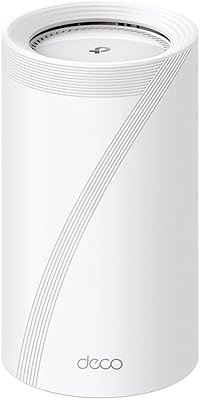
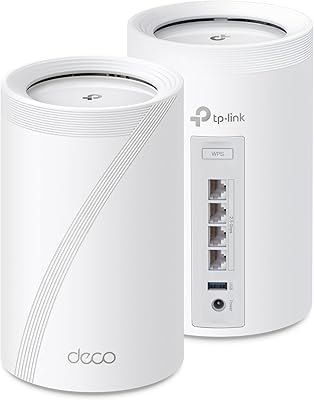
The TP-Link Deco BE95 Wi-Fi 7 Mesh System 2-Pack sits at the very top of TP-Link's mesh lineup, designed for large homes and users who genuinely push their networks hard. Wi-Fi 7 — the BE generation — isn't just a marketing bump; it introduces wider channels, smarter multi-link connections, and meaningfully lower latency versus Wi-Fi 6E. The 2-pack claims coverage up to 7,800 square feet, which is realistic in open floor plans but will shrink in older homes with thick concrete or brick walls. With over 2,200 Amazon ratings averaging 4.1 out of 5 stars, real-world reception is solid, though the premium price point makes this a deliberate purchase, not a casual one.
Features & Benefits

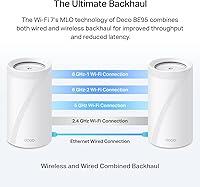
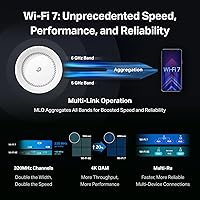
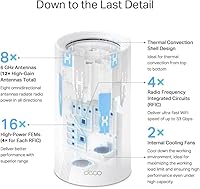
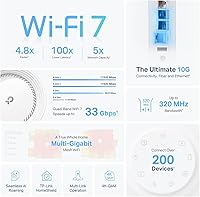
The quad-band architecture is where the Deco BE95 genuinely pulls ahead of most mesh kits. Two dedicated 6 GHz bands mean one can handle backhaul traffic between nodes while the other stays available for client devices — a real advantage in crowded households. Multi-Link Operation lets compatible devices connect across multiple bands at once, shaving latency in ways that gaming and video calls actually reveal. The 10G Ethernet ports are a standout: if your ISP delivers multi-gig speeds or you run a home NAS, you won't hit a hardware ceiling here. AI-driven antennas adjust beam direction as devices move, and the Deco app keeps day-to-day management approachable even without any networking background.

Best For

This Wi-Fi 7 mesh system makes the most sense for homeowners managing 5,000 square feet or more who've already cycled through mid-range mesh kits and still battle dead zones. It's a calculated move for early adopters building infrastructure ahead of the wave of Wi-Fi 7 laptops and phones arriving in the market. Power users with home media servers, wired 8K TVs, or serious gaming rigs will extract immediate value from the multi-gig wired ports. Households running 50 or more smart home and IoT devices will notice real stability gains, and anyone whose ISP already delivers multi-gigabit service needs hardware at this tier to avoid bottlenecking at the router itself.

User Feedback

Owners consistently praise signal consistency across large, multi-story floor plans and note how refreshingly simple the Deco app onboarding is compared to traditional router dashboards. A common complaint, however, centers on value: the sting deepens when buyers discover that meaningful HomeShield features — detailed reporting, advanced parental controls — are locked behind a recurring subscription. Some reviewers have flagged occasional connectivity drops following firmware updates, so waiting a few days before applying new updates seems prudent. The units are physically large and run noticeably warm, limiting discreet placement options. Critically, several owners acknowledge that Wi-Fi 7 speed gains are difficult to perceive today unless they already own Wi-Fi 7 client devices.

Pros

  • Quad-band architecture keeps backhaul and client traffic separated, dramatically reducing congestion in busy households.
  • 10G Ethernet ports future-proof wired connections for NAS setups, multi-gig ISP plans, and demanding gaming rigs.
  • Dead zones in large open-plan homes consistently disappear after proper node placement, according to long-term owners.
  • The Deco app makes setup and daily management accessible even for users with no networking background.
  • Multi-Link Operation reduces real-world latency for video calls and online gaming in ways that prior Wi-Fi generations could not.
  • Works with virtually every major ISP out of the box, including Starlink, Xfinity, AT&T, and Verizon.
  • Backward compatibility with older Wi-Fi standards means legacy devices connect without any issues.
  • AI-driven antennas adjust signal direction dynamically, helping maintain strong connections as devices move through the home.
  • Passive cooling keeps the units completely silent during operation, unlike fan-cooled enterprise alternatives.
  • Supports access point mode for users who want to keep an existing gateway and simply extend their wired network wirelessly.

Cons

  • Advanced HomeShield features — detailed reporting, robust parental controls — require a recurring paid subscription on top of an already high entry price.
  • Occasional connectivity drops following firmware updates have been reported by multiple owners, making automatic updates a minor risk.
  • The units are physically large and run noticeably warm, making discreet or enclosed placement impractical.
  • A standard gigabit Ethernet cable is included in the box, which is insufficient for users wanting to immediately use the 10G port.
  • Mandatory TP-Link account registration during setup is a dealbreaker for users committed to keeping their network management fully local.
  • Real-world coverage falls meaningfully short of the 7,800 square foot claim in homes with concrete, brick, or thick plaster construction.
  • Granular network controls — VLAN support, advanced QoS tuning, detailed traffic logs — are too limited for serious power users.
  • Firmware update reliability has been inconsistent, with some update cycles introducing instability that required manual reboots or rollbacks.
  • The value case weakens considerably for buyers whose current devices cannot yet take advantage of Wi-Fi 7 capabilities.
  • At this price tier, the absence of a built-in modem means buyers need to factor in additional hardware cost if they do not already own a compatible modem.

Ratings

The TP-Link Deco BE95 Wi-Fi 7 Mesh System 2-Pack has been scored across 13 performance and ownership categories using AI analysis of verified global buyer reviews, with spam, bot-submitted, and incentivized feedback actively filtered out before scoring. Ratings reflect the full spectrum of real-world experiences — from enthusiastic power users who finally solved whole-home dead zones to frustrated buyers who expected more visible gains from the Wi-Fi 7 upgrade. Both the genuine strengths and the recurring pain points are weighed transparently in every score below.

Wireless Performance
88%
Owners in large open-plan homes consistently report that dead zones they lived with for years simply disappeared after installing the Deco BE95 nodes. The dual 6 GHz bands keep backhaul traffic from competing with client devices, and users streaming 4K on multiple TVs while video-conferencing notice far less congestion than with previous mesh systems.
The full Wi-Fi 7 throughput advantage is largely theoretical for most households right now, since few consumer laptops or phones yet support the 802.11be standard. Buyers in homes with older construction — thick plaster walls or concrete floors — also report that the coverage footprint falls noticeably short of the marketed 7,800 square feet.
Coverage & Range
83%
In modern open-concept homes and single-story layouts, the 2-pack genuinely blankets spaces that used to require three or four access points. Users with two-story homes around 4,000 to 5,000 square feet report strong, reliable signal in every corner, including garages and backyard patios within reasonable distance of a node.
Realistically, the 7,800 square foot claim assumes ideal conditions that most real homes do not have. Buyers in multi-story homes with brick or concrete construction consistently report needing to adjust node placement significantly, and a few note that a 3-pack would be a better fit for their square footage than the 2-pack configuration.
Wired Connectivity
93%
The 10G Ethernet ports are a genuine differentiator that owners with multi-gig ISP service or home NAS setups specifically call out as a reason they chose this system over competitors. Users running a wired gaming PC or connecting a network-attached storage device report transfer speeds that finally match what their ISP plan promises.
The 2.5G ports, while still above standard gigabit, can feel like a step down when sitting next to the 10G options on the same unit. A small number of owners also note that the included Ethernet cable in the box is standard gigabit, which means buyers who want to take full advantage of the 10G port need to source a compatible cable separately.
Setup & Installation
86%
The Deco app walks users through the setup process in a way that even non-technical family members describe as intuitive and fast, with most reporting a functional network within 15 to 20 minutes of unboxing. Node placement suggestions from the app are practical, and the guided flow removes much of the guesswork that comes with traditional router configuration.
A handful of reviewers encountered issues during initial setup when their ISP used less common connection types, requiring workarounds not clearly explained in the quick-start guide. The app also requires account registration with TP-Link, which is a friction point for privacy-conscious users who would prefer fully local setup and management.
App & Management Experience
79%
21%
Day-to-day network management through the Deco app is genuinely accessible — users can see connected devices, run speed tests, set parental control schedules, and prioritize bandwidth for specific devices without any technical knowledge. The interface has improved noticeably through software updates since launch.
Power users looking for granular controls — VLAN configuration, advanced QoS tuning, or detailed traffic logs — find the app frustratingly simplified. Several technically inclined owners note that advanced features common on competing systems at this price tier are either missing or buried behind the paid HomeShield subscription.
Network Security (HomeShield)
67%
33%
The free tier of HomeShield covers the basics well enough for most households — a security scan on new devices, basic IoT identification, and simple parental filtering give users a meaningful layer of protection without paying anything extra. Owners with young children appreciate that content filtering is available out of the box.
A recurring frustration in reviews is discovering that detailed reports, advanced threat protection, and granular parental controls require an ongoing HomeShield Pro subscription. For a system at this price point, buyers reasonably expect more robust security features included by default, and the subscription requirement feels like a significant omission.
Device Capacity & Congestion Handling
87%
Households with 60 to 80 connected devices — a mix of smart home gadgets, phones, laptops, and streaming sticks — report that the network holds steady without the slowdowns they experienced on previous mesh systems. The quad-band design visibly reduces congestion, and users doing video calls while other household members stream or game notice fewer conflicts.
At genuinely extreme device counts, some owners note that performance becomes harder to predict, particularly with a dense mix of older 2.4 GHz-only IoT devices competing for airtime. The 200-device theoretical capacity is not a guarantee of stable performance for every device simultaneously, and real-world results vary with device types and usage patterns.
Build Quality & Design
74%
26%
The Deco BE95 units feel premium in hand — the matte white finish looks clean, and the construction feels solid rather than hollow. Owners who place them in living spaces appreciate that the design is neutral enough to blend with modern home decor rather than looking like a piece of server equipment.
At over 9 inches tall and nearly 6.7 pounds per unit, these nodes are noticeably large and heavy — not easy to hide on a bookshelf or tuck behind furniture. Heat output is also a consistent mention; the units run warm during sustained heavy use, which raises long-term concerns for buyers planning to place them in enclosed spaces.
Firmware & Long-Term Stability
71%
29%
Most owners report that the system runs reliably for extended periods under normal household conditions, with automatic firmware updates keeping security patches current without requiring manual intervention. Long-term buyers who have owned the system for six months or more generally report fewer issues than those who experienced early firmware versions.
A notable thread of reviews flags connectivity drops immediately following firmware updates, pointing to post-update instability as a recurring pattern. The cautious approach among experienced owners — waiting several days before applying any new update — is telling, and TP-Link's responsiveness to firmware issues in user threads has been inconsistent.
Wi-Fi 7 Future-Proofing
77%
23%
For buyers thinking two to three years ahead, the Deco BE95 positions their home network infrastructure to take full advantage of Wi-Fi 7 client devices as they roll out across laptops, phones, and smart TVs. MLO and 320 MHz channel support are genuinely forward-looking features that mid-range systems simply do not offer.
The honest reality is that most buyers today will not experience a meaningful day-one performance difference compared to a strong Wi-Fi 6E system, because the devices in their homes cannot yet use Wi-Fi 7 capabilities. Paying a significant premium now for future compatibility is a reasonable long-term argument, but a difficult one to justify on immediate results alone.
ISP & Modem Compatibility
82%
18%
Owners across a wide range of ISPs — including Comcast, Xfinity, AT&T, Starlink, and Verizon — report clean compatibility with minimal configuration headaches. The system works in access point mode for users whose ISP-supplied gateway handles routing, which adds useful flexibility for existing network setups.
As with most mesh systems, a separate modem is required for the majority of ISP connections, which is an added cost that budget-conscious buyers should factor into the total investment. A small subset of users on more unusual ISP configurations — particularly those using CGNAT or specialized business connections — report needing workarounds to get the system functioning properly.
Value for Money
61%
39%
For buyers who genuinely need multi-gig wired ports, true quad-band backhaul, and enterprise-grade device capacity in a consumer package, the Deco BE95 delivers capabilities that are hard to replicate at any lower price. Power users who have priced out alternatives confirm that the feature set at this tier is competitive.
For the average household upgrading from a standard mesh system, the value equation is hard to defend right now. The Wi-Fi 7 advantage is not yet visible in daily use, the best security features cost extra on top of an already steep entry price, and several competitors offer strong Wi-Fi 6E performance at a fraction of the cost.
Noise & Thermal Management
69%
31%
The units operate passively cooled and are effectively silent — no fan noise to worry about in a bedroom or living room. For users who have dealt with noisy router fans in the past, the Deco BE95 is a quiet presence regardless of network load.
Silent cooling comes with a trade-off: the units run noticeably warm during sustained heavy use, and owners who place them inside entertainment consoles or enclosed shelving report the heat building uncomfortably. Long-term thermal performance in confined spaces is a reasonable concern that a handful of reviewers have flagged after several months of ownership.

Suitable for:

The TP-Link Deco BE95 Wi-Fi 7 Mesh System 2-Pack is the right call for homeowners who have genuinely outgrown what mid-range mesh systems can deliver. If you are managing a large home — think sprawling open floor plans, multi-story layouts, or a property with a detached garage or home office — and you have already tried a step-down mesh kit that still leaves weak spots, this system is built for exactly that problem. Power users who run a home NAS, stream 8K content to multiple screens simultaneously, or need a competitive gaming setup with wired multi-gig backhaul will extract real, immediate value from the hardware rather than paying for potential they cannot use yet. Households juggling 50 or more connected devices — smart thermostats, security cameras, phones, tablets, and streaming sticks all competing for bandwidth — will notice tangibly better stability compared to tri-band alternatives. Early adopters who plan to hold onto their network infrastructure for three to five years and want to be ready when Wi-Fi 7 laptops and phones become the norm are also making a defensible long-term investment here. If your ISP already delivers multi-gigabit speeds and your current router is the bottleneck, this system removes that ceiling immediately.
Not suitable for:

The TP-Link Deco BE95 Wi-Fi 7 Mesh System 2-Pack is a hard sell for buyers whose primary need is reliable whole-home Wi-Fi in an average-sized house without particularly demanding usage. If your home is under 3,000 square feet, your device count is typical for a family of four, and your ISP plan tops out at standard gigabit, you will struggle to justify the premium — a solid Wi-Fi 6E mesh system at a fraction of the price will cover your needs without compromise. Buyers who expect to feel a dramatic Wi-Fi 7 speed boost immediately will likely be disappointed; the honest reality is that most smartphones and laptops on the market today still do not support the 802.11be standard, so the theoretical throughput ceiling remains unreachable for now. Privacy-focused users who prefer fully local network management without creating a cloud account will find the mandatory TP-Link account registration during setup an immediate friction point. Anyone planning to tuck the nodes discreetly into a cabinet, media console, or enclosed shelf should also think twice — the units are physically large, run warm under load, and need adequate airflow to operate reliably long-term. Finally, buyers expecting enterprise-grade security included in the purchase price will find the paywall around HomeShield Pro's most useful features frustrating given what they have already spent.

Specifications

  • Wi-Fi Standard: Operates on the 802.11be (Wi-Fi 7) standard, with full backward compatibility for 802.11ac, 802.11ax, 802.11n, and 802.11g devices.
  • Frequency Bands: Quad-band design covers 2.4 GHz, 5 GHz, and two independent 6 GHz bands simultaneously for dedicated backhaul and client traffic separation.
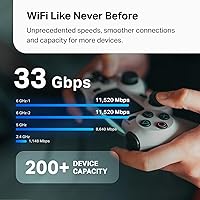
  • Max Combined Speed: Rated at a combined 33,000 Mbps across all four bands, with up to 11,520 Mbps on each 6 GHz band and 8,640 Mbps on the 5 GHz band.
  • Coverage Area: The 2-pack configuration is rated for up to 7,800 square feet under open, ideal conditions; real-world coverage will vary based on home layout and construction materials.
  • Device Capacity: Supports connections for over 200 devices simultaneously across the full mesh network.
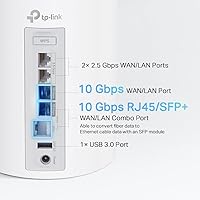
  • Wired Ports: Each node includes two 10G Ethernet ports and two 2.5G Ethernet ports, enabling multi-gigabit wired connections for servers, NAS units, gaming rigs, and managed switches.
  • Wi-Fi 7 Features: Includes Multi-Link Operation (MLO), Multi-Resource Units (Multi-RU), and 320 MHz channel support for reduced latency and higher sustained throughput.
  • Smart Antennas: AI-driven antenna system dynamically adjusts beam direction to track and prioritize signal toward active connected devices.
  • Security Suite: Ships with TP-Link HomeShield, offering a free tier with basic security scanning, IoT device identification, and simple parental controls, plus an optional paid Pro tier for advanced features.
  • Network Management: Managed entirely through the Deco app, available for both iOS and Android, including setup, device prioritization, parental controls, and speed testing.
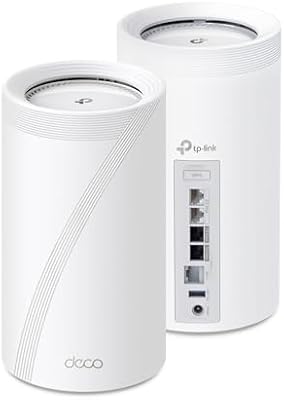
  • Dimensions: Each node measures 5.04″ x 5.04″ x 9.29″, making it one of the larger consumer mesh units currently available in its class.
  • Weight: Each unit weighs 6.67 lbs, which is notably heavy for a consumer mesh node and should be considered for wall-mount or shelf placement.
  • Connectivity: Supports Ethernet, USB, and Wi-Fi connectivity options per unit, providing flexible integration into existing home network setups.
  • ISP Compatibility: Compatible with all major internet service providers including Comcast, AT&T, Verizon, Spectrum, Starlink, and others; a separate modem is required for most ISP connections.
  • In-Box Contents: Each 2-pack ships with two Deco BE95 units, two power adapters, one RJ45 Ethernet cable, and a printed quick installation guide.
  • Cooling System: Passively cooled with no internal fan, resulting in silent operation but noticeable heat output during sustained heavy network usage.
  • Operating Modes: Supports both router mode and access point mode, allowing flexible deployment alongside existing gateway hardware.
  • Color & Finish: Available in a matte white finish designed to blend with modern home interiors rather than resemble traditional networking equipment.

Related Reviews

TP-Link Deco X10 Wi-Fi 6 Mesh System
86%
92%
Value for Money
96%
Ease of Setup
89%
Wi-Fi Coverage
85%
Performance under Load
87%
Device Support
More
TP-Link Deco S4 Mesh WiFi System (2-Pack)
87%
91%
Wi-Fi Coverage
88%
Performance Stability
94%
Ease of Setup
90%
Parental Controls
85%
Device Support
More
TP-Link Deco BE25-Outdoor Wi-Fi 7 Mesh Extender
86%
91%
Wi-Fi Performance
95%
Outdoor Durability
80%
Setup & Installation
88%
Speed & Throughput
85%
Mounting & Placement Flexibility
More
TP-Link Deco AXE5300 Mesh System 3-Pack
78%
88%
Wireless Coverage
86%
Network Speed & Throughput
91%
Setup & Installation
83%
App Experience & Management
67%
Wi-Fi 6E & 6 GHz Band Utility
More
TP-Link Deco BE63 WiFi 7 Mesh System
89%
94%
Overall Performance
93%
WiFi Coverage
91%
Device Capacity Handling
88%
Setup & Installation
90%
App Experience
More
TP-Link Deco BE85 WiFi 7 Mesh System
87%
89%
Wi-Fi Performance
91%
Setup Process
85%
Coverage and Range
93%
Security Features
78%
Device Compatibility
More
TP-Link Deco BE75 WiFi 7 Mesh System
85%
94%
Performance
88%
Ease of Setup
91%
Security Features
92%
Coverage & Range
79%
Value for Money
More
TP-Link Deco XE75 Mesh WiFi System 1-Pack
77%
91%
Setup Experience
78%
WiFi Coverage
83%
Real-World Speed
62%
6 GHz Band Utility
86%
Multi-Device Performance
More
TP-Link Deco X20 1-Pack Mesh WiFi System
78%
93%
Ease of Setup
71%
Coverage Reliability
84%
Multi-Device Performance
88%
App Experience
86%
Parental Controls
More
TP-Link Deco BE23 WiFi 7 Mesh Router
82%
93%
Value for Money
91%
Setup & Ease of Use
84%
Wi-Fi Speed Performance
82%
Coverage & Signal Range
89%
Wired Port Quality
More

FAQ

Yes, for most home internet connections you will need a standalone modem. The Deco BE95 handles routing and Wi-Fi, but it does not include a built-in modem. If your ISP provides a gateway device that already has a modem built in, you can run the Deco nodes in access point mode instead.

Honestly, it depends heavily on what devices you own. If your phones, laptops, and smart TVs are all Wi-Fi 6E or older, you will not see a dramatic throughput jump day-to-day — the hardware is ready, but your client devices are not yet. Where you will notice an improvement is in congestion handling across lots of simultaneous devices, and in wired connectivity if you take advantage of the 10G ports.

The Deco app walks you through everything step by step, and most users report having a working network within 15 to 20 minutes. You will need to create a TP-Link account during setup, which is worth knowing in advance. The app is genuinely one of the more polished setup experiences in the mesh router space.

Yes — all Deco units are designed to work together, so you can add another Deco node to the existing mesh at any time through the app. Just keep in mind that adding a non-BE95 node to the network may reduce the overall performance ceiling of the mesh backhaul.

Yes, it works with Starlink. You would connect the Starlink router to one of the Deco nodes via Ethernet and either use the Deco in router mode or put the Starlink router into bypass mode. Many Starlink users have reported clean compatibility with this setup.

The free tier covers basic security scans when new devices join your network, simple IoT device identification, basic parental content filtering, and quality-of-service controls. The paid Pro tier adds detailed weekly and monthly usage reports, advanced threat protection, granular per-device parental scheduling, and more in-depth network analytics. For most households the free tier is functional, but families with young children or users who want detailed traffic visibility will find the Pro features worth considering.

Wall mounting is not natively supported with included hardware, and placing them inside a closed cabinet is not a great idea — these nodes run warm and need airflow around them to stay stable over long periods. They are genuinely designed to sit out in the open on a shelf or surface, which is something to plan for before purchasing.

Based on owner feedback, waiting a few days before applying any new firmware update is a reasonable precaution. A subset of users have reported connectivity drops immediately after certain updates, and giving the community a few days to flag any problems before you update is a low-effort way to avoid disruption. Automatic updates can be turned off in the Deco app if you prefer manual control.

Yes, the system is fully backward compatible with older Wi-Fi standards including 802.11n and 802.11g, so older 2.4 GHz-only smart home devices will connect without any issues. The mesh network manages band steering automatically, so legacy devices end up on the appropriate band without you having to configure anything manually.

It can be, but treat that number as an upper ceiling rather than a guarantee. Open floor plans with minimal obstructions will get close to the claim, but multi-story homes with wood-framed walls tend to fall somewhere in the 5,000 to 6,500 square foot range in practice. Homes built with concrete, brick, or thick plaster will see a more significant reduction. Placement matters a lot — centering each node within its coverage zone and keeping them off the floor improves results considerably.

Where to Buy