Overview

The Cudy M3000 Wi-Fi 6 Mesh System enters a crowded market with one compelling argument: genuinely modern networking hardware without the flagship price tag. Cudy isn't a name most people recognize immediately, and that hesitation is fair — but the company has been quietly building a reputation among budget-conscious networking enthusiasts. This Wi-Fi 6 mesh router covers up to 2,500 square feet from a single node, which is realistic for apartments, ranch-style homes, or single-floor layouts. Add a 2.5G WAN port — something typically reserved for far pricier gear — and the value case becomes hard to ignore. Just don't expect it to replace a tri-band flagship in a sprawling multi-story house.

Features & Benefits

The M3000 runs on a dual-band Wi-Fi 6 radio with combined throughput reaching 3,000 Mbps — a real step up from the aging AC routers many homes are still running. The 1.3 GHz dual-core Cortex-A53 processor keeps things moving across 200-plus connected devices without obvious slowdowns. What stands out most for privacy-focused users is the built-in VPN suite, covering WireGuard, ZeroTier, OpenVPN, PPTP, and L2TP — options you'd normally only find on more expensive or prosumer gear. DNS-over-HTTPS encryption, WPA3 security, beamforming, QoS, and parental controls fill out the package nicely. Ethernet backhaul support also means you can expand to multiple nodes later without sacrificing wireless bandwidth.

Best For

This Wi-Fi 6 mesh router makes the most sense for people who've upgraded to a gigabit-plus internet plan and want hardware that can actually keep pace with it — the 2.5G WAN port alone justifies the purchase for that group. Small business owners or home network tinkerers who want real VPN flexibility without paying for an enterprise appliance will find a lot to like here. For smart home users juggling cameras, streaming devices, and phones across a single floor, this Cudy mesh node handles the load without complaint. If your home has multiple levels or pushes past 2,500 square feet, though, you'd be better served adding a second node or buying a multi-pack kit from the start.

User Feedback

With a 4.5-star average across 163 ratings, the M3000 has built a solid early reputation — though the sample size is still modest enough that a few outlier reviews carry weight. Buyers consistently praise straightforward setup and real-world speeds that outperform expectations given the price point. WireGuard VPN performance draws particular compliments from technically minded users. On the downside, several reviewers flag the companion app as unpolished, and a handful admit initial hesitation around Cudy's limited brand recognition. Users in larger or two-story homes also report that single-node coverage sometimes falls short of the stated 2,500 square foot figure — honest feedback worth taking seriously before buying the one-pack.

Pros

  • The 2.5G WAN port is a rare find at this price, genuinely future-proofing the router for multi-gig internet plans.
  • Wi-Fi 6 performance delivers a meaningful real-world upgrade for households still running older AC routers.
  • Built-in WireGuard, OpenVPN, and ZeroTier VPN support eliminates the need for a separate VPN appliance.
  • DNS-over-HTTPS encryption via Cloudflare or NextDNS adds privacy protection at the network level, not just per device.
  • Setup is fast and straightforward — most users are up and running in under ten minutes.
  • Handles 40 to 60 simultaneously connected smart home and IoT devices without obvious slowdowns.
  • WPA3 security and beamforming are included without requiring firmware hacks or paid upgrades.
  • Ethernet backhaul support lets you expand to multiple nodes later with minimal wireless performance loss.
  • The value-to-spec ratio consistently surprises buyers who compare it against pricier name-brand alternatives.
  • Access point mode makes it a flexible option for users who already have a primary router but need better wireless coverage.

Cons

  • Single-node coverage in two-story homes regularly falls short of the advertised 2,500 square foot claim.
  • The companion mobile app feels unpolished and lags behind competitor apps in usability and reliability.
  • Firmware updates have been known to reset custom configurations, which is a genuine headache for advanced users.
  • Cudy's long-term firmware support cadence is unproven compared to TP-Link, Asus, or Netgear.
  • Parental controls lack per-profile scheduling and detailed activity reporting that families may expect.
  • The web interface uses vague or poorly translated labels in some settings, requiring trial and error.
  • Wireless mesh roaming between multiple nodes draws mixed feedback, with some users reporting hand-off delays.
  • The device runs noticeably warm under sustained heavy use, which may concern users in poorly ventilated spaces.
  • Limited community resources and third-party guides exist compared to more established networking brands.
  • Advanced routing features like VLAN configuration are accessible but not well-documented for less experienced users.

Ratings

The scores below reflect an AI-driven analysis of verified global buyer reviews for the Cudy M3000 Wi-Fi 6 Mesh System, with spam, incentivized posts, and bot activity actively filtered out before any scoring was applied. Real-world patterns — from gigabit apartment setups to small business VPN use — shaped every category. Both the genuine strengths and the honest frustrations buyers reported are reflected here without softening either side.

Value for Money
93%
Most buyers land on this router after comparing it to options costing two or three times as much and walk away genuinely surprised by what they got. The combination of Wi-Fi 6 performance, a 2.5G WAN port, and a full VPN suite at this price point is difficult to argue with, and that sentiment dominates the positive reviews.
A small segment of buyers feel the value equation weakens if you need more than one node to cover your home, since the per-unit cost adds up quickly. Those coming from premium brands also tend to notice the app and interface polish gap more acutely, which colors their overall value perception.
Wi-Fi Speed & Throughput
84%
Users on gigabit internet plans consistently report that the M3000 actually delivers near-line-speed performance, which is more than can be said for many routers at this tier. Streaming 4K content to multiple devices simultaneously, or handling a household of heavy internet users, rarely produces the congestion complaints common with older AC hardware.
On the 2.4 GHz band specifically, a handful of reviewers note that throughput in crowded apartment buildings is underwhelming — a limitation of the spectrum itself, but worth flagging for dense urban environments. Users who benchmark rigorously also point out that real-world 5 GHz speeds fall short of the theoretical maximums under non-ideal conditions.
2.5G WAN Port
91%
For anyone who has recently upgraded to a multi-gig ISP plan, this port is the reason to choose this router over nearly every competitor at the same price. Buyers frequently mention that it was the single deciding factor, and those who actually use it report that it fully eliminates the bottleneck that cripples standard gigabit WAN ports on faster plans.
The benefit is entirely wasted if your ISP plan tops out at 1 Gbps or below, which is still the reality for most households — making this a forward-looking feature rather than an immediate one for the majority of buyers. A small number of users also report needing to update firmware before the port performed reliably at full speed.
Coverage & Range
72%
28%
In the intended use case — a single-floor apartment or open-plan home under roughly 2,000 square feet — the M3000 delivers consistent, strong signal without the dead zones that plagued the older routers many buyers replaced. Users in these settings rarely need to think about signal strength at all, which is exactly the point of a mesh device.
The 2,500 square foot coverage claim draws the most skepticism in reviews, particularly from users in two-story homes or layouts with thick interior walls. Several buyers found that signal quality degraded noticeably in far corners or upper floors, and a second node ended up being necessary — something the single-pack listing does not make obvious upfront.
VPN Performance
88%
WireGuard performance in particular earns consistent praise from technically experienced users, with several noting that tunnel speeds are genuinely fast compared to software-based VPN solutions running on separate devices. Small business owners using ZeroTier or OpenVPN for remote access report stable, reliable connections that hold up under sustained workloads.
Setting up VPN protocols beyond WireGuard can be tricky without prior networking knowledge, and the documentation bundled with the device is thin. A few reviewers mention that L2TP and PPTP configurations require digging through online forums or Cudy community threads rather than clear in-app guidance.
Setup & Installation
81%
19%
The initial setup process draws frequent praise for being faster and less frustrating than buyers expected from a lesser-known brand. Most users report getting from unboxing to connected devices in under ten minutes, with the included Ethernet cable and power adapter covering everything needed out of the box.
The experience is less smooth for users who want to configure advanced settings during setup — the guided process is designed for simplicity and can feel limiting if you want to customize things like VLANs or static routing from the start. A subset of reviewers also encountered a firmware update prompt immediately on first boot that added unexpected time to the process.
Mobile App Experience
58%
42%
Basic tasks — checking connected devices, running a speed test, adjusting parental controls — work reliably through the app for most users. Those who only need surface-level monitoring find it adequate for day-to-day oversight without touching a web browser.
The app is widely flagged as the weakest part of the overall experience, with complaints about an unintuitive layout, occasional sync delays, and a design that feels noticeably behind what Asus, TP-Link, or Netgear offer at similar price points. Power users tend to abandon it quickly in favor of the web interface, which is more capable but less polished than the competition.
Web Interface & Advanced Controls
74%
26%
Users who prefer managing their network through a browser rather than an app find the web interface functional and reasonably well-organized. QoS controls, DNS settings, and VPN configuration are all accessible without requiring command-line access, which is more than many budget routers can claim.
The interface lacks the refinement of established brands and occasionally presents settings with vague or poorly translated labels that require trial and error to understand. Firmware updates sometimes reset custom configurations, which has frustrated a notable portion of longer-term users.
Security Features
86%
WPA3 support alongside DNS-over-HTTPS encryption through Cloudflare or NextDNS gives privacy-conscious buyers meaningful protection that goes well beyond what most routers in this category offer. The ability to configure encrypted DNS at the router level rather than per-device is a genuine practical benefit for households with many connected devices.
Cudy's track record on long-term security patch frequency is harder to evaluate given the brand's shorter history in Western markets, which makes some buyers uneasy about committing to it for multi-year use. There is also no built-in threat detection or intrusion prevention system, which more security-focused users might miss.
Device Capacity & Load Handling
79%
21%
Smart home enthusiasts with 30 to 50 connected devices — a mix of cameras, bulbs, speakers, phones, and laptops — report that the M3000 handles the load without obvious performance degradation. The dual-core processor holds up well in real household conditions where devices are constantly connecting and disconnecting.
The claim of 200-plus simultaneous devices is a theoretical ceiling that no residential user is likely to hit, but at around 60 to 80 active devices, some reviewers note a slight uptick in latency on time-sensitive tasks like video calls. Those running dense IoT deployments for small commercial use found it less reliable than purpose-built access points.
Mesh Expandability
69%
31%
Ethernet backhaul support is a genuinely useful feature for users who can run a cable between nodes, as it frees up the wireless bands entirely for client traffic and meaningfully improves whole-home performance in multi-node setups.
Wireless mesh performance between multiple M3000 nodes receives mixed feedback — some users report a smooth and stable expanded network, while others describe hand-off delays and inconsistent roaming when moving between floors. The mesh ecosystem is also smaller and less mature than Eero, Deco, or Orbi, with fewer node options available.
Build Quality & Design
71%
29%
The tower-style form factor and matte black finish look clean enough to sit on a desk or shelf without drawing complaints, and the physical construction feels more substantial than some competing budget units that feel hollow or cheap. Status LED behavior is simple and easy to read at a glance.
At nearly 10 inches tall, it is larger than some buyers expect and can feel awkward in tight spaces. The plastic casing, while not flimsy, does not inspire the confidence of higher-end devices, and a few users mention that the device runs noticeably warm during sustained heavy use.
Brand Trust & Support
61%
39%
Buyers who took the chance on Cudy largely report that the hardware delivered on its promises, which has helped the brand build word-of-mouth credibility in budget networking communities. Cudy's community forum and social channels are reasonably active for a lesser-known manufacturer.
Limited brand recognition remains a real psychological barrier for many shoppers, and the shorter warranty and less established customer support infrastructure compared to TP-Link or Asus give some buyers pause. Response times for support tickets and firmware update cadence are harder to predict than with more established networking brands.
Parental Controls
66%
34%
Basic time-scheduling and device-level controls are present and functional, covering the needs of parents who simply want to cut off internet access for specific devices at bedtime or block broad content categories. For straightforward household management, it covers the fundamentals.
The parental control system lacks the depth of dedicated solutions — there is no per-profile scheduling, no detailed activity reporting, and content filtering categories are coarse. Families who have used Circle, Eero's parental controls, or similar dedicated platforms will find this version considerably less granular.

Suitable for:

The Cudy M3000 Wi-Fi 6 Mesh System is a strong fit for apartment dwellers, single-floor homeowners, and anyone whose living space stays comfortably under 2,000 to 2,500 square feet. If you have recently upgraded to a multi-gigabit or gigabit-plus ISP plan and are still running an old AC router that bottlenecks your speeds, this is one of the very few options at this price that can actually keep pace — thanks to its 2.5G WAN port. Tech-savvy users and small business owners who want WireGuard or OpenVPN built directly into the router, without paying for a separate appliance or subscription, will find the M3000 punches well above its weight class. Smart home enthusiasts managing a dense mix of cameras, streaming devices, and IoT gadgets will also appreciate the stable handling of many simultaneous connections. For anyone upgrading from aging Wi-Fi 5 hardware on a modest budget, the performance jump here is tangible and worth the relatively low financial commitment.

Not suitable for:

If your home has two or more floors, thick concrete or brick walls, or a footprint that genuinely pushes past 2,000 square feet, a single unit of the Cudy M3000 Wi-Fi 6 Mesh System is likely to leave you with frustrating dead zones — the coverage claims are optimistic, and real-world performance in complex layouts consistently falls short. Buyers who prioritize a polished, intuitive app experience will find the software side of this router noticeably behind what established brands like Eero, TP-Link Deco, or Asus ZenWifi offer. Households that need robust, granular parental controls with per-profile scheduling and detailed usage reports should look elsewhere, as the built-in tools cover only the basics. If brand longevity and multi-year firmware support history matter to you — reasonable concerns for a device you plan to run for five or more years — Cudy's shorter track record in Western markets is a legitimate hesitation. Users who want a plug-and-play experience with zero networking knowledge required may also find the advanced configuration options more confusing than helpful.

Specifications

  • Wi-Fi Standard: Dual-band 802.11ax (Wi-Fi 6) with backward compatibility for 802.11a/b/g/n/ac devices.
  • Combined Speed: AX3000 class, with up to 574 Mbps on the 2.4 GHz band and up to 2,402 Mbps on the 5 GHz band.
  • WAN Port: One 2.5 Gbps multi-gigabit WAN port designed to support internet subscriptions exceeding 1 Gbps.
  • Processor: 1.3 GHz dual-core ARM Cortex-A53 CPU optimized for concurrent wireless and routing workloads.
  • Coverage Area: Single node covers up to 2,500 sq ft under open, single-floor conditions; real-world range varies by layout.
  • Device Capacity: Rated to handle 200 or more simultaneously connected devices across both frequency bands.
  • VPN Protocols: Native server and client support for WireGuard, ZeroTier, OpenVPN, PPTP, and L2TP.
  • DNS Encryption: DNS-over-HTTPS support configurable through Cloudflare, NextDNS, or Google DNS providers.
  • Security: WPA3 personal encryption is supported alongside legacy WPA2 for backward compatibility with older devices.
  • Special Features: Includes beamforming, QoS traffic prioritization, parental controls, access point mode, WPS, and Ethernet backhaul.
  • Mesh Support: Supports multi-node mesh expansion with both wireless and wired Ethernet backhaul configurations.
  • Dimensions: The unit measures 5.51 × 5.51 × 9.84 inches, with a vertical tower form factor suited for shelf or desktop placement.
  • Weight: The device weighs 1.48 pounds, making it lightweight enough to reposition without difficulty.
  • Color & Finish: Matte black exterior finish across the full chassis.
  • In the Box: Package includes the M3000 unit, one power adapter, one Ethernet cable, and a printed installation guide.
  • Manufacturer: Designed and produced by Shenzhen Cudy Technology Co., Ltd., based in China.
  • Release Date: First made available for purchase on September 27, 2023.
  • Model Number: Official model designation is M3000 1-Pack, with ASIN B0CJX7JCN7 on Amazon.

Related Reviews

TP-Link Deco X10 Wi-Fi 6 Mesh System
86%
92%
Value for Money
96%
Ease of Setup
89%
Wi-Fi Coverage
85%
Performance under Load
87%
Device Support
More
ARRIS SURFboard mAX Pro W133 Mesh Router
71%
83%
Wi-Fi Coverage
71%
Wi-Fi Speed Performance
52%
App & Software Experience
58%
Network Reliability & Stability
91%
Wired Port Availability
More
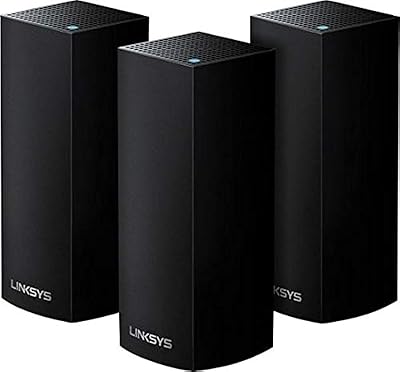
Linksys Velop WHW0203 Mesh Wi-Fi System
85%
94%
Coverage Reliability
91%
Setup & Installation
89%
Connection Speed
88%
App Interface
86%
Device Capacity
More
Cudy AX1500 Wi-Fi 6 Router WR1500
83%
92%
Value for Money
88%
Wi-Fi Performance (5GHz)
79%
Wi-Fi Performance (2.4GHz)
74%
Range and Coverage
93%
Ease of Setup
More
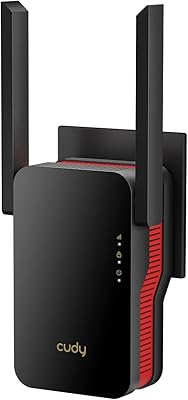
Cudy RE3000 AX3000 Wi-Fi 6 Extender
74%
88%
Setup & Ease of Use
76%
Wi-Fi Coverage
67%
5 GHz Band Performance
81%
2.4 GHz Band Reliability
63%
Real-World Speed Throughput
More
Linksys AC6600 Whole-Home Mesh Wi-Fi System
86%
87%
Overall Performance
92%
Wi-Fi Range
94%
Ease of Setup
88%
Speed and Stability
81%
Build Quality
More
Ubiquiti U6-Mesh Wi-Fi 6 Access Point
79%
93%
Wireless Performance
54%
Setup & Configuration
91%
Build Quality & Durability
88%
Coverage Range
74%
Value for Money
More
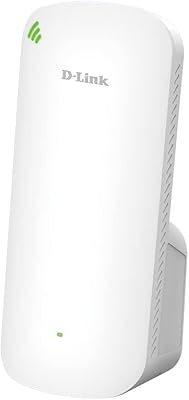
D-Link AX1800 Mesh Wi-Fi 6 Range Extender
84%
90%
Wi-Fi Range and Coverage
85%
Setup and Installation
88%
Device Compatibility
80%
Wi-Fi Speed and Stability
93%
Security Features
More
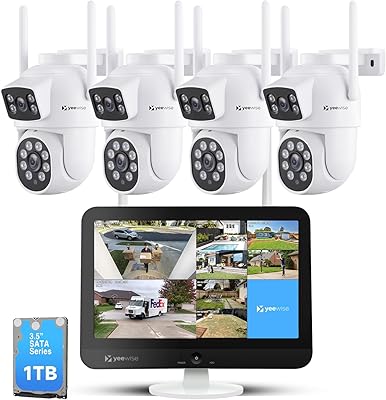
YEEWISE 2K 12″ Monitor Security Camera System
78%
88%
Ease of Setup
83%
Video Quality
79%
Dual-Lens Performance
74%
Night Vision
57%
Remote App Access
More
ARRIS SURFboard mAX W30 Tri-Band Mesh Wi-Fi 6 Router
85%
88%
Wi-Fi Performance
81%
Setup & Installation
85%
Smart Home Integration
90%
Coverage & Range
89%
Speed (AX7800) & Throughput
More

FAQ

It is genuinely functional for multi-gig plans. If your ISP delivers speeds above 1 Gbps to your home, the 2.5G WAN port allows the M3000 to pass through that bandwidth without the bottleneck a standard gigabit port would create. That said, your devices still need to support fast enough wired or wireless connections to take advantage of those speeds at the endpoint.

You can absolutely use it as a standalone router — no mesh required. The device also supports access point mode if you want to slot it into an existing network behind another router. Mesh expansion is optional and only comes into play if you add a second node later.

Treat it as an upper bound under ideal conditions, meaning an open floor plan with minimal walls and interference. In a typical home with interior walls, furniture, and appliances in the way, consistent strong coverage tends to top out closer to 1,500 to 2,000 square feet from a single node. Two-story homes in particular tend to need a second unit for reliable whole-floor coverage upstairs.

WireGuard is actually the easiest of the supported VPN protocols to configure on this router — Cudy has documented the setup reasonably well, and most technically comfortable users get it running within 15 to 20 minutes. If you have never set up a VPN server before, expect to spend some time reading through the Cudy community forum, but it is far from expert-only territory.

Yes, the Cudy M3000 Wi-Fi 6 Mesh System is fully backward compatible with 802.11a, b, g, n, and ac devices. Older gadgets connect normally — they just do not benefit from Wi-Fi 6 features like OFDMA or improved power efficiency, which are reserved for Wi-Fi 6 capable clients.

The web interface is fully capable and handles everything from VPN configuration to parental controls and DNS settings. The mobile app is convenient for quick checks and basic monitoring, but most power users prefer the browser-based admin panel, especially for anything beyond surface-level management.

It holds up well in practice for dense IoT environments. The dual-core processor keeps latency reasonable even when dozens of low-bandwidth devices are constantly polling the network. Some users with 60 or more concurrent IoT connections report no meaningful impact on streaming or gaming performance running alongside the smart home traffic.

You can add a second M3000 node and the router supports wireless mesh out of the box. Wireless backhaul works, but if you can run an Ethernet cable between the two nodes, do it — wired backhaul keeps both radio bands free for your devices and significantly improves throughput and reliability across the expanded network.

The concern is understandable, and it comes up often in buyer discussions. Cudy is a legitimate manufacturer based in Shenzhen with a growing product line and an active support community. The hardware has generally performed as advertised for most buyers, and the firmware receives periodic updates. That said, Cudy does not have the same long-term support track record as Asus or TP-Link, so if brand longevity is a primary concern for a device you plan to run for five-plus years, that is worth factoring into your decision.

It does run warm under sustained load — noticeably more so than some competing units. This is not unusual for a compact device with a reasonably capable processor, but you should avoid enclosing it in a cabinet or cramped shelf with poor airflow. Placing it upright in an open area is both the best setup for signal performance and the safest for keeping temperatures reasonable.