Overview

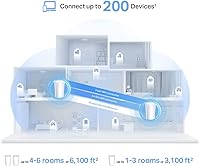
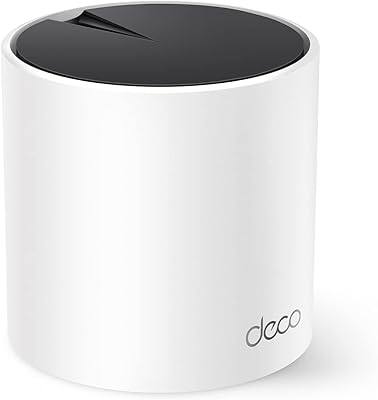
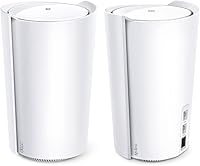
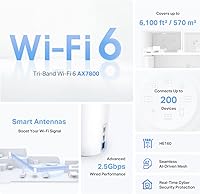
The TP-Link Deco X95 2-Pack Mesh WiFi System sits firmly in the upper tier of home networking — a tri-band WiFi 6 system built for large homes that have outgrown a single router. Promising coverage up to 6,100 square feet from just two units, it sounds impressive on paper, though real-world results depend heavily on your floor plan, wall materials, and where you place each node. What separates it from mid-range mesh kits is the 2.5G multi-gig WAN port, which lets the hardware keep pace with next-generation ISP speeds rather than bottlenecking them. This is not a budget purchase — but for the right home, the performance argument holds up.
Features & Benefits

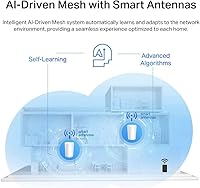
The Deco X95 2-pack runs on an AX7800 tri-band setup — one 2.4GHz band for legacy devices and two separate 5GHz bands that handle backhaul and client traffic without competing for the same airspace. That dedicated backhaul is a real practical advantage; it means the nodes are not choking their own connection just to talk to each other. AI-driven smart antennas adjust dynamically to concentrate signal toward satellite units rather than broadcasting blindly in all directions. Each unit also carries three ethernet ports, including one 2.5G port, which is genuinely useful for wiring in a NAS or desktop PC directly. The built-in HomeShield security suite adds IoT device scanning and parental controls without requiring a paid subscription for its basic features.

Best For

This mesh WiFi 6 system makes the most sense for homeowners dealing with genuinely large floor plans — think open-concept ranch homes, multi-story houses, or properties where a single router inevitably leaves the far bedroom or home office crawling. It is also a strong fit for households juggling 20 or more simultaneous devices: smart TVs, video doorbells, laptops, phones, and streaming sticks all coexisting without anyone complaining about buffering. If your ISP has already upgraded you to a multi-gig plan, or you are planning to soon, this is one of the few consumer mesh systems with the port to handle it. Families wanting basic parental controls baked in — without a separate monthly fee — will also find real value here.

User Feedback

Based on around 135 ratings, TP-Link's flagship mesh kit sits at 3.8 out of 5 — respectable, but that sample size warrants some caution before drawing firm conclusions. Positive reviewers consistently highlight easy app-based setup and a meaningful speed improvement over whatever aging router they replaced, particularly in homes where dead zones were a persistent frustration. On the critical side, some users report inconsistent backhaul between nodes and occasional Deco app bugs requiring a reboot to resolve. Worth noting separately: a portion of buyers have raised data privacy concerns about TP-Link more broadly — this is a legitimate discussion in the networking community and deserves independent research before committing. Satisfaction skews highest among those replacing genuinely inadequate older hardware in large spaces.

Pros

  • Covers up to 6,100 sq ft with just two nodes, making it one of the stronger per-unit coverage values at this tier.
  • Dedicated backhaul band keeps node-to-node communication from competing with device traffic, which matters in busy households.
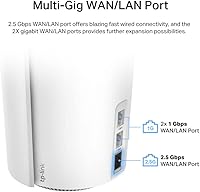
  • The 2.5G multi-gig WAN port future-proofs the setup for ISPs now rolling out gigabit-plus service plans.
  • Supporting up to 200 connected devices means even heavily loaded smart homes are unlikely to hit a hard ceiling.
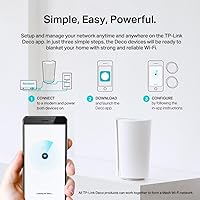
  • App-based setup through the Deco app is consistently praised as straightforward, even by less tech-savvy users.
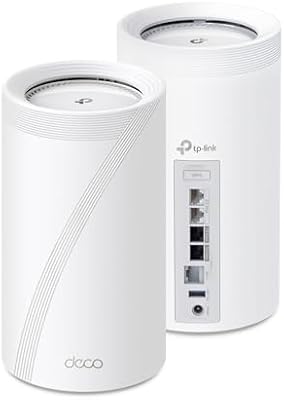
  • Each unit includes three ethernet ports, giving wired connection options for gaming consoles, smart TVs, or a NAS without needing a separate switch.
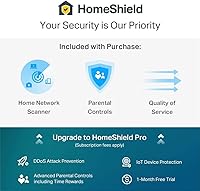
  • HomeShield provides IoT device identification, basic parental controls, and QoS at no additional subscription cost for core features.
  • AI-driven smart antennas concentrate signal directionally toward satellite units rather than radiating it indiscriminately, improving inter-node reliability.
  • A single unified network name means devices roam between nodes automatically without manual switching.

Cons

  • Some users report inconsistent backhaul performance between nodes, particularly in homes with thick concrete or brick walls between units.
  • The Deco app has drawn complaints about occasional connectivity bugs that require a full reboot to resolve rather than a simple refresh.
  • TP-Link's data privacy practices have faced scrutiny in the security community — a real concern worth independent research before buying.
  • At this price, the 3.8 out of 5 rating across only 135 reviews is a thinner confidence base than competing systems with thousands of ratings.
  • Advanced users who want granular network configuration — custom DNS, detailed routing controls, VLAN management — will find the app-centric interface limiting.
  • The physical footprint of each unit is substantial; at over 8 inches tall, placement in discreet spots or small entertainment centers can be awkward.
  • Advanced HomeShield features, including more detailed reporting and enhanced security scans, require a paid subscription beyond the free tier.
  • No built-in support for Wi-Fi 6E means this system cannot access the less congested 6GHz band that newer devices and competing products now support.

Ratings

The TP-Link Deco X95 2-Pack Mesh WiFi System scores below are generated by AI after analyzing verified purchaser reviews from major global retail platforms, with spam, incentivized feedback, and bot activity actively filtered out during processing. The resulting scores reflect a realistic cross-section of real household experiences — covering everything from large-home coverage wins to app stability frustrations — so both the strengths and the genuine pain points are represented transparently.

Coverage & Range
83%
In genuinely large homes — think 3,500 to 5,000 sq ft with standard drywall construction — users consistently report that dead zones they had lived with for years simply disappeared after deploying both nodes. Bedrooms at the far end of the house, backyard patios, and detached garages within reasonable distance all benefited noticeably.
Coverage claims of 6,100 sq ft reflect ideal open-space conditions, and real-world results in multi-story homes with concrete floors or older brick walls fall noticeably short. Several users in two-story homes between 4,000 and 5,000 sq ft noted that upper floors still required careful node placement to achieve reliable signal.
Network Performance
81%
19%
Households that upgraded from aging AC1200 or AC1750 routers report dramatic improvements — 4K streams no longer buffer mid-episode, video calls hold steady even during peak household usage, and online gaming latency dropped for users who connected consoles via the wired ethernet ports.
The AX7800 speed rating is a theoretical aggregate across all three bands combined, not a number any single device will experience. Users on standard 500 Mbps or 1 Gbps ISP plans may notice only modest real-world improvements over a well-placed single router if their home is not particularly large.
Setup & Installation
88%
The Deco app guides users through the process with clear visual steps, and the majority of reviews — including those from self-described non-technical buyers — describe being fully online within 20 minutes. Node discovery is automatic, and the app handles network naming and password creation in a single flow.
A small subset of users reported that initial node pairing failed on the first attempt, requiring a factory reset and a second run through the setup wizard. Users who need to enable bridge mode on an existing ISP-provided gateway first may find that step adds unexpected complexity before they even start.
App Experience
71%
29%
For day-to-day tasks — checking which devices are connected, running a speed test, or adjusting parental control schedules — the Deco app is clean and accessible enough that most family members can navigate it without help. Network status at a glance and device management by room are genuinely useful organizational features.
A recurring complaint involves the app losing connection to the router and requiring users to force-quit and relaunch before it responds again — an annoying bug for a premium product. Power users wanting fine-grained controls like custom DNS servers, static IP assignment, or VLAN configuration will find the app frustratingly shallow.
Value for Money
67%
33%
For buyers replacing a genuinely inadequate setup in a large home — particularly those who have already spent money on range extenders that never quite worked — the all-in-one mesh solution justifies itself quickly. The inclusion of basic parental controls and network security at no extra subscription cost adds tangible everyday value.
At this price point, buyers are firmly in premium territory and will find competing systems with comparable performance and more established review bases available at lower cost. Apartments, small homes, or users with modest device counts are paying a significant premium for hardware capacity they simply will not use.
Wired Connectivity
86%
Having three ethernet ports per unit — including a 2.5G port — sets this kit apart from most competing mesh systems that offer just one or two standard gigabit ports. Users who wire in a NAS, a gaming PC, and a smart TV at the same node location appreciate not needing a separate switch.
The two standard 1G LAN ports per unit are adequate for most wired devices but may feel limiting in a media room or home office with four or more devices that benefit from wired connections. Running ethernet cable to each node's physical location can also add installation complexity depending on home layout.
Device Capacity
84%
Households with a heavy mix of smart home devices — thermostats, door locks, security cameras, light bulbs, plus phones and laptops for every family member — report that the network handles them without the periodic slowdowns they experienced on single-router setups with lower connection limits.
The 200-device ceiling is rarely a genuine constraint for residential users, making it more of a spec-sheet talking point than a practical advantage for most households. Real-world performance under simultaneous heavy load from 50 or more active devices has not been rigorously documented in user reviews at this sample size.
Security Features
78%
22%
The HomeShield suite identifies IoT devices on the network — a practically useful feature for households with smart locks, cameras, or baby monitors that owners want to isolate or monitor. The free tier provides enough functionality for most families: security scanning, basic content filtering, and QoS prioritization are all accessible without paying.
Advanced security reporting, detailed usage logs, and enhanced threat detection all sit behind the paid HomeShield Pro subscription, which feels like a limitation at this hardware price point. Broader concerns about TP-Link's data handling practices have been raised by security researchers, and this is a factor some buyers weigh heavily when choosing networking hardware.
Backhaul Reliability
69%
31%
When the inter-node connection is working well, the dedicated 5GHz backhaul band keeps satellite units communicating efficiently without fighting for airspace with client devices — a meaningful advantage in homes where multiple people are streaming or working remotely at the same time.
A notable portion of negative reviews point specifically to the backhaul link between the two nodes becoming unstable over time — manifesting as one node dropping to a lower signal tier or the satellite unit partially losing its connection to the primary without an obvious trigger or clear fix.
Build Quality & Design
74%
26%
The tall tower design, while polarizing aesthetically, allows the internal antennas to radiate signal more evenly across vertical space — which matters in homes where a node needs to serve both upper and lower floors from a single central position.
At over 8 inches tall, each unit is considerably bulkier than competing mesh nodes from rivals that have moved toward flatter, more shelf-friendly form factors. Finding a discreet, open placement spot — critical for good signal distribution — is not always straightforward in homes with limited surface space or furniture constraints.
Parental Controls
73%
27%
Parents in busy households report that per-device content filtering and usage scheduling are easy enough to configure through the app that even the less tech-oriented parent can manage them independently. Blocking categories like adult content or social media during homework hours works reliably according to the majority of family-focused reviewers.
More granular controls — per-app blocking, real-time browsing history, or detailed usage reports by website — require the paid HomeShield Pro tier, which some parents find frustrating after investing heavily in the hardware. Compared to dedicated parental control routers, the depth of content management here is functional but not class-leading.
Multi-Gig Support
87%
For households whose ISP has already moved them to a 1.5 Gbps or 2 Gbps service plan, the 2.5G WAN port is a practical, tangible differentiator — most mesh systems at comparable price points still cap out at standard gigabit on the WAN side, creating an avoidable bottleneck.
Users on standard 500 Mbps or 1 Gbps plans — which describes the majority of residential customers today — will see no benefit from the multi-gig port currently, making it a future-proofing feature that contributes to the cost without any immediate impact on daily performance.
Roaming & Handoff
79%
21%
Users who move around their home frequently — switching from a home office upstairs to a kitchen downstairs throughout the workday — report that devices transition between nodes without dropping active connections in most cases, and the single unified network name removes the friction of manually switching SSIDs.
Sticky client behavior — where a phone or laptop clings to a distant, weaker node rather than switching to a closer one — occasionally surfaces, particularly with older devices that do not support 802.11k/v roaming assistance protocols. This is partly a client device limitation but still appears consistently enough in user complaints to note.
Long-Term Stability
66%
34%
A portion of buyers who have run the system for six months or more report consistent, trouble-free performance once initial setup is complete and nodes are placed in well-ventilated, central locations — suggesting the hardware is capable of reliable operation under the right conditions.
A meaningful number of reviewers describe the system requiring periodic reboots — weekly in some cases — to resolve sluggish performance or connectivity drops that appear without obvious cause. Firmware update reliability is also inconsistent, with a subset of users reporting that updates temporarily disrupted their network until a manual restart resolved it.
Privacy & Trust
53%
47%
TP-Link has taken steps to address regulatory scrutiny, including signing the U.S. CISA Secure-by-Design pledge, which signals at least a public commitment to building security into the hardware design process — a reassurance that some buyers find meaningful when weighing their options.
U.S. congressional scrutiny over TP-Link's ties to Chinese state entities, combined with cybersecurity researchers flagging vulnerabilities in past firmware, has created a genuine trust gap that hardware pledges alone have not fully resolved for privacy-conscious buyers. Those in sensitive professional roles, or who prefer to minimize data exposure through their home router, may find the uncertainty difficult to overlook.

Suitable for:

The TP-Link Deco X95 2-Pack Mesh WiFi System is built for homeowners who have genuinely run out of options with a single router — specifically those managing floor plans between 3,000 and 6,000 square feet where dead zones are a daily frustration rather than an occasional annoyance. If your household routinely has 20 or more devices competing for bandwidth at the same time — smart home gadgets, 4K TVs, video calls, and gaming consoles all running simultaneously — the tri-band architecture means those devices are not all fighting over the same channel. It is also a particularly smart buy for anyone whose ISP has already upgraded them to a multi-gig internet plan, since the 2.5G WAN port means the router itself will not become the weakest link in that pipeline. Families who want built-in parental controls and basic network security monitoring without paying a separate monthly subscription will also get real, tangible value from the HomeShield suite included at no extra cost. In short, this system rewards buyers who have a specific, large-scale problem to solve.
Not suitable for:

The TP-Link Deco X95 2-Pack Mesh WiFi System is a hard sell for anyone living in an apartment, a small house, or any space under 2,000 square feet — the hardware is simply oversized for that problem, and far more affordable mesh options would cover the space just as well. Budget-conscious shoppers should look elsewhere; the price point sits firmly in premium territory, and there are capable WiFi 6 mesh systems available at a significantly lower cost that will satisfy most average households. Buyers who have serious concerns about data privacy with Chinese-manufactured networking equipment should research TP-Link's track record and current regulatory environment carefully before purchasing, as this is not a trivial concern and has surfaced repeatedly in user discussions. Renters or users who move frequently may also find the hardware investment difficult to justify when their next home could have an entirely different layout. Finally, those expecting the system to fix slow internet speeds from their ISP will be disappointed — a mesh system improves coverage and distribution, not the raw speed delivered to your home.

Specifications

  • WiFi Standard: This system operates on WiFi 6 (802.11ax), which improves throughput efficiency and reduces congestion in environments with many simultaneously connected devices.
  • Band Configuration: Tri-band architecture combines one 2.4GHz band and two independent 5GHz bands, allowing client traffic and inter-node backhaul to operate on separate channels.
  • Combined Speed: Maximum theoretical aggregate speed is AX7800, composed of 574 Mbps on 2.4GHz, 2,402 Mbps on 5GHz Band 1, and 4,804 Mbps on 5GHz Band 2.
  • Coverage Area: The 2-pack configuration is rated for whole-home coverage up to 6,100 sq ft under optimal conditions.
  • Max Devices: The network is designed to support up to 200 simultaneously connected devices without significant degradation in throughput.
  • WAN Port: Each primary unit includes one 2.5G multi-gigabit WAN port, capable of handling internet service plans that exceed standard gigabit speeds.
  • LAN Ports: Each unit provides two 1G ethernet LAN ports for wired device connections such as smart TVs, gaming consoles, or network-attached storage.
  • Backhaul Type: Inter-node communication uses a dedicated wireless backhaul band enhanced by AI-driven smart antennas that focus signal directionally toward satellite units.
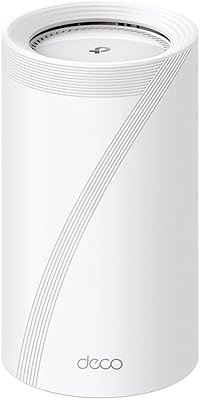
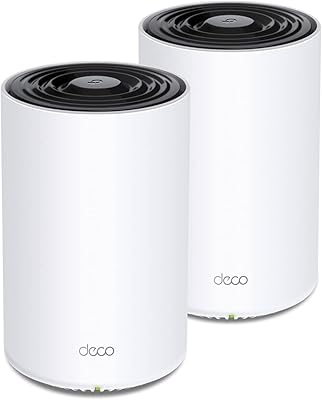
  • Unit Dimensions: Each Deco X95 node measures 5.12″ x 4.84″ x 8.23″, making it a relatively tall unit that requires stable, open shelf or floor placement.
  • Unit Weight: The combined shipping weight of both units in the 2-pack is approximately 3.13 lbs, indicating a moderately dense build for a consumer mesh node.
  • Security Suite: TP-Link HomeShield is included at no cost in its basic tier, covering network security scans, IoT device identification, QoS management, and basic reporting.
  • Parental Controls: Built-in parental controls are accessible through the Deco app and allow content filtering and device scheduling without requiring a paid HomeShield subscription for basic functionality.
  • SSID Management: All nodes broadcast under a single unified network name and password, enabling automatic device roaming across the mesh without manual reconnection.
  • App Control: The system is managed entirely through the TP-Link Deco mobile app, which is available for both iOS and Android devices.
  • Operating Modes: The system supports both standard router mode and access point mode, making it compatible with setups where a separate modem-router handles the primary connection.
  • Wireless Protocols: Backward compatibility is maintained across 802.11a, 802.11b, 802.11g, 802.11n, 802.11ac, and 802.11ax standards.
  • In-Box Contents: Each package includes two Deco X95 units, two power adapters, one RJ45 ethernet cable, and a printed quick installation guide.
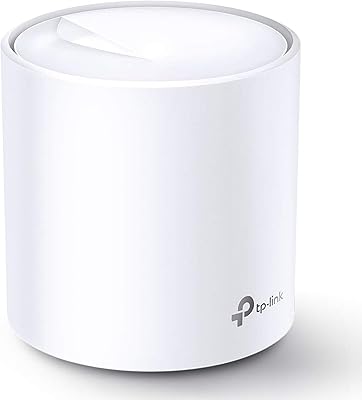
  • Color and Finish: Both units ship in a matte white finish designed to blend into residential interiors without drawing significant visual attention.

Related Reviews

TP-Link Deco S4 2-Pack Mesh WiFi System
75%
91%
Setup & Installation
74%
Coverage & Range
83%
Connection Stability
88%
Value for Money
72%
App Experience
More
TP-Link Deco BE95 Wi-Fi 7 Mesh System 2-Pack
78%
88%
Wireless Performance
83%
Coverage & Range
93%
Wired Connectivity
86%
Setup & Installation
79%
App & Management Experience
More
TP-Link Deco XE75 Mesh WiFi System 1-Pack
77%
91%
Setup Experience
78%
WiFi Coverage
83%
Real-World Speed
62%
6 GHz Band Utility
86%
Multi-Device Performance
More
TP-Link Deco BE85 WiFi 7 Mesh System
76%
84%
Wireless Performance
93%
Wired Port Selection
67%
Mesh Coverage
76%
Setup & App Experience
82%
Build Quality & Design
More
TP-Link Deco BE75 WiFi 7 Mesh System
85%
94%
Performance
88%
Ease of Setup
91%
Security Features
92%
Coverage & Range
79%
Value for Money
More
TP-Link Deco X20 1-Pack Mesh WiFi System
78%
93%
Ease of Setup
71%
Coverage Reliability
84%
Multi-Device Performance
88%
App Experience
86%
Parental Controls
More
TP-Link Deco BE63 2-Pack Mesh WiFi System
82%
91%
Coverage & Range
86%
Network Speed
93%
Setup & Installation
78%
App Experience
89%
Wired Port Flexibility
More
TP-Link Deco X55 1-Pack Mesh Wi-Fi System
81%
91%
Ease of Setup
84%
WiFi Speed & Throughput
78%
Coverage Reliability
72%
App & Management Experience
88%
Value for Money
More
TP-Link Deco M5 Mesh WiFi Router 1-Pack
86%
88%
Performance
93%
Setup Ease
85%
Coverage Range
91%
Security Features
77%
App Experience
More
TP-Link Deco X68 2-Pack Mesh WiFi System
76%
91%
Setup Experience
78%
WiFi Coverage
83%
Network Performance
74%
App & Management
58%
HomeShield Value
More

FAQ

The TP-Link Deco X95 2-Pack Mesh WiFi System is genuinely one of the easier mesh systems to get running. You download the Deco app, plug in the primary node, and the app walks you through each step including adding the satellite unit. Most users report being fully set up and online within 15 to 20 minutes, with no router configuration pages or technical jargon involved.
It works with virtually any residential ISP — cable, fiber, DSL, or fixed wireless — as long as you have a modem or gateway device providing the connection. You simply plug the WAN port into your modem's ethernet output. If your ISP provides a modem-router combo unit, you may need to enable bridge mode on that device first, which your ISP can usually walk you through.

That figure reflects ideal open-space conditions, so treat it as a ceiling rather than a guarantee. In practice, thick concrete walls, multiple floors, or dense building materials will reduce effective range. A more realistic estimate for a typical 2-story home with standard drywall construction is somewhere in the 4,000 to 5,000 sq ft range. Node placement matters significantly — central, elevated positions perform noticeably better than corner or closet placements.

Yes, the Deco ecosystem is designed to be expandable. You can add additional Deco X95 units or other compatible Deco models to the same network through the app. Keep in mind that mixing node models can sometimes affect maximum backhaul performance, so sticking with the same model where possible is generally the cleaner approach.

This system is a router and mesh network — it does not include a built-in modem. You still need a separate modem (or modem-router combo in bridge mode) provided by or purchased for your ISP. The Deco X95 connects to that modem via its 2.5G WAN port and handles everything from there.

The free tier of HomeShield includes content filtering by category, per-device scheduling, and basic usage reporting, which covers what most families actually need. More granular features like detailed activity logs and advanced profile management require a paid HomeShield Pro subscription. For households wanting simple controls — block social media during homework hours, limit screen time for younger kids — the free tier is genuinely functional.

This is a fair and legitimate question that deserves a straight answer. TP-Link has faced scrutiny from U.S. regulators and security researchers regarding data handling practices and potential national security concerns — it is not a fringe worry. As of late 2024, there were ongoing congressional discussions about restricting TP-Link products in certain contexts. If network security and data sovereignty are priorities for you, it is worth researching the current regulatory status independently before purchasing. Buyers in government, enterprise, or high-sensitivity environments should be especially thorough.

In a standard dual-band mesh system, the nodes have to share a single 5GHz band between talking to each other and serving your devices — which creates a bottleneck under heavy load. The Deco X95 2-pack uses a separate 5GHz band exclusively for node-to-node communication, so your devices get the other bands entirely to themselves. In practice, this means less performance drop-off when multiple people are streaming, gaming, or on video calls simultaneously.

If you currently have a 500 Mbps or 1 Gbps internet plan, the 2.5G port will not make your internet faster — your ISP speed is still the ceiling. Where it matters is if your ISP upgrades you to a 1.5 Gbps or 2 Gbps plan in the future, or if you want faster wired transfers between local devices like a NAS. Think of it as hardware that will not become obsolete as service tiers improve.

All three are solid performers at the premium tier, but they have different strengths. The Deco X95 2-pack stands out for its 2.5G multi-gig port and the three ethernet ports per unit, which is more wired connectivity than most rivals offer. Eero integrates tightly with Amazon and Alexa but lacks the same multi-gig hardware. Orbi tends to offer strong raw speeds but at a higher price and with a larger physical footprint. The right choice depends on your ecosystem preferences, how many wired devices you need to connect, and your comfort level with each brand's privacy posture.

Where to Buy

123SecurityProducts.com
In stock $240.58
Surveillance-Video.com
In stock $240.58