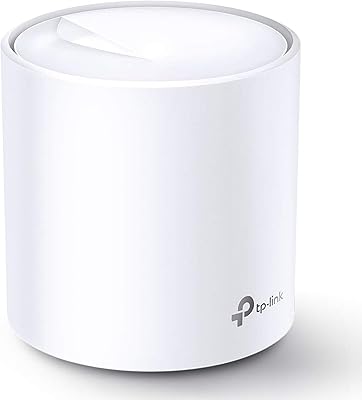
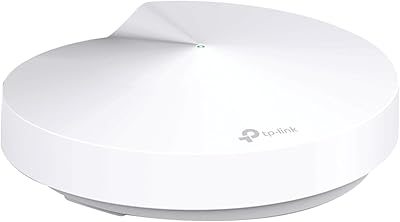
Overview

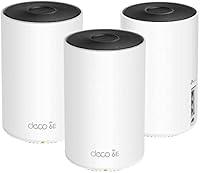
The TP-Link Deco AXE5300 Mesh System 3-Pack enters a crowded market with a clear pitch: whole-home Wi-Fi coverage powered by the newer 6 GHz band that standard Wi-Fi 6 routers simply don't offer. Three nodes give you enough hardware to blanket a large house — realistically somewhere between 6,000 and 7,500 square feet, depending on construction materials and layout. The price sits firmly in premium territory, which puts it alongside other serious contenders in the Wi-Fi 6E space. If your home is large, your device count is high, and your patience for dead zones is zero, this mesh system makes a strong case for itself. Casual users in smaller spaces, though, probably won't get their money's worth.
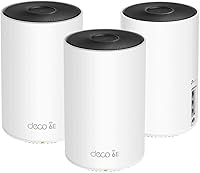
Features & Benefits

The real story with this mesh system is how it handles backhaul — the behind-the-scenes traffic between its three nodes. TP-Link dedicates the 6 GHz band exclusively to node-to-node communication, which keeps the 2.4 GHz and 5 GHz bands free for your actual devices. In practice, that means a laptop streaming video in one room won't compete for bandwidth with signals bouncing across the house. The Deco app setup is genuinely straightforward — most people are up and running within twenty minutes — and it handles parental controls, guest networks, and ongoing monitoring without needing a web interface. Each node also has Ethernet ports, so wired backhaul is an option if you want maximum stability.

Best For

This Wi-Fi 6E kit makes the most sense for homeowners dealing with genuinely large spaces — think sprawling ranch-style homes, multi-floor houses, or properties where a single router has never been able to reach the back bedroom or garage. It's also well-suited to households running a lot of devices at once: smart TVs, security cameras, gaming consoles, phones, and laptops all adding up to a network that cheaper routers struggle to handle gracefully. Power users who want to future-proof their setup will appreciate the 6 GHz band, though it's worth knowing that few consumer devices currently take advantage of it. Renters, apartment dwellers, and anyone on a tighter budget should probably look at less expensive options that will serve them just as well.

User Feedback

With a 4.4-star rating across nearly 200 reviews, buyers are largely positive about speed improvements and how well the app-based setup experience holds up. Those coming from older mesh systems or stock ISP routers tend to notice the biggest difference, especially in households where multiple people are streaming or gaming simultaneously. That said, a recurring theme in critical reviews involves the units running warm, with some buyers questioning long-term heat management. A handful have also flagged prompts toward optional subscription services, which can feel pushy. Real-world range occasionally falls short of advertised figures, particularly in homes with thick concrete or brick walls. On balance, firmware stability has been reliable after initial setup, which counts for a lot.

Pros

  • Three nodes provide reliable coverage across large, multi-floor homes where a single router always struggled.
  • The dedicated 6 GHz backhaul keeps node-to-node traffic off the bands your devices actually use.
  • App-based setup gets most users fully online in under twenty minutes, no technical background required.
  • Smooth device roaming means video calls and streams do not drop when moving between rooms or floors.
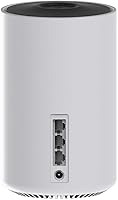
  • Ethernet ports on each node allow wired backhaul for users who want the most stable possible connection.
  • The Deco app handles parental controls and guest networks without requiring a paid subscription for core features.
  • Firmware updates run automatically in the background, keeping the system current without any user intervention.
  • Buyers upgrading from ISP-provided routers or older mesh systems report a clear and meaningful performance improvement.
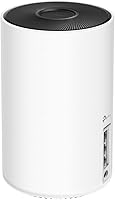
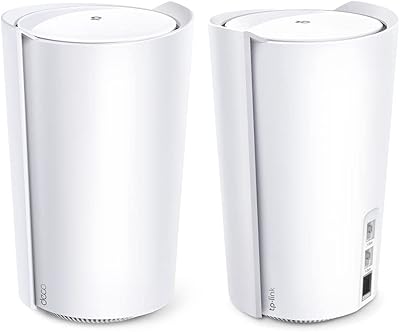
  • The clean, cylindrical design sits comfortably on a shelf without looking like networking equipment.

Cons

  • Units run noticeably warm under sustained load, raising legitimate questions about long-term thermal reliability.
  • The 6 GHz band is underused by most current consumer devices, so the key selling point sits largely idle today.
  • Advertised coverage figures assume open-plan layouts; older homes with thick walls see meaningfully shorter range.
  • The app periodically pushes users toward a HomeCare subscription to unlock features competitors include for free.
  • Advanced parental controls and detailed usage reports are locked behind an optional paid tier.
  • Customer support quality is inconsistent, with some users receiving generic scripted responses rather than real help.
  • No built-in firmware rollback option makes recovering from a bad update unnecessarily complicated.
  • Certain smart home devices with fixed IP or MAC address configurations require manual reconfiguration after switching to this mesh system.
  • The modest port count per node means users connecting multiple wired devices at one location will need a separate switch.

Ratings

The TP-Link Deco AXE5300 Mesh System 3-Pack earns a strong overall consensus across verified buyer reviews worldwide, with our AI-driven scoring model filtering out incentivized, duplicate, and bot-generated feedback to surface what real users actually experience. Ratings reflect both where this Wi-Fi 6E kit genuinely delivers and where it falls short of its premium positioning — no category was softened to protect the brand.
Wireless Coverage
88%
Three nodes working together handle large, multi-floor homes confidently, with buyers in 4,000-plus square foot properties reporting solid signal in places a single router never reached. Thick interior walls that typically killed coverage are less of an issue when nodes are placed strategically.
Marketed coverage figures assume open-plan layouts, and buyers in older homes with plaster walls or concrete floors often find the real-world range noticeably lower. A handful of users felt two nodes would have been sufficient for their space, making the third feel like a forced upsell.
Network Speed & Throughput
86%
Users running multiple 4K streams, video calls, and online gaming simultaneously report that the network holds up without the speed drops they experienced on older systems. The dedicated backhaul channel does meaningful work here, keeping inter-node traffic from competing with client devices.
Peak speeds require being close to a node and using a device that supports the faster bands, which most current consumer hardware does not fully exploit. Some buyers noted that real-world throughput, while improved, did not always match the dramatic jump the specification numbers imply.
Setup & Installation
91%
The Deco app walks users through the entire process step by step, and most buyers report being fully operational in under twenty minutes with no prior networking knowledge required. Node placement suggestions built into the app are practical and genuinely help optimize coverage.
A small number of users encountered pairing failures on the first attempt, requiring a node reset and retry before things clicked into place. Those who prefer a web-based interface for setup will find the app-only approach limiting, particularly on corporate or restrictive networks.
App Experience & Management
83%
Day-to-day management — pausing internet access for kids, setting up a guest network before a dinner party, checking which devices are connected — is handled through an interface that feels genuinely consumer-friendly rather than designed for IT professionals. Parental controls are straightforward and do not require a paid subscription for basic use.
The app periodically prompts users toward optional HomeCare subscription services, which some find intrusive. A few reviewers also noted that the app occasionally takes longer than expected to reflect real-time network changes, which can be frustrating when troubleshooting.
Wi-Fi 6E & 6 GHz Band Utility
67%
33%
For users who own newer smartphones or laptops with Wi-Fi 6E support, the 6 GHz band delivers noticeably lower latency in dense environments — particularly useful in apartment buildings or neighborhoods where the 5 GHz spectrum is congested with neighboring networks.
The honest reality is that very few consumer devices currently support the 6 GHz band, meaning most households are not yet in a position to benefit from the feature that primarily justifies the premium price. Buyers hoping for an immediate, whole-home speed boost may feel underwhelmed if their devices are not 6E-capable.
Device Roaming & Handoff
82%
18%
Walking from the kitchen to the backyard or between floors while on a video call is smooth for most users, with devices switching between nodes without the call dropping or requiring a manual reconnect. This is a meaningful improvement over traditional extender setups where handoffs were often jarring.
A minority of users reported that certain older smart home devices, particularly budget IoT sensors, occasionally struggled to roam cleanly and required a manual reconnect. The handoff timing is not user-configurable, which frustrates those who want finer control over when and how devices switch nodes.
Build Quality & Design
77%
23%
The units have a clean, cylindrical profile that blends into a living room shelf or bookcase without drawing attention, a genuine improvement over traditional router aesthetics. The plastic feels solid enough for a home device, and the finish resists minor scuffs and fingerprints reasonably well.
Several buyers noted that the units run noticeably warm during sustained heavy use, raising questions about how thermal management holds up over years of continuous operation. At this price tier, some users expected a more premium material finish rather than standard matte plastic.
Heat Management
61%
39%
Under typical household loads — browsing, streaming, occasional large file transfers — the nodes stay within a reasonable temperature range and have not triggered widespread reports of thermal throttling or unexpected reboots in normal use conditions.
In warmer rooms or enclosed entertainment centers, buyers report the units getting uncomfortably hot to the touch, which has made some users nervous about long-term reliability. This is one of the more consistent criticisms across reviews and worth factoring in when choosing a placement location.
Value for Money
69%
31%
For a household that is actively straining an older system — constant buffering during peak evening hours, dead zones in key rooms — the performance jump this mesh system delivers is tangible and the three-unit pack eliminates the need to buy expansion nodes separately.
For buyers whose devices are not Wi-Fi 6E-capable, they are effectively paying a premium for a feature they cannot yet use, which makes the price-to-value calculation difficult to justify against capable Wi-Fi 6 alternatives that cost considerably less. The investment makes far more sense as a five-year purchase than an immediate upgrade.
Ethernet & Wired Backhaul
84%
Having Ethernet ports on each node is a genuine advantage for users who can run a cable between at least two nodes — wired backhaul essentially eliminates the wireless congestion issue entirely and delivers the most consistent speeds the system is capable of.
The number of Ethernet ports per node is modest, which can feel limiting for users who want to connect multiple wired devices at each node location without adding a separate switch. Cable management around the units is also awkward given their cylindrical shape.
Firmware Reliability
79%
21%
Post-setup stability is generally praised, with the system running for weeks or months without requiring intervention. Automatic firmware updates in the background mean most users never think about patching, which is exactly how it should work in a consumer mesh product.
A subset of buyers reported that specific firmware updates introduced brief instability periods — random disconnections or reduced speeds — that resolved only after a full system reboot. The lack of a simple firmware rollback option through the app is a notable gap for technically minded users.
Parental Controls
76%
24%
Basic content filtering and internet scheduling for specific devices is included without a subscription, which is more than some competitors offer at this tier. Parents managing screen time for younger children find the per-device pause function particularly practical during homework hours.
Advanced filtering categories and detailed usage reporting require the HomeCare subscription, which feels like a paywall placed directly in front of features that competing systems include at no extra cost. The free tier is functional but noticeably limited for families with older teenagers.
Compatibility with Existing Devices
85%
The system works cleanly with virtually any device that connects over standard Wi-Fi — smart TVs, game consoles, older laptops, and smart home hubs all joined the network without compatibility issues in the vast majority of reported experiences.
A small number of users noted occasional friction when migrating smart home ecosystems that had been tightly configured to a previous router's MAC address or specific IP assignments, requiring some manual reconfiguration on the smart home side rather than the mesh system itself.
Customer Support
63%
37%
TP-Link's support documentation and community forums are reasonably thorough, and buyers who ran into setup issues often found answers through official guides or user communities without needing to contact support directly.
Those who did contact TP-Link support directly reported mixed outcomes — response times were inconsistent, and some users felt the support agents defaulted to generic troubleshooting scripts rather than addressing specific technical concerns. This is a recurring theme across TP-Link's broader product line.
Upgrade Experience from Older Mesh Systems
81%
19%
Buyers migrating from previous-generation Deco systems or basic ISP-provided routers consistently describe a clear improvement in day-to-day reliability and peak performance, particularly in homes where the older system was already showing its age under growing device loads.
Users coming from already-capable Wi-Fi 6 mesh systems — particularly competing flagships — report a less dramatic difference, suggesting the real gains are most visible when the starting point was a meaningfully weaker baseline rather than an already modern setup.

Suitable for:

The TP-Link Deco AXE5300 Mesh System 3-Pack is built for homeowners who have genuinely outgrown what a single router can do — specifically those dealing with dead zones in back bedrooms, garages, or multi-floor layouts where Wi-Fi has always been a compromise. It makes the most sense in households running a high volume of connected devices simultaneously: think a mix of smart TVs, security cameras, gaming consoles, work laptops, and a growing collection of smart home gadgets all competing for bandwidth during peak evening hours. Early adopters who want to invest in infrastructure that will remain relevant as more Wi-Fi 6E-capable devices enter the consumer market will find this a sensible long-term purchase. Families where multiple people work or study from home also benefit significantly, since the dedicated backhaul channel keeps the network stable even when everyone is online at once. Users upgrading from aging ISP-provided equipment or first-generation mesh systems will likely notice the biggest real-world improvement.
Not suitable for:

The TP-Link Deco AXE5300 Mesh System 3-Pack is a difficult sell for anyone living in a smaller home, apartment, or rental property where a single capable router would cover the entire space without issue. If your current device list is modest — a few phones, a laptop, and a TV — the added capacity this Wi-Fi 6E kit provides will go largely unused, and the price premium becomes very hard to justify. Budget-conscious buyers should also weigh the fact that the flagship feature of this system, the 6 GHz band, requires client devices that most consumers simply do not own yet, meaning the core differentiator sits idle for the majority of households. Those who prefer managing their network through a desktop browser rather than a smartphone app will find the Deco ecosystem restrictive. And if you already own a solid Wi-Fi 6 mesh system that is meeting your current needs, the generational jump here is unlikely to produce a noticeable improvement in day-to-day experience.
Specifications

  • Wi-Fi Standard: Operates on the 802.11ax (Wi-Fi 6E) standard, offering improved efficiency, lower latency, and better performance in environments with many active devices compared to previous Wi-Fi generations.
  • Band Configuration: Tri-band system combining a 2.4 GHz band, a 5 GHz band, and a 6 GHz band, with the 6 GHz channel reserved exclusively for high-speed backhaul communication between nodes.
  • Combined Speed: Rated at AXE5300 combined throughput across all three bands, representing the theoretical aggregate of each band operating simultaneously at peak conditions.
  • Pack Contents: Includes 3 individual Deco nodes designed to work together as a unified mesh network without requiring any additional hardware for basic whole-home setup.
  • Dimensions: Each node measures 8 x 10 x 8 inches, using a cylindrical form factor designed to blend into home environments rather than draw attention like traditional router hardware.
  • Total Weight: The complete three-unit system weighs 6.34 pounds in total, making individual nodes lightweight enough to reposition without any physical mounting or installation.
  • Ethernet Ports: Each node is equipped with Ethernet ports supporting both wired device connections and optional wired backhaul configuration for users who prioritize maximum network stability.
  • Backhaul Method: Uses the dedicated 6 GHz wireless band as the default backhaul channel between nodes, keeping client device traffic on the 2.4 GHz and 5 GHz bands without congestion.
  • Setup Method: Configured entirely through the TP-Link Deco smartphone app, with WPS support available as an alternative connection method for compatible devices during initial setup.
  • Roaming Technology: Supports seamless roaming, allowing connected devices to hand off automatically between nodes as users move through the home without manual network switching or connection drops.
  • Color Options: Available in a White/Black finish, with the neutral cylindrical design intended to sit unobtrusively on shelves or countertops in common living areas.
  • Compatible Devices: Works with any standard Wi-Fi-enabled device including personal computers, smartphones, smart TVs, gaming consoles, and smart home accessories across all major operating systems.
  • Parental Controls: Basic parental controls including per-device internet scheduling and content pausing are included at no additional cost through the Deco app, with advanced filtering available via optional subscription.
  • Network Management: Ongoing network monitoring, guest network creation, and device management are all handled through the Deco mobile app, with no web-browser interface available for desktop-based management.
  • Manufacturer: Designed and manufactured by TP-Link, a global networking hardware company with an extensive consumer and SMB product portfolio spanning routers, switches, and smart home devices.
  • First Available: This product was first made available for purchase in April 2022, making it part of the early wave of consumer Wi-Fi 6E mesh systems to reach the retail market.
  • Recommended Use: Intended primarily for whole-home residential coverage in larger properties, particularly those where a single router has proven insufficient to maintain consistent signal across all rooms and floors.
  • Firmware Updates: The system supports automatic over-the-air firmware updates managed through the Deco app, requiring no manual download or intervention from the user to stay current.

Related Reviews

TP-Link Deco S4 Mesh WiFi System (2-Pack)
87%
91%
Wi-Fi Coverage
88%
Performance Stability
94%
Ease of Setup
90%
Parental Controls
85%
Device Support
More
TP-Link Deco BE95 Wi-Fi 7 Mesh System 2-Pack
78%
88%
Wireless Performance
83%
Coverage & Range
93%
Wired Connectivity
86%
Setup & Installation
79%
App & Management Experience
More
TP-Link Deco BE63 WiFi 7 Mesh System
89%
94%
Overall Performance
93%
WiFi Coverage
91%
Device Capacity Handling
88%
Setup & Installation
90%
App Experience
More
TP-Link Deco XE75 Mesh WiFi System 1-Pack
77%
91%
Setup Experience
78%
WiFi Coverage
83%
Real-World Speed
62%
6 GHz Band Utility
86%
Multi-Device Performance
More
TP-Link Deco BE85 WiFi 7 Mesh System
87%
89%
Wi-Fi Performance
91%
Setup Process
85%
Coverage and Range
93%
Security Features
78%
Device Compatibility
More
TP-Link Deco X95 WiFi 6 Mesh System
86%
92%
Performance
95%
Coverage
82%
Setup/Installation
80%
App Experience
88%
Multi-device Support
More
TP-Link Deco X55 1-Pack Mesh Wi-Fi System
81%
91%
Ease of Setup
84%
WiFi Speed & Throughput
78%
Coverage Reliability
72%
App & Management Experience
88%
Value for Money
More
TP-Link Deco X20 1-Pack Mesh WiFi System
78%
93%
Ease of Setup
71%
Coverage Reliability
84%
Multi-Device Performance
88%
App Experience
86%
Parental Controls
More
TP-Link Deco BE75 WiFi 7 Mesh System
85%
94%
Performance
88%
Ease of Setup
91%
Security Features
92%
Coverage & Range
79%
Value for Money
More
TP-Link Deco M5 Mesh WiFi Router 1-Pack
86%
88%
Performance
93%
Setup Ease
85%
Coverage Range
91%
Security Features
77%
App Experience
More

FAQ

It replaces your existing router entirely — you plug one of the nodes directly into your modem or the gateway device your ISP provided, then the other two nodes connect wirelessly or via Ethernet from there. No special ISP equipment is required, though you should confirm your ISP allows you to use a third-party router before switching over.

TP-Link quotes coverage up to around 7,500 square feet for the three-unit set, but that figure assumes an open-plan layout with minimal interference. In a typical home with multiple floors, interior walls, and closed doors, a more realistic expectation is somewhere between 4,000 and 6,000 square feet. Homes with concrete, brick, or older plaster walls will be toward the lower end of that range.

Mostly future-proofing, to be honest. The majority of smartphones, laptops, and smart home devices in most households today do not support the 6 GHz band yet, so you will not see a direct speed benefit on those devices. Where it helps immediately is as a dedicated backhaul channel between nodes, which reduces congestion on the bands your devices do use. As Wi-Fi 6E-capable client hardware becomes more common over the next few years, the benefit will grow.

The Deco ecosystem is app-only — there is no web-based dashboard you can access from a browser on your laptop or desktop. For most users the app handles everything fine, but if you prefer desktop-based network management or work in an environment where app installs are restricted, this is a real limitation worth considering before buying.

In most cases your smart home devices will reconnect automatically if you use the same network name and password as your previous router. Devices that are locked to a specific IP address or MAC address — which is common with some older smart home hubs or security cameras — may need manual reconfiguration. It is a manageable process but worth budgeting an hour or two for if your smart home setup is complex.

Yes, the nodes do run warm, particularly under sustained heavy use or in enclosed locations like an entertainment center cabinet. Under typical household loads they stay within a reasonable range, but if you are planning to put a node in a confined shelf with poor airflow, it is worth giving it some breathing room. Long-term thermal effects have not been widely documented yet given the product's age, but it is the most consistent criticism in buyer reviews and worth factoring into placement decisions.

Basic features — setup, guest networking, parental controls at a fundamental level, and network monitoring — are all free through the Deco app. TP-Link does offer an optional HomeCare subscription that unlocks more granular content filtering, detailed usage reports, and advanced antivirus features. The app does prompt you toward it during setup and occasionally afterward, which some users find annoying, but the core functionality works fine without it.

Yes, the Deco system is expandable. You can add additional compatible Deco nodes through the app and they will integrate into your existing network. Just make sure any node you add is compatible with the AXE5300 system — TP-Link's compatibility documentation is the best place to verify before purchasing an expansion unit.

The main differences are the addition of the 6 GHz band and the use of that band as a dedicated wireless backhaul channel, which older Deco models do not have. This means the nodes communicate with each other on a separate channel that does not compete with your device traffic, which translates to more consistent speeds across the whole network. If you already own a recent Wi-Fi 6 Deco model and are not hitting performance limits, the upgrade is incremental rather than dramatic.

Setup is genuinely straightforward for the vast majority of users. The Deco app walks you through each step with clear instructions, and most people report being fully up and running within fifteen to twenty minutes. The occasional exception involves pairing failures that require a node reset and a second attempt, but that is not a widespread issue. If you have set up any consumer networking device in the past five years, you will not find anything here that challenges you.

Where to Buy