




Overview

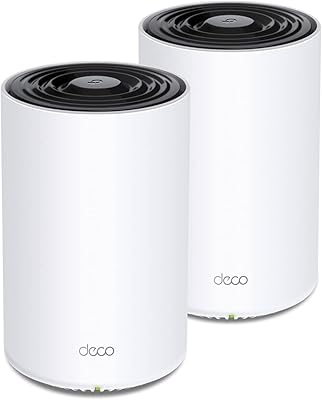
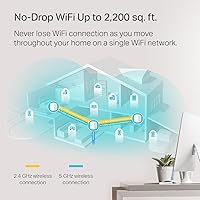
The TP-Link Deco X20 1-Pack Mesh WiFi System is an accessible entry point into Wi-Fi 6 mesh networking, designed for apartments and single-floor homes covering up to around 2,200 square feet. That coverage figure is realistic for open layouts, though walls and interference will shrink it in practice. Released in mid-2020, this Deco mesh node has aged well — it still holds its own against newer budget competitors, and it undercuts older Wi-Fi 5 mesh kits without sacrificing much. It also plugs into TP-Link's broader Deco ecosystem, so you can always add another node later if one unit stops being enough.

Features & Benefits

The X20 unit runs on the AX1800 dual-band radio, which in plain terms means faster top speeds and less congestion compared to older Wi-Fi 5 hardware — though you will notice the difference most when your phones and laptops also support Wi-Fi 6. The standout for busy households is how OFDMA and MU-MIMO let multiple people stream, video call, and game at the same time without fighting over bandwidth. Setup through the Deco app takes under ten minutes, and the same app handles remote network management, usage monitoring, and per-profile parental controls with time scheduling — no third-party subscription required. Alexa users can toggle the guest network by voice.

Best For

This Wi-Fi 6 mesh router makes the most sense for renters and homeowners in smaller spaces — think a one-bedroom apartment, a compact ranch home, or a single-floor layout under 2,000 square feet. If you are juggling 10 to 20 connected devices and your old router struggles at peak hours, the X20 unit handles that load noticeably better. Families who want built-in parental controls without a monthly fee will appreciate what is included out of the box. Already using Deco nodes elsewhere? Adding this one is straightforward. It is less ideal for multi-story homes or anyone expecting whole-home coverage from a single point — that is what the multi-pack versions are for.

User Feedback

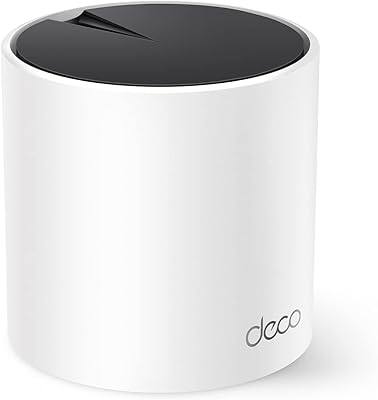
Across thousands of reviews, a consistent pattern emerges. Buyers regularly highlight how quick setup is and how stable day-to-day connections remain over months of use. The compact, cylindrical design draws almost no complaints — it sits on a shelf without looking like networking equipment. The most common frustration is coverage drop-off in two-story homes or anywhere thick walls get in the way; a single node simply is not designed for that scale. Some buyers also report that real-world throughput near the edges of range falls below the peak spec figures. Long-term owners generally praise firmware reliability, though a handful mention slow support response times when problems arise.

Pros

  • Easy app-guided setup gets most users connected in under ten minutes, no networking knowledge required.
  • Built-in parental controls with per-profile scheduling come included at no extra subscription cost.
  • Wi-Fi 6 support handles 10 to 20 simultaneous devices noticeably better than older Wi-Fi 5 routers.
  • The Deco ecosystem lets you expand coverage later simply by adding another compatible node.
  • Compact, cylindrical design blends into a room without drawing attention.
  • Compatible with virtually every major US internet provider and any modem supporting up to 1 Gbps plans.
  • Long-term owners consistently report stable connections and reliable uptime over a year or more of use.
  • OFDMA technology reduces congestion when multiple devices stream or video call at the same time.
  • Remote network management through the Deco app works reliably even when you are away from home.
  • Alexa voice commands let you toggle the guest network hands-free.

Cons

  • A single unit struggles in multi-story homes, often leaving upper floors or basements underserved.
  • Real-world throughput near the edge of coverage range falls meaningfully below advertised peak speeds.
  • Dual-band only — no dedicated wireless backhaul band, which can limit performance when nodes are daisy-chained.
  • The X20 unit is fully app-dependent; there is no traditional browser-based admin interface for advanced users.
  • Some buyers report slow or inconsistent responses from TP-Link customer support when issues arise.
  • Only one Ethernet port is confirmed in the box contents, limiting wired device options per node.
  • Wi-Fi 6 speed gains are minimal unless your client devices also support the Wi-Fi 6 standard.
  • Port count and speeds per node are not clearly documented in official product materials, creating uncertainty for wired setups.

Ratings

The TP-Link Deco X20 1-Pack Mesh WiFi System earns its scores from an AI-driven analysis of thousands of verified global user reviews, with spam, bot activity, and incentivized feedback actively filtered out before any scoring takes place. The result is an honest snapshot of how this Deco mesh node performs in real homes — reflecting both what buyers genuinely love and where it falls short depending on their setup.

Ease of Setup
93%
The Deco app-guided setup process is one of the most consistently praised aspects across all buyer demographics. Even users who describe themselves as non-technical regularly report being online within ten minutes of opening the box, with no router configuration knowledge required.
A small number of users on older Android versions or less common ISP configurations report hiccups during initial pairing that require a second attempt or a call to support. The app-only setup approach also frustrates the rare buyer who prefers browser-based configuration.
Coverage Reliability
71%
29%
In open single-story apartments and compact ranch-style homes, the X20 unit delivers consistent signal strength across the full footprint. Users in 1,000 to 1,500 square foot spaces regularly report zero dead zones and stable throughput in every room.
The single-unit limitation becomes obvious in two-story homes or any layout with thick interior walls. Buyers expecting the full 2,200 square foot figure to apply to their specific floorplan are often disappointed, and this is the most common driver of negative reviews.
Multi-Device Performance
84%
Households running 15 or more simultaneous devices — phones, laptops, smart TVs, security cameras — report noticeably smoother experiences compared to their previous single routers. OFDMA support reduces the queuing bottleneck that causes buffering when everyone is online at once.
During genuinely heavy simultaneous loads — multiple 4K streams plus active video calls — some users report intermittent slowdowns, suggesting the AX1800 ceiling gets approached faster than expected in larger families. This is less a flaw and more a capacity ceiling for this price tier.
App Experience
88%
The Deco app is regularly highlighted as a standout feature rather than just a setup utility. Remote network management, real-time device monitoring, and guest network control all work reliably from anywhere, and the interface is clean enough that household members other than the primary tech person can navigate it.
Advanced users note the app lacks the granular control options found in browser-based router admin panels — things like detailed traffic routing, VLAN configuration, or port-level monitoring are either buried or absent. This is not a concern for most buyers but matters to the technically inclined.
Parental Controls
86%
Per-profile scheduling and content filtering work consistently without requiring any paid subscription, which is a genuine differentiator at this price point. Parents report setting up screen time limits for children in a few minutes and adjusting them remotely when needed.
The content filtering categories are somewhat broad, and there is no option for more granular domain-level blocking without workarounds. A small number of parents note that determined teenagers can sometimes find gaps in the filtering by switching between devices on different profiles.
Wi-Fi 6 Performance
74%
26%
For households where newer laptops, phones, and tablets already support Wi-Fi 6, the throughput improvement over older mesh systems is real and measurable — particularly in crowded radio environments like apartment buildings where channel congestion is common.
The Wi-Fi 6 speed advantage is largely invisible to users whose devices only support Wi-Fi 5 or older, which is still a significant share of buyers. The dual-band architecture also means no dedicated wireless backhaul, which caps real-world performance when multiple nodes are chained.
Build Quality & Design
82%
18%
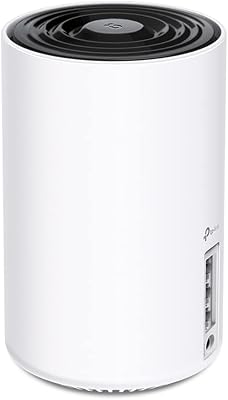
The compact cylindrical design is widely appreciated — it sits on a bookshelf or side table without looking like networking equipment, and the matte white finish ages well. At 1.3 pounds, it is solid enough to feel premium without being bulky.
A few users mention the unit runs noticeably warm during heavy use, and the lack of any ventilation slots raises questions about long-term thermal management. There are no wall-mount options included in the box for users who want to place it out of sight.
Long-Term Reliability
79%
21%
The majority of owners who have used the X20 unit for a year or more report it running without major issues — consistent uptime, infrequent reboots, and no significant performance degradation over time are commonly cited in longer-form reviews.
A recurring minority concern involves firmware updates occasionally introducing new bugs — most resolve in subsequent releases, but the update cycle can feel unpredictable. A handful of users report units that failed after 18 to 24 months, though this appears to be outside the statistical norm.
Value for Money
83%
Compared to Wi-Fi 5 mesh systems at a similar price, the performance and feature gap is meaningful enough to justify the modest premium. Buyers replacing a single aging router consistently feel they got a fair deal, especially given the included parental controls and app ecosystem.
As a single-unit purchase, the per-square-foot cost becomes less competitive for anyone who quickly discovers they need a second node to cover their space. Buying two units separately ends up costing more than going straight to a multi-pack from a competing brand.
ISP & Modem Compatibility
91%
Out of thousands of reviews, compatibility issues with major US internet providers are nearly nonexistent. The X20 unit connects without friction to cable, fiber, and DSL modems from all major carriers, and most buyers report zero troubleshooting during their initial connection.
Users on very niche or regional ISPs occasionally report minor configuration quirks, and the unit does require a separate modem — buyers who assumed they could replace their ISP-provided gateway entirely without additional hardware are occasionally caught off guard.
Speed at Range
63%
37%
In the central zone of the coverage area, speed test results are strong and consistent, with most users on gigabit plans seeing healthy throughput that handles 4K streaming and large file transfers without complaint.
Speed drops off more sharply toward the edges of the coverage range than advertised figures suggest. Users placing the node centrally in a larger home often measure significantly reduced throughput in far rooms — a consistent pain point that reflects the real-world limits of a single dual-band node.
Alexa Integration
68%
32%
The ability to toggle the guest network on or off by voice is a convenient touch for households already embedded in the Alexa ecosystem — useful when having guests over without reaching for a phone.
Alexa integration is limited to guest network control and does not extend to broader network management functions. Users hoping for deeper smart home automation options — like automatically pausing Wi-Fi for specific devices by voice — will find the integration underwhelming.
Customer Support
58%
42%
When issues are straightforward, TP-Link's online documentation and community forums are reasonably thorough, and the Deco app itself reduces the need for support contact for most common troubleshooting steps.
Response times from TP-Link's direct support channels are a recurring complaint — users dealing with defective units or firmware issues often report slow email responses and inconsistent chat support quality. This is particularly frustrating given the otherwise polished product experience.

Suitable for:

The TP-Link Deco X20 1-Pack Mesh WiFi System is a strong fit for anyone living in a smaller home or apartment who wants a meaningful upgrade from an aging single router without overcomplicating the process. It particularly shines in open, single-floor layouts where one node can realistically blanket the entire space in stable Wi-Fi 6 coverage. Households running a mix of phones, tablets, smart TVs, and smart home devices will appreciate how well this Deco mesh node handles simultaneous traffic — the kind of load that makes older routers stumble during peak evening hours. Families with kids benefit from the built-in per-profile parental controls, which let you set screen time limits and filter content without paying for a third-party service. Non-technical buyers will find the Deco app refreshingly guided, making setup genuinely approachable even for someone who has never configured a router. And if your needs grow, the Deco ecosystem lets you expand coverage simply by adding another compatible node down the road.

Not suitable for:

The TP-Link Deco X20 1-Pack Mesh WiFi System is not the right call for anyone expecting to cover a large or multi-story home with a single unit. In two-story houses, basements, or homes with thick concrete or brick walls, one node will leave noticeable dead zones — this is a hard physical limitation, not a software fix. Power users who prioritize maximum throughput should also temper expectations; real-world speeds at the edge of the coverage area fall short of the peak figures, as is common across this category. If you run a home office where wired-speed consistency matters and you need robust tri-band backhaul, the X20 unit is undersized for that workload. Gamers or streamers sensitive to latency spikes during high household traffic may find a tri-band system more appropriate. Finally, buyers who prefer direct web-based router management over a mobile app may find the app-centric approach limiting.

Specifications

  • Wi-Fi Standard: This unit operates on 802.11ax, also known as Wi-Fi 6, with backward compatibility across 802.11a/b/g/n/ac generations.
  • Frequency Bands: Dual-band design broadcasts on both 2.4 GHz and 5 GHz simultaneously to balance range and speed across connected devices.
  • Max Speed: Combined theoretical throughput reaches AX1800, split across both bands under ideal conditions.
  • Coverage Area: A single unit is rated to cover up to 2,200 square feet in open, unobstructed environments.
  • Dimensions: Each node measures 4.33 x 4.33 x 4.49 inches, with a compact cylindrical footprint that fits on a shelf or side table.
  • Weight: The unit weighs 1.3 pounds, making it light enough to reposition without any special mounting hardware.
  • OFDMA Support: Orthogonal Frequency Division Multiple Access is enabled, allowing the router to serve multiple devices in a single transmission window rather than queuing them sequentially.
  • MU-MIMO: Multi-User Multiple Input Multiple Output technology is active on this node, supporting simultaneous data streams to multiple clients at once.
  • Parental Controls: Built-in parental controls allow per-profile internet scheduling and content filtering at no additional subscription cost.
  • App Management: The TP-Link Deco app for iOS and Android handles setup, real-time monitoring, remote access, and network configuration.
  • Voice Assistant: Amazon Alexa integration allows voice commands to toggle the guest Wi-Fi network on or off hands-free.
  • ISP Compatibility: Works with all major US internet service providers including AT&T, Verizon, Xfinity, Spectrum, Cox, and others, requiring a separate modem for most connections.
  • Max Plan Speed: Supports internet plans with speeds up to 1 Gbps, covering the vast majority of residential broadband tiers currently available.
  • Connectivity Ports: Each unit includes at least one RJ45 Ethernet port for wired connections; exact port count per node is not officially specified beyond the included cable.
  • WPS Support: Wi-Fi Protected Setup is supported for simplified pairing with compatible devices.
  • In the Box: Each package includes one Deco X20 node, one power adapter, and one RJ45 Ethernet cable.
  • Color: The unit ships in white with a uniform matte finish designed to blend into residential interiors.
  • Release Date: The Deco X20 was made available in July 2020 and has received ongoing firmware updates since launch.

Related Reviews
TP-Link Deco S4 Mesh WiFi System (2-Pack)
87%
91%
Wi-Fi Coverage
88%
Performance Stability
94%
Ease of Setup
90%
Parental Controls
85%
Device Support
More
TP-Link Deco M5 Mesh WiFi Router 1-Pack

86%
88%
Performance
93%
Setup Ease
85%
Coverage Range
91%
Security Features
77%
App Experience
More
TP-Link Deco BE95 Wi-Fi 7 Mesh System 2-Pack
78%
88%
Wireless Performance
83%
Coverage & Range
93%
Wired Connectivity
86%
Setup & Installation
79%
App & Management Experience
More
TP-Link Deco BE85 WiFi 7 Mesh System
87%
89%
Wi-Fi Performance
91%
Setup Process
85%
Coverage and Range
93%
Security Features
78%
Device Compatibility
More
TP-Link Deco X95 WiFi 6 Mesh System
86%
92%
Performance
95%
Coverage
82%
Setup/Installation
80%
App Experience
88%
Multi-device Support
More
TP-Link Deco BE75 WiFi 7 Mesh System
85%
94%
Performance
88%
Ease of Setup
91%
Security Features
92%
Coverage & Range
79%
Value for Money
More
TP-Link Deco XE75 Mesh WiFi System 1-Pack
77%
91%
Setup Experience
78%
WiFi Coverage
83%
Real-World Speed
62%
6 GHz Band Utility
86%
Multi-Device Performance
More
TP-Link Deco BE63 WiFi 7 Mesh System
89%
94%
Overall Performance
93%
WiFi Coverage
91%
Device Capacity Handling
88%
Setup & Installation
90%
App Experience
More
TP-Link Deco X55 1-Pack Mesh Wi-Fi System
81%
91%
Ease of Setup
84%
WiFi Speed & Throughput
78%
Coverage Reliability
72%
App & Management Experience
88%
Value for Money
More
TP-Link Deco X68 2-Pack Mesh WiFi System
76%
91%
Setup Experience
78%
WiFi Coverage
83%
Network Performance
74%
App & Management
58%
HomeShield Value
More

FAQ

It depends heavily on your floor plan. In an open, single-story apartment or home under roughly 1,500 to 1,800 square feet, one node typically does the job well. Add walls, floors, or a longer two-story layout and you will start seeing weaker signal in the far corners. The 2,200 sq ft figure is a best-case number measured in open space — treat it as a ceiling, not a guarantee.

In most households, yes — but not always for the reasons advertised. The bigger practical improvement is in how the X20 unit handles multiple devices at once, thanks to OFDMA and MU-MIMO. Raw speed gains from Wi-Fi 6 itself are most noticeable only when your phone, laptop, or other devices also support Wi-Fi 6. If most of your gadgets are a few years old, the stability improvement will likely matter more than peak speed.

Setup is genuinely straightforward. You download the Deco app, plug in the node, and follow the on-screen steps — most people are up and running in under ten minutes. The app walks you through each stage with visual guidance, so you do not need to know anything about networking to get it working.

Yes, and that is one of the stronger points of the Deco platform. You can add additional Deco-compatible nodes at any point and they will join the same mesh network automatically through the app. It is a practical way to start with one unit and scale as needed rather than overspending upfront.

Almost certainly yes. It is compatible with modems from all major US internet providers, including Xfinity, AT&T, Verizon, Spectrum, and others. You will need to keep your existing modem in place — the Deco node connects to it via the included Ethernet cable and takes over the wireless routing from there.

You create profiles in the Deco app and assign devices to each one. From there you can set daily time limits, schedule when internet access is available, and apply content filters based on category. It is all managed from the app, and it does not require a paid subscription — everything is included.

Not in a traditional sense. The Deco ecosystem is designed around the mobile app, and there is no full-featured browser-based admin panel like you would find on a conventional router. If you prefer that kind of hands-on control, this Wi-Fi 6 mesh router may feel limiting.

Yes, your local network stays active even if your internet connection drops. Devices on the same network can still communicate with each other — useful if you have a local NAS, smart home hub, or printer connected over Wi-Fi.

Long-term owners generally report solid reliability. Most users who have had the unit running for a year or more mention consistent uptime with only occasional reboots, typically after firmware updates. That said, a small number of users have reported firmware updates introducing temporary issues — keeping auto-update on and checking TP-Link release notes is a good habit.

Yes, and it handles them well. The 2.4 GHz band is what most smart home devices use, and this Deco mesh node keeps that band stable and reliable. If you have a house full of smart plugs, cameras, and bulbs alongside phones and laptops, the OFDMA support helps prevent the congestion that often slows down busier networks.

Where to Buy