Overview

The TP-Link TD-8816 ADSL2+ Modem Router is a straightforward, wired-only device built for households and small offices that still connect to the internet via a DSL phone line — not cable, not fiber. It combines the modem and router functions into one compact unit, which keeps things tidy and eliminates the need for two separate pieces of hardware. TP-Link is a well-known name in budget networking, and the TD-8816 fits squarely in that tradition: no unnecessary extras, just reliable wired connectivity. A built-in setup wizard makes the initial configuration approachable even for users who rarely touch router settings.
Features & Benefits

The TD-8816 supports the ADSL2+ standard with downstream speeds up to 24Mbps, and Annex M support can meaningfully improve upstream rates for tasks like video calls or file uploads. A triple-layer firewall — SPI, NAT, and Packet Filter — provides solid baseline protection without requiring manual configuration. QoS controls let you prioritize traffic by application type, which is useful in shared environments. DHCP and UPnP handle device discovery automatically, and remote administration lets you update settings or check on the router without being physically present. The two-year warranty and unlimited phone-based technical support are genuinely practical assurances.

Best For

This wired DSL router makes the most sense for users whose ISP still provides ADSL or ADSL2+ service and who have no need for wireless connectivity. It suits purely wired LAN setups — think a small office with desktop workstations, or a home environment where Wi-Fi interference is a real concern. Budget-conscious buyers looking for a dependable backup unit will also find it reasonable. Tech-cautious users who prefer calling support rather than digging through forums will appreciate the included wizard and the dedicated helpline. Just be clear going in: this device will not work with cable or fiber internet connections.

User Feedback

Across roughly 350 ratings, the TD-8816 sits at 3.8 out of 5 stars — a respectable middle ground that reflects a divided audience. Satisfied users frequently praise the stable wired connection and straightforward setup experience, with several noting the unit ran without issues for years. On the other side, a recurring frustration is the 24Mbps speed ceiling, which feels limiting for households accustomed to faster broadband tiers. The lack of wireless support also draws criticism from buyers who discovered that detail after purchase. A handful of reviewers reported early hardware failures, so longevity appears somewhat inconsistent across units — worth keeping in mind.

Pros

  • Combines modem and router in one box, eliminating redundant hardware on your desk or shelf.
  • Setup wizard makes initial configuration accessible even for non-technical household users.
  • Annex M support meaningfully improves upstream speeds on compatible DSL plans.
  • Triple-layer firewall provides solid default network protection without manual configuration.
  • QoS controls let you prioritize video calls or VoIP traffic over background downloads.
  • Remote administration allows configuration changes without needing physical access to the device.
  • Two-year warranty and unlimited phone support offer real recourse if something goes wrong.
  • Compact and lightweight — easy to tuck away near a phone jack without cluttering the space.
  • Many owners report stable, uninterrupted connections running continuously for a year or more.
  • DHCP and UPnP handle device IP assignment automatically, reducing setup friction further.

Cons

  • No wireless capability at all — every connected device must use a physical Ethernet cable.
  • The 24Mbps downstream ceiling feels restrictive compared to what modern broadband users expect.
  • Longevity is inconsistent — a notable share of buyers experienced failures within the first year.
  • The management interface looks and feels outdated, making advanced settings harder to navigate.
  • Firmware updates have been sparse, raising concerns about ongoing software support.
  • ISP-specific configurations not covered by the wizard can leave users searching for outside help.
  • QoS setup documentation is thin, so the feature often goes unused by those who need it most.
  • Incompatible with VDSL and VDSL2 plans, which limits usefulness as ISPs upgrade infrastructure.
  • No wall-mount option, and the unit can run noticeably warm in poorly ventilated spaces.
  • Buyers who later upgrade their internet plan may find this router becomes the speed bottleneck.

Ratings

The TP-Link TD-8816 ADSL2+ Modem Router has been scored by our AI system after processing hundreds of verified global buyer reviews, with spam, bot-generated, and incentivized feedback actively filtered out. The result is an honest snapshot of real-world performance across the categories that matter most to DSL internet users. Both the genuine strengths and the recurring frustrations are reflected transparently in the scores below.
Ease of Setup
83%
A large portion of buyers — including those with limited networking experience — completed the initial setup without needing to call support. The built-in wizard walks through each configuration step clearly, and most users reported being connected within 15 to 20 minutes of unboxing.
A minority of users ran into ISP-specific settings that the wizard did not anticipate, requiring manual input that felt undocumented. In those cases, the web interface was described as functional but not particularly intuitive for first-timers.
Connection Stability
78%
22%
For users running light to moderate wired workloads — browsing, email, occasional video streaming — the TD-8816 holds a consistent DSL connection without frequent drops. Several long-term owners noted months of uninterrupted uptime once properly configured.
A segment of reviewers reported intermittent disconnections under sustained load or during peak hours, which they attributed to the router rather than the ISP. Stability seemed to vary noticeably between individual units, suggesting some manufacturing inconsistency.
Throughput & Speed Performance
61%
39%
Within the constraints of the ADSL2+ standard, the router delivers reliably close to the line-rate speeds that a DSL connection provides. Annex M support is a genuine plus for upload-heavy tasks like sending large files or video conferencing on DSL plans that support it.
The 24Mbps downstream ceiling is a hard technical limit that frustrated buyers comparing it to modern broadband expectations. Users on higher-tier DSL plans felt the device was already at its ceiling, and anyone who later upgraded their ISP plan found the router to be the bottleneck.
Build Quality & Durability
69%
31%
The compact plastic chassis feels adequately solid for a budget-tier device, and TP-Link's general reputation for producing durable low-cost hardware holds up here for many buyers. Numerous reviewers mentioned units running continuously for two or more years without physical issues.
Longevity feedback is genuinely split — a notable share of buyers experienced hardware failures within the first year, with units simply stopping responding. The external casing can feel lightweight and cheap compared to mid-range competitors, which affects perceived reliability.
Value for Money
77%
23%
As a combined modem and router for a DSL line, the TD-8816 removes the cost of purchasing two separate devices, which resonates strongly with budget-conscious buyers. For users who specifically need an ADSL2+ solution without wireless overhead, the price-to-function ratio is hard to argue with.
Buyers who later discovered the lack of wireless support felt the value proposition weakened significantly, particularly given that Wi-Fi-capable alternatives exist at nearby price points. If your household has grown beyond wired-only devices, this router will require additional hardware investment.
Security Features
74%
26%
The triple-layer firewall combining SPI, NAT, and Packet Filter gives the TD-8816 a more robust default security posture than many comparably priced units. For a home or small office DSL setup, most users found the out-of-box protection sufficient without extra configuration.
Advanced users found the firewall configuration options limited and the management interface lacking granular control. There is no mention of VPN passthrough support in user discussions, which was a sticking point for buyers needing that functionality for remote work setups.
QoS & Traffic Management
66%
34%
The QoS implementation supports multiple classification methods — ToS, DSCP, and 802.1p — which gives technically minded users a reasonable toolkit for prioritizing time-sensitive traffic like VoIP or video calls over file downloads on a shared connection.
In practice, many users found the QoS interface cumbersome to configure correctly, and documentation on the specific implementation was sparse. Non-technical users largely left QoS settings untouched, meaning the feature went underutilized in a significant portion of households.
Remote Management
71%
29%
The ability to access and update the router remotely over the internet is a practical feature that IT-savvy small business users appreciated, particularly for managing a branch office location or checking on a home connection while traveling.
Some users flagged concerns about the security implications of enabling remote access without strong credential management, and setup instructions for this feature were considered incomplete in the printed documentation. Casual users mostly ignored it entirely.
Web Interface & Firmware
58%
42%
The router management interface is straightforward enough for basic tasks — checking connection status, updating credentials, or adjusting DNS settings — and loads quickly even on older browsers. Firmware updates are accessible directly through the interface.
The UI design is dated and lacks the visual clarity of more modern router interfaces. Several reviewers noted that firmware updates were infrequent, with the device appearing to have received minimal software attention in its later lifecycle, raising questions about long-term software support.
Technical Support Quality
72%
28%
TP-Link offers dedicated phone support lines — including a French-language option — which stands out in a budget product category where many brands offer only forum-based or ticketing help. Buyers who called in generally described wait times as acceptable and staff as competent on basic issues.
Support experiences became more inconsistent when issues moved beyond standard setup questions. A few reviewers described being redirected multiple times before reaching someone with sufficient technical knowledge, and the unlimited support promise did not always translate to swift resolution.
Compatibility with ISP Plans
64%
36%
For customers on legacy ADSL or ADSL2+ DSL plans — which remain common in rural and semi-urban areas — the TD-8816 is broadly compatible and recognized by major ISPs. Annex M compatibility is a meaningful plus for ISPs that offer it.
The device is entirely irrelevant to fiber or cable internet subscribers, and as DSL infrastructure continues to be phased out by providers, the addressable audience for this router shrinks over time. Buyers on VDSL or VDSL2 plans should look elsewhere, as this unit does not support those standards.
Physical Design & Footprint
73%
27%
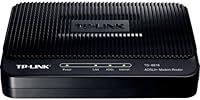
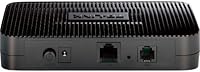
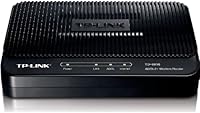
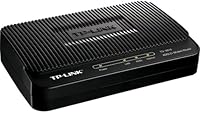
At just over six ounces and with a modest footprint, the TD-8816 tucks neatly onto a shelf or desk without demanding dedicated space. The all-black finish is unobtrusive, and the indicator LEDs are clear enough to read connection status at a glance.
The horizontal form factor does not include a wall-mount option, which some users in tightly organized spaces found limiting. Ventilation slots are present but minimal, and a few users in warmer climates mentioned the unit running warm during extended use.
Documentation & Packaging
67%
33%
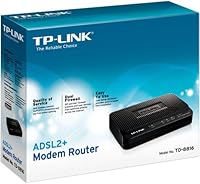
The box includes the core essentials — router, power adapter, RJ-11 phone cable, and a printed quick-start guide — which is sufficient for most straightforward DSL setups. The quick-start guide is clearly laid out with visual step indicators.
The printed manual covers only the most common configurations, leaving more advanced topics like custom QoS rules or remote management setup inadequately explained. Users attempting anything beyond a basic install often ended up searching online for supplementary documentation.

Suitable for:

The TP-Link TD-8816 ADSL2+ Modem Router is the right call for anyone still on an ADSL or ADSL2+ DSL internet plan who wants a single device to handle both the modem and routing functions without overcomplicating things. It fits naturally into small home offices with a handful of wired desktops, or into rural households where DSL remains the only available broadband option and wireless coverage is simply not a priority. Tech-cautious users who dread setting up networking equipment will appreciate the guided wizard, and having a real phone number to call for support is a comfort that not every budget router offers. It also makes a sensible backup unit — if your primary router fails, having the TD-8816 on a shelf means you can restore a wired connection quickly without spending much. Anyone running a wired-only LAN in an environment with high RF interference will also find this a practical, no-drama choice.
Not suitable for:

If your home internet comes over a cable, fiber, or VDSL connection, the TP-Link TD-8816 ADSL2+ Modem Router is simply incompatible — full stop, no workaround. Households where smartphones, tablets, smart TVs, and other wireless devices are the norm will immediately run into a wall, since this router provides zero Wi-Fi functionality by design. Power users or small businesses that need throughput well above 24Mbps will find the ADSL2+ ceiling genuinely constraining, not just a theoretical limitation. Buyers who want a modern management interface, frequent firmware updates, or advanced VPN support should also look elsewhere — the software side of this device has not kept pace with current expectations. And if your ISP is actively retiring DSL infrastructure in your area, investing in this wired DSL router may simply delay an inevitable hardware upgrade rather than solve a long-term connectivity need.
Specifications

  • Brand: Manufactured by TP-Link, a globally recognized networking hardware brand with dedicated North American technical support infrastructure.
  • Model: The device model number is TD-8816, sold under ASIN B0037D922Y on Amazon.
  • DSL Standard: Supports ADSL, ADSL2, and ADSL2+ standards, with a maximum downstream speed of 24Mbps under ADSL2+.
  • Upstream Support: Annex M is supported, which can approximately double upstream data rates compared to standard ADSL2+ configurations.
  • Connectivity: Wired-only device with no wireless capability; all client devices must connect via physical Ethernet cables.
  • Firewall: Triple-layer firewall protection combining Stateful Packet Inspection (SPI), Network Address Translation (NAT), and Packet Filtering.
  • QoS Support: Quality of Service prioritization is configurable based on ToS, DSCP, 802.1p, or service type classification methods.
  • Protocols: Supports DHCP for automatic IP address assignment and Universal Plug-and-Play (UPnP) for automatic local device discovery.
  • Remote Management: The router can be administered and firmware-updated remotely over the internet through the built-in web management interface.
  • Setup Wizard: A step-by-step guided setup wizard is included to walk users through initial network configuration without requiring technical expertise.
  • Dimensions: The unit measures 10.24 x 7.09 x 2.76 inches, making it compact enough for desk or shelf placement near a phone line jack.
  • Weight: The device weighs 6.4 ounces, making it lightweight and easy to reposition or store as a backup unit.
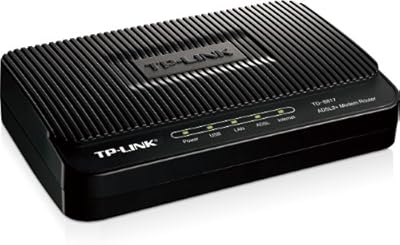
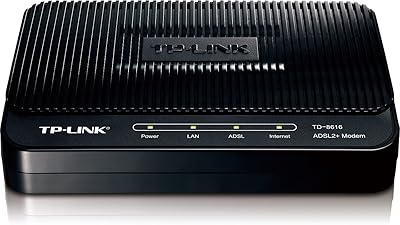
  • Color: Available in black with a standard horizontal form factor and front-facing LED status indicators.
  • Warranty: Covered by a 2-year limited warranty from TP-Link, which is above average for budget-tier networking hardware in this category.
  • Technical Support: Unlimited technical support is provided by phone at +1 866 225 8139, with a dedicated French-language line at +1 855 987 5465.
  • Compatibility: Compatible with ADSL and ADSL2+ DSL internet services only; not compatible with cable, fiber, VDSL, or VDSL2 connections.
  • First Available: This product was first made available for purchase on December 19, 2005, and has not been discontinued by the manufacturer.
  • Department: Categorized under wired networking and ranked within the Computer Networking Modems subcategory on Amazon.

Related Reviews

TP-Link TD-8817 ADSL2+ Modem
80%
87%
Value for Money
92%
Ease of Setup
85%
Build Quality
80%
Internet Speed
88%
Security Features
More
TP-Link TD-W9970 Modem Router
83%
91%
Value for Money
95%
Ease of Setup
76%
Wi-Fi Performance
84%
Build Quality
87%
USB Port Functionality
More
TP-Link TD-8616 ADSL2+ Modem
83%
88%
Ease of Setup
91%
Value for Money
85%
Reliability
93%
Lightning Protection
78%
Build Quality
More
TP-Link TC-W7960 Cable Modem Router
71%
83%
Value for Money
74%
Setup & Activation
81%
Wired Connection Stability
58%
Wi-Fi Performance
54%
Wi-Fi Range & Coverage
More
TP-Link ER7212PC 3-in-1 Gigabit VPN Router
73%
83%
Value for Money
74%
PoE Power Delivery
86%
Omada Controller Integration
81%
Multi-WAN & Failover
77%
VPN Performance
More
TP-Link ER605 V2 VPN Router
80%
93%
Value for Money
89%
Multi-WAN Reliability
71%
VPN Performance
82%
Ease of Setup
91%
Omada SDN Integration
More
TP-Link TC-7610 Cable Modem
82%
91%
Value for Money
88%
Setup & Installation
85%
Internet Speed & Performance
89%
ISP Compatibility
84%
Build Quality
More
TP-Link Archer AC1750 WiFi Router
85%
88%
WiFi Performance
91%
Setup & Installation
80%
Range & Coverage
85%
Value for Money
89%
Alexa Integration
More
TP-Link Archer BE24000 WiFi 7 Router
87%
94%
Performance
89%
Setup & Installation
92%
Connectivity & Compatibility
90%
Coverage & Range
88%
Security Features
More
TP-Link ER7206 Multi-WAN VPN Router
86%
91%
Network Performance
94%
Security Features
88%
Cloud Management Experience
89%
VPN Support
82%
Setup & Installation
More

FAQ

No, it does not. The TD-8816 is a strictly wired device, meaning every computer or device that connects to it needs a physical Ethernet cable. There is no wireless radio inside, so if Wi-Fi is important to you, this is not the right router.

Unfortunately, no. This device is designed specifically for ADSL and ADSL2+ DSL internet service, which runs over a standard phone line. It is not compatible with cable, fiber, or VDSL connections. Check with your ISP before purchasing to confirm your service type.

No, that is actually one of the main advantages here. The TP-Link TD-8816 ADSL2+ Modem Router combines both functions into a single unit, so you plug your phone line directly into it and it handles both the DSL modem and the routing functions without needing additional hardware.
The router supports standard DHCP-based IP assignment, which means it can handle a typical small office or home LAN with multiple wired devices. That said, given the 24Mbps downstream ceiling, performance will naturally degrade the more devices are sharing that bandwidth simultaneously.

Not particularly. The included setup wizard walks you through the configuration step by step, and most straightforward DSL installations can be completed in under 20 minutes. Where it gets trickier is if your ISP requires specific VLAN or encapsulation settings — in those cases, having your ISP account details on hand and calling TP-Link support can save a lot of time.

Annex M is an extension of the ADSL2+ standard that prioritizes upstream bandwidth over downstream. In plain terms, it can roughly double your upload speed if your ISP supports it on their end. It is particularly useful if you do a lot of video calling, file uploads, or run any services from home that push data out to the internet.

Yes, remote administration is supported. You can access the web management interface over the internet to check settings, update firmware, or troubleshoot — as long as you configure remote access properly and use a strong password. It is a useful feature for anyone managing a remote location or checking on a home connection while traveling.

Feedback is genuinely mixed on this. Many owners report the unit running without issues for two or more years, which is solid for a budget device. However, a notable portion of buyers experienced hardware failures within the first year. The two-year warranty provides some coverage, but longevity does appear to vary between individual units.

The official specifications do not explicitly list VPN passthrough or VPN server support, and user reviews do not consistently confirm it. If VPN functionality is a firm requirement for your setup, it would be worth contacting TP-Link support directly to clarify before purchasing.

Based on user feedback, firmware updates for this model have been infrequent in recent years, suggesting it is not a priority in TP-Link's current development cycle. For basic home DSL use this is unlikely to be a problem, but buyers who value regular security patches or feature additions should factor this into their decision.

Where to Buy