Overview

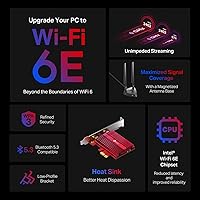
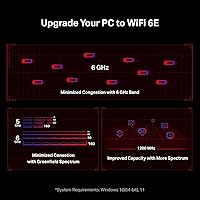
The TP-Link Archer TXE75E WiFi 6E PCIe Card is a solid mid-range upgrade for desktop users who want modern wireless connectivity without buying a new machine. Built around the Intel AX210 chipset — a module used across premium laptops and cards alike — it carries real credibility on the driver and reliability front. The tri-band design spans 2.4 GHz, 5 GHz, and the newer 6 GHz band, which is less crowded and noticeably snappier in dense environments. One important caveat: the 6 GHz band requires Windows 11. If you're still on Windows 10, you'll only access the two older bands. For wireless desktop upgrades, this is one of the stronger options available.
Features & Benefits

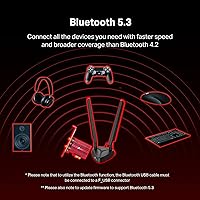
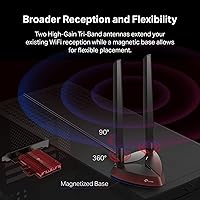
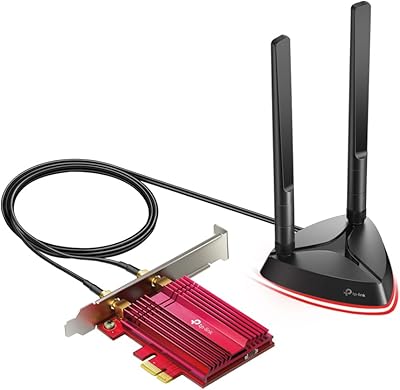
The Intel AX210 chipset is the real foundation here — Intel's driver support is mature and well-maintained, which matters when you're installing a wireless card into a system you depend on. The Archer TXE75E tops out at AXE5400 speeds across three bands, though real-world throughput will naturally run lower than those spec figures. The 6 GHz band shines in crowded spaces where the 5 GHz channel is saturated. Bluetooth 5.3 is on board too, but getting it working requires connecting an internal USB cable to a spare F_USB header on your motherboard — skip this step and Bluetooth simply won't function. The magnetic antenna base lets you route the antennas outside your case for a cleaner signal path.

Best For

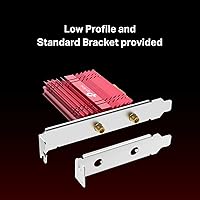
This WiFi 6E PCIe card makes the most sense for a few specific types of buyers. If your desktop sits far from your router and running Ethernet isn't practical, this is a far better option than a cheap USB dongle. Gamers and streamers with a WiFi 6E router will notice the difference on the 6 GHz band — lower latency and less interference from neighboring networks. Home office users wanting to avoid cable installation will appreciate the straightforward PCIe setup. The included low-profile bracket is a genuine bonus for anyone working with a compact or mini-tower case, and the Bluetooth 5.3 support makes it easy to consolidate wireless peripherals under one card.

User Feedback

With over 11,000 ratings averaging 4.6 stars, buyer sentiment around this desktop wireless adapter skews strongly positive. Most praise centers on easy installation, solid signal consistency, and the confidence that comes with an Intel-based chipset. The magnetic antenna base gets frequent mentions — people appreciate pulling the antennas out of a cramped case and positioning them somewhere with a clear line of sight. That said, two complaints surface regularly: Bluetooth not working out of the box because the internal USB cable was never connected, and frustration from Windows 10 users who find the 6 GHz band inaccessible. Driver updates occasionally require a manual install, though most buyers work through it without serious trouble.

Pros

  • Built on the Intel AX210 chipset, which carries a strong reputation for driver stability and long-term OS support.
  • Tri-band design covers 2.4 GHz, 5 GHz, and 6 GHz for flexibility across different router types.
  • The 6 GHz band delivers noticeably less congestion and lower latency in busy wireless environments.
  • Magnetic antenna base lets you position antennas outside the case for a cleaner, stronger signal path.
  • Bluetooth 5.3 is included, so you can consolidate wireless peripherals without a separate USB dongle.
  • Both standard and low-profile brackets are in the box — a practical touch for compact PC builds.
  • WPA3 security support keeps your connection protected with the latest wireless encryption standard.
  • OFDMA and MU-MIMO help maintain stable throughput even when multiple devices share the same network.
  • Installation is straightforward for most users, with the PCIe slot being the only required connection for WiFi.
  • Rated 4.6 stars across thousands of verified buyers, reflecting strong real-world satisfaction.

Cons

  • The 6 GHz band is locked to Windows 11 — Windows 10 users get no benefit from the card's flagship feature.
  • Bluetooth will not work at all if the internal USB cable is not connected to a free F_USB motherboard header.
  • Real-world speeds fall well short of the advertised AXE5400 figures, as with any wireless card on the market.
  • A free PCIe slot is required, which some users with older or heavily populated motherboards may not have.
  • Occasional buyers report needing to manually download and install updated Intel drivers for optimal performance.
  • The internal USB cable for Bluetooth is easy to overlook during installation, causing avoidable setup frustration.
  • No wired Ethernet failover — if the wireless connection drops, there is no backup built into this adapter.
  • Users in buildings with very thick walls or significant RF interference may still see inconsistent signal quality.

Ratings

The scores below for the TP-Link Archer TXE75E WiFi 6E PCIe Card were generated by our AI after analyzing thousands of verified purchase reviews sourced globally, with spam, bot activity, and incentivized feedback actively filtered out. Each category reflects the honest consensus of real buyers — including the friction points that marketing materials tend to gloss over. Both the genuine strengths and the recurring frustrations are represented transparently.
Wireless Performance
88%
On a WiFi 6E router with the 6 GHz band in use, buyers consistently report noticeably lower latency and more stable throughput compared to their previous 5 GHz setups. Gamers in particular call out fewer dropped frames and more consistent ping during online sessions, especially in apartment buildings with heavy neighboring WiFi traffic.
Real-world speeds fall well short of the AXE5400 spec figure, as they always do with any wireless technology — distance and interference take their toll quickly. Users farther than two rooms from their router see more modest gains, and those still on 5 GHz-only routers notice little difference over a standard WiFi 6 card.
Installation Ease
83%
The PCIe card itself slots in and is recognized by Windows with minimal effort — most users report being online within ten minutes of cracking open their case. Intel's driver ecosystem means Windows Update often handles the initial setup automatically, removing the friction that plagues lesser-known chipsets.
The Bluetooth side of installation trips up a surprising number of buyers who miss the internal USB cable requirement entirely. Without connecting that cable to a free F_USB header on the motherboard, Bluetooth simply does not appear, and diagnosing the missing step is not immediately obvious from the quick-start guide.
Chipset Reliability
91%
The Intel AX210 chipset carries real credibility among technically savvy buyers, and that trust is validated in practice — long-term stability reports are strong, with very few users experiencing random disconnections or system conflicts after the initial setup period. Intel's ongoing driver support gives this card a longer useful lifespan than alternatives built on lesser-known modules.
A minority of users report needing to manually pull the latest Intel driver from Intel's support site rather than relying on the version Windows Update installs, which can initially cause suboptimal performance. It is a straightforward fix, but it adds an unexpected step for buyers who assumed the setup would be fully automatic.
Bluetooth Functionality
67%
33%
Once the internal USB cable is properly connected to the motherboard's F_USB header, Bluetooth 5.3 performs well — pairing is quick, range is solid, and users running wireless keyboards, mice, and headsets report a clean and stable connection without needing a separate USB dongle cluttering their setup.
The setup dependency on an internal USB header is the single biggest friction point this card generates. Buyers without a free F_USB header, or those working with older motherboards that use outdated header pinouts, are simply out of luck. The packaging and documentation do not emphasize this requirement prominently enough given how many people miss it.
6 GHz Band Access
74%
26%
For Windows 11 users paired with a WiFi 6E router, the 6 GHz band delivers a noticeably less congested experience — particularly meaningful in urban environments where 5 GHz channels are often saturated. Lower interference translates directly to more consistent latency, which streamers and gamers notice in a real session.
The Windows 11 requirement for 6 GHz access is a hard wall that catches a meaningful portion of buyers off guard. Users on Windows 10 get zero access to the card's headline feature, effectively paying for a tri-band card while receiving dual-band performance — a legitimate grievance that surfaces repeatedly across reviews.
Antenna Design
86%
The magnetic antenna base is one of the more practically useful design choices on this card — buyers appreciate being able to attach the antennas to the side of their metal case and route them to a position with a clear line of sight to the router, rather than having them trapped inside a cramped tower.
The antennas are fixed in length and not adjustable beyond basic positioning, which limits options for users with unusual desk setups or cases mounted below a deep desk. A small number of buyers also report the magnetic hold feeling less secure over time, particularly if the case surface is painted rather than bare metal.
Value for Money
82%
18%
For buyers on Windows 11 with a WiFi 6E router already in place, this desktop wireless adapter delivers a tangible upgrade in wireless capability at a price that is competitive within the PCIe WiFi 6E category. The Intel chipset, Bluetooth 5.3 integration, and dual-bracket inclusion make the package feel well-rounded rather than stripped down.
The value proposition weakens considerably for anyone on Windows 10 or using a WiFi 5 or older router, where the card cannot deliver on its primary advantages. In those scenarios, a cheaper WiFi 6 card would achieve nearly identical real-world performance for less money.
Build Quality
79%
21%
The card feels solid in hand, with a well-constructed PCB and connectors that seat cleanly without requiring excessive force. The included brackets are properly finished and align correctly in standard ATX and mini-tower cases without needing adjustment, which is a small but appreciated detail in a product category where tolerances sometimes vary.
The antenna cables, while functional, feel marginally thin for a product at this tier — a few buyers mention handling them carefully during installation to avoid stressing the connectors. The overall aesthetics are functional rather than premium, which matters to buyers building inside windowed cases.
Driver & Software Support
84%
Intel's driver ecosystem is one of the strongest in the wireless card space, and this card benefits directly from that infrastructure. Updates arrive consistently, compatibility with major Windows releases has been solid, and troubleshooting resources are far more plentiful for Intel-based cards than for cards running proprietary or obscure chipsets.
TP-Link's own software layer adds little value and some users choose to skip it entirely in favor of Windows native network management. Occasionally the version of the Intel driver pushed through Windows Update lags behind the latest available on Intel's site, which can require a manual update step to resolve minor connectivity quirks.
Compatibility
77%
23%
The standard PCIe interface means this card fits into the vast majority of desktop motherboards without issue, and the inclusion of both bracket sizes covers a wide range of case types. Backward compatibility with older WiFi standards ensures it works with any router the buyer currently owns.
Linux support is not officially provided, and while many users report success under recent kernels, there is no guarantee — a meaningful concern for any buyer running a non-Windows desktop environment. The Bluetooth USB header requirement also creates a compatibility gap for older motherboards with limited internal headers.
Low-Profile Case Support
88%
Including a low-profile bracket in the box is a genuine differentiator that small form factor builders actively search for — it removes the need to source a separate bracket or compromise on case choice. Buyers building compact HTPCs or office mini-towers specifically call this out as a deciding factor in choosing this card over competitors.
The low-profile bracket is a passive inclusion rather than a design-first feature — the card's physical dimensions are still sized for a standard slot, so the antenna cable routing in very tight cases can get awkward. A small number of mini-ITX users report needing to be creative with cable management to avoid pinching the antenna lines.
Latency & Gaming Performance
83%
OFDMA and MU-MIMO support keep performance reasonable even when multiple devices share the network simultaneously, and the 6 GHz band's lower congestion translates to more predictable ping times during online gaming sessions. Buyers upgrading from aging WiFi 5 adapters frequently report a noticeable improvement in consistency rather than peak speed.
Wireless will never fully match a wired Gigabit connection for competitive gaming, and buyers expecting that level of consistency will be disappointed regardless of which WiFi card they choose. Latency on the Archer TXE75E still fluctuates more than Ethernet during periods of heavy local network activity.
Security Features
85%
WPA3 support is a meaningful upgrade for security-conscious users, providing stronger encryption than the WPA2 standard that still dominates older hardware. Home office users dealing with sensitive work data on a wireless connection will appreciate that the card is not forcing them to fall back to weaker protocols.
WPA3 is only as useful as the router supporting it — buyers on older routers that do not support WPA3 cannot access this feature at all and will fall back to WPA2 automatically. This is a router-side limitation rather than a card flaw, but it does reduce the practical value of the feature for a portion of buyers.

Suitable for:

The TP-Link Archer TXE75E WiFi 6E PCIe Card is a strong fit for desktop PC owners who want a meaningful wireless upgrade without pulling Ethernet cable through walls or ceilings. It makes particular sense if you already own a WiFi 6E router and want your desktop to actually take advantage of the 6 GHz band — especially in apartments or dense neighborhoods where the 5 GHz channel is constantly congested with neighboring networks. Gamers and streamers will benefit most from the lower-latency 6 GHz connection, where real-world performance tends to be noticeably more consistent than on older bands. Home office users who need reliable video calls and file transfers on a wireless connection will find the Intel AX210 chipset a trustworthy foundation — driver support is stable and well-maintained. The included low-profile bracket also makes this a practical choice for small form factor or mini-tower builds where space is tight, and the single-card Bluetooth 5.3 integration is a clean solution for anyone running a wireless keyboard, mouse, or headset ecosystem.
Not suitable for:

The TP-Link Archer TXE75E WiFi 6E PCIe Card is not the right choice for users still running Windows 10, because the 6 GHz band — the card's primary selling point — is completely inaccessible on that operating system. If you are on Windows 10 and not planning to upgrade, you are essentially paying for a tri-band card while only getting dual-band performance, which is hard to justify at this price point. This card also will not satisfy buyers who need the absolute lowest possible latency for competitive gaming or financial trading, where a wired Gigabit Ethernet connection remains the only truly reliable option. Users without a free PCIe slot on their motherboard, or those working with a very compact case that lacks internal clearance, may also run into fitment issues. Anyone unwilling to spend a few minutes connecting an internal USB cable for Bluetooth — and verifying they have a spare F_USB header — will find the Bluetooth feature nonfunctional out of the box, which has frustrated a meaningful number of buyers.
Specifications

  • Chipset: Powered by the Intel AX210 module, a widely trusted chipset used across premium laptops and desktop wireless cards.
  • WiFi Standard: Supports WiFi 6E (802.11ax), the latest wireless standard offering improvements in speed, latency, and network efficiency.
  • Frequency Bands: Tri-band operation across 2.4 GHz, 5 GHz, and 6 GHz, giving you flexibility to connect on whichever band your router and OS support.
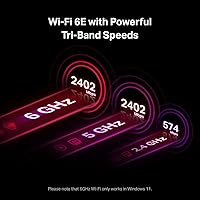
  • Max Throughput: Rated at AXE5400 aggregate across all three bands: up to 2402 Mbps on 6 GHz, 2402 Mbps on 5 GHz, and 574 Mbps on 2.4 GHz.
  • Interface: Connects to the desktop motherboard via a standard PCIe slot, requiring no external power connector.
  • Bluetooth: Includes Bluetooth 5.3, connected through an internal USB cable that must be plugged into a free F_USB header on the motherboard.
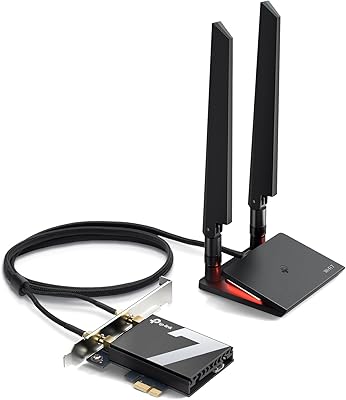
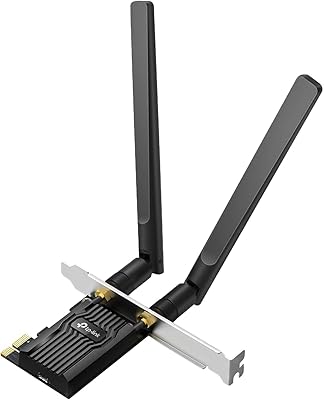
  • Antennas: Comes with two multi-directional external antennas mounted on a magnetic base for flexible positioning outside the PC case.
  • Brackets: Ships with both a standard full-height bracket and a low-profile bracket, supporting installation in standard towers and compact mini-tower cases.
  • Security: Supports WPA3 encryption, providing stronger personal password protection compared to the older WPA2 standard.
  • Key Technologies: Includes MU-MIMO and OFDMA support, which help maintain stable performance when multiple devices are active on the same network simultaneously.
  • OS Requirement: Access to the 6 GHz band requires Windows 11; Windows 10 users are limited to the 2.4 GHz and 5 GHz bands only.
  • Dimensions: The card measures 3.75 x 4.76 x 0.85 inches, fitting within a standard PCIe slot without requiring adjacent slot clearance for most boards.
  • Weight: The card weighs 9.4 oz, which is typical for a full PCIe wireless adapter with an attached antenna assembly.
  • Color: The PCIe card features a red PCB finish, consistent with TP-Link's Archer gaming-oriented product line aesthetic.
  • Brand & Model: Manufactured by TP-Link under the Archer product line, model number Archer TXE75E, first available in April 2022.

Related Reviews
TP-Link Archer TX20E WiFi 6 PCIe Card
79%
91%
Value for Money
83%
Installation Ease
86%
WiFi Signal Stability
84%
Gaming Performance
77%
Bluetooth Performance
More
TP-Link Archer T6E AC1300 PCIe Wi-Fi Adapter
75%
88%
Installation Ease
83%
5 GHz Performance
74%
2.4 GHz Performance
67%
Signal Range
63%
Driver Stability
More
TP-Link Archer TX55E
87%
93%
Throughput Speed
89%
Gaming Latency
86%
Signal Stability
82%
Bluetooth Connectivity
91%
Thermal Management
More
TP-Link Archer T4E AC1200 PCIe WiFi Card

82%
88%
WiFi Performance
94%
Ease of Installation
84%
Build Quality
75%
Compatibility with Windows
82%
Signal Range
More
TP-Link Archer TBE550E
77%
91%
Wireless Performance
43%
OS Compatibility
84%
Installation Ease
88%
Latency & Gaming
78%
Bluetooth Performance
More
TP-Link Archer AXE75
78%
83%
Wireless Performance
71%
6 GHz Band Utility
91%
Setup & Ease of Use
86%
Value for Money
68%
Range & Coverage
More
TP-Link Archer TX3000E
81%
88%
Wireless Speed Performance
91%
Signal Stability & Range
74%
Installation & Setup
62%
Bluetooth Setup & Usability
79%
Driver Reliability & OS Compatibility
More
OKN AX210 WiFi 6E PCIe Card
78%
91%
Value for Money
83%
Wireless Performance
74%
Installation Ease
61%
6GHz Band Access
71%
Bluetooth Performance
More
TP-Link Archer AC1750 WiFi Router
85%
88%
WiFi Performance
91%
Setup & Installation
80%
Range & Coverage
85%
Value for Money
89%
Alexa Integration
More
TP-Link TX401 10GbE PCIe Network Card
80%
91%
Installation Ease
88%
Data Transfer Performance
63%
Linux Compatibility
86%
Value for Money
82%
Build Quality
More

FAQ

The card works on Windows 10, but with an important limitation: the 6 GHz band is only accessible on Windows 11. On Windows 10, you will only connect on the 2.4 GHz or 5 GHz bands, which is the same performance you would get from a standard WiFi 6 card. If you are still on Windows 10 and not planning to upgrade, factor that into your buying decision.

This is the most common setup issue people run into. Bluetooth on the Archer TXE75E requires a separate internal USB cable to be connected from the card to a free F_USB 2.0 header on your motherboard. The WiFi portion works without it, but Bluetooth will simply not appear in Device Manager until that cable is connected. Check your motherboard manual to locate the F_USB header, and make sure the cable is properly seated on both ends.

No, it is fully backward compatible with WiFi 6, WiFi 5, and older routers. You will just connect on whichever standard your router supports. That said, to actually use the 6 GHz band — which is the card's biggest advantage — you do need both a WiFi 6E router and a Windows 11 PC.

The advertised AXE5400 figure is the aggregate theoretical maximum across all three bands combined, not something you will hit in practice. Real-world speeds depend on your router, distance, interference, and network load. On a clean 6 GHz connection close to a WiFi 6E router, you can expect strong and consistent throughput well above what a typical 5 GHz connection delivers, but treating the spec sheet numbers as a guarantee would set the wrong expectations.

Yes, and it is recommended. The two antennas attach to a magnetic base, which you can stick to the side or top of your metal case. Running them outside the case — rather than letting them sit inside — typically results in a noticeably stronger and more stable signal, since the metal chassis can otherwise block or reflect the wireless signal.

It should, yes. TP-Link includes both a standard full-height bracket and a low-profile bracket in the box, so you can swap to the shorter one if your case requires it. Just make sure your motherboard has an available PCIe x1 or larger slot, as that is the only physical requirement for installation.

Official support is for Windows only. Linux compatibility depends on whether your specific kernel version includes the Intel AX210 driver, which has been part of the mainline kernel since version 5.10. Many users report it working on Linux, but TP-Link does not officially support or guarantee it, so if Linux compatibility is a firm requirement, confirm your kernel version before buying.

Windows Update usually installs a working Intel driver automatically after the card is detected. However, a handful of users have reported needing to manually download and install the latest Intel WiFi driver from Intel's support site to resolve initial connectivity issues or unlock full performance. It is worth checking for driver updates if you notice anything unusual after installation.

Yes. Installing this WiFi card does not disable or interfere with any existing Ethernet port on your motherboard. Windows allows both connections to be active simultaneously, though it will typically route traffic through whichever connection it considers the fastest or most preferred. You can manually set connection priorities in your network adapter settings if needed.

In a low-interference environment where 5 GHz is already clean, the practical difference may be minimal for day-to-day browsing or streaming. The 6 GHz band becomes most valuable in dense environments — apartment buildings, offices, or neighborhoods with many overlapping WiFi networks — where the older bands are cluttered. If you are in a rural or low-density area, your 5 GHz connection is likely already performing close to its ceiling.