Overview

The TP-Link Archer TX3000E is a mid-range WiFi 6 PCIe adapter built for desktop users who want fast, reliable wireless without running ethernet cable through their walls. Its dual function is what makes it stand out at this price — wireless and Bluetooth on a single card, no extra dongle needed. The Intel chipset underneath generally means more stable drivers and better long-term OS compatibility compared to some off-brand alternatives. This isn't a top-tier AX5400 card chasing maximum throughput records. For most home setups, though, it hits a sweet spot between performance and value that is hard to argue with.
Features & Benefits

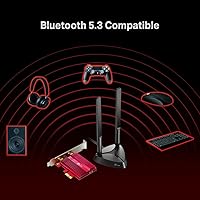
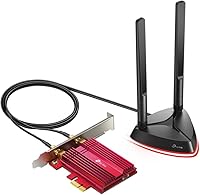
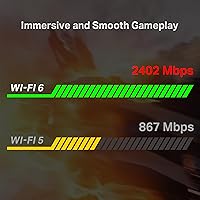
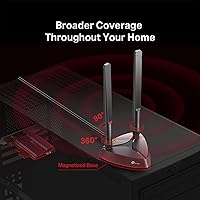
Running on the 802.11ax standard, this WiFi 6 PCIe card reaches up to 2402 Mbps on the 5 GHz band and 574 Mbps on 2.4 GHz — though real-world speeds depend heavily on your router and environment. OFDMA and MU-MIMO help it handle congested networks more gracefully, which matters when a dozen devices are competing for bandwidth. The included Bluetooth 5.3 is a genuine convenience for anyone tired of USB dongles on the back panel. Two external antennas with magnetic bases let you reposition them freely for the best possible signal, and a low-profile bracket is included for compact PC builds.

Best For

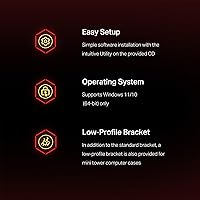
This wireless adapter is a natural fit for desktop builders who simply cannot run a cable to their router. Gamers will appreciate the low-latency performance OFDMA enables on a busy home network, and anyone looking to consolidate peripherals will find the onboard BT 5.3 handles keyboards, headphones, and controllers without fuss. The low-profile bracket also makes it viable for small form factor cases. One thing to plan for: this card supports Windows 10 and 11 in 64-bit only, and a driver installation step is required out of the box — straightforward, but not something you can skip.

User Feedback

Across more than 11,000 ratings, this WiFi 6 PCIe card holds a 4.6-star average — unusually strong for a networking component. Most buyers report an immediate speed improvement over older cards, with particular praise for consistent signal stability through walls and solid gaming performance. The recurring sore spot is Bluetooth activation: it requires connecting an internal USB header cable, which catches people off guard if they skim the setup instructions. Users also widely recommend downloading drivers directly from TP-Link's website rather than relying on the CD. Post-update driver issues affect a small subset of users but are far from a common experience.

Pros

  • WiFi 6 brings a real-world speed boost over older AC cards, especially on the 5 GHz band.
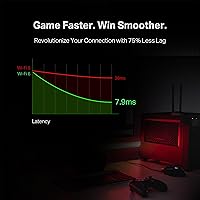
  • OFDMA noticeably reduces lag on busy home networks with many connected devices.
  • Bluetooth 5.3 eliminates the need for a separate USB dongle for peripherals.
  • Magnetic antenna bases let you reposition for better signal without tools or guesswork.
  • Stable signal through walls earns consistent praise from buyers in larger homes.
  • Low-profile bracket is included, making this viable for compact SFF PC builds.
  • Intel chipset backing keeps driver support more reliable than many budget alternatives.
  • Over 11,000 verified ratings with a 4.6-star average reflects unusually strong buyer satisfaction.
  • Works well with Windows 11 after a straightforward driver download from TP-Link's site.

Cons

  • Driver installation is not optional — the included CD is frequently outdated at time of purchase.
  • Bluetooth requires connecting an internal USB header cable, a step that catches many buyers off guard.
  • Motherboards without a free F_USB header cannot use the Bluetooth feature at all.
  • Real-world speeds fall well short of the advertised 2402 Mbps ceiling in typical home environments.
  • OFDMA and MU-MIMO benefits only apply if your router also supports WiFi 6 — older routers see no gain.
  • A small number of users experience driver instability after major Windows update cycles.
  • Antenna cables are fixed length, which limits placement flexibility in tightly managed desk setups.
  • Only supports Windows 10 and 11 in 64-bit — no Linux or older OS support out of the box.
  • The overall build materials feel mid-tier; the antennas in particular feel lightweight for long-term use.

Ratings

The TP-Link Archer TX3000E has been evaluated by our AI system after processing thousands of verified global user reviews, with spam, bot-generated, and incentivized submissions actively filtered out to ensure the scores reflect genuine buyer experiences. This wireless adapter earns high marks in several key areas, though a few friction points around setup and Bluetooth activation keep it from a perfect run. Both the strengths and the frustrations are reflected transparently in the breakdown below.
Wireless Speed Performance
88%
Most users coming from older AC or N-class cards report a noticeable jump in throughput, particularly on the 5 GHz band. In practice, streaming 4K content and running online games simultaneously becomes far more stable, with fewer dropped frames or buffering interruptions.
Real-world speeds fall well short of the theoretical 2402 Mbps ceiling, especially in homes with older WiFi 6 routers or significant wall interference. Users expecting to max out that headline figure are routinely disappointed when actual tests land in the 400–800 Mbps range.
Signal Stability & Range
91%
Buyers consistently highlight how well this card holds a connection through multiple walls and across floors, which is exactly what desktop users stuck far from their router need. Latency spikes during extended gaming sessions are rare, and the connection rarely drops under normal household conditions.
In very large homes or environments with heavy wireless congestion from neighboring networks, a small number of users report occasional signal dips. The card performs best when the antennas are properly positioned, which requires some trial and error after initial install.
Installation & Setup
74%
26%
The physical card installation is genuinely straightforward for anyone who has swapped a PCIe component before — slot it in, secure the bracket, and connect the antennas. Many users had the WiFi portion working within minutes of powering on.
The process is not plug-and-play. Driver installation is a required step, and the included CD is frequently outdated, which means heading to TP-Link's website anyway. New builders or less experienced users can find this friction frustrating, particularly if they expected an automatic Windows detection.
Bluetooth Setup & Usability
62%
38%
Once properly configured, Bluetooth 5.3 performs reliably for everyday peripherals like wireless headsets, keyboards, and game controllers. The broader range compared to older BT versions is genuinely useful in larger rooms, and pairing stability holds up well day-to-day.
This is the most cited pain point across buyer reviews. Activating Bluetooth requires connecting an internal USB header cable to a free F_USB port on the motherboard — a step that is easy to miss and not prominently flagged in the quick-start guide. Users without a spare header, or those unaware of the requirement, end up confused post-installation.
Driver Reliability & OS Compatibility
79%
21%
The Intel chipset foundation helps here considerably. Drivers are generally stable under Windows 10 and 11, and TP-Link keeps its support page updated with new driver releases reasonably promptly after major Windows updates.
A recurring minority complaint involves driver instability following Windows feature updates, requiring a manual reinstall from the support page. The 64-bit-only limitation also shuts out a small number of users running older 32-bit systems, which should be checked before purchasing.
Antenna Design & Flexibility
86%
The magnetic antenna bases are a practical detail that buyers genuinely appreciate. Being able to stick the antennas directly to a metal case or reposition them freely on the desk to chase better signal is more useful than it sounds, especially in compact setups.
The antenna cables are a fixed length, which limits placement options in some configurations. Users with tightly enclosed desk spaces or cable-managed setups occasionally find the reach restrictive, and the antennas themselves feel somewhat lightweight in build.
Low-Latency Gaming Performance
87%
OFDMA support is the key differentiator for gaming households where multiple devices compete for bandwidth. Buyers running competitive titles like Valorant or CS2 report consistently low ping and far fewer lag spikes compared to their previous wireless cards.
Wired ethernet still wins in raw latency consistency, and serious competitive players will feel that gap in high-stakes scenarios. The improvement over older wireless cards is real, but users who previously had a stable wired connection may not notice a meaningful benefit.
Value for Money
89%
At its price point, getting WiFi 6 performance with Bluetooth 5.3 on an Intel-backed chipset is a strong proposition. Buyers who compare it to standalone WiFi cards in the same bracket consistently rate it as one of the better uses of their budget for a desktop networking upgrade.
The Bluetooth setup complexity erodes some of that value perception for users who bought it specifically for the dual functionality. If the BT feature ends up unused due to the header requirement, the card becomes harder to justify over slightly cheaper WiFi-only alternatives.
Build Quality & Physical Construction
77%
23%
The card feels solid in hand and fits cleanly into a standard PCIe x1 slot without any flex or fit issues. The included low-profile bracket is a thoughtful addition that most competing cards at this price omit, making it genuinely useful for SFF builds.
The overall plastic construction feels mid-tier, and the antennas in particular have a lightweight feel that does not inspire confidence for long-term durability. Nothing feels fragile, but it does not have the premium finish of higher-end networking cards.
Small Form Factor Compatibility
83%
Including a low-profile bracket in the box is a real convenience that saves SFF builders from hunting for a compatible one separately. The card fits neatly into compact cases that accept half-height PCIe cards, broadening its usable audience considerably.
Antenna cable routing in very tight cases can be awkward, and the magnetic base loses its usefulness when there is no accessible flat metal surface nearby. A small number of mini-ITX users report the internal USB header cable creates cable management headaches in cramped builds.
Network Congestion Handling (MU-MIMO & OFDMA)
84%
In homes with 10 or more connected devices, the difference OFDMA makes is tangible. Users report that background devices uploading or streaming no longer visibly impact gaming or video call quality the way they did with older card generations.
These benefits only materialize when paired with a router that also supports WiFi 6 with OFDMA enabled. Users on older WiFi 5 routers see no improvement from these technologies, which is an important caveat that the product listing does not emphasize strongly enough.
Package Contents & Documentation
68%
32%
The box includes everything needed for a standard installation: the card, both antennas, the low-profile bracket, the Bluetooth USB header cable, and a driver CD. It is a complete package without needing extra accessories for most builds.
The documentation is minimal and the Bluetooth header cable requirement is buried rather than prominently communicated. Several buyers report that the CD driver version is outdated at time of purchase, making web-based driver sourcing effectively mandatory rather than optional.
Windows 11 Compatibility
82%
18%
Most users running Windows 11 report a smooth experience after the initial driver download from TP-Link's support page. The card works reliably with modern Windows 11 features, and TP-Link has maintained driver updates for the platform since its release.
Occasional incompatibilities surface after major Windows 11 cumulative updates, typically requiring a driver reinstall to restore full functionality. This is not unique to this card, but it is worth noting for users who prefer a fully maintenance-free networking setup.

Suitable for:

The TP-Link Archer TX3000E is the right call for desktop builders who simply cannot run a wired ethernet cable to their router and want a modern wireless solution that does not cut corners on performance. Gamers in particular will appreciate the OFDMA support, which genuinely reduces lag in households where multiple devices are competing for bandwidth at the same time. If you also want to clean up your USB ports by ditching a separate Bluetooth dongle, the onboard BT 5.3 handles controllers, headsets, and keyboards reliably once it is set up correctly. The included low-profile bracket makes it a practical option for small form factor builds where card clearance is tight. Anyone running Windows 10 or 11 on a 64-bit system who is comfortable doing a one-time driver download will find this wireless adapter slots into their setup with minimal ongoing hassle.
Not suitable for:

The TP-Link Archer TX3000E is not the right fit for users who expect a true plug-and-play experience straight out of the box — driver installation is mandatory, and the included CD is often already outdated, so a willingness to visit TP-Link's support page is basically a prerequisite. If Bluetooth is a core reason you are buying this card, you also need to verify that your motherboard has a free internal USB header, because without it the BT functionality simply will not work, and that detail trips up more buyers than it should. Users still running 32-bit versions of Windows are not supported at all. If you are chasing the absolute fastest throughput available and your router supports AX5400 or higher, a premium-tier card will serve you better. And if you already have a rock-solid wired ethernet connection to your desktop, there is no real reason to introduce wireless into the equation — this card is a strong option for those who need wireless, not a meaningful upgrade for those who do not.
Specifications

  • Interface: The card connects via a PCIe x1 slot, compatible with any standard PCIe motherboard.
  • WiFi Standard: Supports 802.11ax (WiFi 6) along with backward-compatible 802.11ac, 802.11n, 802.11g, and 802.11b protocols.
  • Max Speed: Theoretical maximum throughput is 2402 Mbps on the 5 GHz band and 574 Mbps on the 2.4 GHz band.
  • Bluetooth: Equipped with Bluetooth 5.3, offering up to 2x faster data transfer and 4x broader range than Bluetooth 4.2.
  • Chipset: Powered by an Intel wireless chipset, which contributes to more consistent driver support and long-term OS compatibility.
  • Antennas: Includes two external multi-directional antennas with magnetic bases for flexible, tool-free repositioning on any metal surface.
  • Network Tech: Supports OFDMA and MU-MIMO technologies to reduce latency and improve performance on networks with multiple active devices.
  • Frequency Bands: Dual-band operation covers both 2.4 GHz for range and 5 GHz for higher-speed, lower-interference connections.
  • OS Support: Compatible with Windows 10 and Windows 11 in 64-bit versions only; no Linux or 32-bit Windows support is officially provided.
  • Bracket Options: Ships with both a standard full-height bracket and a low-profile bracket for installation in small form factor PC cases.
  • BT Activation: Bluetooth functionality requires connecting the included USB header cable to a free internal F_USB connector on the motherboard.
  • Driver Source: Drivers are available via the included CD or, preferably, as a direct download from TP-Link's official support page for the most current version.
  • Dimensions: The card measures 4.76″ in length, 3.75″ in width, and 0.85″ in height.
  • Weight: The complete package, including antennas and brackets, weighs approximately 1 pound.
  • Color: The card and antenna assembly are finished in black to blend with most desktop PC interiors.
  • Wireless Security: Supports WPA3 and WPA2 encryption standards for secure wireless connections on compatible routers.
  • Package Contents: Box includes the PCIe card, two magnetic-base antennas, a low-profile bracket, a Bluetooth USB header cable, and a driver CD.

Related Reviews

TP-Link Archer VR2100
84%
86%
Wi-Fi Performance
92%
Setup & Installation
87%
Value for Money
72%
Range
90%
Wired Performance
More
TP-Link Archer BE600
90%
96%
Wi-Fi Speed
91%
Coverage Area
94%
Device Capacity
89%
Stability & Reliability
87%
Setup & Installation
More
TP-Link Archer AC1750 WiFi Router
85%
88%
WiFi Performance
91%
Setup & Installation
80%
Range & Coverage
85%
Value for Money
89%
Alexa Integration
More
TP-Link Archer A54
TP-Link Archer A54
74%
91%
Value for Money
88%
Ease of Setup
71%
Wi-Fi Range
74%
Wi-Fi Speed & Performance
86%
Security Features
More
TP-Link Archer BE24000 WiFi 7 Router
87%
94%
Performance
89%
Setup & Installation
92%
Connectivity & Compatibility
90%
Coverage & Range
88%
Security Features
More
TP-Link Archer C59 AC1350 WiFi Router
82%
88%
Setup & Installation
72%
Wi-Fi Range & Coverage
81%
Overall Performance
92%
Value for Money
78%
Build Quality
More
TP-Link Archer BE260 WiFi 7 Router
85%
93%
WiFi Performance
89%
Ease of Setup
77%
Coverage & Range
91%
Streaming & Gaming Experience
85%
Design & Build Quality
More
TP-Link Archer AX6000 WiFi 6 Router
84%
91%
Performance for Gaming and Streaming
87%
WiFi Coverage and Range
80%
Ease of Setup
90%
Security Features (TP-Link HomeCare)
85%
Build Quality and Durability
More
TP-Link Archer AXE75
78%
83%
Wireless Performance
71%
6 GHz Band Utility
91%
Setup & Ease of Use
86%
Value for Money
68%
Range & Coverage
More
TP-Link Archer AX73
TP-Link Archer AX73
79%
88%
Wireless Speed & Throughput
91%
Multi-Device Performance
74%
Coverage & Range
93%
Setup & Ease of Use
79%
Build Quality & Design
More

FAQ

Manual driver installation is required. Windows will not automatically configure this card correctly out of the box. Skip the included CD — it is often outdated — and download the latest driver directly from TP-Link's support page by searching for your card model. The process takes about five minutes and is straightforward once you know where to look.

This is the most common issue buyers run into. Bluetooth on the TP-Link Archer TX3000E requires you to connect the included USB header cable from the card to a free F_USB 2.0 connector on your motherboard. Without that internal connection, the BT radio simply will not activate, regardless of whether drivers are installed. Check your motherboard manual to locate the right header.

Yes, PCIe is backward compatible in terms of physical slot size. You can install a x1 card into a larger x4, x8, or x16 slot without any performance impact, since the card only uses one lane anyway. Just make sure the slot is not blocked by your GPU or other components.

The card is backward compatible and will connect to WiFi 5 and older routers without any issues. However, features like OFDMA and the full speed potential only come into play when paired with a WiFi 6 router. If you are still on a WiFi 5 router, you will see a solid connection but not the full advertised performance gains.

Realistically, no. The 2402 Mbps figure is the theoretical maximum under ideal lab conditions. In a typical home with walls, interference, and a mid-range WiFi 6 router, most users see speeds in the 400–900 Mbps range on the 5 GHz band. That is still a significant improvement over older cards, but it is worth setting accurate expectations going in.

Yes, it is officially supported on Windows 11 in 64-bit. The vast majority of users have no ongoing issues. A small number report needing to reinstall drivers after major Windows feature updates, but this is resolved quickly by downloading the latest driver from TP-Link's support page.

Yes, a low-profile bracket is included in the box, which makes the card compatible with SFF cases that accept half-height PCIe cards. Just swap out the standard bracket before installation. Keep in mind that routing the antenna cables in a very tight case can be a bit fiddly, so plan your cable management before closing everything up.

The antennas connect to the card via short coaxial cables and the bases contain a magnet that sticks to any ferrous metal surface — typically the side or top of your PC case. This lets you position them for optimal signal reception without any mounting hardware. It is a genuinely practical feature, especially if your PC is tucked under a desk or in a corner where antenna angle matters.

TP-Link does not officially support Linux for this card, and there are no official Linux drivers provided. Some experienced Linux users have found community-sourced drivers that work with limited functionality, but this is not a reliable or supported path. If Linux compatibility is important to you, this is not the right card for your build.

Yes, Bluetooth 5.3 supports multiple simultaneous device connections. Once the card is correctly set up with the internal USB header cable connected and the latest Bluetooth firmware installed, you can pair and use several peripherals concurrently — headsets, keyboards, mice, and controllers all work without needing to disconnect and re-pair between uses.