Overview

The TP-Link Archer TBE550E is among the first Wi-Fi 7 PCIe cards to reach desktop users seriously considering a step beyond Wi-Fi 6E. It covers all three bands — 2.4 GHz, 5 GHz, and the newer 6 GHz — giving it genuine headroom over older adapters. Before anything else, though, one point deserves emphasis: this Wi-Fi 7 PCIe card requires Windows 11. It will not function on Windows 10, full stop. That catches more buyers off guard than it should. Priced a step above most Wi-Fi 6E options, committing makes sense only if you are already on a compatible OS and planning a Wi-Fi 7 router to match.
Features & Benefits

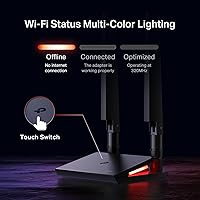
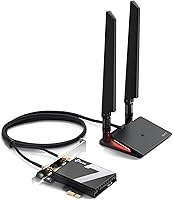
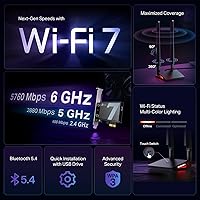
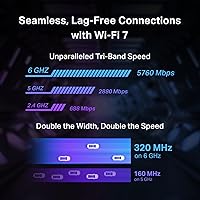
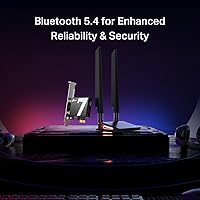
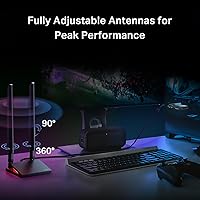
What separates this desktop wireless adapter from its Wi-Fi 6E predecessors is the combination of 4096-QAM modulation and 320 MHz channels, which together push theoretical throughput to heights that older standards simply could not reach. The 6 GHz band alone can handle up to 5760 Mbps — meaningful if your router supports it, though that router upgrade is a prerequisite worth factoring in. OFDMA, MU-MIMO, and Multi-RU work together to keep latency low even when several devices are competing for bandwidth. The included Bluetooth 5.4 adds reliable connectivity for wireless headsets, keyboards, and mice. Two adjustable antennas sit on a magnetic base with a multicolor LED and a touch switch for lighting control — a thoughtful practical detail.

Best For

This Wi-Fi 7 PCIe card makes the most sense for a fairly specific group of buyers. PC gamers who have been running long Ethernet cables across the house — or just tolerating a slower wireless card — will appreciate reduced latency and a higher performance ceiling. Content creators who regularly move large files wirelessly will feel the difference on 6 GHz. Home office users running Windows 11 who want both fast wireless and Bluetooth peripheral support in a single card also benefit here. That said, if you are still on a Wi-Fi 6 router, the real-world gains will be modest. This adapter rewards people who have already committed to the broader Wi-Fi 7 ecosystem.

User Feedback

With over 5,500 ratings averaging 4.5 stars, the general sentiment toward this Wi-Fi 7 PCIe card skews positive, particularly around easy installation and noticeably faster speeds compared to older Wi-Fi 5 and 6 cards. Many users report that the antenna placement flexibility is genuinely useful for signal optimization. The recurring complaints, however, are hard to ignore: a significant number of buyers did not realize the card is Windows 10 incompatible until after purchase, leading to frustration and returns. Some users also report minor friction during initial driver setup. A smaller subset mention compatibility hiccups on specific motherboard configurations. Overall, it is a well-received adapter — but only for buyers who did their homework beforehand.

Pros

  • Genuine Wi-Fi 7 performance upgrade for desktop users already on a compatible router and Windows 11
  • 6 GHz band access reduces congestion dramatically in apartments or dense neighborhoods
  • Bluetooth 5.4 is included, removing the need for a separate USB dongle for wireless peripherals
  • OFDMA and MU-MIMO keep latency stable even when multiple devices are hammering the network simultaneously
  • Magnetic antenna base allows flexible placement outside the tower for better signal reception
  • Physical installation is straightforward and well-suited to anyone with basic PC-building experience
  • Compatible with both AMD and Intel platforms, covering the large majority of modern desktop builds
  • The multicolor LED base doubles as a quick visual network status indicator without opening any software
  • Solid build quality on the PCIe card itself with no reports of widespread hardware failures

Cons

  • Completely non-functional on Windows 10 — a detail that continues to surprise a notable share of buyers
  • Full performance potential is only unlocked with a Wi-Fi 7 router, adding significant cost to the upgrade
  • Driver setup can require manual intervention on some AMD motherboard configurations before the card is recognized
  • LED lighting cannot sync with mainstream RGB software ecosystems, limiting aesthetic integration
  • The antenna cable may be too short for very large full-tower cases with distant I/O panel placement
  • Software utility offers minimal control over band management compared to what power users typically expect
  • 6 GHz range is inherently shorter than 5 GHz, which creates real-world signal drop-off in larger homes
  • The touch switch on the LED base is reported to be unresponsive and requires a firm deliberate press

Ratings

The TP-Link Archer TBE550E earns a strong overall standing among early Wi-Fi 7 PCIe adopters, but the scores below reflect the full picture — not just the highlights. Our AI analyzed thousands of verified global purchases, actively filtering out incentivized and bot-generated reviews, to surface what real desktop users actually experienced. Strengths in raw performance and installation are real, but so are the compatibility frustrations and ecosystem prerequisites that temper the enthusiasm.
Wireless Performance
91%
Users upgrading from Wi-Fi 5 or older Wi-Fi 6 cards report dramatically faster file transfers and noticeably smoother 4K streaming. On a compatible Wi-Fi 7 router with 6 GHz access, the throughput gains are tangible rather than just theoretical, particularly for users in less congested environments.
Real-world speeds on 5 GHz are competitive but not a massive leap over Wi-Fi 6E cards. Buyers without a Wi-Fi 7 router will not unlock the 6 GHz band at all, which effectively reduces this to a premium Wi-Fi 6E experience at a higher cost.
OS Compatibility
43%
57%
For Windows 11 users, the driver experience is relatively clean and the card is detected without unusual steps on most systems. Those who checked the requirements before purchasing report no OS-related issues whatsoever.
This is the single most complained-about aspect across buyer reviews. The card is entirely non-functional on Windows 10, and many buyers only discovered this after installing the hardware. The product title does include a warning, but the placement does not prevent a significant number of returns and one-star reviews rooted purely in this incompatibility.
Installation Ease
84%
The physical installation is straightforward — standard PCIe slot, no unusual bracket configuration, and the magnetic antenna base means no fumbling with small connectors on the back panel. Most users with any PC-building experience report being up and running in under 15 minutes.
Driver setup trips up a smaller but vocal group of users, particularly those who skip the included setup guide. A handful of buyers on certain AMD motherboard configurations reported needing to update chipset drivers or BIOS before the card was recognized reliably.
Latency & Gaming
88%
Gamers specifically call out improved ping stability compared to older wireless cards, and the OFDMA and MU-MIMO support means performance does not degrade noticeably when other household devices are active. For desktop gamers running long Ethernet runs as their only alternative, this adapter is a credible substitute.
Latency over Wi-Fi will never fully match a direct wired connection, and competitive players pushing sub-5ms requirements should still consider Ethernet. A small subset of users on dual-channel routers noted occasional band-switching behavior that caused brief spikes during online sessions.
Bluetooth Performance
78%
22%
Bluetooth 5.4 is a genuine asset here — users pairing wireless headsets, mice, and keyboards report stable connections with no notable audio dropout during simultaneous Wi-Fi activity. Having both functions on a single card keeps the build tidy.
Some users noted minor interference between Bluetooth and the 2.4 GHz band when both were heavily active at the same time. It is not a dealbreaker, but buyers planning to use Bluetooth audio extensively alongside 2.4 GHz devices should be aware of the potential for occasional instability.
Signal Range & Antenna Design
82%
18%
The magnetic antenna base is a practical design choice that lets users position the antennas on top of the case or anywhere nearby with a metal surface. Multiple users credit better signal reception after repositioning the base away from the tower itself, especially in rooms with walls between the router and desktop.
Two antennas is the minimum for a tri-band card at this tier, and some users in larger homes or with the router on a different floor found signal consistency on 6 GHz less predictable than expected. The 6 GHz band has inherently shorter range, which is a physics limitation more than a product flaw, but it still affects real users.
Build Quality & Hardware
86%
The PCIe card itself feels solid — no flex on the PCB, a properly reinforced bracket, and the antenna cable connectors seat firmly. At under one ounce, it is a lightweight card but does not feel cheap or fragile in hand.
The LED base housing is plastic and feels noticeably less premium than the card itself. A few users reported that the touch switch for cycling LED colors is slightly unresponsive and requires a deliberate press rather than a light tap, which is a minor but recurring observation.
LED & Aesthetics
74%
26%
The multicolor LED status display on the antenna base is a nice functional touch — users can glance at it to confirm connection status without opening any software. For RGB-focused builds, it adds a bit of visual cohesion without being over the top.
The LED color options and effects are limited compared to dedicated RGB ecosystems. Users hoping to sync it with Asus Aura, MSI Mystic Light, or similar software will be disappointed — the card operates independently and there is no third-party lighting integration.
Value for Money
69%
31%
For users who are already on Windows 11 and own a Wi-Fi 7 router, the price premium over Wi-Fi 6E cards is defensible — you are paying for a real generational upgrade with headroom for years ahead. Early adopter pricing is the reality with any new wireless standard.
For anyone still on a Wi-Fi 6 or Wi-Fi 6E router, or running Windows 10, this card represents poor value regardless of its technical merits. The effective user base who will extract full value is narrower than the broad market positioning might suggest, and that is reflected in a meaningful share of disappointed buyers.
Driver & Software Support
71%
29%
TP-Link has a reasonable track record for releasing driver updates, and users on Windows 11 report the base driver installation is stable after initial setup. No major firmware bugs have been widely reported in the period following launch.
The setup utility is functional but uninspiring, and advanced users looking for granular band management or traffic prioritization settings will find the software thin. A few early buyers also noted that driver updates required manual downloading rather than being pushed through Windows Update.
Motherboard Compatibility
79%
21%
Both AMD and Intel platforms are supported, and the vast majority of users on mainstream consumer motherboards from the past three to four years report clean detection with no configuration needed beyond a standard PCIe slot.
Edge cases exist on older or budget motherboards, particularly around PCIe lane allocation when multiple expansion cards are installed. A small number of users on AMD X370 and certain B450 boards reported instability that required BIOS updates to resolve, which adds friction for users on older platforms.
Heat & Thermal Management
83%
Under sustained load, this desktop wireless adapter runs noticeably cooler than previous-generation cards with external heatsinks. Users running it in compact cases with limited airflow have not widely reported thermal throttling or unexpected heat output.
There is no active cooling, which is standard for this category. In extremely poorly ventilated cases running heavy workloads for extended periods, a few users observed slightly degraded sustained speeds, though this was not a widespread or severe complaint.
Package Contents & Accessories
77%
23%
The magnetic antenna base is a genuinely useful inclusion rather than a throwaway accessory. The internal antenna cable is long enough to route cleanly in mid-tower and full-tower cases, and the installation guide covers the basics clearly enough for less experienced builders.
No PCIe riser cable is included for users who need to position the card in a tight slot, and the antenna cable length may fall short in very large full-tower cases where the I/O panel is far from the antenna resting spot. A slightly longer cable option would address a recurring minor complaint.

Suitable for:

The TP-Link Archer TBE550E is a strong fit for desktop PC users who have already committed to the Wi-Fi 7 ecosystem — meaning they own or are actively planning to purchase a Wi-Fi 7 router alongside this card. PC gamers who want to cut the Ethernet cable without sacrificing latency will find the tri-band setup and OFDMA support genuinely useful, particularly in homes with multiple competing devices on the network. Content creators and streamers who regularly push large files wirelessly will benefit from the increased throughput ceiling the 6 GHz band provides. Home office users on Windows 11 who want both fast wireless and Bluetooth 5.4 peripheral support from a single card will appreciate the consolidation. Anyone living in a densely populated building where the 2.4 GHz and 5 GHz bands are visibly congested stands to gain the most from access to the less crowded 6 GHz spectrum.
Not suitable for:

If your desktop is running Windows 10, stop here — the TP-Link Archer TBE550E is completely incompatible, and no workaround changes that. Buyers who are still running a Wi-Fi 6 or Wi-Fi 6E router should also reconsider, since the most meaningful performance gains from this card are locked behind a Wi-Fi 7 router upgrade, making the total investment considerably higher than the card price alone suggests. Users on older motherboards — particularly certain AMD 300 and 400 series boards — may encounter driver or recognition issues that require additional troubleshooting. Anyone expecting plug-and-play Bluetooth integration with popular RGB or peripheral ecosystems like Asus Aura Sync will find the Bluetooth implementation functional but entirely standalone. Budget-conscious buyers who simply want a reliable wireless upgrade without a full ecosystem overhaul will find better value in a mature Wi-Fi 6E card at a lower price point.
Specifications

  • Wi-Fi Standard: This card operates on Wi-Fi 7 (802.11be), the latest generation of wireless networking technology available for consumer desktop hardware.
  • Frequency Bands: Tri-band design covers 2.4 GHz, 5 GHz, and 6 GHz simultaneously, allowing the card to connect to whichever band offers the best available signal.
  • Max Throughput: Aggregate theoretical speeds reach up to 9300 Mbps across all three bands combined under ideal conditions.
  • 6 GHz Speed: The 6 GHz band supports a maximum theoretical speed of 5760 Mbps, making it the primary high-throughput channel on compatible Wi-Fi 7 routers.
  • 5 GHz Speed: The 5 GHz band delivers up to 2880 Mbps, offering a strong balance between range and throughput for everyday high-demand tasks.
  • 2.4 GHz Speed: The 2.4 GHz band operates at up to 688 Mbps, primarily serving longer-range or legacy device compatibility scenarios.
  • Modulation: 4096-QAM (4K-QAM) modulation packs significantly more data into each transmission cycle compared to the 1024-QAM used in Wi-Fi 6 and 6E.
  • Channel Width: Supports 320 MHz channel width on the 6 GHz band, doubling the maximum channel width available under Wi-Fi 6E.
  • Latency Tech: OFDMA, MU-MIMO, and Multi-RU technologies work together to reduce latency and improve efficiency on networks with multiple active devices.
  • Bluetooth: Integrated Bluetooth 5.4 provides low-latency wireless connectivity for peripherals including headsets, keyboards, and mice.
  • Interface: Uses a standard PCIe interface, compatible with both AMD and Intel desktop motherboards featuring an available PCIe slot.
  • OS Support: Exclusively supports Windows 11; the card is not compatible with Windows 10, Windows 8, or any earlier version of Windows.
  • Antenna: Includes two adjustable high-performance antennas mounted on a detachable magnetic base that can be positioned freely on metal surfaces near the desktop.
  • LED Indicator: The antenna base features a multicolor LED status display with a touch-activated switch for cycling through lighting modes or turning the LED off.
  • Dimensions: The PCIe card measures 4.76″ in length, 3.75″ in width, and 0.85″ in height, fitting standard full-height PCIe slots.
  • Weight: The card weighs approximately 0.634 ounces, excluding the antenna assembly and magnetic base.
  • Model Number: The official model designation is Archer TBE550E, manufactured and supported by TP-Link.
  • ASIN: The Amazon product identifier for this card is B0D4PDLX6L, useful for cross-referencing listings and verifying authenticity.

Related Reviews

TP-Link Archer BE600
90%
96%
Wi-Fi Speed
91%
Coverage Area
94%
Device Capacity
89%
Stability & Reliability
87%
Setup & Installation
More
TP-Link Archer VR2100
84%
86%
Wi-Fi Performance
92%
Setup & Installation
87%
Value for Money
72%
Range
90%
Wired Performance
More
TP-Link Archer AC1750 WiFi Router
85%
88%
WiFi Performance
91%
Setup & Installation
80%
Range & Coverage
85%
Value for Money
89%
Alexa Integration
More
TP-Link Archer BE24000 WiFi 7 Router
87%
94%
Performance
89%
Setup & Installation
92%
Connectivity & Compatibility
90%
Coverage & Range
88%
Security Features
More
TP-Link Archer A54
TP-Link Archer A54
74%
91%
Value for Money
88%
Ease of Setup
71%
Wi-Fi Range
74%
Wi-Fi Speed & Performance
86%
Security Features
More
TP-Link Archer AX73
TP-Link Archer AX73
79%
88%
Wireless Speed & Throughput
91%
Multi-Device Performance
74%
Coverage & Range
93%
Setup & Ease of Use
79%
Build Quality & Design
More
TP-Link Archer BE260 WiFi 7 Router
85%
93%
WiFi Performance
89%
Ease of Setup
77%
Coverage & Range
91%
Streaming & Gaming Experience
85%
Design & Build Quality
More
TP-Link Archer AX6000 WiFi 6 Router
84%
91%
Performance for Gaming and Streaming
87%
WiFi Coverage and Range
80%
Ease of Setup
90%
Security Features (TP-Link HomeCare)
85%
Build Quality and Durability
More
TP-Link Archer AXE75
78%
83%
Wireless Performance
71%
6 GHz Band Utility
91%
Setup & Ease of Use
86%
Value for Money
68%
Range & Coverage
More
TP-Link Archer BE550
76%
83%
Wireless Performance
91%
Wired Port Quality
88%
Setup & Ease of Use
67%
Coverage & Range
58%
HomeShield Security & Parental Controls
More

FAQ

No — the TP-Link Archer TBE550E has no supported driver for Windows 10 and TP-Link has not released unofficial ones either. This is a hard OS requirement, not just a recommendation. If your desktop is running Windows 10, this card will not function regardless of what workarounds you attempt.
It will work with a Wi-Fi 6 or Wi-Fi 6E router, but you will not gain any Wi-Fi 7 specific advantages like 320 MHz channels or 4096-QAM — the connection will simply negotiate down to the router's capabilities. If you are not planning a router upgrade soon, a less expensive Wi-Fi 6E card would likely deliver a very similar real-world experience at a lower cost.

The card is compatible with PCIe 3.0 slots and does not require PCIe 4.0 to function. Wi-Fi cards have modest bandwidth requirements compared to GPUs or NVMe drives, so the PCIe generation of your available slot is unlikely to create a bottleneck in any practical scenario.

The base contains a magnet that sticks to any flat metal surface, including the top or side of a steel PC case. The antenna cable connects the base to the card inside the case through the standard rear I/O cutout area. This flexibility lets you move the antennas to find the position that gives you the strongest signal, rather than being locked into a fixed angle on the bracket.

In most cases, yes — running two Bluetooth adapters simultaneously on Windows 11 can cause conflicts, and Windows typically only uses one as the primary controller. It is generally best to remove or disable any existing USB Bluetooth dongle after installing this card to avoid pairing and stability issues with your peripherals.

Yes, PCIe slots are backwards and forwards compatible in terms of physical fit for smaller cards. This Wi-Fi 7 PCIe card can be installed in an x4, x8, or x16 slot without any issues — it will simply use the bandwidth it needs and leave the rest unused.

It will not — 6 GHz has a shorter effective range than 5 GHz and is more susceptible to signal degradation through walls, floors, and other physical obstructions. If your router is in a different room or on a different floor from your desktop, you may find that 5 GHz provides more consistent performance in practice, despite the lower theoretical ceiling.

For most mid-tower cases, the cable length is adequate. A notable number of users with very large full-tower cases have mentioned the cables are slightly short when the card sits near the bottom of the case and the antenna base needs to reach the top panel. If you have a particularly tall case, this is worth checking before you finalize your build plan.

Official support is Windows 11 only, and TP-Link does not provide Linux drivers for this card. Some community-developed drivers exist for related chipsets in the broader Linux ecosystem, but there is no guarantee of stability or full feature support, and it is not something TP-Link endorses or assists with.

Yes — the touch switch on the magnetic base cycles through lighting modes and includes an off state. You do not need any software to disable it; a firm press on the touch surface will eventually cycle to no illumination. A few users note the switch requires a deliberate press rather than a light tap, so apply a bit more pressure than you might expect.