Overview

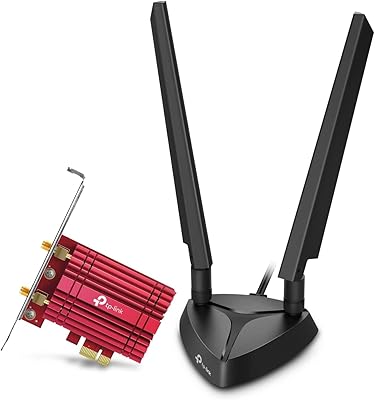
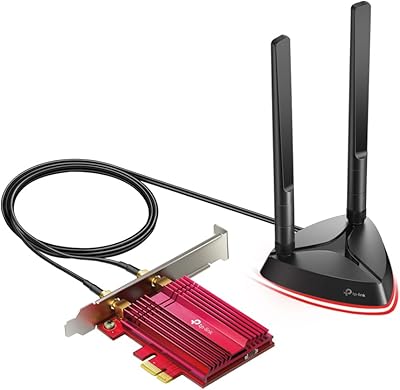
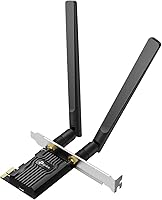
The TP-Link Archer TX20E WiFi 6 PCIe Card is a practical upgrade for desktop users who need wireless connectivity but can't easily run an Ethernet cable to their machine. It targets mid-range builds where spending heavily on networking doesn't make sense, yet where an aging AC adapter is clearly holding things back. One standout at this price point is getting WiFi 6 and Bluetooth 5.2 on a single card — that combo is harder to find cheaply than you might expect. The package also includes both a standard and low-profile bracket, so it fits a wider range of cases. One firm caveat: this desktop wireless adapter runs on Windows 10 and 11 only, 64-bit. Linux users should shop elsewhere.
Features & Benefits

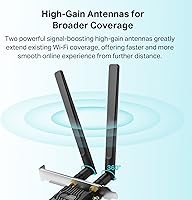
WiFi 6 brings more than raw speed to the table — technologies like OFDMA and MU-MIMO are the real story here. On a crowded home network where multiple devices compete for bandwidth, these features reduce the congestion that makes online gaming feel inconsistent. Compared to a typical AC1200 card, the difference during peak evening hours is genuinely noticeable. The two external high-gain antennas help pull in a stronger signal from farther away, which matters in larger homes. Bluetooth 5.2 handles peripherals like controllers and headphones with broader range and reliability than older versions. Security gets a quiet but meaningful update via WPA3. Just keep in mind: real-world speeds always depend on your router and environment, not the card alone.

Best For

This WiFi 6 PCIe card makes the most sense for desktop owners who've been putting off a wireless upgrade because better options felt overpriced. It's a particularly good fit for online gamers on mid-range rigs — not because the raw speeds are extreme, but because lower latency and better handling of network congestion make sessions feel more consistent. Anyone living in an apartment building where a dozen networks overlap will appreciate what OFDMA actually does in practice. The single-slot design also appeals to builders who want WiFi and Bluetooth without sacrificing two expansion slots or adding a USB dongle. The bundled low-profile bracket is a small but welcome detail for compact cases.

User Feedback

Buyer sentiment around the Archer TX20E leans positive, with most Windows 11 users reporting that the card is recognized automatically after install — no manual driver hunting required. Signal stability is a recurring praise point, especially among those coming from older AC-era cards, and the value-for-money angle comes up frequently. On the critical side, a notable number of reviewers were caught off guard by the Bluetooth USB header requirement — you must connect an internal cable to a motherboard USB header to activate Bluetooth, and this step isn't immediately obvious. A smaller group reports driver hiccups on fresh Windows installs, though these cases appear isolated rather than widespread.

Pros

  • WiFi 6 and Bluetooth 5.2 in one card is a rare combination at this price point.
  • OFDMA visibly reduces lag on congested home networks during peak hours.
  • Windows 11 plug-and-play installation works for most users without manual driver hunting.
  • Both standard and low-profile brackets are included, covering a wide range of case sizes.
  • Bluetooth 5.2 range handles controllers and headsets comfortably across larger rooms.
  • Signal stability is noticeably better than older AC-era adapters at equivalent distances.
  • WPA3 support adds a meaningful layer of wireless security for users with compatible routers.
  • The Archer TX20E frees up USB ports by eliminating the need for a separate Bluetooth dongle.
  • High-gain antennas are adjustable and hold their position reliably after setup.

Cons

  • Bluetooth requires connecting an internal USB header cable — easy to miss and poorly documented.
  • No Linux or macOS support at all; Windows 64-bit is the only option.
  • Driver conflicts on fresh Windows installs are an occasional but recurring complaint.
  • Real-world speeds fall well short of theoretical maximums and depend heavily on your router.
  • Antenna size and placement can be awkward in tight or cabinet-mounted desktop setups.
  • WPA3 benefits are useless if your existing router only supports WPA2.
  • Long-term reliability data is thinner than short-term impressions, leaving durability less proven.
  • Users with no available PCIe slots or USB headers on their motherboard cannot use this card fully.

Ratings

The TP-Link Archer TX20E WiFi 6 PCIe Card has been scored by our AI system after parsing and filtering hundreds of verified global buyer reviews, with spam, bot activity, and incentivized feedback actively excluded from the analysis. The scores below reflect where real desktop users consistently found value — and where frustrations surfaced — giving you an honest picture of this wireless adapter's strengths and limitations before you commit.
Value for Money
91%
Buyers repeatedly call this one of the better-priced ways to bring WiFi 6 and Bluetooth 5.2 to a desktop simultaneously. For mid-range builds where budget matters, getting both technologies in a single card without paying a premium is a recurring reason people choose it over alternatives.
A small number of reviewers feel the price-to-performance ratio softens slightly if you already own a Bluetooth dongle and only need the WiFi upgrade, since you're effectively paying for a feature you don't need in that scenario.
Installation Ease
83%
On Windows 11, the card is widely reported to be recognized automatically, with drivers installing without any manual intervention. Most buyers describe the physical installation as straightforward — slot it in, connect the antennas, and boot up.
The Bluetooth activation step trips up a meaningful portion of buyers. It requires connecting a small USB cable from the card to an internal motherboard USB header, and this is easy to miss if you don't read the manual carefully before closing the case.
WiFi Signal Stability
86%
Users upgrading from older AC-standard cards consistently note a tangible improvement in connection consistency, particularly at greater distances from the router. The two external antennas appear to hold signal through walls better than single-antenna budget alternatives.
A handful of reviewers in concrete-heavy buildings or multi-story homes report that signal drop-off still occurs at longer ranges, which is less a flaw of this card specifically and more a ceiling inherent to any PCIe wireless adapter without a clear line of sight.
Gaming Performance
84%
Online gamers on mid-range rigs frequently mention that lag spikes during peak network hours reduced noticeably after switching to this adapter. OFDMA and MU-MIMO appear to deliver a real-world benefit on congested home networks, not just a spec-sheet talking point.
Competitive players who scrutinize ping at the millisecond level point out that even an optimized wireless connection introduces more variability than a wired Ethernet line. For casual to moderate gaming this is fine; for high-stakes competitive play, the gap is real.
Bluetooth Performance
77%
23%
Once properly set up, Bluetooth 5.2 handles common peripherals — controllers, headsets, keyboards — with noticeably better range than older Bluetooth 4.x adapters. Buyers in larger rooms appreciate being able to keep devices farther from the PC without dropouts.
The hidden dependency on an internal USB header cable for Bluetooth to function at all is the single most cited frustration across reviews. Users who discover this after closing their case have to reopen it, which is an avoidable hassle that better packaging communication would fix.
Driver Reliability
72%
28%
The majority of Windows 10 and 11 users report no driver issues whatsoever after initial setup, with automatic detection handling everything cleanly. Long-term stability over weeks of use is generally described as solid by buyers who mention it.
A recurring minority of reviewers encounter driver conflicts or failed installs on freshly built Windows systems, occasionally requiring manual downloads from TP-Link's support site. These cases aren't dominant but appear often enough to be a legitimate concern for less experienced builders.
OS Compatibility
54%
46%
For Windows 10 and 11 users on 64-bit systems, compatibility is essentially complete. TP-Link's driver support for these operating systems is mature and the card behaves predictably across recent Windows builds.
This adapter simply does not support Linux or macOS, and that's a hard line. Buyers who didn't notice the Windows-only limitation before purchasing are responsible for a notable portion of the negative reviews, making this a purchase decision that requires careful OS verification upfront.
Build Quality
74%
26%
The card feels appropriately solid for its price bracket — not premium, but not flimsy either. The antenna connectors click in securely and don't feel like they'll loosen with normal desk vibration or occasional cable adjustments.
The overall construction uses standard-grade materials that won't impress anyone coming from higher-end networking cards. A few buyers mention that the bracket fit required minor adjustment depending on their case, though no one reported actual structural failure.
Antenna Design
79%
21%
The dual external antennas are adjustable and meaningfully improve signal reception compared to internal or stubby fixed designs. Positioning them vertically tends to yield the best results for most desktop placements, and the swivel joints hold their angle reliably.
The antennas extend noticeably from the rear of the PC, which can be awkward in tight desk setups or if the tower is tucked into a cabinet. They're also not detachable for upgrade in the traditional RP-SMA sense without some effort.
Case Compatibility
88%
Including both a standard full-height bracket and a low-profile bracket in the box is genuinely useful and not something every competitor bothers to do at this price point. Mini-tower and SFF case owners benefit directly from this without needing to source parts separately.
The card occupies a PCIe slot that some builders might prefer to reserve for future expansion. For systems with limited slots this is worth thinking through, though for most mid-range desktops it's rarely a real constraint.
Network Security
82%
18%
WPA3 support is a legitimate security upgrade over WPA2, particularly relevant for users on public or shared networks, or anyone conscious of router-level encryption. It works transparently with WPA3-capable routers without requiring extra configuration.
WPA3's benefits are only realized if your router also supports it — and many mid-range home routers still default to WPA2. Buyers with older networking infrastructure won't see any security improvement in practice, though WPA2 fallback functions normally.
Heat & Power Efficiency
81%
19%
WiFi 6 chipsets run cooler and consume less power than older WiFi 5 designs under equivalent workloads. Users running the card in compact cases with limited airflow report no heat-related issues after extended sessions.
No active cooling is included, which is standard for this category. In very poorly ventilated cases where ambient temps run high, passive operation could theoretically be a concern, though no buyer has specifically flagged thermal throttling as a real problem.
Package Contents
76%
24%
The box includes the card, both brackets, antennas, and the necessary Bluetooth USB cable. Having everything needed for a complete install in one package means no surprise trips to source accessories.
The included documentation is minimal — the quick-install guide is thin on detail for the Bluetooth cable step specifically, which is where most setup confusion originates. A clearer printed diagram would prevent a significant proportion of the frustrated reviews.
Long-Term Reliability
78%
22%
Buyers who mention using the card for six months or more generally report no degradation in performance or unexpected disconnects. TP-Link as a brand has a reasonable track record for networking hardware that holds up past the return window.
The sample of long-term reviews is smaller than short-term impressions, so durability data is less conclusive. A few users report intermittent disconnects emerging after several months, though it's unclear whether this traces back to driver updates, router firmware, or the card itself.

Suitable for:

The TP-Link Archer TX20E WiFi 6 PCIe Card is a strong fit for Windows 10 or 11 desktop users who want to cut the Ethernet cable without paying a premium for networking hardware. Mid-range gamers will find it particularly worthwhile — not because it promises extreme speeds, but because its handling of congested networks translates into more consistent, lower-latency sessions during busy evening hours. Anyone living in an apartment building where a dozen competing networks overlap will notice a real-world difference from OFDMA technology compared to older AC-standard cards. It also suits builders who want to consolidate wireless and Bluetooth into a single PCIe slot, avoiding the clutter of a separate USB dongle for peripherals like controllers, headsets, or keyboards. The included low-profile bracket makes it a practical option for small form factor and mini-tower cases, which often get overlooked by competing products in this category.
Not suitable for:

This desktop wireless adapter is a hard pass for anyone running Linux or macOS — Windows 10 and 11 (64-bit) are the only supported operating systems, full stop, and no workaround changes that. Competitive esports players who need the absolute lowest and most consistent latency should understand that no wireless card, regardless of generation, fully matches a direct Ethernet connection; if your game performance depends on sub-millisecond stability, a cable is still the right answer. Users whose routers only support older WiFi standards like WiFi 4 or WiFi 5 won't unlock the card's most meaningful benefits, since features like OFDMA require a WiFi 6 router on the other end to function. Anyone uncomfortable opening a PC case and routing an internal USB header cable for Bluetooth activation may find the setup more involved than expected. Finally, if you already own a reliable Bluetooth adapter and only need a wireless upgrade, the bundled Bluetooth functionality adds cost you won't recoup.

Specifications

  • Brand: Manufactured and sold by TP-Link, a globally recognized networking hardware brand.
  • Model: The card's official model designation is Archer TX20E.
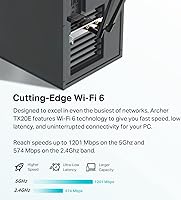
  • WiFi Standard: Supports WiFi 6 (802.11ax), the current-generation wireless standard offering improved speed and network efficiency over WiFi 5.
  • Max Throughput: Theoretical combined dual-band throughput reaches up to 1800 Mbps under ideal conditions with a compatible WiFi 6 router.
  • 5 GHz Band: Delivers up to 1201 Mbps on the 5 GHz band, suited for high-bandwidth tasks at closer range.
  • 2.4 GHz Band: Operates at up to 574 Mbps on the 2.4 GHz band, providing broader coverage at the cost of peak speed.
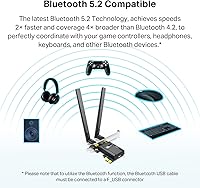
  • Bluetooth Version: Equipped with Bluetooth 5.2, offering approximately double the data speed and four times the range of Bluetooth 4.2.
  • Interface: Connects to the desktop motherboard via a PCIe slot, requiring no external USB port for the wireless function.
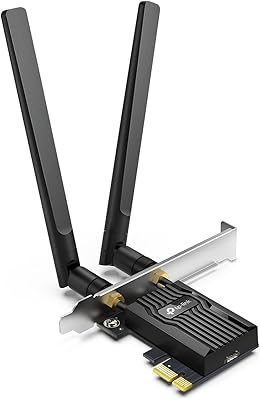
  • Antennas: Includes two external high-gain adjustable antennas designed to extend signal range and improve reception through walls.
  • Security Protocol: Supports WPA3, the latest wireless security standard, while maintaining backward compatibility with WPA2 networks.
  • OS Compatibility: Compatible exclusively with Windows 10 and Windows 11 (64-bit editions only); Linux and macOS are not supported.
  • Bluetooth Setup: Activating Bluetooth requires connecting the included USB cable from the card to an available internal USB 2.0 header on the motherboard.
  • Brackets Included: The package includes both a standard full-height bracket and a low-profile bracket to accommodate mini-tower and compact PC cases.
  • Dimensions: The card measures 4.72″ in length, 3.09″ in width, and 0.83″ in height.
  • Weight: The card weighs 3.52 ounces, making it a lightweight addition to any desktop build.
  • Network Technologies: Incorporates OFDMA and MU-MIMO technology to reduce latency and handle multiple simultaneous device connections more efficiently.
  • UPC: The Universal Product Code for this card is 840030708800.
  • Availability Date: The Archer TX20E was first made available for purchase on April 4, 2023.

Related Reviews

TP-Link Archer TX55E
87%
93%
Throughput Speed
89%
Gaming Latency
86%
Signal Stability
82%
Bluetooth Connectivity
91%
Thermal Management
More
TP-Link Archer T4E AC1200 PCIe WiFi Card
82%
88%
WiFi Performance
94%
Ease of Installation
84%
Build Quality
75%
Compatibility with Windows
82%
Signal Range
More
TP-Link Archer TX3000E
81%
88%
Wireless Speed Performance
91%
Signal Stability & Range
74%
Installation & Setup
62%
Bluetooth Setup & Usability
79%
Driver Reliability & OS Compatibility
More
TP-Link Archer T6E AC1300 PCIe Wi-Fi Adapter
75%
88%
Installation Ease
83%
5 GHz Performance
74%
2.4 GHz Performance
67%
Signal Range
63%
Driver Stability
More
TP-Link Archer TBE550E
77%
91%
Wireless Performance
43%
OS Compatibility
84%
Installation Ease
88%
Latency & Gaming
78%
Bluetooth Performance
More
TP-Link Archer TXE75E WiFi 6E PCIe Card
82%
88%
Wireless Performance
83%
Installation Ease
91%
Chipset Reliability
67%
Bluetooth Functionality
74%
6 GHz Band Access
More
TP-Link Archer AX73
TP-Link Archer AX73
79%
88%
Wireless Speed & Throughput
91%
Multi-Device Performance
74%
Coverage & Range
93%
Setup & Ease of Use
79%
Build Quality & Design
More
TP-Link Archer AX6000 WiFi 6 Router
80%
88%
Wireless Performance
91%
Multi-Device Handling
86%
Setup & Ease of Use
93%
Wired Connectivity
82%
Range & Coverage
More
TP-Link Archer AX10 WiFi 6 Router
77%
91%
Value for Money
78%
Wireless Performance
63%
Range & Coverage
93%
Ease of Setup
82%
Network Stability
More
TP-Link Archer AX72 Pro WiFi 6 Router
87%
89%
WiFi Performance
92%
Value for Money
94%
Ease of Setup
88%
Security Features
83%
Range and Coverage
More

FAQ

For most users on Windows 11, the card is detected automatically and drivers install without any manual steps. On Windows 10 or freshly installed systems, you may occasionally need to download drivers from TP-Link's support site, but this is the exception rather than the rule.

This is the most common setup issue buyers run into. Bluetooth on this card only works if you connect the small USB cable — included in the box — from the card itself to an internal USB 2.0 header on your motherboard. If you skipped that step, Bluetooth won't appear in Windows at all. Check your motherboard manual to locate the correct header.

No. The TP-Link Archer TX20E WiFi 6 PCIe Card is strictly Windows 10 and Windows 11 (64-bit) only. There are no official Linux drivers, and macOS is not supported in any capacity. If you run Linux, you'll need to look at a different adapter with confirmed community driver support.
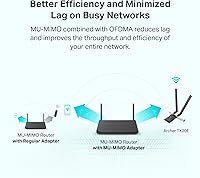
You'll still get a working wireless connection with an older router, but features like OFDMA — which reduces congestion on busy networks — only function when your router also supports WiFi 6. On a WiFi 5 router, this card essentially behaves like a high-quality WiFi 5 adapter, which is still a solid upgrade from most older cards.

It's a reasonable choice for casual to mid-level online gaming. The reduced network congestion from OFDMA and MU-MIMO helps keep latency more consistent on busy home networks, which is where most gaming frustration comes from. That said, no wireless card fully replaces a wired Ethernet connection for competitive play where every millisecond counts.

You get the PCIe card itself, two external antennas, a standard full-height bracket (pre-installed), a low-profile bracket for smaller cases, and the internal USB cable needed to enable Bluetooth. Everything required for a complete install is in the box, though the documentation on the Bluetooth cable step is minimal.

Yes. The included low-profile bracket is specifically there for compact and mini-tower cases. Just swap the pre-installed standard bracket for the low-profile one before fitting it into your case.

Bluetooth 5.2 on this desktop wireless adapter significantly outperforms most budget USB dongles, which typically use older Bluetooth 4.0 or 4.2 chipsets. In practice, you can expect reliable connectivity to controllers and headsets from across a room without the signal dropouts that cheap dongles often produce.

Not under normal circumstances. It occupies a standard PCIe slot and draws minimal power, so interference with GPUs or other expansion cards isn't a reported issue. Just make sure you have a free PCIe slot and an available internal USB header before purchasing.

Functionally, yes — WPA3 only works when your router also supports it. If your router uses WPA2, the card will connect normally using WPA2 instead, so there's no issue with compatibility. You just won't gain the additional security layer that WPA3 provides until you upgrade your router.

Where to Buy