Overview

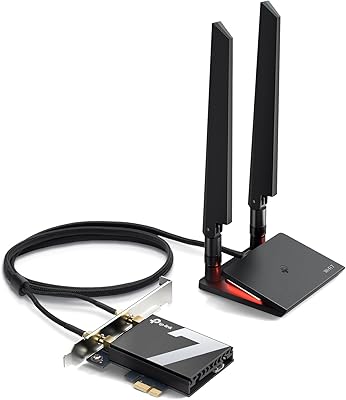
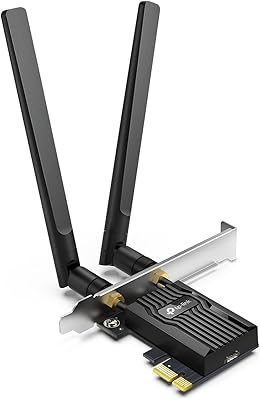
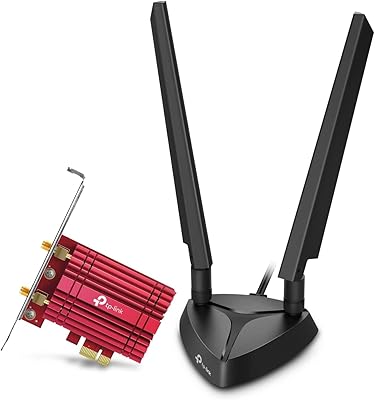
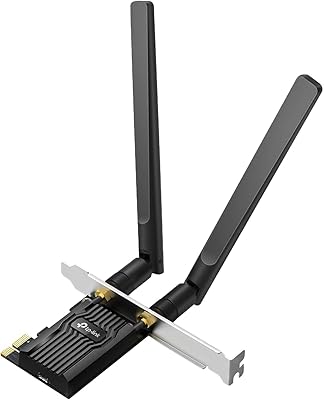
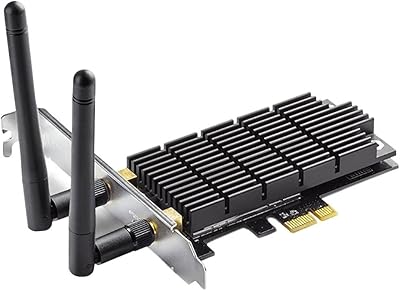
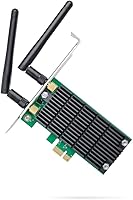
The TP-Link Archer T4E AC1200 PCIe WiFi Card is a reliable upgrade for desktop PCs, delivering dual-band WiFi connectivity. This PCIe adapter supports both 2.4GHz and 5GHz frequencies, ensuring fast and stable internet speeds. The card is particularly suited for users who want to replace old or underperforming WiFi cards. Installation is straightforward, with an included low-profile bracket for desktops with limited space. Once set up, this WiFi card delivers improved network reliability, especially in areas with weak signals or interference.

Features & Benefits

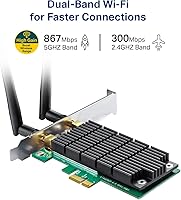
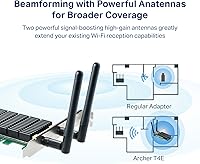
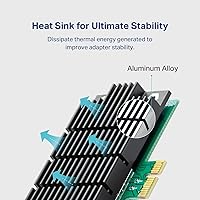
The Archer T4E offers AC1200 speeds, delivering up to 867 Mbps on the 5GHz band and 300 Mbps on 2.4GHz, making it ideal for gaming, HD streaming, and browsing. Thanks to its heat sink technology, this WiFi card remains stable during prolonged use, preventing overheating. The detachable external antennas allow for better range and signal strength, ensuring a stronger connection over longer distances. Compatibility with Windows 7, 8, 10, and 11 ensures broad usability, allowing you to easily integrate the card into your desktop setup.

Best For

This TP-Link WiFi card is best suited for users who demand reliable, high-speed internet. Gamers will appreciate its stable performance, while those who stream 4K video or engage in data-heavy tasks will benefit from its consistent speeds. It’s a great choice for PC users looking to upgrade from outdated WiFi cards. Additionally, anyone needing to extend their WiFi range in a desktop setup will find the Archer T4E a valuable addition, offering enhanced coverage and signal quality.

User Feedback

The Archer T4E is generally well-received, with users praising its easy installation and stable performance. Many have reported noticeable improvements in WiFi range and speed after upgrading from older cards. However, some users have experienced issues with driver support on certain older versions of Windows, particularly Windows 7 and XP. A few also noted occasional signal drops in areas with high interference. Overall, most reviews highlight the reliability and value it offers for a reasonable price.

Pros

  • Easy to install with the included low-profile bracket, even for users with minimal technical expertise.
  • Dual-band support (2.4GHz and 5GHz) provides flexibility in various network environments.
  • AC1200 speeds allow for fast internet connections, making it ideal for online gaming or streaming.
  • Works seamlessly with multiple versions of Windows (7, 8, 10, 11), ensuring broad compatibility.
  • Heat sink technology ensures stable performance even during prolonged use or high-demand tasks.
  • Detachable antennas provide improved range and signal strength, making it suitable for larger desktop setups.

Cons

  • Some users report driver compatibility issues with older Windows versions, requiring additional troubleshooting.
  • Signal drops may occur in environments with heavy interference, such as crowded WiFi areas.
  • Not the best choice for users with very large homes or multi-floor setups due to range limitations.
  • The card may not support all advanced WiFi features in high-end routers, limiting future-proofing potential.
  • A few users have noted that the antennas are not as durable as expected, potentially affecting long-term performance.

Ratings

The ratings for the TP-Link Archer T4E AC1200 PCIe WiFi Card reflect genuine user feedback from verified sources across multiple platforms and languages. After filtering out any spam, incentivized, or off-topic reviews, we've highlighted the most valuable insights based on real-world experiences. While many users praise this device for its ease of installation and reliable performance, there are also some concerns regarding driver compatibility with older Windows versions and occasional signal drops in certain conditions. Both the positive and negative aspects are reflected in the ratings below.

WiFi Performance
88%
Many users have noted that this WiFi card provides solid and reliable performance, especially on the 5GHz band. The stable and fast connection speeds enable smooth streaming and gaming, making it a great upgrade for desktops that need better WiFi coverage and speed. Users have reported minimal latency during gaming and video calls.
However, some users have mentioned that the performance on the 2.4GHz band isn't as strong as expected, with occasional drops in connection when there are many devices on the network. Additionally, a few buyers have found that interference from thick walls or large metal objects can cause signal instability in certain environments.
Ease of Installation
94%
Users consistently highlight how easy it is to install this WiFi card, with many appreciating the included low-profile bracket for small cases. The plug-and-play setup, along with clear instructions, ensures a hassle-free installation experience. The card works immediately after installation without the need for complicated configurations.
Some users have mentioned that while the installation process is generally easy, older PCs may have compatibility issues with the low-profile bracket. Additionally, a few buyers have had to manually install drivers or update them for the card to work properly with specific versions of Windows, which can be a bit frustrating.
Build Quality
84%
The build quality of this WiFi card is generally regarded as solid, with users appreciating its compact form factor and the durable construction of the card and antennas. The detachable antennas provide flexibility in adjusting the signal, and the card itself feels sturdy and well-built, offering peace of mind for long-term use.
While the card feels sturdy overall, some users have reported that the external antennas can feel a bit flimsy and may require careful handling to avoid damage. Additionally, there have been a few complaints about the plastic casing, with some feeling that it could be more robust, especially when compared to more premium models.
Compatibility with Windows
75%
25%
This WiFi card is compatible with a wide range of Windows operating systems, from Windows 7 to 11, ensuring it works well for most users. Many have appreciated the broad compatibility, as it allows for easy integration with a variety of desktop PCs, making it a versatile choice for upgrading old WiFi cards.
A significant number of users have reported issues with driver support for older versions of Windows, particularly with Windows 7 and 8. Some have struggled to find the correct drivers or needed to resort to third-party sources. This has led to frustration for users with older machines who were hoping for a simple plug-and-play experience.
Signal Range
82%
18%
The card delivers a good signal range for most desktop setups, with users noticing improvements in WiFi reception compared to older or lower-quality adapters. The detachable antennas play a key role in boosting signal strength and ensuring reliable performance at longer distances, making it a solid choice for larger homes or offices.
Some users have mentioned that the range is still limited in certain environments, especially when the card is used in homes with thick walls or large metal structures. While the card generally performs well, users in larger spaces or with interference may need to reposition the antennas for optimal coverage.
Driver Support
65%
35%
Once installed and updated, the WiFi card functions well across different Windows platforms, providing reliable connectivity and fast speeds. Many users have found the driver installation process to be straightforward after using the recommended driver version, which helps the card perform as expected.
Driver issues have been a consistent complaint from users, especially with older versions of Windows. Several buyers have experienced difficulties installing the necessary drivers or have had to download them from third-party websites. This has led to some users feeling frustrated with the setup process and questioning the card's overall reliability.
Value for Money
92%
For the price, this WiFi card offers excellent value, providing fast speeds, reliable performance, and strong range for most users. It’s a great choice for those looking to upgrade an older WiFi card without breaking the bank. The ease of installation and compatibility with multiple versions of Windows make it a highly cost-effective upgrade.
While the value for money is generally praised, a few users feel that there are more premium options available that offer slightly better performance, especially for users with higher-end gaming or streaming needs. Additionally, some buyers have mentioned that the card might not be the best fit for those looking for the absolute best range in large homes or buildings with significant interference.
Speed on 5GHz
90%
The 5GHz band performs excellently, delivering fast and consistent speeds that are ideal for gaming, streaming, and heavy internet use. Many users have reported minimal lag and high throughput when using this band, making it a strong contender for those needing the fastest possible connection for modern applications.
While the 5GHz performance is strong, some users have pointed out that signal stability can decrease in environments with heavy interference. This can result in occasional drops in performance, particularly in larger homes or office spaces with multiple WiFi networks or devices competing for bandwidth.
Speed on 2.4GHz
80%
20%
The 2.4GHz band provides decent speeds for basic internet tasks such as browsing, emailing, and light streaming. It works well for users who don't require the ultra-fast speeds of the 5GHz band but still want a reliable connection for everyday use.
However, the 2.4GHz band is not as fast as the 5GHz band and may experience more interference from other devices, such as microwaves and Bluetooth devices. Some users have found that the connection on this band can be inconsistent, particularly in environments with many competing WiFi signals.
Reliability
78%
22%
The WiFi card is generally reliable for day-to-day use, maintaining solid performance across most environments. Users appreciate its stable connection during regular tasks like browsing the web or streaming videos, and it works consistently without frequent disconnects.
However, a few users have experienced occasional signal drops or connection instability, particularly in high-interference areas or when using the card for more bandwidth-intensive tasks. This has led some to feel that the card may not be the best option for users in challenging environments with a lot of competing WiFi signals.
User-Friendly Software
70%
30%
Several users have found the software provided with the card to be simple and easy to navigate. It allows for easy setup and basic customization of network settings, making it user-friendly for those who don't need advanced options.
Some users feel that the software is fairly basic and lacks advanced features for users who want more control over their network settings. There have been reports of limited customization options and a lack of features found in some competing products, leading some buyers to feel that the software could be improved.
Antennas Performance
85%
The detachable antennas are a highlight for many users, allowing for flexibility in optimizing the signal strength. With adjustable antennas, users can fine-tune their setup for the best possible range and signal quality, especially in larger spaces.
While most users find the antennas helpful, a few have reported that the quality of the antennas feels a bit lacking compared to higher-end models. Some users have experienced weaker performance when using the card at greater distances from the router, which can affect overall signal strength.
Overall Satisfaction
84%
Overall, users are generally satisfied with this WiFi card, praising its reliable performance, ease of installation, and compatibility with various Windows versions. It’s a solid choice for users looking to upgrade their desktop’s WiFi without spending a premium price.
While most users are happy with the card, some have voiced concerns about driver support for older versions of Windows and the occasional signal drops in high-interference environments. These issues have led to mixed feelings, but overall, the card is a great budget-friendly upgrade for many desktop setups.

Suitable for:

The TP-Link Archer T4E AC1200 PCIe WiFi Card is a solid choice for users looking to upgrade their desktop WiFi performance without a hefty investment. It’s especially ideal for gamers who need stable, high-speed internet for gaming or online streaming. Users with older WiFi cards or desktops lacking modern wireless standards will find this device an affordable and effective upgrade, providing faster speeds and better range. Additionally, those who stream 4K content or work with bandwidth-heavy applications will benefit from the reliable 5GHz connection, while the dual-band support ensures flexibility across different environments. It’s a great option for people on a budget who need a straightforward, easy-to-install WiFi solution that works across a variety of Windows versions, from 7 to 11.

Not suitable for:

While the TP-Link Archer T4E AC1200 PCIe WiFi Card performs well in many scenarios, it may not be the best fit for users in high-interference environments or those with large homes where WiFi range is a critical factor. Some users have noted occasional signal drops in challenging conditions, such as dense walls or multiple competing networks. Additionally, those using older versions of Windows, such as Windows 7 or 8, might face driver compatibility issues that could complicate installation. Users seeking advanced features or the absolute highest performance for premium gaming or 4K streaming may find that more expensive alternatives offer better results in terms of range, stability, and advanced settings.

Specifications

  • Interface: This WiFi card uses a PCIe interface for installation in a desktop PC.
  • WiFi Standards: Supports 802.11ac WiFi standards for reliable and high-speed wireless connections.
  • Speed: Offers AC1200 speeds, with 867 Mbps on the 5GHz band and 300 Mbps on the 2.4GHz band.
  • Compatibility: Compatible with Windows 7, 8, 10, and 11 for broad support across desktop systems.
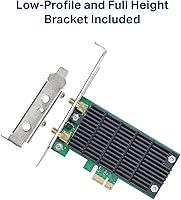
  • Antennas: Equipped with two detachable external antennas for enhanced range and signal strength.
  • Max Range: Provides long-range WiFi signal, ideal for desktop setups in larger spaces.
  • Heat Sink: Includes a built-in heat sink to help maintain stable performance and prevent overheating.
  • Form Factor: Comes with a low-profile bracket for easy installation in compact PC cases.
  • Security: Supports WPA3 security for improved encryption and network protection.
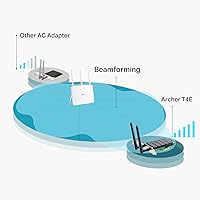
  • Beamforming: Features beamforming technology for better direction of the WiFi signal towards your device.
  • Dimensions: Measures 4.76″ x 4.54″ x 0.85″ in size, compact for easy fitting in desktop systems.
  • Weight: Weighs 4.32 oz, making it lightweight and easy to handle during installation.
  • Power Consumption: Designed to operate efficiently with minimal power consumption while maintaining high performance.
  • Driver Support: Driver installation is required, with software available for download on TP-Link’s website.
  • USB Ports: No USB ports are included; it relies solely on the PCIe slot for installation.
  • Dual-Band Performance: Supports both 2.4GHz and 5GHz bands, offering flexible connectivity options for various environments.
  • Operating Temperature: Operates efficiently within a typical desktop temperature range, up to 70°C.
  • Warranty: Backed by a 2-year warranty from TP-Link for peace of mind.
  • Installation Support: Easy installation with a low-profile bracket and straightforward driver setup for Windows systems.

FAQ

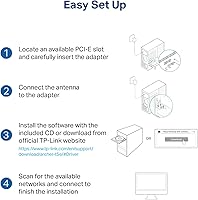
Installing this WiFi card is straightforward. Simply insert the card into an available PCIe slot on your desktop motherboard, then secure it with the included low-profile bracket. After that, install the necessary drivers from the included CD or download the latest version from TP-Link’s website.

The TP-Link Archer T4E offers AC1200 speeds, providing up to 867 Mbps on the 5GHz band and 300 Mbps on the 2.4GHz band. These speeds are ideal for tasks such as gaming, streaming in HD, or general web browsing.

Yes, the TP-Link Archer T4E supports dual-band WiFi, allowing you to connect on both the 2.4GHz and 5GHz bands. This flexibility helps reduce congestion on the 2.4GHz band while providing faster speeds on the 5GHz band.

The Archer T4E is compatible with Windows 7, 8, 10, and 11. It works well across these versions, providing broad compatibility for most users.

The TP-Link Archer T4E features detachable antennas, which allow you to adjust their positioning for optimal signal strength. Additionally, placing your desktop in a more central location or away from obstructions can help improve the WiFi range.

Yes, this PCIe WiFi card is an excellent choice for gamers. With its AC1200 speeds, dual-band support, and stable connection, it ensures low latency and smooth gameplay, especially for multiplayer games and high-speed applications.

If your desktop has a free PCIe slot, this WiFi card will work fine. It’s ideal for upgrading older or underperforming WiFi cards, especially if you need improved speeds and range.

Signal drops can sometimes occur in high-interference environments. If this happens, try relocating your desktop or adjusting the antennas for better signal alignment. You can also update your drivers to ensure optimal performance. If issues persist, consider using a WiFi range extender.

Yes, with AC1200 speeds, this WiFi card is capable of handling 4K streaming without significant buffering, as long as your internet speed supports it. The 5GHz band is particularly effective for high-bandwidth tasks like 4K video.

Yes, TP-Link offers a 2-year warranty for the Archer T4E WiFi card, along with customer support through their website, where you can access troubleshooting guides, driver updates, and more.