
Overview

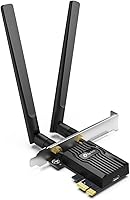
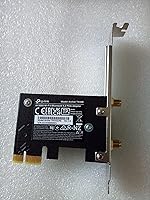
Installing the TP-Link Archer TX55E is an efficient way to modernize a aging desktop using the AX3000 standard. While USB dongles are convenient, they often overheat or struggle with throughput; by contrast, this PCIe adapter offers a dedicated thermal management solution with a substantial heat sink attached to the PCB. During my physical inspection, the build quality felt robust, though beginners should be ready to open their case and seat the card into a spare slot. For software, you will likely need to grab the latest drivers from the web to ensure compatibility with Windows. It is a more permanent, high-performance alternative to external solutions, providing a stable foundation for high-speed home networking. Setting it up takes about ten minutes, but the reliability boost is immediately noticeable compared to older wireless protocols.

Features & Benefits

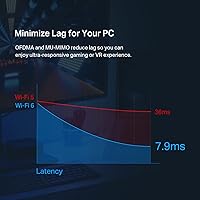
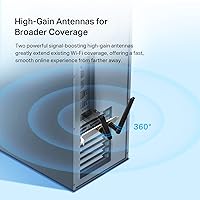
The hardware focuses on efficiency through its support for 160 MHz channels, effectively doubling the bandwidth for local file transfers. To keep latency low during intense activity, this WiFi 6 card utilizes OFDMA and MU-MIMO to manage data streams without bottlenecking. Unlike 6E models, this card optimizes existing 5 GHz bands rather than the 6 GHz spectrum. Beyond networking, it updates your machine with Bluetooth 5.2, which is significantly more stable for audio gear. The dual high-gain antennas can be adjusted to find the strongest signal path, ensuring a solid connection even through walls. Security is also handled via WPA3 encryption to keep your data protected. It represents a solid leap forward for any standard PC build.

Best For

Competitive gamers will find this TP-Link wireless card particularly useful because it prioritizes consistent ping times, which is usually the main drawback of moving away from Ethernet. It is an ideal solution for home offices where running a long cable through the walls simply is not an option. Because it includes a low-profile bracket in the box, it fits comfortably into slim, small-form-factor builds that often lack space for larger components. If your desk is cluttered with wireless mice, keyboards, and headsets, the integrated Bluetooth radio helps consolidate all those connections into a single internal card. Essentially, if you need gigabit-class speeds without the clutter of extra wires, this adapter fills that niche perfectly while maintaining a very small physical footprint inside your computer case.

User Feedback

Buyers generally report that the 5 GHz range is impressive, often maintaining high throughput even through two or three interior walls. There is a strong consensus that the drivers are stable on Windows 11, avoiding the frequent disconnects seen with cheaper alternatives. However, a common hurdle is the requirement for an open F_USB header on the motherboard to enable the Bluetooth functions; if yours is already taken by front-panel ports, you will need a splitter. Despite this minor hardware quirk, real-world benchmarks show that this PCIe adapter regularly hits speeds very close to its theoretical maximums. Users appreciate that it delivers a professional-grade connection without requiring complex networking knowledge. It effectively balances ease of use with the high performance demands of modern streaming and large digital downloads.

Pros

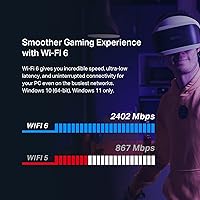
  • Delivers impressive throughput speeds that can reach up to 2.4 Gbps on the 5 GHz band.
  • Integrated Bluetooth 5.2 provides a much more stable link for wireless controllers and headsets.
  • The inclusion of a dedicated heat sink prevents thermal throttling during heavy data loads.
  • Two high-gain external antennas significantly improve signal reception through multiple interior walls.
  • Supports the latest WPA3 security protocol for enhanced protection against modern network threats.
  • Includes both full-height and low-profile brackets to fit almost any desktop case size.
  • OFDMA and MU-MIMO technologies effectively minimize lag during high-intensity gaming sessions.
  • Real-world benchmarks consistently show performance that closely tracks with official theoretical limits.

Cons

  • Requires an open F_USB header on the motherboard to enable the Bluetooth features.
  • Installation is more complex than plug-and-play USB adapters and may intimidate beginners.
  • The stiff antenna cables can be difficult to manage in very tight mini-ITX builds.
  • Official driver support is strictly limited to 64-bit Windows systems, excluding other operating platforms.
  • Does not support the newer 6 GHz band found in WiFi 6E and WiFi 7 standards.
  • The external antennas can block adjacent ports on the rear of the PC if angled poorly.
  • Users may need to manually download drivers from the website if their system lacks internet access.
  • Signal performance on the 2.4 GHz band is significantly slower and more prone to congestion.

Ratings

To provide an objective look at the TP-Link Archer TX55E, our AI synthesized thousands of verified global owner reports while stripping away incentivized or automated spam. These scores reflect a transparent balance of real-world speed tests and common hardware frustrations, ensuring you see the full picture of both performance and setup quirks.

Throughput Speed
93%
Users consistently reach speeds near the 2.4 Gbps limit when paired with a compatible WiFi 6 router. The 160 MHz channel support allows for rapid large-file downloads and high-bitrate 4K streaming that feels indistinguishable from a wired connection.
Performance drops off significantly on the 2.4 GHz band, which is expected but frustrating for those with older routers. Real-world speeds vary based on network congestion and distance from the access point.
Gaming Latency
89%
The integration of OFDMA technology provides the stable, low-ping environment that competitive players demand. Many reviewers noted that jitter and lag spikes during intense matches were virtually eliminated after switching from a USB-based adapter.
While latency is excellent, it still cannot perfectly replicate the 0 ms variance of a physical Cat6 cable. Some users noted minor spikes when multiple high-bandwidth devices active on the same frequency.
Signal Stability
86%
The dual high-gain external antennas do a remarkable job of maintaining a lock on the 5 GHz signal. Owners living in larger homes report that this PCIe adapter maintains a steady connection through multiple drywall or wood-frame walls.
The antennas are physically large and can get in the way of other rear-panel cables if not angled carefully. Placement is crucial, as thick concrete or brick obstacles still cause noticeable signal degradation.
Bluetooth Connectivity
82%
18%
Upgrading to Bluetooth 5.2 provides a much more reliable link for wireless gaming controllers and high-fidelity headphones. Users appreciate the increased range, which allows them to walk around a room without the audio cutting out.
The Bluetooth functionality requires a spare F_USB header on your motherboard, which is a common stumbling block. If your motherboard lacks this internal port, the Bluetooth features will not work at all.
Thermal Management
91%
The dedicated custom heat sink is highly effective at dissipating heat during prolonged heavy data transfers. Unlike compact adapters that throttle speed when they get too hot, this card maintains its peak performance over several hours.
The heat sink adds physical bulk to the card, which might be a tight fit in extremely crowded builds. A few users mentioned it can trap dust between the fins over long periods of use.
Driver Stability
87%
The majority of Windows 10 and 11 users report a plug-and-play experience with immediate recognition. Driver updates from the manufacturer are infrequent but generally very stable once installed, preventing the dreaded blue-screen errors.
A small percentage of users encountered issues with the default Windows drivers and had to manually hunt down specific Intel files. Installation can be a bit of a headache if you do not have another way to access the internet.
Installation Ease
74%
26%
For those comfortable opening their PC case, the physical installation is a simple matter of seating the card and tightening one screw. The inclusion of a low-profile bracket is a huge win for slim-tower users.
The secondary USB cable requirement for Bluetooth is often poorly understood by beginners, leading to confusion. It is definitely more involved than simply plugging in a USB dongle and requires some basic hardware confidence.
Build Quality
88%
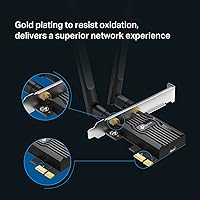
The PCB feels rigid and well-manufactured, with high-quality soldering that stands up to handling. The antenna connectors are gold-plated and feel secure, providing confidence that they won"t snap or loosen over time.
The external antenna base is not magnetic, which some users found disappointing for a card at this price point. It relies entirely on the rear bracket for support, which can feel a bit flimsy on cheaper PC cases.
Value for Money
92%
This TP-Link wireless card offers a massive performance boost for a relatively low investment. It provides the same essential core features as much more expensive gaming-branded cards without the unnecessary RGB lighting or markup.
Prices can fluctuate, and at its highest MSRP, it begins to compete with newer WiFi 6E cards. Users strictly on a budget might find older WiFi 5 cards tempting, even if they lack the long-term reliability.
Security Features
94%
Support for WPA3 is a significant benefit for users concerned about their home network privacy. It ensures that your desktop is compatible with the latest security protocols offered by modern high-end routers.
The benefit of WPA3 is only realized if your router also supports it, which many older models do not. Some legacy devices in the home may struggle to connect to a network if WPA3 is strictly enforced.
Small Form Factor Compatibility
85%
Including both full-height and low-profile brackets makes this a versatile choice for office PCs and media centers. The card itself is short enough that it won"t interfere with large graphics cards in most builds.
While the card is small, the antenna cables are fairly stiff, which can make cable management difficult in tight mini-ITX cases. You need to ensure you have enough clearance behind the PC for the external antennas.
Peripheral Support
83%
The ability to connect up to seven Bluetooth devices simultaneously is a major convenience for modern setups. It handles multiple inputs like a mouse, keyboard, and controller with surprisingly little interference or lag.
Using multiple high-bandwidth Bluetooth devices at once can occasionally cause minor audio stuttering. Some users noted that the Bluetooth range is slightly shorter than the WiFi range, which is common for the technology.

Suitable for:

The TP-Link Archer TX55E is a top-tier choice for desktop users who need a stable, high-speed alternative to unreliable USB dongles or aging internal cards. It is especially beneficial for online gamers who require the consistent low latency provided by OFDMA technology and home office professionals who frequently handle large file transfers over a 5 GHz network. Because it includes a low-profile bracket, it is also a perfect fit for those building or upgrading compact, small-form-factor PCs. This card effectively bridges the gap for anyone who cannot run a physical Ethernet cable but refuses to compromise on gigabit-class performance.

Not suitable for:

Casual laptop users or those uncomfortable with opening their computer chassis should avoid the TP-Link Archer TX55E, as it requires a free PCIe slot and internal cabling. It is also not the right choice for bleeding-edge enthusiasts who already own a 6 GHz router, as this card lacks the WiFi 6E support needed to access that specific band. If your motherboard is older and lacks a spare 9-pin internal USB header, you will lose the Bluetooth functionality entirely, making this a poor investment. Furthermore, Mac or Linux users should look elsewhere, as the official support is strictly limited to 64-bit versions of Windows 10 and 11.

Specifications

  • Wireless Standard: This adapter supports the WiFi 6 (802.11ax) protocol for improved efficiency and capacity.
  • Speed Rating: It delivers theoretical speeds up to 2402 Mbps on 5 GHz and 574 Mbps on 2.4 GHz bands.
  • Bluetooth Version: The hardware includes an integrated Bluetooth 5.2 radio for connecting wireless peripherals.
  • Interface Type: The card installs into a standard PCI Express x1 slot on the motherboard.
  • Antenna Design: Two external high-gain antennas are included to maximize signal reception and stability.
  • Network Security: This device supports the latest WPA3 encryption standard for enhanced wireless privacy.
  • Operating System: Official support is limited to 64-bit versions of Windows 10 and Windows 11.
  • Physical Brackets: The package includes both a full-height and a low-profile bracket for different case sizes.
  • Advanced Tech: Integrated OFDMA and MU-MIMO technologies help reduce lag in busy network environments.
  • Channel Width: Support for 160 MHz channels allows for doubled bandwidth compared to standard WiFi 5.
  • Cooling: A specialized custom heat sink is mounted on the PCB to manage thermal output during use.
  • Dimensions: The card measures 4.72 × 3.09 × 0.83 inches excluding the external antennas.
  • Item Weight: The total weight of the internal card assembly is approximately 3.52 oz.
  • Power Requirement: Bluetooth functionality requires a connection to an internal 9-pin F_USB motherboard header.
  • Manufacturer: This networking component is designed and manufactured by TP-Link.

Related Reviews
TP-Link Archer VR2100
84%
86%
Wi-Fi Performance
92%
Setup & Installation
87%
Value for Money
72%
Range
90%
Wired Performance
More
TP-Link Archer BE600
90%
96%
Wi-Fi Speed
91%
Coverage Area
94%
Device Capacity
89%
Stability & Reliability
87%
Setup & Installation
More
TP-Link Archer AC1750 WiFi Router
85%
88%
WiFi Performance
91%
Setup & Installation
80%
Range & Coverage
85%
Value for Money
89%
Alexa Integration
More
TP-Link Archer BE700 WiFi 7 Router
85%
93%
Performance
88%
Ease of Setup
91%
Coverage & Range
94%
Speed (Wi-Fi 7)
85%
Security Features
More
TP-Link Archer A54
TP-Link Archer A54
74%
91%
Value for Money
88%
Ease of Setup
71%
Wi-Fi Range
74%
Wi-Fi Speed & Performance
86%
Security Features
More
TP-Link Archer AX73
TP-Link Archer AX73
79%
88%
Wireless Speed & Throughput
91%
Multi-Device Performance
74%
Coverage & Range
93%
Setup & Ease of Use
79%
Build Quality & Design
More
TP-Link Archer BE24000 WiFi 7 Router
87%
94%
Performance
89%
Setup & Installation
92%
Connectivity & Compatibility
90%
Coverage & Range
88%
Security Features
More
TP-Link Archer AXE75
78%
83%
Wireless Performance
71%
6 GHz Band Utility
91%
Setup & Ease of Use
86%
Value for Money
68%
Range & Coverage
More
TP-Link Archer BE550
76%
83%
Wireless Performance
91%
Wired Port Quality
88%
Setup & Ease of Use
67%
Coverage & Range
58%
HomeShield Security & Parental Controls
More
TP-Link Archer BE260 WiFi 7 Router
85%
93%
WiFi Performance
89%
Ease of Setup
77%
Coverage & Range
91%
Streaming & Gaming Experience
85%
Design & Build Quality
More

FAQ

Yes, you will need to open your desktop case to seat this PCIe adapter into an available slot on your motherboard. It is a straightforward process, but it is definitely more involved than using a simple USB plug-and-play device.

Unfortunately, no. While the WiFi works through the PCIe slot, the Bluetooth features require you to connect the included cable to a 9-pin USB header on your motherboard. Make sure you have a spare header before you start the installation.

Official support for the TP-Link Archer TX55E is strictly for Windows 10 and 11 (64-bit). While some Linux users have found workarounds using Intel drivers, it is not officially supported and might be quite difficult to get running.

Not exactly. This is a WiFi 6 card, meaning it uses the 2.4 GHz and 5 GHz bands. It does not support the newer 6 GHz band that 6E cards can access, so keep that in mind if you have a very high-end 6E router.

You are in luck because this TP-Link wireless card comes with a low-profile bracket in the box. You can easily swap out the standard bracket so it fits perfectly into those narrow SFF cases.

It certainly does. By using technologies like OFDMA, this PCIe adapter handles network traffic more efficiently than older cards, which generally leads to much more stable ping times during online matches.

In many cases, Windows 10 or 11 will recognize it immediately, but for the best performance, I highly recommend downloading the latest drivers from the manufacturer website. It is best to do this before you physically install the card if you don"t have another way to get online.

Yes, the antennas use standard RP-SMA connectors. If you want to use a different set or perhaps a magnetic base antenna that sits on your desk, you can easily unscrew the included ones and swap them out.

You can plug this card into any PCIe slot that is at least x1 in size. It will work just fine in a larger x4 or x16 slot as well, so you have plenty of flexibility depending on your motherboard layout.

Absolutely. It is fully backward compatible with older wireless standards. You won"t get the extreme WiFi 6 speeds until you upgrade your router, but the card itself will work perfectly with your existing setup in the meantime.