
Overview

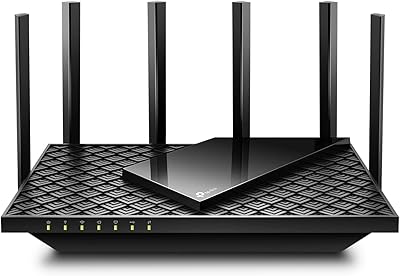
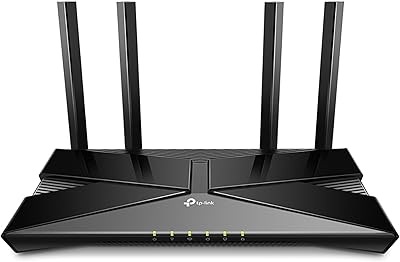
The TP-Link Archer AX10 WiFi 6 Router sits at an interesting intersection: it brings next-generation wireless technology to buyers who don't want to spend a fortune on networking gear. TP-Link has long been a trusted name in home networking, and this WiFi 6 router reflects that reliability at an accessible price point. The physical design is understated — a slim, flat black unit that tucks onto a shelf or desk without demanding attention. It runs dual-band, splitting traffic across 2.4 GHz and 5 GHz to balance older devices with more demanding ones. For anyone still running a WiFi 4 or 5 router, the upgrade case is straightforward.

Features & Benefits

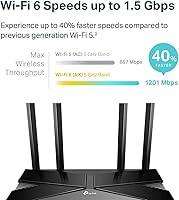
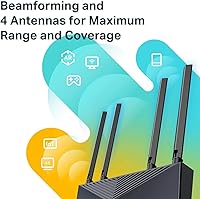
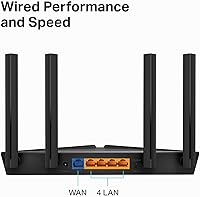
The 5 GHz band tops out at 1201 Mbps under the 802.11ax standard, which translates to noticeably smoother 4K streams and lower-latency gaming compared to older hardware. What makes WiFi 6 practically useful here is OFDMA and MU-MIMO — these technologies let the Archer AX10 communicate with multiple devices simultaneously rather than taking turns, so a busy household stays responsive at peak hours. Beamforming focuses the signal toward your actual devices instead of broadcasting indiscriminately. A dual-core 900 MHz processor holds everything together under load, and four Gigabit LAN ports let you hardwire a console or workstation without sacrificing throughput. OneMesh support is a useful option if you ever need to extend coverage later.

Best For

This TP-Link router makes the most sense for small to mid-size homes — apartments, condos, or single-floor houses — where coverage demands stay moderate. Households running ten to twenty connected devices, from phones and laptops to smart speakers and thermostats, will benefit from the OFDMA architecture keeping things from slowing at peak hours. Budget-focused gamers and streamers get WiFi 6 efficiency without a steep price. It also suits renters or frequent movers who want solid performance without the cost and complexity of a full mesh system. Alexa users gain voice-controlled network management, which is a small but genuinely practical convenience in a smart home setup.

User Feedback

With nearly 19,000 ratings averaging 4.3 stars, the overall reception is hard to dismiss. Easy app setup via TP-Link's Tether app comes up constantly in positive reviews, and most buyers report stable, faster connections compared to their previous routers. That said, the honest picture has real caveats. The 2.4 GHz band is capped at 300 Mbps on the older 802.11n standard — a limitation power users and those with range-dependent devices do notice. Buyers in larger or multi-story homes found the single unit's reach fell short. The lightweight plastic chassis also drew comments from reviewers expecting something more substantial. For the price bracket, though, most consider the trade-offs fair.

Pros

  • Brings WiFi 6 technology to a price point most households can justify without hesitation.
  • OFDMA and MU-MIMO keep the network responsive even when many devices are active at once.
  • Setup via the TP-Link Tether app is quick and accessible, even for non-technical users.
  • Four Gigabit LAN ports give wired connections to consoles, PCs, or smart TVs without compromise.
  • Beamforming focuses signal where it is actually needed rather than wasting it in all directions.
  • OneMesh compatibility means coverage can be extended later with a compatible extender if needed.
  • Alexa integration adds voice-controlled convenience for smart home setups.
  • Slim, low-profile design fits discreetly on a shelf or desk without cluttering the space.
  • Backed by nearly 19,000 reviews averaging 4.3 stars, reflecting broad, consistent user satisfaction.
  • WPA3 security support keeps the network protected with a current encryption standard.

Cons

  • The 2.4 GHz band is capped at 300 Mbps on the older 802.11n standard, which frustrates power users.
  • Range falls short in larger homes, multi-story houses, or spaces with thick interior walls.
  • The plastic build feels lightweight in hand, which some buyers associate with reduced longevity.
  • No USB port means no option to attach a storage drive or printer to the network.
  • Advanced users will find the firmware options limited compared to routers in higher price tiers.
  • Not well suited as a standalone solution for homes exceeding roughly 1,500 square feet.
  • The Archer AX10 lacks a dedicated gaming or quality-of-service dashboard for granular traffic prioritization.
  • No built-in VPN server support, which is a dealbreaker for privacy-focused or remote-work users.

Ratings

The TP-Link Archer AX10 WiFi 6 Router has been scored by our AI system after analyzing thousands of verified global buyer reviews, with spam, bot-submitted, and incentivized feedback actively filtered out. Ratings reflect the full picture — where this router genuinely delivers and where real users ran into frustrations. Both strengths and trade-offs are weighted transparently so you can make a confident, informed decision.

Value for Money
91%
Buyers consistently express surprise at how much performance they get relative to the price. For households upgrading from a years-old WiFi 4 or WiFi 5 router, the jump in network efficiency feels substantial without requiring a significant financial commitment. This is the category where the Archer AX10 earns its strongest praise.
A small segment of reviewers felt the value proposition weakens if you factor in the 2.4 GHz limitation and the lack of a USB port, arguing that a modest additional spend could unlock meaningfully better hardware. For strict budget buyers, though, those trade-offs are largely acceptable.
Wireless Performance
78%
22%
On the 5 GHz band, users report noticeably smoother 4K streaming and reduced lag during online gaming compared to their previous routers. OFDMA and MU-MIMO make a tangible difference in households where multiple devices compete for bandwidth during peak evening hours.
The 2.4 GHz band is a recurring frustration — capped at 300 Mbps on the older 802.11n standard, it holds back devices that rely on that frequency. Users with bandwidth-heavy 2.4 GHz devices like certain smart TVs or older laptops noticed this ceiling clearly.
Range & Coverage
63%
37%
For compact living spaces — studio apartments, small condos, or single-floor homes under roughly 1,200 square feet — coverage is reliable and consistent. Beamforming helps maintain signal quality in the primary rooms where most usage happens, and most urban apartment dwellers report no dead zones.
Coverage complaints are among the most common in the review pool. Multi-story homes, larger floor plans, and spaces with thick walls or reinforced ceilings regularly expose this router's range limits. It is a single-unit device and should not be expected to perform like a mesh system.
Ease of Setup
93%
The Tether app-guided setup is one of the most praised aspects across the entire review base. First-time router buyers and less tech-savvy users specifically call out how intuitive the process is, with most reporting a fully operational network within ten minutes of opening the box.
A minority of users encountered hiccups when switching from an existing ISP-provided router-modem combo, particularly around bridge mode configuration. These edge cases are not unique to this router, but the in-box documentation could be more explicit about that scenario.
Network Stability
82%
18%
Day-to-day connection stability earns consistent praise, with buyers noting that dropped connections and random reboots — common complaints about budget routers — are largely absent here. Households that stream and work from home simultaneously report the connection holds steady without intervention.
A smaller cluster of reviews mentions occasional slowdowns after several weeks of use, sometimes resolved by a firmware update or a manual reboot. These occurrences appear infrequent rather than systemic, but they do surface enough to be worth noting.
Build Quality
58%
42%
The slim, flat footprint is functional and unobtrusive — it sits quietly on a shelf or router cabinet without drawing attention. The design is clean and purposeful for what it is, and the matte black finish resists visible fingerprints and dust accumulation reasonably well.
The lightweight plastic chassis is a polarizing point. At 13.4 oz, it feels noticeably insubstantial in hand, and several reviewers directly associate the build with a sense of fragility or disposability. Compared to mid-range or premium routers, the physical construction reflects the budget positioning clearly.
Multi-Device Handling
81%
19%
WiFi 6 technologies pay real dividends here. Households running 15 or more simultaneous connections — phones, tablets, smart speakers, security cameras, gaming consoles — report that the network stays responsive in a way older routers could not match. Evening peak usage is where buyers notice the clearest improvement.
Beyond roughly 20 to 25 active devices with mixed bandwidth demands, users begin to notice degradation. The dual-core processor handles typical home loads well, but very device-dense environments or small offices with constant high-bandwidth traffic can push it toward its limits.
App & Management
77%
23%
The Tether app covers the essentials cleanly — device monitoring, guest network control, parental scheduling, and basic QoS settings are all accessible without logging into a browser interface. Regular users appreciate being able to check on connected devices or reboot the router from their phone.
Power users looking for granular traffic controls, detailed bandwidth logs, or advanced firewall settings will find the app shallow. It handles everyday management well but lacks the depth offered by routers with more sophisticated firmware environments like OpenWRT compatibility.
Parental Controls
72%
28%
Built-in parental controls let parents assign internet schedules and apply content filters to specific devices without a subscription fee, which buyers with children particularly appreciate. The setup is handled entirely through the Tether app and takes only a few minutes to configure.
The filtering categories are broad and not granular enough for parents who need fine-tuned content controls. It blocks at the category level rather than specific sites, which means determined teenagers can sometimes find paths around the restrictions through less obvious domains.
Smart Home Integration
74%
26%
Alexa compatibility is a genuine convenience bonus for households already embedded in the Amazon ecosystem. Being able to ask Alexa to turn on the guest network or check connected devices fits naturally into smart home routines without requiring a separate hub or skill setup.
Alexa integration covers only a limited set of commands and is not particularly deep. Users expecting voice-based traffic prioritization or detailed network diagnostics through Alexa will be disappointed — it handles simple on-off and status queries but little beyond that.
Security Features
79%
21%
WPA3 support puts this router ahead of many comparably priced competitors on the security front. For households that have upgraded their devices to WPA3-capable hardware, the encryption improvement over WPA2 is meaningful and requires no extra configuration after initial setup.
There is no built-in VPN server functionality, and the advanced security dashboard is minimal compared to routers running more sophisticated firmware. Privacy-focused users or those working remotely with sensitive data will likely need a separate VPN solution running on their devices.
ISP Compatibility
88%
Buyers across a wide range of ISPs — including Xfinity, AT&T, Spectrum, Verizon, and Cox — confirm the router connects and performs without provider-specific issues. The Gigabit WAN port means it does not bottleneck connections even on higher-tier internet plans.
As with any third-party router, users on ISPs that use proprietary modem-router combos occasionally need to configure bridge mode before the Archer AX10 takes over routing duties. This is rarely complicated but does require a call or chat with the ISP if users are unfamiliar with the process.
OneMesh Expandability
71%
29%
The option to add TP-Link OneMesh extenders later is a meaningful future-proofing feature, especially for buyers in smaller homes today who may move or renovate. It allows the network to grow without replacing the router entirely, which buyers appreciate from a long-term investment standpoint.
OneMesh performance depends heavily on the quality and placement of the paired extender, and results are inconsistent in the review base. Some users found the unified SSID experience genuinely smooth, while others noted handoff issues when moving between router and extender coverage zones.
Gaming Performance
76%
24%
Budget-focused gamers report noticeably lower ping and more consistent latency on the 5 GHz band compared to their previous routers, particularly on platforms like PlayStation and Xbox where stable connections matter more than raw throughput. The four wired LAN ports are a practical bonus for those who prefer a cable.
The router lacks a dedicated gaming mode or per-device latency prioritization dashboard, which more serious competitive gamers expect. QoS settings exist but are basic, and users competing at a higher level will find the traffic management tools too blunt for precise optimization.

Suitable for:

The TP-Link Archer AX10 WiFi 6 Router is a strong fit for budget-conscious households that have outgrown their old router and want a meaningful upgrade without a steep investment. Renters, apartment dwellers, and single-floor homeowners will find its coverage range more than adequate for their space. Families juggling a dozen or more connected devices — phones, tablets, smart TVs, security cameras, and voice assistants — will notice real improvements in how the network handles simultaneous traffic during busy evenings. Gamers and streamers on a tighter budget get access to WiFi 6 efficiency gains that reduce lag and buffering without paying premium router prices. It also integrates neatly into Alexa-enabled smart homes, and the Tether app makes ongoing management accessible even for less tech-savvy users.

Not suitable for:

The TP-Link Archer AX10 WiFi 6 Router is not the right choice for buyers with larger homes, multi-story layouts, or thick-walled construction where a single router unit simply cannot deliver consistent coverage throughout. Power users who rely heavily on the 2.4 GHz band will hit a wall quickly — it runs on the older 802.11n standard and tops out at 300 Mbps, which is a real bottleneck for bandwidth-heavy devices on that frequency. This is also not a router for advanced networking enthusiasts who expect robust firmware customization, VPN server capabilities, or enterprise-grade traffic controls. If your household regularly streams 4K on multiple screens while gaming and video conferencing at the same time, a higher-tier router or a dedicated mesh system will serve you better. Those who view their router as a long-term investment and prioritize build quality may also find the lightweight plastic chassis underwhelming.

Specifications

  • WiFi Standard: This router uses the 802.11ax (WiFi 6) standard on the 5 GHz band and 802.11n on the 2.4 GHz band, with backward compatibility for all previous 802.11 standards.
  • Frequency Bands: Dual-band operation covers both 2.4 GHz and 5 GHz simultaneously, allowing older and newer devices to connect on the most appropriate band.
  • Max Throughput: The 5 GHz band reaches up to 1201 Mbps, while the 2.4 GHz band is capped at 300 Mbps under the 802.11n standard.
  • Processor: A dual-core 900 MHz CPU manages concurrent data streams across all connected devices without creating a processing bottleneck during peak usage.
  • LAN Ports: Four Gigabit Ethernet LAN ports support full-speed wired connections for devices such as gaming consoles, desktop PCs, or smart televisions.
  • WAN Port: One Gigabit Ethernet WAN port connects the router to a cable or DSL modem from any major internet service provider.
  • Dimensions: The unit measures 10.24 x 4.96 x 1.3 inches, making it a slim, low-profile device well suited for placement on a shelf or desk.
  • Weight: At 13.4 oz, the router is lightweight and easy to reposition, though some buyers interpret this as an indicator of budget-tier construction.
  • Security: WPA3 encryption is supported alongside WPA2, providing current-generation network protection for all connected devices.
  • Key Technologies: OFDMA and MU-MIMO allow the router to communicate with multiple devices at the same time rather than sequentially, reducing congestion on busy networks.
  • Beamforming: Beamforming technology directs wireless signal strength toward connected devices rather than broadcasting it uniformly in all directions.
  • Smart Features: Built-in support for QoS, parental controls, guest network mode, WPS, and access point mode is included without requiring additional hardware or subscriptions.
  • Alexa Support: The router is Amazon Alexa compatible, enabling basic voice-controlled network management for households already using Alexa-enabled devices.
  • Mesh Support: TP-Link OneMesh compatibility allows the router to pair with supported TP-Link range extenders to create a unified whole-home WiFi network under a single SSID.
  • App Management: The free TP-Link Tether app for iOS and Android handles initial setup, device monitoring, parental controls, and guest network configuration.
  • Color: The router is available in black with a matte finish that blends into most home or office environments.
  • In the Box: The package includes the router unit, a power supply adapter, and a Quick Installation Guide; no Ethernet cable is included.
  • ISP Compatibility: The Archer AX10 works with all major internet service providers including AT&T, Verizon, Xfinity, Spectrum, Cox, and others, though a separate modem is required for most connections.

Related Reviews

TP-Link Archer AX73

TP-Link Archer AX73
79%
88%
Wireless Speed & Throughput
91%
Multi-Device Performance
74%
Coverage & Range
93%
Setup & Ease of Use
79%
Build Quality & Design
More
TP-Link Archer AX6000 WiFi 6 Router
80%
88%
Wireless Performance
91%
Multi-Device Handling
86%
Setup & Ease of Use
93%
Wired Connectivity
82%
Range & Coverage
More
TP-Link Archer AX72 Pro WiFi 6 Router
87%
89%
WiFi Performance
92%
Value for Money
94%
Ease of Setup
88%
Security Features
83%
Range and Coverage
More
TP-Link Archer AX23 WiFi 6 Router

78%
91%
Value for Money
93%
Ease of Setup
74%
WiFi Speed Performance
67%
Range & Coverage
83%
Connection Stability
More
TP-Link Archer AC1750 WiFi Router
85%
88%
WiFi Performance
91%
Setup & Installation
80%
Range & Coverage
85%
Value for Money
89%
Alexa Integration
More
TP-Link Archer C59 AC1350 WiFi Router
82%
88%
Setup & Installation
72%
Wi-Fi Range & Coverage
81%
Overall Performance
92%
Value for Money
78%
Build Quality
More
TP-Link Archer BE700 WiFi 7 Router
85%
93%
Performance
88%
Ease of Setup
91%
Coverage & Range
94%
Speed (Wi-Fi 7)
85%
Security Features
More
TP-Link Archer BE260 WiFi 7 Router
85%
93%
WiFi Performance
89%
Ease of Setup
77%
Coverage & Range
91%
Streaming & Gaming Experience
85%
Design & Build Quality
More
TP-Link Archer AXE75
78%
83%
Wireless Performance
71%
6 GHz Band Utility
91%
Setup & Ease of Use
86%
Value for Money
68%
Range & Coverage
More
TP-Link Archer BE550
76%
83%
Wireless Performance
91%
Wired Port Quality
88%
Setup & Ease of Use
67%
Coverage & Range
58%
HomeShield Security & Parental Controls
More

FAQ

In most cases you can keep your existing modem. The Archer AX10 connects to any standard cable or DSL modem via its Gigabit WAN port. If your internet provider supplies a modem-router combo unit, you may need to put it in bridge mode first — your ISP can walk you through that in a few minutes.

Setup is genuinely straightforward. The TP-Link Tether app guides you through the process step by step from your phone, and most users report being up and running in under ten minutes. You do not need to log into any web interface unless you want to dig into advanced settings.

The Archer AX10 handles 10 to 20 connected devices comfortably in everyday use. WiFi 6 technologies like OFDMA and MU-MIMO are specifically designed to reduce slowdowns when many devices are active simultaneously, so a household full of phones, laptops, smart speakers, and streaming boxes should not overwhelm it.

That depends on the size and construction of your home. In a compact two-story space, coverage is generally acceptable, but in larger homes or those with thick concrete or brick walls, signal strength on the upper floor may be inconsistent. If range is a concern, pairing this router with a TP-Link OneMesh extender is a practical and affordable fix.

Yes, even with WiFi 5 devices you will likely notice improvements. Older devices connect without any issues since the Archer AX10 is backward compatible, and the router itself manages traffic more efficiently, which reduces congestion across your whole network. When you eventually upgrade your devices to WiFi 6, you will get the full benefit without needing a new router.

For most everyday uses — smart home gadgets, IoT sensors, older laptops browsing the web — 300 Mbps on 2.4 GHz is more than sufficient. Where it becomes a limitation is if you have bandwidth-heavy devices that only support 2.4 GHz, such as some older streaming sticks or security cameras. Those users may notice a ceiling that more expensive routers with a WiFi 6 2.4 GHz radio would not have.

Yes, access point mode is a built-in feature. This is useful when you want to keep your ISP-provided router handling the connection but prefer a better wireless experience from the Archer AX10. You can switch modes through the Tether app or the web interface.

Parental controls are built in and managed through the Tether app. You can set content filters, schedule internet access times for specific devices, and monitor connected devices without needing a third-party subscription. The controls are basic compared to dedicated parental control software, but they cover the essentials most families need.

No, the Archer AX10 does not include a USB port. If network-attached storage or a shared printer is important to you, you would need to look at a higher-tier router model that includes USB connectivity.

Long-term reliability appears solid based on the large volume of user reviews, with most buyers reporting stable performance over extended periods. The plastic chassis is lightweight and feels modest in quality, but durability complaints are not a dominant theme in the feedback. Keeping the firmware updated via the Tether app is the best way to maintain performance and security over time.

Where to Buy