Overview

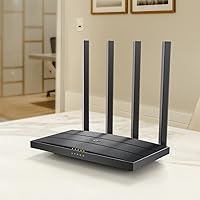
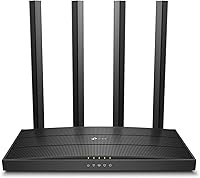
The TP-Link Archer A6 AC1200 WiFi Router is a no-frills dual-band router built for everyday home users who want reliable wireless coverage without overspending. The AC1200 speed rating means you get a combined theoretical ceiling split across two bands — which in practice translates to comfortable browsing, video calls, and HD streaming for a typical household. It is compact enough to sit on a shelf without dominating the room, and setup is approachable enough that most people will not need to consult a manual. Worth noting: this home router requires a separate modem for most ISP connections. It is a solid performer for what it is, but if your home is large or packed with heavy simultaneous users, you will want to temper expectations accordingly.
Features & Benefits

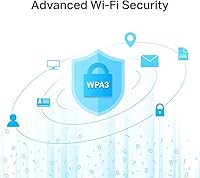
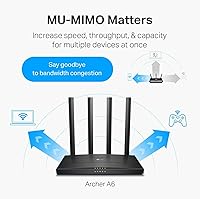
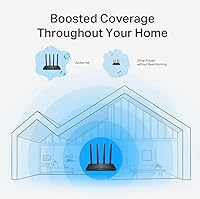
The Archer A6 splits its wireless capacity across two bands: a 2.4 GHz band for wider coverage and a faster 5 GHz band better suited to streaming or gaming. All four LAN ports are Gigabit-rated, so wired connections will not bottleneck fast internet plans. Four external antennas work with Beamforming to focus the signal toward connected devices rather than broadcasting blindly in every direction. On the 5 GHz band, MU-MIMO lets the router handle multiple devices simultaneously without making each one queue up. Security-wise, WPA3 support is a genuine step forward from the older WPA2 standard. And if your coverage needs grow over time, OneMesh compatibility and Access Point Mode offer practical expansion options without replacing the unit entirely.

Best For

This TP-Link router makes the most sense for people in smaller homes or apartments with a moderate device count — think a handful of phones, a laptop or two, a smart TV, and maybe a security camera. If you are still running an older 802.11n router, the jump in speed and stability will be immediately noticeable. Casual streamers and occasional online gamers will get solid mileage from the 5 GHz band. The setup process is accessible enough for non-technical users, with no need for manual network configuration out of the box. It also suits anyone wanting WPA3 security without jumping to a higher price bracket.

User Feedback

With a 4.3-star average across well over eight thousand ratings, the Archer A6 has built a strong base of satisfied buyers. The most consistent praise centers on how painless initial setup is — most people are connected quickly through the Tether app. Stable day-to-day performance and the Gigabit wired ports also come up frequently as genuine highlights. On the critical side, users in larger or multi-floor homes report that the 5 GHz signal does not always reach every corner they need. The Tether app itself gets mixed feedback — some find it intuitive, while others encounter occasional bugs or connectivity hiccups during configuration. Overall, the consensus tilts clearly positive for the intended use case.

Pros

  • Four Gigabit LAN ports handle fast wired connections without bottlenecking high-speed internet plans.
  • WPA3 security support puts the Archer A6 ahead of many competitors in its price range.
  • Setup through the Tether app is genuinely quick — most users are online in under ten minutes.
  • The 5 GHz band delivers reliable performance for HD streaming and casual online gaming.
  • MU-MIMO allows multiple devices to receive data simultaneously rather than taking turns.
  • OneMesh support means you can expand coverage later by adding a compatible extender.
  • Access Point Mode makes this home router a versatile option for users who already have an existing gateway.
  • Compact, low-profile design fits discreetly on a shelf without dominating the room.
  • Broad ISP compatibility means it works out of the box with most major cable and fiber providers.
  • Strong overall track record backed by a large volume of verified buyer ratings skewing positive.

Cons

  • The 5 GHz band loses range quickly through walls, leaving dead spots in larger or multi-floor homes.
  • Performance degrades noticeably when ten or more devices are active simultaneously.
  • The Tether app has a recurring pattern of pairing failures and intermittent connectivity bugs during setup.
  • No built-in modem means an additional purchase is required before the router is usable with most ISPs.
  • Advanced parental controls and QoS features are limited compared to routers in higher price tiers.
  • The web-based admin interface feels outdated and is less intuitive than modern router dashboards.
  • Some features are unavailable or restricted when operating in Access Point Mode.
  • The unit can run warm during sustained heavy use, which may cause stability issues in enclosed or hot environments.
  • No Wi-Fi 6 support means it will not fully leverage next-generation devices entering the market now.
  • Long-term value is questionable for growing households, as device counts and bandwidth needs tend to outpace it within a few years.

Ratings

The TP-Link Archer A6 AC1200 WiFi Router earns its place as one of the more consistently reviewed budget routers on the market, with our AI rating system analyzing thousands of verified global purchases — actively filtering out incentivized, bot-generated, and outlier reviews to surface what real everyday users actually experience. The scores below reflect a balanced picture: where the Archer A6 genuinely delivers, and where it falls short depending on your home setup and expectations.
WiFi Speed & Performance
74%
26%
For a single-floor apartment or smaller home, the 5 GHz band handles HD streaming and video calls without breaking a sweat. Users running a couple of laptops alongside a smart TV consistently report smooth, uninterrupted connections during typical evening use.
The AC1200 speed class hits its ceiling faster than many buyers anticipate. In households with four or more active devices simultaneously pulling data — especially anyone gaming while others stream in 4K — congestion becomes noticeable during peak hours.
WiFi Range & Coverage
67%
33%
In compact living spaces, the four external antennas do a capable job of pushing the 2.4 GHz signal into corners and through interior walls. Buyers in studio apartments and smaller two-bedroom homes report consistently solid coverage throughout.
Multi-floor homes and larger layouts regularly expose the range limitations of this router. The 5 GHz band in particular drops off noticeably with distance or through concrete walls, leaving dead zones in rooms that are even moderately far from the unit.
Setup & Ease of Use
88%
The guided setup through the Tether app is genuinely one of the smoother onboarding experiences in this price range. Most users report being fully connected in under ten minutes without ever opening a manual, which matters a great deal for less tech-savvy households.
A meaningful subset of users runs into hiccups specifically with the Tether app — occasional failure to detect the router during initial pairing, or connectivity drops mid-configuration. It is not universal, but it is frequent enough to be a pattern rather than an anomaly.
Build Quality & Design
71%
29%
The Archer A6 has a clean, low-profile design that sits unobtrusively on a shelf or desk. The four antennas feel sturdy and adjustable, and the overall chassis does not feel cheap for its price tier — it is unlikely to feel out of place in a living room setup.
The plastic housing is lightweight, which some users interpret as feeling insubstantial. There is no wall-mount option built into the base design, and the ventilation slots, while functional, give the unit a somewhat dated aesthetic compared to newer compact designs.
Wired Port Performance
91%
Having four Gigabit LAN ports at this price is a genuine differentiator. Users who plug in desktop PCs, NAS drives, or smart TVs directly report full-speed wired throughput without any bottlenecking — particularly valuable for those on high-speed fiber plans above 100 Mbps.
The single WAN port is the only ingress point, which is standard for this class but still a hard ceiling on overall throughput. There is no link aggregation or WAN failover support, so power users with redundant internet connections will find the port layout limiting.
Multi-Device Handling
69%
31%
MU-MIMO on the 5 GHz band helps the router juggle several devices at once more gracefully than older single-stream designs. In a household with five to seven connected devices in active use, the Archer A6 manages the load reasonably well during standard activity.
Once device counts climb into the double digits — as is increasingly common in smart homes with speakers, cameras, thermostats, and multiple phones — the router starts to show strain. Response times slow and occasional drops appear, especially when multiple devices are doing anything bandwidth-intensive simultaneously.
Security Features
83%
WPA3 support is a meaningful inclusion at this price point, offering stronger encryption and better protection on open or shared networks compared to WPA2-only routers. For households with security-conscious users, this alone puts the Archer A6 ahead of several comparable units.
Beyond WPA3, the advanced security toolset is fairly basic. There is no built-in malware filtering, no subscription-based threat intelligence, and the parental controls are functional but rudimentary compared to what higher-end routers provide.
App & Software Experience
62%
38%
The Tether app covers the essentials well: guest network creation, parental control scheduling, device management, and basic traffic monitoring are all accessible without touching a web interface. For non-technical users, this is exactly the right level of simplicity.
Reliability is the recurring complaint. Some users experience repeated re-authentication prompts, sluggish load times within the app, and occasional loss of remote management access. The web-based admin panel is more stable, but it feels dated and is less intuitive for casual users.
Value for Money
86%
For buyers in smaller homes who simply need dependable wireless coverage and fast wired ports without spending heavily, the Archer A6 represents strong value. The combination of Gigabit LAN, WPA3, and MU-MIMO at its price tier is difficult to match in this category.
The value calculus shifts if your home is large or your device count is high. In those scenarios, the performance gaps become real enough that spending noticeably more on a Wi-Fi 6 or mesh-capable router would likely be the smarter long-term investment.
Beamforming Effectiveness
72%
28%
Users who place the router centrally and in an open location report that the focused signal delivery makes a real difference — particularly for devices in adjacent rooms that previously struggled with weaker routers. The improvement over basic omnidirectional antennas is tangible in the right conditions.
Beamforming benefits are highly dependent on placement and environment. In dense wall configurations or cluttered rooms, the improvement is marginal at best. Users expecting the technology to compensate for poor router placement tend to be disappointed.
OneMesh & Expandability
76%
24%
OneMesh support gives this home router a longer useful life by allowing compatible TP-Link extenders to be added later without creating a separate network name. For renters or homeowners who anticipate needing more coverage eventually, this is a practical forward-looking feature.
OneMesh requires purchasing additional TP-Link-compatible hardware, which locks users into the TP-Link ecosystem. The setup for adding extenders, while functional, is not always as intuitive as competing mesh systems that are designed as unified products from the start.
Access Point Mode
79%
21%
The ability to switch the Archer A6 into Access Point Mode makes it a genuinely versatile purchase for users who already have a capable modem-router combo but want to extend wireless coverage in a specific area. Setup in AP mode is reported as straightforward by most users.
Some advanced features, including certain parental controls and QoS settings, are unavailable or limited when operating in AP mode. Users who expect the full feature set regardless of operating mode will need to account for these restrictions.
Heat Management
68%
32%
Under light to moderate loads, the Archer A6 runs at acceptable temperatures and does not require any active cooling or unusual placement considerations. For standard household use, thermal performance is not a concern for most buyers.
Extended periods of heavy throughput — particularly sustained file transfers or prolonged gaming sessions — cause the unit to run noticeably warm. A few users in warmer climates or enclosed cabinet setups report occasional instability that appears to correlate with heat buildup.
ISP Compatibility
84%
The Archer A6 works reliably across the major US internet providers, including cable, fiber, and DSL services. Users on AT&T, Xfinity, Spectrum, and similar providers consistently report plug-and-play compatibility with their existing modems without any unusual configuration steps.
Because a modem is sold separately, the total cost of entry is higher than the router price alone suggests — a point that catches some first-time buyers off guard. Users on certain DSL plans with specific VLAN or PPPoE requirements occasionally need to dig into the admin panel to get things working correctly.

Suitable for:

The TP-Link Archer A6 AC1200 WiFi Router is a strong fit for renters and homeowners in smaller spaces — think one- or two-bedroom apartments, condos, or compact single-floor houses — where coverage demands are straightforward and device counts stay manageable. If you are still running a router that is several years old and noticing sluggish speeds or dropped connections, the jump to the Archer A6 will feel like a meaningful upgrade without requiring a major investment. It works particularly well for households that include a mix of everyday use cases: a couple of people streaming, someone on a video call, and a few phones and smart home gadgets ticking away in the background. Casual gamers who primarily use one device at a time on the 5 GHz band will find the performance more than adequate for most online titles. It is also a practical choice for anyone who wants a simple, guided setup experience and has no interest in managing complex network settings — the Tether app handles the basics well enough that most people will never need to touch the admin panel.
Not suitable for:

The TP-Link Archer A6 AC1200 WiFi Router starts to show its limits quickly in larger homes, especially those spanning multiple floors or featuring thick concrete or brick interior walls that weaken the 5 GHz signal before it reaches distant rooms. Power users running a busy household — multiple simultaneous 4K streams, active online gaming, large file transfers, and a sprawl of smart home devices all competing for bandwidth — will likely find the AC1200 speed class insufficient within a short period of ownership. Buyers who rely entirely on a single device for both modem and routing should also note that this unit requires a separate modem, which adds to the real cost of the setup. If your work depends on rock-solid remote network management or you need granular QoS controls for a home office or small business environment, the software feature set here is too limited to meet those demands. Anyone already eyeing Wi-Fi 6 devices or planning to build out a proper whole-home mesh network from the start will find better long-term value in a platform designed for that purpose.
Specifications

  • WiFi Standard: The router operates on the 802.11ac (Wi-Fi 5) standard, supporting backward compatibility with 802.11a, 802.11b, 802.11g, and 802.11n devices.
  • Speed Class: Dual-band AC1200 delivers a combined theoretical maximum of 1200 Mbps, split across 300 Mbps on the 2.4 GHz band and 900 Mbps on the 5 GHz band.
  • Frequency Bands: Operates simultaneously on both 2.4 GHz for wider range coverage and 5 GHz for faster, lower-latency connections to nearby devices.
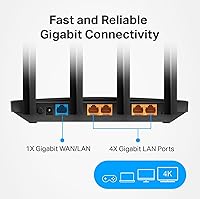
  • LAN Ports: Equipped with four Gigabit Ethernet LAN ports, each supporting up to 1000 Mbps for wired device connections.
  • WAN Port: Includes one Gigabit Ethernet WAN port for connecting to a cable or fiber modem, supporting internet plans up to 1000 Mbps.
  • Antennas: Features four fixed external antennas with Beamforming technology to focus and direct wireless signals toward connected devices.
  • MU-MIMO: Multi-User MIMO is supported on the 5 GHz band, allowing the router to transmit data to multiple devices at the same time rather than sequentially.
  • Security Protocol: Supports WPA3 personal encryption, the latest Wi-Fi security standard, along with legacy WPA2 and WPA for broader device compatibility.
  • OneMesh Support: Compatible with TP-Link OneMesh, allowing users to add a supported range extender to create a unified whole-home network under a single SSID.
  • Access Point Mode: Includes a dedicated Access Point Mode that converts an existing wired network connection into a wireless network without replacing an existing router.
  • Dimensions: The unit measures 8.46 x 4.92 x 1.81 inches, making it compact enough to sit flat on a shelf or entertainment unit.
  • Weight: The router weighs 11.4 ounces, making it lightweight and easy to reposition as needed.
  • Special Features: Includes Beamforming, Guest Mode, Parental Controls, QoS (Quality of Service), WPS button, LED indicator, and Access Point Mode.
  • App Control: Managed via the TP-Link Tether app for iOS and Android, or through a browser-based admin panel at tplinkwifi.net.
  • ISP Compatibility: Works with all major internet service providers including AT&T, Xfinity, Spectrum, Verizon, Cox, CenturyLink, and Frontier; a separate modem is required for most connections.
  • In-Box Contents: Package includes the Archer A6 router, a power adapter, one RJ45 Ethernet cable, and a quick installation guide.
  • Model Identifier: The specific version reviewed is the Archer A6 V4.6, manufactured by TP-Link with ASIN B08KJF5BS7.
  • Warranty: TP-Link provides a standard two-year limited hardware warranty for the Archer A6 in most regions, with support available via their official website.

Related Reviews

TP-Link Archer A54
TP-Link Archer A54
74%
91%
Value for Money
88%
Ease of Setup
71%
Wi-Fi Range
74%
Wi-Fi Speed & Performance
86%
Security Features
More
TP-Link Archer AC1750 WiFi Router
85%
88%
WiFi Performance
91%
Setup & Installation
80%
Range & Coverage
85%
Value for Money
89%
Alexa Integration
More
TP-Link Archer AX6000 WiFi 6 Router
80%
88%
Wireless Performance
91%
Multi-Device Handling
86%
Setup & Ease of Use
93%
Wired Connectivity
82%
Range & Coverage
More
TP-Link Archer AXE75
78%
83%
Wireless Performance
71%
6 GHz Band Utility
91%
Setup & Ease of Use
86%
Value for Money
68%
Range & Coverage
More
TP-Link Archer BE24000 WiFi 7 Router
87%
94%
Performance
89%
Setup & Installation
92%
Connectivity & Compatibility
90%
Coverage & Range
88%
Security Features
More
TP-Link Archer C59 AC1350 WiFi Router
82%
88%
Setup & Installation
72%
Wi-Fi Range & Coverage
81%
Overall Performance
92%
Value for Money
78%
Build Quality
More
TP-Link Archer BE550
76%
83%
Wireless Performance
91%
Wired Port Quality
88%
Setup & Ease of Use
67%
Coverage & Range
58%
HomeShield Security & Parental Controls
More
TP-Link Archer AX73
TP-Link Archer AX73
79%
88%
Wireless Speed & Throughput
91%
Multi-Device Performance
74%
Coverage & Range
93%
Setup & Ease of Use
79%
Build Quality & Design
More
TP-Link Archer BE700 WiFi 7 Router
85%
93%
Performance
88%
Ease of Setup
91%
Coverage & Range
94%
Speed (Wi-Fi 7)
85%
Security Features
More
TP-Link Archer BE260 WiFi 7 Router
85%
93%
WiFi Performance
89%
Ease of Setup
77%
Coverage & Range
91%
Streaming & Gaming Experience
85%
Design & Build Quality
More

FAQ

Yes, in most cases you will. The TP-Link Archer A6 AC1200 WiFi Router is a standalone wireless router, not a modem-router combo. You will need a compatible modem connected to your ISP's coax or phone line, and then plug that modem into the router's WAN port. If your ISP provides a gateway device that already includes a modem, you can either use the Archer A6 in Access Point Mode or put your ISP's gateway into bridge mode.
The easiest way is through the TP-Link Tether app on your phone — download it, create or log into a TP-Link account, and follow the guided steps. Most users are up and running in under ten minutes. Alternatively, you can connect a laptop directly to one of the LAN ports via Ethernet, open a browser, and navigate to tplinkwifi.net to use the web-based setup wizard.

Yes, the Archer A6 is compatible with virtually all major US internet service providers, including Xfinity, AT&T, Spectrum, Verizon, Cox, and others. Just make sure you have a compatible modem — your ISP can confirm which modems are approved for your plan. If you rent a modem or gateway from your ISP, that will work fine too.

For a single 4K stream, yes — the 5 GHz band handles it comfortably. The challenge comes when multiple people are streaming 4K simultaneously, especially if other devices are also active on the network. In that scenario, you may notice some buffering or quality drops. For a one- or two-person household with moderate usage, AC1200 is generally sufficient.

Technically it can connect a fairly large number of devices, but real-world performance starts to degrade once you get beyond around eight to ten devices that are actively using bandwidth at the same time. Devices that are just connected but idle — like a smart bulb or a TV on standby — have minimal impact. If you have a genuinely busy smart home with lots of simultaneous activity, you may want to consider a more capable router.

Yes, that is exactly what Access Point Mode is designed for. If you already have a working router and just want to add wireless coverage in another area, you can connect the Archer A6 to your existing network via an Ethernet cable and switch it to AP mode. It will broadcast its own Wi-Fi signal while passing traffic through your existing router and modem setup.

OneMesh is TP-Link's system for creating a unified Wi-Fi network by pairing this router with a compatible TP-Link range extender. Instead of having a separate extender network with a different name that your devices have to manually switch to, everything appears as one network and your devices roam between the router and extender automatically. You do not need it for a small apartment, but if you find coverage gaps later, it is a convenient way to expand without buying a whole new system.

Yes, basic parental controls are available through the Tether app. You can block specific websites and set time schedules to cut off internet access for certain devices — useful for managing screen time for kids. That said, the controls are fairly simple compared to what more advanced routers offer, so if robust content filtering is a priority for you, it may be worth looking at routers with dedicated security features.

It is on the edge of what this home router can handle reliably. On a single floor, 1,800 square feet is generally manageable if the router is placed centrally. Across two floors, especially with thick walls or ceilings involved, you will likely find weaker spots on the floor that does not have the router. A centrally placed unit on the first floor or landing gives you the best shot, but there are no guarantees. If coverage is non-negotiable across the whole space, a mesh system or adding a OneMesh extender would be a safer bet.

Yes, TP-Link does release periodic firmware updates for the Archer A6, and it is worth keeping the firmware current for security patches and stability improvements. You can check for updates either through the Tether app or by logging into the admin panel at tplinkwifi.net and navigating to the firmware upgrade section. The process is straightforward and typically takes just a few minutes, though the router will briefly restart during the update.

Where to Buy