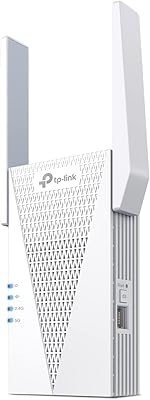
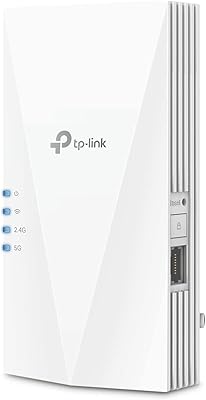
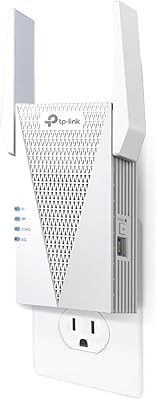
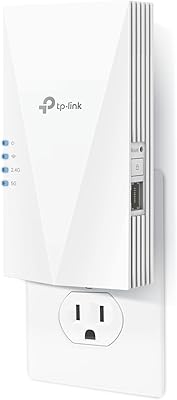
Overview

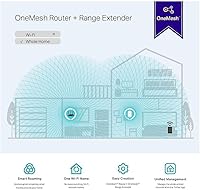
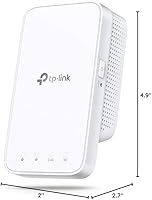
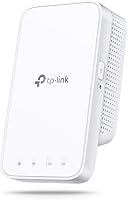
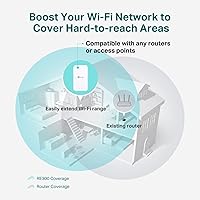
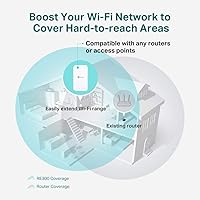
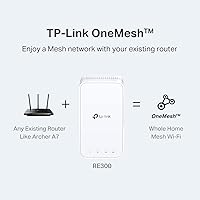
The TP-Link RE300 WiFi Range Extender is a compact, wall-plug unit built for one practical purpose: pushing your existing signal into the corners of your home that your router simply cannot reach. It runs on both 2.4GHz and 5GHz bands, giving you some flexibility depending on what your devices need. If you are already in the TP-Link ecosystem with an Archer router, you get the added bonus of OneMesh support, which keeps everything under one network name. For everyone else, it still works fine as a standard extender with no special router required. It sits comfortably in the mid-range segment for everyday home networking.
Features & Benefits

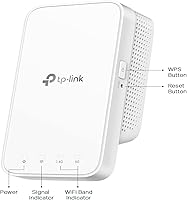
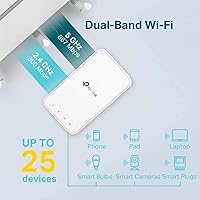
On paper, this range extender combines both bands for a total theoretical throughput of 1200Mbps — 300Mbps on 2.4GHz and 867Mbps on 5GHz. In practice, you will not hit those ceiling numbers, but that holds true of every repeater on the market. What actually matters day-to-day is coverage, and up to 1500 square feet handling 25 devices simultaneously is solid for a typical apartment or single-floor home. The smart LED indicator is genuinely useful during setup, telling you whether you have found a good middle ground between your router and the dead zone. Worth noting: there is no Ethernet port, so this is purely a wireless solution — if you need a wired backhaul, look elsewhere.

Best For

This WiFi booster makes the most sense for renters or homeowners dealing with weak signal in a specific part of the house — the far bedroom, the garage, or a basement corner. It handles streaming on smart TVs, browsing on phones, and keeping voice assistants online without issue. If you are already running a compatible Archer router, the OneMesh feature means your phone stops clinging to a weak signal as you move room to room. It also suits anyone wanting a plug-and-play solution without touching router settings or running cables. That said, if your home spans multiple floors or well beyond 1500 square feet, a single extender will likely fall short.

User Feedback

Across a large pool of buyer reviews, a few patterns emerge clearly. Setup draws consistent praise — people appreciate being up and running in minutes, and the LED placement guide helps avoid the common mistake of positioning the unit too far from the source router. Noticeable coverage gains in previously dead spots also earn positive marks. On the downside, speed reduction is the most repeated complaint, which is an honest limitation of any single repeater — cutting throughput roughly in half is normal with this technology. A portion of buyers also flag that if OneMesh is your primary reason for buying the RE300, you should verify your router appears on the compatibility list before purchasing.

Pros

  • Quick and approachable setup that most users complete in under ten minutes without technical knowledge.
  • The smart LED placement indicator genuinely helps find the optimal outlet on the first attempt.
  • Works with virtually any router brand, so there is no compatibility gamble involved.
  • Compact form factor sits flush against the wall without blocking the neighboring outlet.
  • Dual-band support gives connected devices access to either 2.4GHz or 5GHz depending on their needs.
  • Solid for keeping smart home devices, voice assistants, and streaming sticks reliably online in weak-signal areas.
  • OneMesh support removes the need to manually switch networks when moving rooms, for users with compatible Archer routers.
  • Two-year warranty and free round-the-clock support add a reasonable safety net at this price point.
  • Universal 802.11a/b/g/n/ac compatibility means it will not be made obsolete by a router upgrade in the near term.

Cons

  • Throughput in the extended zone can drop by nearly half compared to a direct router connection — a structural repeater limitation, but a real one.
  • Placing it too close to the router reduces coverage gain; too far causes instability — the ideal location window is narrower than expected.
  • No Ethernet port means wired devices like consoles or desktop PCs cannot be connected in the extended zone.
  • OneMesh functionality is restricted to a limited list of compatible TP-Link router models, which is not always clear before purchase.
  • The management app offers limited diagnostic tools and occasionally fails to detect the device after initial setup.
  • Single-floor coverage is the sweet spot; multi-story homes with thick walls will likely see significant real-world range reduction.
  • No physical power switch makes quick reboots inconvenient — you have to unplug the unit entirely.
  • Can run noticeably warm during sustained heavy use, which may be a concern for always-on high-load households.

Ratings

The TP-Link RE300 WiFi Range Extender has been evaluated by our AI system after analyzing thousands of verified global buyer reviews, with spam, bot-generated, and incentivized feedback actively filtered out. The scores below reflect an honest synthesis of real-world experiences — strengths and frustrations weighted equally — so you can make a genuinely informed purchase decision. Both the practical wins and the recurring pain points are transparently captured across every category.
Ease of Setup
88%
A large share of buyers report being connected within minutes, with no router login or technical knowledge required. The smart LED indicator removes much of the guesswork, helping users find a usable midpoint between their router and the dead zone without trial and error across multiple outlets.
A small number of users running older or less common router firmware ran into pairing hiccups that required a factory reset to resolve. The mobile app setup path can also feel unnecessarily convoluted compared to the simpler WPS button method.
Signal Coverage
82%
18%
For single-floor apartments and mid-sized homes, this WiFi booster delivers a meaningful and noticeable improvement in areas where the primary router signal was previously unreliable or absent. Bedrooms at the far end of a hallway and open-plan kitchens are common success stories among reviewers.
Coverage claims of 1500 square feet assume ideal conditions — open layouts with minimal wall obstruction. In older homes with thick plaster walls or multi-story layouts, real-world reach tends to fall noticeably short of the advertised figure.
Throughput & Speed Performance
61%
39%
For everyday tasks like streaming HD video, casual browsing, and keeping smart home devices online, the RE300 provides enough bandwidth to get the job done in extended coverage zones. Users replacing total dead zones with any usable signal tend to rate this aspect favorably.
Speed reduction is the single most repeated complaint across buyer reviews, and it is a structural limitation of single-unit repeater technology rather than a defect. Users expecting near-router speeds in extended zones will be disappointed — real-world throughput can drop by 40 to 50 percent compared to a direct router connection.
Device Capacity
78%
22%
Handling up to 25 connected devices simultaneously makes this range extender a reasonable fit for households with a mix of phones, tablets, smart TVs, and voice assistants all running concurrently. Most buyers with typical home device counts report no obvious congestion issues during normal use.
Power users or households where multiple people are simultaneously streaming 4K content or gaming online may start to feel the strain at higher device counts. The RE300 was not designed for bandwidth-intensive multi-device scenarios, and performance can degrade under heavy simultaneous load.
Build Quality & Form Factor
84%
The compact plug-in design is consistently praised for not blocking the adjacent outlet, a small but genuinely appreciated detail that similar products in this category often overlook. The white finish is neutral enough to blend into most wall sockets without drawing attention.
The plastic casing feels lightweight, and a few buyers note it sits loosely in certain outlet styles, particularly older two-prong sockets. There is no physical on/off switch, which minor as it sounds, frustrates users who want a quick way to power cycle without unplugging.
OneMesh Integration
69%
31%
For households already running a compatible TP-Link Archer router, the OneMesh feature works well in practice — your phone stops clinging to a weak signal as you walk between rooms, and you never need to manually switch networks. It is a genuine quality-of-life improvement for those in the right ecosystem.
The compatibility list is narrower than the marketing implies, and a notable portion of buyers discover post-purchase that their specific TP-Link router model is not yet supported. For anyone outside the TP-Link ecosystem entirely, this feature simply does not apply, reducing the perceived value of the unit.
Router Compatibility
86%
Universal support for 802.11a/b/g/n/ac standards means the RE300 pairs with virtually any router brand on the market without special configuration. Buyers using ISP-supplied routers from a wide range of providers report no compatibility issues during standard setup.
While broad compatibility is a genuine strength, a handful of users with ISP-locked router firmware report inconsistent re-connection behavior after power outages. This is not unique to the RE300, but it is worth knowing if your home internet relies on a heavily restricted ISP gateway.
Placement Flexibility
74%
26%
Being a wall-plug unit with dual-band support gives users reasonable flexibility in choosing where to position it, and the LED signal indicator actively helps identify the optimal outlet during initial placement. Most buyers find a workable spot on their first or second attempt.
The lack of a power cable means placement is entirely determined by where your wall outlets are located, which is not always the geometrically ideal midpoint between your router and the dead zone. In some home layouts this constraint meaningfully limits how effectively the extender can be positioned.
Connection Stability
72%
28%
In well-placed installations — close enough to the router to maintain a strong upstream connection — the RE300 holds a stable link for extended periods without needing manual reconnection. Light-use devices like smart speakers and Ring doorbells particularly benefit from consistent low-demand connectivity.
Stability degrades noticeably when the extender is pushed too far from the primary router in an attempt to maximize reach. Several reviewers describe intermittent drops that only resolved after moving the unit closer to the router, effectively reducing the coverage gain they were hoping for.
Value for Money
77%
23%
At its price point, this range extender delivers a straightforward solution for buyers with a clearly defined and modest goal — fixing one specific weak spot in a reasonably sized home. For those use cases, the cost-to-benefit ratio is genuinely fair.
If your needs extend beyond a single dead zone or require reliable high-speed throughput across multiple floors, the RE300 starts to feel like an undersized solution relative to its cost. Spending modestly more on an entry-level mesh node would serve those users considerably better.
App & Management Experience
63%
37%
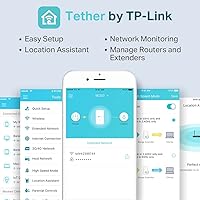
The Tether app gives users a simple interface for checking connection status and basic settings without needing to access a browser-based admin panel. For non-technical users who just want a quick status check, it covers the basics adequately.
Beyond the basics, the app offers limited diagnostic tools, and several users report that it occasionally fails to detect the extender after initial setup, requiring a fresh search. Advanced users looking for granular band-steering or channel control will find the management options frustratingly thin.
Warranty & Support
81%
19%
A two-year warranty paired with free 24/7 technical support is a stronger after-sales package than many competitors offer at a similar price. Buyers who have contacted TP-Link support generally report responsive and helpful service, particularly for setup-related issues.
While the support availability is good on paper, some users note that troubleshooting guidance can feel scripted and loop back to the same basic steps — reset and reinstall — without resolving deeper configuration issues. Hardware replacement under warranty has drawn occasional complaints about processing time.
Heat Management
75%
25%
Under typical everyday use — a handful of devices browsing and streaming — the RE300 runs at a reasonable temperature without becoming a concern. Most buyers never notice any heat-related issue during normal operation over extended periods.
A minority of users report that the unit becomes noticeably warm during sustained heavy usage, particularly when acting as the connection point for many simultaneous devices. While not a safety issue, it raises questions about long-term component reliability in always-on high-load scenarios.

Suitable for:

The TP-Link RE300 WiFi Range Extender is a practical pick for renters and homeowners who have one clear, specific problem: a room or area of the house where the router signal simply does not reach reliably. Think the far bedroom that keeps dropping video calls, the garage where a smart speaker struggles to stay connected, or a living room corner where streaming buffers despite a decent internet plan. It works with virtually any router brand out of the box, so there is no complicated compatibility research required before buying. Households with a reasonable mix of phones, smart TVs, tablets, and voice assistants will find it handles everyday multi-device loads without issue. If you are already running a compatible TP-Link Archer router, the OneMesh feature adds genuine convenience by keeping your network name consistent as you move through the home. For anyone who wants a low-hassle, plug-it-in solution without spending on a full mesh system, this WiFi booster hits a sensible sweet spot.
Not suitable for:

The TP-Link RE300 WiFi Range Extender is not the right tool if your home spans multiple floors, has thick concrete or plaster walls, or requires reliably fast speeds in the extended zone — particularly for gaming, 4K streaming on multiple screens simultaneously, or large file transfers. Like all single-unit repeaters, it cuts your available throughput in the extended area, so if speed matters as much as coverage, you will likely find the trade-off frustrating. Buyers hoping to solve a whole-home coverage problem with one device should also temper expectations — 1500 square feet is the ceiling under ideal conditions, not a guarantee in real-world layouts. The absence of an Ethernet port also rules it out for anyone needing a wired connection to a desktop, gaming console, or smart TV in the extended zone. And if OneMesh compatibility is your primary motivation, verify your specific router model is on the supported list before purchasing — the RE300 does not automatically work in OneMesh mode with every TP-Link device, let alone other brands.
Specifications

  • Brand: Manufactured by TP-Link, a globally recognized networking hardware company.
  • Model: The unit is designated as the RE300, part of TP-Link's range extender lineup.
  • Frequency Bands: Operates on both the 2.4GHz and 5GHz bands simultaneously for dual-band coverage.
  • Max Speed: Combined theoretical throughput reaches up to 1200Mbps across both bands.
  • 2.4GHz Speed: The 2.4GHz band supports speeds of up to 300Mbps for longer-range, lower-bandwidth connections.
  • 5GHz Speed: The 5GHz band delivers up to 867Mbps for faster, shorter-range device connections.
  • Coverage Area: Rated to extend WiFi coverage by up to 1500 square feet under optimal conditions.
  • Device Capacity: Supports up to 25 simultaneously connected wireless devices across both bands.
  • WiFi Standards: Compatible with 802.11a, 802.11b, 802.11g, 802.11n, and 802.11ac wireless protocols.
  • OneMesh Support: Supports TP-Link OneMesh technology for unified roaming when paired with a compatible Archer router.
  • Ethernet Port: This unit does not include an Ethernet port and operates as a purely wireless extender.
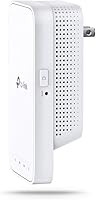
  • Form Factor: Compact wall-plug design plugs directly into a standard electrical outlet with no cable required.
  • Dimensions: The unit measures 2.7 x 4.9 x 2 inches (L x W x H).
  • Weight: Weighs 6.4 ounces, making it light enough to sit securely in most standard outlets.
  • Voltage: Supports both 120V and 240V input, making it compatible with outlets in most countries.
  • Color: Available in white, designed to blend unobtrusively into typical home wall sockets.
  • Warranty: Covered by a 2-year limited hardware warranty from TP-Link.
  • Technical Support: Free 24/7 technical support is included and accessible via phone, chat, or email.

Related Reviews

TP-Link RE550 Wi-Fi Range Extender
78%
86%
Coverage & Range
91%
Setup & Installation
62%
Throughput & Speed Performance
78%
Build Quality & Design
88%
Gigabit Ethernet Port
More
TP-Link RE200 AC750 WiFi Range Extender
81%
94%
Ease of Setup
85%
Signal Range
80%
Speed Performance
82%
Dual-Band Performance
77%
Build Quality
More
TP-Link RE700X AX3000 WiFi 6 Range Extender
85%
91%
Setup & Installation
88%
WiFi Performance
85%
Coverage Range
80%
Build Quality
90%
App & Software Experience
More
TP-Link RE615X
TP-Link RE615X
77%
91%
Ease of Setup
76%
WiFi Coverage
63%
Throughput Performance
93%
Ethernet Port Utility
71%
Signal Stability
More
TP-Link RE815X AX5400 WiFi 6 Range Extender
85%
88%
Performance
91%
Setup & Installation
82%
Coverage Area
77%
Speed Stability
89%
App & Software Experience
More
TP-Link RE715X
TP-Link RE715X
75%
88%
Signal Coverage
91%
Setup Experience
63%
WiFi Speed in Extended Zones
79%
EasyMesh & Roaming
72%
Build Quality & Design
More
TP-Link RE500X WiFi Extender
86%
89%
Setup and Installation
85%
WiFi Performance
90%
Coverage Area
87%
App Experience
92%
Value for Money
More
TP-Link AC750 WiFi Extender RE190
84%
85%
Wi-Fi Performance
91%
Ease of Setup
88%
Build Quality
92%
Value for Money
78%
Coverage Range
More
TP-Link RE450 WiFi Range Extender
73%
83%
Coverage Extension
61%
Signal Throughput
88%
Ease of Setup
79%
Dual-Band Flexibility
67%
Ethernet Port Utility
More
TP-Link RE600X WiFi 6 Extender
87%
87%
Performance
93%
Ease of Setup
85%
WiFi Coverage
89%
Dual-Band Speed
84%
Reliability
More

FAQ

It works with virtually any router brand on the market — Netgear, ASUS, Linksys, ISP-supplied gateways, you name it. The OneMesh feature is the only function that requires a compatible TP-Link Archer router. For standard signal extension, brand does not matter at all.

Some speed reduction is unavoidable with any single-unit repeater — you can realistically expect throughput in the extended zone to be roughly 40 to 50 percent lower than what you get right next to your router. This is a technology-wide limitation, not a defect specific to this WiFi booster. For streaming, browsing, and smart home devices it is usually more than adequate; for competitive gaming or large file transfers, the drop may be noticeable.

The built-in LED signal indicator does most of the work for you. Plug the RE300 into an outlet roughly halfway between your router and the dead zone, then check the LED color — a solid blue means the signal from your router is strong enough. If it shows amber, move it a bit closer to your router. Most people find a good spot on their first or second attempt.

By default, this WiFi booster creates a new extended network with a slightly different name (typically your existing name plus an underscore EXT). If you are using a compatible TP-Link Archer router, enabling OneMesh removes this annoyance by merging both into a single network name, and your devices switch between them automatically as you move around.

No — the TP-Link RE300 WiFi Range Extender does not have an Ethernet port, so it cannot provide a wired connection to any device. If you need a wired link for a console or desktop in a weak-signal area, you would need a different extender model that includes an Ethernet output port.
Probably not reliably. The 1500 square foot coverage rating assumes an open, single-floor layout with minimal obstructions. Floors, ceilings, and thick walls all reduce effective range. For a two-story home, a single unit positioned on one floor may help with that floor, but full whole-home coverage across both levels typically requires either two extender units or a mesh system.

The easiest method is WPS — you press the WPS button on your router and then on the extender within two minutes, and they pair automatically. Alternatively you can set it up through the TP-Link Tether mobile app or by connecting to the extender directly via a browser. Most buyers use the WPS method and are done in under five minutes.

Yes, it supports both 120V and 240V input, so it is electrically compatible with outlets worldwide. You may still need a physical plug adapter depending on the country, but you will not need a voltage converter.

Generally yes, it will attempt to reconnect to your router once the main internet connection is restored. A small number of users with heavily locked ISP gateways have reported occasional failures to auto-reconnect after outages, which a quick unplug-and-replug typically resolves. It is not a widespread issue, but worth knowing if your connection drops frequently.

None at all — this is a one-time hardware purchase with no subscription, cloud fee, or account required for basic use. The Tether app is free, technical support is free, and there are no recurring costs involved.

Where to Buy