Overview

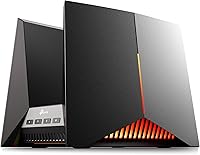
The TP-Link Archer GE800 sits firmly at the top of the consumer router market, and it earns that position by targeting a specific kind of buyer — someone who genuinely pushes their network to its limits. The tri-band Wi-Fi 7 architecture advertises 19 Gbps of combined throughput, a figure you will likely never fully use, but one that signals real headroom for demanding households. What matters more in practice is consistent, low-latency performance across dozens of simultaneous connections. The gaming-first design — dedicated port, live performance panel, customizable RGB — makes clear who this was built for. Casual users will find it overkill. Power users will find it hard to outgrow.
Features & Benefits

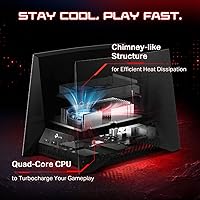
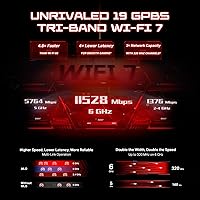
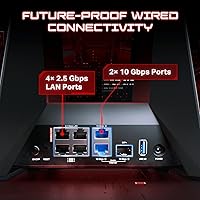
The standout capability here is Multi-Link Operation, Wi-Fi 7's ability to let devices connect across multiple bands at once rather than hopping between them. In practical terms, your gaming PC can pull data from two bands simultaneously, reducing the odds of sudden drops or interference spikes mid-match. On the wired side, two 10-gigabit ports and four 2.5-gigabit ports give your NAS, gaming rig, and high-speed ISP connection genuine dedicated lanes. The quad-core processor with 2 GB of RAM keeps things stable when twenty-plus devices are active at once. One thing worth knowing upfront: the HomeShield security suite provides solid free basics, but advanced parental controls and detailed reporting require a paid subscription.

Best For

This Wi-Fi 7 gaming router makes the most sense for a few distinct groups. If you are already on a multi-gigabit ISP plan — 2.5G or faster — this is one of the few home routers that can handle that kind of throughput without becoming the bottleneck itself. Competitive gamers running multiple machines, consoles, and streaming rigs simultaneously will notice the difference in consistency, not just peak speed. Content creators uploading large files while others stream in 4K will appreciate the processor handling everything without throttling anyone. Tech-forward buyers planning ahead as Wi-Fi 7 client devices continue rolling out will also find this a future-ready foundation worth investing in now.

User Feedback

With over 6,000 ratings averaging 4.4 stars, buyer sentiment is broadly positive, though not without nuance. Most verified purchasers report genuinely improved range and throughput compared to their previous routers, and the Tether app setup draws consistent praise for being fast and approachable. Where things get mixed: the router's sheer physical size catches some buyers off guard, and a handful of early adopters flagged occasional firmware instability in the months after launch. The RGB lighting divides opinion sharply — gamers appreciate it, while others find it unnecessary for a device tucked away in a closet. On balance, lower-star reviews tend to reflect expectations mismatch rather than outright hardware problems.

Pros

  • Handles thirty-plus active devices simultaneously without visible performance degradation during peak household usage.
  • Dual 10-gigabit wired ports let multi-gig ISP subscribers and NAS users finally stop being bottlenecked by their router.
  • Wi-Fi 7 Multi-Link Operation keeps gaming connections stable even when other bands are congested.
  • Tether app setup is fast and approachable — most users report going from unboxing to working network in under fifteen minutes.
  • Tri-band architecture with a dedicated 6 GHz band provides noticeably cleaner wireless performance in dense urban environments.
  • Dedicated gaming port and QoS implementation produce real consistency improvements during peak household usage hours.
  • EasyMesh compatibility means you can expand coverage later without being locked into a single hardware generation.
  • Recent firmware updates have resolved the majority of stability issues reported by early adopters.
  • The free HomeShield tier delivers genuine security scanning and IoT device identification with no subscription required.

Cons

  • Costs significantly more than routers that will feel nearly identical to most households in everyday use.
  • Wi-Fi 7 client devices are still uncommon, so the biggest wireless benefits remain out of reach for most buyers right now.
  • Advanced HomeShield features — detailed reports, granular parental controls — require a recurring subscription that is not clearly disclosed upfront.
  • The physical size makes it impractical for media cabinets, wall mounting, or small apartment shelving.
  • Some early buyers experienced firmware instability and dropped connections before patches were issued.
  • The real-time performance panel displays data most users cannot translate into actionable changes during a gaming session.
  • USB storage sharing is functional for light use but too slow for users who need a genuine network-attached storage solution.
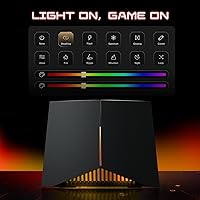
  • RGB lighting has no dedicated physical off switch, requiring app access to disable it at night.

Ratings

The TP-Link Archer GE800 has been put through its paces by thousands of verified buyers worldwide, and the scores below reflect what our AI found after systematically analyzing that feedback — filtering out incentivized reviews, spam patterns, and outlier noise to surface what real users actually experience. Strengths are recognized where they are earned, and recurring pain points are called out just as plainly, so you can make an informed call before spending at this level.
Wireless Performance
91%
Users running demanding households — multiple 4K streams, active gaming sessions, and video calls happening at the same time — consistently report that wireless congestion stops being a problem. The Wi-Fi 7 Multi-Link Operation keeps connections stable in ways older routers simply cannot match when the 5 GHz band gets crowded.
Realizing the full benefit requires Wi-Fi 7 compatible client devices, which are still far from standard in most homes. Buyers upgrading from Wi-Fi 5 hardware will see improvements, but not the dramatic leap the spec sheet implies until their devices catch up.
Wired Connectivity
94%
The combination of dual 10-gigabit and four 2.5-gigabit ports is genuinely rare at this form factor, and users with high-speed ISP plans or network-attached storage report that this router stops being the choke point in their setup. For a home lab or content creator with multiple wired machines, the port variety is hard to beat.
Most households simply do not have the switching infrastructure or ISP tiers to take advantage of the 10G ports today. Buyers without a multi-gig internet plan or a 10G-capable switch are paying for capacity they will not use for years.
Gaming Latency & Prioritization
88%
The dedicated gaming port combined with the router's Quality of Service implementation does produce measurable consistency improvements in competitive online play. Users report fewer latency spikes during peak household usage hours, which is exactly the scenario where cheaper routers fall apart.
The real-time performance panel, while visually impressive, surfaces information that most gamers cannot act on directly. A few users noted that the gaming acceleration features require some configuration to work as intended and are not optimized out of the box.
Build Quality & Design
83%
The physical construction feels appropriately premium for the price, with a solid chassis and eight well-positioned antennas that do not feel like an afterthought. The overall aesthetic, with its angular design and RGB lighting, fits naturally in a gaming setup and draws positive comments from users who keep it visible on a desk.
At nearly five pounds and over 22 inches across, this is a large piece of hardware that demands dedicated space. Several buyers noted it cannot be practically mounted on a wall or tucked into a media cabinet, which limits placement options in smaller apartments or shared spaces.
RGB Lighting
69%
31%
Gamers who set up the Archer GE800 as a visible centerpiece of their gaming room generally enjoy the lighting customization. The color range is broad and the effects are controllable through the app, which is more flexibility than most competing routers offer.
For anyone placing this router in a bedroom, living room, or office, the RGB becomes an active annoyance rather than a feature. There is no single physical button to kill the lights, and users report that the app-based control, while functional, is not as immediate as they would like at night.
Setup & Initial Configuration
86%
The Tether app walks users through initial setup in a way that most reviewers describe as genuinely painless, even for buyers who do not consider themselves network-savvy. Getting from box to working connection typically takes under fifteen minutes according to consistent user reports.
Advanced configuration options — VLAN setup, detailed QoS tuning, or manual band steering adjustments — require jumping to the web interface, which feels less polished than the app. Users comfortable only with the app may not realize these deeper controls exist.
App & Firmware Stability
74%
26%
Recent firmware updates have addressed a number of the bugs that early adopters encountered in the months after launch, and users who purchased more recently report a considerably more stable experience. The Tether app itself handles routine tasks like guest network management and device prioritization without issues.
A meaningful subset of early buyers encountered dropped connections and app-to-router sync problems before patches arrived. Some users still report that the router occasionally requires a reboot after a firmware update, which is a frustrating expectation to set for a router at this price point.
Security Features
78%
22%
The free tier of HomeShield covers real fundamentals: network vulnerability scans, basic IoT device identification, and rudimentary parental controls. For users who simply want to know their network is not obviously exposed, the free offering is solid and does not require any subscription to activate.
The moment you want detailed traffic reports, robust content filtering, or granular parental controls by child profile, a paid subscription becomes necessary — and this is not prominently disclosed at point of purchase. Several reviewers expressed frustration at discovering the paywall after expecting full functionality.
Range & Coverage
87%
In medium to large homes, users consistently report reaching spaces that their previous routers could not reliably cover. The eight-antenna layout and tri-band design handle multi-floor coverage well, and the 6 GHz band provides a noticeably cleaner signal in congested urban environments with many neighboring networks.
In very large homes or those with thick concrete walls, the range advantage narrows, and users will still need to add a mesh node to eliminate dead zones. The EasyMesh compatibility helps here, but that is an added cost that buyers should factor in from the start.
EasyMesh & Ecosystem Integration
81%
19%
For households already using TP-Link extenders or mesh nodes, adding the Archer GE800 as a backbone unit is reported as a smooth process that noticeably boosts whole-home consistency. The EasyMesh standard also means it is not locked to TP-Link nodes exclusively.
Buyers coming from competing mesh ecosystems like Eero or Netgear Orbi will not be able to integrate their existing hardware, meaning a potential full-system replacement cost. The mesh performance, while competent, is not as automatically optimized as purpose-built mesh systems.
Processor & Multi-Device Handling
89%
Households with thirty or more active devices — smart home gear, phones, laptops, gaming consoles, and streaming sticks all running at once — report that the router handles the load without visible degradation. This is where the generous onboard memory pays off in ways that spec sheets understate.
Under sustained maximum load with many active streams and heavy QoS processing simultaneously, a small number of users have reported slightly elevated CPU temperatures that correlate with occasional slowdowns. This appears to be an edge case, but worth noting for users planning genuinely extreme network configurations.
Value for Money
71%
29%
For the specific buyer this router was designed for — someone with a multi-gig ISP connection, Wi-Fi 7 devices, and a house full of simultaneous heavy users — the investment reflects what the hardware actually delivers. That buyer will feel the gap between this and mid-range alternatives immediately.
For the majority of households, the honest answer is that a well-configured mid-range Wi-Fi 6E router would deliver near-identical real-world results at a fraction of the cost. The premium is largely future-proofing, and buyers need to be clear-eyed about how long that future is from arriving in their specific situation.
Physical Footprint & Placement
62%
38%
Users who have the desk space or a dedicated networking shelf find the large form factor a non-issue and appreciate the stability the weight provides. The aesthetic is intentionally bold, and for open gaming room setups it reads as a design statement rather than an eyesore.
This is one of the more commonly cited practical complaints in the user reviews. The router simply does not fit in standard entertainment center compartments, cable management boxes, or small apartment shelving, forcing some users to place it in suboptimal locations that reduce its wireless effectiveness.
USB Functionality
67%
33%
The USB 3.0 port supports basic network-attached storage sharing and printer connectivity, and users who need a simple shared drive on their local network find it functional enough for light use. Transfer speeds for local file sharing are adequate for casual document or media access.
Power users hoping to use the USB port as a mini NAS for large video libraries or frequent high-volume transfers will find it underwhelming. The implementation prioritizes convenience over throughput, and those with serious storage needs should plan on a dedicated NAS device connected to one of the 10G ports instead.

Suitable for:

The TP-Link Archer GE800 was built for a specific kind of household, and those buyers will get every dollar's worth out of it. If you are on a multi-gigabit ISP plan and have been watching your current router fail to deliver those speeds to your devices, this is one of the few home routers that will not be the weak link in that chain. Competitive gamers who share a network with heavy streamers, remote workers on video calls, and smart home devices will appreciate how consistently the router handles that kind of simultaneous load without anyone feeling the squeeze. Content creators who are uploading large files while others in the house are gaming or streaming in 4K will notice a genuine difference in day-to-day reliability. Tech-forward buyers who want to invest in Wi-Fi 7 infrastructure now — knowing their device lineup will gradually catch up over the next few years — will also find this a sound long-term foundation. Finally, existing TP-Link users looking for a flagship node to anchor or expand their home mesh network will find the EasyMesh integration makes the upgrade path straightforward.

Not suitable for:

The TP-Link Archer GE800 is genuinely overkill for a large portion of buyers who might be tempted by its specs, and it is worth being direct about that. If your ISP plan tops out at a few hundred megabits, or if most devices in your home are still on Wi-Fi 5 or Wi-Fi 6, a well-configured mid-range router will produce results that are practically indistinguishable in everyday use — at a fraction of the cost. Renters or anyone living in smaller apartments will likely struggle with the router's considerable physical footprint; it demands real estate that compact living situations rarely have available. Buyers who want advanced parental controls or detailed security reporting without paying an ongoing subscription will find the HomeShield free tier frustratingly limited once they discover where the paywall sits. Anyone who prefers a set-and-forget device with no interest in monitoring network performance or fine-tuning QoS settings will find many of this router's marquee features sitting permanently unused. And buyers coming from competing mesh ecosystems should factor in the potential cost of replacing existing nodes, since seamless cross-brand integration is not guaranteed.
Specifications

  • Wi-Fi Standard: Operates on Wi-Fi 7 (802.11be), with backward compatibility for 802.11a/b/g/n/ac/ax devices.
  • Frequency Bands: Tri-band design covering 2.4 GHz, 5 GHz, and 6 GHz simultaneously for flexible device distribution.
  • Max Throughput: Combined theoretical wireless throughput reaches up to 19 Gbps across all three bands and 12 spatial streams.
  • Channel Width: Supports up to 320 MHz channel width on the 6 GHz band, a key Wi-Fi 7 advancement for reducing interference.
  • Antennas: Equipped with 8 externally positioned antennas, optimized for wide-angle signal distribution across multiple floors.
  • Wired Ports: Includes 2× 10 Gbps and 4× 2.5 Gbps Ethernet ports, plus one WAN/LAN configurable 10G port for ISP connections.
  • USB Port: One USB 3.0 port supports basic network-attached storage sharing and printer connectivity over the local network.
  • Processor: Powered by a quad-core CPU paired with 2 GB of RAM to handle high-concurrency routing and QoS processing without throttling.
  • MLO Support: Multi-Link Operation allows compatible devices to transmit and receive across multiple bands simultaneously, reducing latency and dropout risk.
  • Security Suite: HomeShield provides free basic network scanning and IoT device identification, with advanced features available via paid subscription.
  • Parental Controls: Basic parental controls are included in the free HomeShield tier; granular per-device scheduling and content filtering require a subscription.
  • App Management: The TP-Link Tether app supports full setup and ongoing network management from iOS and Android devices.
  • Mesh Support: EasyMesh certified, allowing integration with compatible TP-Link and third-party mesh nodes and range extenders.
  • Gaming Port: One dedicated gaming Ethernet port with hardware-level traffic prioritization to minimize latency for wired gaming devices.
  • Dimensions: Measures 22.83 × 11.02 × 10.63 inches, making it one of the larger consumer routers currently available.
  • Weight: Weighs 4.87 pounds, reflecting a robust internal component layout and dense antenna array.
  • RGB Lighting: Features fully customizable RGB lighting across the chassis, controllable in color and effect through the Tether app.
  • Color: Available in a single colorway: matte black with accent lighting elements across the body and antenna base.

Related Reviews
TP-Link Archer VR2100
84%
86%
Wi-Fi Performance
92%
Setup & Installation
87%
Value for Money
72%
Range
90%
Wired Performance
More
TP-Link Archer BE600
90%
96%
Wi-Fi Speed
91%
Coverage Area
94%
Device Capacity
89%
Stability & Reliability
87%
Setup & Installation
More
TP-Link Archer AC1750 WiFi Router
85%
88%
WiFi Performance
91%
Setup & Installation
80%
Range & Coverage
85%
Value for Money
89%
Alexa Integration
More
TP-Link Archer AX6000 WiFi 6 Router
84%
91%
Performance for Gaming and Streaming
87%
WiFi Coverage and Range
80%
Ease of Setup
90%
Security Features (TP-Link HomeCare)
85%
Build Quality and Durability
More
TP-Link Archer BE550
76%
83%
Wireless Performance
91%
Wired Port Quality
88%
Setup & Ease of Use
67%
Coverage & Range
58%
HomeShield Security & Parental Controls
More
TP-Link Archer AXE75
78%
83%
Wireless Performance
71%
6 GHz Band Utility
91%
Setup & Ease of Use
86%
Value for Money
68%
Range & Coverage
More
TP-Link Archer BE700 WiFi 7 Router
85%
93%
Performance
88%
Ease of Setup
91%
Coverage & Range
94%
Speed (Wi-Fi 7)
85%
Security Features
More
TP-Link Archer AX73
TP-Link Archer AX73
79%
88%
Wireless Speed & Throughput
91%
Multi-Device Performance
74%
Coverage & Range
93%
Setup & Ease of Use
79%
Build Quality & Design
More
TP-Link Archer BE24000 WiFi 7 Router
87%
94%
Performance
89%
Setup & Installation
92%
Connectivity & Compatibility
90%
Coverage & Range
88%
Security Features
More
TP-Link Archer C59 AC1350 WiFi Router
82%
88%
Setup & Installation
72%
Wi-Fi Range & Coverage
81%
Overall Performance
92%
Value for Money
78%
Build Quality
More

FAQ

For most households with standard ISP speeds and common Wi-Fi 6 or older devices, this router delivers more than you will realistically use today. Where it starts making sense is if you have a multi-gig internet plan, a house full of heavy concurrent users, or you are planning to hold onto your router for five-plus years as Wi-Fi 7 devices become the norm.

It is easier than you might expect for a router at this level. The TP-Link Tether app guides you through the initial configuration step by step, and most users report being fully connected within fifteen minutes of unboxing. Advanced settings like VLAN or detailed QoS tuning do require the web interface, but those are entirely optional for everyday use.

In plain terms, MLO lets your device talk to the router over two wireless bands at the same time instead of committing to just one. In practice, this means if one band gets congested — say, because someone started a large download — your gaming session does not stutter waiting for bandwidth to free up. It is a meaningful real-world improvement, not just a spec-sheet talking point, though it requires Wi-Fi 7 client devices to activate.

There is a genuinely useful free tier that includes network vulnerability scanning, basic IoT device identification, and a simple Quality of Service tool. However, if you want detailed weekly traffic reports, advanced content filtering, or robust per-child parental control profiles, those features sit behind a paid subscription. It is worth knowing this upfront so expectations are set correctly before purchase.

Potentially, yes — because the Archer GE800 supports the EasyMesh standard, it is designed to work with other EasyMesh-certified devices regardless of brand. That said, cross-brand mesh performance and feature compatibility can vary, and you are likely to get the most reliable experience pairing it with TP-Link's own Deco or range extender lineup.

It is genuinely large — over 22 inches across — and it will not fit inside a standard media cabinet compartment or wall-mount neatly without a dedicated bracket. It works best placed openly on a shelf, desk, or networking stand where the antennas have clearance. Buyers in smaller apartments or those who prefer discreet hardware should factor this in before purchasing.

Yes, and this is one of the scenarios where the router's wired port lineup pays off directly. The four 2.5-gigabit ports mean your ISP's connection gets a dedicated lane without any negotiation or downgrade. You will not be fighting a bottleneck at the router level the way you would with a standard gigabit-only device.

You can disable or change the lighting, but it has to be done through the Tether app — there is no physical button on the unit itself. For a bedroom setup, this is a minor but real inconvenience if you want to kill the lights quickly at night without reaching for your phone. Once it is off via the app, it stays off until you change it again.

Early adopters did run into some firmware instability and occasional dropped connections in the months following launch. TP-Link has since pushed several updates addressing the most commonly reported issues, and buyers who purchased more recently report a considerably more stable experience. It is still worth keeping the firmware updated regularly through the Tether app, as is good practice with any router.

It depends on how you frame the purchase. If you are buying it purely for today's performance, a well-spec'd Wi-Fi 6E router will feel nearly identical at a lower price point. If you see it as infrastructure — something you plan to keep for five or more years while your device ecosystem gradually upgrades — then locking in Wi-Fi 7 capability now has a reasonable logic behind it. The wired port advantages are available immediately regardless of your wireless devices.