Overview

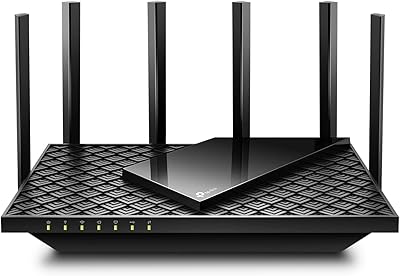
The TP-Link Archer AX23 WiFi 6 Router is one of the more honest options in the mid-range networking market — it doesn't promise the moon, but it delivers where it counts for most households. It brings WiFi 6 technology down to a price point that doesn't require a second thought, making it a practical first step for anyone still running older hardware. Setup is refreshingly simple: everything you need is in the box, including an Ethernet cable and a quick-start guide that actually lives up to its name. For a typical home with a handful of connected devices, this dual-band router covers the bases without unnecessary complexity.
Features & Benefits

The dual-band setup runs on both 2.4 GHz and 5 GHz frequencies, which matters more practically than it sounds. The 2.4 GHz band reaches farther and handles smart home gadgets well, while the 5 GHz band is where your laptop or streaming device will get faster, more stable connections. WiFi 6 support means the router handles multiple devices at once more efficiently than older standards — though you will only see the full speed gains on devices that also support WiFi 6. WPS makes adding a new device quick and painless. The TP-Link Tether app rounds things out with remote management and basic parental controls, all from your phone.

Best For

This WiFi 6 router is a natural fit for small to medium homes — apartments, condos, or single-floor houses — where one router can cover the whole space without dead zones. It works especially well in households that have accumulated a mix of older and newer devices over the years, since the Archer AX23 is backward compatible with pretty much anything. Non-technical users will appreciate how little friction there is to get up and running. It is not built for a large two-story house or heavy gaming demands, but for everyday browsing, streaming, and video calls, it holds up reliably well.

User Feedback

Buyers consistently mention how straightforward the physical installation is, with the included guide doing its job better than most. Connection stability gets positive marks too, particularly from people who were previously running older budget hardware. The honest trade-off is range: users in larger or multi-story homes have noted that coverage can fall short in back rooms or upper floors, so a mesh extender might be worth considering. There is also a recurring point that WiFi 6 speeds depend on your other devices — if your laptop or phone is a few years old, the difference will be modest. Still, the overall value lands well with most buyers.

Pros

  • Brings WiFi 6 technology to a price point that most households can justify without hesitation.
  • Setup takes under fifteen minutes for most users, even without any technical background.
  • The Tether app makes managing the network from a phone genuinely easy and practical.
  • Handles ten or more simultaneous connected devices without the slowdowns older routers struggle with.
  • Backward compatible with every device in the house, so nothing needs replacing on day one.
  • Connection stability is noticeably improved over budget WiFi 5 and WiFi 4 hardware from a few years ago.
  • The included Ethernet cable and clear quick-start guide mean you have everything needed right out of the box.
  • Compact and low-profile design fits on a shelf or desk without drawing attention.
  • Guest network setup is fast and easy, which is a genuine convenience for households that frequently host visitors.
  • Firmware updates have continued post-launch, indicating active product support from TP-Link.

Cons

  • Coverage drops noticeably in larger homes, multi-story houses, or spaces with thick concrete walls.
  • Full WiFi 6 speed benefits only apply if your devices also support the standard — many older phones and laptops do not.
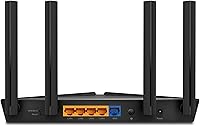
  • No USB port means no option for shared network storage or printer sharing.
  • Parental controls are too basic for parents who need per-device scheduling or detailed usage reports.
  • The web admin panel feels dated and limited compared to what rival routers offer at a similar price.
  • The unit runs noticeably warm during extended use, which may concern users in poorly ventilated spaces.
  • A subset of users report performance degradation after a year or more of continuous operation.
  • Advanced network features like VLAN support and custom DNS require third-party guidance to configure.
  • WPS is enabled by default, which is a minor but real security consideration that less experienced users may overlook.
  • Brief occasional disconnections have been reported after weeks of uptime without a manual restart.

Ratings

The TP-Link Archer AX23 WiFi 6 Router has been evaluated by our AI system after processing thousands of verified purchase reviews from buyers worldwide, with spam, bot activity, and incentivized feedback actively filtered out. The scores below reflect a transparent picture of where this dual-band router genuinely excels and where real users have run into friction. Both the strengths and the honest limitations are accounted for in every category.
Value for Money
91%
This is where the Archer AX23 earns its strongest praise. Buyers repeatedly note that getting WiFi 6 capability at this price point felt like a genuine win, especially when comparable specs from other brands cost noticeably more. For renters and first-time upgraders, the cost-to-performance ratio is hard to argue with.
A small segment of users feel the value equation only holds if you already own WiFi 6 client devices. Those still running older phones and laptops see less tangible benefit, which can make the price feel less justified in practice.
Ease of Setup
93%
The included quick-start guide is genuinely clear, and most users report having the router up and running within ten minutes of opening the box. The TP-Link Tether app simplifies the process further, walking non-technical users through each step without requiring any web browser configuration.
A handful of users experienced minor hiccups when trying to clone their existing network name from an older router. The app also occasionally requires a firmware update on first boot, which can add a few unexpected minutes to the process.
WiFi Speed Performance
74%
26%
For everyday tasks like 4K streaming, video calls, and general browsing, speeds are more than adequate. Users who upgraded from aging WiFi 4 or early WiFi 5 routers noticed a clear improvement in how consistently their connections held under load, particularly when multiple devices were active at once.
Top-tier throughput numbers only materialize on devices that also support WiFi 6, and many households simply do not have enough such devices yet. Users with WiFi 5 phones and laptops reported speed gains that were real but modest rather than dramatic.
Range & Coverage
67%
33%
In apartments and single-floor homes under around 1,500 square feet, coverage is solid throughout. The 2.4 GHz band reaches into corners and through walls reasonably well, keeping smart home devices and older gadgets connected without constant dropouts.
This is the most consistent pain point in user feedback. Multi-story homes and larger houses regularly see dead zones on upper floors or in rooms far from the router. Users expecting whole-home coverage in a larger property will likely need a mesh extender alongside it.
Connection Stability
83%
Day-to-day stability gets strong marks from the majority of buyers. Video calls staying connected, streams not buffering mid-episode, and devices not randomly dropping off the network are the kinds of improvements users highlight most often after switching to this router.
Some users report occasional brief disconnections after the router has been running for several weeks without a restart. This appears to affect a minority of units but is worth noting for households that rely on constant uptime for work-from-home setups.
Multi-Device Handling
79%
21%
WiFi 6 brings improved efficiency when several devices compete for bandwidth simultaneously, and the Archer AX23 handles a busy home network noticeably better than older budget routers. Households with ten or more connected devices report fewer slowdowns during peak evening hours.
Under very heavy simultaneous load — think multiple 4K streams plus active gaming plus video calls at the same time — some users notice performance degradation. It holds up well for typical households but is not engineered for power-user scenarios.
App & Remote Management
77%
23%
The Tether app covers the essentials cleanly: network monitoring, device prioritization, guest network setup, and basic parental controls are all accessible without logging into a web interface. For non-technical users, this is a meaningful convenience that older budget routers simply did not offer.
Advanced users find the app limiting compared to a full web admin panel. Options like detailed traffic statistics, advanced QoS tuning, or custom DNS settings require going outside the app, and some users found the web interface less polished than expected.
Parental Controls
62%
38%
Basic time scheduling and content filtering are available through the Tether app, which is enough for parents who want to limit screen time for younger kids. Setting up a separate guest network with restricted access is also quick and practical.
The controls are fairly blunt. There is no per-app blocking, no detailed usage reporting, and filtering categories are broad rather than granular. Parents looking for robust family management tools will likely find this falls short of dedicated parental control solutions.
Build Quality & Design
71%
29%
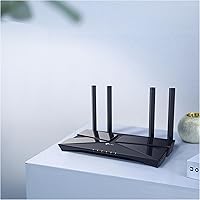
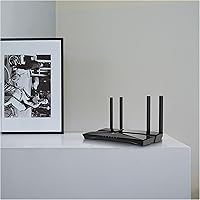
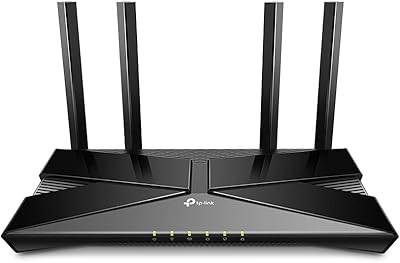
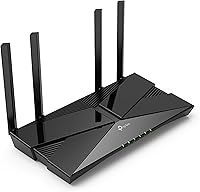
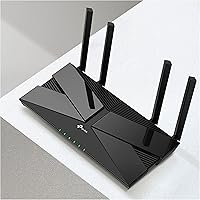
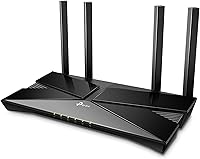
The router has a clean, low-profile black design that sits unobtrusively on a shelf or desk. At under a pound, it is light enough to mount or reposition easily, and the matte finish avoids the fingerprint-magnet look of glossy budget hardware.
The plastic casing feels firmly mid-range rather than premium. A few users noted the unit runs warm after extended use, though no thermal issues were widely reported. The external antenna count is modest compared to higher-end competitors at similar price points.
Backward Compatibility
88%
Every device in the house works with this router, full stop. Support for 802.11ac, n, g, and b means older tablets, smart TVs, and budget smartphones connect without any configuration headaches. This makes it an easy drop-in replacement for an aging router without forcing any device upgrades.
Older 2.4 GHz-only devices can occasionally crowd that band and create minor congestion, though this is a general limitation of dual-band architecture rather than a flaw specific to this router.
WPS Functionality
81%
19%
WPS works reliably for connecting printers, smart speakers, and other devices that support it. Users who regularly add new gadgets to their home network appreciate being able to skip password entry entirely for compatible devices.
WPS has known security limitations that more technically aware users prefer to disable. The router allows this, but the option is buried in settings, and less experienced users may not think to check it.
Port Selection
66%
34%
The inclusion of a dedicated WAN port and multiple LAN ports covers the needs of most home setups, allowing wired connections for a desktop, smart TV, or gaming console alongside the wireless network.
Users with more complex wired setups have noted the port count is limited for the price. There is no USB port for network storage or printer sharing, which some buyers expected at this tier and only discovered after purchase.
Installation & Documentation
89%
The physical quick-start guide is clearer than average, with diagrams that actually match the hardware. First-time router buyers specifically call out how approachable the setup process felt, which is not always a given in this category.
The documentation covers basic setup well but offers little guidance for more advanced configurations. Users who wanted to set up a static IP, configure VLANs, or adjust DNS settings had to rely on third-party forums rather than official resources.
Long-Term Reliability
72%
28%
The majority of buyers report consistent performance over many months of continuous use. Firmware updates have been issued periodically, suggesting TP-Link is actively maintaining the product rather than abandoning it post-launch.
A smaller but notable group of users reported unit failures or significant performance degradation after roughly a year of use. This is not widespread enough to be alarming, but it is a pattern that appears more in this price segment than in premium tiers.

Suitable for:

The TP-Link Archer AX23 WiFi 6 Router is a strong match for anyone living in an apartment, condo, or single-floor home who wants reliable, modern wireless performance without overpaying for features they will never use. It is particularly well-suited to renters who need a plug-and-play upgrade from an aging router, or households where the number of connected devices has quietly crept up over the years — smart TVs, phones, tablets, smart speakers, and laptops all competing for bandwidth at once. Non-technical buyers will feel at home here; the Tether app removes the need to fiddle with web admin panels, and the physical setup is genuinely straightforward. Families looking for a light layer of parental controls without investing in a dedicated solution will also find enough here to get by. If your current router is several years old and dropping connections regularly, this dual-band router offers a meaningful, practical step forward.
Not suitable for:

The TP-Link Archer AX23 WiFi 6 Router is not the right choice for larger homes, particularly those spread across two or more floors, where coverage tends to run thin in back rooms and far corners. Serious gamers or households that run demanding workloads simultaneously — multiple 4K streams, competitive online gaming, and large file transfers all at once — will likely hit the ceiling of what this router can handle under pressure. Tech-savvy users who want granular control over traffic management, detailed usage analytics, or advanced network segmentation will find the admin tools underwhelming. The absence of a USB port also rules it out for anyone hoping to attach a shared drive or network printer. And if your devices are all a few years old and not WiFi 6 compatible, the headline feature of this router will not translate into meaningful real-world gains for your specific setup.
Specifications

  • WiFi Standard: Operates on WiFi 6 (802.11ax), the current mainstream wireless standard offering improved speed and efficiency over WiFi 5.
  • Frequency Bands: Dual-band design transmits simultaneously on both 2.4 GHz and 5 GHz frequencies to support a wide range of devices.
  • Compatibility: Backward compatible with 802.11ac, 802.11n, 802.11g, and 802.11b devices, covering virtually every wireless device made in the past two decades.
  • Special Features: Includes WPS (Wi-Fi Protected Setup) for one-button device pairing without manually entering a network password.
  • Management App: Managed via the TP-Link Tether app on iOS and Android, supporting remote access, device monitoring, and basic parental controls.
  • Dimensions: Measures 12.99 x 9.84 x 3.15 inches, giving it a low-profile footprint suitable for shelves or desktop placement.
  • Weight: Weighs 14.8 ounces, making it light enough to reposition or wall-mount without difficulty.
  • Color & Finish: Finished in matte black, which resists visible fingerprints and blends into most home and office environments.
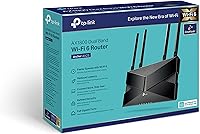
  • In the Box: Package includes the Archer AX23 router, a power adapter, one RJ45 Ethernet cable, and a printed quick installation guide.
  • Model Number: Officially designated as the Archer AX23, a model within TP-Link's mid-range home networking lineup.
  • Connectivity Type: Connects client devices exclusively via Wi-Fi, with wired LAN ports available for devices requiring a direct Ethernet connection.
  • Recommended Use: Designed for home networking environments, suited to small and medium households with everyday internet usage needs.
  • Manufacturer: Designed and produced by TP-Link, a globally recognized networking hardware brand with a broad consumer router portfolio.
  • Release Date: First made available in October 2021, with continued firmware support provided by TP-Link post-launch.
  • Discontinuation Status: As of the latest available data, this router has not been discontinued by the manufacturer and remains in active production.

Related Reviews

TP-Link Archer AX6000 WiFi 6 Router
80%
88%
Wireless Performance
91%
Multi-Device Handling
86%
Setup & Ease of Use
93%
Wired Connectivity
82%
Range & Coverage
More
TP-Link Archer AX73
TP-Link Archer AX73
79%
88%
Wireless Speed & Throughput
91%
Multi-Device Performance
74%
Coverage & Range
93%
Setup & Ease of Use
79%
Build Quality & Design
More
TP-Link Archer AX10 WiFi 6 Router
77%
91%
Value for Money
78%
Wireless Performance
63%
Range & Coverage
93%
Ease of Setup
82%
Network Stability
More
TP-Link Archer AX72 Pro WiFi 6 Router
87%
89%
WiFi Performance
92%
Value for Money
94%
Ease of Setup
88%
Security Features
83%
Range and Coverage
More
TP-Link Archer AC1750 WiFi Router
85%
88%
WiFi Performance
91%
Setup & Installation
80%
Range & Coverage
85%
Value for Money
89%
Alexa Integration
More
TP-Link Archer BE550
76%
83%
Wireless Performance
91%
Wired Port Quality
88%
Setup & Ease of Use
67%
Coverage & Range
58%
HomeShield Security & Parental Controls
More
TP-Link Archer C59 AC1350 WiFi Router
82%
88%
Setup & Installation
72%
Wi-Fi Range & Coverage
81%
Overall Performance
92%
Value for Money
78%
Build Quality
More
TP-Link Archer AXE75
78%
83%
Wireless Performance
71%
6 GHz Band Utility
91%
Setup & Ease of Use
86%
Value for Money
68%
Range & Coverage
More
TP-Link Archer BE24000 WiFi 7 Router
87%
94%
Performance
89%
Setup & Installation
92%
Connectivity & Compatibility
90%
Coverage & Range
88%
Security Features
More
TP-Link Archer BE260 WiFi 7 Router
85%
93%
WiFi Performance
89%
Ease of Setup
77%
Coverage & Range
91%
Streaming & Gaming Experience
85%
Design & Build Quality
More

FAQ

Not entirely, but it does matter for the headline speed gains. The TP-Link Archer AX23 WiFi 6 Router will work perfectly fine with older devices, and you will still see improved stability and better handling of multiple connections at once. However, the full throughput benefits of WiFi 6 only kick in when both the router and the connecting device support the standard. If most of your devices are a few years old, the upgrade is still worthwhile — just manage your expectations on raw speed numbers.
It is genuinely one of the easier routers to get running. The box includes a clear quick-start guide with diagrams, and the TP-Link Tether app on your phone walks you through the rest. Most users are connected within ten to fifteen minutes of opening the box, with no need to log into any web browser or type in complicated settings.

That depends on your home's size and layout. For apartments, condos, and single-floor homes up to around 1,500 square feet, coverage is solid. Multi-story homes or larger properties often see weaker signal in far rooms or on upper floors. If you have a bigger space, you may want to pair this dual-band router with a range extender or consider a mesh system instead.

Yes, the Archer AX23 works as a standard wireless router and connects to any broadband modem via the WAN Ethernet port. It is compatible with virtually all ISPs. You simply plug it into your existing modem and run through the setup process — no ISP-specific configuration is usually needed.

No, this router does not include a USB port. If network-attached storage or shared printer functionality is important to you, you would need to look at a step-up model that includes USB connectivity. It is one of the trade-offs made to keep this router accessible from a cost standpoint.

It handles a typical busy household comfortably — think ten to fifteen simultaneous connections including phones, laptops, smart TVs, and smart home gadgets. WiFi 6 is specifically designed to manage multiple devices more efficiently than older standards. That said, if you have twenty-plus devices all actively pulling heavy data at once, you may start to notice some slowdown during peak hours.

It is useful for basic needs — you can set time limits and apply broad content filters through the Tether app without any technical setup. For parents of younger children who just want to limit screen time or block certain categories of content, it gets the job done. If you need detailed per-app controls, usage history reports, or very granular filtering, it will feel limited and you would be better served by dedicated parental control software.

WPS is convenient for quickly connecting compatible devices without a password, but it has known security vulnerabilities that make it a minor risk if left permanently on. If you only occasionally add new devices to your network, it is worth disabling WPS in the router settings after initial setup. The option to disable it is available in the admin panel, though it takes a little digging to find.

Yes, TP-Link has continued to push firmware updates since the router launched in 2021. These updates generally address security patches and minor performance improvements. You can check for and install updates directly through the Tether app or the web admin interface. It is good practice to check periodically, especially in the first year of ownership.

Think of the 2.4 GHz band as the long-range, slower lane and the 5 GHz band as the shorter-range, faster lane. Smart home gadgets, older devices, and anything far from the router tend to do better on 2.4 GHz. Laptops, phones, and streaming devices in the same room or nearby will benefit from connecting to 5 GHz for faster, more responsive performance. The router manages both bands simultaneously, so devices can connect to whichever suits them best.

Where to Buy