TP-Link Archer A8 AC1900

Overview
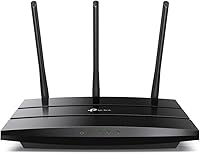
If your ISP-provided gateway is dragging down your whole household, the TP-Link Archer A8 AC1900 is worth a serious look. It sits squarely in the mid-range: fast enough for most homes, priced low enough that you won't lose sleep over it. Running dual-band at 600 Mbps on 2.4 GHz and 1300 Mbps on 5 GHz, it handles the typical mix of phones, laptops, and smart devices without breaking a sweat. The flat, compact body — just over an inch thick — fits neatly on a bookshelf or media console. One honest caveat up front: there's no USB port, so if you were hoping to attach a shared drive or printer, this isn't the router for that job.
Features & Benefits
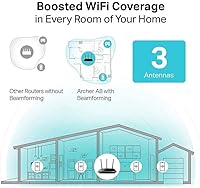
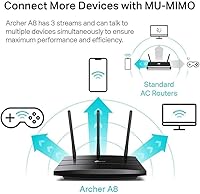
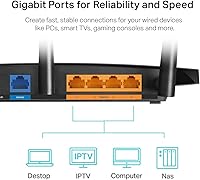
What makes the A8 genuinely useful in a busy household is how it handles multiple devices at once. MU-MIMO technology means your laptop isn't forced to wait while someone else's phone grabs its data — all three streams work in parallel. Pair that with beamforming, which directs signal toward your devices rather than scattering it around the room, and you get noticeably steadier connections at range. The full gigabit port suite — four LAN, one WAN — means your wired gaming console or smart TV gets full-speed throughput. If you need to expand coverage later, OneMesh compatibility lets you add a TP-Link extender without creating a separate network name. Parental controls and a guest network round things out at no extra cost.
Best For
This Archer router earns its place in homes where the device count is creeping past ten — two floors, a handful of laptops, several phones, a smart TV or two. If you're still running on an ISP-provided gateway, the speed and stability jump when switching to the A8 tends to be significant. Families will appreciate the parental controls without needing to spend twice as much. Wired gamers or 4K streamers get solid gigabit LAN connections right out of the box. That said, if you need USB-based file or printer sharing, or rely on a built-in VPN client, look elsewhere. This TP-Link unit is built for straightforward home networking, not advanced power-user configurations.
User Feedback
Owners consistently highlight quick, painless setup as the standout first impression — most report being online within 15 minutes using the Tether app. On the 5 GHz band, performance in open-plan spaces draws strong praise, with many noting a clear improvement over their previous ISP gateway. The honest flipside: in homes with thick concrete or brick walls, the 2.4 GHz signal loses steam faster than you'd hope. A few long-term users also mention the unit runs noticeably warm, and suggest leaving airspace around it rather than boxing it into a cabinet. Advanced tweaks like QoS require the browser-based interface, not the app. Overall, long-term reliability holds up well, with most owners reporting consistent performance across two to three years.
Pros
- Setup via the Tether app typically takes under 15 minutes, even for first-time users.
- The 5 GHz band delivers strong, consistent speeds in open-plan spaces and single-floor homes.
- Three-stream MU-MIMO keeps multiple devices running smoothly without one hogging bandwidth.
- All four LAN ports operate at full gigabit speeds — ideal for wired gaming or 4K streaming.
- Built-in parental controls include content filtering and time limits at no extra subscription cost.
- Guest network mode isolates visitor devices from your main network without any technical setup.
- OneMesh compatibility makes it easy to expand coverage later using compatible TP-Link extenders.
- The compact, flat design fits discreetly on a shelf or media unit without dominating the space.
- Long-term reliability is solid — most owners report consistent uptime over two to three years.
- Beamforming directs signal toward active devices, improving connection stability at moderate range.
Cons
- The 2.4 GHz band underperforms in homes with thick walls, concrete floors, or multiple stories.
- No USB port means no shared drive or printer connectivity — a real gap for some households.
- The router runs noticeably warm under sustained load; open ventilation is not optional, it is necessary.
- Advanced settings like VPN and detailed QoS tuning require the browser admin panel, not the app.
- Coverage in larger homes above roughly 2,000 square feet will likely require an additional extender.
- OneMesh expansion only works with TP-Link hardware, locking you into one brand's ecosystem.
- The Tether app lacks depth for power users who want granular per-device network controls.
- A small number of long-term owners report performance degradation after 18 to 24 months of heavy use.
Ratings
The scores below for the TP-Link Archer A8 AC1900 were generated by our AI system after analyzing thousands of verified global user reviews, with spam, bot-submitted, and incentivized feedback actively filtered out. The result is an honest, balanced picture of where this Archer router genuinely delivers and where real buyers have run into friction. Both consistent strengths and recurring pain points are reflected in every category score.
Wireless Speed (5 GHz)
Wireless Speed (2.4 GHz)
Setup & Installation
Coverage Range
Multi-Device Performance
Build Quality & Design
Parental Controls
App & Software Experience
Wired Port Performance
Long-Term Reliability
Value for Money
OneMesh & Extender Integration
Security Features
Suitable for:
The TP-Link Archer A8 AC1900 is a strong fit for households that have outgrown their ISP-provided gateway and want a meaningful, no-fuss upgrade without spending a lot. If your home has between 10 and 20 connected devices — phones, laptops, a smart TV, a gaming console, maybe a handful of smart home gadgets — this Archer router handles that load comfortably, especially in open-plan or single-floor layouts where the 5 GHz band can stretch without obstruction. Families will find the built-in parental controls genuinely useful: content filtering and screen-time limits are managed through an app and don't require a separate subscription. Wired setups benefit too, since all four LAN ports run at full gigabit speeds, making it a reliable backbone for a hardwired gaming rig or 4K streaming device. If you're already using TP-Link range extenders, the OneMesh support is a practical bonus — it lets you expand coverage later without juggling two separate network names.
Not suitable for:
The TP-Link Archer A8 AC1900 is not the right tool for every situation, and knowing its limits upfront will save you a return trip. If you live in a multi-story home with brick or concrete interior walls, the 2.4 GHz band may leave you with dead zones that a more powerful router — or a mesh system — would have handled without needing an extender. Anyone who wants to attach an external hard drive for basic file sharing, or connect a USB printer across the network, should look elsewhere; there is simply no USB port on this unit, and that is not going to change with a firmware update. Power users who rely on a built-in VPN client, need granular QoS controls from their phone, or want advanced network monitoring will find the feature set thin — the browser-based admin panel covers more ground than the app, but it still falls short of what higher-end routers offer. Finally, buyers in larger homes above 2,500 square feet should be realistic: the A8 will likely need help from an extender to cover the full footprint, which adds cost and complexity that a purpose-built mesh kit might handle more cleanly from the start.
Specifications
- Dimensions: The router measures 9.57 x 6.32 x 1.28 inches, designed to lie flat on a shelf or media unit.
- Weight: The unit weighs 14.6 ounces, making it lightweight enough to reposition easily without mounting hardware.
- Wi-Fi Standards: Supports 802.11a, 802.11b, 802.11g, 802.11n, and 802.11ac wireless communication standards.
- Frequency Bands: Dual-band operation covers both 2.4 GHz (up to 600 Mbps) and 5 GHz (up to 1300 Mbps) simultaneously.
- Max Wi-Fi Speed: Combined theoretical maximum throughput is AC1900, totaling up to 1900 Mbps across both bands.
- MIMO Technology: 3-stream MU-MIMO allows up to three devices to receive simultaneous data streams without queuing.
- Beamforming: Active beamforming focuses the wireless signal toward connected client devices rather than broadcasting omnidirectionally.
- LAN Ports: Equipped with four Gigabit LAN ports supporting full 1000 Mbps wired throughput for connected devices.
- WAN Port: One Gigabit WAN port connects to a modem or ONT at up to 1000 Mbps for full-speed internet input.
- USB Port: No USB port is included; shared drive and USB printer connectivity are not supported on this model.
- OneMesh Support: Compatible with TP-Link OneMesh-enabled extenders to form a unified whole-home network under a single SSID.
- Parental Controls: Built-in parental controls support content category filtering and daily time-limit scheduling managed via the Tether app.
- Guest Network: Supports a dedicated guest Wi-Fi network that isolates visitor traffic from the primary home network.
- QoS: Quality of Service (QoS) prioritization is available via the browser-based admin interface for bandwidth management.
- Access Point Mode: Can be configured as a wireless access point when connected to an existing wired network infrastructure.
- Security Protocols: Supports WPA, WPA2, and WPA3 wireless encryption standards along with a built-in SPI firewall.
- WPS: Physical WPS button on the unit enables quick, push-button wireless pairing with compatible client devices.
- Color & Finish: Available in matte black finish designed to blend into home entertainment and office shelf environments.
- In the Box: Package includes the router, a power adapter, one RJ45 Ethernet cable, and a quick installation guide.
- Model Number: Official model designation is Archer A8, manufactured by TP-Link under the Archer consumer router lineup.
Related Reviews
TP-Link Archer VR2100 VDSL/ADSL Modem Router
TP-Link Archer BE600 WiFi 7 Router

TP-Link Archer A7 AC1750 WiFi Router
TP-Link Archer BE700 WiFi 7 Router
TP-Link RE550 Wi-Fi Range Extender

TP-Link Archer BE900 Wi-Fi 7 Router

TP-Link Archer A54
TP-Link Archer C59 Dual-Band WiFi Router

TP-Link Archer BE550
