
Overview

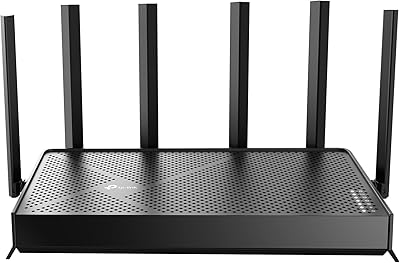
The TP-Link Archer AX55 is a dual-band Wi-Fi 6 router that sits squarely in the mid-range sweet spot — capable enough to replace aging Wi-Fi 5 hardware without the price tag of a flagship model. It covers the AX3000 speed class, splitting bandwidth across 2.4 GHz and 5 GHz bands to handle a busy household without breaking a sweat. The flat, low-profile chassis is wider than most routers at this price, with four external antennas fanning out on each side. A USB 3.0 port on the back adds basic shared storage functionality, though it is modest rather than a full NAS replacement. Out of the box, you get an Ethernet cable, power adapter, and a no-fuss quick-start guide.

Features & Benefits

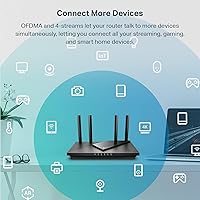
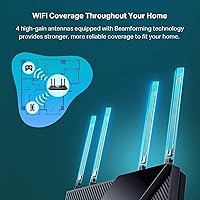
Wi-Fi 6 brings more than just faster top-end speeds — the real benefit for most households is how well it handles congestion. This Wi-Fi 6 router uses OFDMA technology to let multiple devices share the same band simultaneously, cutting down on the lag spikes that build up when a dozen phones, laptops, and smart devices compete at once. MU-MIMO adds parallel communication capacity, while Beamforming and four high-gain antennas direct the signal more efficiently. Target Wake Time tells compatible devices when to check in, reducing radio activity and helping preserve battery life across phones and IoT gadgets. A larger passive heatsink keeps thermals in check during extended use, and built-in VPN server and client support is a genuine bonus for remote workers.

Best For

This TP-Link router makes the most sense for households juggling 15 to 30 connected devices — game consoles, smart TVs, security cameras, tablets, and everything in between. Medium-sized homes, roughly up to 2,500 square feet on a single floor, tend to be the sweet spot for reliable coverage. Remote workers will appreciate the built-in VPN functionality, which is genuinely uncommon at this price point. Families get workable parental controls through HomeShield's free tier without needing a separate paid service. It is also a practical upgrade for anyone still running a Wi-Fi 5 router who wants Wi-Fi 6 benefits without committing to a full mesh system or a significantly more expensive brand.

User Feedback

Across thousands of verified reviews, the Archer AX55 earns consistent praise for easy app-based setup — TP-Link's Tether app guides new users through the process quickly, which resonates strongly with buyers who are not particularly network-savvy. Coverage gets solid marks for single-floor homes, though a handful of multi-story households note that signal weakens on upper floors. On the critical side, a number of users find HomeShield's premium upsell prompts irritating once the router is up and running — it is worth knowing upfront that the full security suite sits behind a paid subscription. Occasional firmware updates have caused brief connectivity hiccups for a small group of users. Overall, a 4.4-star average across a very large review pool reflects a genuinely reliable mid-range performer.

Pros

  • Wi-Fi 6 OFDMA support keeps multi-device households running smoothly without constant buffering or lag.
  • The Tether app makes setup genuinely painless, even for non-technical users.
  • Built-in VPN server and client support is a rare and useful feature at this price tier.
  • Free HomeShield tier covers basic parental controls and security scanning with no monthly fee.
  • Four high-gain antennas with Beamforming deliver reliable signal across medium-sized single-floor homes.
  • The Archer AX55 handles 15 to 30 simultaneous devices without the congestion collapse common in older routers.
  • EasyMesh compatibility means you can expand coverage later by adding compatible nodes.
  • Improved passive cooling keeps the unit running at stable speeds during extended use.
  • Target Wake Time helps extend battery life on phones and IoT gadgets connected to the network.
  • Ships with an Ethernet cable included, so you can get connected to your modem right out of the box.

Cons

  • HomeShield premium upsell prompts appear frequently after setup and frustrate a notable number of users.
  • Coverage drops off significantly in two-story homes or properties with thick concrete or brick walls.
  • Firmware updates have caused brief but disruptive connectivity outages for a subset of users.
  • The physical footprint is larger than most competing routers in this price range, which can be awkward on small shelves.
  • VPN throughput is noticeably reduced compared to direct connection speeds, limiting its usefulness for bandwidth-heavy tasks.
  • The free parental controls lack granular filtering and per-profile usage history, pushing families toward a paid upgrade.
  • USB file-sharing speeds are too slow for large media libraries or frequent large file transfers.
  • Advanced network configuration options feel limited compared to similarly priced prosumer alternatives.
  • Alexa voice integration covers only a narrow set of basic commands and adds little practical value for most users.
  • No third Wi-Fi band means heavy mixed traffic loads cannot be split as effectively as on tri-band models.

Ratings

The TP-Link Archer AX55 earns its place as one of the more consistently praised mid-range Wi-Fi 6 routers in its class, and the scores below reflect what real buyers actually experience — not marketing claims. Our AI has analyzed thousands of verified global reviews, actively filtering out incentivized, bot-generated, and outlier submissions to surface a balanced picture. Strengths and frustrations are both represented honestly, so you can make a genuinely informed decision.

Wireless Performance
83%
For a mid-range AX3000 router, real-world throughput on the 5 GHz band impresses most users, especially those streaming 4K or running video calls from one or two rooms away. Buyers upgrading from older Wi-Fi 5 hardware consistently report noticeable improvements in speed and stability under load.
Top advertised speeds are theoretical maximums that few users will hit in practice. At longer distances or through multiple walls, the 5 GHz band drops off more noticeably than some competitors, and heavy network loads can expose the limits of a dual-band-only setup.
Coverage & Range
74%
26%
In single-story homes and mid-sized apartments, the four external antennas and Beamforming technology deliver solid, consistent signal across most rooms. Users in open-plan layouts or smaller two-bedroom homes report rarely needing a range extender.
Multi-story homes are where coverage becomes inconsistent. Several users in three-bedroom, two-floor houses note weak signal on upper floors or in detached garages, and coverage estimates around 2,500 square feet should be treated as a best-case figure rather than a reliable target.
Device Handling & Congestion
86%
OFDMA and MU-MIMO together make a real difference in households with 15 or more simultaneous devices. Gamers and remote workers specifically call out reduced lag during peak evening hours when multiple family members are streaming, gaming, and video conferencing at once.
The dual-band configuration means there is no dedicated 5 GHz backhaul or a third band to offload traffic. In very dense device environments — think 30-plus active clients — some users notice scheduling delays that a tri-band router would handle more gracefully.
Setup & Ease of Use
91%
The Tether app walks users through the full setup process in under ten minutes, and reviewers who describe themselves as non-technical consistently highlight how painless the experience is. QR-code Wi-Fi sharing and a clean dashboard make day-to-day management accessible even for less confident users.
Advanced users wanting granular control over DHCP reservations, firewall rules, or VLAN configuration may find the app interface limiting. The web-based admin panel offers more depth, but its layout feels dated and less intuitive compared to some rival platforms.
Build Quality & Design
78%
22%
The chassis feels sturdy and well-finished for the price tier, and the flat low-profile form factor sits neatly on a shelf or entertainment unit without dominating the space. The redesigned heatsink does appear to keep temperatures in check during extended use, which is a genuine functional improvement.
The footprint is noticeably larger than competing routers at this price, which can be a problem on cramped desks or small shelving units. The all-black plastic build looks functional rather than premium, and antenna positioning options are limited given the fixed placement along the sides.
Security Features
71%
29%
The free tier of HomeShield covers the basics well — network security scans, IoT device identification, and simple parental controls are included without any subscription. For families wanting a safety net without adding another monthly bill, this is a meaningful inclusion.
TP-Link pushes HomeShield Pro upgrade prompts fairly aggressively after setup, which a significant number of users find intrusive. The free tier also lacks more advanced features like real-time threat intelligence and detailed usage analytics, meaning power users will quickly hit its ceiling.
VPN Functionality
77%
23%
Having both a VPN server and VPN client built directly into the router is uncommon at this price point and genuinely useful for remote workers who want all home traffic routed through a company or personal VPN without configuring individual devices. OpenVPN and WireGuard-style configurations are supported.
VPN throughput is noticeably throttled compared to direct connections, and actual speeds depend heavily on the server location and chosen protocol. Users expecting to maintain full ISP speeds while running a VPN tunnel will be disappointed, and setup complexity increases sharply for less experienced users.
Value for Money
88%
Relative to what is on offer — Wi-Fi 6, EasyMesh support, built-in VPN, HomeShield basics, and a USB 3.0 port — the price represents a strong proposition for buyers who do not need a tri-band or mesh-native system. The feature-to-cost ratio consistently wins praise from buyers who compared it against similarly priced rivals.
The value calculation shifts slightly if you factor in that unlocking the full HomeShield suite adds an ongoing subscription cost. Some buyers also note that slightly higher-tier AX routers occasionally go on sale for not much more, narrowing the gap.
Parental Controls
68%
32%
The free HomeShield parental controls allow per-device scheduling and basic content filtering, which is enough for households looking to limit screen time for children without purchasing a separate router or third-party tool. Setup through the app is straightforward.
The controls are fairly blunt compared to dedicated parental software or premium router suites. Granular filtering categories, per-profile histories, and real-time pause functionality sit behind the paid HomeShield Pro tier, which limits how useful the free version is for families with older children.
USB & Storage Sharing
58%
42%
The USB 3.0 port adds a layer of flexibility that is absent on many budget routers — plugging in a flash drive or external hard drive to share files across the local network works as advertised and is a convenient bonus for light use cases.
Transfer speeds over the USB share are modest enough that it should not be mistaken for a proper NAS solution. Large file transfers are slow, and advanced features like media server or download manager functionality are present but unreliable in practice according to multiple reviewers.
Firmware & Software Stability
66%
34%
For the majority of users, the firmware runs quietly in the background with automatic update options and no intervention needed for months at a time. The Tether app handles most common management tasks reliably once the initial setup is complete.
A recurring complaint in recent reviews involves firmware updates causing brief but disruptive drops in connectivity or requiring a manual reboot to restore normal operation. While not widespread, it is consistent enough to be a real concern for users who rely on always-on uptime for work or smart home devices.
Thermal Management
82%
18%
The redesigned passive cooling system with an enlarged heatsink is one of the less-talked-about but practically meaningful upgrades in this model. Users who run their routers in enclosed media cabinets or warmer rooms report that the unit stays noticeably cooler than the previous generation hardware it replaces.
There are no active fans, so in very confined spaces with poor airflow, temperatures can still creep up during sustained heavy use. A small number of reviewers note that sustained heat did correlate with slightly degraded performance in their specific setups.
EasyMesh & Expandability
73%
27%
EasyMesh compatibility means this router can serve as the foundation for a wired or wireless mesh network using other compatible TP-Link nodes, which is a useful forward-looking feature for households that might want to expand coverage later without replacing the entire setup.
EasyMesh performance and reliability varies depending on which node products are paired with it, and the experience is not as polished as dedicated mesh systems like Eero or Deco. Users expecting plug-and-play mesh expansion may find the configuration more involved than anticipated.
Alexa & Smart Home Integration
63%
37%
Amazon Alexa integration allows basic voice commands for toggling guest networks or checking connection status, which is a convenient touch for households already embedded in the Alexa ecosystem. Setup is relatively painless through the standard Alexa app skill.
The Alexa integration is fairly shallow — it covers a narrow set of commands and cannot handle more nuanced tasks like prioritizing a specific device or running a speed test. Users expecting deep smart home automation through voice will find the functionality more of a novelty than a meaningful tool.

Suitable for:

The TP-Link Archer AX55 is a practical fit for households that have outgrown their older router and want a meaningful upgrade without spending a lot. If your home has a growing collection of connected devices — smart TVs, game consoles, phones, laptops, security cameras — this Wi-Fi 6 router handles that kind of congestion far better than budget Wi-Fi 5 hardware. Single-floor homes and medium-sized apartments get the most out of its coverage, and the built-in Tether app makes the whole setup process approachable even for people who have never logged into a router admin panel before. Remote workers who want a VPN server baked into the router itself will find it a genuinely useful feature that is rarely offered at this price point. Families who want basic parental controls and network security scanning without subscribing to a third-party service will also find the free HomeShield tier covers the essentials reasonably well.

Not suitable for:

Buyers with large multi-story homes or sprawling open floor plans should think carefully before committing to the TP-Link Archer AX55, as its dual-band configuration and single-unit design will struggle to provide consistent coverage across every corner of a bigger property. If you have 40 or more active devices running simultaneously, or you regularly push heavy file transfers across multiple clients at once, a tri-band router or a dedicated mesh system would serve you better. Power users who want deep firewall controls, VLAN segmentation, or advanced QoS configuration will find the interface limiting — the web admin panel is functional but not in the same league as prosumer options. Anyone hoping to use the USB port as a genuine NAS replacement for large media libraries will be disappointed, as throughput is too modest for that kind of workload. And if firmware stability is a hard requirement for a smart home or always-on work setup, the occasional post-update connectivity hiccup that some users report is worth factoring into your decision.

Specifications

  • Wi-Fi Standard: This router supports 802.11ax (Wi-Fi 6) alongside backward-compatible 802.11ac, 802.11n, 802.11g, and 802.11b standards.
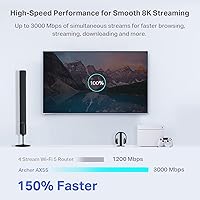
  • Speed Class: Rated AX3000, combining up to 2402 Mbps on the 5 GHz band and up to 574 Mbps on the 2.4 GHz band under ideal conditions.
  • Frequency Bands: Dual-band operation across 2.4 GHz and 5 GHz, with no dedicated third band or backhaul channel.
  • Antennas: Four fixed external high-gain antennas are arranged along the sides of the unit to support Beamforming and extended signal reach.
  • Dimensions: The unit measures 12.99 x 9.45 x 2.87 inches, making it larger in footprint than most single-band or entry-level routers in its class.
  • Weight: The router weighs 1.66 pounds, which is typical for a mid-range unit with a full external antenna array.
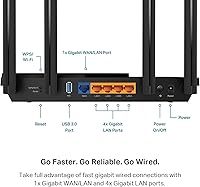
  • USB Port: One USB 3.0 port is included on the rear panel, supporting basic shared storage and light file-transfer use cases over the local network.
  • LAN Ports: Four Gigabit Ethernet LAN ports allow wired connections for desktops, smart TVs, gaming consoles, or network switches.
  • WAN Port: One Gigabit Ethernet WAN port connects the router to your modem or ISP-provided gateway device.
  • MU-MIMO: Supports MU-MIMO technology, allowing the router to communicate with multiple devices simultaneously rather than sequentially.
  • OFDMA: Orthogonal Frequency Division Multiple Access (OFDMA) enables multiple clients to share a single transmission channel, reducing latency under congested conditions.
  • Beamforming: Beamforming technology focuses the wireless signal toward connected devices rather than broadcasting omnidirectionally, improving effective range and stability.
  • Target Wake Time: Target Wake Time (TWT) schedules device check-ins to reduce unnecessary radio activity, helping extend battery life on phones, laptops, and IoT devices.
  • Security Suite: TP-Link HomeShield provides a free tier covering basic network security scans, IoT device identification, QoS, and simple parental controls, with a paid Pro tier available.
  • VPN Support: Both VPN server and VPN client functionality are built into the router firmware, supporting protocols including OpenVPN and PPTP for remote access configurations.
  • Mesh Compatibility: EasyMesh compatible, allowing this unit to function as a mesh node or primary router within a broader TP-Link or standards-compliant mesh network.
  • Voice Assistant: Amazon Alexa integration is supported, enabling basic voice commands for common network management tasks through the Alexa app skill.
  • Cooling Design: Passive cooling is handled by an enlarged internal heatsink and a redesigned chassis with improved airflow, with no active fan required.
  • Color & Finish: Available in matte black with a flat, low-profile form factor designed to sit horizontally on a shelf or desk surface.
  • In-Box Contents: Package includes the Archer AX55 router, a power adapter, one RJ45 Ethernet cable, and a printed quick installation guide.

Related Reviews
TP-Link Archer VR2100
84%
86%
Wi-Fi Performance
92%
Setup & Installation
87%
Value for Money
72%
Range
90%
Wired Performance
More
TP-Link Archer BE600
90%
96%
Wi-Fi Speed
91%
Coverage Area
94%
Device Capacity
89%
Stability & Reliability
87%
Setup & Installation
More
TP-Link Archer AC1750 WiFi Router
85%
88%
WiFi Performance
91%
Setup & Installation
80%
Range & Coverage
85%
Value for Money
89%
Alexa Integration
More
TP-Link Archer AX6000 WiFi 6 Router
84%
91%
Performance for Gaming and Streaming
87%
WiFi Coverage and Range
80%
Ease of Setup
90%
Security Features (TP-Link HomeCare)
85%
Build Quality and Durability
More
TP-Link Archer A54
TP-Link Archer A54
74%
91%
Value for Money
88%
Ease of Setup
71%
Wi-Fi Range
74%
Wi-Fi Speed & Performance
86%
Security Features
More
TP-Link Archer AXE75
78%
83%
Wireless Performance
71%
6 GHz Band Utility
91%
Setup & Ease of Use
86%
Value for Money
68%
Range & Coverage
More
TP-Link Archer BE550
76%
83%
Wireless Performance
91%
Wired Port Quality
88%
Setup & Ease of Use
67%
Coverage & Range
58%
HomeShield Security & Parental Controls
More
TP-Link Archer C59 AC1350 WiFi Router
82%
88%
Setup & Installation
72%
Wi-Fi Range & Coverage
81%
Overall Performance
92%
Value for Money
78%
Build Quality
More
TP-Link Archer BE260 WiFi 7 Router
85%
93%
WiFi Performance
89%
Ease of Setup
77%
Coverage & Range
91%
Streaming & Gaming Experience
85%
Design & Build Quality
More
TP-Link Archer AX73
TP-Link Archer AX73
79%
88%
Wireless Speed & Throughput
91%
Multi-Device Performance
74%
Coverage & Range
93%
Setup & Ease of Use
79%
Build Quality & Design
More

FAQ

It works with virtually any internet service provider. You just connect it to your existing modem or gateway using the included Ethernet cable, and it handles the rest. There is no ISP lock.

The easiest way is through the TP-Link Tether app on your smartphone. It guides you step by step and most users are up and running in under ten minutes. You can also access the web-based admin panel from a browser if you prefer that approach.

The basic HomeShield tier is permanently free and includes network security scanning, IoT device identification, simple parental controls, and QoS. The paid Pro tier unlocks more advanced features like real-time threat intelligence. Just be aware that the router will prompt you to upgrade fairly often, which some users find annoying.

It depends on the layout and building materials. Single-floor homes and open-plan spaces up to around 2,500 square feet generally get solid coverage. Multi-story homes, especially those with thick walls or concrete floors between levels, may experience weaker signal on upper floors. If that sounds like your situation, adding a compatible mesh node or range extender would help.

Yes, that feature is built right into the firmware. You can configure it as a VPN server and connect to your home network from anywhere using a compatible VPN client on your laptop or phone. Setup takes some configuration, but there are step-by-step guides available on the TP-Link support site.

In practice, households with 15 to 25 active devices generally see good performance thanks to Wi-Fi 6 features like OFDMA and MU-MIMO. If you are regularly running 35 or more bandwidth-intensive devices simultaneously, you may start noticing congestion that a tri-band router would handle more gracefully.

You can, and it works for light use — sharing documents or occasionally accessing files over your local network is fine. That said, transfer speeds are modest, so it is not a substitute for a dedicated NAS device if you are moving large files or streaming high-bitrate video from the drive regularly.

Yes, it is EasyMesh compatible, which means you can pair it with other EasyMesh-supported TP-Link devices to extend coverage into larger spaces. It is a useful option if your needs grow after you buy, though the mesh experience is generally smoother with devices from the same product family.

Absolutely. Wi-Fi 6 is fully backward compatible, so all your older Wi-Fi 5, Wi-Fi 4, and even older devices will connect without any issues. They just will not benefit from the Wi-Fi 6 specific improvements like OFDMA or TWT unless they also support those standards.

Firmware updates can be set to install automatically through the Tether app or admin panel. For most users this works without any issues, but a small number of reviewers have reported brief connectivity drops right after an update installs. If uptime is critical — say, you work from home full-time — you might prefer to schedule manual updates during off-hours just to be safe.