Overview

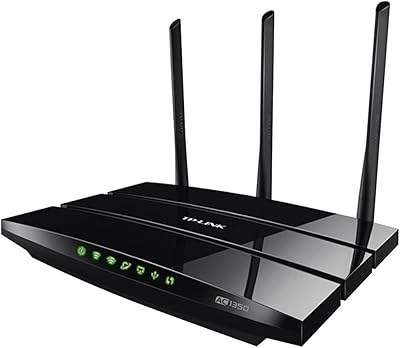
The TP-Link Archer A10 AC2600 WiFi Router entered a crowded mid-range market in 2019 with a clear pitch: reliable whole-home coverage without the cost of a premium mesh system. AC2600 is a combined speed class label — useful shorthand, but what it really means in daily life is enough bandwidth headroom for 4K streaming, video calls, and casual browsing happening at once across multiple devices. The design is low-profile and unobtrusive, sitting flat on a shelf without demanding much space. Setup via Tether, TP-Link's companion app, takes just a few minutes and spares most users from ever touching a browser-based admin panel.
Features & Benefits

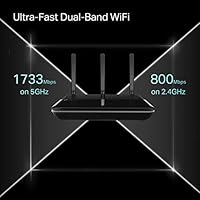
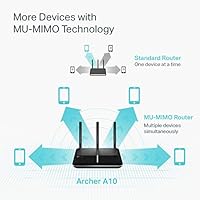
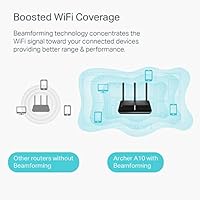
This dual-band router splits traffic across two frequencies — 5 GHz at 1733 Mbps for bandwidth-heavy tasks and 2.4 GHz at 800 Mbps for devices that simply need a steady, wide-area connection. MU-MIMO allows the router to talk to multiple devices at the same time rather than cycling through them, which noticeably helps in homes where gaming, streaming, and video calls overlap. Smart Connect steers devices to the better band automatically, while beamforming focuses signal toward connected clients rather than scattering it uniformly. The built-in VPN server, supporting OpenVPN and PPTP, lets you tunnel into your home network remotely without paying for a separate subscription service.

Best For

The Archer A10 is a practical choice for households running ten or more devices at once — smart TVs, laptops, phones, tablets, and a gaming console all competing for bandwidth. Remote workers who want to reach their home network securely while traveling will appreciate the built-in VPN server, though configuring it does require some comfort with network settings. It also works well for people in medium to large spaces, including multi-floor homes, where a single-antenna router struggles to maintain signal in distant rooms. If your home is already Alexa-connected, voice-controlled guest access adds a small but genuinely convenient touch.

User Feedback

With over 3,700 ratings averaging 4.5 out of 5 stars, this TP-Link router has built a dependable track record among buyers. The most consistent praise centers on how straightforward the initial setup is and how stable the connection remains over time, especially on the 5 GHz band in closer rooms. On the downside, some users run into firmware update issues that require a reboot or reset to fix, and the Tether app draws intermittent complaints about reliability. A smaller group of long-term owners report hardware degradation after a year or two, though these accounts are far from the norm. Against comparably priced alternatives, most buyers consider the range and multi-device performance a fair trade.

Pros

  • App-based setup through the Tether app gets most users connected in under ten minutes.
  • Dual-band MU-MIMO handles 10 or more simultaneous devices without the usual peak-hour slowdowns.
  • Built-in OpenVPN server removes the need for a separate subscription or dedicated VPN hardware.
  • Beamforming keeps signal focused on connected devices rather than wasting strength in empty directions.
  • The Archer A10 maintains stable 5 GHz connections for streaming and video calls in mid-size homes.
  • Smart Connect automatically steers devices to the better band without manual configuration.
  • Alexa integration makes toggling the guest network quick and hands-free for busy households.
  • Gigabit Ethernet ports deliver full wired speeds for gaming PCs, smart TVs, or NAS devices.
  • Low-profile design sits unobtrusively on a shelf without dominating the room.
  • Strong long-term buyer satisfaction rating across thousands of verified purchases worldwide.

Cons

  • Coverage drops noticeably on upper floors or through thick walls in larger homes.
  • Firmware updates have a spotty history, with some releases introducing new bugs or disrupting features.
  • The Tether app crashes and loses router connection often enough to frustrate regular users.
  • No USB port means no option for connecting a shared drive or network printer directly.
  • PPTP VPN support is outdated and should not be relied on for sensitive remote access.
  • OpenVPN configuration is not beginner-friendly and lacks clear step-by-step guidance from TP-Link.
  • A pattern of hardware failures around the 18 to 24-month mark appears in a notable share of long-term reviews.
  • Wi-Fi 6 alternatives are increasingly available at comparable prices, making this Wi-Fi 5 router harder to recommend fresh.
  • Alexa integration is limited to guest network toggling and offers no deeper smart home control.
  • HomeCare security features require a paid subscription after the trial, an unexpected extra cost at this price tier.

Ratings

The TP-Link Archer A10 AC2600 WiFi Router earns its strong reputation across thousands of verified buyer reviews worldwide, which our AI has analyzed while actively filtering out incentivized, bot-generated, and spam submissions. The scores below reflect genuine household experiences — from first-time setup to months of daily use — and do not shy away from the recurring frustrations buyers have raised alongside the genuine strengths.
Wireless Speed & Performance
83%
Most buyers notice a real jump in throughput compared to older AC1200 or AC1750 routers, particularly for 4K streaming and video calls happening simultaneously on the 5 GHz band. The MU-MIMO implementation holds up well in living rooms crowded with smart devices.
At the outer edges of its range, the 5 GHz band loses speed noticeably — users in larger homes report drops that make it feel more like a mid-tier AC1750 in practice. Walls and floors take a harder toll than the antenna count might suggest.
Wi-Fi Range & Coverage
78%
22%
In typical two-bedroom or three-bedroom homes, the Archer A10 covers most of the space without dead zones, and the beamforming helps sustain signal for devices that stay relatively stationary, like smart TVs or desktop PCs. Buyers in open floor plan homes are generally satisfied.
Multi-story homes and older buildings with thick walls expose the coverage limits fairly quickly. Several users report needing to add a range extender for back bedrooms or garages, which somewhat undercuts the value proposition at this price point.
Setup & Initial Configuration
91%
The Tether app guided setup is genuinely one of the smoothest onboarding experiences in its class — most buyers report being connected within ten minutes without touching a browser or reading a manual. Even less tech-savvy users in reviews describe completing it confidently on the first try.
A handful of users hit snags when their ISP required specific VLAN or PPPoE settings that the app did not surface clearly, forcing them into the web admin panel after all. The app also occasionally fails to detect the router on certain Android versions during setup.
Multi-Device Handling
81%
19%
Households running 12 to 15 simultaneous connections — phones, laptops, a gaming console, smart home hubs, and streaming sticks — report stable performance without the traffic congestion slowdowns common in cheaper routers. Smart Connect does a reasonable job distributing devices across bands automatically.
When the total device count climbs above 20, some buyers notice latency spikes during peak evening hours. Power users running bandwidth-intensive tasks on multiple devices at once occasionally find the router struggles compared to pricier Wi-Fi 6 alternatives.
VPN Server Functionality
67%
33%
For remote workers who need to access home network resources while traveling, having a built-in OpenVPN server without paying for a third-party subscription is a genuine advantage. Users who successfully configure it report stable, reasonably fast tunnel connections.
The VPN setup is not beginner-friendly — it requires port forwarding, certificate management, and comfort with network terminology that many home users simply do not have. PPTP is outdated from a security standpoint, and the documentation guiding users through OpenVPN configuration is thin.
Build Quality & Design
74%
26%
The flat, low-profile chassis sits unobtrusively on a shelf or entertainment unit without looking like a spider with antennae sticking out. At just over a pound, it feels solid enough for everyday placement and the matte black finish does not show fingerprints badly.
The plastic housing feels noticeably less premium than competing routers at a similar price from Asus or Netgear. A few long-term owners report the casing developing slight warping or discoloration near the ventilation area after extended continuous use.
Firmware Stability & Updates
62%
38%
When the firmware runs cleanly, the router is genuinely set-and-forget for most households. TP-Link has pushed several updates since launch addressing security patches and minor performance tuning, which longer-term owners appreciate.
Firmware updates have a mixed track record — multiple buyers describe updates that introduced new bugs, required manual rollbacks, or temporarily knocked out specific features like the guest network. The update process via the Tether app is also less reliable than doing it through the web interface.
Tether App Experience
69%
31%
Day-to-day tasks like checking connected devices, toggling the guest network, or running a quick speed test are genuinely convenient through the app, and it handles the basics well for non-technical household managers.
The app draws consistent complaints about crashing, slow loading times, and losing connection to the router without explanation. Several users find it unreliable enough that they revert to the browser-based admin panel for anything beyond basic monitoring.
Gigabit Port Performance
86%
Wired connections through the Gigabit Ethernet ports are fast and stable — users plugging in a NAS, gaming PC, or smart TV via cable report full throughput with zero congestion interference from wireless traffic. The port selection covers most home setups comfortably.
There is no USB port for network-attached storage or printer sharing, which buyers coming from older routers or comparing against Asus alternatives in the same range notice as a meaningful omission. For wired-only power users, the port count may also feel limiting.
Alexa Integration
72%
28%
The Alexa skill for toggling the guest network on and off works reliably for households already embedded in the Amazon ecosystem. Parents in particular find the voice-controlled guest access useful when kids have friends over.
The Alexa integration is narrow in scope — it covers guest network toggling and little else. Users hoping for broader smart home automation capabilities, like scheduled reboots or device prioritization by voice, will find the feature underwhelming.
Value for Money
77%
23%
Relative to its feature set — dual-band MU-MIMO, beamforming, a built-in VPN server, and Alexa support — the Archer A10 offers a reasonable package for buyers who do not need Wi-Fi 6. For straightforward home use in a mid-size household, the price-to-performance ratio holds up.
With Wi-Fi 6 routers increasingly available at competitive prices, the Archer A10 feels like it occupies a shrinking sweet spot. Buyers who research before purchasing often note they considered newer alternatives before settling here, and some feel the positioning has aged since its 2019 launch.
Security Features
71%
29%
WPA2 encryption, a configurable guest network with client isolation, and the built-in VPN server cover the baseline security needs of most home users. TP-Link also offers the optional HomeCare security suite for those who want deeper protection.
HomeCare is subscription-based after the trial period, which feels like an upsell for features that competing routers include natively. The PPTP VPN option, while convenient, is considered cryptographically weak by security-conscious users and should not be used for sensitive remote access.
Heat Management
66%
34%
Under normal mixed-use conditions — several devices streaming and browsing simultaneously — the router runs warm but not alarmingly so. Most users report no heat-related performance throttling during typical daily workloads.
In warmer environments or when placed in enclosed entertainment units, heat buildup becomes a recurring complaint. A cluster of negative long-term reviews points to hardware degradation or unexpected reboots that correlate with poor ventilation and sustained high temperatures.
Long-Term Reliability
68%
32%
The majority of buyers who have owned this dual-band router for one to two years report no hardware failures, and the overall rating staying above 4.4 stars across thousands of reviews reflects a generally dependable product across a wide range of home environments.
A pattern in older reviews flags units developing intermittent drop issues or complete failure after 18 to 24 months of continuous operation. While not the dominant experience, it appears often enough to suggest some variance in component longevity that prospective buyers should weigh.

Suitable for:

The TP-Link Archer A10 AC2600 WiFi Router is a strong fit for families and households that have outgrown a basic single-band router and need something that can handle a busy mix of streaming, gaming, and browsing without constant slowdowns. If your home has 10 or more connected devices — phones, smart TVs, laptops, gaming consoles, smart speakers, and the occasional tablet — the MU-MIMO and Smart Connect features help distribute traffic in a way that single-stream routers simply cannot. Renters or homeowners in medium to large single-floor spaces will find the coverage particularly well-suited to their needs, without the cost and complexity of a full mesh system. Remote workers who want to securely access their home network while traveling will appreciate the built-in VPN server, provided they are comfortable working through the initial configuration. And if your household already runs on Alexa, the voice-controlled guest network access is a small but practical convenience that adds up over time.

Not suitable for:

Buyers who need blanket coverage across a large multi-story home, or through older construction with thick concrete or brick walls, will likely find the TP-Link Archer A10 AC2600 WiFi Router undersized for the job — the signal degrades enough in those conditions that a mesh system would serve them far better. Anyone eyeing the built-in VPN as a plug-and-play feature should pump the brakes: configuring OpenVPN requires port forwarding, certificate setup, and a real tolerance for network administration that casual users tend to find frustrating. Tech-forward buyers who are already comparing Wi-Fi 6 routers — which now sit at competitive prices — may find this AC (Wi-Fi 5) router hard to justify as a long-term investment given the bandwidth demands that modern households are trending toward. The absence of a USB port is also a quiet dealbreaker for anyone who wants to attach a shared drive or printer directly to their router, a feature that several alternatives in the same price bracket do include. If long-term hardware reliability is a top concern, the cluster of reviews flagging premature failure after 18 to 24 months is worth taking seriously before committing.
Specifications

  • Brand & Model: Manufactured by TP-Link under the Archer A10 model designation, part of the AC2600 router series.
  • Wi-Fi Standard: Operates on 802.11ac (Wi-Fi 5), with backward compatibility across 802.11a, 802.11b, 802.11g, and 802.11n standards.
  • Speed Class: Rated AC2600, combining a 1733 Mbps maximum on the 5 GHz band and 800 Mbps on the 2.4 GHz band.
  • Frequency Bands: Dual-band operation with simultaneous 2.4 GHz and 5 GHz networks for flexible device distribution across the home.
  • Antennas: Equipped with 3 external high-gain antennas and 1 internal antenna to extend signal reach and support beamforming.
  • MU-MIMO: Supports MU-MIMO technology, allowing the router to communicate with multiple devices simultaneously rather than sequentially.
  • Beamforming: Implicit and explicit beamforming focuses the wireless signal toward connected client devices to improve range and stability.
  • Ethernet Ports: Includes one Gigabit WAN port and four Gigabit LAN ports for full-speed wired connections to computers, consoles, or smart TVs.
  • VPN Server: Built-in VPN server supports both OpenVPN and PPTP protocols for encrypted remote access to the home network.
  • Smart Connect: Smart Connect automatically assigns connected devices to the most appropriate frequency band based on signal quality and load.
  • Alexa Support: Compatible with Amazon Alexa for voice-activated control of the guest Wi-Fi network via a linked smart speaker.
  • Setup App: Managed through the TP-Link Tether app on iOS and Android, providing guided setup and ongoing network monitoring.
  • Dimensions: Physical footprint measures 8.5 x 6.46 x 1.45 inches, designed for flat horizontal placement on a shelf or desk.
  • Weight: Weighs 1.23 pounds, making it lightweight enough to reposition or wall-mount without difficulty.
  • Color: Available in a matte black finish that blends into most home entertainment or office shelf setups.
  • Power Input: Accepts 120–240V input voltage, making it compatible with both North American and international power standards.
  • Security Protocols: Supports WPA, WPA2, and WPA/WPA2-Enterprise wireless encryption standards along with a configurable guest network with client isolation.
  • Included Items: Package contains the Archer A10 router unit, a power adapter, one RJ45 Ethernet cable, and a quick installation guide.
  • Airtime Fairness: Airtime Fairness prevents older or slower devices from monopolizing bandwidth and slowing down faster clients on the same network.
  • Release Date: First made available for purchase on April 18, 2019, positioning it as a late Wi-Fi 5 generation mid-range router.

Related Reviews

TP-Link Archer AC1750 WiFi Router
85%
88%
WiFi Performance
91%
Setup & Installation
80%
Range & Coverage
85%
Value for Money
89%
Alexa Integration
More
TP-Link Archer BE550
76%
83%
Wireless Performance
91%
Wired Port Quality
88%
Setup & Ease of Use
67%
Coverage & Range
58%
HomeShield Security & Parental Controls
More
TP-Link Archer BE260 WiFi 7 Router
85%
93%
WiFi Performance
89%
Ease of Setup
77%
Coverage & Range
91%
Streaming & Gaming Experience
85%
Design & Build Quality
More
TP-Link Archer BE24000 WiFi 7 Router
87%
94%
Performance
89%
Setup & Installation
92%
Connectivity & Compatibility
90%
Coverage & Range
88%
Security Features
More
TP-Link Archer C59 AC1350 WiFi Router
82%
88%
Setup & Installation
72%
Wi-Fi Range & Coverage
81%
Overall Performance
92%
Value for Money
78%
Build Quality
More
TP-Link Archer BE700 WiFi 7 Router
85%
93%
Performance
88%
Ease of Setup
91%
Coverage & Range
94%
Speed (Wi-Fi 7)
85%
Security Features
More
TP-Link Archer AXE75
78%
83%
Wireless Performance
71%
6 GHz Band Utility
91%
Setup & Ease of Use
86%
Value for Money
68%
Range & Coverage
More
TP-Link Archer A54
TP-Link Archer A54
74%
91%
Value for Money
88%
Ease of Setup
71%
Wi-Fi Range
74%
Wi-Fi Speed & Performance
86%
Security Features
More
TP-Link Archer AX6000 WiFi 6 Router
80%
88%
Wireless Performance
91%
Multi-Device Handling
86%
Setup & Ease of Use
93%
Wired Connectivity
82%
Range & Coverage
More
TP-Link Archer AX73
TP-Link Archer AX73
79%
88%
Wireless Speed & Throughput
91%
Multi-Device Performance
74%
Coverage & Range
93%
Setup & Ease of Use
79%
Build Quality & Design
More

FAQ

It is genuinely one of the easier routers to get running in its class. The TP-Link Tether app walks you through the process step by step, and most people are online within ten minutes without ever needing to open a browser or type in an IP address. The main exception is if your ISP requires specific PPPoE or VLAN settings — in that case, you may need to dig into the web admin panel briefly.

It handles single-floor medium to large homes well, but two-story coverage is hit or miss depending on your floor plan and construction materials. Open layouts with standard drywall tend to be fine, but older homes with thick walls or concrete floors will see signal drop off on the upper level. If your upper floor is critical, a range extender or mesh node may be worth adding.

It does not work automatically — you need to set it up manually, which involves configuring port forwarding on your router and generating certificates for OpenVPN. It is not difficult if you are comfortable with basic network administration, but it is not a plug-and-play feature for casual users. The PPTP option is simpler to configure but is considered outdated from a security standpoint, so OpenVPN is the better choice for anyone handling sensitive data.

In practical terms, most households running 10 to 15 devices simultaneously — phones, smart TVs, laptops, a gaming console, and smart home gadgets — report stable performance. When the count climbs significantly higher or multiple users are running bandwidth-heavy tasks at the same time, some congestion can creep in during peak hours. For very device-dense homes, a Wi-Fi 6 router would be a more future-proof choice.

The Tether app is optional — the router has a full browser-based admin panel accessible via its default gateway IP address that covers everything and more. Many experienced users actually prefer the web interface for advanced settings. The app is mainly useful for quick daily tasks like checking connected devices or toggling the guest network.

Unfortunately, no — the Archer A10 does not include a USB port, so there is no built-in option for attaching a shared drive or network printer directly to the router. If that feature matters to you, you would need to look at alternatives from Asus or Netgear in a similar price bracket that do include USB ports.

It works with the vast majority of ISPs and supports the common connection types: dynamic IP, static IP, PPPoE, L2TP, and PPTP. As long as your ISP provides a standard modem or gateway, the TP-Link Archer A10 AC2600 WiFi Router will connect without issues. The rare exceptions involve ISPs that use proprietary authentication methods, which is uncommon in most markets.
Smart Connect broadcasts a single network name instead of separate 2.4 GHz and 5 GHz SSIDs, and the router automatically decides which band to assign each device to based on signal strength and load. In practice, it works well for most devices, though some users find that certain gadgets — particularly older smart home sensors — get stuck on a suboptimal band. You can always disable Smart Connect and manage the two bands separately if you prefer manual control.

Firmware updates are not automatic by default — you can check for and apply them through either the Tether app or the web admin panel. The update history is a bit mixed; TP-Link has released several patches addressing security and stability, but some updates have introduced new bugs that required a rollback or reset to fix. It is worth reading release notes before applying an update and keeping a note of your settings in case a reset is needed.

It is still a capable router for everyday home use, but the Wi-Fi 5 technology it is built on is aging as Wi-Fi 6 routers have become much more accessible in price. If you are buying for a household with moderate needs and a tighter budget, the Archer A10 delivers solid value. However, if you are planning to hold onto the router for three or more years or you have a growing number of devices, spending a bit more on a Wi-Fi 6 model is likely the smarter long-term move.

Where to Buy