Overview

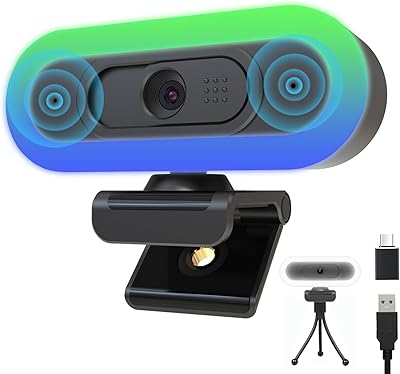
The ToLuLu 2K RGB LED Streaming Webcam arrived in early 2025 and has quietly built a strong following among budget-conscious streamers and remote workers — over 25,000 ratings and a 4.2-star average tells you something. What separates it from the sea of similarly priced webcams is the built-in RGB ring light, a feature you rarely find at this price point. It works as both a visual flourish for themed desk setups and a genuinely practical fill light when your room lighting is poor. Plug-and-play USB connectivity, with both Type-A and a Type-C adapter included, means almost anyone can be up and running in under a minute.

Features & Benefits

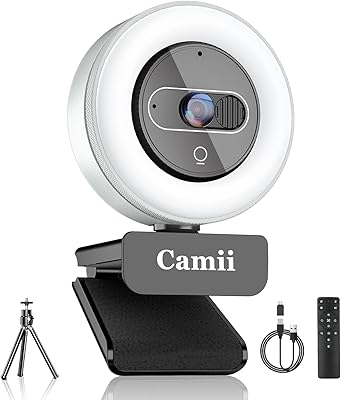
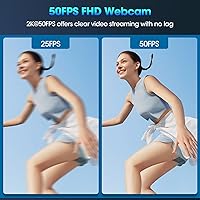
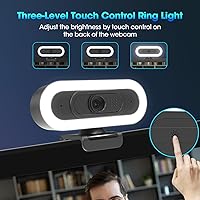
The camera shoots at 2K resolution with a 50fps ceiling, dropping to 1080p at 60fps if you prefer that more standard broadcast look — both modes are smooth enough for live streaming or video calls without visible stuttering. The RGB ring light cycles through seven color modes, and a quick touch on the back of the unit toggles it to a three-level white light, handy when you just need clean illumination for a Zoom call. Autofocus handles position changes without any intervention, which matters more than people realize mid-stream. The 65-degree field of view keeps your background out of frame by default, and the box includes a tripod, privacy cover, and USB-C adapter.

Best For

This streaming webcam makes the most sense for people just getting started on Twitch or YouTube who want their setup to look intentional without spending a lot. It also fits remote workers and students dealing with dim overhead lighting — the built-in light genuinely helps, and you won't need a separate ring light stand cluttering your desk. Gamers running an RGB peripheral setup will appreciate the visual cohesion this camera adds. If you're coming from a built-in laptop camera, the image quality jump is real and noticeable. That said, skip it if your work involves group calls or you need a wide-angle lens — the 65-degree optic simply isn't built for that.

User Feedback

The pattern across thousands of reviews is consistent: buyers are happy with the ease of setup and genuinely surprised by how much the ring light improves their on-screen presence. Plug-and-play reliability on both Windows and macOS gets mentioned often, with almost no reports of driver conflicts. Where things get more nuanced is the microphone — it holds up fine in quiet environments, but in a noisier room the noise cancellation doesn't fully deliver compared to a dedicated mic. Low-light image quality is another honest limitation; detail softens noticeably once room lighting drops. Still, value for money is the phrase that recurs most, and few buyers feel shortchanged.

Pros

  • Built-in RGB ring light doubles as a fill light, solving poor room lighting without any extra equipment.
  • Shoots at 2K and 50fps or 1080p at 60fps, delivering smooth, clear footage for streaming and calls.
  • Autofocus adjusts continuously, keeping your image sharp even when you shift position mid-stream.
  • Plug-and-play across Windows, macOS, Chrome OS, and Android with zero driver installation required.
  • The narrow 65-degree lens passively keeps your background out of frame without any software privacy tools.
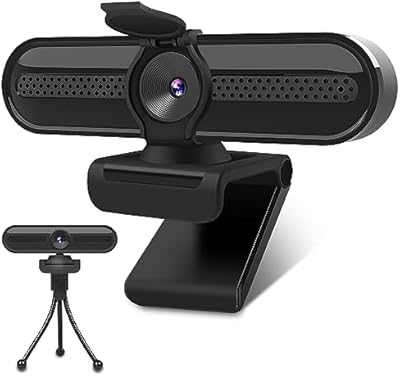
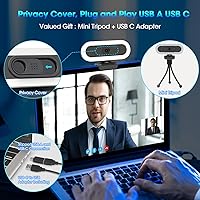
  • Ships with a tabletop tripod, physical privacy cover, and USB-C adapter — a genuinely complete package.
  • Touch-activated switch on the back cycles between seven RGB modes and a three-level white light instantly.
  • Over 25,000 buyers rate it 4.2 stars, reflecting consistent satisfaction across a large and varied user base.
  • The 5.9ft cable provides enough reach for most desk arrangements without needing an extension cord.
  • 360-degree horizontal rotation and adjustable stand make it easy to dial in the exact framing you need.

Cons

  • Image detail softens noticeably in low-light conditions, even with the ring light running at full brightness.
  • The built-in microphone struggles in noisy environments and is not a substitute for a dedicated external mic.
  • The 65-degree field of view is too narrow for group video calls or anyone with a wide dual-monitor setup.
  • No software companion app means you cannot save custom light profiles or adjust image settings beyond defaults.
  • Noise cancellation performance is inconsistent — low-level background sounds like fans or HVAC still bleed through.
  • This budget webcam offers no manual exposure or white balance controls, limiting fine-tuning in tricky lighting.
  • RGB lighting modes cannot be synced with other peripherals, which may disappoint users with integrated RGB ecosystems.
  • Autofocus can briefly hunt or hesitate in very dim scenes, causing momentary blurring during live footage.
  • The plastic construction, while keeping weight down, may not hold up as well under heavy daily wear and handling.
  • No standard tripod thread compatibility beyond the included stand limits mounting flexibility for more advanced setups.

Ratings

The scores below for the ToLuLu 2K RGB LED Streaming Webcam were generated by our AI system after processing thousands of verified global buyer reviews, with spam, bot-submitted, and incentivized feedback actively filtered out before any scoring was applied. Every category reflects how this streaming webcam actually performs in day-to-day use — the genuine strengths and the honest limitations — so you can make a clear-eyed buying decision.

Image Quality
78%
22%
In good lighting, the 4MP CMOS sensor produces genuinely sharp 2K footage at 50fps — a noticeable improvement over built-in laptop cameras. The 1080p at 60fps mode is smooth and well-suited to regular streaming or video calls where fluidity matters as much as resolution.
Low-light performance is a real weak point; fine detail softens quickly once room lighting drops below a comfortable level. Users who stream in dim setups or rely entirely on the built-in ring light will notice the image lacks the crispness it delivers in brighter conditions.
RGB Lighting
88%
The built-in RGB ring light is this camera's most distinctive feature at its price tier — genuinely rare for a budget webcam. Seven color modes let streamers match their desk aesthetic, while the three-level white light mode functions as a practical fill light during calls in dim rooms.
The RGB modes cannot be customized through any software, and there is no way to sync the lighting with peripheral ecosystems like Corsair iCUE or Razer Synapse. For users who want precise color matching across a fully themed RGB setup, the hardware-only cycling approach falls short.
Value for Money
86%
Few webcams at this price include a built-in ring light, autofocus, a tripod, a privacy cover, and a USB-C adapter all in one box. Buyers consistently describe it as exceeding expectations for everyday use, making it a practical pick for anyone upgrading from a built-in laptop camera.
The value equation only holds when expectations are calibrated to the price tier — anyone comparing it to mid-range or premium webcams will find the image and audio quality trailing noticeably. Long-term durability of the plastic construction is also an open question that affects the true cost-per-year assessment.
Microphone Quality
61%
39%
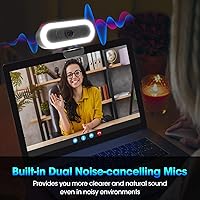
In quiet environments, the dual omnidirectional mics pick up voices clearly enough for casual Zoom calls, online classes, and light streaming without needing an external microphone. Noise cancellation does an acceptable job filtering out minor keyboard clicks or soft ambient sounds at close range.
In real-world noisy conditions — a fan running, street noise through a window, or a lively household — the noise cancellation noticeably struggles to keep up. Users in anything other than a controlled quiet room consistently rate audio as the weakest element of this budget webcam.
Ease of Setup
93%
True plug-and-play performance is among the most praised aspects across the review base — plug it in on Windows or macOS and the camera appears immediately in Zoom, OBS, or Teams with zero driver downloads. Even users with minimal technical confidence report being fully operational within minutes of unboxing.
A small number of users report occasional recognition hiccups on specific USB hubs or older USB 2.0 ports, though connecting directly to a motherboard port resolves this in most cases. The absence of companion software also means there is no way to adjust exposure, white balance, or image settings after setup.
Autofocus Performance
76%
24%
The autofocus system reliably locks onto a subject at normal desk distances and handles moderate movement well — useful for streamers who lean in to react, or remote workers who shift around during long calls. Most users do not notice it actively working, which is precisely the intended experience.
In very dim lighting, autofocus can occasionally hunt before settling on a focal point, causing brief but visible blurring during live video. This is most noticeable during lighting transitions or when changing room conditions mid-session, and it affects some setups more than others.
Low-Light Performance
54%
46%
The built-in ring light partially compensates for dim environments, and with white light mode at full brightness, close-up footage remains usable for casual calls. Users who always stream with the ring light enabled report meaningfully better results than those relying solely on ambient overhead lighting.
Without the ring light, footage in dim conditions is noticeably soft and grainy — a consistent complaint across a significant share of reviewers. Even with the ring light active, performance falls short of competing webcams in the same segment that use larger apertures or better low-light sensor tuning.
Field of View
58%
42%
The 65-degree narrow angle works well for solo users who want a deliberate, tight frame — it naturally keeps cluttered backgrounds out of view without relying on software blur or virtual backgrounds. Streamers who prefer a clean, close talking-head framing find this constraint actually works in their favor.
For group calls, wide dual-monitor desk setups, or anyone sitting closer than arm's length to the camera, 65 degrees feels genuinely restrictive. Users upgrading from wider-angle webcams frequently report the narrower framing as a trade-off they did not fully anticipate before purchase.
Build Quality
67%
33%
The camera feels adequately solid for everyday desk use, and the mounting clip grips monitors securely without wobbling during typing or minor movement. At 5.6 oz and compact dimensions, it is easy to reposition, slip into a bag, or move between workspaces without any hassle.
The all-plastic construction gives the unit a noticeably budget feel in hand, and the clip and hinge mechanism may show wear with frequent repositioning over months of use. A subset of reviewers also noted that the plastic finish scuffs and attracts fingerprints more readily than expected.
Compatibility
91%
Broad OS support across Windows 7 and above, macOS 10.10 and above, Chrome OS, and Android 5.0 and above means almost no buyer hits a compatibility wall. The included USB-C adapter extends usability to modern thin-and-light laptops that have dropped the full-size USB-A port entirely.
There is no dedicated software or firmware update path, so hardware quirks or bugs present at launch cannot be patched after purchase. A small number of users have also reported intermittent detection issues when connected through USB hubs rather than directly into the host device.
Privacy Features
82%
18%
The combination of a narrow 65-degree lens and a physical sliding privacy cover gives users two passive layers of protection. The tight framing naturally limits room visibility, while the physical cover provides a tangible, software-independent way to block the lens — both appreciated by home office users in shared spaces.
The privacy cover adds a small amount of plastic bulk to the front of the unit, and a few users report it fitting slightly loose after extended daily use. There is also no active recording indicator light on the unit itself, which some security-aware users find less reassuring than expected.
Mounting Flexibility
74%
26%
Having both a monitor clip and a tabletop tripod in the box covers the two most common desk placement needs without any extra purchases. The 360-degree horizontal rotation and adjustable base make it straightforward to dial in a comfortable framing angle for most standard setups.
The clip can struggle to grip very thin bezels or near-bezel-free monitor designs securely, and the included tripod is too compact for users who want to elevate the camera to eye level from a shelf or unconventional position. There is no standard tripod thread for attaching aftermarket mounts.
In-Box Accessories
84%
The package includes a tabletop tripod, a physical privacy cover, and a USB-A to USB-C adapter — three practical additions that would otherwise require separate purchases. Most buyers appreciate receiving a functionally complete kit that gets them running without any immediate add-ons.
The tripod is lightweight plastic and feels more like a starter placeholder than a long-term accessory — active users will likely replace it relatively quickly. The USB-C piece is a short plug adapter rather than a full cable, which some users find feels fragile under repeated daily connection and disconnection.

Suitable for:

The ToLuLu 2K RGB LED Streaming Webcam is a strong pick for anyone stepping into content creation on a tight budget — particularly casual Twitch or YouTube streamers who want their setup to look considered without committing to a high-end rig. Remote workers and students dealing with dim home office lighting will find the built-in ring light genuinely useful, replacing the need for a separate lamp or light stand. Gamers who already run RGB peripherals will appreciate how naturally this camera fits into a themed desk setup. Anyone upgrading from a basic laptop webcam will notice an immediate and meaningful jump in image clarity, especially in well-lit conditions. The plug-and-play USB connectivity works across Windows, macOS, Chrome OS, and Android without any driver installation, making it accessible to a wide range of users regardless of technical comfort level.

Not suitable for:

The ToLuLu 2K RGB LED Streaming Webcam is not the right tool for professional content creators, podcasters, or streamers who need broadcast-grade image and audio quality. The 65-degree field of view is a real constraint — if you run a wide desk setup, host virtual group meetings, or need to frame multiple people at once, the narrow lens will feel limiting fast. The built-in microphone handles quiet, controlled environments reasonably well, but anyone recording in a room with background noise, HVAC hum, or ambient sound should plan on pairing it with a dedicated external mic from the start. Low-light performance is also a genuine limitation; once room lighting drops, image definition softens noticeably, and the built-in ring light can only compensate so much. Buyers expecting the color accuracy or dynamic range of a mid-range or premium webcam will likely come away disappointed.

Specifications

  • Resolution: The camera supports 2K (1440p) at 50fps, 1080p at 60fps, and 720p at 60fps, with 30fps modes also available at each resolution.
  • Sensor: Image capture is handled by a 4MP CMOS sensor.
  • Field of View: The lens provides a 65-degree field of view, framing a single subject tightly while naturally limiting how much background is visible.
  • Focus System: Continuous autofocus is built in and adjusts automatically throughout a session without any manual input.
  • Ring Light: A built-in RGB ring light offers 7 color modes and a separate 3-level white light setting, both controlled by a touch switch on the rear of the unit.
  • Microphone: Dual omnidirectional microphones with noise cancellation are integrated into the unit, with a manufacturer-claimed pickup range of up to 16.4ft.
  • Connectivity: The webcam uses a USB Type-A connection; a USB-A to USB-C adapter is included in the box for compatibility with modern laptops and devices.
  • Cable Length: The fixed attached USB cable measures 5.9ft (approximately 1.8m).
  • Compatibility: Supported operating systems include Windows 7 and above, macOS 10.10 and above, Chrome OS, and Android 5.0 and above via standard UVC and UAC drivers.
  • Driver Requirement: No driver installation is required; the camera operates as a true plug-and-play UVC device on all supported platforms.
  • Mounting: The camera ships with a built-in monitor clip for direct screen attachment and a tabletop tripod stand for freestanding placement.
  • Rotation Range: The mounting joint supports 360-degree horizontal rotation, 15-degree vertical tilt adjustment, and a 180-degree adjustable base.
  • Privacy Cover: A physical sliding lens cover is included to block the camera lens completely when the device is not in use.
  • Dimensions: The camera body measures 3.3 x 1.8 x 1.4 inches.
  • Weight: The unit weighs 5.6 oz, keeping it light enough for easy repositioning or travel.
  • Video Format: Video is captured in MP4 format with AAC audio encoding.

Related Reviews
Dobuhont D90-2K Webcam
75%
83%
Image Clarity
61%
Low-Light Performance
68%
Microphone Quality
59%
Build Quality
78%
Privacy Cover
More
XOCLON 2K Webcam
XOCLON 2K Webcam
86%
89%
Video Quality
91%
Audio Performance
96%
Ease of Setup
85%
Low-Light Performance
87%
Field of View
More
UGREEN 25442 2K Webcam
76%
83%
Image Clarity
54%
Low-Light Performance
78%
Autofocus Speed
74%
Microphone Quality
94%
Ease of Setup
More
PixelForge 2K Webcam
76%
83%
Image Quality
88%
Built-In Ring Light
71%
Autofocus Performance
67%
Microphone Quality
91%
Privacy Cover
More
Camii C-4K-001 4K Webcam
75%
67%
Image Quality
83%
Built-in Lighting
71%
Microphone Quality
79%
Value for Money
58%
Build Quality
More
NUROUM V11 2K Webcam
88%
92%
Video Quality
89%
Audio Quality
94%
Ease of Use
96%
Setup & Installation
78%
Low-Light Performance
More
TRAUSI TW-06 2K HD Webcam
76%
74%
Video Quality
78%
Auto Light Correction
66%
Microphone Quality
93%
Ease of Setup
83%
Value for Money
More
Logitech BRIO Stream Webcam
78%
88%
Image Quality
91%
Low-Light Performance
54%
Software Experience
86%
Ease of Setup
83%
Build Quality
More
NearStream V02AF
NearStream V02AF
80%
83%
Image Clarity
81%
Autofocus Performance
67%
Microphone Quality
88%
Adjustable Field of View
71%
NearSync Software Usability
More
NUROUM V15AFL 2K Autofocus Ring Light Webcam
77%
81%
Video Quality
74%
Autofocus Performance
83%
Ring Light Quality
67%
Microphone Quality
77%
Value for Money
More

FAQ

Yes, completely. It is plug-and-play on macOS 10.10 and above — plug it in, open your video app, and the camera appears automatically. No driver downloads, no setup wizard. Most users report it recognizing instantly on both Intel and Apple Silicon Macs.

Absolutely. Because it registers as a standard UVC device, any video calling platform that supports a webcam will work with it — Zoom, Google Meet, Teams, Skype, FaceTime, and more. Just select it as your camera input in the app settings and you are good to go.

For quiet rooms it holds up well enough for casual calls and light streaming. Voices come through clearly at close range. That said, if your space has fan noise, HVAC hum, or any consistent background sound, the noise cancellation starts to show its limits. Anyone doing serious streaming, podcasting, or regular voice-over work will still benefit from a dedicated USB mic.

You will see a subtle ring reflection in your eyes, which is a typical effect with ring lights at this size. More usefully, it acts as a genuine fill light that brightens your face in dim environments. You can also switch it to white light mode for a cleaner, more neutral look during professional calls.

For a single person at a normal desk distance, 65 degrees is generally sufficient — you will be framed from roughly chest-up, which works well for streaming and video calls. It becomes limiting if you want to show your full setup, include a second person in the frame, or sit closer than usual to the camera.

Yes. OBS recognizes it as a standard video capture device — just add a Video Capture Device source, select the camera from the dropdown, and set your preferred resolution and frame rate. Most users run it at 1080p at 60fps in OBS without any issues.

Yes, that scenario is covered. The package includes a USB-A to USB-C adapter, so you can connect it directly to any USB-C port. The adapter handles the conversion without any impact on video or audio performance.

Yes. Tapping the touch switch on the back of the unit cycles through the light modes, and one of those states is lights off entirely. The camera records and streams normally regardless of whether the ring light is on or off.

The built-in clip works well on most standard monitor bezels and laptop screens. For very thin or nearly bezel-less displays, the grip can feel less secure, which is where the included tabletop tripod becomes the better option. You can also use the tripod if you prefer placing the camera on your desk at a different height or angle.

For most everyday home office use — video calls, virtual meetings, the occasional online class — this streaming webcam delivers results that are noticeably better than a built-in laptop camera, especially if your room lighting is uneven or dim. The built-in ring light alone solves the most common home office video complaint. If you are presenting to clients regularly or your video quality is under constant scrutiny, you may want to upgrade eventually, but as a practical everyday starting point it earns its place.