


Overview

The Angetube 863Plus sits in a crowded mid-range webcam market but manages to stand out by bundling 2K HDR video and a built-in ring light into a single unit — something most competitors at this price point simply don't offer. It's aimed squarely at remote workers, streamers, and online educators who want noticeably better image quality without building out a full lighting setup. Ranked #661 in Webcams on Amazon, this streaming camera has genuine traction with everyday buyers. Plug-and-play setup over USB means no driver installation headaches, and it works across Windows, Mac, Linux, Chrome OS, and Ubuntu. Just keep expectations grounded — this is a capable consumer webcam, not a prosumer broadcast tool.

Features & Benefits

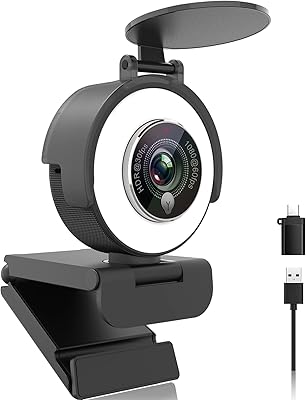
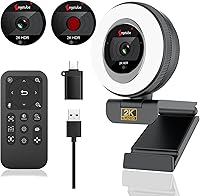
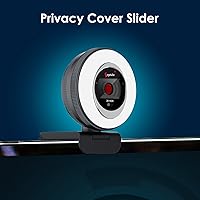
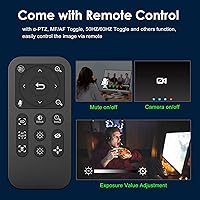
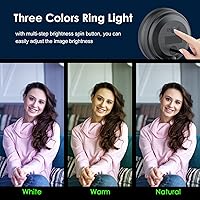
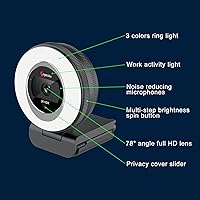
The headline spec is 2K resolution at 2560x1440p with HDR, which produces noticeably richer detail compared to standard 1080p webcams. Autofocus keeps you sharp during movement, and there's a 5x zoom — though it's worth being clear that this is digital zoom, not optical, so image quality does soften at maximum magnification. The built-in ring light is genuinely useful: three color temperatures with touch-controlled brightness let you dial in decent lighting without reaching for a separate lamp. A bundled remote handles mute, exposure, and focus switching, which is handy during presentations or live sessions. The sliding privacy cover is a small but appreciated touch, and the dual stereo mics handle call audio adequately, though they lack noise cancellation.

Best For

This webcam shines most for home office workers dealing with poor or inconsistent ambient lighting — the ring light alone can make a visible difference on video calls without requiring any additional gear. Budget-conscious streamers and content creators who want a step up from 720p or basic 1080p cameras will find the image quality a solid improvement. Online tutors and educators especially benefit from the remote control, which allows hands-free adjustments mid-session. That said, the 863Plus is not the right fit for everyone. If you need true optical zoom, a dedicated noise-canceling microphone, or 4K resolution, you'll need to look at higher-end options. It's best understood as a capable all-in-one webcam for everyday use, not a specialized production tool.

User Feedback

Buyers tend to respond positively to this streaming camera overall, with image quality and lighting drawing the most consistent praise — many note it makes a meaningful difference in how they appear on calls compared to laptop webcams. Build quality gets a mixed reception; the unit feels reasonably solid, though some buyers have noted the monitor clip could be sturdier. The microphones come up regularly: they're fine for casual Zoom or Teams calls, but users recording audio for content have found them underwhelming in noisier environments. A recurring point of confusion is the remote — it cannot control the ring light, which catches some buyers off guard. On balance, most feel the value for money holds up well for everyday home office or streaming use.

Pros

  • 2K HDR resolution delivers a noticeable image quality upgrade over standard laptop webcams.
  • The built-in ring light with three color modes eliminates the need for a separate lighting setup.
  • Plug-and-play USB setup works instantly on Windows, Mac, Linux, Chrome OS, and Ubuntu.
  • Included USB-C adapter means no extra accessories are needed out of the box.
  • The remote control allows mute, exposure, and focus adjustments without touching the keyboard.
  • A physical sliding privacy cover provides genuine peace of mind between calls.
  • Autofocus performs reliably in well-lit conditions, keeping subjects sharp throughout video meetings.
  • Works seamlessly with Zoom, Teams, Skype, OBS, Google Meet, and most major platforms.
  • The bundled package — camera, ring light, and remote — offers strong combined value at the price point.
  • Compact, tidy form factor clips securely to most standard monitors and laptop screens.

Cons

  • The 5x zoom is digital only — image quality softens noticeably at higher magnification levels.
  • Dual microphones lack noise cancellation, making background sounds clearly audible in recordings.
  • The remote cannot control the ring light, which surprises many buyers expecting full unit management.
  • Low-light sensor performance without the ring light engaged is average and noticeably grainy.
  • No companion desktop app means advanced settings like color profiles and white balance are inaccessible.
  • The monitor clip can feel unstable on thicker bezels or curved screens with extended use.
  • Windows 7 users are hard-capped at 1080p and cannot access the advertised 2K resolution.
  • The USB cable length may be too short for some desk configurations, requiring an extension.
  • Touch control for the ring light on the back of the unit can accidentally shift the camera angle.
  • No carry case or storage solution is included, making it inconvenient for users who travel with the camera.

Ratings

The Angetube 863Plus has been evaluated by our AI system after analyzing thousands of verified global buyer reviews, with spam, bot-generated, and incentivized feedback actively filtered out to ensure the scores reflect genuine user experience. Across categories ranging from image quality to build durability, this streaming camera shows real strengths alongside a few honest limitations worth knowing before you buy. Both the highlights and the pain points are reflected transparently in the scores below.

Image Quality
83%
Most users report a noticeable jump in sharpness and color accuracy compared to standard 1080p webcams or built-in laptop cameras. The HDR processing helps maintain decent exposure during video calls even when there is a bright window in the background, which is a common real-world challenge for home office setups.
The 2K output is dependent on both the receiving platform and the host screen supporting that resolution, which not everyone realizes upfront. A handful of users also noted that autofocus occasionally hunts in low-contrast scenes, briefly softening the image before locking back in.
Built-in Ring Light
78%
22%
The integrated ring light is the feature buyers mention most favorably, particularly those working in dim home offices or basement setups. Having three color temperature options with adjustable brightness means you can get a reasonably flattering look without needing a separate LED panel cluttering your desk.
The light output is modest — adequate for close-range face illumination during calls, but not powerful enough to compensate for very dark rooms or large spaces. A few users also found the touch control on the back of the unit fiddly to operate without accidentally moving the camera.
Remote Control Usability
71%
29%
Online educators and presenters who move away from their desks during sessions find the included remote genuinely practical. Being able to mute, toggle the image, or adjust exposure without reaching back to the keyboard adds a layer of professionalism to live classes and webinars.
The remote cannot control the ring light, which surprises a meaningful number of buyers who assume it manages the whole unit. The dependency on a CR2 battery is also a minor inconvenience, and the remote's range has been described as inconsistent by some users in larger rooms.
Microphone Quality
62%
38%
For everyday Zoom, Teams, or Skype calls in a reasonably quiet environment, the dual stereo mics perform adequately and voices come through with acceptable clarity. Users in small home offices with minimal background noise tend to rate this aspect more favorably.
There is no noise cancellation, which becomes evident in louder environments — keyboard clatter, household sounds, and HVAC hum all bleed through noticeably. Content creators who intended to use this streaming camera for voiceover or commentary recording were consistently disappointed and ended up pairing it with a dedicated mic.
Zoom Performance
58%
42%
The 5x zoom function is useful for quick reframing during video calls, particularly for users presenting documents or whiteboards who want to pull in tighter on specific content. At moderate zoom levels — 2x or 3x — the image degradation is relatively contained.
This is digital zoom, not optical, and the image quality drops visibly at 4x and 5x magnification. Buyers who assumed optical zoom based on the product marketing have left notably critical feedback after discovering the distinction, making this one of the most common sources of post-purchase disappointment.
Build Quality & Design
69%
31%
The overall form factor is compact and tidy, and the unit does not feel cheap in hand. Most users found it stable enough when clipped to a standard monitor, and the finish holds up reasonably well with daily use over several months.
The monitor clip draws mixed feedback — it works fine on thin laptop lids and standard monitors, but feels less secure on thicker bezels or curved screens. A small number of buyers also noted some flex in the adjustable neck over extended use, causing the camera angle to drift slightly.
Privacy Cover
88%
The sliding privacy cover is a small addition that buyers appreciate more than they expected to. It provides genuine peace of mind for users who are privacy-conscious but do not want to resort to taping over the lens, and the mechanism feels solid rather than flimsy.
The cover does not have a tactile click or locking position, so users occasionally find it has shifted slightly after adjusting the camera angle. It is a minor issue but worth knowing if precise lens blocking is important to you.
Setup & Compatibility
91%
Plug-and-play USB setup is consistently praised — buyers report the webcam is recognized instantly on Windows 10, Windows 11, and modern macOS versions without needing to install any drivers. The included USB-C adapter is a thoughtful inclusion that removes a common connectivity barrier.
Windows 7 users are capped at 1080p and cannot access 2K resolution, which is documented but still catches some buyers off guard. A small number of Linux users reported minor configuration friction, though Chrome OS and Ubuntu compatibility was generally smooth.
Low-Light Performance
67%
33%
The combination of HDR processing and the built-in ring light gives this webcam a meaningful advantage over competitors in its price range when ambient lighting is poor. Evening video calls or sessions in windowless rooms benefit noticeably from having both tools available in one unit.
Without the ring light engaged, low-light performance on the raw sensor alone is average at best — images become grainy and slightly washed out in genuinely dark conditions. Users expecting strong low-light performance from the sensor alone, similar to Sony STARVIS-equipped cameras, will find this falls short.
Software & App Integration
74%
26%
Compatibility with major video platforms — Zoom, Teams, Skype, Google Meet, OBS, and Webex — works reliably out of the box for most users. Streamers using OBS reported clean integration with no unusual latency or frame drop issues at standard streaming resolutions.
There is no dedicated companion software or desktop app for fine-tuned adjustments, which means advanced users cannot tweak color profiles, white balance presets, or custom zoom settings beyond what the remote offers. This limits the ceiling for users who want granular control.
Value for Money
79%
21%
When you factor in the ring light, remote control, and 2K resolution as a bundled package, most buyers feel the pricing is fair relative to what they received. Buying each component separately — a decent webcam plus a ring light — would typically cost considerably more.
Users who primarily wanted a high-quality microphone or true optical zoom will feel the price does not fully deliver for their specific needs. The value proposition is strongest for buyers who actually need the lighting feature; for those who don't, cheaper 2K alternatives may offer better per-dollar image quality.
Autofocus Reliability
72%
28%
Under well-lit, stable conditions, the autofocus locks on to the subject quickly and holds steady throughout calls. Users who stay relatively still during video meetings — the majority of the target audience — rarely encounter any focus-related issues.
The autofocus struggles more in lower light without the ring light active, and can momentarily lose tracking if the subject moves quickly or steps out of frame and returns. The ability to switch to fixed focus via the remote helps, but requires users to know this option exists.
Packaging & Accessories
76%
24%
The box arrives with everything needed to get started: the webcam, USB-C adapter, and remote control with battery included. Buyers appreciate not having to track down an additional adapter or battery before their first call.
There is no carry pouch, protective case, or cable management solution included, which feels like a minor missed opportunity for users who travel with the unit or want to store it tidily. The USB cable length has also been noted as slightly short for some desk configurations.

Suitable for:

The Angetube 863Plus is a strong fit for remote workers and hybrid employees who spend several hours a day on video calls and are tired of looking washed out or poorly lit on camera. If your home office lacks a dedicated window or reliable overhead lighting, the built-in ring light alone justifies serious consideration — it removes the need to buy and position a separate lighting accessory. Online educators and tutors will particularly appreciate the remote control, which lets them mute, adjust focus, or toggle the camera feed without interrupting the flow of a lesson. Budget-conscious streamers who want a step up from a basic 1080p webcam without committing to a prosumer setup will find the 2K HDR output a meaningful improvement for their audience. It also makes practical sense for anyone who values privacy hygiene, since the physical sliding lens cover provides real reassurance during off hours. In short, this streaming camera delivers the best return for buyers who genuinely need the lighting and call-management features bundled together in one unit.

Not suitable for:

The Angetube 863Plus will disappoint buyers who are shopping based on the zoom spec without reading the fine print — the 5x zoom is digital, not optical, and image sharpness degrades visibly at higher magnification levels. Podcasters, YouTubers, or anyone planning to record voiceovers or commentary should be aware that the dual microphones have no noise cancellation, meaning background noise from a busy household or office will bleed through in recordings. Users running Windows 7 will hit a hard cap at 1080p and cannot access the full 2K resolution at all, which is a genuine limitation for anyone still on that operating system. If 4K resolution is a baseline requirement for your workflow — whether for high-end streaming, professional video production, or large-format display output — this webcam simply does not reach that tier. Buyers who want granular software control over color profiles, white balance, or custom zoom presets will also find the lack of a companion desktop app frustrating. For these users, a more specialized camera with optical zoom, dedicated noise cancellation, or higher sensor resolution would be a better long-term investment.

Specifications

  • Resolution: Captures video at up to 2560x1440p (2K) with HDR processing enabled for richer color and exposure balance.
  • Image Sensor: Uses a CMOS sensor to handle light capture and image processing across a range of lighting conditions.
  • Digital Zoom: Supports up to 5x digital zoom, which enlarges the image in-software rather than through optical lens movement.
  • Focus System: Features autofocus as the default mode, with the option to switch to fixed focus via the included remote control.
  • Microphones: Built-in dual stereo microphones capture ambient audio for calls and recordings without requiring an external mic.
  • Ring Light: Integrated ring light offers three color temperature modes and multiple brightness steps, controlled by a touch sensor on the back of the unit.
  • Privacy Cover: A physical sliding cover built into the webcam body can be manually positioned to block the lens when the camera is not in use.
  • Connectivity: Connects via USB-A; a USB-C adapter is included in the box to support laptops and desktops with USB-C ports only.
  • Remote Control: Included remote requires one CR2 battery (provided) and controls mute, image toggle, e-PTZ, focus mode, and exposure adjustment.
  • OS Compatibility: Compatible with Windows XP, 7, 8, 10, and 11; Mac OS 10.6 and above; Linux 2.6.24 and above; Chrome OS 29.0.1547.70 and above; Ubuntu Linux 10.04 and above.
  • Windows 7 Limit: On Windows 7, the maximum supported resolution is 1080p at 30fps; 2K resolution is not accessible on that operating system.
  • Package Dimensions: The retail package measures 4.09 x 3.86 x 3.78 inches, making it compact enough to store in a desk drawer when not in use.
  • Weight: The complete unit weighs 9.2 ounces, which is light enough to mount on a monitor without placing undue strain on the clip.
  • Model Number: The official model designation is 863Plus, as assigned by the manufacturer Angetube.
  • Video Format: Records and streams in MPEG video format, compatible with major recording and broadcasting software platforms.
  • Audio Formats: Supports AAC, MP3, and PCM audio output formats for broad compatibility with recording and conferencing applications.
  • Maximum Aperture: The lens operates at a maximum aperture of f/2, allowing more light in during low-ambient-light conditions.
  • Platform Support: Works out of the box with Zoom, Microsoft Teams, Skype, Webex, Google Meet, OBS, Twitch, Facebook Live, and YouTube Live.
  • Driver Requirement: No driver installation is required; the webcam is recognized automatically by supported operating systems upon USB connection.
  • Battery (Remote): The remote control is powered by one CR2 battery, which is included in the package at the time of purchase.

Related Reviews
Angetube 962 1080P Webcam
85%
94%
Video Quality
88%
Audio Capture
90%
Autofocus Performance
86%
Low-Light Functionality
92%
Ease of Setup
More
Angetube PC 1080P Webcam
85%
88%
Video Quality
90%
Audio Quality
95%
Ease of Setup
84%
Low Light Performance
87%
Wide-Angle Lens
More
Angetube 913AI 4K AI Webcam
86%
91%
Video Quality (4K)
84%
AI Tracking & Auto-Framing
96%
Ease of Setup
85%
Audio Quality (Noise-Canceling Mics)
88%
Build Quality & Design
More
Angetube 873AI Webcam
77%
83%
Video Quality
88%
AI Auto-Framing
86%
TOF Autofocus
77%
HDR Performance
71%
AI Noise Reduction (Microphone)
More
Angetube 967Pro 1080p Webcam
76%
78%
Video Quality
86%
Ring Light Performance
71%
HDR Mode
81%
Frame Rate (60fps)
62%
Microphone Quality
More

FAQ

The Angetube 863Plus is designed to output native 2K resolution at 2560x1440p, but there is an important caveat: both your software and your display need to support 2K for you to see the full benefit. If your video calling app caps output at 1080p — which some do — the camera will default to that limit regardless of the hardware capability.

No, and this trips up a lot of buyers. The remote controls camera functions like mute, image toggle, zoom, focus mode, and exposure — but the ring light is entirely separate and can only be adjusted using the touch control on the back of the webcam itself. Keep that in mind if hands-free lighting control is something you were counting on.

It is digital zoom only. The lens itself does not physically move; instead, the image is cropped and enlarged in software. At lower zoom levels like 2x or 3x the quality holds up reasonably well, but at 4x or 5x you will notice softening and some loss of detail. If you need true optical zoom for close-up clarity, this streaming camera is not the right fit.

For quiet home office environments and standard Zoom or Teams calls, the dual mics are perfectly serviceable. Voices come through clearly when background noise is minimal. That said, there is no noise cancellation built in, so if you work in a louder space — think open-plan homes, shared offices, or rooms with active HVAC — background sounds will bleed into your audio noticeably.

No installation is needed. The webcam is plug-and-play on all supported operating systems, including Windows 10, Windows 11, and modern versions of macOS. Just plug it into a USB port and your system will recognize it automatically within a few seconds.

Yes, a USB-C adapter is included in the box specifically for this situation. You do not need to buy anything extra — just use the adapter to connect the standard USB-A cable to your USB-C port and you are good to go.

The ring light is genuinely useful for close-range face illumination — it will meaningfully improve how you look on a video call in a dim room compared to using no supplemental lighting at all. It is not powerful enough to light up a large dark space, but for a standard sitting-at-a-desk setup it does a solid job. The three color temperature options let you choose between warm, neutral, and cool tones depending on your preference.

It is a real, physical sliding cover built directly into the body of the webcam. You slide it manually over the lens to block the camera completely — no software is involved. This means it works even when the webcam is still plugged in and powered, which provides genuine privacy protection rather than relying on software that could theoretically be bypassed.

On standard thin-bezel monitors and most laptop lids the clip holds well and the camera stays in position during normal use. Thicker bezels and curved screens are less reliable — a few users have reported the clip feeling loose or the angle drifting slightly over time on those setups. If your monitor has an unusually thick or curved frame, it is worth checking before committing.

It officially supports Linux 2.6.24 and above, Chrome OS 29.0.1547.70 and above, and Ubuntu Linux 10.04 and above, in addition to Windows and macOS. Most users on these platforms report smooth plug-and-play operation, though a small number of Linux users have encountered minor configuration steps depending on their specific distribution and setup.