Overview

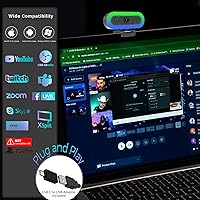
The Hrayzan W4LS 2K Webcam is a solid entry-level option that brings built-in lighting, dual microphones, and 2K resolution together in a compact body — with no drivers or software required. Hrayzan is a relatively new brand, so buyers who prioritize established names will need to weigh that carefully, but the specs and early sales traction tell an encouraging story. It launched in early 2025 and quickly climbed into the top 150 in Amazon's webcam category. Setup is as simple as plugging it in; a USB-A adapter is included for machines without a USB-C port. The 5.9-foot cable gives you enough reach for most desk arrangements.

Features & Benefits

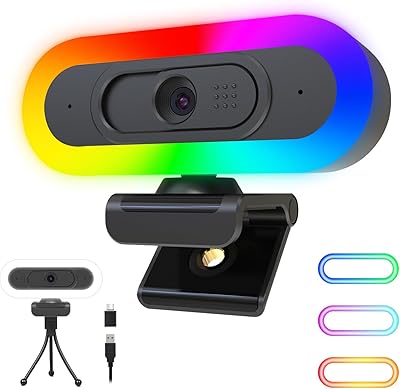
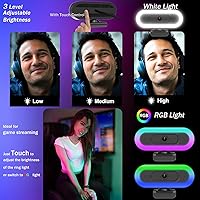
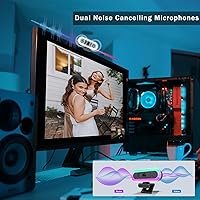
What makes this webcam stand out at its price point is the combination of resolution and lighting in one unit. Running at 2K and 50fps, video stays smooth enough that motion does not turn into a blur during fast head movements — something cheaper cameras often struggle with. The dual-mode lighting is notably useful: the RGB setting adds color atmosphere for streaming setups, while the white ring light — adjustable across three brightness levels — gives a cleaner, more professional look during work calls. The dual stereo microphones pick up voice clearly from across a room, covering most home office situations without needing an extra mic. Automatic low-light correction helps maintain image clarity when the room dims.

Best For

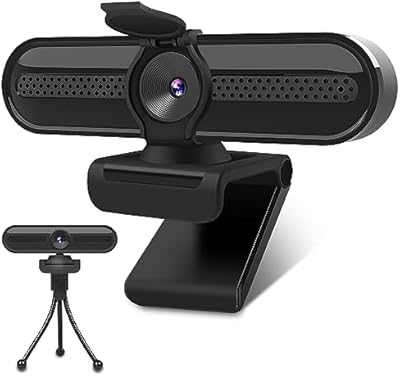
This budget 2K camera makes the most sense for remote workers and students who want a meaningful upgrade over a laptop's built-in camera without a steep investment. If you are joining Zoom or Teams calls from a home office, the white ring light alone makes a noticeable difference when overhead lighting is poor. Beginner streamers on Twitch or YouTube will appreciate the RGB mode and 2K output, even if this webcam will not match a dedicated streaming camera at triple the price. The USB-C connection is a natural fit for MacBook users and newer laptops, and the included tripod adds placement flexibility. The built-in privacy cover is a practical touch for anyone who prefers a physical shutter.

User Feedback

Buyers who have tried the Hrayzan cam tend to fall into two camps. Those upgrading from an older built-in camera often feel the video clarity and lighting quality justify the purchase, with setup speed being a frequently praised point. On the other side, some users note that the microphone can struggle in echo-heavy rooms or noisier shared spaces — workable for a quiet home office, but worth knowing before buying. A few reviewers have flagged concerns about plastic build quality, which is fairly standard at this price tier but occasionally disappointing up close. Color accuracy draws comments too, with some finding the image slightly warm. Overall, buyer satisfaction skews positive among those with grounded expectations.

Pros

  • Built-in dual-mode lighting removes the need to buy a separate ring light for most home setups.
  • 2K resolution at 50fps delivers noticeably smoother video than typical budget webcams running at 30fps.
  • Plug-and-play USB-C setup works right out of the box — no drivers, no configuration headaches.
  • The physical privacy shutter is a genuinely useful feature for anyone who wants peace of mind between calls.
  • Autofocus handles head movement and minor repositioning without needing manual adjustment.
  • Included tripod adds placement flexibility beyond the standard monitor clip.
  • Wide compatibility covers Windows, macOS, Chrome OS, and Android — rarely an issue regardless of your setup.
  • The 5.9-foot cable gives enough reach for most desk arrangements without requiring an extension.
  • Automatic low-light correction helps maintain a usable image when room lighting drops.
  • For the price, having both RGB and white lighting modes in one unit is a genuinely useful combination.

Cons

  • Microphone quality drops noticeably in echo-prone or noisy environments, limiting its usefulness in shared spaces.
  • Plastic build feels lightweight in hand and may not inspire confidence with repeated daily handling.
  • Color accuracy can run slightly warm, which some users find unflattering in skin tones without adjustment.
  • The 2K output, while real, does not match the perceptual sharpness of more expensive cameras with better optics.
  • Hrayzan is a newer brand with a limited support and warranty track record compared to established names.
  • RGB lighting, while fun, is fairly basic and not individually addressable — limited appeal for more demanding streamers.
  • The 65-degree field of view is somewhat narrow and may feel tight in wider desk or room setups.
  • No dedicated software means limited manual control over exposure, white balance, or image fine-tuning.
  • Cable is fixed and non-removable, so damage to the cord means replacing the entire unit.
  • Budget-tier users expecting laptop-camera-level convenience may be surprised by the slight size and weight on a monitor clip.

Ratings

The Hrayzan W4LS 2K Webcam scores here reflect an AI-driven analysis of verified global buyer reviews, with spam, incentivized feedback, and bot activity actively filtered out before scoring. Ratings cover the full picture — where this webcam genuinely delivers and where real users have run into frustrations. Both the highlights and the honest shortcomings are represented so you can make a well-informed call.

Video Clarity
78%
22%
For buyers stepping up from a built-in laptop camera, the jump in sharpness is immediately noticeable during Zoom calls and recorded sessions. The 2K output at 50fps keeps motion smooth enough that fast head movements or hand gestures stay readable rather than blurring out.
Users with experience on higher-end cameras point out that the perceived sharpness does not fully match what the 2K label implies — optics and sensor quality at this price tier have real limits. Color rendering can appear slightly warm or flat compared to cameras with better glass.
Lighting System
84%
The dual-mode lighting setup is one of the most praised aspects of this camera among buyers. The white ring light at its middle brightness level works well for morning video calls in dim home offices, and the three-level adjustment gives enough range to avoid washing out your face under overhead lights.
The RGB mode, while visually fun, is fairly basic — it does not offer per-zone control or fine color customization, which limits its appeal for more serious streamers. A small number of users note that the ring light can create a slight halo reflection on glasses.
Microphone Performance
62%
38%
In quiet, acoustically neutral rooms — a carpeted bedroom or a dedicated home office — the dual stereo microphones pick up voice clearly enough that call participants rarely complain. The noise cancellation does a workable job filtering out steady background hums like fans or air conditioning.
Open-plan spaces, echo-heavy rooms with hard floors, or environments with variable background noise expose the microphone's limitations quickly. Several buyers who expected to ditch their standalone mic were disappointed and ended up keeping it alongside this webcam.
Ease of Setup
93%
Plug-and-play functionality is one area where this budget 2K camera genuinely earns high marks — buyers across Windows, Mac, and Chrome OS consistently report zero setup friction. The included USB-A adapter means most users do not need to hunt for a dongle before their first call.
A small subset of users on older Windows 7 or early macOS builds encountered minor recognition delays, though these appear to resolve on their own in most cases. There is no companion app, so buyers expecting software-level controls will need to adjust settings through their OS or video platform instead.
Build Quality
57%
43%
The camera is light enough to clip onto a thin monitor bezel without stressing it, and the physical construction is sturdy enough for stationary desk use where it stays in one place most of the time. For the price, the finish looks reasonably clean and does not feel overtly cheap at a glance.
Hands-on handling reveals that the plastic shell flexes more than buyers might expect, and the hinge mechanism on the monitor clip drew durability concerns from some longer-term users. The fixed cable is the biggest structural risk — any fraying or kinking means the entire unit needs replacing.
Autofocus
76%
24%
The autofocus responds well during typical single-person video calls, locking on quickly when you shift position or lean forward. For remote workers who move around their desk, this removes the constant soft-focus distraction that plagues fixed-focus budget webcams.
In low-contrast or very dim scenes, the autofocus can hunt briefly before settling, which occasionally causes a momentary blur visible to the other party. It is not a persistent issue for most users, but buyers who frequently work in dark rooms may notice it more than others.
Low-Light Performance
71%
29%
The automatic low-light correction does a decent job lifting shadow detail in dim rooms, making this webcam functional in evening calls without requiring a lamp or external light source. When paired with the built-in white ring light, performance in poorly lit spaces improves noticeably.
Without the ring light active, the automatic correction introduces some noise and slight softness in genuinely dark environments — something buyers working under only monitor glow tend to notice. It handles moderate low-light well, but it is not a match for cameras with wider apertures or larger sensors.
Value for Money
88%
Buyers who approach this webcam with realistic expectations for its price tier consistently feel they got more than their money's worth, especially given the combination of 2K output, dual lighting modes, and a built-in microphone in one unit. Replacing a laptop's built-in camera while also skipping a separate ring light purchase makes the overall value argument compelling.
Buyers who stretched their budget expecting near-premium output were more likely to feel let down — the value proposition depends heavily on what you are comparing it against. If your baseline is a mid-range webcam rather than a laptop camera, the gap in quality is more apparent.
Compatibility
86%
The breadth of OS support is a genuine plus — Windows 7 through 11, macOS 10.10 and above, Chrome OS, and Android 5.0 are all covered without requiring third-party drivers. Users switching between a work MacBook and a personal Windows machine report it working seamlessly on both.
Advanced software compatibility, particularly with complex OBS configurations or certain enterprise security environments, can occasionally require additional setup steps. A small number of users flagged intermittent recognition issues after system updates, though these were not widespread.
Privacy Cover
89%
The physical sliding shutter is straightforward and genuinely useful — closing it between calls takes under a second and gives complete confidence that the lens is blocked. Buyers who work from home with family or housemates around consistently call it out as a feature they use every day.
The cover mechanism on some units can feel slightly loose over time with repeated use, which a few buyers mentioned after extended ownership. It functions correctly, but the tactile feel is less precise than on cameras where the shutter has a firmer click.
Field of View
67%
33%
The 65-degree field of view frames a single person at standard desk distance cleanly, keeping the background reasonably tight and reducing the amount of room visible behind you during calls. For solo use in a typical home office, it is well-suited.
Users who share a screen with a colleague during hybrid calls, or who want to show a whiteboard or wider workspace, find 65 degrees restrictive. Buyers used to 90-degree or wider webcams will notice the narrower framing immediately, particularly in smaller rooms where moving the camera back is not an option.
Cable & Connectivity
64%
36%
The 5.9-foot cable length covers most desk-to-PC distances without needing an extension, and the USB-C to USB-A adapter means the hardware is versatile across older and newer machines. Signal stability is consistently reported as reliable once connected.
The non-removable fixed cable is a meaningful design limitation — a single point of failure that cannot be addressed without replacing the entire unit. Some buyers also note that the cable is not particularly flexible, which makes routing it neatly behind a monitor or along a desk edge somewhat awkward.
Mounting Options
79%
21%
Having both a monitor clip and a tabletop tripod included in the box gives buyers more placement flexibility than most webcams at this price point. The tripod is compact but functional for positioning the camera on a desk surface at a slightly elevated angle.
The monitor clip grip feels adequate for thin laptop screens but less secure on thicker desktop monitor bezels, where a small amount of wobble can develop. The included tripod is not height-adjustable, limiting its usefulness for setups where precise camera positioning matters.
Frame Rate Smoothness
82%
18%
Running at 60fps in 1080p mode, video looks noticeably smoother than the 30fps output typical of many budget webcams — a real difference during fast-moving presentations or active hand gestures on calls. For beginner streamers, the higher frame rate output gives content a more polished feel without any additional configuration.
Achieving the full 2K at 50fps requires a host machine with enough USB bandwidth and processing headroom — on older or resource-constrained laptops, some users report the camera defaulting to lower frame rates automatically. This is a system dependency issue rather than a flaw in the camera itself, but it is worth knowing.

Suitable for:

The Hrayzan W4LS 2K Webcam is a practical pick for anyone who spends meaningful time on video calls but does not want to commit serious money to a dedicated camera setup. Remote workers and hybrid employees will get the most out of it, particularly those dealing with dim overhead lighting — the built-in white ring light makes a real difference when your room is not well-lit. Students who need clear video for online classes or group projects benefit from the included mic, which handles quiet room conditions well enough to skip a separate purchase. Beginner streamers who want to try out Twitch or YouTube without investing heavily will appreciate having RGB lighting and 2K output in one compact unit. The plug-and-play USB-C connection is especially convenient for MacBook or modern laptop users who simply want to plug in and start without hunting for drivers or fiddling with settings.

Not suitable for:

The Hrayzan W4LS 2K Webcam is not the right tool for buyers who need production-grade or near-broadcast video quality. The 2K label is real on paper, but experienced streamers, content creators, or professionals who have used higher-end cameras will likely notice limitations in dynamic range, color depth, and low-light performance that specs alone do not reveal. If you work in a noisy shared space — an open-plan office, a busy household, or anywhere with persistent background sound — the microphone will likely disappoint, and you will end up needing a dedicated mic anyway. Buyers who prioritize long-term build durability should be cautious; the plastic construction is standard for this price tier but may not hold up well with heavy daily use or frequent repositioning. Anyone who relies on advanced camera controls within professional software like OBS or uses highly specific streaming configurations may also find the feature set limiting.

Specifications

  • Model Number: The webcam carries the official model designation W4LS from Hrayzan.
  • Resolution: Supports three output resolutions: 2K (1440p) at 50fps, 1080p at 60fps, and 720p at 60fps, with 30fps alternatives available for each tier.
  • Image Sensor: Uses a 4-megapixel CMOS sensor for capturing video and still imagery.
  • Field of View: Fixed 65-degree field of view, suitable for single-person framing in standard desk setups.
  • Autofocus: Equipped with an autofocus lens that adjusts automatically based on subject distance without requiring manual input.
  • Low-Light Handling: Automatic low-light correction is built into the camera to compensate for dim ambient conditions.
  • Lighting System: Dual-mode lighting includes an RGB fill light for atmosphere and a white ring light with three adjustable brightness levels.
  • Microphone: Dual stereo microphones with noise cancellation are built in, rated for voice pickup at distances up to 16.4ft.
  • Connectivity: Connects via USB-C; a USB-A adapter is included in the box for use with standard ports.
  • Cable Length: The attached cable measures 5.9ft, providing flexible reach for most desk configurations.
  • Privacy Cover: A built-in physical shutter slides over the lens to block the camera when not in use.
  • Mounting Options: Comes with both a monitor clip for standard desk setups and a small tripod for freestanding placement.
  • Compatibility: Works with Windows 7 through 11, macOS 10.10 and above, Chrome OS, and Android 5.0 and above via standard UVC and UAC drivers.
  • Driver Requirement: No additional drivers or software installation are required; the camera is recognized automatically by supported operating systems.
  • Weight: The unit weighs 5.3oz, making it lightweight enough for easy repositioning or travel.
  • Package Dimensions: The retail packaging measures 4.84 x 2.99 x 2.52 inches.
  • Aperture: The lens has a maximum aperture of 2.7mm as specified by the manufacturer.
  • Focal Length: Maximum focal length is listed at 40mm by the manufacturer.

Related Reviews
Dobuhont D90-2K Webcam
75%
83%
Image Clarity
61%
Low-Light Performance
68%
Microphone Quality
59%
Build Quality
78%
Privacy Cover
More
UGREEN 25442 2K Webcam
76%
83%
Image Clarity
54%
Low-Light Performance
78%
Autofocus Speed
74%
Microphone Quality
94%
Ease of Setup
More
PixelForge 2K Webcam
76%
83%
Image Quality
88%
Built-In Ring Light
71%
Autofocus Performance
67%
Microphone Quality
91%
Privacy Cover
More
XOCLON 2K Webcam
XOCLON 2K Webcam
86%
89%
Video Quality
91%
Audio Performance
96%
Ease of Setup
85%
Low-Light Performance
87%
Field of View
More
NUROUM V11 2K Webcam
80%
86%
Video Quality (Daylight)
58%
Low-Light Performance
83%
Microphone & Audio Quality
77%
Build Quality & Design
91%
Ease of Setup
More
VIZOLINK W4DS 2K Webcam
75%
83%
Video Clarity
66%
Low-Light Performance
61%
Microphone Quality
78%
Autofocus Reliability
94%
Setup & Ease of Use
More
Camii C-4K-001 4K Webcam
75%
67%
Image Quality
83%
Built-in Lighting
71%
Microphone Quality
79%
Value for Money
58%
Build Quality
More
NearStream V02AF
NearStream V02AF
80%
83%
Image Clarity
81%
Autofocus Performance
67%
Microphone Quality
88%
Adjustable Field of View
71%
NearSync Software Usability
More
Hrayzan WN5 1080p USB Webcam
77%
88%
Value for Money
74%
Image Quality
51%
Low-Light Performance
93%
Ease of Setup
63%
Microphone Quality
More
ToLuLu 2K RGB LED Streaming Webcam
76%
78%
Image Quality
88%
RGB Lighting
86%
Value for Money
61%
Microphone Quality
93%
Ease of Setup
More

FAQ

No, you do not. The Hrayzan W4LS 2K Webcam is fully plug-and-play on Windows, macOS, Chrome OS, and Android. Your operating system detects it automatically using standard UVC drivers, so you can be up and running within seconds of plugging it in.

Yes, it is compatible with all major video conferencing platforms including Zoom, Teams, Google Meet, Skype, and FaceTime. Since it uses standard UVC protocols, any app that can access a webcam will recognize it without additional configuration.

The RGB mode cycles through or holds colored lighting, which adds visual atmosphere for gaming streams or YouTube content. The white ring light is a practical tool for video calls — it illuminates your face with clean, neutral light and has three brightness levels so you can dial it in based on your room conditions. They serve quite different purposes, and switching between them is straightforward.

In a quiet or moderately quiet room, the dual stereo microphones do a reasonable job of picking up voice clearly without needing a separate mic. However, in noisier environments — open-plan spaces, rooms with hard floors, or anywhere with significant background sound — the noise cancellation has its limits and audio quality can suffer. For casual calls it works fine; for professional recordings or streaming in a noisy space, a dedicated microphone would still be the better choice.

Yes, OBS recognizes this camera as a standard video capture device. You can add it as a video source and adjust settings within OBS itself. Keep in mind that the camera does not have dedicated software, so any fine-tuned image adjustments like manual white balance or exposure control will need to be done through OBS or your operating system's camera settings.

Yes, it is a physical sliding shutter that covers the lens entirely when closed. It is not software-based, which means there is no way for an app to activate the camera while the cover is shut. It is a small but genuinely useful feature if you share a space or simply prefer not to have an uncovered lens pointing at you all day.

The cable is fixed and built directly into the unit. There is no option to swap it out. This means if the cable gets damaged, the whole camera would need to be replaced, which is worth factoring in if you plan to move it around frequently or travel with it.

Yes, it is compatible with macOS 10.10 and above, which covers all current Apple Silicon Macs. Because it relies on standard UVC drivers that macOS includes natively, there are no compatibility issues to worry about with newer Mac hardware.

For most people replacing a built-in laptop camera, the difference is noticeable — sharper detail, smoother motion at higher frame rates, and far better lighting options. That said, this budget 2K camera should not be compared directly to premium webcams costing significantly more; those offer better optics, wider dynamic range, and more nuanced color rendering. Within its class, though, the output is genuinely competitive.

The included tripod is a compact tabletop model and works well enough for placing the camera on a desk without needing to clip it to a monitor. It is not a heavy-duty stand, but it does the job for most standard setups. If you need to position the camera at an unusual angle or height, a more adjustable third-party tripod with a standard thread mount would be the better route.