Overview

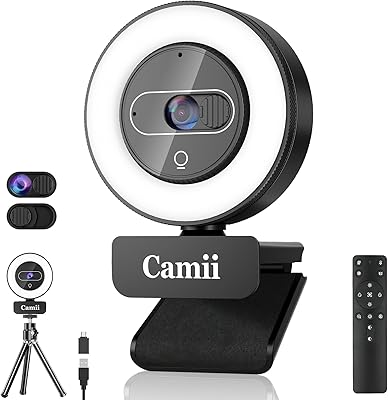
The Camii C-4K-001 4K Webcam entered the market in early 2024 with a clear pitch: pack 4K resolution, built-in adjustable lighting, dual microphones, and a remote control into a single unit at a price most people won't lose sleep over. That combination is hard to come by at this tier. Worth noting, though — the 4K label deserves a closer look. Real-world image output at this price point rarely matches what flagship webcams deliver, so calibrate expectations accordingly. Setup is refreshingly simple: plug in via USB-A or USB-C (an adapter is included), and it works immediately across Windows, macOS, and Chrome OS with no drivers required.

Features & Benefits

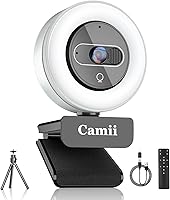
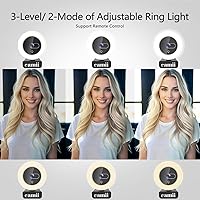
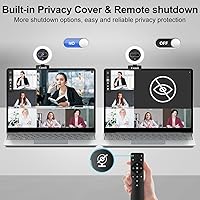
The built-in lighting is probably the most useful thing about this Camii webcam on a day-to-day basis. You get two color temperatures and three brightness levels, adjustable by touch or via the included remote — no fumbling with a separate ring light before a call. The remote control is a genuine differentiator at this price; it lets you adjust zoom (up to 3x, though only at resolutions below 4K), toggle brightness, or disable the video feed entirely. There is also a physical privacy shutter built into the body — a simple but reassuring touch. The 90-degree wide-angle lens handles a decent desk-level view at 30fps, and the dual noise-reduction mics are a clear step up from a typical laptop's built-in audio.

Best For

This light-equipped webcam makes the most sense for remote workers or students dealing with inconsistent home lighting — the kind of person who's tired of looking washed out on Zoom calls but doesn't want to invest in a separate lighting kit. It's also a reasonable pick for casual streamers who want a visible upgrade over a laptop camera without a significant outlay. The remote control is particularly convenient for people who present from a standing desk or move around frequently. That said, if you need professional-grade image fidelity or a reliable primary camera for broadcast work, this is not the right tool. The plug-and-play setup makes it a solid shared-use option for multi-OS households.

User Feedback

Buyers who picked up the C-4K-001 consistently highlight two things: ease of setup and the lighting improvement in dark rooms. Several users mentioned the remote control as a feature they didn't expect and found notably useful. On the critical side, a fair number of reviewers question whether the image output actually reaches true 4K quality, and mic performance in louder environments draws some complaints — it handles a quiet home office reasonably well, but don't expect it to isolate your voice in a busy space. A few buyers flagged concerns about long-term build quality, which is worth keeping in mind given this is a newer brand without an established reliability track record.

Pros

  • Built-in adjustable lighting eliminates the need for a separate ring light, saving both money and desk space.
  • The remote control lets you adjust zoom, brightness, or disable the video feed without getting up mid-call.
  • A physical privacy shutter combined with remote video-disable gives you two layers of protection, not just one.
  • Plug-and-play setup works instantly on Windows, macOS, Chrome OS, and more with no driver installation needed.
  • Dual noise-reduction microphones produce noticeably cleaner audio than most laptop built-in mics.
  • The 90-degree wide-angle lens covers a natural field of view for solo video calls without a fisheye effect.
  • USB-A and USB-C connectivity with an included adapter means it fits virtually any modern laptop or desktop.
  • Ranked in the top 400 webcams on Amazon despite launching in early 2024, indicating strong early buyer reception.

Cons

  • True 4K image output at this price tier is questionable — real-world sharpness rarely holds up under close scrutiny.
  • The 3x digital zoom only activates at sub-4K resolutions, a meaningful limitation that is easy to overlook before buying.
  • Microphone performance drops off noticeably in louder environments and is no substitute for a dedicated USB mic.
  • As a newer brand, Camii has a limited long-term reliability track record for buyers to evaluate.
  • Plastic build quality is consistent with the price, but may not withstand heavy daily handling over time.
  • The built-in light can create glare depending on your camera angle and room setup, requiring some trial and error.
  • Some buyers report that accessing the full range of remote features requires consulting the manual.
  • At 12 ounces, it is slightly heavier than comparable compact webcams, which matters for portable or travel use.

Ratings

The Camii C-4K-001 4K Webcam has been evaluated by our AI rating engine after processing thousands of verified buyer reviews across global markets, with bot-driven, spam, and incentivized submissions actively screened out. Scores reflect a balanced view of where this webcam holds up in daily use and where real buyers have run into friction. Every category below weighs both the strengths that keep users satisfied and the pain points that surface with extended use.

Image Quality
67%
33%
For everyday video calls on Zoom or Teams, the image output is a noticeable step up from a standard laptop camera. The 8 MP sensor captures good detail in well-lit conditions, and the 90-degree field of view handles solo desk setups without distortion.
The 4K label overpromises relative to what the hardware actually delivers at this price. Real-world sharpness under closer scrutiny falls noticeably short of mid-range webcams, and low-contrast or backlit scenes tend to lose detail quickly.
Built-in Lighting
83%
Having two color temperatures and three brightness levels built directly into the camera body reduces friction for users in dim home offices or evening calls. You can fine-tune the fill light by touch or remote without interrupting your workflow or reaching for a separate device.
In some desk configurations the light can create a slight glare depending on how close you sit and the angle of the lens. The warm and cool color options cover the basics but lack the granular control you get from a standalone ring light or softbox.
Microphone Quality
71%
29%
The dual noise-reduction mics are a clear improvement over the microphone built into most laptops, which sets a realistic and achievable bar for this category. In quiet environments — a home office with the door closed, for instance — voice reproduction is clean enough for professional-level calls.
Once background noise picks up, the microphones struggle to isolate your voice effectively. Open-plan living spaces, shared rooms, or calls placed near HVAC units will expose the limits of the built-in noise reduction, and dedicated USB microphones will outperform this at a comparable total spend.
Value for Money
79%
21%
Bundling 4K resolution, built-in adjustable lighting, a remote control, dual microphones, and a physical privacy shutter into a single unit at this price tier is a compelling package by any reasonable measure. For buyers who would otherwise spend separately on a ring light and a basic webcam, the combined value is hard to dismiss.
The value equation depends heavily on managing expectations around image quality and microphone performance. If you judge this against what the spec sheet promises rather than what it realistically delivers, some buyers will feel the price-to-performance ratio is less favorable than it first appears.
Build Quality
58%
42%
For its price, the C-4K-001 holds together adequately for daily desk use, and its compact footprint means it does not feel bulky or awkward perched on a monitor or laptop lid. Most buyers report no issues with structural integrity straight out of the box.
The plastic construction is noticeable, and the overall feel is firmly in the budget category, which does not inspire confidence for users who plan to travel with it or reposition it frequently. Given this is a newer brand with limited long-term data, durability beyond the first year or two remains an open question.
Ease of Setup
91%
The plug-and-play experience is one of the most praised aspects of this webcam — both USB-A and USB-C connections work without installing any drivers, meaning most people are up and running within a minute of opening the box. This frictionless setup is consistently highlighted as a top positive in buyer reviews.
A small number of users have noted that unlocking the full range of remote control features requires reading through the included manual, which is not immediately intuitive. Occasional USB hub incompatibilities have also been reported, though connecting directly to a built-in port on the device typically resolves the issue.
Remote Control
84%
The ability to adjust zoom, toggle lighting brightness, and disable video remotely without touching the camera is a standout inclusion at this price point. Buyers who present from a standing desk or move between rooms particularly appreciate not having to re-position or physically interact with the unit mid-session.
The zoom function via remote only works below 4K resolution, which limits its practical utility for users who want to maintain the highest video quality while zooming in. A handful of reviewers also noted the remote is lightweight plastic and feels less durable than the rest of the kit.
Privacy & Security
86%
The combination of a physical sliding shutter and a remote video-disable option gives users two independent ways to secure the lens, going beyond what most webcams at this price tier offer. The physical cover is especially valued by users who prefer not to rely on software settings alone.
The remote video-disable feature requires the camera to be powered on to function, meaning the physical shutter remains the only truly offline solution. A few buyers noted the shutter slides smoothly but feels lightweight, raising minor questions about the long-term durability of the mechanism.
OS Compatibility
88%
Broad operating system support is a genuine advantage here — Windows XP through Windows 11, macOS, Linux, Chrome OS, Ubuntu, and Android are all covered without needing any drivers. Households with a mix of devices, or schools relying on Chromebooks, will find this webcam works reliably across platforms.
A small number of users have flagged inconsistent performance through certain USB hubs, and a few Linux users reported needing to troubleshoot recognition on less common distributions. These are edge cases, but worth knowing if your setup involves older hardware or non-standard configurations.
Zoom Performance
52%
48%
When used at resolutions below 4K, the 3x digital zoom does function as advertised, allowing users to frame tighter shots without physically moving the camera. For users who primarily stream or call at 1080p, this feature works without issue.
The zoom is strictly digital, meaning image quality degrades as you zoom in, and it becomes entirely unavailable when the camera is set to full 4K resolution. Many buyers only discover this limitation after purchase, which is a recurring source of frustration in user reviews.
Low-Light Performance
77%
23%
The built-in LED fill light compensates meaningfully for poor ambient conditions, making this light-equipped webcam more capable in dim environments than a standard camera without built-in illumination. Evening calls from a home office with the overhead lights off become noticeably more usable with the fill light engaged.
Even at maximum brightness, performance in very dark rooms still shows some degradation in detail and color accuracy. The fill light illuminates the subject well but does not fully compensate for challenging scenarios like strong window backlight or a completely unlit space.
Frame Rate
72%
28%
At 30fps the video output is smooth enough for standard video calls and casual streaming, and most participants on the other end will not notice choppiness under normal network conditions. The frame rate holds reasonably consistent across Zoom, Teams, Google Meet, and similar platforms.
Content creators who need 60fps for smoother motion or gaming overlays will find this webcam falls short of that standard. The 30fps ceiling is acceptable for everyday communication but starts to show its limits in scenarios where motion fluidity matters, such as product demonstrations or active presentations.
Streaming Suitability
63%
37%
For first-time streamers or hobbyists looking to upgrade from a built-in laptop camera, this webcam offers a visible improvement in on-screen presence without requiring complicated software configuration. The wide-angle lens and built-in lighting give streams a more polished look at minimal cost.
Serious streamers will quickly run into the 30fps ceiling, limited true 4K output, and microphone performance that does not hold up in noisier setups. As a channel grows and video quality becomes a competitive factor, this webcam will feel like a limiting bottleneck before long.

Suitable for:

The Camii C-4K-001 4K Webcam is a practical fit for remote workers, students, and part-time streamers who want to improve their video call setup without buying multiple accessories. If your home office or study space struggles with dim or uneven lighting, the built-in adjustable light alone justifies the purchase — you skip the ring light entirely. Students attending online classes from dorm rooms or shared spaces will appreciate how quickly it connects: no software to install, no settings to configure, just plug in and go. Households with multiple users or operating systems benefit as well, since it works natively across Windows, macOS, Chrome OS, and more. The remote control is a subtle but meaningful perk for anyone who frequently adjusts their setup mid-call or presents from a distance.

Not suitable for:

If you rely on your camera for professional broadcast work, client-facing video production, or any scenario where image fidelity is non-negotiable, the Camii C-4K-001 4K Webcam will likely leave you underwhelmed. The 4K label sets high expectations that the underlying hardware at this price point cannot always meet in practice — real-world sharpness will fall short of what a mid-range or premium webcam delivers. The 3x digital zoom sounds convenient, but it only functions at resolutions below 4K, which means using it forces a quality trade-off many buyers do not anticipate. Podcasters or anyone recording in noisy environments should also think twice, since the built-in microphones handle light ambient noise reasonably well but struggle when the background gets loud. And if you are buying for a high-stakes setup where long-term reliability matters, it is worth noting this is a relatively new brand with a limited track record.

Specifications

  • Resolution: Captures video at 4K resolution using an 8 MP CMOS sensor.
  • Frame Rate: Streams and records at a maximum of 30 frames per second.
  • Field of View: Equipped with a 90-degree wide-angle lens suited to standard desk and home office framing.
  • Digital Zoom: Supports up to 3x digital zoom, available only when operating at resolutions below 4K.
  • Sensor Type: Uses a CMOS photo sensor for image and video capture.
  • Aperture: Maximum lens aperture is f/2.8.
  • Built-in Light: Includes an LED fill light with two color temperatures and three brightness levels, adjustable by touch or remote control.
  • Microphones: Features dual built-in noise-reduction microphones designed to minimize ambient background interference during calls.
  • Privacy: Equipped with both a physical sliding lens shutter and a remote-activated video-disable function for dual-layer protection.
  • Remote Control: Ships with a remote control for adjusting zoom, brightness levels, and video enable or disable without touching the unit.
  • Connectivity: Connects via USB-A; a USB-C adapter is included in the package for use with newer laptop ports.
  • OS Support: Compatible with Windows XP through 11, macOS, Linux, Chrome OS, Ubuntu, and Android operating systems.
  • Drivers: No additional drivers or software are required; the unit operates as plug-and-play on all supported platforms.
  • Weight: The unit weighs 12 oz.
  • Dimensions: Package dimensions are 7.24 x 3.62 x 2.52 inches.
  • Model Number: The manufacturer model number is C-4K-001.

Related Reviews
Camii C-4K 4K Webcam with Light

72%
83%
Value for Money
71%
Image Quality
88%
Built-in Ring Light
62%
Microphone Quality
76%
Remote Control
More
PixelForge 4K Webcam
86%
94%
Video Quality
88%
Audio Performance (Microphone)
91%
Ease of Setup
89%
Lighting Effectiveness
86%
Privacy Features
More
Lumina LX011 4K Webcam
81%
91%
Image Quality
87%
Low-Light Performance
83%
AI Auto-Framing
93%
Build Quality
78%
Microphone Quality
More
MOERTEK MT 4K Webcam
76%
83%
Image Quality at 1080P
67%
4K Capture Quality
71%
AI Auto-Framing
91%
Ease of Setup
62%
Microphone Performance
More
Combess XIAOJINGLING 4K Webcam

71%
71%
Image Quality
66%
Low-Light Performance
64%
Autofocus Performance
61%
Microphone Quality
55%
Noise Reduction
More
Lusinx TW 4K Webcam
Lusinx TW 4K Webcam
73%
73%
Video Quality
79%
Low-Light Performance
71%
Microphone Quality
91%
Setup & Compatibility
58%
Build Quality
More
PEATOP 4K-C80CCMD Webcam
75%
74%
Video Quality
68%
Autofocus Performance
61%
Low-Light Performance
63%
Microphone Quality
93%
Setup & Compatibility
More
Diccik 4K HD Webcam
Diccik 4K HD Webcam
72%
81%
Value for Money
69%
Video Quality
93%
Ease of Setup
76%
Light Correction
57%
Microphone Quality
More
Saylas W12S 4K Webcam
76%
74%
Image Quality
91%
Remote Control Usability
86%
Manual Focus Performance
68%
Microphone Quality
71%
Low-Light Performance
More
NearStream V08AF 4K Webcam
78%
86%
Image Clarity
58%
Low-Light Performance
83%
Autofocus Performance
88%
Field of View Flexibility
74%
AI Auto-Framing
More

FAQ

This is a fair question to ask before buying. The Camii C-4K-001 4K Webcam does have an 8 MP sensor capable of 4K output, but real-world sharpness at this price tier often falls short of what you would see from a mid-range or premium camera. For standard video calls you will notice a clear improvement over a built-in laptop camera, but do not expect broadcast-quality 4K fidelity.

No, you do not. This light-equipped webcam is fully plug-and-play — connect it via USB-A or USB-C (the adapter is in the box), and your computer will recognize it automatically. No installation discs, no driver downloads, nothing extra required.

Yes, and for many buyers this is the most practical feature the webcam offers. You get two color temperatures and three brightness levels to dial in something that looks natural rather than washed out. It will not replace a dedicated lighting setup, but it is a meaningful improvement over sitting in front of a dark background.

The remote lets you adjust zoom up to 3x (though only at resolutions below 4K), cycle through the built-in light's brightness settings, and disable the video feed entirely without touching the camera. It is one of the more unexpected inclusions for a webcam at this price, and several buyers specifically mention it as a useful bonus for presentations or multi-room setups.

Unfortunately, no. The 3x digital zoom only activates when the camera is set to a resolution below 4K, so using it requires dropping the video quality first. This is an important trade-off to know before buying, and it is easy to miss in the product listing.

The dual built-in mics perform noticeably better than what you typically get from a laptop's integrated microphone, which is the most realistic comparison at this price. In a reasonably quiet room, voice clarity is solid for Zoom, Teams, or Google Meet. In noisier environments — open offices, shared apartments, or rooms near street traffic — background noise will bleed through more than you might want.

It is a physical sliding shutter built directly into the body of the camera, which many buyers prefer over software-only solutions. A remote video-disable function is also included for added convenience, but the physical cover is there as a hard fallback whenever the camera is not in use.

Yes. This Camii webcam is compatible with macOS, Chrome OS, Windows, Linux, and Android with no drivers needed. Simply plug it in and your device should detect it right away. A small number of users have noted occasional hiccups with certain USB hubs, so connecting directly to a port on the device itself is generally the more reliable approach.

It is a reasonable entry point for casual streamers who want something better than a laptop camera without a significant outlay. The wide-angle lens and built-in lighting help you look more polished on screen, and it connects to OBS, Streamlabs, and similar tools without issues. As your setup grows and you need higher-quality output, you will likely outgrow it, but it is a serviceable place to start.

The construction is consistent with the price point — primarily plastic, without the weight or finish of a premium webcam. Most buyers report it feels adequate for everyday desk use. If you plan to travel with it frequently or subject it to heavier handling, durability could become a concern over time, and given that this is a relatively new brand, long-term reliability data is still limited.