Overview

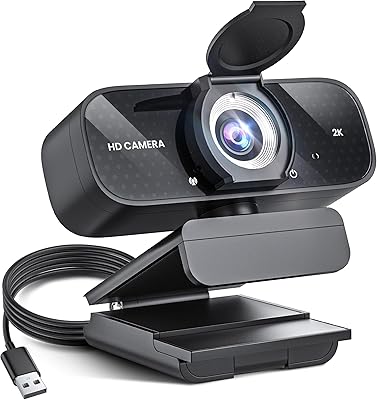
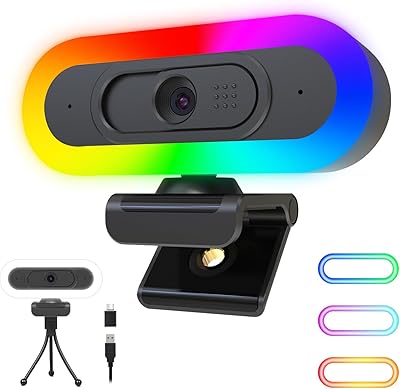
The Dobuhont D90-2K Webcam is a budget-minded option that punches into a market dominated by far more established names. Dobuhont isn't a brand you'd recognize from a shelf at Best Buy, and that's worth acknowledging upfront. What it offers, though, is a genuine 2K resolution experience at a price point where most cameras are still pushing 1080p. It arrived in April 2024 and has already climbed to a respectable ranking in its category — not a fluke for a newcomer. Plug-and-play USB 2.0 setup, a built-in noise-reduction microphone, and a sliding privacy cover round out a surprisingly competitive feature set for the tier it occupies.

Features & Benefits

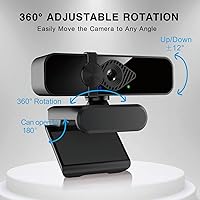
The jump from 1080p to 2560×1440 is more noticeable than people expect, especially on larger monitors. Faces look sharper, text on a shared screen reads more cleanly, and the overall image has a clarity that built-in laptop cameras simply cannot match. The 85° wide-angle lens is broad enough to capture a decent background without distorting your face, which is a common pitfall with cheaper wide-angle options. Physically adjusting the camera is straightforward — the base extends and opens to 180°, letting you clamp it to a monitor or sit it flat on a desk. The 1.4-meter cable gives enough reach for most setups, and no driver installation is needed — just plug in and go.

Best For

This webcam makes the most sense for people who spend hours each week on video calls and are tired of looking washed out on a grainy built-in camera. Remote workers and students will get the clearest benefit — the image quality improvement is real and immediate. Casual streamers can also make it work, though it is not built for high-frame-rate gaming broadcasts or professional productions. If privacy is a genuine concern, the physical lens cover is meaningful; software-based privacy toggles can fail, but a physical cover cannot. Wide OS support means it works across Windows, Mac, Linux, and even Android TV without any fuss, which is a practical plus for mixed-device households.

User Feedback

Buyers consistently praise the image quality jump over a built-in camera — that theme comes up repeatedly and seems genuine. The microphone earns mixed marks; in quiet environments it performs well enough, but background noise rejection in busier settings appears to be a limitation some users notice. Low-light performance is a gap reviewers flag; at f/2.0 it is acceptable in a well-lit room but reportedly struggles after dark without a desk lamp. Build quality is the other common concern — at just five ounces, the plastic construction feels light, and a few buyers found the privacy cover hinge less solid than expected. Cable length rarely draws complaints, though compatibility edge cases with older Linux builds have surfaced occasionally.

Pros

  • Genuine 2560×1440 resolution makes a noticeable difference over any built-in laptop camera.
  • Physical sliding privacy cover offers hardware-level protection that software toggles cannot match.
  • Plug-and-play setup works across Windows, Mac, Linux, and Android TV with zero driver installation.
  • 85° wide-angle lens covers enough of the room without heavy distortion in the center frame.
  • The D90-2K is recognized natively by Zoom, Skype, Google Meet, and YouTube Studio without configuration.
  • Lightweight and compact design repositions easily on monitors, desks, or tripods.
  • Built-in noise-reduction mic handles quiet and moderately calm environments capably during calls.
  • Extendable base with 180° opening accommodates a wide range of mounting and placement setups.
  • Solid value at this price tier — 2K resolution and a privacy cover rarely come bundled this affordably.

Cons

  • Low-light image quality degrades significantly — evening calls without supplemental lighting are a real problem.
  • Fixed-focus lens struggles whenever users shift their distance from the camera unexpectedly.
  • The plastic body feels hollow and lacks the rigidity that suggests long-term durability.
  • Privacy cover hinge loosens with repeated use and may not stay firm after months of daily sliding.
  • Built-in microphone falls apart in noisy or dynamic environments beyond a quiet home office.
  • The 1.4-meter cable runs short for under-desk PC towers or extended monitor arm configurations.
  • 30fps cap feels limiting for anyone hoping to use this webcam for motion-heavy streaming content.
  • Some Linux distributions and Android TV devices experience inconsistent or unreliable recognition.
  • OBS Studio users may need to manually override resolution settings to achieve the full 2K output.

Ratings

The Dobuhont D90-2K Webcam has been scored by our AI system after processing verified buyer reviews from global markets, with spam, bot-submitted, and incentivized feedback actively filtered out before any scoring began. Ratings reflect a balanced picture — where this budget 2K camera genuinely impresses and where real users have run into frustrations. Both sides are represented transparently below.
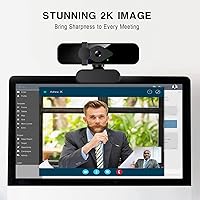
Image Clarity
83%
The jump to 2560×1440 is something most buyers notice immediately, especially those coming from a built-in laptop camera. On video calls, faces appear sharper and text on shared screens reads more cleanly — a meaningful upgrade for daily meetings or online classes.
At 30fps, the footage can feel slightly less fluid compared to 60fps competitors at a higher price tier. A few users also noted that sharpness drops noticeably when the camera auto-adjusts in mixed lighting conditions.
Low-Light Performance
61%
39%
In a well-lit home office or a room with a decent desk lamp, the CMOS sensor handles the scene competently. The f/2.0 aperture does allow more light in than some comparable budget cameras, which helps during daytime calls near a window.
After dark or in poorly lit rooms, the image degrades more than buyers expect. Grain and color washout are recurring complaints, and several users specifically noted that a ring light becomes almost necessary for evening video calls.
Microphone Quality
68%
32%
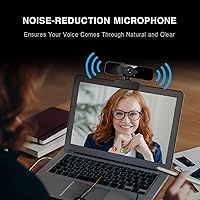
In quiet environments — a home office with the door closed, for example — the built-in noise-reduction mic picks up voice cleanly and with reasonable warmth. Call participants on Zoom and Google Meet rarely ask for a repeat in calm settings.
Background noise rejection is the weak point. Open-plan spaces, apartments with street noise, or rooms with loud keyboards expose the mic's limitations quickly. It handles ambient hum acceptably but struggles with more dynamic, unpredictable noise sources.
Build Quality
59%
41%
The camera is lightweight at five ounces, which actually makes it easy to reposition on a monitor or laptop lid without any strain on the hinge. The compact footprint keeps the desk relatively uncluttered.
The all-plastic construction feels noticeably light in hand, and not always in a reassuring way. Several buyers flagged that the body feels hollow, and the overall rigidity does not inspire confidence over long-term daily use.
Privacy Cover
78%
22%
Having a physical sliding lens cover is a genuine differentiator at this price point. Users who keep the camera plugged in permanently find real peace of mind knowing no software bug or permissions glitch can expose their feed.
The hinge mechanism on the cover feels thin, and a subset of reviewers mentioned it loosens with repeated sliding. It functions correctly when new but may not hold up as well after months of daily use.
Ease of Setup
91%
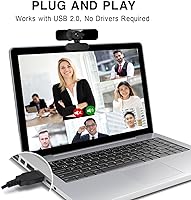
Plug-and-play functionality works as advertised across Windows and Mac without any driver installation. Most users report being up and running inside two minutes, which is exactly what a busy remote worker or student needs.
A small number of Linux users on older or less common distributions reported detection issues. Android TV compatibility also appears to depend on the specific device, so edge-case platform users should verify before purchasing.
Adjustability & Mounting
77%
23%
The 360° rotation combined with a tilt adjustment and an extendable base that opens to 180° gives users a solid range of positioning options. It clips onto monitors, sits on desks, and attaches to standard tripods without any adapters needed.
The tension on the tilt hinge can feel loose after repositioning multiple times, and the camera may gradually drift downward if not set firmly. The clip does not accommodate all monitor thicknesses equally well.
Wide-Angle Coverage
74%
26%
The 85° field of view is wide enough to capture a useful portion of the background, which helps in video calls where context matters. It works particularly well in smaller rooms where a narrower lens would cut off too much of the scene.
At the edges of the frame, barrel distortion is visible — not severe, but noticeable on straight lines or bookshelves in the background. For casual calls it is a non-issue, but content creators who care about visual precision may find it distracting.
Cable & Connectivity
72%
28%
The 1.4-meter USB 2.0 cable handles the vast majority of typical desk setups without forcing the user to reposition their computer. The connector feels secure and data transfer for video has been stable in reported use.
For users with a PC tower under the desk or a monitor arm setup that creates extra distance, 1.4 meters runs short. The cable is also not detachable, so a damaged cord means replacing the entire unit.
Software Compatibility
87%
The webcam is recognized natively by Zoom, Skype, Google Meet, FaceTime, and YouTube Studio without any configuration. Users switching between different call platforms throughout the day encounter no re-pairing or recognition delays.
A handful of users found that OBS Studio required a manual resolution override to lock in the full 2K output rather than defaulting to a lower setting. Not a dealbreaker, but worth knowing for anyone setting up a streaming workflow.
Value for Money
82%
18%
Relative to what 2K resolution and a physical privacy cover typically cost from more established brands, the D90-2K delivers a surprisingly full feature set. For a student or remote worker on a tight budget, the performance-to-cost ratio is hard to argue with.
The savings are real, but so are the trade-offs in build quality and low-light capability. Buyers who push this camera in demanding conditions — poor lighting, noisy environments, heavy daily adjustment — may find the value proposition erodes faster than expected.
Autofocus Performance
63%
37%
For static seated setups — sitting at a desk and speaking directly at the camera — the fixed focus handles the typical working distance well enough that most users do not notice the absence of true autofocus during normal calls.
This is a fixed-focus camera, not a true autofocus unit, which becomes apparent the moment a user leans far forward or steps back from the desk. Objects at unusual distances can appear noticeably soft, and there is no way to adjust focus manually.
OS & Platform Compatibility
84%
Support spans Windows 7 through 10, macOS 10.7 and above, Linux, and Android TV 7.0 and above, which covers an unusually wide range for a camera at this price. Multi-device households with mixed operating systems benefit the most from this breadth.
Compatibility claims are broader than the consistently smooth experience. Linux support in particular depends heavily on the distribution and kernel version, and Android TV behavior varies enough across devices that some users report inconsistent results.
Packaging & First Impression
71%
29%
The camera arrives well-protected and ready to use out of the box. Most buyers note that the unboxing experience is clean and functional — no excess waste, everything needed is included, and setup instructions are straightforward.
The packaging and included materials feel utilitarian rather than polished. There is no printed quick-start guide beyond a basic insert, and the overall presentation reflects the budget positioning of the product more than it might reassure a first-time buyer.

Suitable for:

The Dobuhont D90-2K Webcam is a strong fit for remote workers and students who spend a significant portion of their day on video calls and are frustrated by the washed-out, grainy output of a built-in laptop camera. If your primary use case is Zoom meetings, Google Meet sessions, or online classes in a reasonably well-lit room, this webcam delivers a visible and immediate improvement without requiring any technical setup. It also makes practical sense for anyone working across multiple devices or operating systems — the broad compatibility with Windows, Mac, Linux, and Android TV means it just works regardless of what is on your desk. Casual content creators who want to stream at 2K resolution without committing to a premium-tier budget will find it functional and capable enough for low-stakes broadcasts. The physical privacy cover is a genuine draw for privacy-conscious users who keep the camera plugged in permanently and want a hardware-level guarantee that the lens is blocked.
Not suitable for:

The Dobuhont D90-2K Webcam is not the right choice for anyone who needs dependable performance in low-light conditions — evening calls, dim home offices, or poorly lit streaming setups will expose its limitations quickly, and a ring light becomes more of a requirement than an accessory. Professional streamers or video creators who need smooth, cinematic output should look elsewhere; 30fps at 2K is workable for casual use but will feel limiting in any production context where motion and frame quality matter. The fixed-focus lens means users who frequently shift their distance from the camera — leaning in close, stepping back to show something — will notice softness that a true autofocus camera would handle automatically. Those who demand durable build quality for heavy daily use should also be cautious; the lightweight plastic construction and loosening hinge reports suggest it is built for moderate, not intensive, handling. Finally, buyers in noisy environments — open offices, busy households, apartments near traffic — should not expect the built-in microphone to carry the load alone.
Specifications

  • Resolution: The camera captures video at 2560×1440 (2K) resolution and outputs at 30 frames per second for smooth, detailed video calls and recordings.
  • Sensor Type: Uses a CMOS image sensor, which is the standard technology in consumer webcams for balanced light sensitivity and color reproduction.
  • Field of View: The lens covers an 85° wide-angle field of view, capturing a broader scene than the typical 60–70° found on basic budget cameras.
  • Focal Length: Fixed focal length of 3.6mm, optimized for the typical 50–80cm distance between a seated user and their monitor.
  • Aperture: Maximum aperture of f/2.0 allows more light to reach the sensor compared to f/2.4 or f/2.8 alternatives in the same price range.
  • Connectivity: Connects via USB 2.0; no additional drivers or software installation are required on compatible Windows or Mac systems.
  • Cable Length: The attached, non-detachable USB cable measures 1.4 meters, suitable for most standard desk setups with a nearby USB port.
  • Microphone: Equipped with a single built-in noise-reduction microphone designed to reduce steady ambient hum and light background interference during calls.
  • Privacy Cover: A sliding physical lens cover is built into the camera housing, allowing users to block the lens mechanically without relying on software controls.
  • Rotation & Tilt: Supports full 360° horizontal rotation and manual vertical tilt adjustment to help users find and lock in their preferred angle.
  • Base Design: The extendable clip base opens to 180° and is compatible with monitors, laptop screens, desktop setups, and standard tripod mounts.
  • Weight: The camera unit weighs approximately 5 oz (142g), making it light enough to clip onto a laptop lid without adding meaningful strain.
  • Package Dimensions: The retail package measures 4.29 × 3.54 × 2.52 inches, compact enough to store or transport in a laptop bag.
  • OS Compatibility: Officially supports Windows 7, 8, and 10, macOS 10.7 and above, Linux, and Android TV 7.0 and above.
  • Software Support: Compatible with major video conferencing and streaming platforms including Zoom, Skype, Google Meet, FaceTime, YouTube, GoToMeeting, and Facebook.
  • Model Number: The manufacturer model designation is D90-2K, sold under the Dobuhont brand name.
  • Focus System: This camera uses fixed focus rather than continuous autofocus, meaning the lens is pre-set for a typical arm-length working distance.
  • Power Source: The camera draws power entirely through the USB connection and requires no external power supply, batteries, or charging.

Related Reviews
XOCLON 2K Webcam
XOCLON 2K Webcam
86%
89%
Video Quality
91%
Audio Performance
96%
Ease of Setup
85%
Low-Light Performance
87%
Field of View
More
PixelForge 2K Webcam
76%
83%
Image Quality
88%
Built-In Ring Light
71%
Autofocus Performance
67%
Microphone Quality
91%
Privacy Cover
More
UGREEN 2K Webcam
UGREEN 2K Webcam
86%
91%
Video Clarity
85%
Autofocus Accuracy
88%
Audio Quality
84%
Build Quality
93%
Ease of Setup
More
ToLuLu 2K Streaming Webcam
83%
89%
Video Quality
84%
Microphone Performance
93%
Ease of Setup
85%
Lighting Functionality
78%
Build Quality
More
NUROUM V15AFL 2K Webcam
87%
88%
Video Quality
91%
Autofocus Performance
85%
Low-Light Performance
92%
Ease of Setup
80%
Microphone Clarity
More
NearStream V02AF
NearStream V02AF
80%
83%
Image Clarity
81%
Autofocus Performance
67%
Microphone Quality
88%
Adjustable Field of View
71%
NearSync Software Usability
More
Camii 2K Webcam with Light
85%
88%
Video Quality
94%
Ease of Setup
85%
Lighting Performance
80%
Microphone Quality
78%
Build Quality
More
ROCWARE RC08 2K Webcam
75%
78%
Video Clarity
81%
Autofocus Performance
72%
Built-in Speaker
83%
Microphone Quality
66%
Low-Light Performance
More
VIZOLINK 2K Webcam W4DS
84%
88%
Video Quality
85%
Audio Performance (Microphone)
91%
Ease of Setup
75%
Field of View
80%
Low-Light Performance
More
Angetube 863Plus
Angetube 863Plus
74%
83%
Image Quality
78%
Built-in Ring Light
71%
Remote Control Usability
62%
Microphone Quality
58%
Zoom Performance
More

FAQ

The D90-2K is designed to output at 2560×1440 natively, but you may need to manually select that resolution in your video app settings. Some platforms like Zoom default to a lower resolution unless you specifically configure the camera input. In OBS Studio especially, users report needing to set the capture resolution manually to get the full 2K output.

Yes, it is plug-and-play on macOS 10.7 and above — no drivers needed. Just plug the USB cable into an available port and your Mac should recognize it within seconds. FaceTime, Zoom, and Google Meet all pick it up automatically in testing.

For quiet home office environments, it handles the job reasonably well — voices come through clearly and the noise reduction keeps background hum from being distracting. If you are in a louder space with street noise, a noisy household, or an open-plan office, the built-in mic will struggle and a dedicated USB microphone would serve you better.

This is one of the weaker areas for this budget 2K camera. The f/2.0 aperture helps more than a slower lens would, but in genuinely dim conditions the image gets grainy and loses color accuracy. A simple desk lamp or ring light pointed at your face makes a significant difference — it is worth having one if you frequently take calls after dark.

The base is tripod-compatible, so yes, you can mount it on any standard tripod with a universal 1/4-inch thread. It also clips onto monitors and laptop screens, and the extendable base allows it to sit flat on a desk if needed. The flexibility in positioning is actually one of the more practical aspects of this webcam.

The sliding cover works well when the camera is new, but the hinge mechanism is made of lightweight plastic and a number of buyers have noted it loosens with repeated daily use over several months. It will not break immediately, but it is not built to the standard of a premium camera. If the cover is a primary reason you are buying this webcam, handle it with care to extend its lifespan.

It is listed as Linux-compatible, and it does work on many common distributions without any setup. That said, compatibility is not guaranteed across all kernel versions or less common distros. If you are running a mainstream distribution like Ubuntu or Fedora on a recent build, the odds are in your favor — but niche setups carry some risk.

Probably not comfortably. The cable is 1.4 meters, which works fine when the USB port is on a monitor hub or within arm's reach on a laptop, but an under-desk tower adds enough distance that you may come up short. A USB extension cable would solve this without any performance impact given the USB 2.0 bandwidth requirements of a webcam.

It can stream, and the 2K resolution is a genuine step up from what most built-in cameras offer. However, the 30fps cap and fixed-focus lens mean it is best suited for talking-head streams rather than anything involving motion or rapid repositioning. If streaming is your primary use case, it will get you started, but serious streamers will eventually want a more capable camera.

The camera is listed as compatible with Android TV 7.0 and above, connecting through a standard USB port if your TV or TV box has one available. In practice, results vary by device — some Android TV setups recognize it immediately, while others require going into the camera app settings to switch the input source. It is worth testing if you have an accessible USB port, but it is not a guaranteed plug-and-play experience on every Android TV device.