Overview

The CMSTEDCD SW532 KVM Docking Station tackles one of the most stubborn desk problems: running two computers through a single clean setup without duplicate cables, keyboards, and monitors piling up. This dual-computer docking station doubles as a full 15-in-1 hub — gigabit Ethernet, card readers, USB ports, and more — so you are not just switching inputs, you are consolidating an entire workstation. At this price tier, buyers expect both reliability and real port depth, and the spec sheet delivers. One critical point upfront: the USB-C host port demands DP Alt Mode support or Thunderbolt 3, 4, or 5. Not every USB-C laptop qualifies, so confirming compatibility before ordering is non-negotiable.
Features & Benefits

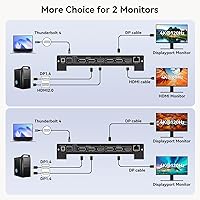
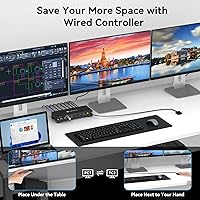
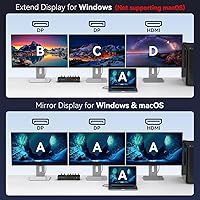
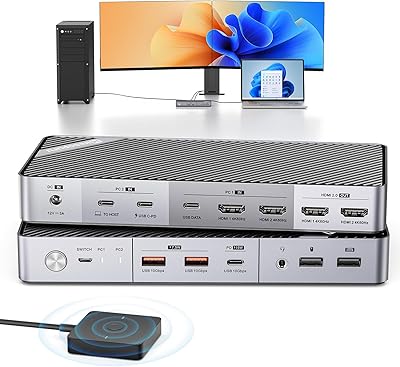
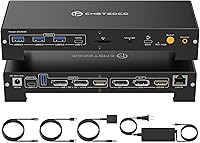
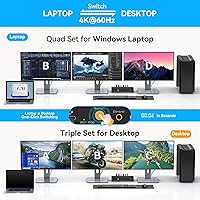
The display setup is genuinely flexible for the category. Three monitors run simultaneously at 4K and 60Hz — two over DisplayPort, one over HDMI — which covers most productivity and creative workflows without compromise. If you have a Thunderbolt 4 machine and two DisplayPort monitors specifically, you can push both to 4K at 120Hz, though that combination is a firm requirement, not a loose suggestion. Switching between computers is handled by a wired toggle button that ships in the box — no drivers, no software, just a physical click. Charging is split smartly: 100W reaches the primary laptop while a dedicated 65W USB-C port covers a second device, all backed by the bundled 120W adapter.

Best For

This KVM dock is built for people who genuinely live at a two-machine desk. The most natural fit is the hybrid worker juggling a corporate laptop alongside a personal PC — one keyboard, one mouse, three monitors, no daily cable-swap ritual. Video editors and designers get real value from a wide triple-4K canvas, and Thunderbolt 4 users doing high-frame-rate work can exploit the dual 120Hz mode. Compatibility runs deepest with Dell XPS, Lenovo ThinkPad, HP EliteBook, and ASUS ProArt hardware, but any laptop with DP Alt Mode on its USB-C port should qualify. If you only run one machine, the KVM layer is wasted cost — this is firmly a dual-machine solution.

User Feedback

Users running this dual-computer docking station with confirmed-compatible laptops consistently praise the instant KVM switching and the convenience of consolidating displays, peripherals, storage, and charging into a single connection. The 100W power delivery holds up for mainstream productivity laptops, though buyers with power-hungry machines have flagged that it can fall short under sustained heavy loads. Compatibility is where friction most commonly surfaces — some users outside the listed laptop families have encountered display or charging failures that required returns. Warmth under long triple-display sessions gets occasional mentions, but rarely rises to a serious complaint. For those it fits, the port variety and driver-free switching consistently justify the asking price.

Pros

  • One physical button switches your entire keyboard, mouse, and three-monitor setup between two computers instantly.
  • No drivers or software required — it works out of the box on any compatible machine.
  • The 15-in-1 port layout replaces a separate USB hub, card reader, and Ethernet adapter in a single unit.
  • Triple 4K at 60Hz across dual DisplayPort and one HDMI output covers virtually every productivity and creative layout.
  • Thunderbolt 4 users can push both DisplayPort monitors to 4K at 120Hz for noticeably smoother high-resolution work.
  • A dedicated 65W USB-C port charges a tablet or phone simultaneously while the laptop receives its full 100W.
  • The bundled 120W power adapter handles the combined draw of all connected peripherals without instability.
  • Both MicroSD and full SD card slots are included, which photographers and content creators will use constantly.
  • Gigabit Ethernet keeps wired network performance intact without needing a separate USB adapter.
  • The compact footprint keeps desk real estate manageable even with three display cables and two host connections running.

Cons

  • Laptops outside the validated compatibility list can fail entirely to drive displays, with no warning before purchase.
  • 4K at 120Hz is locked to Thunderbolt 4 hosts with two DisplayPort monitors — a narrower subset of buyers than marketing implies.
  • High-performance laptops with discrete GPUs may charge slowly or fail to maintain battery under sustained triple-display loads.
  • Occasional reports of one monitor — typically the HDMI output — lagging several seconds behind the DisplayPort screens on KVM toggle.
  • Audio devices do not follow the KVM switch, meaning headsets must be manually reassigned after toggling between computers.
  • Surface temperature rises noticeably during extended triple-display sessions, requiring clear ventilation around the unit.
  • The printed documentation inadequately explains DP Alt Mode requirements, leading to avoidable returns from uninformed buyers.
  • No Thunderbolt or USB4 passthrough on downstream ports limits expandability for users with advanced peripheral chains.
  • The 120W power brick adds meaningful cable bulk that partially undermines the desk-decluttering appeal of the dock.
  • USB-A port count may feel limiting when sharing peripherals across two computers with multiple wired devices each.

Ratings

The CMSTEDCD SW532 KVM Docking Station was evaluated by our AI system after processing verified buyer reviews from global markets, with spam, bot-generated, and incentivized feedback actively filtered out. Scores reflect the honest distribution of real-world experiences — including the friction points that manufacturers rarely highlight. Both the standout strengths and the recurring frustrations are weighted transparently in every category below.
KVM Switch Reliability
88%
The wired toggle button earns consistent praise for its immediacy — users report that switching between a work laptop and a personal PC mid-task feels instant and never requires a reboot or display handshake delay. The no-software approach is especially valued by IT professionals who cannot install third-party drivers on managed corporate machines.
A minority of users report that after extended sessions, one of the two connected machines occasionally fails to re-acquire all three displays on switch-back, requiring a manual cable reseat. This appears more common with certain USB-C host controllers than others.
Multi-Monitor Display Performance
84%
Running three monitors simultaneously at 4K and 60Hz holds up reliably for video editing timelines, multi-panel trading setups, and wide creative workflows. Users with dual DisplayPort monitors and a Thunderbolt 4 laptop who unlocked 120Hz report noticeably smoother cursor movement and animation rendering.
The 4K at 120Hz mode is far more conditional than marketing language implies — it strictly requires both a Thunderbolt 4 host and two DisplayPort monitors, leaving many buyers on Thunderbolt 3 or mixed-display setups capped at 60Hz. A handful of users also reported occasional flicker on the HDMI output at 4K resolution.
Laptop Compatibility
67%
33%
For users running Dell XPS, Lenovo ThinkPad, HP EliteBook, or ASUS ProArt systems with confirmed DP Alt Mode support, setup is largely plug-and-play. Thunderbolt 4 and 5 machines from major brands connect cleanly with full feature access including maximum display resolution and 100W charging.
Compatibility failures are the single most common return trigger. Laptops outside the validated list — including several mid-range business ultrabooks with USB-C ports that lack DP Alt Mode — simply do not drive displays at all, which catches buyers off guard. The pre-purchase compatibility check step is not optional, and some users only discover this after unboxing.
Power Delivery & Charging
79%
21%
The 100W pass-through keeps most productivity laptops fully charged even under sustained load, and having a separate 65W USB-C port for a tablet or secondary device is a practical touch that reduces adapter clutter. The bundled 120W power brick handles the combined draw without instability during normal workloads.
Power-hungry laptops — gaming machines or mobile workstations with discrete GPUs pulling hard — can drain faster than the 100W input replenishes, especially with three displays active simultaneously. Users in this category report settling for a slow charge rather than sustained battery level.
Port Selection & Variety
91%
The 15-in-1 layout genuinely replaces a separate USB hub, card reader, and Ethernet adapter for most desks. Having both MicroSD and full SD slots alongside USB 3.0, USB-C data, and gigabit Ethernet means photographers, developers, and content creators rarely need a supplemental device.
A few users expected more USB-A ports given the hub-class billing, noting that four or five peripheral devices fill the available slots quickly in a shared two-computer setup. There is also no USB4 or Thunderbolt passthrough on the downstream data ports, which limits expandability for advanced users.
Build Quality & Form Factor
74%
26%
The compact footprint — just under six inches long and under three inches wide — is well-suited to tight desks, and the chassis feels solid enough for daily handling. Users appreciate that the wired KVM button can be placed wherever it is most reachable without repositioning the dock itself.
At 2.6 pounds the dock is heavier than it looks, which can make cable tension an issue if it sits unsecured. The plastic housing, while functional, draws mild criticism from buyers comparing it to metal-chassis competitors at similar price points.
Thermal Management
71%
29%
Under typical dual-display use with moderate peripheral activity, the SW532 runs warm but not alarmingly hot. Most users running standard office workloads report no thermal throttling or unexpected shutdowns during full business days.
Extended triple-display sessions with active USB and Ethernet traffic push surface temperatures noticeably higher, and a small number of users mention the dock becoming uncomfortably warm to the touch after three or more continuous hours. Ventilation around the unit is worth keeping clear.
Setup & Ease of Use
82%
18%
For users with a compatible laptop, the setup experience is genuinely straightforward — connect the USB-C cable, plug in the power adapter, and the dock is recognized without any driver installation. The physical KVM button requires no configuration and works from the first press.
The initial setup experience diverges sharply based on compatibility. Users who hit a DP Alt Mode wall spend considerable time troubleshooting before concluding their laptop simply does not qualify, and the product instructions could do far more to guide this check before the hardware is connected.
Value for Money
76%
24%
Buyers who use the KVM functionality daily — particularly those who previously maintained two separate docking stations — consistently describe the consolidation as worth the price. The port count and dual-computer sharing together represent genuine value that single-machine docks cannot match.
For users who only partially use the feature set — running one computer, skipping the higher refresh modes, or using fewer than three displays — the pricing feels steep against simpler alternatives. The value equation is highly dependent on actually needing the KVM layer.
Cable Management
69%
31%
Having a single USB-C tether to each host computer dramatically reduces the cable count versus maintaining separate hubs and KVM switches. Users transitioning from a multi-device tangle consistently highlight this consolidation as a quality-of-life improvement.
With two host cables, a power brick cable, up to three display cables, and multiple peripheral connections, the back of the dock still generates a notable cable mass. The dock offers no integrated cable routing or rear strain relief, which means desk tidiness depends entirely on the user.
Display Switching Speed
83%
Most users report that all three connected monitors reactivate within two to four seconds of pressing the KVM toggle, which is competitive for a hardware-level switch without DisplayLink or software arbitration. Streamers and IT users who switch contexts frequently find the response time acceptable for professional use.
Occasionally one monitor — usually the HDMI-connected screen — lags behind the two DisplayPort panels by several additional seconds on wake. It is a minor inconsistency but noticeable enough that some users mention it in otherwise positive reviews.
Peripheral Sharing
86%
Sharing a single keyboard and mouse across two computers via USB passthrough works reliably across the tested setups. Users who previously used separate input devices for each machine highlight how much desk space and cognitive load this eliminates throughout a workday.
There is no audio switching integrated into the KVM layer, so headsets or speakers connected to the dock do not automatically follow the active computer on toggle. Users who route audio through their peripherals need a separate solution or must manually adjust input settings.
Documentation & Support
58%
42%
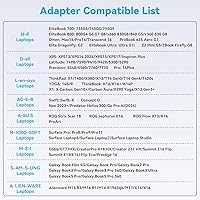
CMSTEDCD does maintain a compatibility reference image within the product listing, and their customer support team is reported to respond to pre-purchase compatibility inquiries, which helps buyers on less common laptop models make an informed decision.
The included printed documentation is sparse and does not adequately explain the specific conditions required for 4K at 120Hz or the DP Alt Mode requirement in plain terms. Several negative reviews trace directly back to mismatched expectations that better documentation would have prevented.

Suitable for:

The CMSTEDCD SW532 KVM Docking Station is purpose-built for anyone running two computers on one desk who is tired of the daily cable-swap routine. Hybrid workers who split their day between a managed corporate laptop and a personal machine get the most immediate value — one keyboard, one mouse, and three monitors shared cleanly between both systems with a single button press. Video editors, graphic designers, and photographers will appreciate the triple 4K display canvas alongside the built-in SD and MicroSD card slots, which keep their workflow entirely on one desk without supplemental adapters. Thunderbolt 4 users in particular unlock the full potential of this dual-computer docking station, since dual 4K at 120Hz becomes genuinely accessible for smoother design previews or high-frame-rate secondary monitor use. IT professionals and streamers managing parallel setups — one for production, one for monitoring or gaming — will find the driver-free hardware switch especially practical in environments where software installations are restricted.
Not suitable for:

The CMSTEDCD SW532 KVM Docking Station is a poor fit for anyone who only operates a single computer, since the KVM layer adds cost and complexity that delivers zero benefit in that scenario. Buyers with laptops outside the confirmed compatibility list — particularly mid-range ultrabooks whose USB-C ports lack DP Alt Mode — face a real risk of receiving a dock that cannot drive any external displays at all, making pre-purchase compatibility verification genuinely critical rather than optional. Users expecting 4K at 120Hz from a Thunderbolt 3 machine or a mix of DisplayPort and HDMI monitors will be disappointed, as that mode is locked strictly to Thunderbolt 4 hosts with two DisplayPort monitors. Buyers running power-hungry gaming laptops or mobile workstations with discrete GPUs may find that the 100W charging input cannot keep pace with heavy sustained loads, effectively making the dock a slow-charge solution under peak use. Anyone prioritizing a compact, lightweight travel dock should also look elsewhere — at 2.6 pounds with a sizable 120W power brick, this is firmly a fixed desk solution.
Specifications

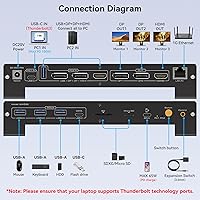
  • Brand & Model: Manufactured by CMSTEDCD under the model designation SW532 (full model code CMSTEDCD-US-SW532).
  • KVM Capacity: Supports two host computers sharing one set of peripherals, three monitors, and all dock ports simultaneously via hardware-level switching.
  • Display Outputs: Two DisplayPort outputs and one HDMI output allow a maximum of three external monitors to be connected at once.
  • Max Resolution: Triple-display operation is supported at up to 4K at 60Hz; dual-display operation via two DisplayPort connections supports up to 4K at 120Hz.
  • 120Hz Requirement: The 4K at 120Hz dual-display mode requires the host computer to have a Thunderbolt 4 port and both monitors to be connected via DisplayPort.
  • Host Connection: Each host computer connects via a USB-C port that must support DisplayPort Alternate Mode or Thunderbolt 3, 4, or 5 to enable display output.
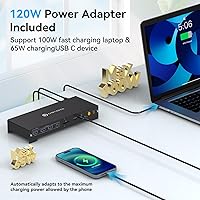
  • Laptop Charging: The primary USB-C host port delivers up to 100W of Power Delivery pass-through to keep the connected laptop charged during use.
  • Secondary Charging: A dedicated downstream USB-C port provides up to 65W of charging output for a secondary device such as a phone or tablet.
  • Power Adapter: A 120W external power adapter is included in the box to supply stable power across all connected displays, peripherals, and charging ports.
  • Total Ports: The dock provides 15 ports in total, covering display, data, networking, charging, and storage in a single unit.
  • USB Data Ports: Multiple USB 3.0 Type-A ports and at least one USB-C data port are included for connecting peripherals and storage devices.
  • Networking: A gigabit Ethernet port provides wired network connectivity at up to 1Gbps without requiring a separate adapter.
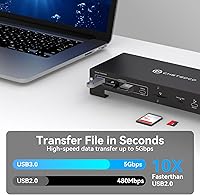
  • Card Slots: Dedicated MicroSD and full-size SD card slots are built in for direct media transfer without an external card reader.
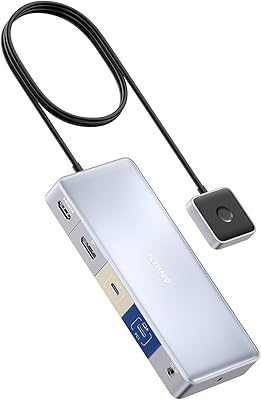
  • KVM Toggle: A wired physical push-button switch is included to toggle control between the two connected computers without any software installation.
  • Operating Voltage: The dock operates at 20 volts DC with a current rating of 1 amp on its switching circuit.
  • Dimensions: The dock measures 2.68 inches wide by 1.5 inches tall by 5.91 inches long.
  • Weight: The dock unit itself weighs 2.6 pounds, not including the power adapter or cables.
  • Driver Requirement: No software drivers or application installs are required; the dock and KVM switch function entirely at the hardware level on all supported platforms.

Related Reviews

Anker 554 USB-C KVM Docking Station
77%
83%
KVM Switching Reliability
79%
Dual Monitor Performance
71%
Power Delivery
86%
Build Quality
77%
Port Selection & Variety
More
StarTech 129N-USBC-KVM-DOCK Dual-Laptop KVM Docking Station
75%
83%
KVM Switching Reliability
88%
Display Performance
51%
Setup & Driver Experience
72%
Power Delivery
81%
Build Quality
More
Minisopuru MK808M-US Dual Monitor KVM Switch Docking Station
84%
94%
Dual Monitor Performance
91%
USB Peripheral Compatibility
88%
Switching Convenience
90%
Build Quality
82%
Setup & Installation
More
Lenovo 40AF0135US Docking Station
86%
88%
Performance
94%
Connectivity Options
85%
Ease of Setup
92%
Dual Display Support
91%
Power Delivery (135W)
More
WAVLINK UMD306B Docking Station
88%
91%
Dual Monitor Performance
88%
Data Transfer Speed
89%
Build Quality
92%
Ease of Setup
87%
Network Connectivity (Ethernet)
More
TobenONE UDS047 Dual Monitor Laptop Docking Station
82%
91%
Dual Monitor Output Quality
88%
Build Quality & Sturdiness
86%
Vertical Laptop Stand Design
84%
USB Data Transfer Speed
78%
Power Delivery Performance
More
Anker 778 Thunderbolt Docking Station
85%
89%
Display Performance
92%
Data Transfer Speed
90%
Charging Power
87%
Build Quality
81%
Compatibility
More
4URPC DisplayLink Docking Station DC0001A
85%
91%
Multi-Monitor Support
88%
Charging Performance
85%
Setup/Installation
89%
Connectivity & Ports
80%
Build Quality
More
Minisopuru DisplayLink Docking Station MD6950D
85%
89%
Setup & Installation
94%
Compatibility with MacBook & USB-C Laptops
91%
Multi-Monitor Support
87%
Charging Speed & Power Delivery
90%
Data Transfer Speed
More
Dell UD22 Universal Docking Station
86%
92%
Value for Money
87%
Performance & Stability
90%
Ease of Setup
95%
Compatibility with Multiple Platforms
89%
Display Quality (4K Support)
More

FAQ

The core requirement is that your laptop's USB-C port must support DisplayPort Alternate Mode, or the port must be a Thunderbolt 3, 4, or 5 connection. The easiest way to verify is to check your laptop's spec sheet or manufacturer page for either of those designations. If your USB-C port is listed only for charging or data without mention of DP Alt Mode or Thunderbolt, it will not drive displays through this dock. When in doubt, the brand offers pre-purchase compatibility inquiries which is worth using before ordering.

It is very much a conditional feature. To hit 4K at 120Hz on two monitors simultaneously, your host computer must have a Thunderbolt 4 port specifically — Thunderbolt 3 does not qualify — and both monitors must be connected via the DisplayPort outputs. If you are using the HDMI port for either display, or your machine is Thunderbolt 3, you are capped at 4K at 60Hz across all three screens. It is a great feature for the right setup, but the hardware requirements are strict.

In practice, most users report all three monitors coming back to life within two to four seconds of pressing the toggle button. The DisplayPort-connected screens tend to reactivate slightly faster than the HDMI output, which can lag a couple of extra seconds behind. It is fast enough that switching mid-task is not disruptive for most users, though it is not the instantaneous flicker-free experience you would get from a software-based switcher on a single machine.

For most productivity laptops — ultrabooks, business notebooks, thin-and-light machines — 100W is more than enough to maintain or even charge the battery during normal use. Where it starts to fall short is on high-performance laptops with dedicated GPUs under heavy load, where power draw can exceed what 100W can replace in real time. If you are running a gaming laptop or a mobile workstation pushing its GPU hard with three displays active, expect the battery to hold steady at best or slowly deplete at worst.

Yes, USB peripherals connected to the dock's downstream ports switch to the active host computer along with the display outputs when you press the toggle button. What does not follow the switch is audio — headsets or speakers connected to the dock will stay associated with whichever computer they were last recognized on, so you may need to manually reassign your audio input and output after toggling if audio routing matters to you.

Honestly, probably not at this price point. The CMSTEDCD SW532 KVM Docking Station is engineered around the dual-computer use case, and a large portion of its cost reflects the KVM switching hardware and the engineering required to support two simultaneous host connections. If you are running a single machine, a standard USB-C dock with triple display support will give you the same port density and display performance for considerably less money.
No. Both host connections on this dual-computer docking station use USB-C, and both require DP Alt Mode or Thunderbolt capability to enable display output. A standard desktop PC without a USB-C port featuring Thunderbolt or DP Alt Mode would need a compatible add-in graphics card with a Thunderbolt or DP Alt Mode-capable USB-C output to connect as a host. Most traditional desktop tower builds do not meet this requirement without additional hardware.

It runs warm — that is normal for any dock handling this level of display and power throughput. Under typical dual-display use it stays manageable, but sustained triple-display sessions with active USB and Ethernet traffic will push surface temperatures noticeably higher. Nothing users have reported suggests dangerous heat levels, but it is worth making sure the dock has clear airflow around it rather than sitting inside a cable management box or enclosed shelf.

No installation of any kind is needed. The KVM switch operates entirely at the hardware level, which means it works the same on Windows, macOS, or any other operating system your two machines run. This is particularly useful for IT environments where managed corporate laptops block third-party software installs. You plug in, connect the toggle button, and it works.

The box includes the dock unit, the 120W power adapter, and the wired KVM toggle button. DisplayPort and HDMI cables are generally not included, so if you do not already have cables to connect your monitors you will need to purchase those separately. Host USB-C cables for each computer are also typically not bundled, so confirm what you have on hand before the dock arrives to avoid a delayed setup.