TobenONE UDS047 Dual Monitor Laptop Docking Station
Overview
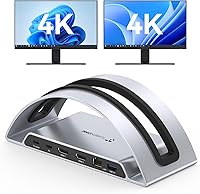
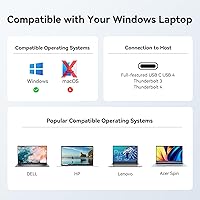
The TobenONE UDS047 Dual Monitor Laptop Docking Station entered the market in January 2025 as a vertical stand-style hub designed to tidy up cluttered Windows and ChromeOS desks. It sits comfortably in the mid-range bracket, competing with well-known docks from Anker and similar brands. With 13 ports packed into a compact silver chassis and a built-in laptop stand, it promises real utility without demanding a premium price. One thing worth knowing upfront: no macOS support whatsoever — if you're on a Mac, stop here. For Windows and ChromeOS users, though, the value proposition is genuinely interesting.
Features & Benefits
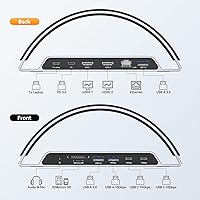
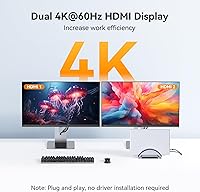
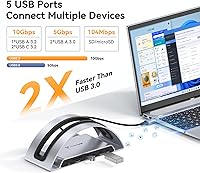
The standout spec here is dual 4K@60Hz output — two HDMI ports running full 4K resolution simultaneously, which isn't something you always get at this price tier. The integrated vertical stand holds the laptop firmly with no wobble, keeping it upright beside the monitors rather than flat on the desk. Data transfers run at up to 10Gbps through both the USB-C 3.2 and USB-A 3.2 ports, fast enough for large video files or external SSDs. The UDS047 also delivers 100W power delivery, though how much of that your laptop actually draws depends on its own charging circuit. Rounding things out: SD and microSD slots, Ethernet, and a 3.5mm audio jack — 13 ports in a footprint smaller than a hardback book.
Best For
This docking station is a natural fit for Windows 10/11 and ChromeOS users who want to run two external monitors without hunting for adapters or a separate laptop stand. It works particularly well with Dell XPS, Lenovo ThinkPad, HP Spectre, and Microsoft Surface machines — essentially any laptop with a full-featured USB-C, USB4, or Thunderbolt 3/4 port. Professionals who routinely move large files between drives will appreciate the high-speed USB ports. If you shoot photos or edit video, the dual card reader is a quiet but practical bonus. Just be aware: laptops with non-standard slim USB-C connectors or proprietary charging ports may not get the full experience.
User Feedback
With around 64 ratings and a 4.6-star average, early impressions are encouraging but it's worth tempering expectations — this is still a relatively new product. Buyers frequently mention the sturdy stand construction and how much cleaner their desk looks once the laptop is propped vertically. Dual-monitor output generally gets positive marks for reliability. On the flip side, a handful of users have noted the dock runs warm during long sessions, and a few found the laptop slot doesn't accommodate thicker or unusually sized machines well. Opinions on power delivery are mostly positive, though some users with power-hungry laptops felt charging slowed under load. Setup, for most, was plug-and-play with no driver installation needed.
Pros
- Drives two external monitors at full 4K and 60Hz simultaneously — no compromises on resolution.
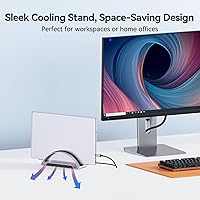
- The built-in vertical laptop stand genuinely frees up desk space rather than just claiming to.
- Plug-and-play on Windows 11 and recent ChromeOS — most users are up and running in under two minutes.
- USB-C 3.2 and USB-A 3.2 ports hit close to 10Gbps in real-world file transfers with compatible drives.
- Thirteen ports in a sub-8-inch body means fewer adapters cluttering the desk.
- Both SD and microSD card slots are included — handy for photographers who switch between camera formats.
- Wired Ethernet delivers stable, reliable connectivity for video calls without depending on Wi-Fi.
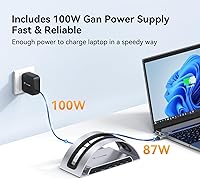
- The 100W power delivery keeps most mainstream Windows laptops charged throughout the workday.
- Early buyers consistently praised the solid, wobble-free stand construction for everyday docking.
Cons
- The chassis runs noticeably warm during extended sessions with all ports fully loaded.
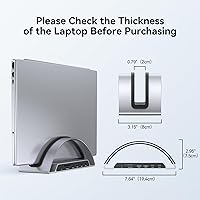
- Laptop stand slot width is fixed — unusually thick or ultra-slim laptops may not sit securely.
- Only one USB-C downstream port limits flexibility for users with multiple USB-C peripherals.
- Card read speeds are adequate for photos but slow enough to frustrate 4K or 6K video imports.
- Ethernet tops out at gigabit speeds — no 2.5GbE option for bandwidth-intensive network tasks.
- The included host cable is short, which can be awkward if the dock needs to sit away from the laptop.
- With roughly 64 reviews to date, long-term reliability and brand support remain unproven.
- A faint audio hiss is detectable through sensitive headphones at higher volume levels.
- Power delivery may not keep pace with battery draw on high-performance laptops during heavy CPU workloads.
Ratings
The TobenONE UDS047 Dual Monitor Laptop Docking Station has been scored below using AI analysis of verified global buyer reviews, with spam, bot-generated, and incentivized feedback actively filtered out. Ratings reflect both what real users consistently praised and the friction points that surfaced across Windows and ChromeOS workspaces. Nothing has been glossed over — the scores represent an honest picture of where this vertical laptop dock delivers and where it falls short.
Dual Monitor Output Quality
Build Quality & Sturdiness
Vertical Laptop Stand Design
USB Data Transfer Speed
Power Delivery Performance
Plug-and-Play Compatibility
Thermal Management
Port Variety & Count
Ethernet Reliability
SD & MicroSD Card Slots
Audio Output
Cable Management
Setup Experience
Value for Money
Suitable for:
The TobenONE UDS047 Dual Monitor Laptop Docking Station was clearly built with the Windows-first home office worker in mind, and that target is a good fit. If you spend long hours across multiple applications — juggling a browser, a spreadsheet, and a communication tool simultaneously — having two 4K displays driven from a single cable connection is a genuine productivity upgrade. Dell XPS, Lenovo ThinkPad, HP Spectre, and Microsoft Surface users with full-featured USB-C or Thunderbolt ports will find the plug-and-play setup refreshingly straightforward. The integrated vertical stand makes particular sense in tighter workspaces where a flat laptop beside a keyboard eats up the whole desk. Photographers and content creators who frequently import from SD or microSD cards will also get quiet but consistent value from the dual card slots. ChromeOS users on supported Chromebook models can take advantage of the dock as well, though they should verify display compatibility before buying.
Not suitable for:
The TobenONE UDS047 Dual Monitor Laptop Docking Station is a hard pass for anyone running macOS — compatibility is Windows and ChromeOS only, and no workaround exists. MacBook users of any generation should look elsewhere without exception. Power users with gaming laptops or mobile workstations that require 140W or more to maintain battery under load will find the 100W power delivery insufficient during demanding sessions. If your laptop has a proprietary charging port and relies on a barrel connector rather than USB-C, this dock won't charge it at all. Users with unusually thick or slim laptops — outside the mainstream thickness range — may also find the vertical stand slot either too loose or too snug for reliable daily use. Finally, anyone expecting two USB-C output ports for a multi-USB-C peripheral setup will run into limitations, as the dock provides only one USB-C downstream port alongside its USB-A options.
Specifications
- Model Number: The official model identifier for this dock is UDS047, manufactured by TobenONE.
- Dimensions: The unit measures 7.64 x 3.15 x 2.95 inches, making it compact enough to sit alongside a monitor without dominating the desk.
- Weight: At 2.05 pounds, the dock is substantial enough to stay planted during daily use without being difficult to relocate.
- Form Factor: This is a vertical docking station with an integrated laptop stand slot, designed to hold the laptop upright beside the connected monitors.
- HDMI Output: Two full-size HDMI ports support simultaneous 4K output at 60Hz on both connected displays.
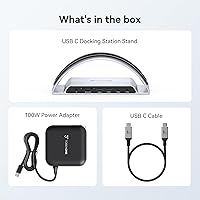
- Host Connection: The dock connects to the host laptop via a single USB-C cable and is compatible with USB-C, USB4, Thunderbolt 3, and Thunderbolt 4 interfaces.
- USB-C Port: One downstream USB-C 3.2 Gen 2 port delivers data transfer speeds of up to 10Gbps for compatible peripherals and storage devices.
- USB-A Ports: Multiple USB-A 3.2 Gen 2 ports provide up to 10Gbps data transfer speeds for external drives, keyboards, mice, and other accessories.
- Total Ports: The dock includes 13 ports in total, covering display output, data, power, networking, audio, and card reading in a single hub.
- Total USB Ports: Five USB ports are distributed across USB-C and USB-A formats to handle a range of peripheral combinations simultaneously.
- Power Delivery: The dock supplies up to 100W of power delivery to the connected host laptop through the same USB-C connection used for data and display.
- Card Slots: A full-size SD card slot and a microSD card slot are both included, supporting simultaneous or individual use for photo and video imports.
- Network Port: One RJ-45 Ethernet port provides a wired network connection, operating at up to gigabit speeds.
- Audio: A 3.5mm combo audio jack supports both headphone output and microphone input from a single port.
- OS Compatibility: The dock is compatible with Windows 10 and Windows 11, as well as ChromeOS version 100.x or later; macOS is not supported.
- Color & Finish: The dock ships in a silver finish with a smooth matte-style chassis that blends with most modern monitor and laptop aesthetics.
- Availability Date: The UDS047 was first made available for purchase in January 2025, making it a relatively recent release with an early but positive review profile.
Related Reviews
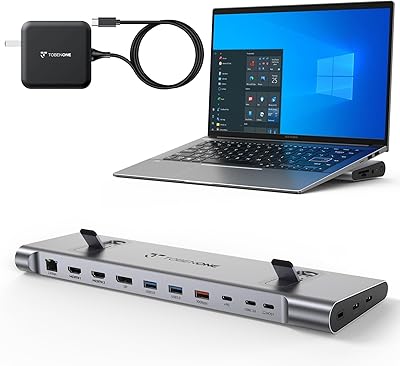
TobenONE UDS041W USB-C Triple Monitor Docking Station
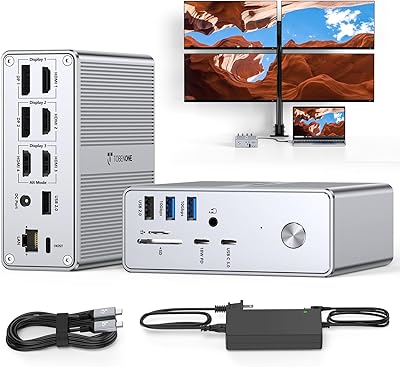
TobenONE UDS033B 18-in-1 Quad Monitor Docking Station
VisionTek VT4510
StarTech 129N-USBC-KVM-DOCK Dual-Laptop KVM Docking Station
Minisopuru MK808M-US Dual Monitor KVM Switch Docking Station

LIONWEI Triple Monitor USB-C Docking Station
RSHTECH RSH-DS02 Dual Bay Hard Drive Dock
MAIWO Dual-Bay Hard Drive Docking Station
StarTech DK31C4DPPD Quad Monitor USB-C Dock