Overview

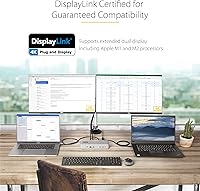
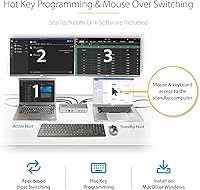
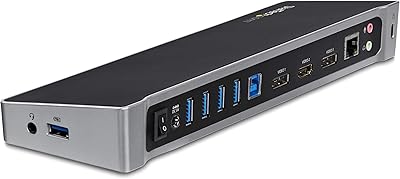
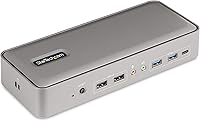
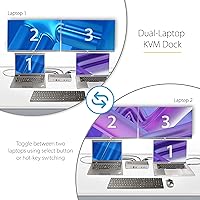
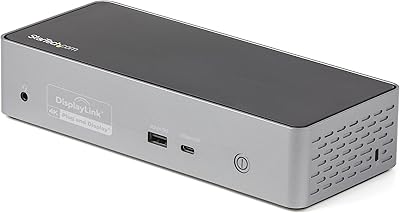
The StarTech 129N-USBC-KVM-DOCK Dual-Laptop KVM Docking Station solves a genuinely awkward desk problem: two laptops, one workspace, and zero desire to constantly swap cables. Rather than buying a separate dock for each machine plus a traditional KVM switch on top, this dual-host dock bundles all of that into a compact horizontal bar that sits quietly at the back of your desk. A single button on the front toggles control between both hosts — monitors, keyboard, mouse, and USB peripherals switch together in one press. For government or enterprise buyers, TAA compliance adds a procurement advantage that few competitors at this price tier can match.
Features & Benefits

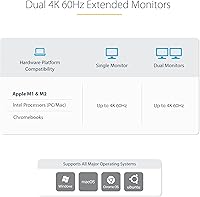
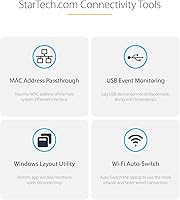
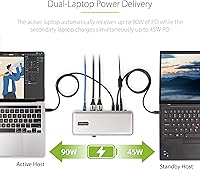
Both DisplayPort outputs run at 4K 60Hz simultaneously, so neither monitor takes a resolution hit regardless of which laptop is active. Charging flows through the same USB-C connection: the active machine receives 90W, while the standby gets 45W — sufficient for most ultrabooks and business laptops, though owners of power-hungry 16-inch MacBook Pros or workstation-class machines should verify their needs first. Connectivity covers fast USB-A and USB-C data ports, Gigabit Ethernet, stereo audio in and out, plus dual Kensington lock slots for physical security. IT teams will appreciate tools like MAC Address Pass-Through and WiFi Auto Switching, which simplify network management in tightly controlled enterprise environments. One honest caveat: the 180W power brick is substantial.

Best For

This two-laptop docking station is purpose-built for a specific kind of professional — and it shows. Hybrid workers who toggle daily between a personal MacBook and a corporate Windows machine will get the most from it, bypassing the cable-swapping ritual entirely. It also suits IT help-desk staff who value the network management features without sacrificing desk space. Creative professionals doing cross-platform testing between macOS and Windows will find it genuinely practical. Government or defense contractors can satisfy TAA compliance requirements without hunting for a niche vendor. If you already own two DisplayPort monitors, the StarTech KVM dock turns a cluttered two-machine setup into something far more controlled and manageable.

User Feedback

With 67 reviews and a 3.7-out-of-5 rating, the StarTech KVM dock sits in genuinely mixed territory — worth being straight about rather than glossing over. Buyers who praise it point to reliable one-button switching, solid build quality, and consistent 4K output once everything is properly configured. The friction tends to appear during setup: macOS driver installation draws repeated complaints, and some users report USB peripherals briefly dropping when switching between hosts. The size of the external power brick also earns consistent gripes. A small subset flags compatibility hiccups with specific Apple Silicon models. Given the limited review pool, these impressions remain somewhat provisional — if you have hands-on experience with this dock, sharing your perspective helps others make a better-informed decision.

Pros

  • One-button switching transfers monitors, keyboard, mouse, and all USB peripherals between two laptops instantly.
  • Both DisplayPort outputs run at full 4K 60Hz simultaneously — no resolution trade-offs when switching hosts.
  • Charges both connected laptops at once, so neither machine sits idle and draining on standby.
  • TAA compliance makes this dual-host dock viable for government and defense procurement without extra paperwork.
  • MAC Address Pass-Through keeps network authentication consistent across host switches in managed IT environments.
  • Broad OS support covers Windows, macOS, ChromeOS, and Linux with Intel, AMD, and Apple M-series chips.
  • Compact horizontal form factor takes up minimal desk space relative to the connectivity it replaces.
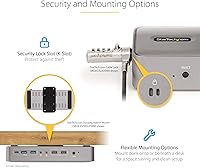
  • Dual Kensington lock slots — standard and Nano — add physical security options most docks omit entirely.
  • A single 180W power adapter handles the entire system, reducing the total number of wall plugs needed.
  • WiFi Auto Switching and Windows Layout persistence are thoughtful IT-focused additions rarely found at any price.

Cons

  • Driver installation is required on both Windows and macOS before the dock works fully — not plug-and-play.
  • The 180W external power brick is bulky and can create cable management headaches on a tidy desk.
  • 90W power delivery may not satisfy high-performance laptops under sustained workloads like video rendering or gaming.
  • Some users report USB peripherals briefly disconnecting and re-enumerating each time the host toggle is pressed.
  • Only DisplayPort outputs are available — HDMI monitor owners need adapters, adding cost and potential signal issues.
  • A 3.7-out-of-5 rating across a relatively small review pool signals setup and compatibility friction worth taking seriously.
  • Certain Apple Silicon laptop models have drawn compatibility complaints, so verifying your specific machine is essential.
  • The StarTech KVM dock requires a meaningful upfront investment that only pays off if the dual-host use case genuinely applies to you.
  • No front-facing USB-C port for quick peripheral connections means reaching around the dock more than ideal.
  • Limited real-world review data makes it harder to assess long-term reliability compared to more established dock models.

Ratings

The scores below for the StarTech 129N-USBC-KVM-DOCK Dual-Laptop KVM Docking Station were generated by our AI review engine after analyzing verified global buyer feedback, with spam, bot-submitted, and incentivized reviews actively filtered out. We examined recurring patterns across both positive and critical responses to reflect an honest picture of where this dual-host dock genuinely delivers and where it creates friction for real users.
KVM Switching Reliability
83%
The front-panel toggle button is the centerpiece of this dock, and for most buyers it works exactly as advertised — one press hands off both displays, the keyboard, mouse, and connected USB devices to the second laptop in a matter of seconds. Professionals switching between a personal and work machine multiple times a day find the experience notably cleaner than managing two docks manually.
A recurring complaint involves USB peripherals briefly dropping and re-enumerating during each host switch, which disrupts audio interfaces, USB hubs, and some storage devices mid-task. For users who switch hosts frequently throughout the day, this momentary hiccup becomes a consistent annoyance rather than an occasional oddity.
Display Performance
88%
Both DisplayPort outputs hold 4K 60Hz on each connected monitor without any resolution compromise during or after a host switch, which is not a given at this product tier. Creative professionals running design or video work across two screens report crisp, stable output that holds up reliably across extended sessions.
The dock is limited to DisplayPort outputs only, leaving HDMI monitor owners dependent on adapters — and active adapters at that, if 4K 60Hz is the goal. Buyers who discover this limitation after purchase represent a notable share of the more frustrated one-star reviews.
Setup & Driver Experience
51%
49%
Once drivers are correctly installed on both Windows and macOS, the dock operates stably for the majority of users, and StarTech does provide downloadable software through their support site. IT professionals who are comfortable with managed software deployment tend to navigate this phase without much trouble.
Driver installation is the single most cited frustration in user reviews, particularly on macOS, where permission prompts, security settings, and the requirement to restart multiple times catch many buyers off guard. For users expecting a plug-and-play experience standard on consumer docks, the setup process feels disproportionately involved for a premium-priced product.
Power Delivery
72%
28%
Delivering 90W to the active host and 45W to the standby simultaneously from a single connection is genuinely practical for hybrid workers running two ultrabooks or mid-range business laptops. The fact that neither machine sits completely uncharged during standby is a meaningful quality-of-life improvement over basic KVM setups.
Owners of high-wattage machines — particularly a fully loaded MacBook Pro 16-inch under rendering workloads or any performance Windows laptop that recommends a 140W adapter — will find that 90W maintains but does not replenish the battery under sustained load. This limitation is not prominently flagged in the product listing and catches some buyers by surprise.
Build Quality
81%
19%
The dock has a solid, dense feel that reviewers consistently describe as professional and well-constructed, with no reports of flex or rattling in the chassis. The low-profile horizontal form factor sits neatly on a desk without drawing attention, and the port placement on both front and rear faces feels deliberately considered.
The external 180W power brick is the primary build-related complaint — it is large, heavy, and requires its own space, undermining the otherwise compact desk presence of the dock itself. A few users note the USB-C host cables, while functional, feel less premium than the dock body they connect to.
Port Selection & Variety
77%
23%
For a dock designed around a two-host switching workflow, the port layout covers the essentials well: fast USB-A and USB-C data ports for storage and peripherals, dedicated HID ports for keyboard and mouse, separate audio in and out jacks, and Gigabit Ethernet with MAC Address Pass-Through for enterprise network stability.
The absence of a front-facing fast USB-C port for quick peripheral connections is a missed convenience — reaching behind or around the dock to plug in a flash drive or camera becomes a daily minor irritant. The total USB port count is also modest given the premium positioning, and there is no SD card reader despite the dock targeting content-adjacent professionals.
macOS Compatibility
63%
37%
The dock genuinely unlocks dual external display support on Apple Silicon MacBooks that Apple natively limits to a single external monitor — a capability that competing docks at this price often fail to deliver reliably. M1, M2, M3, and M4 chip variants across the supported MacBook lineup are covered once the driver is installed.
Apple Silicon compatibility is the most frequent source of negative reviews, with some users reporting persistent issues on specific MacBook models even after successful driver installation. The driver requirement on macOS also conflicts with how Mac users expect peripherals to behave, and any macOS system update can temporarily break dock functionality until StarTech releases a compatible software revision.
Enterprise & IT Features
86%
MAC Address Pass-Through, WiFi Auto Switching, USB Event Monitoring, and Windows Layout persistence are not features you find bundled into consumer docks at any price — they reflect a genuine understanding of managed IT environments where network identity and peripheral logging matter. Help-desk professionals in particular appreciate having these tools in a compact, desk-friendly footprint.
These features are largely irrelevant to buyers who are not in managed enterprise or IT environments, which means a segment of purchasers is paying for capabilities they will never use. The software interface for accessing these tools is functional but not particularly intuitive for non-IT users who stumble into it during setup.
TAA Compliance Value
89%
For government agencies, defense contractors, and federally funded institutions where TAA compliance is a hard procurement requirement, this dock is one of the very few dual-host docking solutions in this category that qualifies. Buyers in those environments report that TAA certification alone justifies serious consideration over competing products.
TAA compliance adds no practical value for private-sector buyers, home office users, or international purchasers, making it a non-factor for a significant portion of the potential audience. Its presence also does not imply any additional hardware quality or reliability guarantee beyond the compliance certification itself.
Value for Money
67%
33%
When framed against the alternative — two separate single-host docks plus a standalone KVM switch — the consolidated cost of this dual-host dock becomes more defensible, particularly for buyers who also need enterprise IT features and TAA compliance bundled into one unit. The right buyer, in the right workflow, gets meaningful return on the investment.
At its price point, a 3.7-out-of-5 aggregate rating is difficult to reconcile, especially when the core friction points — driver installation and power delivery limitations — are setup-phase issues rather than unavoidable hardware trade-offs. Buyers who do not firmly fit the dual-host professional use case will likely feel the value proposition does not hold up.
Cable Management
58%
42%
Having a single 180W power brick supply the entire system — two laptops charging plus the dock — does reduce the total number of wall outlet connections needed compared to running two separate docking setups. The dock body itself is compact enough to position without dominating a desk.
The 180W power brick is bulky and inflexible in how it can be routed, and managing two host USB-C cables on top of monitor, Ethernet, and peripheral cables creates a complex bundle behind the dock that several reviewers describe as genuinely frustrating to organize neatly. Desk setups with tight cable management constraints will feel the strain.
Cross-Platform Flexibility
82%
18%
Supporting Windows, macOS, ChromeOS, and Linux across Intel, AMD, and Apple M-series hardware in a single dock is a meaningful technical achievement that very few competitors match at any price. Creative and technical professionals who legitimately operate across operating systems daily benefit directly from not needing to qualify each host machine.
The cross-platform promise carries an asterisk: Windows and macOS both require driver installation, and ChromeOS and Linux users may find that some of the advanced IT features are unavailable or unsupported on their platforms. Mixed-OS households where one user is non-technical may find the setup demands strain the flexibility claim.
Physical Security
84%
Dual Kensington lock slots — one standard and one Nano — are a thoughtful inclusion for shared office environments or open-plan workspaces where equipment theft is a genuine concern. IT procurement managers who spec docks for shared workstations will appreciate having locking options without sourcing a separate security bracket.
Physical lock slots are purely additive for home office users, and the dual-slot implementation does not meaningfully secure the connected laptops themselves — only the dock chassis. In practice, most individual buyers will never use either slot, making it a feature that earns respect but rarely gets exercised.

Suitable for:

The StarTech 129N-USBC-KVM-DOCK Dual-Laptop KVM Docking Station is built for a specific professional reality: two laptops, one desk, and a genuine need to switch between them without touching a single cable. Hybrid workers who carry both a personal machine and a company-issued laptop will find the one-button host toggle saves real time and frustration every single day. IT professionals and help-desk staff benefit from enterprise-grade extras like MAC Address Pass-Through and WiFi Auto Switching — features that simply do not exist on consumer-grade docks. Creative professionals who run a Mac and a Windows machine side by side for cross-platform testing or mixed-OS file workflows will appreciate that both hosts can run dual 4K displays at full resolution without compromise. Government and defense contractors working under TAA compliance mandates will find this one of the few docking solutions in this category that actually checks that box. If you already own two DisplayPort monitors and want to stop managing two chaotic cable nests, this dual-host dock consolidates everything cleanly.
Not suitable for:

The StarTech 129N-USBC-KVM-DOCK Dual-Laptop KVM Docking Station is not the right pick if you only ever use one laptop at your desk — at that point, you are paying a significant premium for KVM functionality you will never use, and a standard single-host dock will serve you better for less money. Users who rely on high-wattage machines like a fully specced MacBook Pro 16-inch or any performance-oriented Windows laptop should check their charging requirements carefully, since 90W may fall short under sustained heavy workloads. Buyers who are not comfortable installing drivers on both Windows and macOS before the dock functions fully should be prepared for a setup process that is more involved than plug-and-play alternatives. Anyone expecting a consumer-friendly unboxing experience may be put off by the size and placement demands of the 180W external power brick. Finally, if your monitors use HDMI rather than DisplayPort, this dock offers no native path without adapters, which adds cost and potential compatibility headaches.
Specifications

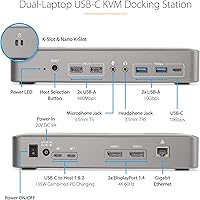
  • Model Number: The official model identifier for this dock is 129N-USBC-KVM-DOCK, manufactured by StarTech.com.
  • Hosts Supported: The dock supports two simultaneous USB-C laptop connections, allowing one-button switching between both hosts.
  • Display Outputs: Two DisplayPort outputs deliver up to 4K 60Hz resolution on each connected monitor, regardless of which host is active.
  • Power Delivery: The active host receives 90W of USB-C Power Delivery, while the standby host receives 45W simultaneously.
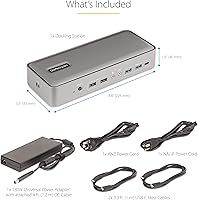
  • Power Adapter: A 180W external power brick is included and powers the entire docking system, including both laptop charging streams.
  • USB-A Ports: Four USB-A ports are available: two running at 10Gbps for fast data transfer, and two USB 2.0 ports dedicated to HID devices like keyboards and mice.
  • USB-C Data Port: One USB-C data port operates at 10Gbps for connecting high-speed peripherals or external storage devices.
  • Network: A Gigabit Ethernet port with MAC Address Pass-Through ensures consistent network identity across host switches in managed IT environments.
  • Audio: Dedicated 3.5mm stereo output and 3.5mm microphone input jacks are provided as separate ports for headsets or speakers.
  • Security Slots: Dual physical security options are included: one standard Kensington lock slot and one Nano K-Slot for compatible locks.
  • Dimensions: The dock measures 8.8″ long by 3.5″ wide by 1.6″ tall, keeping a low profile on most desk surfaces.
  • Weight: The dock unit itself weighs 14.2 oz, not including the external power adapter.
  • OS Compatibility: Supported operating systems include Windows, macOS, ChromeOS, and Linux, with driver installation required on Windows and macOS for full functionality.
  • Chip Compatibility: The dock works with Intel, AMD, and Apple M-series processors, including M1, M2, M3, and M4 variants across supported MacBook models.
  • TAA Compliance: This dock is Trade Agreements Act (TAA) compliant, making it eligible for U.S. government and federal procurement use.
  • KVM Switch: A physical toggle button on the front face of the dock switches all connected peripherals and displays between the two host laptops instantly.
  • IT Features: Enterprise-focused software tools include WiFi Auto Switching, USB Event Monitoring, and Windows Layout persistence for managed deployment environments.
  • Total Ports: The dock provides 14 total ports across all connectivity types, consolidating peripheral management for a two-laptop workstation setup.

Related Reviews
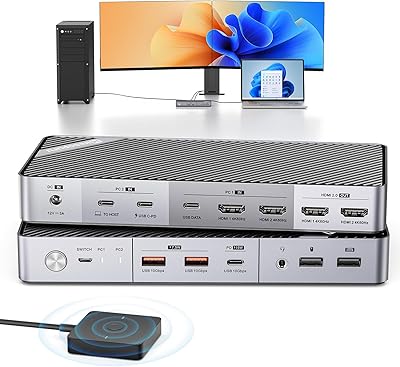
Minisopuru MK808M-US Dual Monitor KVM Switch Docking Station

84%
94%
Dual Monitor Performance
91%
USB Peripheral Compatibility
88%
Switching Convenience
90%
Build Quality
82%
Setup & Installation
More
StarTech SDOCK2U33EB Dual-Bay Hard Drive Docking Station
78%
83%
Hot-Swap Reliability
88%
Drive Compatibility
74%
Transfer Performance
76%
Build Quality
93%
Ease of Setup
More
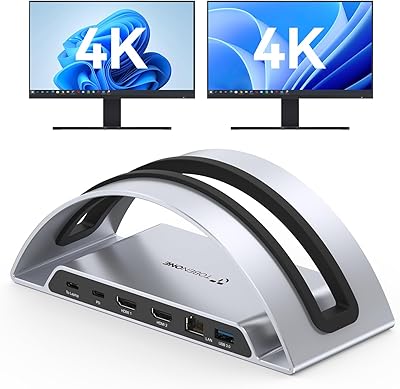
TobenONE UDS047 Dual Monitor Laptop Docking Station
82%
91%
Dual Monitor Output Quality
88%
Build Quality & Sturdiness
86%
Vertical Laptop Stand Design
84%
USB Data Transfer Speed
78%
Power Delivery Performance
More
StarTech DK31C4DPPD Quad Monitor USB-C Dock
76%
88%
Multi-Monitor Performance
51%
Driver Setup Experience
74%
Power Delivery
91%
OS & Hardware Compatibility
83%
Build Quality
More
VisionTek VT4510
VisionTek VT4510
73%
84%
Dual Display Performance
52%
Driver Setup & Ease of Use
74%
Laptop Charging & Power Delivery
61%
macOS & Apple Silicon Compatibility
88%
Port Selection & Connectivity
More
MAIWO Dual-Bay Hard Drive Docking Station
78%
88%
Offline Clone Reliability
91%
Value for Money
67%
Transfer Speed
83%
Drive Compatibility
93%
Ease of Setup
More
RSHTECH RSH-DS02 Dual Bay Hard Drive Dock
80%
88%
Offline Cloning Reliability
83%
Build Quality
76%
Transfer Speed
71%
Heat Management
62%
Large Drive Compatibility
More
dockteck Dual Bay External Hard Drive Docking Station
84%
90%
Performance and Speed
88%
Ease of Use
85%
Build Quality
91%
Cloning Functionality
82%
Compatibility
More
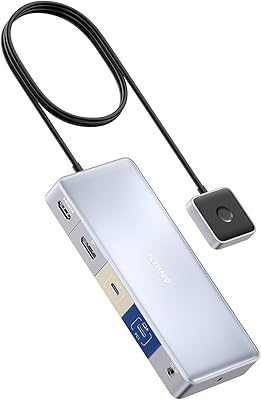
Anker 554 USB-C KVM Docking Station
77%
83%
KVM Switching Reliability
79%
Dual Monitor Performance
71%
Power Delivery
86%
Build Quality
77%
Port Selection & Variety
More
TobenONE UDS041W USB-C Triple Monitor Docking Station
77%
84%
Multi-Monitor Output
91%
Single-Display Performance
93%
Integrated 100W Charging
88%
Data Transfer Speed
79%
Ethernet Performance
More

FAQ

On Windows and macOS, driver installation is required before the dock operates fully — this is not optional and is one of the more common setup frustrations buyers report. StarTech provides the software through their support portal, and the process is straightforward once you locate it, but do not expect a true plug-and-play experience out of the box. ChromeOS and Linux users typically have an easier time, as those platforms do not require the additional software step.

It depends on what you are doing. For general productivity tasks, 90W is usually sufficient to maintain or slowly top up a MacBook Pro 16-inch, but under heavy workloads like video exports or sustained CPU-intensive tasks, 90W may not fully keep pace with the laptop's power draw and you could see the battery slowly drain. If your 16-inch model recommends a 140W adapter for full-speed charging, treat the 90W here as a maintenance charge rather than a fast charge.

Yes, that is exactly the core function of this dual-host dock. You press the toggle button on the front, and both monitors, your keyboard, mouse, and connected USB peripherals all hand off to the other laptop automatically. The switch itself takes only a couple of seconds, though some users note that USB devices briefly re-enumerate during the transition, which can cause a momentary disconnect for things like audio interfaces or USB hubs.

The dock only provides DisplayPort outputs natively, so HDMI monitors are not directly supported without an active DisplayPort-to-HDMI adapter. Passive adapters may work in some cases, but for reliable 4K 60Hz output on an HDMI monitor, an active adapter is the safer choice. This is worth factoring into the total cost if your current monitors use HDMI.

Yes, and this is one of its more useful capabilities. StarTech's driver enables dual external display support on Apple Silicon MacBooks that Apple natively limits to one external monitor — covering M1, M2, M3, and M4 chip variants across supported models. You do need to install the StarTech driver on macOS for this to work, so skipping that step will leave you with only one active display on those machines.

If you work in a corporate environment where your IT department has registered your laptop's network MAC address for access control or security filtering, MAC Address Pass-Through ensures the network sees a consistent identity when you switch between hosts on this dock. Without it, switching hosts could appear to the network as a different device, potentially triggering authentication failures. If you work from home with a personal router, this feature is largely irrelevant to you.

It is large by consumer standards — 180W of total power delivery for two laptops plus the dock itself requires a substantial adapter. Several buyers mention it as a genuine annoyance, particularly for desk setups where cable management is a priority. If you plan to route everything neatly or mount cables under your desk, factor in that the brick will need its own real estate and is not something you can tuck behind a monitor easily.

Mixed-OS setups are fully supported and are actually one of the more compelling reasons to choose this dock over a standard KVM switch. You can run a Mac on one host port and a Windows machine on the other, and the dock switches displays and peripherals between them normally. Both systems will need their respective drivers installed for full functionality, but there is no requirement for matching operating systems.

Yes. The dock carries TAA (Trade Agreements Act) compliance, which is a common procurement requirement for federal agencies and defense contractors in the United States. This is a meaningful differentiator in this product category, as many competing dual-host docks do not carry that certification. If TAA compliance is a hard requirement for your procurement process, this dock is one of the few in this space that qualifies.

It is worth taking seriously, but context matters. The rating is based on 67 reviews, which is a relatively small sample for drawing firm conclusions — a handful of negative experiences can weigh heavily at that count. The positive reviews consistently praise the switching reliability and build quality, while the criticism clusters around setup friction and the power brick size rather than fundamental hardware failures. If your use case closely matches what the dock is designed for and you are comfortable with a driver installation step, the mixed rating reflects setup expectations more than a broken product.

Where to Buy