Overview

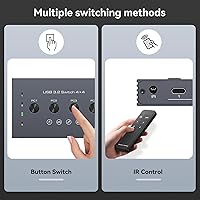
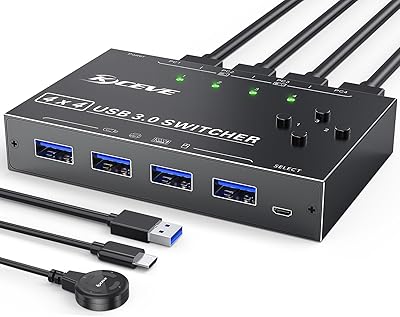
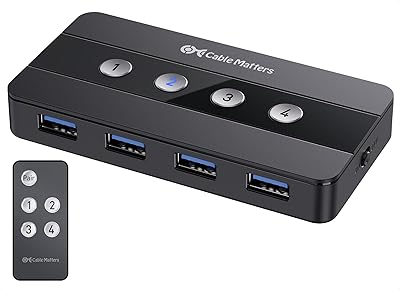
The TJCXELE TJUS-03 4-Port USB Switch solves a genuinely frustrating desk problem: running multiple computers while sharing the same keyboard, mouse, or printer without constantly swapping cables. One thing worth clarifying upfront — this is not a KVM switch. It handles USB peripherals only; your monitors stay connected however they already are. What sets it apart in its price range is support for both USB-C and USB-A, covering modern laptops and older desktops in a single device. Switching between up to four host computers happens either via a button on top of the unit or through an included wireless remote, which is a more useful pairing than it might sound.
Features & Benefits

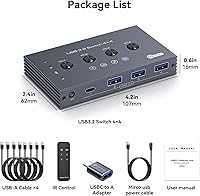
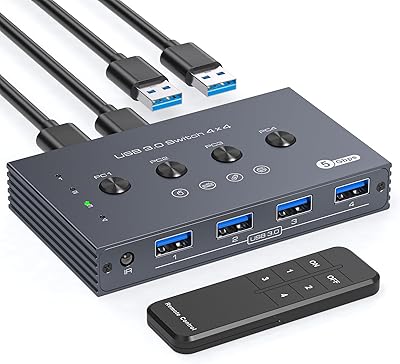
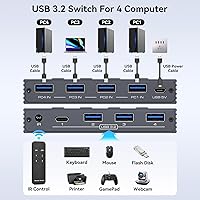
The port layout is more considered than it first appears — three USB-A 3.2 ports alongside one USB-C 3.2 port means the 4-port switcher handles nearly any peripheral without hunting for adapters, though a USB-C to USB-A adapter ships in the box anyway. Transfer speeds reach 10Gbps via USB 3.2 Gen 2, which is genuinely relevant when sharing an external hard drive between machines, less so for a keyboard. A Micro USB auxiliary power input helps stabilize high-draw devices that the bus alone struggles with. The wireless remote deserves real credit — stash the unit behind a monitor stand, keep the desk clean, and switch computers without getting up.

Best For

This peripheral sharing hub fits a handful of specific situations particularly well. The clearest match is the multi-PC home office — someone running a personal laptop alongside a work machine, sharing one keyboard, one mouse, and a printer without dedicating separate peripherals to each. It also suits content creators moving between a primary editing rig and a secondary system without yanking cables from external drives. The remote makes it practical when the unit sits tucked away rather than front and center. It is a poor fit for anyone needing display switching, since video output is not part of what this device does.

User Feedback

Buyer impressions of this USB switch tend to follow a predictable pattern. The remote control and consistent switching behavior draw the most appreciation, especially from users who tuck the unit out of reach. Build quality earns a more divided response — the plastic housing feels workmanlike rather than solid, though most find it reasonable given the price tier. Power-related issues surface regularly: connecting an external hard drive without using the auxiliary power port can cause instability, and the documentation around this could be clearer. The lack of hot-key switching frustrates buyers who expected keyboard shortcuts. Cross-platform compatibility with Windows and macOS is generally reported as trouble-free.

Pros

  • Supports four host computers simultaneously — far more useful than the typical two-port switcher for busy desks.
  • The included wireless remote is a genuine convenience upgrade, not a gimmick, especially for tucked-away setups.
  • USB 3.2 Gen 2 at 10Gbps makes sharing an external SSD between machines actually fast enough to be practical.
  • Both USB-C and USB-A peripheral ports are covered, so most existing devices connect without adapter hunting.
  • A bundled USB-C to USB-A adapter ships in the box, reducing immediate out-of-pocket accessory costs.
  • The auxiliary Micro USB power port prevents the instability issues that plague USB switches used with external hard drives.
  • Driver-free setup on Windows and macOS means most users are running within minutes of unboxing.
  • Peripheral re-enumeration after switching is fast enough that the transition feels natural in daily use.
  • The physical button provides a positive, tactile click that confirms a switch without needing to look at indicators.

Cons

  • Remote control batteries are not included, which is an avoidable friction point on first use.
  • No hot-key switching support eliminates a feature many multi-PC users specifically look for.
  • The plastic housing feels lightweight in hand and does not inspire confidence compared to pricier alternatives.
  • Only four peripheral ports total means making trade-offs when you have five or more devices to share.
  • Included cables are short, often forcing buyers to purchase longer replacements for anything but compact desk arrangements.
  • Power supply documentation is vague — many users discover the auxiliary port is necessary only after experiencing dropouts.
  • The remote provides no switching confirmation, making it easy to overshoot the intended host without realizing it.
  • Linux compatibility is inconsistent and not officially supported, leaving those users in uncertain territory.
  • Status LEDs are only useful when the unit is in direct sightline — hidden installs get no meaningful feedback.

Ratings

The TJCXELE TJUS-03 4-Port USB Switch has been evaluated by our AI system after analyzing verified buyer reviews from across global marketplaces, with spam, bot-generated, and incentivized feedback actively filtered out before scoring. What emerges is a nuanced picture — this peripheral sharing hub earns real praise for its switching reliability and remote control convenience, while a handful of friction points around power handling and missing hot-key support keep it from a clean sweep. Scores below reflect both sides honestly.
Switching Reliability
86%
Buyers consistently report that the switcher changes host computers promptly and without peripheral dropout — a critical detail for anyone hot-swapping between a work laptop and a personal machine mid-session. Keyboard and mouse reconnection after switching is described as near-instant in most setups.
A smaller subset of users reports occasional hesitation or failed switches, particularly when high-draw USB devices are connected without the auxiliary power port in use. The issue appears device-dependent rather than universal, but it is worth flagging.
Remote Control Usability
83%
The wireless remote is genuinely useful and not just a box-filler accessory. Users who mount or tuck the unit behind a monitor stand particularly appreciate being able to switch computers without reaching across the desk, keeping the workspace tidy.
Batteries are not included, which catches buyers off guard on first use. The remote also offers no feedback — no LED indicator, no click confirmation — so users in noisy environments occasionally switch one too many times without realizing it.
Port Selection & Compatibility
88%
Having three USB-A and one USB-C port on a single switcher covers the realistic peripheral mix of most multi-PC desks — older mice and keyboards on USB-A, newer hubs or drives on USB-C. The bundled adapter further reduces the chance of hitting an incompatible port.
Four peripheral ports total can feel limiting if a user wants to share a keyboard, mouse, printer, and external drive simultaneously. Power users with more complex setups may need to make trade-offs about which devices stay connected through the switcher.
Data Transfer Speed
79%
21%
The USB 3.2 Gen 2 spec delivering up to 10Gbps is a genuine advantage when sharing an external SSD between machines, where the speed difference over USB 3.0 becomes noticeable during large file moves. For storage-heavy creative workflows, this matters.
For typical keyboard, mouse, and printer use, the 10Gbps ceiling is entirely invisible — those devices barely scratch USB 2.0 bandwidth. Buyers who purchased primarily for peripheral sharing rather than storage may feel the speed spec was oversold in the marketing.
Power Handling
63%
37%
The inclusion of a Micro USB auxiliary power input is a thoughtful addition that directly addresses a common complaint with USB switches — instability when powering external hard drives. Users who connect the power supply report noticeably more stable operation with high-draw devices.
The auxiliary power port requires a separate power adapter that is not prominently flagged during purchase, and some buyers only discover the limitation after experiencing device dropouts. The documentation around when and why to use it needs to be clearer.
Build Quality
67%
33%
The unit is compact and light enough to tuck away easily, and the button on top has a satisfying, positive click that gives physical confirmation when switching. Most buyers find it adequate for a device that often lives out of sight.
The plastic housing feels noticeably lightweight — a few buyers describe it as cheap to the touch compared to competing switchers in a similar price bracket. Port fitment is generally fine, but the overall construction does not inspire confidence for heavy daily use.
Setup & Installation
91%
No drivers are required on Windows or macOS, and the unit is recognized immediately upon plugging in. Most buyers report being fully operational within a few minutes of unboxing, with no configuration menus or software to navigate.
Cable management around the unit can become messy quickly given four host cables plus peripheral cables all converging on a small box. The included cables are functional but short, which limits placement flexibility on larger desks.
Hot-Key & Shortcut Support
34%
66%
For users content to use the physical button or remote, the absence of hot-key switching is a non-issue. Those two methods work reliably and are accessible enough for most desk setups.
The lack of keyboard shortcut switching is a firm dealbreaker for a meaningful portion of buyers who specifically searched for that feature. It is not a firmware limitation that may be patched — it is a hardware design choice, and no workaround exists.
Cross-Platform Compatibility
84%
Windows and macOS compatibility is broadly positive, with buyers running mixed environments — a Windows desktop alongside a MacBook, for instance — reporting no issues with peripheral recognition after switching between hosts.
A small number of Linux users report inconsistent behavior, particularly with certain USB hubs and keyboard configurations. It is not a widespread complaint, but Linux-primary users should treat compatibility as uncertain rather than guaranteed.
Value for Money
74%
26%
Relative to the 4-computer USB switching category, the price sits in a reasonable position given the inclusion of USB-C support, the wireless remote, and a power port. Buyers who use all of those features tend to feel the purchase was justified.
Buyers who only needed basic USB-A peripheral switching, or who were hoping for hot-key support, often feel the price is harder to justify. The remote loses some of its value proposition given the missing batteries and lack of switching feedback.
Cable Quality & Length
58%
42%
The included cables cover basic connection needs and allow most buyers to get the unit running without an immediate trip to buy replacements. They are adequate for compact desk arrangements where the computers sit close together.
The cables are noticeably short, and buyers with desktop towers or larger workstation setups often find themselves needing longer replacements within the first week. Cable quality is functional but not robust enough for frequent plugging and unplugging.
Indicator & Status Feedback
61%
39%
LED indicators on the unit show which host computer is currently active, giving a clear visual reference at a glance — useful when the switcher is placed in a visible location on the desk.
When the unit is stored out of direct sightline, those indicators become useless, and the remote provides no complementary feedback. Users who hide the switcher have no reliable way to confirm which host is active without testing a peripheral.
Device Recognition Speed
81%
19%
Peripheral re-enumeration after switching is fast enough that buyers describe the transition as smooth in daily use. Mice and keyboards are ready almost immediately after a switch, avoiding the awkward dead-input gap common in cheaper alternatives.
External storage devices take slightly longer to remount after a switch, which is understandable but occasionally disruptive when switching mid-task. A handful of buyers note that particularly slow-to-enumerate devices occasionally require a manual reconnect.

Suitable for:

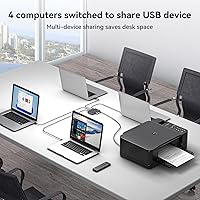
The TJCXELE TJUS-03 4-Port USB Switch is built for people who run more than one computer at a single desk and are tired of physically swapping cables every time they need to use a shared peripheral. The clearest fit is the dual-machine home office worker — someone with a personal laptop and a work-issued machine who wants one keyboard, one mouse, and one printer serving both without a second thought. Content creators who move files between a primary editing rig and a secondary system will also appreciate the USB 3.2 Gen 2 speeds when a shared external drive is in the mix. The wireless remote makes it particularly practical for setups where the unit lives behind a monitor or inside a desk cable tray, since you never need to reach for the device itself. Anyone supporting up to four machines in a small studio or shared workspace will find the four-host design covers most realistic scenarios without requiring additional hardware.
Not suitable for:

Buyers searching for a KVM switch — one that handles both peripherals and monitor output from a single box — should stop here, because the TJCXELE TJUS-03 4-Port USB Switch does not support display switching in any form. If your primary goal is to move between computers using keyboard shortcuts rather than pressing a physical button or picking up a remote, this device will frustrate you immediately, as hot-key switching is not supported and cannot be enabled through software or firmware. Users who need to connect more than four peripheral devices simultaneously will also hit a ceiling quickly, since the switcher offers only three USB-A and one USB-C port on the peripheral side. Those planning to share power-hungry devices like 3.5-inch desktop hard drives should budget for a separate power adapter, as relying on bus power alone introduces instability. Linux users should approach compatibility with caution rather than assuming out-of-the-box reliability.
Specifications

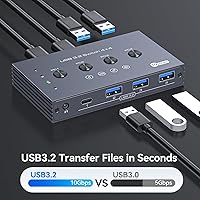
  • USB Standard: The device operates on USB 3.2 Gen 2, delivering a maximum data transfer rate of 10Gbps — twice the throughput of standard USB 3.0.
  • Host Ports: Four USB Type-A host ports connect up to four computers simultaneously, allowing any one of them to access the shared peripherals at a given time.
  • Peripheral Ports: The peripheral side offers three USB-A 3.2 ports and one USB-C 3.2 port, accommodating a wide mix of modern and legacy devices.
  • Switching Methods: Users can switch between host computers either by pressing the physical button on top of the unit or by using the included wireless remote control.
  • Auxiliary Power: A Micro USB 5V input port provides supplemental power for high-draw devices such as external hard drives, stabilizing operation beyond what bus power alone can support.
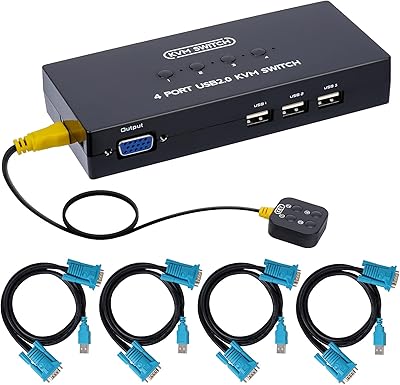
  • Display Support: This device is strictly a USB peripheral switch and does not support monitor or display output of any kind — it is not a KVM switch.
  • Hot-Key Support: Keyboard shortcut or hot-key switching is not supported; all host switching must be performed manually via the button or remote control.
  • Included Accessories: The package includes a USB-C to USB-A adapter, a wireless remote control, and the necessary connecting cables for host and peripheral hookup.
  • Remote Batteries: Batteries for the wireless remote control are not included in the package and must be sourced separately before the remote can be used.
  • Model Number: The official model designation for this unit is TJUS-03, manufactured by the brand TJCXELE.
  • Dimensions: The packaged unit measures 7.48 x 6.85 x 1.57 inches and weighs 13.76 ounces, making it compact enough for placement behind a monitor stand or inside a cable tray.
  • Color & Finish: The unit ships in black with a matte plastic housing designed to blend into standard desk and workstation environments.
  • Driver Requirement: No additional drivers or software installation is required; the device is plug-and-play compatible with Windows and macOS operating systems.
  • Power Input: Supplemental power is supplied via a Micro USB 5V connection, which is used specifically to support connected high-power USB peripherals rather than to power the switch itself.
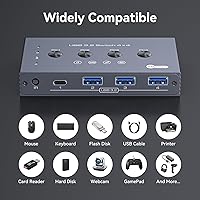
  • Compatible Devices: Supported peripheral types include keyboards, mice, printers, scanners, external hard drives, flash drives, card readers, webcams, and gamepads.
  • Adapter Included: A USB-C to USB-A adapter is included in the box, allowing USB-A peripherals to connect to the single USB-C peripheral port without an additional purchase.

Related Reviews

TJCXELE USB 3.0 Switch Selector 4-Port for 4 Computers
88%
94%
Ease of Use
89%
Performance
91%
Remote Control Feature
76%
Power Supply and Stability
98%
Setup and Installation
More
DGODRT KS204V 4-Port VGA KVM Switch
83%
86%
Switching Reliability
89%
Desktop Controller Convenience
91%
Value for Money
78%
Cable Quality & Included Accessories
73%
USB Peripheral Compatibility
More
DGODRT KS604H 4-Port HDMI KVM Switch
80%
91%
Ease of Setup
74%
Switching Reliability
78%
Video Quality
79%
USB Peripheral Sharing
84%
Wired Remote Control
More
Cable Matters 4-Port USB 3.0 KVM Switch
77%
91%
Ease of Setup
78%
Switching Reliability
83%
RF Remote Control
74%
Build Quality
86%
USB 3.0 Transfer Speed
More
MLEEDA 4-Port USB 3.0 KVM Switch
79%
93%
Ease of Setup
82%
Switching Reliability
67%
Build Quality
79%
Wired Remote Usability
88%
USB 3.0 Performance
More
StarTech SV411KUSB 4-Port USB KVM Switch
72%
88%
Ease of Setup
61%
Video Quality
58%
Build Quality
67%
USB Switching Reliability
63%
Audio Passthrough
More
D-Link DKVM-4U 4-Port USB KVM Switch
69%
93%
Ease of Setup
81%
Switching Reliability
78%
Build Quality
74%
Video Quality
69%
Peripheral Compatibility
More
Steetek STK-S7415H 4-Port HDMI KVM Switch
74%
91%
Ease of Setup
83%
Switching Reliability
78%
Video Quality & Resolution
76%
Adaptive EDID Performance
69%
USB Peripheral Sharing
More
JideTech JD-41UA 4-Port VGA KVM Switch
71%
83%
Value for Money
88%
Ease of Setup
71%
Switching Reliability
67%
Audio Switching
79%
Video Quality
More
Scyniney 4-Port Triple-Monitor HDMI KVM Switch
74%
83%
Video Signal Stability
79%
4K Resolution Performance
74%
USB Hub Performance
81%
Switching Reliability
41%
Hotkey Switching Support
More

FAQ

No, it cannot. The TJCXELE TJUS-03 4-Port USB Switch handles USB peripherals only — things like keyboards, mice, and external drives. It does not carry video signal, so your monitors need to stay connected directly to each computer or through a separate display switch.
No drivers are needed. Just plug the host cables into your computers and connect your peripherals, and the operating system recognizes it automatically. It works out of the box on both Windows and macOS without any setup software.

Unfortunately, no. Hot-key switching is not supported on this device — it is a hardware limitation, not something that can be enabled through a firmware update. You will need to either press the physical button on the unit or use the included remote control to switch hosts.

Batteries are not included in the package, so you will need to pick some up separately before you can use the remote. Check the battery compartment on the remote itself for the correct size, as the product documentation specifies this detail.

It depends on whether you use the auxiliary power port. If you connect the Micro USB 5V power input, high-draw devices like external hard drives generally operate stably. Without it, you may experience dropouts or the drive failing to mount reliably, so using the power port is strongly recommended for storage devices.

No, the maximum number of host computers is four. The device has four fixed host ports, and there is no way to chain or expand beyond that count.

Linux compatibility is not officially confirmed, and user feedback suggests results are inconsistent. Some Linux setups work fine while others encounter recognition or switching issues, particularly with certain keyboard configurations. If Linux is your primary environment, treat compatibility as uncertain and check for return options before committing.

In practice, peripheral switching is nearly instant for keyboards and mice — most users describe it as fast enough that there is no noticeable gap during the transition. External drives take a few extra seconds to remount after switching, which is normal behavior for storage devices.

Technically you can plug a USB hub into one of the peripheral ports to expand device count, but results vary. Power delivery through the switch is limited, so a powered USB hub is strongly recommended if you go this route. Unpowered hubs may cause instability or device dropouts.

The remote is wireless and does not require strict line-of-sight in most setups — it works reasonably well through light obstructions at typical desk distances. That said, range and reliability may decrease if the unit is enclosed inside a cabinet or desk drawer, so some open path to the receiver is helpful.