Overview

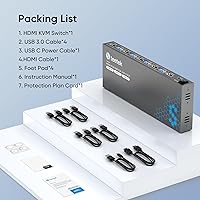
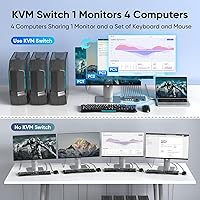
The Steetek STK-S7415H 4-Port HDMI KVM Switch arrived on the market in mid-2023 as a solid mid-range option for anyone juggling multiple computers at a single desk. It lets you run up to four machines — PCs, laptops, or consoles — through one monitor, keyboard, and mouse, cutting down on cable clutter without a hefty price tag. Steetek ships it under the PWAYTEK brand, and it has climbed into the top 100 KVM switches on Amazon, which reflects consistent buyer interest. The box includes an HDMI cable, four USB cables, rubber feet, and a printed manual, so you can get started without scrounging for extras.
Features & Benefits

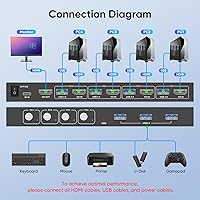
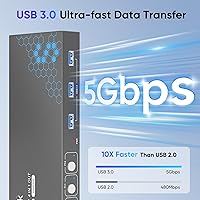
The standout spec here is 4K at 60Hz — though worth noting upfront that you'll need a compatible GPU and cable on each machine to actually hit that ceiling; the included HDMI cable handles the job. What earns real points in daily use is the Adaptive EDID feature: it stores your monitor's display profile so switching computers doesn't trigger the frustrating black screen while the display re-negotiates the signal. Three USB 3.0 ports handle shared peripherals — a printer, an external drive, whatever you need — at up to 5Gbps. No drivers needed; plug everything in, push the button, and you're switching.

Best For

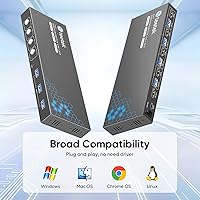
This KVM switch is a natural fit for anyone who sits at one desk but needs to move between two, three, or four machines throughout the day — think a developer juggling a work laptop, a home desktop, and a test box all at once. It's equally practical in a small office where colleagues share a printer or external drive without wanting to swap USB cables constantly. The broad OS compatibility — Windows, macOS, and Linux all work without fuss — is a genuine strength when your machines don't all run the same system. Power users chasing enterprise KVM features should look elsewhere, but for focused multi-PC desk management, it covers the essentials well.

User Feedback

Buyers consistently highlight how quick the setup is — most report being fully connected in under ten minutes, which aligns with the plug-and-play approach. Switching between machines is generally described as snappy and dependable under normal workloads. That said, two recurring complaints are worth knowing before you buy: USB transfer speeds reportedly fall short of the advertised 5Gbps under real-world conditions, and there is no audio switching at all — monitor speakers stay tied to whichever computer last had control, which frustrates some users. Long-term reliability feedback is mixed, with some buyers noting degraded performance after months of heavy use, though the lifetime protection plan does offer a measure of reassurance.

Pros

  • Connects four computers to one monitor, keyboard, and mouse with zero driver installation required.
  • Adaptive EDID prevents the monitor from going dark or re-negotiating the signal every time you switch machines.
  • Ships with all necessary cables included — no immediate need to buy extras for a basic four-machine setup.
  • 4K at 60Hz output holds up well for productivity and media use when paired with capable hardware.
  • Broad OS compatibility means Windows, macOS, and Linux machines all coexist on the same switch without configuration.
  • The compact bar-shaped form factor tucks neatly onto or under a desk without consuming workspace.
  • HDCP 2.2 support allows streaming platforms to render properly without signal refusal errors.
  • Three USB 3.0 ports make sharing a printer or external storage across multiple computers straightforward.
  • The lifetime protection plan adds meaningful long-term reassurance for a product in this category.

Cons

  • No audio switching at all — sound does not follow the active computer, requiring a separate manual workaround.
  • Real-world USB transfer speeds are noticeably lower than the advertised 5Gbps in actual use.
  • No keyboard hotkey support for switching, which slows down high-frequency workflows significantly.
  • Build quality feels consumer-grade; the casing and button action can degrade after months of heavy daily switching.
  • Console and Chromebook compatibility is inconsistent and may require power cycling to resolve handshake failures.
  • The included HDMI cable is short, limiting desk placement flexibility for larger setups or floor-mounted towers.
  • Some users report a cold-start port recognition issue that requires a full power cycle to resolve.
  • Switching while a USB peripheral is actively transferring data can introduce lag or drop the connection briefly.
  • The user manual is sparse and offers little help if something does not work correctly out of the box.

Ratings

The scores below reflect our AI-driven analysis of verified global buyer reviews for the Steetek STK-S7415H 4-Port HDMI KVM Switch, with automated filtering applied to remove incentivized, duplicate, and bot-generated submissions. Each category is scored independently to give you an honest picture of where this 4K HDMI switcher genuinely delivers and where real users have run into friction. Both the strengths and the recurring pain points are represented as accurately as the data allows.

Ease of Setup
91%
Most buyers report being fully up and running in under fifteen minutes, with no driver downloads or software configuration required. The included cables cover everything needed for a basic four-machine setup, which reviewers working from home especially appreciate when time matters.
A small subset of users — particularly those on older Windows versions or niche Linux distributions — report needing to manually reassign USB device priorities after initial connection. The user manual, while included, is described as thin on troubleshooting guidance.
Switching Reliability
83%
Day-to-day switching between machines is consistently described as quick and predictable, with the push-button mechanism registering cleanly in normal office and home lab workflows. Developers who switch between a work machine and a personal build box several times an hour report few missed inputs.
Some users note intermittent lag when switching while a USB 3.0 peripheral — particularly an external SSD — is actively transferring data. A minority report that the switch occasionally needs a second button press to register, which becomes noticeable during high-frequency use.
Video Quality & Resolution
78%
22%
When paired with a capable GPU and a quality cable, the 4K output at 60Hz holds up well for both productivity tasks and casual media consumption. HDCP 2.2 support means streaming platforms render without the signal refusal errors that plague cheaper switchers.
Reaching true 4K at 60Hz depends entirely on the weakest link in your cable and GPU chain — the included HDMI cable works, but some users with longer desk runs find they need an upgrade. A handful of buyers with older GPUs report being silently capped at 30Hz without obvious indication.
Adaptive EDID Performance
76%
24%
For users who previously dealt with monitors going dark or requiring manual input switching every time they changed computers, the Adaptive EDID feature is a meaningful improvement. Buyers with ultrawide or high-refresh-rate monitors specifically call it out as reducing re-negotiation delays noticeably.
The EDID handling is not flawless — some users with multi-monitor-capable setups or unusual display configs report that the stored profile occasionally conflicts with a computer that expects different signal metadata. It works well in straightforward single-monitor setups but can behave inconsistently with more complex rigs.
USB Peripheral Sharing
69%
31%
Sharing a printer or flash drive across four machines without physically replugging cables is the core value here, and for basic peripherals it works as expected. Office users who share a laser printer between a work laptop and a personal desktop report clean, automatic handoff most of the time.
Real-world USB 3.0 throughput falls noticeably short of the advertised 5Gbps ceiling, with users copying large files to external drives reporting speeds closer to USB 2.0 in some cases. High-bandwidth devices like capture cards or fast NVMe enclosures expose the hub's limitations quickly.
Audio Switching
31%
69%
There is nothing to praise here by design — this unit does not route audio through the switch at all, and buyers who understand that going in are not surprised. For users relying entirely on monitor speakers and accepting the limitation, the absence of audio switching does not affect their workflow.
The lack of any audio passthrough or switching is the most cited frustration in negative reviews. Users who want sound to follow their active computer must manage audio routing manually through software or a separate switch, which defeats much of the convenience a KVM is supposed to offer.
Build Quality & Durability
66%
34%
The unit is compact and light enough to tuck out of the way, and the included rubber feet keep it from sliding on a desk surface. For buyers using it in a fixed home office position, the physical construction is adequate for the price tier.
Long-term durability is where opinions split — users running it heavily for six months or more describe the casing feeling hollow and the button action becoming less crisp over time. It does not feel built to enterprise standards, and a few buyers report intermittent connection issues emerging after extended daily use.
Included Accessories
84%
Getting a full set of four USB cables and one HDMI cable in the box is genuinely appreciated at this price point, since it removes the immediate need to order extras. The rubber feet are a small but thoughtful addition that reviewers consistently mention when comparing unboxing experiences.
The included HDMI cable is functional but short, which limits placement flexibility for users with larger desk setups or tower PCs positioned on the floor. A few buyers also note that the USB cables, while usable, are on the stiffer side and can feel awkward to route neatly.
OS & Device Compatibility
88%
Buyers running mixed-OS desks — Windows alongside macOS or Linux — appreciate that the switch does not require any per-system configuration. IT admins managing heterogeneous environments call out the broad compatibility as a key reason they chose this unit over brand-locked alternatives.
Compatibility with non-PC inputs like game consoles is less consistent than the product page implies — PS4 users in particular report occasional handshake failures that require power cycling the switch. Chromebook users also note spotty USB hub recognition depending on the ChromeOS version.
Hotkey & Switching Controls
57%
43%
The physical push-button is straightforward and requires no learning curve, which is appreciated by less tech-savvy buyers who just want a simple way to change computers without navigating menus or memorizing commands.
There are no keyboard hotkey shortcuts for switching, which frustrates power users who prefer keeping their hands on the keyboard. Buyers coming from higher-end KVM brands that support hotkey cycling describe the button-only approach as a step backward in workflow efficiency.
Value for Money
79%
21%
At its price point, getting 4K@60Hz support, three USB 3.0 peripheral ports, Adaptive EDID, and a complete cable kit in one package represents a reasonable deal for home office users who do not need enterprise-grade reliability. Buyers frequently describe it as the right amount of switch for the money.
The value equation weakens for users who eventually hit the USB throughput ceiling or discover the audio limitation after purchase. Buyers who needed more from the USB hub or expected audio routing report feeling the price was fair only if expectations were set correctly from the start.
Cable Management & Form Factor
73%
27%
The slim, bar-shaped design sits unobtrusively on a desk without eating into workspace. Users with tidy cable setups appreciate that all ports face the same direction, making it easier to route cables cleanly behind a monitor stand or along a desk edge.
With four computers connected simultaneously, the back of the unit becomes a tangle of USB and HDMI cables that the device itself offers no help organizing. The weight of multiple cables can shift the unit despite the rubber feet, especially when the button is pressed repeatedly.
Plug-and-Play Consistency
81%
19%
In the majority of setups — standard Windows or macOS machines with typical peripherals — the switch simply works without any system intervention. Buyers who have dealt with driver-dependent KVMs in the past find the driverless approach a genuine relief.
Plug-and-play behavior is less reliable when high-power USB devices like certain external HDDs are connected, sometimes requiring the host computer to rediscover the peripheral after a switch. A cold-start connection issue — where one computer port fails to register until the switch is power-cycled — is reported occasionally.

Suitable for:

The Steetek STK-S7415H 4-Port HDMI KVM Switch is a practical fit for anyone who manages multiple computers from a single desk and wants to cut down on hardware without spending enterprise money. It works especially well for developers or IT professionals who run a work laptop alongside a personal machine and a test box, all needing access to the same monitor and peripherals throughout the day. Home office workers who share a printer or external drive between a company-issued laptop and a personal desktop will find the three USB ports genuinely useful for that exact scenario. Mixed-OS households are well served here too — the switch handles Windows, macOS, and Linux without any setup friction, which is harder to find at this price tier. If your display is 4K-capable and your GPUs support it, you can run crisp visuals across all four machines without buying additional adapters, provided your cable runs are not excessively long.
Not suitable for:

Buyers who rely on audio following their active machine will hit a wall immediately — the Steetek STK-S7415H 4-Port HDMI KVM Switch has no audio switching capability whatsoever, meaning you will need a separate workaround to manage sound across computers. Anyone planning to use this as a high-speed data hub for demanding USB devices like fast NVMe enclosures or video capture cards should temper expectations, since real-world USB throughput regularly falls short of the theoretical maximum. Power users who prefer keyboard hotkeys for switching between computers will find the button-only control scheme frustrating compared to more fully featured KVM options. This unit is also not well suited for setups involving game consoles or Chromebooks, where USB and display handshaking can be inconsistent. Finally, buyers expecting long-term durability under heavy commercial or multi-shift use should look at more robust alternatives, as the build quality reflects a consumer-grade product rather than anything designed for demanding continuous operation.
Specifications

  • Brand & Model: Manufactured by PWAYTEK and sold under the Steetek brand, model number STK-S7415H.
  • Computer Ports: Supports up to 4 host computers connected simultaneously via individual USB and HDMI input ports.
  • Monitor Output: Single HDMI output port connects to one monitor, displaying the active computer's signal.
  • Max Resolution: Supports up to 4K at 60Hz, with backward compatibility for 4K@30Hz, 2K, 1080p, and 3D content.
  • HDCP Support: HDCP 2.2 compliant, allowing playback of copy-protected streaming and disc-based content without signal errors.
  • EDID Technology: Adaptive EDID stores the connected monitor's display profile to prevent blank-screen handshake delays when switching between computers.
  • USB Standard: USB 3.0 with a theoretical maximum transfer speed of 5Gbps for connected peripherals and storage devices.
  • USB Peripheral Ports: Three USB-A 3.0 ports on the unit allow shared access to keyboards, mice, printers, and external drives across all connected computers.
  • Switching Method: Manual push-button switching with automatic peripheral detection on each host port; no hotkey support.
  • Driver Requirement: No driver installation required; the unit operates as a plug-and-play device on all supported operating systems.
  • OS Compatibility: Compatible with Windows 7, 8, 10, and 11 (including Vista and XP), macOS, and most Linux distributions.
  • Audio Switching: No dedicated audio switching capability; audio output remains tied to the host computer independently of the KVM switch.
  • Operating Voltage: Powered at 5V DC with a current rating of 1 amp, typically drawn from a connected host computer's USB port.
  • Dimensions: The unit measures 8.27 x 2.95 x 0.86 inches, making it compact enough to sit flat on a desk or mount out of the way.
  • Weight: The switch weighs 1.81 pounds, which is light enough to be repositioned easily but substantial enough to stay in place under normal use.
  • In the Box: Package includes the KVM switch unit, 1 HDMI cable, 4 USB 3.0 cables, 4 anti-slip rubber feet, a user manual, and a protection plan card.
  • Warranty: Covered by a lifetime protection plan as stated by the manufacturer, details of which are included on the protection plan card in the box.
  • Release Date: First made available for purchase on August 25, 2023.

Related Reviews

ANXQQ ANQ-8401B 4-Port HDMI KVM Switch
77%
91%
Ease of Setup
88%
Display Switching Reliability
86%
EDID Performance
67%
USB Device Recognition
61%
8K Resolution Capability
More
DGODRT KS604H 4-Port HDMI KVM Switch
80%
91%
Ease of Setup
74%
Switching Reliability
78%
Video Quality
79%
USB Peripheral Sharing
84%
Wired Remote Control
More
StarTech SV431HDU3A2 4-Port HDMI KVM Switch
73%
74%
Switching Reliability
69%
Video Quality
66%
USB 3.0 Hub Performance
71%
Audio Switching
83%
Setup & Installation
More
JideTech 64H2UA 4-Port HDMI KVM Switch
73%
84%
Video Output Quality
79%
EDID Emulation Reliability
81%
Switching Methods & Flexibility
62%
USB Hub Performance
77%
Audio Switching
More
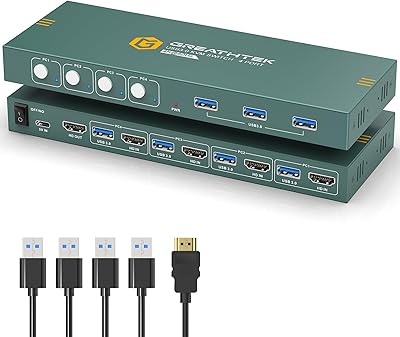
GREATHTEK 4-Port HDMI KVM Switch
66%
89%
Video Signal Quality
74%
Switching Performance
83%
USB Peripheral Sharing
92%
Setup Experience
71%
Build Quality
More
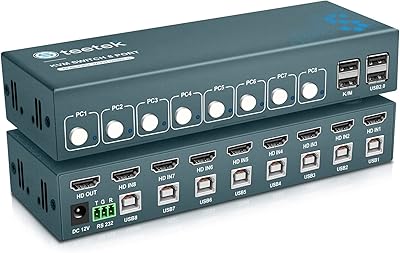
Steetek USB 2.0 HDMI KVM Switch 8 Port
84%
91%
Ease of Switching
87%
4K Video Quality
84%
Build Quality
93%
Setup and Installation
65%
Hotkey Functionality
More
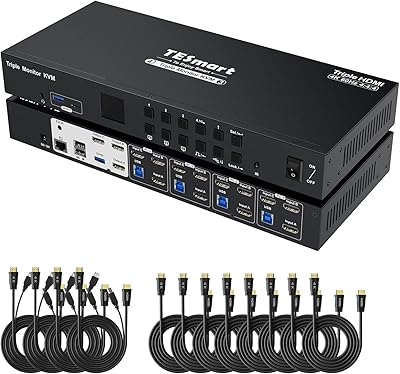
TESmart HKS403-P23 4-Port Triple Monitor KVM Switch
69%
78%
Display Performance
72%
EDID Emulation Reliability
74%
Switching Speed & Reliability
58%
USB Hub Performance
69%
Network Sharing
More
Scyniney 4-Port Triple-Monitor HDMI KVM Switch
74%
83%
Video Signal Stability
79%
4K Resolution Performance
74%
USB Hub Performance
81%
Switching Reliability
41%
Hotkey Switching Support
More
KAGO 4-Port VGA KVM Switch
84%
92%
Value for Money
96%
Ease of Setup
85%
Performance
78%
Build Quality
87%
Display Quality
More
TCNEWCL KS-801 8-Port HDMI KVM Switch
78%
88%
Ease of Setup
91%
Port Capacity & Scalability
74%
Video Quality & Resolution
69%
Switching Speed & Reliability
83%
IR Remote Control
More

FAQ

No, the Steetek STK-S7415H 4-Port HDMI KVM Switch is fully plug-and-play. You just connect your computers and peripherals with the included cables, and the switch handles the rest without any software installation on Windows, macOS, or Linux.
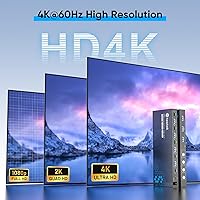
It can genuinely hit 4K at 60Hz, but there are conditions — each connected computer needs a GPU that supports 4K output, and the cable connecting that computer to the switch needs to be capable as well. The included cables are rated for it, but if you have a very long run or an older GPU, you may end up at 4K@30Hz without obvious warning.

Yes, that is one of the more practical use cases for this unit. Plug your printer into one of the three USB-A ports on the switch, and whichever computer is currently active will have access to it. Just keep in mind that only the active computer controls the shared peripherals at any given time.

Unfortunately, this switch has no audio routing capability at all. Your monitor speakers or connected audio device will stay on whatever the last active computer was, and you will need to manage sound switching separately — either through software on each machine or a dedicated audio switcher.

EDID is the signal your monitor sends to a computer to tell it what resolutions and refresh rates it supports. Without Adaptive EDID, switching computers can cause the monitor to go black for several seconds while it re-negotiates that handshake. This switch stores the monitor's profile so that switching is faster and less disruptive, which is especially noticeable on higher-resolution displays.

Yes, mixed-OS setups work fine here. The switch does not care what operating system each host is running, so a MacBook and a Windows desktop can share the same monitor and peripherals without any compatibility issues on either machine.

On paper it is USB 3.0, rated up to 5Gbps, but real-world performance is lower — often closer to what you would expect from a basic USB 3.0 hub rather than a direct connection. For casual file transfers and peripheral use it is perfectly fine, but if you are regularly moving large files to a fast external SSD, you may notice the hub is a bottleneck.

No, this unit does not support keyboard hotkey switching. The only way to change the active computer is to press the physical button on the unit itself. If hotkey switching is important to your workflow, you would need to look at a different model that specifically lists that feature.

The product listing mentions console compatibility, but in practice it is inconsistent. Some users get it working with a PS4, while others report handshake failures that require power cycling the switch to resolve. If console use is a primary need rather than an occasional one, this unit is not the most reliable choice for that purpose.

Powered-off computers on unused ports should not interfere with the active machine. The switch detects connected devices per port, so you can leave machines off and switch only between the ones that are running. That said, a small number of users report occasional port recognition quirks on cold starts, which usually resolve with a power cycle of the switch itself.