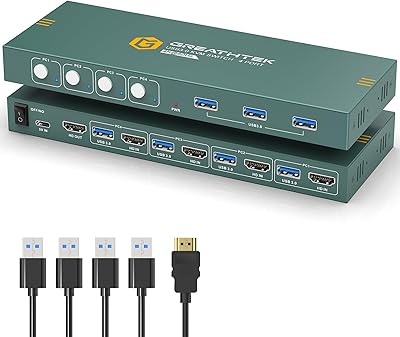
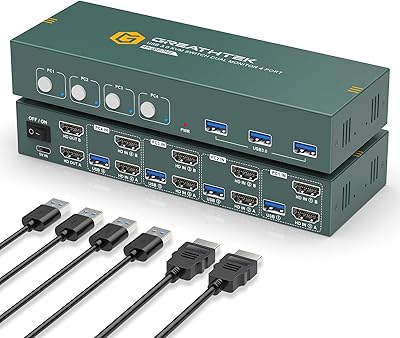
Overview

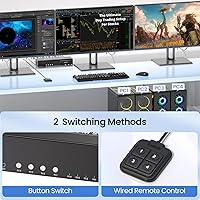
The Scyniney 4-Port Triple-Monitor HDMI KVM Switch entered the market in late 2024 as a hardware-focused solution for power users who need to juggle multiple computers without cluttering their desk with duplicate peripherals. The core idea is straightforward: one keyboard, one mouse, and three monitors shared cleanly across up to four machines. Switching happens via physical front-panel buttons or a bundled wired remote controller — no hotkey support, which is worth knowing upfront. Scyniney is not an established name in the KVM space, so buyer confidence will largely depend on real-world performance rather than brand reputation alone.
Features & Benefits

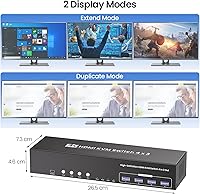
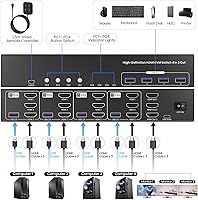
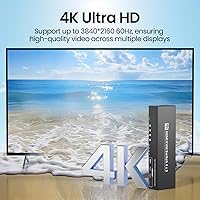
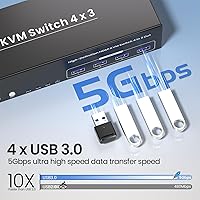
What makes this triple-monitor switch genuinely interesting at its price point is the 4K at 60Hz output across all three HDMI connections simultaneously — that kind of throughput is not always guaranteed in this category. Four USB 3.0 ports handle peripherals at up to 5 gigabits per second, meaning a fast external drive or printer will not create a bottleneck. The switch handles four source computers and plays well with Windows, macOS, and Linux without requiring special drivers. It also steps down gracefully to 1080p or USB 2.0 speeds for older hardware. At roughly 10 by 3 inches, it sits comfortably on a desk without dominating the space.

Best For

This four-port KVM is a strong fit for anyone running a dual-workstation desk — say, a personal machine and a work laptop side by side — who wants a clean, hardware-reliable switching experience without software dependencies. Developers and sysadmins who monitor multiple servers or keep a test environment running in parallel will appreciate hopping between machines without touching cables. Creative professionals using a primary editing rig alongside a secondary render or encoding box are another natural fit. If you already own three HDMI monitors and want to avoid buying a second set, this switch makes a practical consolidation solution worth considering.

User Feedback

Early buyers of this KVM switch have generally reported stable video output across all three displays, with most finding 4K signals hold without the handshake hiccups that affect cheaper alternatives. The included wired controller gets mixed marks — some users appreciate the desk flexibility it offers, while others find the cable length restrictive. A consistent point of praise is how well the USB hub handles everyday peripherals, though a few noted that running multiple high-bandwidth devices simultaneously can reduce transfer speeds. The absence of hotkey switching draws occasional criticism but rarely appears to be a dealbreaker. Build quality is described as solid for the tier, with no notable heat complaints after extended use.

Pros

  • Drives three monitors at full 4K resolution simultaneously, a genuine capability at this price tier.
  • Plug-and-play setup across Windows, macOS, and Linux with no driver installation needed.
  • Four USB 3.0 ports handle keyboards, mice, and peripherals without noticeable lag or dropout.
  • The included wired remote controller adds desk flexibility without requiring you to reach the main unit.
  • Hardware-based switching is dependably consistent — no app crashes or OS conflicts to manage.
  • Backward compatible with older monitors and USB 2.0 devices, making mixed hardware setups workable.
  • Compact footprint means it fits on a desk shelf or beside a monitor stand without dominating the space.
  • Runs cool even during full workdays, with no reported thermal issues in typical office environments.
  • Supports up to four source computers, covering most multi-machine desk configurations in one device.

Cons

  • No hotkey switching support makes rapid, frequent computer changes noticeably more cumbersome.
  • The wired remote controller cable is too short for larger or deeper desk configurations.
  • macOS users may need to manually refresh display settings after switching, disrupting workflow.
  • USB hub bandwidth is shared, so running a fast external SSD alongside multiple devices can slow transfers.
  • Port labeling is small and hard to read in dim lighting, complicating initial cable setup.
  • Brand is new enough that warranty experience and long-term reliability are not yet well-documented publicly.
  • Achieving true 4K output requires every cable and display in the chain to support it — no shortcuts.
  • Front-panel buttons feel stiff and require deliberate presses, which can be mildly annoying over time.
  • Troubleshooting resources and official documentation are thin, leaving edge-case users to figure things out alone.

Ratings

The Scyniney 4-Port Triple-Monitor HDMI KVM Switch has been evaluated by our AI rating system after processing verified buyer reviews from multiple global markets, with spam, bot-generated, and incentivized submissions actively filtered out. The scores below reflect an honest, balanced picture of where this triple-monitor switch genuinely delivers and where real users have run into friction. Both the standout strengths and the recurring pain points are represented transparently across each category.
Video Signal Stability
83%
Most buyers running all three displays at full 4K resolution report consistently clean signals with no persistent flicker or dropout during normal desktop work and media playback. Users switching between a gaming rig and a work machine found the handshake speed acceptable, with monitors re-detecting sources within a couple of seconds.
A subset of users, particularly those using older HDMI cables or monitors with aggressive power-saving modes, reported occasional signal loss on one display after switching. The issue often resolved by power-cycling the switch, but it was frustrating enough for some to mention it repeatedly.
4K Resolution Performance
79%
21%
Running three monitors at 4K and 60Hz simultaneously is a real capability here, not just a marketing claim — buyers with compatible cables and displays confirmed smooth, sharp output across all three screens. For productivity workloads like coding across multiple windows or referencing design files, the visual quality holds up well.
Achieving the full resolution requires every link in the chain — cables, monitors, and source GPU outputs — to support 4K at 60Hz, and buyers who missed that detail were disappointed. A few macOS users also noted that one monitor would occasionally downscale after switching, requiring a manual display settings refresh.
USB Hub Performance
74%
26%
The four USB 3.0 ports handle everyday peripherals reliably. Keyboard, mouse, and a USB audio adapter running simultaneously caused no issues for the majority of users, and those who plugged in flash drives for quick file transfers between machines appreciated the noticeably faster speeds compared to older USB 2.0 KVMs.
When users pushed the hub harder — running a high-speed external SSD alongside multiple peripherals — some noted reduced transfer speeds, suggesting bandwidth is shared rather than fully independent across all ports. This is a real limitation for anyone planning to use it as a full docking-station replacement.
Switching Reliability
81%
19%
Physical button switching is responsive and consistent in daily use, and the included wired remote controller gives enough desk flexibility for most setups. Users who had previously dealt with unreliable software KVMs found the hardware-based approach a welcome change — the switch does its one job predictably.
The wired remote cable is on the shorter side, which limits placement options on larger desks. A handful of users also reported that the front-panel buttons require a deliberate press rather than a light tap, which can feel slightly stiff compared to premium competitors.
Hotkey Switching Support
41%
59%
For users who primarily switch computers once or twice a day, the absence of hotkey support rarely comes up as a practical issue. The physical buttons are always within reach on the unit itself, and the remote controller adds an extra layer of convenience that partially compensates.
This is a genuine omission for power users who expect to flip between computers dozens of times daily using keyboard shortcuts. Developers and sysadmins in particular flagged this as a workflow friction point, and a few buyers returned the unit specifically because they had assumed hotkey support was standard at this price tier.
Build Quality
77%
23%
The enclosure feels solid for the category — no flex or rattling when plugged in, and the ports accept connectors with a firm, reassuring grip. Users who placed the unit on a rack shelf or cable-managed it under a desk commented that it held up well after weeks of continuous operation.
The plastic finish shows fingerprints easily and feels slightly utilitarian compared to metal-bodied competitors. A few buyers noted that the port labeling is small and hard to read in low-light desk setups, which made initial cable routing more tedious than it needed to be.
Setup & Installation
86%
The majority of buyers had all four computers and three monitors up and running within fifteen to twenty minutes of unboxing, with no driver installation required on Windows or Linux. The plug-and-play nature was specifically praised by users who dread complicated KVM configuration processes.
macOS users occasionally encountered a monitor detection hiccup on first boot, requiring them to go into display preferences and manually trigger a re-scan. The included documentation is minimal, so users who ran into edge cases had to rely on trial and error.
OS Compatibility
82%
18%
Windows and Linux users reported broad compatibility across various distro versions and Windows generations without any special configuration. The switch handles OS-level peripheral handoff cleanly, so keyboard and mouse inputs register immediately on the newly selected machine.
macOS compatibility is functional but slightly less polished — monitor re-detection after switching can be inconsistent depending on the Mac model and display configuration. Users running a mix of macOS and Windows machines should test their specific setup carefully before committing.
Peripheral Sharing Accuracy
80%
20%
Keyboard and mouse inputs transfer to the active computer cleanly, with no key-repeat artifacts or mouse acceleration changes that sometimes plague software-based KVMs. Users who type quickly noted that keystrokes were not dropped during or immediately after switching.
A couple of users with USB audio interfaces reported that the device was not always recognized on the newly selected computer without a manual unplug-replug. This appears to be an edge case rather than a widespread issue, but it is worth flagging for audio-focused workstations.
Cable Management Compatibility
68%
32%
The device's compact footprint means it does not dominate a desk or shelving unit, and the port layout is spread across the unit in a way that prevents severe cable bunching on one side. Users with moderately managed desks found it straightforward to route six HDMI cables without major tangles.
Six HDMI cables plus power and up to four USB connections converging on one small device creates an inherently dense cable situation. Users with tight under-desk cable management setups found that the HDMI connectors on the rear sit close together, making it awkward to seat thick braided cables side by side.
Value for Money
76%
24%
Relative to what triple-monitor 4K KVM switches cost from more established brands, this four-port KVM sits at a noticeably lower price while delivering comparable core functionality. Buyers who prioritized getting the job done over premium branding found the value proposition straightforward.
A few buyers felt the pricing was only justified if all features worked flawlessly out of the box, and those who hit compatibility quirks questioned whether the savings over a known brand were worth the troubleshooting time. The lack of robust customer support documentation compounds this concern.
Heat Management
84%
Extended use across a full workday produced no notable warmth from the unit's enclosure, and no buyers reported thermal throttling or unexpected shutdowns. For users who run their setups continuously for eight or more hours, the thermal behavior appears well within safe limits.
No active cooling is present, which is expected at this form factor, but users in warmer climates or enclosed desk hutches may want to ensure some airflow around the unit. No specific heat-related failures were widely reported, but long-term durability in high-ambient-temperature environments remains an open question.
Brand Confidence & Support
53%
47%
The product listing is detailed and clearly written, and some buyers noted that seller responses to product questions on the marketplace were reasonably prompt. For buyers comfortable with newer brands that stand behind their products with responsive communication, the experience has been adequate.
Scyniney does not yet carry the track record of established KVM manufacturers, and buyers who encountered issues found that official troubleshooting resources were thin. Warranty claim experiences are not yet well-documented in public reviews, which introduces uncertainty for buyers making a long-term investment.
Remote Controller Usability
66%
34%
Having a separate wired controller means users do not always need to reach across to the main unit to switch machines, which is a practical convenience on deeper desks. The button layout is simple and unambiguous — one button per source computer.
The controller cable length was the single most common complaint in this category, with many users wishing it were longer to allow more flexible desk placement. The buttons themselves lack tactile distinction from each other, so accidental presses on the wrong source happened more than once for buyers switching in low light.

Suitable for:

The Scyniney 4-Port Triple-Monitor HDMI KVM Switch is built for people who run more than one computer at a serious desk and refuse to compromise on display quality doing it. If you maintain a personal workstation and a work-issued laptop side by side, or keep a dedicated render machine running while you edit on a primary rig, this four-port KVM removes the need for a second set of monitors entirely. Developers and sysadmins who regularly hop between servers, staging environments, or test machines will find the hardware-based switching reliable and predictable — no software agents to update, no OS-level conflicts to troubleshoot. It also suits creative professionals who want a clean 4K workflow across three displays without the cost of duplicating their entire monitor setup. Anyone already comfortable with physical button switching and who values simplicity over keyboard shortcuts will fit right in with how this triple-monitor switch was designed to operate.
Not suitable for:

The Scyniney 4-Port Triple-Monitor HDMI KVM Switch is not the right tool for buyers who expect to flip between computers dozens of times a day using keyboard shortcuts — hotkey switching is simply not supported, and that is a hard limitation, not a firmware update away. If your monitors, graphics cards, or HDMI cables are not all rated for 4K at 60Hz, you will not get that resolution across all three screens, which undercuts a core reason to buy this over cheaper alternatives. macOS users in particular should approach with some caution, as monitor re-detection after switching has been inconsistent enough across different Mac configurations to cause real workflow interruptions. Power users who intend to use the USB hub as a full docking replacement — running high-speed external storage alongside multiple peripherals simultaneously — may find the shared bandwidth limiting. Finally, buyers who prioritize long-term brand support and a proven warranty track record should weigh the fact that Scyniney is a newer entrant with limited public documentation for troubleshooting edge cases.
Specifications

  • Brand: Manufactured by Scyniney, a newer entrant to the KVM switch market that became available in October 2024.
  • Dimensions: The unit measures 10.43″ long by 2.87″ wide by 1.81″ tall, making it compact enough for most desk or shelf placements.
  • Weight: The device weighs 2.43 pounds, light enough to reposition without hassle but substantial enough to stay put during use.
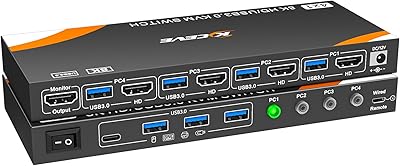
  • Display Outputs: Three HDMI output ports are provided, allowing one set of three monitors to be shared across all connected source computers.
  • Source Inputs: Supports up to four source computers connected simultaneously via dedicated HDMI input groups on the rear of the unit.
  • Max Resolution: Each of the three HDMI outputs supports resolutions up to 4K at 60Hz when paired with compatible cables, displays, and GPU outputs.
  • Lower Resolutions: Backward compatible with 4K at 30Hz, 1080p at 60Hz, 1080i at 60Hz, and 720p at 60Hz for mixed hardware environments.
  • USB Hub Ports: Four USB 3.0 ports are built in, enabling shared peripheral access — keyboard, mouse, printer, flash drives — across all connected computers.
  • USB Speed: USB 3.0 connectivity delivers transfer speeds of up to 5Gbps, which is significantly faster than USB 2.0 and backward compatible with it.
  • Switching Methods: Computer switching is accomplished via physical front-panel buttons on the unit itself or through the included wired external remote controller.
  • Hotkey Support: Keyboard hotkey switching is not supported; all computer selection must be performed manually via the physical buttons or wired controller.
  • Power Input: The device operates at 5 volts DC with a current rating of 2 amps, powered via a standard USB power connection.
  • OS Compatibility: Compatible with Windows, macOS, and Linux operating systems without requiring additional driver installation for standard peripheral sharing.
  • HDMI Standard: All HDMI ports are designed to support the bandwidth required for 4K at 60Hz, though cable quality must match to achieve this output.
  • USB Compatibility: USB 3.0 ports are fully backward compatible with USB 2.0 devices, so older peripherals connect and function without adapters.
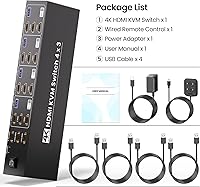
  • Controller Included: An external wired remote controller is included in the box, providing a secondary switching interface separate from the front-panel buttons.
  • Market Rank: This KVM switch holds a Best Sellers Rank of approximately 327 in the KVM Switches category on Amazon as of early 2025.
  • ASIN: The Amazon Standard Identification Number for this product is B0DJPPDYR3, useful for locating the exact listing across regional storefronts.

Related Reviews
TESmart HKS403-P23 4-Port Triple Monitor KVM Switch

69%
78%
Display Performance
72%
EDID Emulation Reliability
74%
Switching Speed & Reliability
58%
USB Hub Performance
69%
Network Sharing
More
DGODRT KS604H 4-Port HDMI KVM Switch
80%
91%
Ease of Setup
74%
Switching Reliability
78%
Video Quality
79%
USB Peripheral Sharing
84%
Wired Remote Control
More
ANXQQ ANQ-8401B 4-Port HDMI KVM Switch
77%
91%
Ease of Setup
88%
Display Switching Reliability
86%
EDID Performance
67%
USB Device Recognition
61%
8K Resolution Capability
More
StarTech SV431HDU3A2 4-Port HDMI KVM Switch

73%
74%
Switching Reliability
69%
Video Quality
66%
USB 3.0 Hub Performance
71%
Audio Switching
83%
Setup & Installation
More
JideTech 64H2UA 4-Port HDMI KVM Switch
73%
84%
Video Output Quality
79%
EDID Emulation Reliability
81%
Switching Methods & Flexibility
62%
USB Hub Performance
77%
Audio Switching
More
GREATHTEK 4-Port HDMI KVM Switch
66%
89%
Video Signal Quality
74%
Switching Performance
83%
USB Peripheral Sharing
92%
Setup Experience
71%
Build Quality
More
NAWEN HDMI KVM Switch 4 Computers 1 Monitor
86%
89%
Performance
93%
Resolution Support (8K/4K)
91%
Ease of Setup
85%
USB 3.0 Performance
87%
Switching Reliability
More
KCEVE 2-Monitor 4-Computer KVM Switch
81%
91%
Ease of Setup
83%
Switching Reliability
86%
Dual-Monitor Configuration
82%
USB 3.0 Performance
88%
Wired Remote Control
More
Steetek STK-S7415H 4-Port HDMI KVM Switch
74%
91%
Ease of Setup
83%
Switching Reliability
78%
Video Quality & Resolution
76%
Adaptive EDID Performance
69%
USB Peripheral Sharing
More
EVATEK 4K@60Hz HDMI KVM Switch for 4 Computers & 2 Monitors
83%
89%
Performance
93%
Ease of Setup
91%
Resolution Quality (4K@60Hz)
87%
USB 3.0 Port Functionality
85%
Switching Speed
More

FAQ

No, this triple-monitor switch is plug-and-play on Windows, macOS, and Linux. You connect your computers and monitors, power the unit, and it should be recognized without any software installation. macOS users may occasionally need to refresh display preferences after the first switch, but no dedicated driver is required.

Yes, but every part of the chain has to support it — your graphics cards, your HDMI cables, and your monitors all need to be 4K-at-60Hz capable. If any one of those components is rated only for 4K at 30Hz, that will be your effective ceiling on that output. Most buyers with modern setups report stable 4K across all three screens without issue.

It depends on how often you switch. If you are flipping between machines every few minutes, the lack of hotkey support will likely frustrate you, since you will always need to physically press a button or use the wired remote. For users who switch a handful of times per day, most find the physical buttons perfectly adequate. It is an honest limitation worth weighing before you buy.

The remote controller cable is on the shorter side, which is one of the more common complaints from buyers with larger or deeper desk setups. Exact length is not officially specified, but if your switch is going to sit more than a foot or two from where you normally work, you may find it does not reach as comfortably as you would like.

Yes, all three operating systems are supported, and you can mix and match source computers freely. The keyboard and mouse inputs transfer cleanly between systems. The one area to watch is macOS — a few users have reported that their Mac occasionally needs a manual display re-scan after switching, but this is not universal and usually resolves in seconds.

The four USB 3.0 ports will handle peripherals and flash drives reliably for everyday tasks. However, if you are planning to run a high-speed external SSD and multiple other devices simultaneously, the shared USB bandwidth can become a limiting factor. It works well as a peripheral hub but is not a full docking station replacement for storage-heavy workflows.

It is primarily designed as a computer KVM switch, but it will work with any HDMI source device, including consoles and media players, as long as you are using it as an input source. Keep in mind the USB hub is designed for computer peripheral sharing, so controller passthrough for consoles is not the intended use case.

You press one of the front-panel buttons or use the wired remote, and the switch re-routes the video and USB signals to the selected source. Most users report monitor re-detection takes about one to three seconds, which is typical for HDMI KVM switches in this category. It is a hardware handshake process, not instantaneous, but it is reliable.

Neither, based on reported user experience. The switch has no fan, so it runs silently, and thermal complaints are essentially absent from buyer feedback even after full workdays of use. If you are in a very warm room or an enclosed desk hutch, giving it a little airflow is sensible, but it is not a device that runs hot under normal conditions.

Yes, briefly. When you switch to a different computer, the monitors will go dark for a moment while the new source is detected and the HDMI handshake completes. This is standard behavior for HDMI KVM switches and is not a defect. The displays come back within a couple of seconds in most cases, though monitors with aggressive power-saving settings may take slightly longer to wake.